Disclosure: As an Amazon Associate, ilcastellomenu.com earns from qualifying purchases. Links on this page are affiliate links; they cost you nothing extra. Prices and availability change often, so check the current Amazon listing before you buy.
This guide explains how to set up conference speakerphone properly: not just plugged in, but placed, connected, selected in your apps and tested the way the far end will hear it. Most speakerphone disappointment is born in the first twenty minutes of ownership, from a unit shoved in a corner, an app quietly using the laptop microphone, or a volume set loud enough to defeat the echo cancellation. Work through the steps in order, in a quiet half hour before any important call depends on the result, and the device will start its life as the rooms that compliment your audio know it.
Key Takeaways
- Place the unit centrally on the table before you connect anything.
- Charge fully first if the unit will ever run on battery.
- Prefer the dongle or a cable for laptops; keep direct Bluetooth for phones and personal machines.
- Confirm the app uses the speakerphone for both microphone and speaker.
- Test by recording from every seat, and practise the hardware mute, before the first real call.
How To Set Up Conference Speakerphone: What You Need
Setting up well is mostly a sequence of small, unglamorous decisions made in the right order. Decide where the unit lives before you pair anything, because placement drives both the wiring and the wireless choices. Charge it fully first if it will ever run on battery, so your first tests reflect its normal behaviour rather than a low-battery compromise. Connect by the simplest route that suits the room, confirm the meeting app has selected the unit for both microphone and speaker, and only then start judging sound. Most setup misery comes from evaluating audio before the plumbing is verified, and blaming a good device for a setting buried in an app.
Battery life shapes how a speakerphone fits into a week rather than how it sounds on a call. A unit that lives on one desk can stay plugged in and its battery barely matters. A unit that moves between rooms, or travels in a laptop bag, needs enough stamina to survive a full day of meetings away from a charger, and a charge port that matches the cables you already carry. Treat headline battery claims as best-case figures for moderate volume, and value a battery indicator you can read at a glance. Nothing about call quality collapses faster than a device dying mid-sentence in front of a client.
In this guide
Safety and Before You Start
A speakerphone microphone hears the whole room, and that fact deserves a standing place in any honest discussion of these devices. Side conversations, a colleague entering with a sensitive question, or paperwork discussed before the call officially starts can all reach the far end if the unit is live. Mute discipline is the countermeasure: use the hardware mute button rather than the app control where you can, learn what its indicator light means, and treat the mute check as part of starting and ending every call. Teams that adopt the habit explicitly, the way they adopt camera habits, avoid the classic speakerphone embarrassment entirely.
Physical controls sound like a footnote until you are mid-call. A clear hardware mute with an unmistakable indicator, volume keys you can find without looking, and a call button that behaves predictably are worth more than a long feature list. Touch surfaces look clean and photograph well, but they can be ambiguous under pressure, and a mute you cannot verify at a glance is a privacy risk rather than a style choice. When you compare models, picture the worst moment of your meeting week and ask which set of controls you would rather operate in it. That thought experiment ranks devices more honestly than most specification tables.
The Setup, Step by Step
Step One: Place the Unit
Placement is the cheapest performance upgrade available. Put the unit at the centre of the people it serves, on the table rather than on a sideboard or a windowsill, with nothing tall immediately beside it to reflect sound or shadow the microphones. Keep it away from laptop fans, projector exhausts and air-conditioning vents, whose noise it will faithfully transmit. A unit shoved to one end of a long table makes the far seats sound exactly as far away as they are. Thirty seconds of placement thought at the start of a meeting routinely buys more clarity than a tier of product upgrade.
No speakerphone defeats a bad room. A large, echoey space with hard floors, bare walls and a high ceiling smears every voice with reflections, and the far end hears that smear no matter how clever the processing is. Distance compounds it: a participant seated far down a long table is simply quieter and more reverberant than one near the unit. The honest fixes for genuinely large rooms are architectural and procedural rather than a more expensive puck: soften the room where you can, seat people closer together, or step up to multiple linked units or a properly installed conference system designed for the space.
Step Two: Charge and Power
Care for a speakerphone is light but not zero. Keep the microphone openings free of dust and desk debris, wipe the housing with a dry or barely damp cloth, and avoid solvents that attack fabric wraps and finishes. Store a travelling unit in its case so the buttons are not pressed and the grille is not crushed against other gear. Batteries prefer regular, moderate use to being left flat for months. None of this is burdensome, and most neglected units fail socially before they fail mechanically: they get borrowed, unplugged, and left uncharged in a drawer, which is an argument for giving a shared device a labelled home and a labelled cable.
Build quality in this category is about surviving the bag and the boardroom rather than about luxury. A metal or well-finished housing shrugs off daily travel, resists the scuffs of shared-room life, and usually signals a maker who also sweated the acoustics. Fabric-wrapped and minimalist designs suit executive desks and home offices where the device sits in view all day. Neither approach sounds better by itself; what matters is that buttons stay positive, the base stays planted when cables tug, and the unit does not buzz or rattle at high volume, which is the audible signature of a housing that was not engineered as carefully as the electronics inside it.
Step Three: Connect by Cable, Dongle or Bluetooth
A plain USB cable remains the most reliable connection of all, and it deserves more respect than it gets. Wired, the speakerphone is simply an audio device: no pairing, no battery anxiety, no wireless interference from a crowded office band, and no question about which of three remembered devices it will greet when it wakes. The cost is a cable across the table and a fixed seat for the unit. Many experienced users run a hybrid pattern, keeping the cable connected in the home office where the unit lives, and using wireless only when the speakerphone travels to another room or another building.
The practical difference between a dongle connection and direct Bluetooth shows up on the worst mornings: the call that starts in five minutes, with guests already joining. A dongle-based link is boring in the best sense, because the pairing lives between the dongle and the speakerphone rather than inside the computer’s settings, so swapping laptops or rebooting rarely breaks it. Direct Bluetooth saves a USB port and is fine for a single personal machine you control. For a shared room device that different laptops must use across a week, boring wins, and the dongle is usually the right default.
Bluetooth is the connection everyone wants and the one that causes the most quiet frustration. Paired directly to a laptop, a speakerphone depends on the computer’s Bluetooth stack and profile handling, and the result can be a device that connects as headphones but not as a microphone, or that behaves differently after every operating system update. Bluetooth to a phone is usually painless. Bluetooth to a computer is where the included USB dongle earns its place: the dongle presents the unit to the computer as a simple, standard audio device, sidesteps profile negotiations, and tends to reconnect to the same machine in the same way every morning.
Step Four: Select the Device in Your Meeting Apps
Many speakerphones can remember or hold connections to more than one device, which suits the common pattern of a laptop for meetings and a phone for everything else. The convenience is real, and so is the confusion when the unit cheerfully connects to the phone in your bag instead of the laptop in front of you. The fix is procedural: know how your unit announces its connection, learn its button or app control for switching, and keep the list of remembered devices tidy. In shared rooms, a wired default removes the whole class of problem, which is why so many meeting rooms quietly keep a cable in the table even when the device is proudly wireless.
Platform certification, most often for Microsoft Teams or Zoom, signals that a unit has been tested against that platform’s expectations and usually that its buttons speak the platform’s language: answering, ending and muting from the device itself, in step with the app. Certification is a convenience and compatibility signal, not a sound-quality grade. An uncertified unit from a reputable maker generally still works as a standard USB or Bluetooth audio device on any platform. Buy certification when your organisation standardises on one platform and you want the controls and behaviour to feel native; do not pay a premium for a badge if you switch platforms constantly.
Step Five: Set Volume and Test from Every Seat
Test a new speakerphone the way the far end will experience it, because that is the product you actually bought. Record a short call or a voice memo through the unit from each seat you expect people to use, then listen back on headphones. Walk through the real agenda: one speaker, two speakers alternating, a question from the far seat, a moment of natural overlap. You will learn more in five minutes of listening than in an afternoon of reading impressions, and you will find the placement and volume habits that suit your room while the stakes are low and no client is on the line.
The loudspeaker half of the device matters more than first-time buyers expect, because listening fatigue is real. A unit voiced for speech puts its energy where voices live, so consonants stay intelligible at modest volume and nobody asks for repeats. Undersized speakers force the volume up, which stresses the echo cancellation and makes long calls wearing. In a small room almost any reputable unit is loud enough; in a larger or noisier space, the speaker is often the first thing that runs out of headroom, and it is the reason stepping up a tier buys calmer, clearer listening even when the microphones seem similar on paper.
Step Six: Rehearse the First Call
Your first real call on a new setup should be a friendly one. Choose a colleague who will tolerate two minutes of experimentation, confirm they can hear each seat in the room, practise muting and unmuting from the hardware button, and agree on a hand signal or chat message for audio problems so you are never reduced to mouthing silently at a dead microphone. Note the volume level that worked and where the unit sat. That tiny rehearsal converts the first client call from a debut into a routine, and it is the step that distinguishes rooms that seem professionally run from rooms that apologise for their audio every week.
A speakerphone rewards good meeting habits and exposes bad ones, and a little etiquette multiplies the hardware. Introduce the room at the start so remote guests know who is present. Say names when handing over, because the far end cannot see your glances. Keep papers and cups away from the unit, mute when typing or when the room needs a private word, and leave a beat after a remote speaker finishes, since processing and network delay together shave the natural cues that tell you a sentence has ended. None of this is burdensome, and rooms that practise it get compliments about their audio that are really compliments about their manners.
Troubleshooting and Common Mistakes
When the far end reports echo, work through the causes in order of likelihood. Volume too high in a small room lets the speaker overwhelm the cancellation, so reduce it before touching anything else. A unit placed against a wall or beside a monitor reflects sound straight back into its microphones, so re-centre it. Two audio devices live in the same room, such as a laptop microphone left open alongside the speakerphone, create a loop no single device can cancel, so confirm the app is using the speakerphone for both microphone and speaker. Most echo complaints die somewhere in those three checks.
Dropouts and robotic audio usually belong to the connection rather than the device. On Bluetooth, distance, walls and a crowded wireless environment all thin the link, and the included dongle placed in a clear port often stabilises what direct pairing could not. On any connection, a laptop under heavy load can starve the audio, and closing the dozen forgotten tabs is a legitimate troubleshooting step. If problems follow one particular app, check that the app has actually selected the speakerphone rather than a default device with a similar name. Change one thing at a time and re-test with a recording, or you will fix the problem without learning what it was.
People talking over each other defeats every device in this category, including the best of them. Microphone arrays and noise processing assume, reasonably, that one person speaks at a time; two simultaneous voices from different seats arrive as a tangle that no consumer unit untangles into two clear streams. This is a meeting-discipline problem wearing a technology costume. A chair who invites contributions one at a time, and participants who leave a breath of space before replying, will improve call quality more than any upgrade. Buy the speakerphone to fix distance and echo, not to fix crosstalk, because crosstalk is not fixable at this level.
Gear That Makes Setup Easier
Two picks illustrate the connection stories this guide recommends: one value unit that behaves predictably on the dongle, and one personal unit that sets up in seconds for a single desk. The wider shortlist, with tiers, is in our conference speakerphone buying guide.
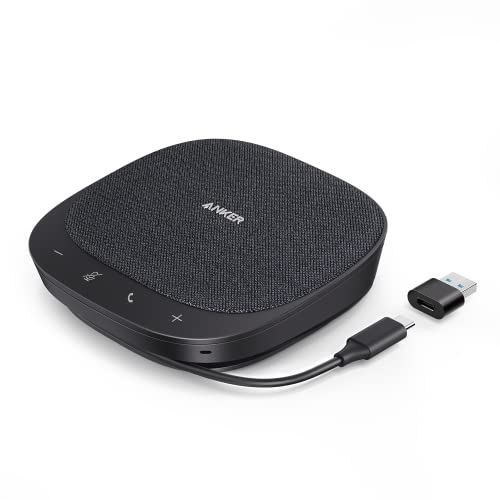
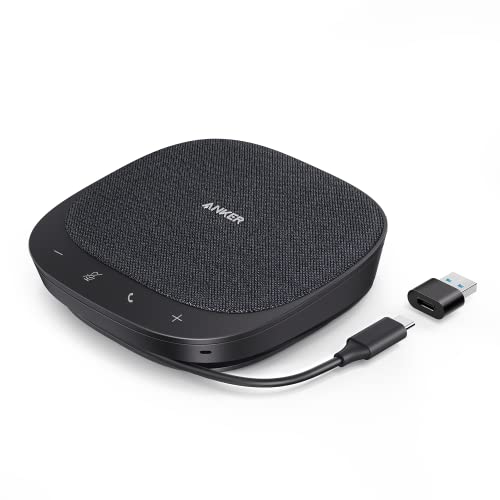
Anker PowerConf — Best for: defined use cases at the mid-tier tier
The Anker PowerConf line is the value engine of this category: the core experience of array microphones and echo cancellation, delivered at a mid-tier position without obvious corner-cutting where it matters. It is a sensible default for home offices and small teams buying their first dedicated unit, and for organisations equipping several rooms at once. The trade-offs appear at the edges: larger rooms, louder environments and buyers sensitive to the last degree of voice naturalness will hear where the money was saved, but for desk-distance and small-table work it covers the brief honestly.
Best for: buyers whose meetings match the brief described above. Not suited for: rooms or habits well outside that brief, where a different class of device will serve better. As a prose-only pick at this stage, treat it as a mid-tier option and check the current Amazon listing before you buy.
Poly Sync 20 — Best for: defined use cases at the mid-tier tier
The Poly Sync 20 is the personal, portable expression of the category: a slim unit aimed at the individual hybrid worker rather than the shared boardroom. It suits a single voice at a desk, a hotel room, or a small huddle of two or three, and it doubles naturally as a personal speaker for the working day. Its limits follow from its brief: it is not the tool for a long table or a big group, and asking it to cover one produces exactly the distant far seats its design never promised to serve. Within its brief, it is coherent and likeable.
Best for: buyers whose meetings match the brief described above. Not suited for: rooms or habits well outside that brief, where a different class of device will serve better. As a prose-only pick at this stage, treat it as a mid-tier option and check the current Amazon listing before you buy.
Maintenance and Keeping It Working
Firmware updates are the quiet maintenance task of modern audio gear. Makers use them to refine echo handling, fix Bluetooth quirks with new operating system releases, and occasionally improve noise processing in ways you can actually hear. Check for updates when you set the unit up and a few times a year afterwards, using the maker’s companion app or desktop tool. Do it on a quiet afternoon rather than in the five minutes before a board call, because an update that restarts the device mid-morning is an entirely avoidable own goal. A unit that has not been updated since purchase is not broken, but it may not be the best version of itself.
Huddle rooms and small meeting spaces are the natural habitat of this category. Two to six people around a small table, at conversational distance from a central unit, is precisely the geometry the microphone arrays and echo cancellation were designed around. In that setting a good speakerphone makes remote guests feel present rather than patched in, and it frees everyone from the headset-and-laptop huddle. If most of your meetings look like this, you are in the category’s sweet spot and even a mid-tier unit will feel like a transformation compared with laptop audio. Spend your remaining budget on the room: a rug, soft furnishings, and a door that closes.
If problems persist after this guide, revisit the decision layer rather than the device: our conference speakerphone pros and cons explains which frustrations are inherent, our method for how to choose a conference speakerphone prevents a mismatched purchase, and our conference speakerphone review and conference speakerphone reviews set expectations for the class. Whether the category belongs in your room at all is answered in our verdict on is a conference speakerphone worth it.
In Depth: Living With a Conference Speakerphone
The Shared-Room Ownership Problem
Shared technology fails socially before it fails technically. A speakerphone that belongs to everyone belongs to no one: it migrates between rooms, its cable walks away, and it is flat on the morning of the board call. The fix costs nothing. Give the unit a named home room, label the unit and its cable, keep the charger with it, and make one person the informal owner who checks it weekly. Organisations that do this get years of uneventful service from modest hardware; organisations that do not manage to make even premium hardware feel unreliable.
Why Demos Mislead
Showroom and video demonstrations flatter every device in this category. The demo room is quiet, the speaker is close, the script has one voice at a time, and the listener hears a polished recording rather than a live call through a real network. Your room will offer none of those kindnesses. This is why the recurring advice in this cluster of guides is to test in your own space, from your own seats, with your own colleagues interrupting each other at their usual rate. A device that survives your Tuesday team meeting has passed the only demo that was ever relevant.
Meetings That Should Not Use One
Honesty about the category includes naming the meetings where a speakerphone is the wrong tool even for owners. Sensitive one-to-one conversations belong on a headset or handset, because a room microphone is architecturally indiscreet. Calls taken while moving between spaces punish any fixed device. Very large gatherings need a system designed for them. Recognising these cases does not weaken the case for owning a speakerphone; it protects the device from being blamed for jobs it never claimed, and it protects your genuinely private conversations from the wrong microphone.
How Long a Good Unit Should Last
This is mature technology with no moving parts worth the name, and a well-kept unit should serve for years. The realistic ageing paths are battery wear on heavily travelled units, firmware drift as platforms evolve, and the slow accumulation of shared-room neglect. All three are manageable: keep firmware current, treat the battery kindly, and give the device an owner. Buyers sometimes delay purchasing while waiting for a generational leap in this category; the technology improves incrementally, and the meetings you hold this quarter will not wait for it.
The Etiquette of Being Heard
A room microphone changes the social contract of a meeting. Everyone present is, in a small way, broadcasting, and the courtesies follow from that: announce who is in the room, keep side talk for the mute button or for after the call, and remember that rustling, typing and tapping near the unit are sounds your guests receive at full size. None of this is onerous, and most of it is simply good manners made audible. Rooms that internalise it stop thinking of the speakerphone as equipment and start treating it as the far end’s seat at the table.
Small Rooms Punch Above Their Weight
It is worth saying plainly that modest spaces are this category’s home turf. A small, soft-furnished room with a handful of people at conversational distance is exactly the environment the engineering assumes, and in that environment even mid-tier hardware delivers an experience that impresses guests. If your meetings live in such rooms, you do not need to agonise over the top of the range. Buy competently, place carefully, and enjoy the fact that your setting, not your spending, is doing the heavy lifting that boardrooms pay systems integrators to imitate.
How the Far End Judges You
Remote guests form their impression of your organisation through a narrow channel, and audio is most of it. They cannot see your office, your preparation or your intent; they hear whether voices are clear, whether they must ask for repeats, and whether the room sounds calm or chaotic. That is why experienced teams treat call audio as part of their professional presentation rather than as an IT detail. A speakerphone does not guarantee a good impression, but it removes the most common reasons for a bad one, and it does so for every guest on every call without anyone having to perform.
What Changes After the First Month
The first week with a speakerphone is about novelty and settings. By the end of the first month the device has either become furniture, in the best sense, or it has become an irritation that people route around. The difference is rarely sound quality. It is whether reconnection is uneventful, whether the mute can be trusted without thinking, and whether the unit is simply there, charged and in its place, when a meeting starts. When you evaluate any model, you are really forecasting that thirtieth day: choose the device whose daily behaviour you can picture being boring.
A Note on Voice Levels
Rooms develop a volume culture. With laptop speakers, people shout politely all afternoon because they cannot hear themselves being heard, and they leave calls hoarse and tired. A clear speaker at a sensible level resets that culture within a few meetings: voices drop to conversational level, which in turn gives the microphone array an easier signal and the echo cancellation an easier job. The improvement feeds itself. If your team currently ends call-heavy days vocally exhausted, that fatigue is diagnostic information about your current setup, and it is one of the benefits owners mention most once it is gone.
Guests, Visitors and the Borrowed Laptop
Sooner or later someone outside the usual pattern joins: a visitor with their own laptop, a colleague from another office, a client presenting from your room. Shared speakerphones earn their keep in these moments if, and only if, the connection story is simple enough to explain in one sentence. This is the practical argument for the dongle in a drawer and a cable in the table: the visitor does not care about your usual setup, and the meeting cannot pause for a pairing ritual. Design your setup for the borrowed laptop and the regulars will find it effortless too.
Recording, Transcription and the Written Record
Many meetings are now recorded or transcribed, and the quality of that record is set at the microphone, not in the software. A room captured through a laptop microphone produces transcripts full of gaps and misattributed speakers; the same room captured through a well-placed speakerphone gives the transcription something clean to work with, and gives absent colleagues a recording they can actually follow. If your organisation relies on recordings as its memory, the speakerphone is part of your record-keeping infrastructure, and it should be chosen and placed with that responsibility in mind.
Accessibility Is Part of Audio Quality
Clear call audio is an accessibility feature, not a luxury. Participants who are hard of hearing, colleagues working in a second language, and anyone joining from a less-than-silent environment all depend disproportionately on clean, intelligible speech and on the visual discipline of one speaker at a time. A good speakerphone setup, with its central placement and its intolerance of crosstalk, quietly enforces the habits that make meetings more accessible to everyone on the call. That benefit rarely appears in product comparisons, but for mixed teams it can be the most important one on the list.
A Practical Troubleshooting Sequence for Common Snags
Diagnose before you adjust
When a conference speakerphone task goes wrong, the temptation is to change three things at once and hope. Resist it. Work through the likely causes in order of probability — setup, materials or media, settings, then the hardware itself — and change one variable at a time, noting what each change does. In a desk or bench that doubles as a workspace for two completely different hobbies, most failures trace back to the first two categories, which are free to fix. This ordered approach feels slower for ten minutes and saves hours across the life of the product, because you build a personal map of cause and effect instead of a pile of superstitions.
The recovery sequence for a job gone wrong
Mid-task failures with a conference speakerphone follow a pattern worth memorising: stop safely, preserve whatever state you can, identify the earliest point where things diverged, and restart from the step before that point rather than from the beginning. Rushing a restart from zero wastes materials and often repeats the same error at the same step. If the failure damaged a consumable or a wear part, replace it before retrying; a compromised part makes the next attempt fail in a new, confusing way that sends your troubleshooting in the wrong direction entirely.
Small calibrations, repeated on schedule
Most conference speakerphone techniques drift gradually rather than failing suddenly, which means small scheduled checks beat occasional heroic fixes. Pick the two or three quick checks relevant to your setup — alignment, cleanliness, tightness, levels, or whatever your model’s manual names — and attach them to a rhythm you already keep, such as the start of the month or the end of a big job. In a desk or bench that doubles as a workspace for two completely different hobbies, a two-minute check on schedule prevents the slow decline that owners often misread as the product wearing out, when it is really just an adjustment that was never made.
Document your working settings
The moment a conference speakerphone job goes exactly right, write down the settings, materials and steps that produced it — on paper, in a note on your phone, anywhere you will actually find it again. Memory rewrites these details within weeks, and the next difficult job will have you guessing at a recipe you once knew. A personal settings log is the single highest-value habit in the whole Sound Cards category: it turns one success into a repeatable process and turns troubleshooting into comparison against a known-good baseline instead of guesswork.
Know when the problem is not technique
Some failures are the product telling you something: a part at the end of its life, a consumable past its best, or a task beyond the model’s design limits. If the same failure survives correct setup, fresh consumables and careful settings, stop refining your technique and inspect the hardware, or check whether the job needs a heavier-duty conference speakerphone than the one you own. Recognising that boundary is a skill in itself. Persisting with technique fixes for a hardware problem is how an afternoon disappears, and how a basically sound product earns an unfair reputation.
Teach the second user
In a desk or bench that doubles as a workspace for two completely different hobbies, you may not be the only person who operates the conference speakerphone, and a technique that lives only in your head is a fragile one. Once your process is stable, walk the other user through it once, then let them run it while you watch for the step where your instructions were ambiguous. Their mistakes are diagnostic gold: they show exactly which step depends on tacit knowledge you have not written down. Fix the written version, not just the user, and the whole household’s results become as consistent as your own.
Frequently Asked Questions
Where is the best place to put a conference speakerphone?
Centrally among the people it serves, on the table surface, away from walls, monitors and noise sources such as laptop fans and projector vents. Central placement equalises distances, which is what the microphone array is designed around, and distance from reflective surfaces keeps echo cancellation in its comfort zone. If one seat consistently sounds faint in your tests, move the unit or the seat, not the volume, and re-test before the next real call.
Should I connect by USB cable, dongle or Bluetooth?
Choose the simplest route that fits the room’s pattern. A cable is the most predictable and suits a fixed desk. The included dongle gives nearly the same predictability wirelessly and is the best default for shared rooms and laptop swapping. Direct Bluetooth suits a single personal machine and phone use. Whichever you choose, confirm in the meeting app that the speakerphone is selected for both microphone and speaker, since split selections are the most common setup fault of all.
How do I stop the far end hearing echo?
Start with volume: lower it until the room is comfortable rather than loud, because excessive volume is the most common echo trigger. Keep the unit away from walls and screens that reflect sound back into it. Make sure no second microphone, such as the laptop’s built-in one, is live in the same call. Then re-test with a recording or a patient colleague. Work through those steps in order and the large majority of echo complaints are resolved without touching advanced settings.
How do I test my setup before an important call?
Record a short test call or voice memo through the speakerphone from every seat that will be used, and listen back on headphones, because the far end’s experience is the one that counts. Include a quiet speaker and a moment of two people alternating quickly. Practise the hardware mute and note the volume that worked. Five minutes of testing converts the important call into a routine event, and it surfaces placement problems while they are still free to fix.
Why does my speakerphone connect to the wrong device?
Because it remembers previous partners, usually a phone, and greets the first available one. Clear or tidy the pairing list, use the unit’s switching control or companion app to choose deliberately, and consider a wired or dongle default in shared rooms, which removes the ambiguity entirely. The behaviour is a feature working as designed in a situation it was not designed for, and a fixed connection routine is the durable cure.
How often should I update the firmware and clean the unit?
Check for firmware updates at setup and a few times a year, applying them at a quiet moment rather than before a big call, since updates refine echo handling and wireless behaviour. Cleaning is lighter: keep microphone openings free of dust, wipe the housing with a dry or barely damp cloth, and store a travelling unit in its case. A shared unit also benefits from a labelled home and cable, which prevents the most common failure of all: being borrowed and never returned.
Consider, too, how the device interacts with the camera side of the meeting. Once a room sounds good, its next weakness is usually visual: a camera that frames half the table, or lighting that silhouettes faces against a window. You do not need to solve those today, but it is worth knowing that audio was the right first investment, because guests forgive a plain picture far more readily than they forgive sound they must strain to follow. Fix hearing first, then seeing, in that order, and each fix will make the other look better than it is.
There is a temptation, after the first successful week, to keep optimising: a different position, a new setting, a firmware beta. Resist it. A meeting room’s audio should become invisible infrastructure, and invisible infrastructure is finished, not perpetually tuned. Note the configuration that works, in a document the room’s users can find, and then leave it alone until something material changes: a new room, a new platform, a new pattern of meetings. Stability is what you bought, even if it was not listed on the box.
New joiners deserve a thirty-second induction into any shared room setup: where the unit lives, what the mute light means, and the request to say immediately if the far end sounds wrong. That tiny ritual protects every meeting that follows it, because most audio failures are discovered late by people too polite to interrupt. A room that teaches its habits to newcomers keeps its standards; a room that assumes them watches its standards quietly dissolve within a quarter.
Finally, judge the purchase after a month, not after a day. Keep a rough tally of the meetings it served, the repeats it prevented, and the moments it embarrassed you, if any. That tally, written from your own calendar, is a more trustworthy review than anything published about the product, including the guides in this cluster. If the tally is good, stop reading about speakerphones and spend the attention on your meetings. If it is bad, the tally will tell you whether the device, the room or the habits were at fault, and each of those has a different cure.
Battery behaviour deserves a final practical word for travelling units. Charge on a routine rather than on a panic: the night before travel, or the same weekday each week for a room unit that runs unplugged. A speakerphone that is always nearly flat teaches its owner to distrust it, and distrust is what sends devices back into drawers. The technology asks very little; the little it asks is mostly this, that someone keeps it fed and knows where it sleeps.
If your organisation buys several units, buy the same model for rooms of the same class. Sameness is an operational feature: one connection story to learn, one set of controls to teach, one firmware routine to maintain, and units that can substitute for each other on a bad morning. A mixed fleet of individually excellent devices produces a support burden out of proportion to any single unit’s advantages. Standardise the room classes, document the setup once per class, and let novelty live in somebody else’s meeting rooms.
Sound checks have a social dimension worth managing. Asking a regular guest how the room sounds can feel like fishing for compliments; frame it as maintenance, once a month, and act visibly on what you hear. Guests who are asked become allies in your audio quality, reporting the drifting seat, the new echo from a rearranged room, the fan that started cycling in the afternoons. That channel of honest feedback is worth more than any measurement you can make from inside the room itself.
Think about the table itself as part of the equipment. A hard, bare, highly reflective table throws sound back at the microphones and at the participants; a cloth, a runner, or simply the ordinary clutter of notebooks and laptops breaks that reflection up. Nobody should redecorate for a speakerphone, but when a room is being furnished anyway, the choices that make it pleasanter to sit in, softer surfaces, upholstered chairs, curtains, are precisely the choices that make it pleasanter to be heard from.
There is also a generational comfort to this category: it asks nothing of participants beyond showing up and speaking. No accounts, no per-seat licences, no headsets to distribute and sanitise, no software for guests to install. In a working world that adds a tool to every task, a device whose entire user interface is sit down and talk has a genuine claim on a team’s gratitude, and that simplicity is a legitimate part of what the purchase buys.
Keep expectations calibrated about voices at the extremes. Very quiet speakers will still need encouragement to project a little, and very loud speakers will still dominate a room’s dynamics; the processing narrows the gap between them but does not abolish it. A chair who notices both, inviting the quiet voice in and gently capping the loud one, is doing the part of the job that no microphone array was ever going to do, and meetings with such a chair sound better on any equipment.
When something does go wrong mid-call, have a calm order of operations: check the mute, check the app’s selected device, lower the volume, move the unit to the centre, in that order, narrating briefly so the room stays relaxed. Most faults yield to one of those four moves. Panic produces the memorable failures: three people changing settings at once, cables pulled at random, the call abandoned to a phone on a table. A rehearsed order of operations is a small thing that separates professional rooms from apologetic ones.
And when the setup simply works, week after week, let it disappear. The best outcome this category offers is not admiration for a device; it is meetings that nobody comments on, guests who remember the discussion instead of the audio, and a team that has quietly forgotten there was ever a problem. If, a season from now, that is your situation, the purchase has done everything it promised, and the correct next step is to leave it entirely alone.
There is a wider lesson in how this category is discussed online. Impressions are dominated by the first five minutes: how loud the speaker goes, how the unit looks on a desk, how quickly it pairs. The qualities that decide satisfaction at month six are quieter ones: whether the mute indicator can be trusted at a glance, whether reconnection on a Monday morning is uneventful, whether soft-spoken colleagues survive the processing. Weight your reading accordingly, and if you can, borrow or trial a unit across a full working week rather than a single impressive demonstration call.
Room treatment deserves one more mention because it is the advice nobody wants and everybody benefits from. Soft surfaces near the table, curtains on a bare window wall, a rug under hard chairs, and a door that actually closes will improve every device discussed here more reliably than the step from one tier to the next. None of it is glamorous and none of it appears in product photography, but the far end of your calls cannot tell which speakerphone you bought nearly as easily as it can tell whether your room echoes. Fix the room first, then let the electronics finish the job.
It also helps to set expectations with the people on the other side of your calls. Tell regular collaborators that the room is now on a speakerphone, invite them to say immediately if audio dips, and check in after the first week. That feedback loop catches the problems you cannot hear from your own chair: the seat that sounds distant, the volume that creeps too high, the air conditioner that only runs in the afternoon. Devices get blamed for many things that a single honest sentence from a regular guest would have diagnosed in a day.
One more practical consideration is the rest of the desk. A speakerphone joins an ecosystem of webcams, hubs, chargers and cables, and small frictions between them are the stuff of daily annoyance: the hub with no free port for the dongle, the cable that is ten centimetres too short for the tidy route, the webcam whose microphone the app prefers. Lay the whole setup out once, deliberately, and photograph it if the room is shared. A considered arrangement, made once, is repaid every single morning, and it costs nothing but the half hour nobody wants to spend.
It is also worth keeping a simple fallback. Technology that a whole room depends on should have a plan B that everyone knows: the laptop’s built-in audio, understood and pre-tested, or a headset kept in the room for the day the speakerphone is borrowed, flat or updated at the wrong moment. A fallback that has been rehearsed once turns a potential meeting failure into a thirty-second shrug. Rooms without one discover their dependence on a single small device at the least convenient possible time, usually in front of the guest they most wanted to impress.