Disclosure: As an Amazon Associate, ilcastellomenu.com earns from qualifying purchases. Links on this page are affiliate links; they cost you nothing extra. Prices and availability change often, so check the current Amazon listing before you buy.
So, is a laptop cooling pad worth it for the laptop on your desk? The short answer is that a laptop cooling pad is worth it for a narrow, identifiable owner — and this article exists to find out whether that owner is you. Asked as is a laptop cooling pad worth it, the question deserves better than a yes with affiliate links attached. Worth depends on how your laptop breathes, how hard it works, what you have already tried for free, and what you honestly expect a tray of fans to change.
Worth it if: your laptop intakes from underneath, runs warm and loud through long sessions at a fixed desk, and still does so after elevation, vent cleaning and a sensibly cool room — with a sealed high-pressure pad offering the strongest case. Not worth it if: your machine is fanless or side-intaking, already cool and quiet, used mostly on the move or in bed, or shutting down from heat and therefore in need of repair rather than accessories. Everything below is the working behind those two sentences.
Key Takeaways
- Elevation first: a plain riser delivers much of the benefit, and a pad should be judged against it.
- Pads help bottom-intake laptops; a sealed base or side intakes mean a stand is the smarter buy.
- Sealed high-pressure pads are the exception category — stronger, louder and bulkier than mesh trays.
- Never block the exhaust, and never ask a pad to fix shutdowns: that is a service problem.
- Clean vents and a cooler room come before shopping, every time.
In this guide
Is A Laptop Cooling Pad Worth It: What You Actually Get
What you actually get is conditions, not power. A pad gives your laptop’s own cooling system an easier job: space beneath the chassis, air arriving where the intakes are, and in the sealed designs a measure of pressure behind that air. The felt results are calmer fans, a cooler-feeling base and steadier behaviour late in long sessions. You do not get a faster processor, a quieter room by default, or a reprieve for failing hardware. Framed that way, value becomes measurable in your own experience within a week of fair trials — which is more than can be said for many accessories whose benefits live entirely in their descriptions.
You also get, bundled in, a stand. The ergonomic half of the purchase — screen height, working angle, the external keyboard arrangement it invites — delivers value every day regardless of thermals, and for many owners it quietly becomes the reason the pad stays. Honest accounting counts it. A pad bought for cooling that ends up loved for posture was still worth its money, though the lesson about what you actually needed is worth keeping for the next purchase.
The Real Costs Beyond Money
The money is the smallest cost. A pad also costs desk footprint in a currency small desks feel keenly, a cable and a port or socket, a little daily friction in setup and positioning, and — at the strong end — a permanent contribution to the room’s soundscape. It costs attention too: seals to check, decks to clean, a fit to re-verify whenever the setup moves. None of these is large, and together they explain why a pad that merely breaks even on cooling often ends up in a cupboard. Worth-it calculations that ignore the non-money costs predict satisfaction badly; the owners who keep their pads are those for whom the daily friction is invisible because the desk, the load and the machine all suit the arrangement.
Who It Pays Off For
The Fixed-Desk Gamer
The clearest case. A bottom-intake gaming laptop, long sessions, a warm room and fans that dominate the evening: here a sealed pad can pay for itself in comfort and steadiness, and even a mesh pad earns its keep as elevation with assistance.
The Long-Load Creator
Exports and renders that run for hours turn small margins into felt differences, and a desk already built around the laptop absorbs the pad’s costs without noticing them. The payoff is steadiness and a calmer room across the working week.
The Warm-Room Worker
Where the room itself runs warm and the laptop works all day, a pad is one of the few levers available once placement and cleaning are done. The payoff is modest and daily, which is exactly the shape of most worthwhile purchases.
Who Should Skip It
The Fanless and Side-Intake Owner
There is nothing underneath for a pad to feed. A stand, a cool room and an uninsulated surface answer the whole brief, and the pad money is better kept.
The Owner of a Sick Laptop
Shutdowns, crashes and grinding fans convert the question from worth-it to what’s-wrong. Spend on diagnosis first; revisit the pad afterwards, with a healthy machine to judge it fairly.
The Traveller and the Bed User
Bulk fights the bag and softness defeats the deck. A light stand for the road and a rigid lap desk for the bed each beat a pad at its own game, for less money and no cable.
Strengths and Trade-Offs of Owning One
Strengths
- A genuine, felt margin on the right laptop under sustained load.
- Ergonomic value that pays daily, independent of thermals.
- Low commitment: simple, safe and fully reversible.
Trade-Offs
- Noise rises with strength, and the strongest pads are furniture, not accessories.
- Daily friction — footprint, cable, cleaning, fit checks — never fully disappears.
- It can postpone a needed repair by making a sick laptop feel almost acceptable.
Alternatives to Consider
A passive riser or stand is the first alternative and, for many, the final answer: silent, cheap in spirit, and capturing the elevation benefit entire. Internal cleaning and professional service are the alternative when heat has grown over the machine’s life, because they address causes. A rigid lap desk is the alternative for bed and sofa. A cooler, shadier desk position is the alternative that costs nothing at all. A pad is worth it precisely when it beats this honest field — not when it is compared against doing nothing in a warm room with a dirty, desk-bound laptop suffocating on its own intakes.
If You Buy: The Designs to Understand
The models below are named so you can recognise the real designs on sale and understand what each approach actually is. They are presented in prose only, in words rather than figures, because the right choice depends on your laptop’s intake layout and your tolerance for noise far more than on any headline claim. Treat each entry as a description of a type as much as a single product, check the current listing carefully before you buy, and remember that no pad on this page can rescue a laptop whose own fans and thermal paste are failing inside.
IETS GT500 — premium tier
The IETS GT500 is the sealed-foam, high-pressure representative: a foam frame seals against the underside of a bottom-intake laptop while a strong blower pushes air into the chassis intakes rather than past them. It is the design to study if a gaming laptop still runs hot after elevation and cleaning, and the one whose noise and bulk you must accept with open eyes.
Best for: owners whose laptop matches what the IETS GT500 was designed to do, who have already tried elevation and cleaning, and who value its particular balance of airflow, noise and desk presence. Not suited for: laptops that do not intake from underneath, buyers expecting a silent or invisible accessory, or anyone hoping an external fan will substitute for an internal repair their machine is plainly asking for. As with every pick here, the tier is described in words — this one sits in the premium tier — and the current listing is where you check price on Amazon when a linked edition becomes available.

Llano laptop cooling pad — premium tier
The Llano laptop cooling pad is another entry in the sealed, high-pressure school, built around a foam-sealed deck and a powerful blower for gaming laptops that intake from underneath. It belongs on the shortlist beside the IETS approach rather than beside gentle mesh trays, and it deserves the same fit check: the seal must match your chassis and clear every exhaust.
Best for: owners whose laptop matches what the Llano laptop cooling pad was designed to do, who have already tried elevation and cleaning, and who value its particular balance of airflow, noise and desk presence. Not suited for: laptops that do not intake from underneath, buyers expecting a silent or invisible accessory, or anyone hoping an external fan will substitute for an internal repair their machine is plainly asking for. As with every pick here, the tier is described in words — this one sits in the premium tier — and the current listing is where you check price on Amazon when a linked edition becomes available.
Klim Ultimate — mid tier
The Klim Ultimate is a large-fan open mesh design in the classic mould: a broad deck, a big central fan and a quiet manner suited to desks where the laptop works long hours. It will not pressurise a chassis, and it does not pretend to; judged as assisted elevation with a steady breeze, it is a sensible, established example of the type.
Best for: owners whose laptop matches what the Klim Ultimate was designed to do, who have already tried elevation and cleaning, and who value its particular balance of airflow, noise and desk presence. Not suited for: laptops that do not intake from underneath, buyers expecting a silent or invisible accessory, or anyone hoping an external fan will substitute for an internal repair their machine is plainly asking for. As with every pick here, the tier is described in words — this one sits in the mid tier — and the current listing is where you check price on Amazon when a linked edition becomes available.
Cooler Master NotePal — mid tier
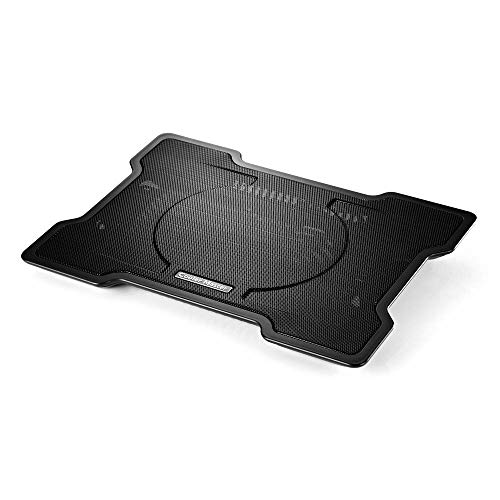
The Cooler Master NotePal is a long-running open mesh line from a maker that has sold laptop cooling for years, typically with a metal mesh deck, movable or fixed fan layouts depending on the version, and an emphasis on everyday ergonomics. Check the current version’s fan position against your own intakes, because the family name covers more than one layout.
Best for: owners whose laptop matches what the Cooler Master NotePal was designed to do, who have already tried elevation and cleaning, and who value its particular balance of airflow, noise and desk presence. Not suited for: laptops that do not intake from underneath, buyers expecting a silent or invisible accessory, or anyone hoping an external fan will substitute for an internal repair their machine is plainly asking for. As with every pick here, the tier is described in words — this one sits in the mid tier — and the current listing is where you check price on Amazon when a linked edition becomes available.

TopMate laptop cooling pad — entry tier
The TopMate laptop cooling pad is a multi-fan open pad in the accessible tier, spreading several smaller fans across the deck to cover a wide base. The spread suits laptops whose intakes are scattered rather than centred, while the cooling effect stays in the honest mesh-pad range: helpful elevation and airflow, not transformation.
Best for: owners whose laptop matches what the TopMate laptop cooling pad was designed to do, who have already tried elevation and cleaning, and who value its particular balance of airflow, noise and desk presence. Not suited for: laptops that do not intake from underneath, buyers expecting a silent or invisible accessory, or anyone hoping an external fan will substitute for an internal repair their machine is plainly asking for. As with every pick here, the tier is described in words — this one sits in the entry tier — and the current listing is where you check price on Amazon when a linked edition becomes available.
How to Get the Most Value If You Buy
Value is extracted in setup and trial, not at checkout. Align the pad to the intakes, clear the exhaust completely, start at moderate speeds, and judge across several real sessions rather than one eager afternoon. Keep the free comparisons honest: if the pad adds nothing over your stand trial, return it inside the window and bank the information. Clean it with the laptop’s vents, protect its cable, and let the external keyboard unlock the ergonomic half of its worth. Owners who do these things report satisfaction out of proportion to the product’s modesty, because they bought the right tool and then used it as designed.
The Decision Checklist
- Does my laptop intake through its underside? If not, stop here — a stand is the answer.
- Have I tried elevation, cleaning and a cooler position first? If not, do those this week.
- Is my typical load long and steady rather than short bursts? If yes, a pad has something to work on.
- Can my room forgive the noise of the strength I am considering? Answer at night, honestly.
- Is my laptop healthy — no shutdowns, no grinding, no new crashes? If not, service comes first.
- Will the pad live on one desk? If it must travel or work in bed, choose the alternatives instead.
Mostly yes answers, in order, make a pad worth it. A no early in the list is not a disappointment; it is the checklist saving you money, which is the other way a good guide pays.
The Deeper Picture
Fanless and Side-Intake Machines: Know When to Skip
Some laptops should not be paired with a pad at all, and recognising them saves money and desk space. Fanless designs shed heat through the chassis itself; what they want is a cool room, a surface that does not insulate them, and freedom from direct sun — not a fan blowing at a sealed base. Machines that intake from the sides or the keyboard deck gain little from under-body airflow, though a stand still helps their posture and their exhaust clearance. A few very thin designs run warm by intention within their makers’ limits, and their owners’ real problem is expectation rather than temperature. In all these cases the honest purchase is a good stand, a tidy desk and perhaps an external keyboard. Pad marketing rarely volunteers this, because a skipped sale helps nobody’s quarter. Let the underside of your own laptop cast the deciding vote: grilles underneath mean a pad can play; a smooth, sealed base means it mostly cannot.
The Desk Around the Pad Matters
A pad does not work in isolation; it works on a desk, in a cable run, beside a dock and under a monitor. Leave breathing room behind and beside the laptop so exhaust air escapes into the room rather than pooling against a wall or a stack of books. Route cables so none of them drape across a vent or force the laptop to sit crooked on its deck. If you use a docking station or a hub, place it where its own warmth does not feed the laptop’s intakes. Small desks reward planning: the pad’s footprint, the external keyboard, and the mouse all compete for the same shallow rectangle. Sketch the arrangement once, with the pad at its working tilt, and you will spot collisions on paper that would otherwise announce themselves daily. Cooling is partly a property of the pad and partly a property of the whole setup, and the setup half is entirely within your control for free.
Trying a Pad Fairly in the Return Window
Most pads are bought online and judged in a hurry, which produces unfair verdicts in both directions. Give a new pad a fair trial. Fit it properly, align it with the intakes, set a sensible speed, and use it through several real sessions across a few days — long enough for a warm room, a heavy task and an ordinary afternoon to all have their say. Keep notes in the plainest form: were the fans calmer, did the base feel less trapped, did long sessions hold up better, and did the noise trade feel worth it at your desk. If the answers disappoint, check the fixable causes first — alignment, exhaust clearance, a dirty vent, a speed left low — because returning a pad for a positioning mistake wastes everyone’s time. If it still disappoints, return it without bitterness. A fair trial either earns the pad its place or gives you clean information about what your laptop actually needs, and both outcomes are worth having.
Longevity: Bearings, Habits and Realistic Life
Pad fans are small motors asked to spin for hours a day, and their lives are governed by bearing quality and by how they are treated. A pad run at moderate speed on a clean desk will generally outlast one run flat out in a dusty room, just as the laptop above it will. Listen for change over time: a new tick, a growing roughness, a fan that needs a nudge to start. Those are the sounds of wear arriving, and they usually arrive gradually enough to plan around. Treat the pad as a consumable accessory with a respectable lifespan rather than a lifetime purchase, and its economics make sense. Buy from makers who support their products, keep the cable strain-free, store a travel pad flat rather than crushed in a bag, and clean it before dust becomes upholstery. Nothing here is precious, but simple fans reward simple care with years of unremarkable service, which is exactly what you want from them.
Safety and Common Sense
Cooling pads are among the safest accessories in computing, and the precautions are correspondingly plain. Keep liquids off the deck and away from the fans, as you would around the laptop itself. Do not use a pad with a damaged cable, a cracked deck or a fan that scrapes and stalls, and unplug it before cleaning. Mind where the exhaust of a hard-working laptop lands during long sessions; sustained hot air aimed at hands, paperwork or another device helps none of them. A pad is not a toy and not a step, and its tilt legs are not rated for enthusiasm from children or pets. Finally, remember the boundary drawn earlier in this guide: a pad manages comfort and margins, it does not certify a sick laptop as healthy. Shutdowns, burning smells, swelling batteries and grinding fans are stop-and-seek-help events, with or without a cooler underneath. Ordinary care, honestly applied, covers everything else.
Start With Where Your Laptop Breathes
Before any pad can help, you have to know where your laptop actually breathes. Many gaming and performance laptops draw cool air in through grilles on the underside and push hot air out through vents at the back or sides. For those machines, lifting the base and moving air underneath speaks directly to how the cooling system was designed. Other designs draw air from the keyboard deck, from the sides, or from a narrow slot near the hinge, and some thin machines are entirely fanless. A pad blowing at a solid underside panel does almost nothing for those laptops, however powerful its fans feel on your palm. Turn the machine over while it is off, look for the intake grilles, and feel for where warm air leaves during a heavy task. That two-minute check predicts pad success better than any marketing claim, and it costs nothing. If the underside is mostly solid, spend your effort on a simple stand and a clean desk instead, and treat any pad as an ergonomic accessory rather than a cooling device.
The Humble Riser Is the Benchmark
The most useful comparison for any cooling pad is not another pad. It is a plain riser, a small stand, or even a pair of stable props that lift the back of the laptop off the desk. Raising the chassis opens the gap the internal fans need to draw air, and for a great many laptops that single change delivers most of the benefit people later credit to a powered pad. A stand also improves the screen height and, with an external keyboard, the whole posture of a desk setup. This is why honest advice starts with elevation: try the free or nearly free version first, use the laptop under your normal workload for a few days, and notice whether the fans settle and the base feels less trapped. If elevation alone solves the discomfort, a powered pad is an optional refinement. If the laptop still runs hot and loud with clear space underneath, you have learned something real, and a pad — particularly a sealed, high-pressure design — becomes a much more defensible next step.
Clean Vents Beat New Accessories
Dust is the quiet saboteur of laptop cooling. Intake grilles clog, the fine fins of internal heatsinks felt over with lint, and fan blades carry a film that dulls their work. A laptop that was comfortable in its first year and now roars through light tasks is often simply dirty inside, and no pad blowing at a blocked grille will restore it. Start outside: with the machine off, clear the visible vents gently and keep the desk surface itself free of the dust that the intakes will otherwise inhale. Deeper internal cleaning is a service task for many owners, especially where opening the chassis risks clips, cables or warranty terms. The point for a pad buyer is sequencing. Clean first, elevate second, and only then judge whether moving more air underneath adds anything. Buying a pad to compensate for clogged vents treats the symptom at the wrong end, and the disappointment that follows is usually blamed on the pad when the real fault was maintenance deferred for years.
Room Temperature Sets the Ceiling
Every laptop cooler works with the air the room gives it, and that simple fact explains a lot of confusing results. A pad cannot manufacture cold; it can only move room air across and through the chassis more effectively. In a cool room, that exchange works in your favour and even a modest mesh pad may feel worthwhile. In a hot room with the sun on the desk, the same pad moves warm air and the gains shrink, sometimes to the point of vanishing. Before judging any cooling accessory, notice the room: shade the desk, move the laptop away from a radiator or a sunlit window, and avoid stacking it above other warm equipment like docks, drives and consoles. Air conditioning, a shaded corner and sensible placement are unglamorous, but they lower the starting point for everything the laptop’s own fans then do. Owners who fix the room first often find a basic pad is suddenly enough, while owners who ignore it can buy the strongest pad available and still feel underwhelmed.
Related reading on this site: our laptop cooling pad review guide, our laptop cooling pad reviews guide, our laptop cooling pad buying guide guide, our laptop cooling pad pros and cons guide, our how to choose a laptop cooling pad guide. For the wider desk setup, see our how to use laptop cooling pad guide, our guide to cooling lap desks for gaming laptops, our notes on a two-monitor laptop setup, our docking station guide for dual monitors, our roundup of laptop desks for bed.
More Detail Worth Having
Never Block the Exhaust
If there is one rule that outranks every other in this subject, it is this: never block the exhaust. Hot air leaving the laptop has to go somewhere, and a pad, a book, a cable or a desk lip parked against the rear or side vents traps that heat inside the chassis. Check the fit of any pad with this in mind. The laptop should sit fully supported, its exhaust path clear on every side, with nothing in the raised rear edge pressing against a vent. Sealed foam designs deserve a special check here, because the foam frame that makes them effective must seal around the underside without creeping over an exhaust outlet or a side intake. When you change pads, change height settings or move the setup to a new desk, repeat the check. It takes seconds, and it prevents the one configuration that can make a laptop hotter with a cooler attached than it ever was without one — a mistake that is easy to make and entirely avoidable.
What Sealed High-Pressure Pads Do Differently
Most cooling pads are open trays: fans under a mesh deck push air generally upward, and much of it escapes sideways before it ever enters the laptop. Sealed designs take a different approach. A foam frame presses gently around the underside of the chassis, and a stronger blower pressurises that enclosed space so air has essentially one way to go — through the laptop’s own bottom intakes. That is why models in the style of the IETS GT500 are the recognised exception in a category famous for modest results: they cooperate with the internal fans instead of merely breezing at the base. The trade-offs are equally real. The seal has to fit your chassis, the blower is typically louder than open mesh fans, the pad is bulkier on the desk, and the whole idea only works on laptops that genuinely intake from underneath. Treat sealed pads as a targeted tool for hot-running, bottom-intake gaming machines, not as a universal upgrade, and their reputation makes sense.
Open Mesh Pads and Modest Expectations
The classic cooling pad — a mesh or metal deck with one large fan or several smaller ones — is best understood as assisted elevation. It lifts the laptop, keeps the underside off the desk, and adds a gentle flow of air where the intakes can use some of it. For office work, study, browsing and moderate creative tasks, that combination can make the base feel cooler and the internal fans a little less busy. What it will not do is transform a struggling gaming laptop under sustained load, because most of the air it moves never enters the chassis at all. Judged as a stand with a breeze, many mesh pads are perfectly pleasant. Judged as refrigeration, all of them disappoint. Brands such as Klim and Cooler Master have sold this style for years precisely because the formula is simple, slim and quiet enough for everyday desks. Set the expectation at modest, match the fan position to your intakes where you can, and this category delivers roughly what it honestly promises.
Noise Is Part of the Deal
Every powered pad trades heat for sound, and the exchange rate matters. A pad that calms the laptop’s own fans but adds a louder whine of its own has not improved your room; it has only changed who is making the noise. Open mesh pads with larger, slower fans tend to be the gentlest, while sealed high-pressure blowers are usually the most audible, especially at the settings where they do their best work. Think about where the machine lives. In a shared office, a bedroom or a recording corner, a modest quiet pad may be worth more than a stronger loud one you will keep switching off. During gaming with headphones, the balance flips and stronger airflow earns its sound. Speed controls help because they let you match the pad to the moment instead of living at one setting. Judge noise at your desk, with your ears, under your workload — a pad returned for noise is a far more common story than a pad returned for doing nothing at all.
Power Draw, in Plain Terms
Pad fans have to be powered somehow, and the honest summary is qualitative: small mesh-pad fans sip power, typically through a laptop USB port, while stronger sealed blowers ask for more and are commonly fed by their own supply rather than the laptop. Drawing from the laptop is convenient and keeps the desk simple, but it occupies a port and adds a small extra load and a little extra warmth to the machine you are trying to cool. A pass-through connector on the pad’s plug softens the port problem on some designs. Drawing from the wall keeps the laptop out of it entirely, at the cost of another cable and another thing to pack. None of this should dominate the decision, but it shapes daily friction: how many ports you have free, whether the pad travels, and whether you mind the laptop powering its own cooler. Check how a specific model is powered before buying, and plan the cable run once instead of fighting it daily.
When Heat Means Service, Not Shopping
A cooling pad is an accessory, not a repair. If a laptop shuts down from heat, crashes under loads it once handled, or shows a fan that grinds, stalls or never spins, the problem lives inside the machine and belongs with a service bench. Ageing thermal paste dries out, internal fans wear, and heatsink fins clog beyond anything external airflow can fix. Blowing harder at the underside of a laptop with a failing fan is like opening a window for a car with a broken radiator: the gesture is understandable and the diagnosis is wrong. Use a pad trial as information, not as a verdict. If a well-fitted pad on a clean, elevated, bottom-intake laptop changes almost nothing, that absence of response is itself a clue pointing inward. At that point the money earmarked for a stronger pad is better spent on inspection, cleaning and, where a technician advises it, fresh thermal interface work.
Soft Surfaces Undo Everything
Beds, sofas and laps are where laptop cooling goes to die. A soft surface swallows the underside, seals the intakes against fabric, and insulates exactly the panel that needs to breathe. The laptop responds by running its fans harder into a blocked space, which is why machines feel hottest precisely where people use them most casually. A pad can help here only if it provides a firm, flat deck that keeps the chassis and its intakes clear of the bedding — and many slim pads flex too much to do even that well. A rigid lap desk is often the better tool for bed and sofa use, with a pad reserved for the desk. If you do use a pad away from a desk, place it on a firm board or tray, keep blankets out of the intake zone, and never leave a loaded machine buried in soft furnishings. Comfort for the user and airflow for the machine pull in opposite directions, and the machine’s need is the non-negotiable one.
Fit, Footprint and the Sliding Laptop
A pad that is too small is worse than no pad: the laptop overhangs, rocks on its feet, and its intakes may sit partly over the deck edge where no fan reaches. A pad that is far too large wastes desk, invites the machine to wander, and can leave the fans centred under solid parts of the base. Aim for a deck that supports the whole footprint with a modest margin, then check the details that decide daily satisfaction. Rubber stops or a front lip should hold the laptop at the tilt you choose without it creeping forward through a long session. The pad’s own feet should grip the desk rather than skate on it. Cables should exit where your ports actually are. These sound like small things until you have corrected a sliding laptop for the hundredth time in a week. Cooling performance gets a pad onto a shortlist; fit and stability are what keep it on the desk a year later.
Align the Fans With the Intakes
On an open pad, position is performance. The fans do the most good when they sit under the laptop’s intake grilles rather than under the battery, the memory cover or a solid stretch of base panel. Some pads let you move a fan or choose between fan positions; most fix the layout, which makes your pre-purchase homework simple: compare the pad’s fan map with a photograph of your laptop’s underside. A large central fan suits centred intakes, while multiple smaller fans spread their bets across a wider base. Where alignment is impossible, elevation still helps, but expectations should fall accordingly. Sealed pads sidestep much of this by pressurising the whole underside, which is one reason they suit owners who do not want to fuss. For everyone else, five minutes with the laptop turned over tells you more than a page of airflow marketing, and it is the step most often skipped by buyers who later conclude, unfairly or not, that pads simply do not work.
Tilt, Wrists and the External Keyboard Question
Most pads tilt the laptop, and that tilt cuts both ways. Raising the rear improves the screen angle and opens the underside, but it also slopes the built-in keyboard and trackpad, which some wrists love and others quickly hate. Short sessions forgive almost any angle. Long workdays do not, and the classic resolution is to treat the pad as a stand: raise the laptop properly, then type on a separate keyboard with the screen at a healthier height. That arrangement also frees you to choose the pad purely for airflow and stability rather than typing feel. If you rely on the built-in keyboard, favour pads with gentle or adjustable tilt and test your typing at each setting before settling. Height steps that feel clever in a listing can feel arbitrary at a desk, so simple, repeatable positions beat elaborate mechanisms. The best pad setup is the one your shoulders, wrists and neck stop noticing, because a cool laptop under an aching typist is only half a solution.
Gaming Loads Are the Honest Test
Games expose cooling truth because they load the processor and the graphics hardware together, hard, for a long time. A laptop that feels fine through documents and video may saturate its cooling within a long gaming session, at which point clock speeds, frame pacing and fan noise all tell you the system has reached its limit. This is the scenario where pads earn or lose their reputation. Elevation and clean intakes help first; a sealed pad can add a further, genuine margin on a bottom-intake machine; a gentle mesh pad mostly takes the edge off. Judge any pad in the scenario you actually care about, using a repeatable session: the same game, the same settings, the same room, with and without the pad, after the machine has fully warmed up. Short tests flatter everything, because a cool laptop coasts on its own thermal mass. Sustained load is the audit no marketing survives, and it is the fairest way to decide whether your pad was money well spent.
Is the Payoff Real? Testing Whether a Laptop Cooling Pad Earns Its Place
A laptop cooling pad is worth it when it removes a recurring frustration completely, and much harder to justify when it only makes an occasional minor annoyance slightly smaller. Revisit the decision after the novelty fades: the right laptop cooling pad should feel almost boring in use, doing its job without negotiation every single time. Keep the instructions somewhere you can find them months later, since the setting or step you skip today is often the one a future problem sends you hunting for. Picture the busiest version of your week and ask whether this laptop cooling pad still fits when other people, other tasks and other equipment compete for the same space.
As a concrete listing check, take the IETS GT500 and the Llano laptop cooling pad named earlier in this article and confirm, line by line, that each variant offered matches the size, connection and contents described for it here. Take a quick photo of the working setup before you change anything, so cable routes, positions and settings can be restored exactly if the new arrangement disappoints. Prefer a setup you can explain to another person in a minute, because simple arrangements are easier to troubleshoot, share and repeat than fragile clever ones. Separate the features you will use in the first month from the ones that only sound reassuring, and let the first group carry far more weight in the decision. Set a review date a month after buying, and judge the laptop cooling pad by whether you would choose it again knowing exactly how your routine actually uses it.
Recheck the return window and the condition requirements before you discard any packaging, especially for a laptop cooling pad whose fit only becomes clear after several real sessions. When a specification is stated in unfamiliar terms, translate it into your own routine: how long, how often, how far, how loud in practice, before letting it sway you. Leave a little headroom in every direction that matters, whether that means physical space, connection capacity, adjustment range or simply time to do a task properly. Write the exact model name and variant from the packaging into your notes, so replacement parts, accessories and support conversations start from certainty rather than guesswork.
Start this final check away from the listings, with the space, the equipment and the routine you already have written down in plain terms. If two options look identical on paper, choose the one whose controls, layout or handling you understood fastest, since clarity in daily use beats a longer feature list you never touch. The value question for a laptop cooling pad is answered by your calendar more than by any feature list: count how often the problem it solves actually interrupts your week.
Frequently Asked Questions
Do all laptops benefit from a cooling pad?
No, and checking first saves money. Pads help laptops that draw air in through grilles on the underside, which includes many gaming and performance models. Laptops that intake from the sides or the keyboard deck gain little from air blown at the base, and fanless designs gain essentially nothing, since they shed heat through the chassis itself. Turn your laptop over while it is off and look for underside intakes. If the base is mostly solid, choose a simple stand for posture and exhaust clearance instead of a powered pad.
Is a sealed pad better than a mesh pad?
It is stronger, not simply better. A sealed pad uses a foam frame and a more powerful blower to pressurise air into the laptop’s underside intakes, which suits hot-running gaming laptops that genuinely intake from below. The costs are more noise, more bulk and a fit that must match your chassis. A mesh pad is slimmer, quieter and cheaper in spirit — an elevated deck with a gentle breeze — and for office, study and moderate creative work that is often exactly enough. Match the tool to the heat, not to the specification sheet.
Can a cooling pad fix a laptop that shuts down from heat?
No. A shutdown is the laptop protecting itself, and it points to an internal problem: a failing or clogged fan, blocked internal fins, or thermal paste that has dried with age. A pad might delay the moment slightly, but it cannot repair the cause, and relying on it risks worse damage. Treat shutdowns, grinding fans and sudden crashes under familiar loads as a service issue. Once the machine is cleaned and repaired, a pad can help it stay comfortable — but shopping comes after the repair, not instead of it.
How should I position a laptop on a cooling pad?
Centre the laptop so the whole footprint is supported, align the pad’s fans under the underside intake grilles where the design allows it, and make certain nothing blocks the exhaust vents at the back or sides. The foam frame of a sealed pad should meet the base evenly without covering any vent. Raise the tilt only as far as your wrists — or your external keyboard arrangement — comfortably allow, and confirm the laptop does not creep forward on its stops during a long session. Recheck the position whenever you move the setup.
Does a cooling pad use a lot of power?
In qualitative terms, very little for a simple mesh pad, which is why so many run happily from a laptop USB port, and noticeably more for a sealed high-pressure blower, which is commonly powered from the wall instead. Drawing power from the laptop is convenient but occupies a port and adds a small load to the machine being cooled. Drawing it from the wall keeps the laptop out of the arrangement at the cost of an extra cable. Either way, the draw is a minor practical consideration rather than a running-cost concern.
Should I buy a pad or a laptop stand first?
Buy the stand first, or at least test its effect first, because elevation is where much of the benefit lives. Prop the rear of the laptop up securely, keep the exhaust clear, and use the machine under your normal workload for a few days. If the fans settle and long sessions feel steadier, you may already own the whole solution. If a bottom-intake laptop still runs hot and loud with clean vents and clear space beneath it, a pad — especially a sealed design — becomes a well-evidenced next step rather than a hopeful guess.