Disclosure: As an Amazon Associate, ilcastellomenu.com earns from qualifying purchases. Links on this page are affiliate links; they cost you nothing extra. Prices and availability change often, so check the current Amazon listing before you buy.
Short answer: is a mini wireless keyboard worth it? Worth it if your typing happens in two places the category serves, a couch facing a big screen or a small desk that a full-size keyboard dominates, and if you choose the branch that matches your room. Not worth it if you expect one small board to replace both a remote and a main keyboard at full strength, if your daily work runs on a number pad, or if you know layered keys will irritate you every day. The rest of this article prices the decision in the currencies that actually matter: space, attention, habits and the small daily frictions that compound.
Key Takeaways
- Worth is decided by branch fit, not by features: couch boards and typing boards repay different households.
- The real returns are space, placement freedom and one board serving several screens.
- The real costs are a relearning fortnight, battery and pairing habits, and accepting menu-grade pointing.
- Because minis are modest purchases, two branch specialists can be a smarter spend than one compromised all-rounder.
In this guide
Is a Mini Wireless Keyboard Worth It? What You Actually Get
Every mini wireless keyboard belongs to one of two families, and confusing them is the single most common buying mistake in this category. The first family is the home-theater remote style: a small board, often with an integrated touchpad, designed to be held in two hands or rested on a lap while you drive a media PC, a smart TV box or a streaming stick from the couch. Typing on it means short bursts: a search term, a password, a URL, a message in a chat overlay. The second family is the typing-first mini: a compact desk keyboard, roughly sixty to seventy-five percent of a full-size layout, built for real sentences at a real desk. It may be a low-profile mechanical board or a slim scissor-switch board, and it exists to free desk space without giving up a genuine typing feel. The two families overlap in size and wireless technology and differ in almost everything else: key size, key travel, pointing method and the posture you use them in. Decide which family you are shopping for before you compare a single model, because a superb couch board makes a miserable desk keyboard, and an excellent desk mini is an awkward remote. Everything else in this guide hangs off that one decision.
The classic home for a mini wireless keyboard is the home-theater setup: a PC, media box or console under the TV, controlled from the couch. In that room the keyboard’s job description is specific. It must wake the moment a search box appears, type a title accurately enough that autocomplete can help, move a cursor or focus highlight without drama, adjust volume, pause, and then disappear onto the arm of the sofa or the coffee table without dominating it. It lives among remotes, drinks and blankets, gets used in the dark, gets sat on occasionally, and is handled by guests who have never seen it before. That last point matters more than enthusiasts admit: a couch keyboard that a visitor can pick up and use without instruction is a better household tool than a cleverer one that needs explaining. Storage is part of the design brief too. A board that lives in a drawer across the room will not be fetched for a thirty-second search; a board that lives within arm’s reach will be used daily. When you evaluate a couch mini, evaluate the whole loop: where it sleeps, how fast it wakes, how it feels in the dark, and how it behaves in a guest’s hands. The best home-theater keyboard is the one the whole household actually reaches for.
At a desk, what you get is equally concrete: a keyboard sized to the keys you actually use, a mouse that lives closer to your body, and a surface that can be cleared in seconds for paper, a notebook or nothing at all. Tablet owners get a writing machine assembled from two light pieces. Presenters get a keyboard that can walk around a room. None of these gains is speculative, and all of them arrive on the first day, which is unusual among gadget purchases: the value of a well-chosen mini is front-loaded, and the only deferred part is the layout adjustment that buys it.
The Real Costs Beyond Money
Compact layouts are an exercise in honest compromise, and learning to read them is a core skill in this category. A mini board cannot carry every key, so makers choose what to keep, what to layer and what to delete entirely. On couch boards the letter keys shrink, punctuation migrates, and typing becomes a two-thumb or hunt-and-peck activity, which is fine for search boxes and passwords and miserable for paragraphs. On desk minis the letters stay full-size and the sacrifice moves to the edges: the number pad disappears, function keys share a row with numbers, and arrows hide under a modifier. Before buying, study a clear photograph of the exact layout and play a honest game of pretend: type your email address, your most common passwords’ shape, a line of code or a spreadsheet formula, and notice which characters would require a layer or a stretch. Pay special attention to the keys you use without thinking, because those are the ones whose absence you will feel daily. A layout that matches your habits is a feature no specification sheet lists, and a layout that fights them will still be fighting them in six months, long after the novelty of the small footprint has worn off.
Battery life shapes daily satisfaction with a mini keyboard more than any headline feature, because a wireless board that is often flat is worse than a wired board that is always ready. Two power systems dominate: built-in rechargeable cells charged over USB, and replaceable batteries you swap when they fade. Rechargeable designs suit people with a tidy charging ritual, perhaps a cable kept at the desk or beside the TV stand, while replaceable cells suit people who want a dead keyboard revived in seconds with spares from a drawer. Either system fails the same way when neglected, usually at the start of a film night or a work session. Build the smallest possible habit: learn what your board’s low-battery warning looks like before you urgently need to recognise it, charge or swap at the warning rather than after it, and keep the cable or spare cells with the keyboard rather than across the house. Practical safety matters too: charge on a clear, hard surface, use an undamaged cable, and retire any device whose battery swells, overheats or behaves strangely instead of coaxing it along. Sensible, ordinary care of this kind turns power from a specification into a non-issue, which is exactly what you want from a device bought to remove friction.
Attention is the third cost. A wireless board asks to be charged, paired, occasionally re-paired after a host updates, and kept track of in a living room where small electronics migrate. None of this is heavy, but it is not zero, and a household that resents maintaining devices should count it honestly. Accessories can follow: a sleeve for a travelling board, a stand to give a flat board an angle, a USB extension to free a buried receiver. Each is small; together they are the true price of ownership, and they are still usually repaid by the space and freedom above, provided the branch was right. If the branch was wrong, no accessory fixes it, which is why this article keeps returning to that single decision.
Who It Pays Off For
The media-centre household gains the clearest return: searches stop being remote-control spelling bees, passwords stop being public performances, and guests can drive the screen without a tutorial. The small-desk worker gains daily, physical returns in mouse room and a calmer surface, repaid across every working day of the year. The tablet writer and traveller gains a portable writing setup that assembles anywhere and disappears into a bag. The presenter or teacher gains freedom of movement that changes how a room feels. In each profile the pattern is identical: the mini is used daily, for the exact job its branch was built for, and daily use of a modest tool is what makes any purchase worth it.
Who Should Skip It
Skip it if your work is number-entry at volume, because a mini plus a separate pad is a full-size keyboard rebuilt at extra trouble. Skip it if your living room is voice-first and your searches are simple, because a remote you already own is doing the job. Skip it if you have tried compact layouts before and a specific exiled key still makes you angry to remember, because that reaction does not fade with a new brand. And skip the premium tiers if your use is occasional: a household that types on the TV twice a month should buy the calm, entry-level version of the right branch and spend the difference on the films. Worth-it judgements fail most often not on the product but on the intensity of use, so estimate your real frequency before your real preferences.
Strengths and Trade-Offs of Owning One
Strengths
- Space returns on day one, in the living room and at the desk alike.
- One small board can serve a TV, a laptop and a tablet, following the task around the house.
- The category is mature and modestly priced, so the risk of trying is low and the return window is a genuine trial.
Trade-offs
- A relearning fortnight is unavoidable on the typing branch and thumb-typing patience on the couch branch.
- Wireless ownership means charging, pairing and the occasional troubleshooting session.
- Pointing, where it exists, is menu-grade; precision work still belongs to a mouse at a desk.
Alternatives to Consider
A voice remote is the couch alternative: better for simple commands and casual searches, worse for names, passwords and anything private. A full-size wireless keyboard is the desk alternative: better for number work and familiar layouts, worse for space and for living-room handling. A laptop-style tablet case keyboard is the travel alternative: better as an all-in-one, worse as a keyboard you can position freely. A phone remote app is the zero-hardware alternative: fine in a pinch, slower for real text and dependent on your phone’s battery and attention. The mini beats each alternative at its branch’s core job and loses to each somewhere else, which is exactly what a healthy category looks like.
If you do buy, these four reference models mark the sensible spending points: the couch all-rounder and handheld for the living room, and the premium slim board and low-profile mechanical for the desk. All are prose-only here; their tiers are stated in words so you can match spend to intensity of use.

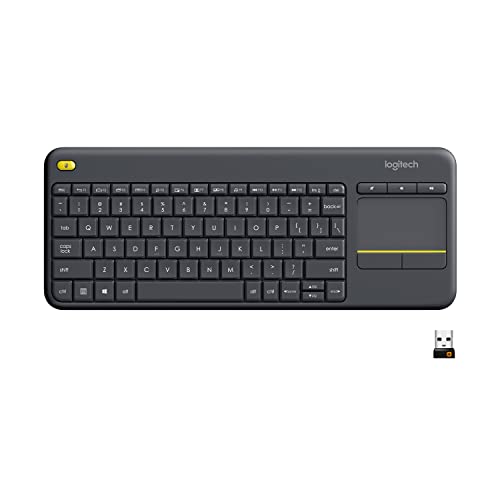
Logitech K400 Plus
Positioning: mainstream home-theater tier, prose-only; described in prose only in this draft, so check the current listing for live details before you buy.
The Logitech K400 Plus is the reference design for the couch branch of this category: a full-width-but-compact board with an integrated touchpad, shaped for two-handed use on a lap and aimed squarely at the media PC or smart TV household. In prose terms its appeal is completeness and familiarity. The keys are large enough for real search terms and passwords, the touchpad removes any need for a separate mouse on the coffee table, and the layout includes the media controls a living room actually uses. Guests understand it on sight, which in a shared living room is a genuine feature. It connects by wireless receiver, which suits TV boxes and home-theater PCs that wake inconsistently over Bluetooth. The honest limitations are those of its branch: the keys are quiet, short-travel units made for bursts rather than paragraphs, the touchpad is modest in size, and nobody should plan to write essays or work a spreadsheet on it from the sofa. Choose it if your mini exists to run a screen across the room and your household values a board everyone can use without instruction. Skip it if your real need is a desk keyboard that happens to be small.
Best for: home-theater PCs, media boxes and family living rooms that want one familiar board with a touchpad. Not suited for: long typing sessions, mechanical-key feel, or compact travel kits.

Rii i8+
Positioning: entry handheld tier, prose-only; described in prose only in this draft, so check the current listing for live details before you buy.
The Rii i8+ represents the true handheld end of the category: a palm-sized board you hold like a game controller, with a small touchpad and a layout designed for thumbs rather than fingers. In prose terms, its job is to be the remote that can type. For entering search terms, passwords and short messages on a TV box or mini PC, it is quick, light and easy to store in the smallest drawer of a TV stand, and its backlit keys suit dark rooms where a full board would be overkill. It is the kind of device that makes a streaming stick feel complete. The limitations are equally clear and should be embraced rather than discovered: the keys are small, punctuation requires patience, and anything longer than a sentence or two becomes a chore. The touchpad serves menus and simple cursor work, not detailed pointing. Choose it if your typing is measured in search terms per evening and space is at a genuine premium. Skip it if several people will type longer messages, if you want a board that also serves a desk, or if small keys frustrate you on a phone, because the experience is closer to a phone keyboard than to a desk one.
Best for: streaming boxes, mini PCs and single-viewer setups where typing means searches and passwords. Not suited for: shared family typing, longer messages, or anyone who dislikes thumb-typing.

Logitech MX Keys Mini
Positioning: premium slim typing tier, prose-only; described in prose only in this draft, so check the current listing for live details before you buy.
The Logitech MX Keys Mini is the premium statement of the slim typing branch: a compact board that keeps the refined, quiet, sculpted key feel of a high-end laptop-style keyboard while cutting away the number pad and excess width. In prose terms it is aimed at desk workers who want their small keyboard to feel like their main keyboard, because it is their main keyboard. The keys are designed for long, accurate sessions, the backlighting behaves intelligently in changing light, and multi-device pairing suits the common modern arrangement of a work laptop, a personal machine and a tablet sharing one desk. It is the mini for people who type for a living and refuse to feel that they compromised. The limitations are about fit rather than quality: there is no touchpad, so couch duty needs a separate pointer; the slim profile will not satisfy anyone who wants mechanical tactility; and its premium tier only makes sense if your hands are on it for hours daily. Choose it if typing quality at a tidy desk is the entire point. Skip it if your mini is mainly a TV remote, or if your budget of attention belongs to the mechanical branch instead.
Best for: writers, professionals and multi-device desks that want premium laptop-style keys in a compact board. Not suited for: couch touchpad use or mechanical-switch seekers.

Keychron K3
Positioning: mid-to-premium low-profile mechanical tier, prose-only; described in prose only in this draft, so check the current listing for live details before you buy.
The Keychron K3 represents the low-profile mechanical branch: a compact board with genuine mechanical switches in a slim chassis, made for typists who want feedback and character without returning to a tall, full-size keyboard. In prose terms its appeal is the combination that used to be impossible: mechanical feel, wireless freedom across more than one host, and a footprint that leaves a desk feeling open. It suits the writer or coder who has gone number-pad-free on purpose, enjoys a distinct actuation under each finger, and moves between a computer and a tablet in the same session. The layout is a compact one, so the usual relearning around layers and edge keys applies, and low-profile mechanical switches feel different from both laptop keys and full-height mechanical switches; most people need a few days before they can say honestly whether the feel is theirs. Sound also needs a thought in shared or evening spaces. Choose it if you want your mini to be a hobbyist-grade typing instrument that travels well. Skip it if you need a touchpad for the couch, prefer the soft landing of scissor keys, or want the absolute quietest board in the house.
Best for: touch-typists, coders and mechanical fans who want a slim, compact main keyboard. Not suited for: couch control, silent shared rooms, or buyers who dislike relearning layouts.
How to Get the Most Value If You Buy
Multi-device switching sounds like a luxury until your keyboard genuinely serves more than one host, which for minis is remarkably common: the TV box and the tablet, the work laptop and the home PC, the console and the streaming stick. Boards handle switching with a small dial, a slider or a key combination, and what matters is not the method on paper but how discoverable it feels in the dark, half-watching a screen, when the board has connected itself to the wrong host and the search box is waiting. A switch you can find by touch, and a host indicator you can read at a glance, keep the moment minor. Test switching during your first week with real tasks, not with a stopwatch: start a film on one host, answer a message on another, come back, and see whether the board returns to the machine you expect, every time. Also learn each host’s wake behaviour, because a board can be faithfully connected to a sleeping host and look broken when it is merely waiting. Households that master this small ritual describe their mini as the universal remote for screens; households that skip it describe the same device as temperamental. The difference is rarely the hardware.
Mini keyboards collect the evidence of their environments. Couch boards gather crumbs, dust and the occasional splash from coffee-table life; desk minis gather the usual desk grit in a smaller, tighter chassis where debris has nowhere to hide. Care is simple and mostly sufficient. Shake the board gently over a bin, work a soft brush between the keys, and wipe the case with a barely damp cloth. On mechanical minis many keycaps pull off for a deeper clean; work over a tray, photograph the layout first, and let everything dry fully before reassembly. Handheld boards deserve a specific habit: wipe the touchpad with a soft, dry cloth, because a film of living-room life on the pad is the most common cause of the jumpy cursor people blame on wireless interference. Keep drinks on a different surface from the keyboard where you reasonably can, and store a travelling mini in its own sleeve so keys are not held down by bag contents for hours. None of this needs special products or expertise. It needs only the recognition that a small, simple device rewards small, regular attention, and that most mini keyboards retired as faulty were, on inspection, simply dirty, flat or paired to the wrong host.
The Decision Checklist
- Is my main use a couch screen or a small desk? (One answer must clearly win.)
- Do I type more than search terms on the TV, or more than bursts at the desk?
- Can I name the keys I use hourly, and are they present without a layer?
- Does my main host prefer Bluetooth or a receiver, and does the board offer it?
- Will I honestly maintain a charging habit or spare batteries?
- Will this board be used at least several times a week?
The rule: five or six yes-shaped answers, buy your branch’s reference model and trial it properly for a week. Three or fewer, keep your current setup and revisit when your rooms or habits change. The checklist works because worth in this category is a property of the household, not of the keyboard.
Games deserve an honest paragraph, because mini keyboards brush against gaming from two directions. On the couch, a mini board is an excellent companion to a living-room PC or console for everything around the game: logging in, searching a store, typing chat messages, entering names and codes, and managing a media library between sessions. Inside fast competitive games, a small couch board on a lap is the wrong tool, and no honest review should pretend otherwise; that job belongs to a desk, a full layout and often a mechanical board. Desk minis are a different story: compact mechanical layouts are genuinely popular with players whose games need the letter cluster, movement keys and plenty of mouse room, and who rarely touch a number pad. If your gaming is of that kind, a typing-first mini is not a compromise at all but a deliberate choice many players make. The buying mistake is expecting one mini to cover both patterns at once. Decide whether your gaming needs a remote-style helper for the living room or a space-saving main board for a desk, buy that one properly, and let the other pattern be served by the equipment you already own.
Presenting, teaching and shared-screen work form a quiet third use case that suits minis surprisingly well. A compact wireless board lets a presenter stand, move and type away from the lectern, advance material, annotate and answer questions typed live, all while the audience watches the screen rather than the performer’s back. In classrooms and meeting rooms the same freedom lets a teacher or facilitator work from among the audience, which changes the energy of a session more than most technology does. The requirements are specific: pairing must be boringly reliable in a room full of other people’s devices, the board must wake instantly after long pauses while others are talking, and the layout must survive being handed to a colleague without a briefing. A small board also travels between rooms and buildings without the ceremony of packing a full keyboard, which is why so many presenters quietly own one even when their desk has a full-size board. If this is your pattern, prioritise connection reliability and a familiar layout over exotic features, test in an empty version of the actual room, and keep your pairing ritual practised. The audience should remember your material, not your keyboard, and a well-chosen mini is very good at being forgotten.
Build quality on a mini keyboard announces itself in the first minute of handling. Pick the board up the way you actually will, one-handed from a sofa arm or out of a bag, and notice whether the chassis flexes, creaks or feels hollow. Press a corner key and watch whether the whole unit rocks or stays planted; a board that sits steady invites confidence, while a wobbling one taxes every press with a tiny negotiation. On handheld models, check that the battery door, if there is one, closes with conviction, and that the touchpad surface feels smooth rather than gritty under a thumb. Key legends deserve a glance too: legends formed into the keycap age far more gracefully than printed ones, which matters on the handful of keys a couch board uses hundreds of times. None of this requires laboratory testing. It requires handling with intent during the return window, while changing your mind is still cheap. A mini keyboard is a tool your hands will meet daily, often in the dark, often one-handed, often in a hurry. Small physical honesty, compounded over that many meetings, is the difference between a device that disappears into the evening and one that keeps reminding you it is there.
The people who get the most from a mini wireless keyboard share a pattern rather than a job title. Their typing arrives in two distinct shapes: short control bursts aimed at a screen across the room, or full working sessions in spaces too small, temporary or tidy for a full-size board. Media-centre households, streaming-first families, presenters, students in small rooms, tablet writers, and desk workers who have deliberately gone number-pad-free all recognise one of those shapes. Naming your own pattern honestly is the highest-value step in the whole purchase, because it decides the branch, the connection type, the pointing method and the tier in one stroke. Mixed households should name the dominant pattern and let it win: a board bought mainly for the couch that also handles the odd email is a couch board, and judging it as a desk keyboard will only disappoint. If two patterns are both daily and both serious, the honest answer may be two inexpensive specialists rather than one compromised all-rounder, because the category is affordable enough that specialisation is a realistic strategy. Buy for the pattern you have, not the pattern in the product photographs, and the small keyboard will feel like it was designed for your rooms rather than adapted to them.
Value in this category is measured in friction removed per week, not in features per coin. A modest couch board that wakes instantly, types a search term cleanly and survives family handling will repay its cost in calm within a month of film nights, while an elaborate board that confuses its pairing or dies at awkward moments charges you attention every day you own it. The same arithmetic governs desk minis: a board whose layout you stop noticing after a week is worth more than a feature-rich one whose layers you still curse in month three. This is why experienced buyers read return policies as carefully as specifications and test with real workloads during the first week: a full film night with guests, a full morning of writing, the exact apps and hosts of your household. It is also why the second-hand market in mini keyboards is quietly healthy; the devices are simple, durable and easy to evaluate. Think of the purchase as hiring a small, specialised helper. You would not hire on a dazzling interview alone; you would set a trial week of real tasks. Do the same here, and let the trial, not the listing, have the final word on whether the keyboard has earned its place.
One More Consideration Worth Weighing
Media keys are the unglamorous controls that decide how a couch board feels in daily use, and they deserve a deliberate test. Play and pause, volume up and down, mute, and a search or home shortcut are the living room’s equivalent of a typist’s home row: your thumb should find them without light or thought. During your trial week, run a realistic evening: start a film, pause it when someone speaks, lower the volume quickly, search for the next thing, and notice which of those actions required looking down. Boards differ surprisingly in how they arrange these keys, and the differences are personal rather than hierarchical. A layout that puts volume where your thumb expects it will feel intelligent; one that buries mute behind a combination will feel stupid at the exact moment a loud scene wakes the house. Judge by your thumb, in the dark, and trust the judgement completely.
Shortcut habits transfer between branches in an interesting way. Couch users learn to lean on autocomplete, voice for simple commands and media keys for control, typing only what machines cannot guess. Desk users learn layers, and the good ones customise their habits around the two or three layered keys they actually need rather than memorising an entire second layout. In both cases the skill being built is selectivity: a mini keyboard rewards people who know which twenty percent of a full keyboard does eighty percent of their work, and it gently punishes the assumption that every key matters equally. If you are new to compact boards, spend one session listing the keys and shortcuts your last week of computing genuinely used. The list is always shorter than expected, it fits on an index card, and it is the most useful buying and learning document in this entire category.
Second-hand and hand-me-down minis circulate quietly and well, which tells you something about the category’s durability. If you are offered one, or find one in the household drawer, the sensible checks are quick: charge it fully, pair it to your own host rather than trusting an old pairing, test every key in a plain text field, run a fingertip over the touchpad for grit, and confirm the receiver is present if the model needs one. A board that passes those five minutes is very likely to give good service, because there is little inside a mini keyboard to wear invisibly. The same five-minute routine, incidentally, is the right annual health check for a board you already own: it catches the fading battery, the dirty pad and the drifting pairing while all three are still small, free problems.
Gifting is a real route into this category, and it has its own logic. A mini keyboard is a kind gift for the person who has just built a media PC, moved into a small flat, started presenting at work or taken a tablet to university, because it solves a problem they may not yet know they have. The branch rule still applies, doubled: a couch board for the new media setup, a typing mini for the student or traveller, and never a compromise between the two because you were unsure. Include the small kindnesses that make the gift usable on day one: charge it before wrapping, and add a note with the two or three habits from this guide that matter most, waking, switching and where the receiver lives. A well-chosen mini is used daily for years, which is more than most gifts achieve.
Sound is a household consideration that solo reviews underplay. A keyboard is heard by everyone in the room, and on the couch branch it is heard during films, which is the least forgiving listening environment in the house. Membrane and scissor couch boards are effectively silent partners in an evening; a mechanical typing board brought to the sofa announces every search to the room. The reverse also holds at a desk shared with a sleeping household or a light-sleeping baby: the quiet board is the considerate one at midnight. None of this argues against mechanical feel, which many typists rightly love. It argues for matching the board’s voice to its room and its hour, and for testing in the real acoustic, with the real audience, during the return window. A keyboard you have to apologise for is a keyboard in the wrong room.
Small living spaces deserve a specific mention, because they are where mini keyboards stop being a preference and become a strategy. In a studio flat, a dorm room or a spare-room office that must dismantle on Friday, every object is asked to justify its footprint daily. A compact wireless board passes that audit easily: it works at the table that is also the dining table, pairs with the screen that is also the television, and stores in the drawer that is also the wardrobe. Owners in small spaces consistently report the same secondary benefit, which is psychological rather than physical: a workspace that assembles in a minute and vanishes in a minute makes work feel chosen rather than permanent, and the room returns to being a home each evening. If your space is generous, this paragraph will sound precious. If your space is not, it may be the most relevant one in the article, and you should weight size and storability accordingly when you choose.
Families add a testing dimension that solo buyers never meet: other people’s hands. A living-room mini will be used by children, grandparents and guests, in the dark, with varying patience and no interest in your pairing rituals. That reality argues for boring virtues: a familiar layout, legends that survive, a chassis that tolerates being dropped onto a sofa or slid across a coffee table, and a wake behaviour that forgives being picked up and typed on instantly. It also argues for keeping the setup simple enough that the board still works when you are not home to explain it. When you trial a couch board, hand it to the least technical person in the household during the first week and watch silently. Whatever they cannot do unaided is a feature your household does not have, whatever the listing says, and it is far better to learn that inside the return window than across a year of being summoned to the living room to type a password.
There is a quiet environmental and economic argument for this category that rarely gets made: a mini keyboard is a small, durable, repairable-by-replacement-part kind of object in a market of disposable giants. Keycaps, cables and batteries are the usual wear points, and on many models all three are replaceable, which means a board can serve for years with minor attention instead of being discarded when one part tires. Buying the right branch once, instead of the wrong branch twice, is also part of that arithmetic; the cheapest and greenest keyboard is the one you do not have to replace because it never suited you. None of this needs to dominate a buying decision. It simply rewards the same behaviour the rest of this guide recommends: choose deliberately, buy once, maintain lightly, and let a simple tool have a long working life.
A Note on Households That Already Own Too Many Remotes
One objection deserves a direct answer, because it is the one most often raised against this purchase: the living room already has a remote, a phone app and perhaps a voice assistant, so why add another object? The honest reply is that the mini keyboard is not another way to do what those tools do; it is the tool for the moments they handle badly. Names with unusual spellings, passwords that should not be spoken aloud in a room with guests, addresses, codes, chat messages and searches in apps with poor voice support are all remote-shaped problems with keyboard-shaped solutions. If your household hits those moments weekly, the mini earns its drawer space within a month. If it hits them twice a year, the objection stands and the money is better kept. That frequency test, applied honestly, is the whole worth-it question in miniature, and it is why this article’s checklist asks about real evenings rather than imagined ones.
The Ownership Maths of a Mini Wireless Keyboard: Time, Hassle and Recurring Frustration
Compare it honestly with the workaround you use now, describing that workaround in the same detail, because vague dissatisfaction makes almost any purchase look worthwhile. Picture the busiest version of your week and ask whether this mini wireless keyboard still fits when other people, other tasks and other equipment compete for the same space. Measure the place where a mini wireless keyboard will actually live, including the clearance you need to reach cables, doors, trays, vents or controls without moving everything else first. Think about the longest session you realistically run, not the average one, since heat, noise, clutter and small annoyances all grow more noticeable over time.
As a concrete listing check, take the Logitech K400 Plus and the Rii i8+ named earlier in this article and confirm, line by line, that each variant offered matches the size, connection and contents described for it here. Notice how the mini wireless keyboard behaves when you are tired or in a hurry, since products that demand perfect technique tend to fail exactly when you have least patience. Prefer a setup you can explain to another person in a minute, because simple arrangements are easier to troubleshoot, share and repeat than fragile clever ones. Ask whether the benefit you want survives your least favourite conditions, such as low light, a crowded desk, a warm room or a rushed start to the day. Add up the hidden costs of ownership in time and attention, including setup, cleaning, storage and the accessories you will inevitably want, before deciding it earns its keep.
Recheck the return window and the condition requirements before you discard any packaging, especially for a mini wireless keyboard whose fit only becomes clear after several real sessions. Treat any accessory bundled in the box as a starting point, and check whether it suits your setup before assuming the maker has solved that part for you. Look for the failure you would notice first if you chose badly: a port you cannot reach, a part that will not fit, a control you cannot see, or a routine that becomes slower instead of easier. Make one change at a time during the first days, so that when something improves or gets worse you know which change caused it.
Decide in advance what good enough looks like for your use, so a minor cosmetic flaw does not distract you from performance that genuinely meets the brief. Give a new mini wireless keyboard a fair trial in the position it was bought for before improvising workarounds, since many early complaints disappear once placement is corrected. The value question for a mini wireless keyboard is answered by your calendar more than by any feature list: count how often the problem it solves actually interrupts your week. Test in the order you actually work: power on, connect, adjust, run a real task, then tidy up, rather than judging the mini wireless keyboard on a single impressive first impression. Think about storage for the accessories this mini wireless keyboard brings with it, so spare parts and tools end up in one known place instead of scattered across drawers.
Keep the packaging and any small adapters, feet, brackets or fasteners together until the mini wireless keyboard has survived a full week of ordinary use in its final position. Leave a little headroom in every direction that matters, whether that means physical space, connection capacity, adjustment range or simply time to do a task properly. A calm final test is to walk away mid-task, come back later, and see whether the setup still makes sense at a glance without reconstructing what you were doing.
Start this final check away from the listings, with the space, the equipment and the routine you already have written down in plain terms. If the benefit depends on a habit you do not yet have, be sceptical, since products rarely create routines on their own and often end up waiting in a drawer or corner. If the mini wireless keyboard will be shared, agree on one home position and one simple reset routine, so each person does not undo the previous person’s adjustments. If you work in more than one place, decide whether this mini wireless keyboard stays fixed in one spot or travels, and judge its size, weight and setup time accordingly.
Frequently Asked Questions
Is a mini wireless keyboard worth it for a smart TV?
If you search, sign in or browse on the TV regularly, yes: typing titles and passwords on a small board is faster and more private than spelling them with a remote, and a touchpad model removes the mouse problem too. If your TV life is voice commands and continuing half-finished series, a mini adds little, because the remote already covers those two jobs well.
Is a mini keyboard worth it as my main desk keyboard?
For writers, coders and office users who rarely need a number pad, long-term owners generally say yes, citing the mouse room and the clear desk. The condition is surviving the layout adjustment: give it two honest weeks of real work. If your days involve heavy number entry or full-size shortcuts, a mini as a main board is a false economy.
Should I buy one premium mini or two cheaper specialists?
If both your patterns are daily and serious, two modest specialists, a couch board and a typing board, often deliver more satisfaction than one premium compromise, because each is fully right for its room. If one pattern dominates, spend on that branch’s better model and let the other pattern make do. Match the spend to the frequency, not to the feature lists.
What is the hidden cost of owning a mini keyboard?
Attention. Charging or battery swaps, the occasional re-pairing after a host updates, keeping track of a small receiver, and a sleeve or stand here and there. None is large, but together they are the real subscription the category charges. Households that accept the small rituals upfront report the board as effortless; households that expected zero maintenance report the same board as fiddly.
How quickly does a mini keyboard pay for itself in usefulness?
There is no money return to calculate, but in friction terms the payback is fast when the branch is right: the first film night without remote-spelling a title, or the first working week with a clear desk, usually settles the question. If a fortnight of genuine use has not produced that moment, the honest conclusion is that the fit is wrong, and the return window exists for exactly that verdict.
Is a mini keyboard worth it for travel?
For travellers who write or work on tablets and laptops in small spaces, yes: a slim mini turns hotel desks and kitchen tables into workstations and packs without dominating a bag. Test it on one ordinary trip before a critical one, pair it at home, and protect the keys in a sleeve so it does not wake and drain itself against your luggage.
Related Guides
Related reading: mini wireless keyboard pros and cons; mini wireless keyboard buying guide; how to use mini wireless keyboard; Bluetooth keyboards for Android with a touch pad; portable keyboards for iPad; keyboards for small hands; wireless keyboard and mouse setups for couch gaming.