Disclosure: As an Amazon Associate, ilcastellomenu.com earns from qualifying purchases. Links on this page are affiliate links; they cost you nothing extra. Prices and availability change often, so check the current Amazon listing before you buy.
Key Takeaways
- Is a pc case fan worth it? Short answer: worth it when a fan completes a path, and not worth it when it merely fills a mount.
- Beyond three or four well-placed fans, extra fans mostly add noise — this page argues that plainly.
- The strongest returns are dust control and idle quiet, not dramatic temperature headlines.
- Value is highest for owners who will set curves and clean filters; zero for owners who will not.
- Alternatives — a better case, a cooler upgrade, doing nothing — each win in named situations.
So, is a pc case fan worth it? Worth it if your case has a gap in its airflow path, your fans are the loudest thing at your desk, or dust coats your components while your filters stay clean — in those situations a fan, or a small matched set, repays its modest cost quickly and keeps repaying it for years. Not worth it if your layout is already complete, your temperatures are already settled, or the purchase is a fifth and sixth fan bought because the mounts exist. This page defends both halves of that answer with equal energy.
The question sounds small because the component is small, but it is the right question to ask of every PC upgrade, and case fans answer it more honestly than most: their value is measurable in noise you no longer hear, dust you no longer excavate and component fans that no longer strain. Where those things are not problems, the honest answer flips, and a good guide should say so without flinching.
In this guide
What You Actually Get
What you actually get from a well-placed pc case fan is a lower temperature for the air itself inside the case, and everything downstream of that: component fans turning slower, a system that settles instead of surging, and headroom on hot days. You get a dust arrangement that works in your favour, with intake filtered and the excess air leaking outward. You get, with decent fans and curves, a machine whose sound you choose rather than endure. None of these arrive from a fan fitted without direction, grouping or a curve, which is why worth-it judgements must include the installation, not just the purchase.
You also get time. A build whose cooling decays slowly because its filters catch the dust is a build that asks for ten minutes of maintenance instead of an afternoon of excavation, year after year. Owners rarely price their own time into an upgrade, but over the life of a machine the maintenance dividend of a balanced layout can exceed the thermal one.
A case fan does not cool anything by itself in isolation. Its job is to keep a steady path of air moving through the case, bringing cooler room air in across the components that need it and pushing warmed air out before it can pool around the graphics card, the processor and the storage drives. When that path is clear and reasonably direct, every cooler inside the case works with cooler air to begin with, and the whole system can run slower, quieter fans for the same result.
Think of the inside of a case as a short wind tunnel rather than a box to be stirred. Air that enters at the front and leaves at the rear and top follows the natural layout of most builds, passing the drives, the graphics card and the processor cooler in turn. Air that is pushed in from every side at once mostly creates turbulence, warm pockets behind the power supply shroud and a graphics card breathing its own exhaust, which is why direction matters at least as much as the number of fans fitted.
Exhaust placement deserves as much thought as intake. A single rear exhaust close behind the processor cooler helps that cooler directly, because the air it has just warmed leaves the case instead of drifting across the motherboard. Top exhausts help warm air escape as it rises, but a top fan placed too far forward can also pull cool intake air straight out before it reaches anything, so position within a mount matters, not just the mount itself.
Positive pressure means slightly more filtered air is being pushed into the case than is being pulled out, so the small excess leaks out through seams, slot covers and vents. That outward leak is useful: air entering through gaps is kept to a minimum, and most of the air the system breathes arrives through the intake filters, where dust can be caught and cleaned away instead of settling on boards and heatsinks.
Negative pressure is the opposite balance, with exhaust pulling harder than intake can supply. The case then makes up the difference through every unfiltered opening it has, and those openings are rarely where you would choose. Builds run this way tend to collect dust in thin lines around panel gaps and rear slots, and they can starve a hard-working intake path. It rarely causes an immediate failure, which is why it persists unnoticed in so many dusty systems.
Neutral pressure, where intake and exhaust are closely matched, is a perfectly reasonable target and is what many well-planned builds land near in practice. The practical lesson is not to chase a label. Fit filtered intake at least equal to exhaust, keep the filters clean, and check the balance again whenever you add or remove a fan, because one extra exhaust can quietly tip a tidy positive-pressure build into a dust-collecting negative one.
The Real Costs Beyond Money
The money is the smallest cost. The real costs are an hour of installation done properly, the planning to choose sizes and groups, the ongoing minutes of filter cleaning, and the attention a curve asks for in its first week while you adjust it to your room. There is also a clutter cost in a full case: every fan is a cable, and a build at the limit of its cable management pays for each addition in future maintenance pain. Finally there is the ecosystem cost if you choose lit fans, paid in software and in commitment to one maker’s world.
None of these costs is large, but they explain why a fan can be worth it for one owner and not another with an identical PC. The owner who enjoys an hour of careful building gets the upgrade nearly free beyond the purchase. The owner who will never open the case again gets a fan spinning on a default curve behind a clogging filter, and for that owner the same purchase is worth much less.
Control method decides how civilised a fan feels day to day. Fans with pulse-width modulation control connect to a four-pin header and can be slowed precisely and held at a steady low speed, which is what makes a quiet idle possible. Simpler voltage-controlled fans work well enough on headers that support that mode, but they cannot always run as slowly or as predictably, and mixing the two types on one shared header can produce behaviour that is hard to tune.
A fan curve is simply the instruction that links temperature to speed: gentle at desktop temperatures, rising as load builds, and only reaching full speed when the system genuinely needs it. Setting that curve is part of installing fans properly, not an optional extra. A premium fan left on an aggressive default curve will sound ordinary, while a modest fan on a patient curve can disappear into the room for most of the day.
Headers and sharing deserve a quick plan before you buy. Count the fan headers on the motherboard, note which ones sit near the mounts you intend to use, and decide whether a splitter, a daisy-chain design or a small hub makes the wiring honest rather than strained. Never hang an unlimited chain of fans off one header; keep groups modest, follow the header guidance in the motherboard manual, and route every cable so it cannot sag into a spinning blade.
Dust is the slow tax on every airflow plan. Filters catch much of it, which is exactly their job, but a clogged filter quietly strangles intake until the balance you set up no longer exists. Wipe or wash filters on a simple routine, let washable ones dry fully before refitting them, and vacuum the front intake area when you clean the desk. A build that is cleaned lightly and often rarely needs the full strip-down that neglected builds eventually demand.
Blades and heatsinks collect what the filters miss. With the machine off and unplugged, a soft brush and short bursts of air clear most of it; hold a blade still while you blow at it so the fan does not spin freely. Keep cans upright, keep liquids away from bearings, and never be tempted to wash a fan itself. Ten unhurried minutes a few times a year preserves the cooling you paid for better than any single upgrade.
Who It Pays Off For
It pays off for the owner of a warm, dusty build with empty filtered mounts, where one intake fan changes the behaviour of the whole machine. It pays off for the quiet-seeker in a bedroom or studio, whose complaint is a constant background that better fans and curves directly erase. It pays off for the owner of a new, hotter graphics card in an older case, where the card has outgrown the airflow the build was born with and the case itself is still worth keeping. Each of these owners has a named problem, and a named problem is the surest sign an upgrade is worth it.
Who Should Skip It
Skip it if your layout is already a complete, balanced path and your sessions already sound and measure the way you want; your next fan is decoration. Skip it if the noise you hate actually comes from a graphics card or processor cooler under load, because case fans cannot quiet another component’s fan directly. Skip it if you are replacing the case soon, unless the fans are a size and style that will transfer — and be honest about whether they will, because a fan bought for a case you are leaving is worth it only if it leaves with you.
Strengths and Trade-Offs of Owning Better Case Fans
- Strengths of owning: every component breathes cooler air at once
- Strengths of owning: dust moves to filters, where cleaning is minutes of work
- Strengths of owning: the machine’s sound becomes a setting you control
- Trade-offs of owning: curves, cleaning and cables ask for a little ongoing attention
- Trade-offs of owning: returns collapse once the layout is complete
- Trade-offs of owning: lit ecosystems ask for commitment to one maker
Alternatives to Consider
Consider the case itself as the alternative. If the front panel offers no real intake path, the money for several fans may be better held toward a case whose architecture solves the problem permanently, with the fans you already own transferred into it. Consider a component cooler upgrade when exactly one component suffers while case air is demonstrably fine. Consider liquid cooling for the processor through the companion cluster below when sustained processor loads are the story of your build. And consider doing nothing, which is the correct alternative more often than the industry admits: a settled build with no complaint does not need an upgrade to justify itself.
A sensible starting layout for most tower cases is simple: filtered intake at the front, one exhaust at the rear, and then additions only where a specific need appears. That base covers the great majority of gaming and workstation builds. A top exhaust can help a hot processor area, a second or third front intake can help a long graphics card, and bottom intake can feed a card directly in cases that support it, but each addition should answer a question the base layout left open.
Beyond three or four well-placed fans, returns shrink quickly. Extra fans mostly add noise, wiring and cost while moving temperatures by amounts most users cannot feel in use. This is the uncomfortable arithmetic at the centre of case fan buying: the jump from no intake to a proper intake path is large, the jump from a good layout to a crowded one is small, and the wisest money often stops at the layout that already works.
Leave room in the plan for the components themselves. A long graphics card can block a front intake’s path, a tall air cooler can crowd a top mount, and a front radiator changes what the front fans should be. Fit the big parts first, look at the spaces that remain, and then place fans in the gaps that serve the airflow path, rather than filling every mount the case advertises simply because it is there.
Fan noise is rarely just the fan. Vibration passed into a thin steel panel, a loose screw, a cable brushing a blade, turbulent air pulled through a restrictive grille and a curve that hunts up and down all add their own sounds, and each has a different fix. Diagnosing noise therefore starts with listening and isolating, not with buying replacements, because a new fan fitted to a vibrating mount will usually inherit the old complaint.
Rubber mounting, anti-vibration pads and screws that are snug rather than crushed all help a fan stay decoupled from the panel it is bolted to. So does a curve with a little patience built in: a fan that changes speed gradually is far less noticeable than one that steps sharply at a temperature the processor crosses every few seconds during ordinary work. Steady and slightly warmer almost always feels quieter than cool and constantly shifting.
Placement shapes noise as well. An intake fan hard against a dense filter and a solid front panel works harder and sounds different from the same fan behind an open mesh front. Neither is automatically wrong, but expectations should match the case: a sealed, silence-focused front will ask more of its fans than a mesh front does, and choosing fans known for calm behaviour matters more in that kind of case.
Is a Pc Case Fan Worth It for These Picks?
Named designs make the value question concrete. Each pick below is presented prose-first as a segment representative, so you can ask the worth-it question of a real tier and role rather than in the abstract.

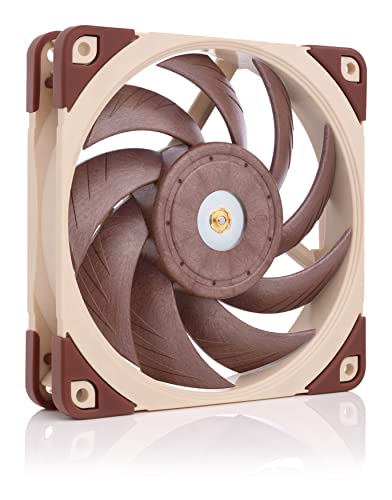
Noctua NF-A12x25 PWM
A premium-tier example known for calm all-round airflow. Its pros and cons follow the pattern of its segment: strong where its design aims, ordinary where it does not, and always dependent on being fitted in the right position, in the right direction, on a sensible curve. Treat it as a segment representative when you weigh the balance on this page.
be quiet! Silent Wings 4
A premium-tier example known for low-noise manners. Its pros and cons follow the pattern of its segment: strong where its design aims, ordinary where it does not, and always dependent on being fitted in the right position, in the right direction, on a sensible curve. Treat it as a segment representative when you weigh the balance on this page.

ARCTIC P12 PWM PST
A entry-tier example known for good-value grouped layouts. Its pros and cons follow the pattern of its segment: strong where its design aims, ordinary where it does not, and always dependent on being fitted in the right position, in the right direction, on a sensible curve. Treat it as a segment representative when you weigh the balance on this page.

Corsair AF120 RGB Elite
A mid-tier example known for lighting-led builds. Its pros and cons follow the pattern of its segment: strong where its design aims, ordinary where it does not, and always dependent on being fitted in the right position, in the right direction, on a sensible curve. Treat it as a segment representative when you weigh the balance on this page.

Lian Li Uni Fan SL120
A mid-tier example known for tidy daisy-chained installs. Its pros and cons follow the pattern of its segment: strong where its design aims, ordinary where it does not, and always dependent on being fitted in the right position, in the right direction, on a sensible curve. Treat it as a segment representative when you weigh the balance on this page.
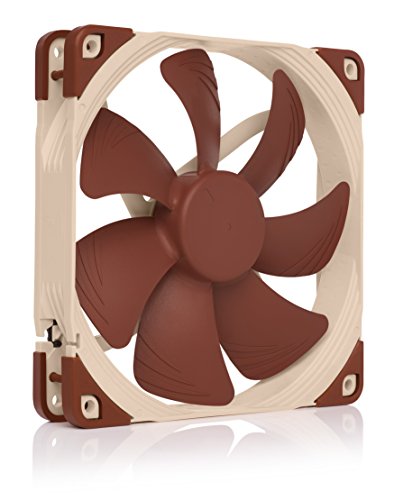
Noctua NF-A14 PWM
A premium-tier example known for larger mounts where they fit. Its pros and cons follow the pattern of its segment: strong where its design aims, ordinary where it does not, and always dependent on being fitted in the right position, in the right direction, on a sensible curve. Treat it as a segment representative when you weigh the balance on this page.
How to Get the Most Value If You Buy
Buy the layout, not the fan: positions first, direction second, control third, models last. Put the best fans at the front intakes where they work hardest and are heard most, use simpler fans in easy positions, and group matched fans on shared curves. Set the curve the day you install, photograph the direction arrows, and put filter cleaning on the rhythm your room demands. Then stop. The discipline of stopping is where most of the value lives, because it protects the quiet and the budget that made the upgrade worth it.
Buy fans as a layout, not as singles. Decide the positions first, the direction of each second, the control method third and the specific models last. That order prevents the classic outcome of owning excellent fans that duplicate one job while another mount stays empty, and it keeps the wiring plan, the header count and the lighting plan consistent across the whole build instead of being improvised fan by fan.
Matching fans across a visible array is worth more than it sounds. Identical fans on one header or hub behave identically on the same curve, light identically if they are lit, and age at the same rate. A mixed array can work, but it asks for more tuning and often shows its differences at low speed, which is where you spend most of your time. If budget forces a mixture, group like with like by position.
Value in case fans is real but uneven. The cheapest fans can be perfectly serviceable as a rear exhaust in a modest build, while the same money spread thinly across a full showcase array buys noise you will hear every day. A common sensible pattern is to put the best fans where they work hardest and are heard most, usually the front intakes, and simpler fans in easier positions. Tiers exist for a reason; use them deliberately.
The most common fan mistake is fitting a fan backwards. A reversed intake turns your front array into exhaust, fights the rear fan and leaves the graphics card short of cool air, yet the build still runs, so the error can survive for years. The direction arrows moulded on the fan frame exist for exactly this moment: check them before the screws go in, every time, even when you are sure, especially when you are sure.
The second mistake is judging a layout in the first five minutes. Temperatures under a short test tell you little about a long gaming session in a warm room, where heat soaks into the case and the curve settles at its working point. Judge changes after a real session, change one thing at a time, and keep notes. Builders who change three things at once learn nothing except that something, somewhere, helped or did not.
Cable mistakes are the unglamorous third. A fan cable trapped under a motherboard standoff, pinched by a side panel or resting against a blade will eventually announce itself, as a rattle, a stopped fan or a worn-through sheath. Route cables along the channels the case provides, leave a little slack for the panel, spin each fan gently by hand before first power-on, and look once more with a torch before you close the case for good.
When a fan does not spin, work the simple chain first: is the machine actually powered, is the header enabled and set to the right control mode, is the connector fully seated, and does the fan spin on a different header? Connectors that look seated can sit one pin off on some headers, and a curve set to a silent profile may legitimately hold a fan still until a temperature threshold is crossed, which is a setting, not a fault.
When temperatures disappoint, resist the urge to simply add fans. Check direction, check that intake filters are clean, check that the front panel is not starving the intakes, and check where the graphics card is exhausting. Most disappointing layouts have one clear fault that an extra fan would only mask. Fix the fault, retest under the same load, and only then decide whether the layout genuinely needs another fan at all.
Consider the room as part of the system. A case tucked into a closed cabinet, under a desk against a wall or beside a radiator starts every session with warmer air and fewer places for exhaust to go. Moving the case a short distance into open air can change fan behaviour more than replacing the fans themselves, because every cooler in the machine ultimately works against the temperature of the room air it is given to breathe.
A quiet build is a system property, not a fan property. The case panels, the desk surface, the processor cooler, the graphics card fans and the power supply all contribute, and the loudest contributor sets the experience. Case fans are worth optimising because they run constantly and sit close to openings, but if another component is clearly louder under load, honesty says to fix that one first.
Humidity and environment matter at the margins. A build in a workshop, a kitchen-adjacent room or a home with pets loads its filters far faster than a build in a clean office, and its cleaning routine should match its environment rather than a calendar copied from the internet. Look at the filters, learn your own interval, and write it on the same note as your fan curve settings.
Finally, remember what good looks like so you can recognise it: a machine that is unremarkable. Temperatures that stay in their expected range through your longest session, fans you notice only when you listen for them, filters that catch the dust instead of the components wearing it, and a case you can open, understand and put back without a puzzle. That ordinariness is the whole point of a well-chosen pc case fan layout.
The Decision Checklist
- Can I name the problem this fan solves — heat, noise or dust — in one sentence?
- Does my case have a free, filtered mount in the position that problem needs?
- Have I checked the size, thickness and header this fan requires?
- Is my current layout already a complete path? If yes, stop here.
- Will I set a curve and clean the filters? If not, lower my expectations.
- If I am buying beyond a fourth fan, what exactly does this one add?
- Would the same money solve the problem better as a case or cooler change?
Score it plainly: yes answers to the first three and a real gap in the fourth make a pc case fan worth it. A complete layout, an unnamed problem or a fan count climbing past four for its own sake make it not worth it, and the money is better kept or spent where the build actually hurts.
The Value Story in Three Common Builds
Take a three-year-old gaming build whose owner is considering a full new machine because it has grown loud. Inside, the case fans are the originals, one front intake is fitted behind a filter that has not been cleaned in a year, and the graphics card does most of the complaining because it breathes warm case air. For this owner, a small matched set of fans, a cleaned filter and an afternoon of curves is worth a great deal, because it can retire the complaint that was pushing a far larger purchase. The worth-it answer here is not close.
Take, by contrast, a new build assembled carefully last year: filtered intakes, a rear exhaust, curves set, filters cleaned on a rhythm. Its owner is now eyeing two more fans for the empty top mounts. For this owner the same component is worth very little, because the path is complete and the additions answer no question; the money would do more work almost anywhere else, including being saved. Same fans, same prices, opposite answers — which is precisely why this page refuses a universal verdict.
Take finally a workstation in a shared home office, rendering through the day while calls happen in the same room. Its problem is not peak temperature but presence: a constant fan character that tires everyone who shares the space. Premium quiet fans at the working positions, on a patient curve, are worth their cost to this owner in a currency benchmarks do not measure — a room that stays usable. Worth-it judgements that ignore the room and the people in it will always misprice this case.
What the Money Buys at Each Tier
At the entry tier, money buys completeness: enough matched fans to finish a layout properly, with honest control and no frills. For a build that currently has gaps, this tier delivers most of the available benefit, and pretending otherwise would be snobbery. The worth-it question at this tier is rarely about the fans and almost always about whether the layout they complete is the right one.
At the middle tier, money buys refinement and systems: better low-speed manners, lighting that belongs to a real ecosystem, cabling ideas such as daisy-chaining that make a multi-fan build tidier to build and to maintain. This tier is worth it when the build is a showcase or when several fans must be wired in a tight case, and harder to justify in a closed case under a desk where none of its refinements can be seen or felt.
At the premium tier, money buys calm and longevity: fans designed to disappear at the speeds a machine uses most, mounting hardware that treats panels kindly, and a track record across years of owner reports. This tier is worth it in quiet rooms, in builds kept for many years and at the positions nearest your ears. It is not worth it as a blanket specification for every mount in every build, and the manufacturers’ own line-ups, which reserve their finest designs for a premium, quietly agree with that positioning.
The tier question also interacts with count. A premium pair at the front and entry fans elsewhere can cost the same as a uniform middle-tier set, and for many builds the mixed spend is the better one, because the front intakes work hardest against the filter and sit closest to the user. Worth-it thinking is portfolio thinking: allocate to the positions in proportion to the work they do and the attention they receive.
The Hidden Returns Nobody Advertises
A balanced layout returns value in places listings never mention. Components that run cooler and cleaner tend to hold their behaviour longer, so the build feels new for more of its life. A machine that is pleasant to sit beside gets used as intended, at its desk, rather than migrated to a cupboard where its exhaust has nowhere to go. A case interior that stays comparatively clean is safer to work in, because dust hides screws, jumpers and small connectors exactly when you are looking for them. None of these returns appears in a specification table, and all of them are real.
There is also a learning return. The owner who plans a layout, checks directions, groups headers and sets curves has learned the thermal logic of their own machine, and that knowledge transfers to every troubleshooting moment afterwards. A noise is no longer a mystery but a short list of suspects. A hot day is no longer a worry but a curve doing its job. Part of what a case fan purchase is worth, for a first-time builder especially, is the competence that installing it properly leaves behind.
When the Answer Changes Over Time
A fan that is not worth it today can become worth it without the fan changing at all. A new graphics card raises the heat the case must move. A house move puts the PC in a bedroom instead of a study. A summer hotter than the last exposes a curve and a layout that winter forgave. Conversely, a planned case change can turn a worthwhile fan into a stranded one. The practical habit is to ask the worth-it question at the moment of the change, against the build and the room as they now are, rather than treating an old answer as permanent in either direction.
This is also why buying one fan short of a full set is rarely the saving it appears. Needs grow into the mounts you left empty, and a matched fan bought later may no longer match if a line is revised or discontinued. When a layout is clearly right and a set is clearly the purchase, buying the set together is part of the value. When the layout is uncertain, buying the single fan that answers the named problem is the value. The checklist earlier in this page exists to tell those two situations apart before money moves.
Two Objections, Answered Fairly
The first objection says temperatures are the only honest measure, and by that measure a fan or two rarely performs miracles. The objection is half right: miracles are not on offer, and any page promising them should be distrusted. But the measure is too narrow, because owners do not live with a temperature readout; they live with a sound, a dust rhythm and a machine’s behaviour across a long session. Judged on the full experience owners actually have, the returns are larger and more durable than the narrow measure suggests, and dismissing them because they are harder to graph is its own kind of dishonesty.
The second objection runs the other way: that because fans are cheap, the question is not worth asking and you should simply fill the case. Cheapness, though, is per fan, and a full case of fans plus a controller plus the hours to wire them is not a trivial purchase; worse, the cost that matters most — noise added to every hour the machine runs — is paid by exactly the full-case approach. Asking the question costs a page of reading. Not asking it can cost the quiet the machine was capable of. That trade favours asking.
There is a middle position this page endorses without reservation: buy the base layout without agonising, because filtered intake and a rear exhaust are as close to a settled answer as this category offers, and reserve the worth-it scrutiny for everything beyond it. The first fans are infrastructure. The later fans are options, and options should argue for themselves. That division keeps the decision quick where it can be and careful where it counts.
The Answer, Restated by Owner
If you are the owner whose build has a gap, buy the fan and finish the path; it is worth it. If you are the owner whose build is complete and calm, keep the money; another fan is not worth it, and the discipline of that answer protects the build you already have. If you are the owner whose case is the problem, neither answer applies until the case question is settled, because fans bought for the wrong architecture are worth little in any tier. And if you are the first-time builder, buy the simple layout, install it with the care the companion guide describes, and let your own first season with the machine teach you whether anything more is worth it at all. Experience, in this category, is a better adviser than any page — including this one — once the basics are honestly in place.
How to Revisit the Decision After a Season
Set a date with your own build a season after any fan purchase and audit the decision with evidence instead of memory. Are the filters carrying the dust while the interior stays comparatively clean? Does the machine still draw your attention at idle, or has it faded into the room as intended? Did the extra mount you filled ever answer the question it was bought for? Write the answers down, briefly, because they are the calibration for your next upgrade decision, whatever component it concerns.
If the audit says the purchase failed, name the reason precisely before spending again. A fan that failed because it was fitted backwards teaches a different lesson from one that failed because the case had no intake path, and both differ from a fan that failed because the problem was always the graphics card. Owners who can name their failures this precisely almost stop having them, because each purchase afterwards is aimed by the last one’s evidence. That, in the end, may be the most valuable return a modest component can offer: not the air it moves, but the judgement it trains.
A Note for Builders Selling or Passing On a Machine
One audience rarely considered in worth-it discussions is the next owner. A build with a complete, documented fan layout — directions photographed, curves noted, filters clean — is simply a better machine to inherit, buy second-hand or hand to a family member than the same hardware with a dusty, mysterious interior. If you expect to pass the machine on, the fan layout’s value includes the confidence it gives the person who receives it, and the troubleshooting hours it saves them. Few sellers think to mention their airflow layout; the ones who can describe it clearly are, not coincidentally, usually selling machines that have been cared for in every other way as well.
That thought completes the page’s argument neatly. A pc case fan is worth it when it is part of a cared-for system — planned, installed, tuned and maintained — because care is what converts a small component into years of quiet, clean, predictable service. It is not worth it as a gesture, a photograph or a substitute for the repair the build actually needs. Decide which purchase yours is, honestly, and the answer will already have decided itself.
If you have read this far and still cannot decide, use the smallest reversible step: buy the single fan that answers your most clearly named problem, install it properly, set its curve, and live with it for a season. Evidence from your own machine will settle what argument could not, and the cost of the experiment is one fan you can move, reuse or pass on. Indecision resolved by a small honest experiment is not indecision at all; it is the method this whole category rewards, applied to the buying decision itself. Start there, and let the build tell you whether the rest of the layout is worth it.
One last calibration: compare the fan you are considering with the last upgrade you bought and judged honestly. If that purchase taught you that you value quiet over spectacle, or completeness over refinement, believe the lesson and spend the same way here. Owners are remarkably consistent in what satisfies them; the worth-it answer for this small component is mostly a matter of listening to what your own history has already told you, and then buying the fan — or deliberately not buying it — that your history recommends.
The Value Test: How Often You Use It Decides Everything
The one-question shortcut
If the full analysis still leaves you undecided, ask the question that cuts through it: if this pc case fan disappeared from your home after a month of use, would you replace it immediately, eventually, or not at all? People answer honestly when the purchase is framed as a loss. Immediate replacers should buy with confidence and choose the better model; eventual replacers should buy modestly; the not-at-all group has its answer too. In a small rented room where drilling, permanent fixings and bulky extras are off the table, that instinct, checked against the use-frequency count, settles the worth-it question more reliably than any feature comparison.
Count the uses, honestly
The worth-it question for a pc case fan is mostly a frequency question. Estimate how many times a month the product would genuinely be used in your routine — not the enthusiastic first fortnight, but month four, when the novelty has worn off. In a small rented room where drilling, permanent fixings and bulky extras are off the table, a pc case fan used weekly almost always justifies itself through saved time, avoided workarounds or better results, while the same product used twice a year is usually an expensive storage obligation. If your honest count is low, borrowing, hiring or using a service is the mathematically sound answer, and there is no shame in it.
The workaround you are already paying for
Most people considering a pc case fan are already solving the problem somehow — with a slower method, a borrowed tool, a workaround that costs time or produces worse results. Price that workaround in attention and frustration, not just money: how often does it interrupt you, and what does the interruption cost the rest of your day? A purchase is worth it when it retires a recurring annoyance, not when it merely upgrades a process that was already painless. If your current workaround barely bothers you, the honest verdict for you is probably to skip the purchase.
Five honest minutes at this stage is worth more than five hours of comparison browsing.
If a candidate fails this check, strike it from the list without regret and let the remaining options compete on merit.
Frequently Asked Questions
Is one good case fan worth it, or do I need a set?
One good fan is worth it when it completes a path — typically the missing filtered intake or the missing rear exhaust. A set is worth it when the existing fans are uniformly crude, loud or mismatched, because replacing the working positions together gives one control story and one noise character. Judge by what is missing: a gap needs a fan, a character problem needs the set that causes it replaced.
Are premium case fans worth it over budget ones?
At the front intakes of a quiet build, generally yes, because low-speed manners are the product and they are heard every day. As a rear exhaust in an ordinary build, generally no, because the job is easy and the difference is small. The worth-it answer follows the position and the room, which is why blanket claims in either direction mislead. Spend premium money where your ears and your filters will notice it.
Will case fans lower my temperatures enough to matter?
When the case air itself is the problem, yes, by enough to change how hard every component fan must work, which you will hear even more than you measure. When case air is already cool and one component still runs hot, case fans will not matter much, and the honest purchase is that component’s cooler. Test the distinction by running a session with the side panel removed: a big improvement points at the case airflow, a small one points elsewhere.
How many fans is too many?
For most towers, the point arrives at three or four well-placed fans. Past that, each addition should have to argue its case against the noise, wiring and cost it brings, and most cannot. A case with every mount filled is a photograph, not a recommendation. If you cannot state in one sentence what the next fan fixes, it is too many, whatever the mount count allows.
Is it worth upgrading fans in an old PC?
Often yes, because fans transfer. A good set bought for an old build whose case has standard mounts will usually serve the next build too, which spreads the value across two machines. It is not worth it if the old case has no sensible mounts or you will replace the case with a different size standard soon. Check the mounts, think one build ahead, and the answer is usually clear.
Are lit fans worth the extra?
Worth it if the build is genuinely a showcase you look at daily and you commit to one ecosystem as a kit, software included. Not worth it under a desk, behind a solid panel or as a mixed bargain set, where the premium buys cables and apps instead of a look. The cooling is not the question — good lit fans cool fine — the question is whether anyone, including you, will actually see the benefit you paid for.
Related Guides and Next Steps
Keep reading within this cooling series and the guides already live on this site:
- pc case fan review
- pc case fan reviews
- pc case fan buying guide
- pc case fan pros and cons
- how to install pc case fan
- liquid cpu cooler review
- liquid cpu cooler reviews
- liquid cpu cooler buying guide
- liquid cpu cooler pros and cons
- is a liquid cpu cooler worth it
- how to install liquid cpu cooler
- how to set up airflow in a pc case
- pc case airflow explained
- how to fix pc case fan noise
- how to improve pc case airflow