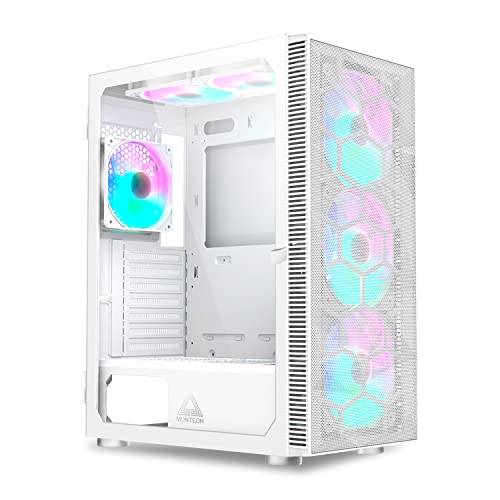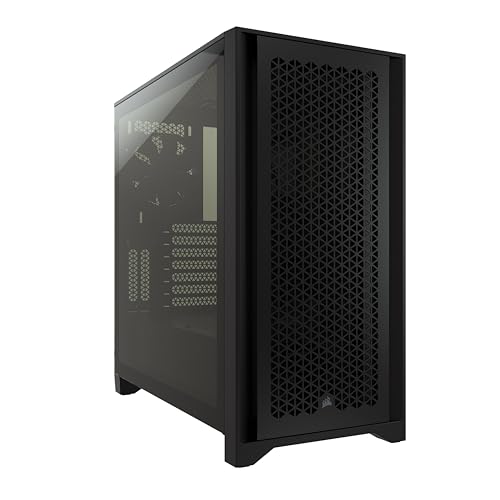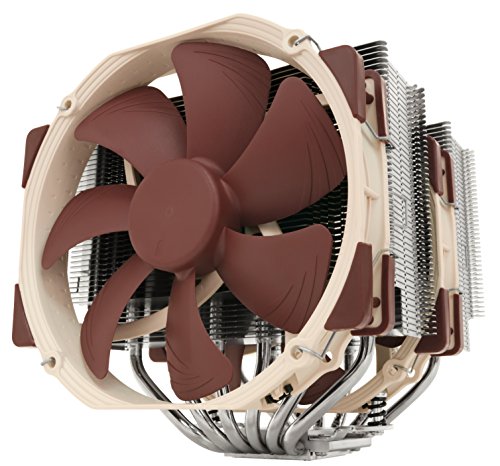
PC case airflow explained in one idea: your case is a wind tunnel, and cooling happens when air travels a deliberate path — in cool, across the hot components, and out — rather than when fans merely stir the air inside a box. Every rule of thumb you have heard (front intake, rear exhaust, positive pressure, mesh fronts) is an application of that single idea to a specific problem. Understand the path and the pressure, and you can design or fix the airflow of any case without memorising a single rule.
This explainer covers how the path works, what pressure balance means and why it controls dust, where turbulence and dead zones come from, and the misconceptions that lead builders to buy more fans when they needed a better plan.
Disclosure: As an Amazon Associate, ilcastellomenu.com earns from qualifying purchases. Product examples below link to Amazon, where you can check current availability and specifications; this guide itself lists no fixed prices because pricing and bundles change frequently.
PC Case Airflow Explained: The Core Idea
Components do not cool themselves into the room; they cool themselves into the air inside the case. The CPU and graphics card transfer their heat to their heatsinks, their fans push that heat into the case’s internal air — and there the case’s job begins. If the case steadily replaces its internal air with fresh room air, component temperatures settle at a level set by that exchange rate. If it does not, the internal air warms until the whole system is trying to cool itself with pre-heated air, and temperatures climb no matter how good the individual coolers are.
So case airflow is a transport problem: supply cool air, deliver it across the heat sources, and remove the warmed air before it recirculates. Fan specifications, panel design, and layout all serve that transport. The practical build sequence that implements it is How to Set Up Airflow in a PC Case; this article is the theory that makes the sequence make sense.
In this guide
The Standard Path and Why It Won
Nearly every case implements the same path: intake at the front and bottom, exhaust at the rear and top. Three facts converged on this design. The graphics card — usually the largest heat source — sits low and toward the rear, so air entering at the front-bottom reaches it first. The CPU sits high and rearward, at the path’s end, where the rear exhaust waits. And hot air rises, so top and rear exhausts work with buoyancy rather than against it.
Deviations exist for good reasons — a front radiator warms intake air deliberately to cool the CPU better; some small cases invert the path entirely — but each deviation is a conscious trade made by someone who understood the standard path first. When you troubleshoot a hot build, you are usually discovering an accidental deviation: a reversed fan, a blocked intake, an exhaust recycling into an intake.
Streamlines, turbulence, and dead zones
Air prefers smooth paths. Where the stream meets an obstruction — a cable bundle, a drive cage — it eddies and slows, and behind obstructions sit dead zones where air barely exchanges. This is why cable management is a cooling topic and not merely an aesthetic one, and why a case can have powerful fans and a hot graphics card simultaneously: the air is moving, just not where the heat is. The fix is rarely more fan; it is a clearer corridor between intake and components.
The graphics card's private problem
Most graphics cards exhaust much of their heat inside the case (blower-style cards, which eject it directly outside, are the exception). An open-air card effectively has its own weather system: its fans draw from below and dump heated air upward and sideways, some of which its own intake re-breathes. Case airflow’s job for the card is to supply fresh air beneath it and sweep its exhaust away before recirculation — which is why bottom intakes and an unobstructed front-to-card corridor help graphics cards disproportionately.
Pressure: Positive, Negative, and Dust
Pressure describes the balance between air pushed in and air pulled out. If exhausts move more air than intakes supply, the case runs at negative pressure: the deficit is made up by air leaking in through every unfiltered gap — rear slots, seams, unused mounts — carrying dust with it. If intakes supply more, the case runs positive: excess air leaks outward through those same gaps, so nearly all incoming air arrives through the filtered intakes, and the interior stays cleaner far longer.
The subtlety is that fan counts do not determine pressure — delivered airflow does, and filters, panels, and radiators all tax the fans behind them. Three intakes behind a clogged filter can deliver less than two free exhausts. This is why pressure is best verified by behaviour: dust accumulating inside despite filters is the signature of negative pressure, whatever the fan arithmetic said. Diagnosis and correction are covered in How to Improve PC Case Airflow.
Heat, Airflow, and Noise Are One Equation
Fans obey an unforgiving trade: moving more air costs disproportionately more noise, because fan noise rises much faster than fan speed. This single fact organises most of case design. Low-restriction cases (mesh panels, clear paths) let fans achieve the needed flow slowly and quietly. Restricted cases force speed. Component coolers live by the same law, which is why a large slow cooler beats a small fast one for the same cooling.
It also explains why ‘just add fans’ disappoints: a fifth fan adds little flow to a restricted path but adds its full voice to the chorus. The airflow-versus-silence negotiation is compared directly in Airflow Case vs Silent Case, and the maintenance half of the equation — restriction grows as filters clog — is in How to Clean a PC Case.
Key Terms
Intake and exhaust: fans moving air into and out of the case. Static pressure: a fan’s ability to push air through resistance (filters, radiators); high-pressure fans suit restricted paths, high-flow fans suit open ones. CFM: airflow volume, quoted in free air and always reduced by real-world resistance. Radiator: a liquid-cooling heat exchanger whose dense fins are the most restrictive common component. Dead zone: a region the main stream bypasses, where air stagnates and heat lingers. Recirculation: warmed air re-entering an intake or a cooler’s inlet, the silent killer of cooling efficiency. Fan curve: the mapping from temperature to fan speed that decides how the system behaves between idle and full load.
Common Misconceptions
Four myths deserve retirement. ‘More fans always cool better’ — arrangement beats accumulation, and a reversed fan makes things worse than its absence. ‘Hot air rises, so only top exhaust matters’ — at fan-driven speeds, buoyancy is a minor force compared with the path your fans impose; direction discipline matters more. ‘A bigger case is automatically cooler’ — volume without a path is a lake, not a river. And ‘sealing every gap improves airflow’ — a case needs its designed vents; the goal is that air enters through filters and leaves through exhausts, not that the box is airtight. Each myth survives because it contains a grain of truth; the path-and-pressure model tells you exactly where each grain ends.
Why Temperatures Stabilise: The Equilibrium Idea
A PC under constant load does not heat forever; it settles. The reason is equilibrium: components produce heat at a steady rate, the case exchanges air at a steady rate, and temperatures rise until the outflow of heat in the exhaust air exactly balances production. Everything in airflow design is an attempt to make that balance point lower — more exchange, cooler intake air, less recirculation — and this is why small improvements compound: a slightly freer intake lowers the internal air temperature, which lowers every component’s starting point at once.
Equilibrium also explains the twenty-minute rule in testing: a system needs time to reach its balance point, and temperatures read at minute three flatter every setup. Judge any airflow change by stabilised temperatures under a sustained load, or you are comparing warm-up curves, not cooling.
The Room Is Part of the System
The case’s intake air is the room’s air, and the room is the final heatsink. A PC exhausting into a small, closed, sun-warmed room steadily raises its own intake temperature, and no internal arrangement can cool below the air it breathes. This is why the same PC runs hotter in summer, hotter in a cabinet, and hotter in a tiny bedroom with the door closed — and why ‘improve airflow’ sometimes honestly means opening a door, moving the case out of the alcove, or accepting that the room sets the floor for what the case can achieve.
Treat the chain as a whole: component to case air, case air to room air, room air to the building. The weakest exchange in the chain sets the temperature of everything upstream of it.
Airflow Myths in Product Marketing
The path-and-pressure model also arms you against marketing. ‘Wind tunnel’ claims mean nothing without a defined intake and exhaust — ask where air enters and leaves, and the claim either resolves into a path or evaporates. Fan counts in advertisements count installed fans, not delivered air; a case shipping with six fans behind a sealed front moves less air than a three-fan mesh design. ‘Gaming airflow’ styling — aggressive vents that are actually shallow styling grooves over solid plastic — is detected the same way: look through the vent. If you cannot see a path for air, there is none, whatever the box says.
The honest signals are boring ones: published fan-mount diagrams, filter specifications, radiator support tables, and a front panel you can see daylight through. Judge cases by those, and the marketing sorts itself.
A Thirty-Second Airflow Audit for Any Case
Apply the whole explainer in half a minute, in a shop or on a product page. One: find the intakes — are they filtered, and is the panel in front of them genuinely open? Two: trace the stream — does a clear corridor run from those intakes across the graphics card’s position? Three: find the exhausts — is there a rear exhaust at the stream’s end, and top exhaust behind it? Four: count the leaks — will the pressure plan survive the case’s gaps, or is it so perforated that pressure is meaningless (in which case dust behaviour, not pressure, is your management problem)? A case that passes all four will cool; a case that fails one tells you exactly which compromise you are accepting.
From Theory to Shopping: Reading a Case Through Airflow Eyes
Close the loop between this explainer and the marketplace. When you evaluate any case now, you are really asking four questions in disguise. Where does air enter, and is that entry filtered and genuinely open? What corridor does it travel, and what stands in the corridor? Where does it leave, and is the exit at the path’s end rather than its middle? And what will the pressure be, given the fans and resistances involved? A case whose product page answers all four clearly is a case designed by people who think in paths.
A case whose page answers none — all lifestyle photography and lighting choreography — may still cool adequately, but you will be buying the answer to find out. The theory in this article cannot choose your case for you; it can, however, make you fluent in the only language in which cases can be honestly compared, and fluency is the whole game.
The one-sentence summary to keep
If you remember nothing else: feed the components cool air along a clear path, remove the warmed air at the path’s end, keep the pressure slightly positive so the filters do the dust work, and let slow fans do all of it quietly. Every guide in this series — setup, cleaning, troubleshooting, panel choice — is that sentence unfolded. You now hold the folded version, which fits in a pocket and works in any shop.
Airflow and Component Lifespan
One consequence of airflow is rarely marketed because it accrues silently: components that run cooler tend to live longer and behave more consistently. Heat accelerates the ageing of capacitors, fan bearings, and thermal interface materials; a system whose equilibrium sits a few degrees lower is a system whose parts age a little slower, every hour, for years. This is not an argument for obsession — the difference between adequate and maximal airflow is small change in lifespan terms — but it is the final reason the path matters more than any single product: good airflow is a property of the whole machine’s life, not of one benchmark afternoon.
It is also why the boring maintenance in this series — filters cleaned, paths kept clear — belongs in an explainer about theory. Theory says the equilibrium depends on exchange; practice says exchange decays as dust accumulates. The clean case is the theory, maintained.
The explainer's promise, kept
You arrived, perhaps, wanting a rule and are leaving with a model. That trade is deliberate and it favours you: rules expire with each new case design, while the model — path, pressure, equilibrium, and the room beyond the case — evaluates designs that have not been invented yet. Apply it in the shop, at the workbench, and over a misbehaving build at midnight, and it will keep producing the right questions. In airflow, as in most of engineering, the right questions are the valuable part.
Follow One Breath: A Parcel of Air Through a Working Case
Abstractions settle better with a story, so follow a single breath of room air through a conventional build at gaming load. It arrives at the front filter doing the room’s temperature, drawn by the intake fans, and the filter takes its toll immediately — a little speed, a little dust surrendered. Inside, the stream divides by pressure and obstacle: the lower river bends toward the graphics card’s fans, which seize it, accelerate it across the card’s fin stack, and return it to the case’s interior several degrees warmer and moving in the card’s own chosen directions, some toward the rear slots, some rising along the card’s back. The upper river passes the processor’s tower cooler, whose fan hands it through the fins and onward to the rear exhaust, which is expecting it.
Notice what the story contains: no molecule was assigned a route by the case’s marketing, every handoff was a fan or a pressure difference, and the breath’s temperature at each stage is the whole plot. The rear exhaust expels a blend — card-warmed and cooler-warmed air, mixed with a fraction of intake air that short-circuited along the case’s empty corners without visiting any component, which is normal and only wasteful when the fraction grows large. The breath leaves warmer than it arrived by an amount set by the build’s power draw and the total flow, and the room receives it. Every concept in this explainer — path, pressure, equilibrium, dead zones — is a way of talking about some moment in that breath’s journey, and a builder who can narrate the journey for their own case understands their airflow better than one who can recite the fan count.
The Arithmetic of Heat: Watts In, Air Out
Airflow obeys an unforgiving little equation that every builder should meet once, in plain language. A PC converts essentially all of its electrical draw into heat inside the case. Air carries heat away in proportion to how much of it passes through and how much warmer it is allowed to leave than it arrived. So for a given build, there are only two dials: move more air, or let the exhaust run hotter. A build drawing a few hundred watts at full cry needs a substantial river of air to keep its exhaust — and therefore its components — within a modest rise over the room; halve the river and the same heat must leave in half the air, which therefore leaves roughly twice as warm, and the components sit in that warmth.
This arithmetic explains several things that puzzle beginners. It explains why a low-power office machine can be cooled by almost any arrangement — its heat is so modest that even a lazy draught keeps the rise small — while a flagship build exposes every weakness in a case’s path. It explains why adding fans helps steeply at first and then stops: once the river is large enough that the rise is small, more air buys fractions. And it explains the room’s role with new precision — the equation’s starting temperature is the room’s, so a case in a warm room runs its components warm by exactly the room’s excess, and no fan ever built can argue with the addition.
Keep the equation in your pocket when reading case claims. A case does not have a temperature; a build in a case, at a power draw, in a room, has temperatures — and the case’s contribution is how much air it lets you move, how directly, at what noise. Everything else is arithmetic doing what arithmetic does.
Fan Specifications Translated: Flow, Pressure, and the Two Jobs
Fans are sold with two headline numbers, and the explainer’s readers deserve to know which job each describes. The flow figure — a volume of air per minute — is measured in free air, with nothing resisting, and it describes a fan’s talent as a case fan moving air through open grilles and filters. The pressure figure describes the fan’s push against resistance, and it is the talent that matters when the air must be forced through a radiator’s dense fins or a heatsink’s stack. A fan can be gifted at one and ordinary at the other, because blade design trades them: wide, scooped blades move volume; tight, angled blades build pressure.
In a case, both jobs exist. The intakes behind filters want a blend — a filter is a mild resistance — the radiator fans want pressure first, and the exhausts, blowing into the room’s freedom, want flow. This is why swapping a case’s included fans for a single fashionable model in every position can make a build worse: the positions are different jobs wearing the same diameter. It is also why fan diameter matters beyond fashion — a larger fan moves the same air at lower speed and lower noise, which is the whole acoustic game in one sentence, and why cases designed around larger fans start the noise comparison with an advantage no curve can fully imitate.
The third specification is the one that decides your evenings: the speed range and how the fan behaves at its floor. A fan that idles down to near-silence and a fan whose minimum is a murmur are different instruments, and a build’s idle voice is set by the worst-behaved fan in it. Read the range, not just the maximum — the maximum is a benchmark number, the minimum is a lifestyle one.
More Terms That Earn Their Keep: Dead Zones, Short Circuits, and Re-Ingestion
Dead zone
A region inside the case where air barely moves — the corner behind a drive cage, the pocket beneath a long graphics card, the space above the power supply shroud’s far end. Components rarely live in dead zones by design, but heat soaks into them and cables and drives stored there run warmer than their owner expects. The tissue test finds them; a redirected fan or a removed obstruction usually cures the ones that matter.
Short-circuiting
Intake air that leaves by the nearest exhaust without visiting a component — classically, a top-front exhaust drinking the front intake’s freshest air. A little is unavoidable; a lot means an exhaust is positioned as a thief. The cure is placement: exhausts belong downstream of the components they serve, and an early exhaust is a suspect in any build whose parts run hot in a case that feels breezy.
Re-ingestion
The case’s own exhaust returning as its intake — the under-desk bay where the rear exhaust pools and the bottom intake drinks it, the alcove that recirculates the machine’s warmth. Re-ingestion quietly raises the equation’s starting temperature, and its signature is a machine whose temperatures are worse in its home than on the test bench. Distance, baffles, and an exhaust route out of the microclimate are its cures.
Thermal soak
The slow warming of the case’s structure and contents during a long load, until the whole system — panels, drives, the air in the dead zones — sits at an elevated temperature and the components’ readings creep with it. Soak is why a ten-minute test flatters a build that a two-hour session judges honestly, and why marathon loads are the true examination of any airflow arrangement.
When Airflow Barely Matters — and the Moment It Starts To
Honesty about the explainer’s subject requires its boundary. For a frugal build — an office machine, a media PC, a small server of efficient parts — the heat arithmetic is so forgiving that almost any case with a fan or two will run it coolly and quietly for a decade, and airflow optimisation for such a machine is a hobby, not a necessity. The owner of such a build should spend their attention on dust and on the machine’s placement, and may read the rest of this explainer as culture rather than instruction. There is no prize for a perfectly pathed breeze around components that were never going to be warm.
The moment airflow starts to matter is identifiable: it is the moment a build’s power draw climbs into the range where a case’s path, rather than the components’ own coolers, sets the temperatures — in practice, the arrival of a gaming graphics card of real appetite, or a processor run at sustained full load for work. The symptoms announce the crossing before any theory is needed: temperatures that respond dramatically to removing a side panel, fans that must run hard to hold ordinary loads, a machine much louder than its parts list suggests. Those symptoms are the explainer’s abstract concepts asking to be applied, and the improvement guide is where their application is laid out as a sequence of fixes.
How Modern Graphics Cards Rewrote Case Airflow
Case design spent decades assuming the graphics card was a modest heater with a fan that minded its own business. The modern card broke the assumption twice over: its power draw now rivals the rest of the system combined, and its cooler designs actively rearrange the case’s air. Flow-through cards, whose rearmost fan blows straight through the fin stack and out the card’s end, fire a jet of heated air upward toward the processor’s cooler — a gift of warmth the classic path never planned for. Cards that exhaust along their edges bathe the side panel and the motherboard in their output. The standard path still works, but it now works around a component that behaves less like a passenger and more like a second engine with its own exhaust routing.
Cases have answered with the bottom intake’s promotion — feeding the card directly from beneath, before its heat can tour the case — and with rear and top exhaust capacity sized for the card’s hand-me-down heat. The explainer’s lesson for buyers of older or classic-layout cases is not that they are obsolete; it is that their path must be arranged with the card’s behaviour in mind, giving the card a personal supply and its exhaust a short route out. The physics has not changed since the first section of this article. The cast has: one member of it now produces most of the heat and several of the draughts, and the wise builder choreographs accordingly.
Altitude, Climate, and the Air Itself
Air is the coolant, and like any coolant it has properties that vary with where you live. At altitude, air is thinner — each cubic metre carries less mass, and therefore less heat, than the same volume at sea level — so a build that is comfortable in a coastal city may run measurably warmer in a mountain one, with its fans spinning faster to move the same cooling. Builders at altitude should treat fan headroom as a specification rather than a luxury, and should read sea-level reviews’ temperatures as a slightly flattering translation of their own future.
Humidity, by contrast, is mostly innocent in the thermal story — its effects on cooling are small beside its effects on dust, which clumps and mats faster in damp air, and on corrosion over years. Climate’s main vote is the one already counted: the room’s temperature sets the equation’s floor. A build in a hot climate lives its whole life shifted warmer, which argues for the airflow headroom, the mesh panels, and the cleaning rhythm that a temperate reader might call excessive. The explainer’s principles are universal; their settings are local, and the local paper — your room, your altitude, your summers — is part of every honest calculation.
Airflow and Dust Are the Same Story Told Twice
Every breath the case takes carries the room’s dust, and the airflow design decides where that dust is filed. A filtered, positive-pressure arrangement concentrates the filing at the filters — the one place designed to be emptied — while an unfiltered or negative-pressure arrangement distributes it across every fin, fan blade, and board surface in the machine. This is why pressure, covered earlier in this explainer as a thermal topic, is equally a housekeeping one: the builder choosing a pressure balance is also choosing a cleaning schedule and a location for the dirt. Neither choice is wrong, but they should be made as one decision, with the room’s dustiness — pets, carpets, workshops, city air — counted as a specification.
The dust story has a thermal ending, which closes the loop between this section and the arithmetic one. Dust is insulation: it blankets the fins that must shed heat and mats the filters that must pass air, so a neglected machine’s airflow degrades on both sides of the equation at once — less air moved, worse heat exchange from what remains. The degradation is slow enough to be invisible month to month and large enough, across two uncleaned years, to explain a machine that runs hotter and louder than its reviews promised. The explainer’s physics does not change as the dust accumulates; the machine simply becomes a worse example of it, one filter-load at a time.
From Explainer to Bench: A Self-Test You Can Run Tonight
Close the theory with practice, because airflow understanding is only real when it survives contact with your own machine. Tonight’s test needs a tissue strip, a temperature monitor, and a repeatable load. First, at idle and then at load, hold the tissue at every vent, seam, and opening and note each direction — you are drawing your case’s true ventilation map, which will differ from its diagram in at least one place that matters. Second, record the processor and graphics temperatures at your standard load, with the room’s temperature noted beside them, so the figures are rises rather than absolutes. Third, remove one variable — open the side panel, or clear the intake’s surroundings — and repeat, so you learn the size of the largest single prize available to your build.
File the results with the machine’s records. You now own three things no review can give you: your case’s actual map, your build’s actual rises, and the measured value of your easiest improvement. Every future decision — a fan, a case, a cleaning schedule, a new card’s likely behaviour — can be argued from that page of evidence instead of from the internet’s weather. That is the explainer’s whole ambition: not that you can recite the path-pressure-equation catechism, but that your own machine has become legible to you.
Why Two Identical Builds Run at Different Temperatures
A closing puzzle that tests everything in this explainer: two machines with identical parts, in identical cases, can run measurably differently, and the causes are a tour of the article. Their rooms differ by a few degrees and a sunbeam. Their fan curves were set by different hands. One sits in open air, the other in a desk bay re-ingesting its own exhaust. One was built with its cables dressed out of the intake path and the other was not. One is six months older and carries six months of filter-load. None of these is the components’ fault, and all of them are airflow — which is the explainer’s final point. Airflow is not a property a case has on a shelf. It is a condition a whole system, in a whole room, is in, and it can be understood, measured, and improved precisely because it obeys the simple physics this article began with.
Gear for This Guide
Two verified coolers that illustrate the theory from the component side: both move heat into the case’s airstream with large, slow fans — which is why the case must then transport that air out.
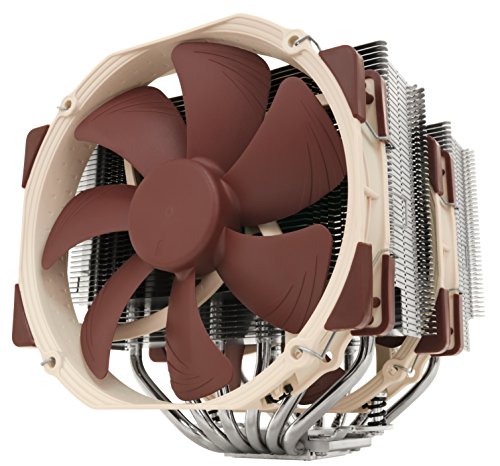
Noctua NH-D15 CPU Cooler
A dual-tower cooler whose twin fans push a broad, slow stream front-to-back — mount it in line with the case path and the rear exhaust finishes the job. Noctua NH-D15 CPU Cooler — Check on Amazon

Cooler Master Hyper 212 Black II CPU Air Cooler
A single-tower cooler showing the same principle at a smaller scale: its fan’s direction relative to the case stream matters as much as its speed. Cooler Master Hyper 212 Black II CPU Air Cooler — Check on Amazon
Frequently Asked Questions
What is the ideal airflow direction in a PC case?
Front and bottom in, rear and top out — the path that feeds the graphics card first, passes the CPU last, and lets hot air leave at the high, rear corner where it collects. Deviations should be deliberate (a front radiator, an inverted small-form-factor layout), never accidental.
Is positive pressure always better?
For dust control, slightly positive is the practical favourite: incoming air arrives filtered, and the interior stays cleaner. Cooling performance between balanced positive and negative setups is similar; strong negative pressure’s real cost is dust through every seam, and strong positive pressure can leave hot pockets if exhausts are undersized.
Why is my PC still hot with five fans installed?
Because flow is not path. Check for a reversed fan, a clogged filter, an intake smothered by a panel or wall, cables blocking the corridor to the graphics card, or exhaust air recycling into an intake. Five fans stirring a box cannot beat three fans moving air along a route.
Do I need high static pressure fans?
Where air must cross resistance — radiators, dense filters, restrictive vents — pressure-optimised fans deliver more of their rated flow. In open mesh paths, airflow-optimised fans move more air quietly. Most builds mix: pressure fans on radiators and filtered intakes, flow fans on open exhausts.
How can I test whether my case airflow is the problem?
Run your heaviest load with temperatures logged, then repeat with the side panel removed. A large improvement with the panel off means the case’s path is restricting the components; a small difference means the coolers themselves are the limit and case changes will not help much.
My temperatures drop a lot with the side panel off. Does that prove my case has bad airflow?
It proves your components prefer the room’s air to your case’s air, which is a diagnosis with several possible addresses: clogged filters starving the intakes, an intake path too weak for the build’s draw, a dead zone around the card, or simply a case whose design cannot feed this generation of components. Work it as a sequence — clean first, then test fan arrangements, then judge the case — because the panel-off test tells you the size of the prize, not the name of the thief. A drop of a couple of degrees is ordinary; a dramatic drop is a to-do list.
Do case fans cool the room as well as the PC?
They move the PC’s heat into the room more efficiently, which warms the room by exactly the machine’s power draw — the fans themselves add a trickle. A gaming PC is a small electric heater with opinions, and in winter that is a feature households quietly enjoy. In summer, the only honest remedies are the room’s own: ventilation, air conditioning, or moving the machine’s exhaust out of the occupied zone. No fan arrangement repeals the conservation of energy, and any product implying otherwise is selling the arithmetic short.
Is turbulence inside a case good or bad?
Mostly irrelevant at the scale a case operates — and the word is often used as a spell rather than a description. What matters is delivery: fresh air reaching the components and warmed air leaving, by whatever mixture of smooth and turbulent motion achieves it. Deliberately chaotic arrangements fail not because turbulence is bad but because they deliver badly — short circuits, dead zones, re-ingestion. Judge a layout by the tissue test and the thermometer, and let fluid dynamics keep its vocabulary; the case rewards results, not terminology.
Should the rear exhaust be the strongest fan in the system?
It should be adequate, not supreme. The rear exhaust’s job is to clear the processor zone’s warmed air and it works in partnership with the top exhausts and the general pressure balance. An overpowered rear fan mostly drinks from the nearest sources — including, in some layouts, the graphics card’s intake zone — and can starve the very components it serves. Balance the system as the setup guide describes, and let the rear fan be a good citizen rather than a tyrant.
Why do my temperatures creep up during long sessions even though they start fine?
Thermal soak — the slow warming of everything in and around the case until the system’s whole baseline has risen. The air in the room’s corner, the case’s panels, the drives, the dead zones: all of it stores heat across the first hour and then lends that warmth back to the components. It is normal physics, worst in enclosed placements and marathon loads, and its cures are the system’s: a placement that lets the room take the heat away, exhaust capacity that clears the case faster than soak accumulates, and test sessions long enough to measure the soaked state rather than the honeymoon.
Does the colour or material of a case affect its airflow?
The material affects the heat’s side exits, marginally: a steel panel conducts a little of the interior’s warmth to the room, a glass panel insulates, and in a fan-cooled machine both effects are small beside the air path’s work. Colour matters only in sunlight, where a black case in a sun patch absorbs the room’s heat as well as making its own — one more reason the placement sections of this site’s guides keep returning to the sunbeam as an unlisted component in every build.
How long should a temperature test run before I trust it?
Long enough for the soak to arrive — thirty minutes at a steady load is a fair minimum for a gaming-class build, and an hour tells the whole truth. Short tests measure the honeymoon: cool panels, cool room corner, components still warming their neighbourhood. Compare configurations only at equal durations, or you will crown whichever setup you tested first and call it science.
The Bottom Line
Cool air in through filters, across the components in a clear corridor, hot air out at the rear and top, pressure balanced slightly positive, fans slow because the path is free. That is the whole theory — every airflow rule, product claim, and troubleshooting step is a footnote to it.
Related Guides
Apply the theory to panel choice and case selection, and browse airflow-rated roundups: