Disclosure: As an Amazon Associate, ilcastellomenu.com earns from qualifying purchases. Links on this page are affiliate links; they cost you nothing extra. Prices and availability change often, so check the current Amazon listing before you buy.
These liquid cpu cooler reviews gather the current mainstream of sealed all-in-one coolers into one comparative evaluation, because buyers do not choose between a cooler and nothing — they choose between several good coolers and one very good alternative that uses no liquid at all. Each model below is reviewed on the same terms: what it is for, how it behaves, what it demands, and who should walk past it. No invented figures, no borrowed scores — the qualities an owner actually lives with.
A word on method before the models. Reviews of coolers often pretend to a precision the subject does not support: the same cooler behaves differently in two cases, two rooms and two fan curves. So this roundup judges the durable things — mounting design, radiator placement demands, pump temperament, software burden, warranty posture and fit — and treats temperature talk qualitatively, the way your own experience of the product will be qualitative. A cooler you mount once and forget for years beats a cooler that wins a chart and nags you monthly.
Key Takeaways
- The models differ more in temperament — software, styling, ecosystem — than in raw cooling ability.
- Every model here shares the category truths: pump below the radiator top, never open the loop, finite lifespan.
- The strongest rival to every pick below is a good air cooler, and for mainstream processors it often wins.
- Buy the ecosystem you already own; mixing fan and lighting platforms is where builds get messy.
- Warranty and leak policy separate the makers more honestly than marketing does.
In this guide
Liquid CPU Cooler Reviews: How the Current Field Divides
An all-in-one liquid cooler, usually shortened to AIO, is a sealed loop with four working parts: a cold plate and pump block that sits on the processor, two tubes, a radiator, and fans that push air through that radiator. Coolant carries heat away from the chip far faster than a metal fin stack alone can move it, and the radiator gives that heat a large surface to leave from. Nothing in the loop is user-serviceable by design, which is both the convenience and the compromise at the heart of this whole category.
Radiator construction and fin density influence how a cooler behaves with different fans, but for most buyers these details matter less than fit, warranty and fan quality. Resist the urge to comparison-shop on exotic materials. The mainstream of this market is mature: cold plates are well made, tubes are properly sleeved or reinforced, and the differences that reach your ears and your temperatures are the everyday ones — radiator size class, fan tuning, mounting position and case airflow.
The field divides into temperaments. There are ecosystem flagships that want to run your fans, lighting and curves from one suite; engineering-led value lines that spend the money on the loop itself; aesthetics-led models whose pump block is a small screen or sculpture; case-maker models designed to complete a matching case; and heritage models from the custom-loop world wearing sealed-loop clothes. Cooling ability overlaps heavily across all five temperaments, which is liberating: it means you can choose on fit, software and warranty — the things you will actually notice — without giving up meaningful performance.

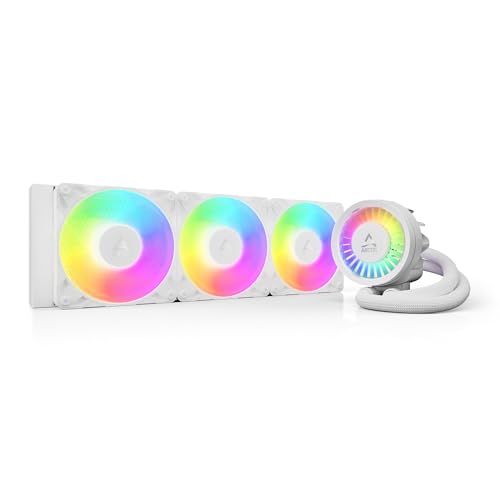
ARCTIC Liquid Freezer III
A maker known for plain-spoken engineering and strong value in qualitative terms, with a distinctive touch: a small fan on the pump block that stirs air over the motherboard’s voltage regulation area. That detail sounds like a gimmick until you remember those components rely on incidental airflow that a tower cooler’s fan used to provide, and that an AIO removes. The Liquid Freezer III family sits in the value-to-mid tier by positioning, and it is the pick that treats cooling the whole socket neighbourhood, not just the chip, as the job.
Judged as a review subject rather than a shopping list entry, it behaves the way its positioning promises: calm under ordinary loads, composed under sustained ones, and honest about its demands in fit, software and care. Its weaknesses are the category’s weaknesses — a pump that will age, coolant that will very slowly diminish, and a sealed design you must trust rather than service — weighed against strengths its maker executes well.

Corsair iCUE H150i Elite
Corsair’s flagship-class AIO line pairs a large radiator with the company’s iCUE software ecosystem, which is the right choice for a builder already running Corsair fans and lighting and the wrong one for someone who hates software suites. The hardware itself is polished, the mounting system is among the friendliest in the category, and the positioning is premium tier. Choose it as a system decision — cooler plus fans plus lighting under one controller — rather than as a standalone part, and it makes the most sense it can make.
Judged as a review subject rather than a shopping list entry, it behaves the way its positioning promises: calm under ordinary loads, composed under sustained ones, and honest about its demands in fit, software and care. Its weaknesses are the category’s weaknesses — a pump that will age, coolant that will very slowly diminish, and a sealed design you must trust rather than service — weighed against strengths its maker executes well.
NZXT Kraken
The Kraken line is the aesthetics-first face of liquid cooling, famous for pump blocks that can carry a display or tasteful illuminated ring, managed through NZXT’s CAM software. Beneath the presentation it is a conventional, competent sealed loop, and that is exactly the right way to judge it: buy it because the machine sits on your desk and you will enjoy looking at it, having first confirmed it also fits, mounts and is warrantied like any other cooler. It sits in the premium tier, and honesty about why you want it makes it a good purchase.
Judged as a review subject rather than a shopping list entry, it behaves the way its positioning promises: calm under ordinary loads, composed under sustained ones, and honest about its demands in fit, software and care. Its weaknesses are the category’s weaknesses — a pump that will age, coolant that will very slowly diminish, and a sealed design you must trust rather than service — weighed against strengths its maker executes well.

Lian Li Galahad II
Lian Li brings a case maker’s eye to the Galahad line: clean lines, thoughtful cable presentation and versions aimed at builders who coordinate the cooler with a Lian Li case and fan ecosystem. Performance positioning is in the upper-mid to premium tier, and the appeal is coherence — fans, lighting and controls that were designed to live together. If your build already leans on Lian Li’s ecosystem, the Galahad is the natural radiator to complete it; if not, judge it on fit and warranty like any rival.
Judged as a review subject rather than a shopping list entry, it behaves the way its positioning promises: calm under ordinary loads, composed under sustained ones, and honest about its demands in fit, software and care. Its weaknesses are the category’s weaknesses — a pump that will age, coolant that will very slowly diminish, and a sealed design you must trust rather than service — weighed against strengths its maker executes well.

EK Nucleus AIO
EK comes to sealed loops from the custom water-cooling world, and the Nucleus line carries that heritage in its fittings, its block design and its restrained, technical styling. It appeals to builders who like the idea of a loop that looks engineered rather than decorated, and who may one day graduate to a custom loop from the same stable. Positioning is premium tier. The same honesty applies as everywhere in this category: it is still a sealed, finite-life unit, however serious its machining looks.
Judged as a review subject rather than a shopping list entry, it behaves the way its positioning promises: calm under ordinary loads, composed under sustained ones, and honest about its demands in fit, software and care. Its weaknesses are the category’s weaknesses — a pump that will age, coolant that will very slowly diminish, and a sealed design you must trust rather than service — weighed against strengths its maker executes well.
DeepCool LS
DeepCool’s LS line is the straightforward, value-conscious route into liquid cooling: tidy blocks, infinity-mirror style lighting touches on some versions, and none of the ecosystem lock-in of the flagship suites. Positioning runs from entry to mid tier depending on radiator size class. For a first AIO in a mainstream gaming build, that simplicity is a feature — fewer background processes, standard expectations, and money left in the budget for the case airflow that will decide how well any cooler actually works.
Judged as a review subject rather than a shopping list entry, it behaves the way its positioning promises: calm under ordinary loads, composed under sustained ones, and honest about its demands in fit, software and care. Its weaknesses are the category’s weaknesses — a pump that will age, coolant that will very slowly diminish, and a sealed design you must trust rather than service — weighed against strengths its maker executes well.
Performance Patterns Across the Field
Different workloads crown different coolers. Gaming loads are spiky and often leave much of the processor waiting on the graphics card, so many gaming machines are perfectly served by modest cooling run quietly. Rendering, compiling, simulation and long exports hold every core at work for extended periods, and that sustained heat is where a large radiator’s extra surface earns its place. Match the cooler to the load you actually run for hours, not the benchmark you ran once, and the purchase will feel right every day rather than impressive once.
Noise is where liquid cooling earns much of its reputation, and also where it is most oversold. A large radiator lets fans turn slowly while still moving enough air, so a well-tuned AIO is genuinely quiet under moderate loads. But an AIO also adds a pump, and pump noise — a hum or whine that stays constant while fans rise and fall — bothers some ears more than fan whoosh. The quietest system is the one tuned as a system: sensible fan curves, a pump speed that is not needlessly high, and no rattling panels.
Fan curves matter more than fan brands. A curve that holds fans near silent until the processor is genuinely working, then ramps smoothly, beats a default profile that surges at every brief background task. Most modern boards and cooler software suites let you shape that curve and tie it to coolant or processor temperature. Spend the twenty unhurried minutes this takes on the first evening and the cooler will feel like a different, calmer product for the whole of its life in your machine.
Read across all six models and a pattern emerges that no single review shows: the gap between the best and the rest, in a decent case with sane curves, is smaller than the gap between a good mounting position and a bad one for the very same cooler. Placement, airflow and tuning are worth more than the final step up any maker’s range. That is the most useful sentence in this entire roundup, and it is why the buying guidance below spends so little time ranking and so much time on fit.
Strengths and Trade-Offs
Strengths
- Across the field: strong sustained cooling with slow fans and an open, accessible socket area
- Across the field: models for every temperament, from silent engineering to desk-jewellery displays
- Across the field: mature mounting systems and serious factory sealing
Trade-Offs
- Across the field: a small but real leak risk and a finite, pump-limited lifespan
- Across the field: software suites that vary from tidy to intrusive
- Across the field: premium tiers priced by ecosystem and styling as much as by cooling
How the Field Compares With a Good Air Cooler
The strongest argument for a good air cooler is that it removes entire categories of worry. There is no coolant to permeate, no pump to wear, no leak scenario to insure against, and a failed fan — the one realistic failure — is cheap and takes minutes to replace. For a processor in the broad middle of the market, a quality tower cooler delivers temperatures and noise that most owners would struggle to distinguish from liquid in daily use. Any honest liquid cooler guide has to say plainly: many readers should buy exactly that, and be done.
The fair comparison, then, is not liquid good and air bad. A good air cooler matches many AIOs for most processors, runs silently enough for most rooms, costs less in qualitative terms, never leaks, and asks for nothing but dusting. Liquid pulls ahead with very hot processors, sustained all-core workloads, cases where a tall tower cannot fit or where its weight on the board is a concern, and for builders who value the clean look and the freed space around the socket. Both answers are respectable; the mistake is buying either one on fashion alone.
Ownership cost over a long life tilts toward air, and that tilt is worth naming. An air cooler bought today can plausibly cool a processor bought many years from now, with nothing spent in between but a fan. An AIO will likely be replaced as a unit within that span, because its pump and its coolant are aging even while it works perfectly. None of this condemns liquid — many owners happily accept a component lifespan in exchange for what liquid does better — but the exchange should be made knowingly, with eyes open.
Who Each Kind of Buyer Should Choose
The ecosystem builder should buy the flagship that matches the fans and lighting already in the case, and stop comparison shopping — coherence is the benefit. The value-minded builder should buy the engineering-led line and spend the saving on case airflow. The desk-display builder should buy the beautiful one without apologising, having checked its warranty like a grown-up. The quiet-room builder should buy on owner reports of pump temperament and tune patiently. And the mainstream builder, whose processor never holds all its cores for hours, should read the air-cooler comparison above twice and consider closing this tab with a clear conscience.
Warranty length and leak-damage policy are part of the product, not fine print. Makers differ in how long they cover the cooler and in what they say about damage to other components in the rare event of a leak. Read those terms before buying, keep your proof of purchase, and register the product if the maker offers it. A slightly plainer cooler from a maker with a long, clear warranty is often the wiser purchase than a flashier one standing behind vague promises.
Software deserves scrutiny before it becomes your daily companion. Some coolers need a software suite for lighting, pump and fan control; others take their orders from the motherboard and ask for nothing. Suites vary from tidy to intrusive, and a cooler that behaves perfectly with its software closed is worth more than one that sulks without a background process running. Check whether fan and pump headers can be controlled from the board alone, so the machine stays calm and predictable even on a fresh operating system install.
Setup, Care and Maintenance Essentials
A front-mounted radiator intakes cool room air, which flatters processor temperatures, but it then exhausts warmed air into the case, where the graphics card has to breathe it. A top-mounted radiator exhausts the processor’s heat straight out of the case, which flatters the graphics card, while itself breathing warmer internal air. Neither arrangement is wrong; they trade a little performance between the two hottest components. Choose based on which component works harder in your machine, and on which position your case genuinely supports well.
Maintenance for a sealed cooler is blessedly short, and mostly shared with the rest of the PC. Dust is the enemy: it mats on radiator fins exactly as it does on an air cooler’s stack, and a radiator clogged with felt can lose much of its advantage. A gentle brush and short bursts of air, holding fan blades still while you clean, a few times a year keeps the fins breathing. Check that dust filters are in place and clean them too — a filter doing its job is one that needs emptying.
Monitor temperatures the way you would glance at a dashboard, not obsess over them. Know roughly what your processor runs at idle, in games and under your heaviest real workload, so that a genuine change stands out. Software readouts vary and sensors have their quirks, so trends matter more than any single figure. A slow creep upward over months usually means dust, paste or airflow; a sudden jump after moving the PC usually means a disturbed mount, a disconnected fan or a pump header that came adrift in transit.
Gurgling that appears after moving house, shipping a PC or changing the radiator’s position is almost always the air pocket relocating, and it usually settles once the loop has run with the radiator’s high point above the pump for a while. Gentle tilting of the case while running can encourage the bubble home. What should not be done is shaking the cooler, opening anything, or running the pump dry at the loop’s highest point for days while hoping. Air management is positioning, patience and nothing more violent than that.
Final Verdict
Reviewed together, the current liquid coolers are a field without a bad mainstream choice and without a magic one. Choose by temperament, fit and warranty; mount by the one rule that matters; and keep the air cooler in the frame until the moment your processor, case or workload genuinely votes it out. The reviews above give each model its due — the decision framework around them is what turns a good cooler into the right one.
More Detail From the Workbench
Pump behaviour deserves a listen before you judge a finished build. A faint hum at full pump speed is normal in a quiet room; gurgling, rattling or a sound like gravel suggests air in the pump, which usually means the radiator position needs attention rather than the cooler being faulty. Tilting the case gently while the system runs can help an air pocket migrate to the radiator. Persistent noise after repositioning is a warranty conversation, not something to live with or to fix by opening anything.
Honesty about risk belongs in any serious discussion of liquid cooling. A sealed AIO can leak — rarely, and far less often than in the early days of the category, but the possibility is real in a way it simply is not with a block of aluminium fins. Fittings, tubes and the cold plate seal are all engineered and tested, and the overwhelming majority of units never lose a drop. Still, the correct mental model is small risk, serious consequence: coolant and live electronics are unhappy neighbours, and a buyer should choose a maker with a clear warranty and a good record of honouring it.
An AIO also has a finite life in a way an air cooler does not. Coolant slowly permeates through the tube walls over the years, so the loop gradually loses a little of its fill; the pump, the one moving part an air cooler does not ask you to depend on in the same way, wears as it runs. None of this makes an AIO a short-lived product — a good one serves for many years — but it does mean an air cooler’s near-immortality is a genuine advantage. A tower of fins and a replaceable fan can outlive several processors; a sealed loop eventually retires whole.
Installation safety starts before a single screw turns. Shut the system down properly, switch the power supply off and unplug it from the wall, then press the case power button once to drain residual charge. Work on a clear surface, keep screws organised, and ground yourself by touching the case chassis as you go. Liquid near electronics during an install is not the danger — the cooler is sealed — but a dropped screw, a forced connector or a rushed hand near a live system causes most of the damage attributed to cooler swaps.
Never open a sealed AIO. There are no user-serviceable parts inside, no fill port intended for owners, and no topping-up ritual that extends its life. Opening the loop voids the warranty, invites leaks and airlocks, and turns a reliable appliance into a science project. If a cooler is old enough that you are thinking about its coolant level, the correct maintenance is replacement planning, not surgery. Custom open loops are a different hobby with different rules; a sealed unit should stay sealed for its entire working life.
Overtightening the cold plate is the classic beginner’s error, and it helps nothing. The block needs even, firm contact with the processor’s heat spreader — snug in a cross pattern, a little at a time on each corner — not maximum human force. Cranking one corner down fully first can tilt the plate, squeeze the paste unevenly and, at the extreme, stress the socket or board. Finger-tight plus a gentle final turn with the tool, following the maker’s sequence, is the standard that protects both temperatures and hardware.
Tubes should curve, never kink. A kinked tube restricts flow, strains the fitting it leaves from, and can worsen over time as the material settles. Route the tubes in a relaxed arc with clearance from fan blades, memory and side panels, and check the full travel of any hinged panel before closing the case. If a route only works under tension, the radiator belongs in a different position. A calm, unstressed tube run is one of the best predictors of a quiet, long-lived installation.
Thermal paste is the quiet partner in every cooler installation, liquid or air. Its only job is to fill the microscopic imperfections between the processor’s heat spreader and the cold plate so heat crosses the boundary efficiently. Many AIOs arrive with paste pre-applied, which removes guesswork for a first build; a cooler without it needs a small, sensible amount spread by the pressure of the block itself. More paste is not better — the layer should be as thin as complete coverage allows, because paste conducts heat far worse than metal does.
Remounting a cooler means cleaning and renewing the paste, every time. Old paste dries, pumps out and traps air once the seal is broken, and reusing it is a reliable way to inherit temperatures you then blame on the cooler. Lift the old material away with a soft lint-free cloth and suitable cleaner, let everything dry, and start fresh. It is a small ritual, but it is the difference between a remount that restores performance and one that quietly bakes in a problem for the next year.
Listening is maintenance, too. Once in a while, in a quiet moment, notice your machine. A new rattle, a pump that has grown louder, fans working harder than they used to at the same task — these are early reports, and catching them early is the difference between repositioning a radiator, cleaning a filter or arranging a warranty replacement in good time, and meeting the same issue later as an emergency. You do not need instruments for this; you need familiarity with what your own system normally sounds like.
Small cases change the argument in liquid’s favour, with conditions. A compact build may have no room for a tall tower cooler, while a radiator can use a case wall that would otherwise hold only fans. But compact cases also restrict radiator positions, tube routes and airflow, and a badly placed radiator in a tiny box performs worse than a modest air cooler with clean air. In small-form-factor builds the case, the cooler and the graphics card are one decision, and should be researched as one decision, in that order.
Aesthetics are a legitimate reason to choose liquid, provided they are admitted honestly. A pump block with tasteful lighting and a clear view of the motherboard looks sharp, keeps the socket area accessible, and makes memory swaps and cable work easier than reaching around a large tower. None of that cools anything, and it should not be dressed up as performance. But a machine you enjoy looking at, in a room you live in, is a real benefit — just let it be the tiebreaker, not the whole argument.
Weight and transport deserve a mention that spec sheets rarely give them. A large tower cooler hangs a substantial mass from the motherboard, which is fine in a stationary machine and worth thinking about in one that travels to events or moves house often. An AIO moves most of that mass to the case wall, where it is bolted down. Builders who ship or carry their systems often choose liquid for this unglamorous reason alone, and it is a sound one.
Socket compatibility is the first buying check and the least forgiving. The cooler must list your exact socket, and the mounting kit in the box must match it; kits for new sockets sometimes ship separately or arrive in later production runs. Check the maker’s compatibility page for your processor generation rather than trusting a marketplace headline, and keep any spare brackets you do not use — a cooler that survives into your next build only does so if its alternative mounting hardware survives with it in the same box.
Fan quality shows up in the ownership details: whether the fans use a durable bearing design, whether they can be replaced with standard fans when they age, and whether the cabling reaches your headers without strain or ugly extensions. Proprietary connectors are a small warning sign, because they tie future replacements to one maker’s parts bin. Standard connections keep your options open for the whole life of the cooler, and options, in a component you may own across two builds, are worth real money.
Pump placement within the product varies, and it shapes both noise and mounting freedom. Most designs put the pump in the block on the processor; a few place it in the radiator or inline in a tube. Each layout has honest trade-offs in vibration, headroom and which radiator orientations work best. The maker’s stated orientation guidance exists for a reason — follow it over forum folklore, because the maker knows where the air pocket in their loop is designed to sit.
Think about the second owner of your build: you, in three years, with a new processor. A cooler bought with a broad socket kit, standard fans and a maker who still sells mounting hardware can move forward with you. One bought narrowly for today’s socket, with proprietary everything, becomes e-waste at the next upgrade. Cooling is one of the few components that can genuinely span builds, and choosing for that span is the quiet way this category rewards patience.
Budget honestly across the whole installation. The cooler’s tier is only part of it: a case that fits it properly, perhaps additional case fans to feed it, and the small consumables of a clean install all belong in the same decision. A mid-tier cooler in a well-ventilated case will outperform a premium cooler suffocating in a sealed glass box, reliably and quietly. Spend on the system, in the order the heat experiences it, and the results will follow the money in the right direction.
The most common buying mistake is choosing the radiator before the case. Shoppers fall for a large cooler, discover their case supports it only in theory, and end up with a compromised mount, a removed drive cage or a return. Reverse the order: confirm the case position, the clearance and the tube route first, then shop within the size class that fits. The second most common mistake is its mirror image — buying a small cooler for a very hot processor because it was the one on offer that week.
Peeling protective film sounds too basic to mention, which is exactly why it keeps happening. Cold plates ship with a protective plastic film, and leaving it in place guarantees terrible temperatures from a perfectly good cooler. The same family of errors includes forgetting to plug in the pump header, connecting the pump to a header set to a mode that starves it, and leaving radiator fans unplugged after a tidy cable-routing session. A calm final checklist — film, paste, pump power, fan power, panel clearance — catches all of them in two minutes.
Chasing the last degree is a mistake of proportion. Builders remount coolers repeatedly, swap pastes and re-route radiators hunting improvements smaller than the variation between two runs of the same test. If temperatures are sensible, noise is pleasant and performance is stable, the cooling system is done, and further fiddling risks the mount you already have. The goal is a machine that works beautifully for years, not a screenshot. Know what good enough looks like for your processor and workload, and let yourself stop there.
When temperatures disappoint after an install, work the problem in order of likelihood and ease. Confirm the pump is powered and reported as running, confirm the radiator fans spin and respond to load, check the film-and-paste basics if the block has been off, and feel — carefully, on the tubes near the block — whether one tube is noticeably warmer, which tells you coolant is moving. Only after those checks should you suspect the cooler itself. Most bad first days are connection and mounting stories, not defective hardware stories.
A system that starts cool and grows hot over a long session is telling a different story from one that is hot immediately. Gradual heat soak points at airflow: the radiator recycling warmed air, a case that cannot exhaust what it intakes, or filters and fins loaded with dust. Immediate heat points at the mount, the paste or the pump. Reading the shape of the problem before reaching for tools halves the troubleshooting time, and it is a skill worth learning on your own machine rather than a stranger’s forum thread.
Where liquid genuinely separates itself is at the extremes of the brief. The hottest flagship processors under sustained all-core load, builds where the case simply has no tower height, workstations that must hold boost behaviour for hours, and machines whose owners care deeply about the open, accessible socket area — in those places the radiator’s extra surface and flexible placement solve problems air cannot. Knowing which side of that line your build sits on is the entire decision, and it is a decision about your processor and case, not about fashion.
The physics are friendly but not magical. Liquid is simply a transport medium: the heat still has to leave through a radiator into the air of the room, exactly as it does from an air cooler’s fins. That is why radiator placement, case airflow and room temperature matter as much as the cooler itself, and why two builds with the same AIO can behave quite differently. Treat any cooler, liquid or air, as one part of a whole airflow system rather than a spell you cast on a hot processor.
Heat moves through the system in stages, and each stage can bottleneck the rest. The chip warms the cold plate through a thin layer of thermal paste, the pump moves warmed coolant to the radiator, the radiator fins hand the heat to moving air, and the case has to exhaust that air instead of recycling it. A weakness at any stage — dried paste, a starved intake, a radiator breathing its own exhaust — shows up as disappointing temperatures no matter how impressive the hardware looked in the box.
Modern processors complicate cooling judgements because they boost opportunistically. Given thermal headroom, a current chip will raise its clocks on its own and simply run warm at higher performance, which means a better cooler may show up as more speed rather than lower temperatures. Comparing coolers by a single temperature reading, without noting the workload, the fan behaviour and the room, misleads more than it informs. Judge a cooler on the combination of temperatures, noise and consistency across long sessions.
Radiator placement follows one rule above all others: the pump should not be the highest point in the loop. Every sealed loop contains a small amount of air, and air rises to the highest point. If that point is the pump, the pump runs partly in air, which makes it noisy, shortens its life and can leave it struggling to move coolant. Mounting the radiator so its top sits above the pump block keeps the air trapped harmlessly in the radiator’s end tank instead.
Related Guides and Further Reading
Cooling decisions connect to each other, so this guide sits inside a small cluster written together. Start with the companion pieces: liquid cpu cooler review, liquid cpu cooler buying guide, liquid cpu cooler pros and cons, and then is a liquid cpu cooler worth it, how to install liquid cpu cooler. Each takes a different angle — evaluation, purchase criteria, honest drawbacks, value and hands-on installation — so together they cover the decision from every side.
The thermal interface underneath the cold plate has its own cluster, because paste choice and application decide more temperatures than most cooler swaps do: thermal paste review, thermal paste reviews, thermal paste buying guide, thermal paste pros and cons, how to choose thermal paste, thermal paste vs liquid metal. Read the comparison of paste against liquid metal before being tempted by exotic interface materials; for almost every build in this guide, ordinary good paste, applied thinly and renewed at every remount, is the correct and sufficient answer.
For the wider build context, our established guides cover the neighbouring decisions: best pc cases for aio, best motherboards for water cooling, best pc cases for custom loops, best cpu coolers for i7 12700k. Case choice, motherboard choice and processor choice all feed back into which cooler fits and how well it can possibly work, and reading them together prevents the classic error of choosing a cooler in isolation and discovering the conflicts at build time.
The Second-Pass Review: Consistency, Fit and Fine Print
The detail that dates a design
Every CPU Coolers generation has a detail that quietly dates it: a port standard on its way out, a control app that has stopped receiving updates, a consumable format being phased away. When reviewing a liquid cpu cooler, that detail matters because it decides how gracefully the product ages. A model built on current standards and widely stocked consumables will still be serviceable when a flashier rival is orphaned by its own ecosystem. Check the age of the design, not just its feature list, and favour the product whose supporting ecosystem is still actively maintained.
What the box should contain — and what it should not need
Unboxing is a small but telling review checkpoint for a liquid cpu cooler: the essentials for the first session should be in the box, the instructions should match the actual unit, and nothing vital should depend on an immediate second purchase. If a pick requires an accessory to perform its core job, that dependency is flagged in its assessment above, because it changes both the real cost and the first-day experience. Equally, beware bundles padded with extras you will never use; in a workspace that gets packed away and rebuilt more often than it stays in place, unused bundle clutter is a cost paid in storage, not a bonus.
Reading the assessments against your own routine
These reviews were written against a general routine, and your routine is the final filter. Map each pick’s stated strengths onto your busiest realistic day with a liquid cpu cooler: if a pick’s best quality serves a task you do rarely, it is not the pick for you, however strong the assessment. If a pick’s noted limitation sits in a corner of the workflow you never visit, discount it. This translation step — from review conditions to your conditions in a workspace that gets packed away and rebuilt more often than it stays in place — is where a good review becomes a good decision rather than a borrowed opinion.
Verify the listing, not just the product
A review can only judge the liquid cpu cooler in front of it, but what arrives at your door depends on the listing you order from. Before choosing, confirm that the listing names the exact model, generation and bundle contents you think you are buying, because CPU Coolers listings often group variants under one page. When picks such as Corsair iCUE H150i Elite, NZXT Kraken and Lian Li Galahad II are on your shortlist, run this check against each listing in turn. Check which accessories are in the box and which are sold separately, and note the seller’s returns terms while you are there. Ten minutes of listing hygiene prevents the most common review-versus-reality mismatch: a good product judged by the wrong variant.
Consistency is the quiet test
Single impressive results are easy; a good liquid cpu cooler repeats them on an ordinary day, with ordinary materials, when you are in a hurry. Across the picks in this review, the models that earned their place did so by being predictable: the same setup producing the same outcome, with controls that behave identically every time. In a workspace that gets packed away and rebuilt more often than it stays in place, predictability is worth more than a peak performance figure you will rarely reach. When you read the individual assessments above, treat consistency comments as the highest-value signal in each one.
Five honest minutes at this stage is worth more than five hours of comparison browsing.
If a candidate fails this check, strike it from the list without regret and let the remaining options compete on merit.
Frequently Asked Questions
Is a liquid cooler better than a good air cooler?
For some builds, clearly; for many, not really. A large AIO pulls ahead with very hot processors, sustained all-core workloads, cases without room for a tall tower, and builders who want the socket area open. A good air cooler matches many AIOs for mainstream processors, never leaks, has no pump to wear, and can serve across several builds for the cost of a fan. The better cooler is the one matched to your processor, case and workload — which is why this site argues the case for air so often inside its liquid cooling guides.
What size radiator should I buy?
Buy the size class your case genuinely fits well, matched to your processor’s heat. A modest processor is well served by a smaller radiator run quietly; a flagship chip under sustained load justifies the largest class your case mounts properly. Bigger is not automatically better: an oversized radiator crammed into a poor position, breathing recycled air, loses to a smaller one mounted cleanly. Confirm case support, clearance and tube routing first, then choose the largest sensible class within that honest space — in that order, never the reverse.
Why is my new AIO making a gurgling sound?
Gurgling usually means the loop’s small air pocket has settled in or near the pump, which happens after shipping, moving the PC or mounting the radiator with its top below the pump. Run the system with the radiator’s highest point above the pump, and gently tilt the case while it runs to encourage the bubble to migrate into the radiator, where it belongs. Most gurgling fades within the first day of correct positioning. If rattling or grinding persists after repositioning, contact the maker — that is a warranty matter, not a quirk to live with.
Should I replace the pre-applied thermal paste?
If the cooler arrives with paste pre-applied and you are installing it for the first time, use it with confidence — it is measured, clean and one less variable for a first build. Replace paste whenever the block comes off for any reason: clean both surfaces gently, let them dry, and apply a fresh, thin layer or fit a fresh pre-applied pad if supplied. Old paste that has been separated traps air and dries further, and reusing it is one of the most reliable ways to manufacture a temperature problem from nothing.
Can I take an AIO on a PC that travels?
Yes, and liquid has a genuine advantage here: most of the cooling mass is bolted to the case wall rather than hanging from the motherboard, so transit stresses the board less than a large tower cooler does. Support the graphics card, check the radiator and block screws after the journey, and listen on first power-up for a relocated air pocket gurgling at the pump. Builders who regularly move their machines often choose an AIO for exactly this unglamorous reason, and it is a sound one.
Does liquid cooling need special software?
Some lines do lean on a software suite for lighting, pump and fan control, while others take their orders from motherboard headers and ask for nothing. Neither approach is automatically better, but a cooler that behaves well with its software closed is the safer long-term companion. Before buying, check what still works without the suite — fan curves, pump speed, lighting memory — because you will reinstall your operating system more often than you will reinstall your cooler, and calm defaults matter on day one of every rebuild.