Disclosure: As an Amazon Associate, ilcastellomenu.com earns from qualifying purchases. Links on this page are affiliate links; they cost you nothing extra. Prices and availability change often, so check the current Amazon listing before you buy.
Key Takeaways
This thermal paste review exists because of a simple, unglamorous truth: the thin layer of compound between your processor and its cooler does more for everyday temperatures than most people expect, and less than most marketing claims. Thermal paste fills the microscopic valleys and machining marks on two metal surfaces that look flat but are not, pushing out the insulating air that would otherwise sit in those gaps and trap heat. A fresh, well-applied layer of a quality paste restores the contact a cooler was designed around; a dried, pumped-out or badly spread layer quietly costs you degrees, fan speed and, over years, component lifespan.
Our verdict after working through the category in depth: a good modern paste is one of the cheapest, highest-value maintenance items in PC building, and the differences between the leading names are smaller than the difference between fresh paste and old paste. It suits anyone assembling a new build, anyone replacing a cooler, and anyone whose three-to-five-year-old machine runs hotter and louder than it used to. It does not suit anyone expecting a miracle from a tube alone when the real problem is a clogged heatsink, a failing fan or a case with no airflow.
- Best for: new builders, cooler upgraders, and owners of ageing desktops and laptops whose temperatures have crept up over the years.
- Not suited for: anyone hoping paste will fix broken cooling hardware, and anyone working on a chip that uses a pad or a soldered interface by design.
- The one rule that matters: application quality beats product choice — a modest paste applied cleanly will outperform a flagship paste applied badly.
In this guide
What Thermal Paste Is and Where It Fits
Thermal paste — also sold as thermal compound, thermal grease or TIM (thermal interface material) — is a filled, non-hardening compound, typically a silicone or synthetic carrier oil loaded with thermally conductive particles such as metal oxides or, in premium blends, finer ceramic and metallic fillers. Its job is not to be a superconductor. Its job is to be a better conductor than air, which is a genuinely poor one, and to stay exactly where it is put for years without drying, cracking or migrating. When you tighten a cooler down, the paste is squeezed into a layer far thinner than a sheet of paper, and in that state even a middling compound transfers heat well; thickness, not headline chemistry, is what punishes sloppy work.
Where it fits in a build is specific: between a CPU heatspreader and a cooler cold plate, between a GPU die and its heatsink (a job many owners leave to the factory), and in a handful of other clamped interfaces such as some chipset and VRM heatsinks. It does not belong everywhere heat exists. Larger, uneven gaps are the territory of pads, which is why our companion guide exists — see thermal pad review if your graphics card memory or voltage regulators are the hot parts, because paste in a gap measured in millimetres will simply squeeze out and fail.
The market divides into a few honest tiers. Entry pastes are bundled free with coolers or sold cheaply in generous syringes; they are competent, electrically non-conductive and entirely adequate for mainstream processors. Mid-tier pastes from established cooling brands add easier spreading, longer claimed service life and a little more thermal headroom. Premium pastes chase the last degree or two with denser filler loads, at the cost of thicker consistency and prices per gram that look absurd until you remember a single application uses a fraction of a gram. Above them all sits liquid metal, a different material with different risks entirely, which we deliberately keep out of this review’s shortlist and treat separately in thermal paste vs liquid metal.
One more piece of context before the detail: paste ages. Heat cycles slowly pump compound out from between the surfaces, carriers dry, and what was a supple film becomes a crust. That is why a machine that was quiet in its first year can be loud in its fourth with no change in workload, and why re-pasting is a recognised maintenance job rather than an enthusiast ritual. Everything in this thermal paste review — the picks, the comparisons and the care guidance — follows from those two facts: the layer is thin, and it does not last forever.
Design, Composition and Application Character
Judge a paste the way you would judge a paint: by how it handles, how it covers and how it ages, not by the numbers on the box. Thermal conductivity figures printed on packaging are measured under differing methods by different makers, are not independently standardised across the industry, and predict real-world rankings poorly. Two pastes with very different printed figures can finish within a degree of each other on a real processor, because at real mounting pressures the layer is so thin that contact quality dominates. Treat headline conductivity as marketing weather, and judge instead on consistency, longevity and behaviour under your cooler’s mounting pressure.
Consistency and spreading
Pastes range from runny to stiff. A softer paste spreads itself under mounting pressure, forgives an imperfect application and suits beginners and large heatspreaders where the cooler’s pressure does the work. A stiffer, denser paste holds its shape, resists pump-out on bare dies, and rewards a careful hand — but punish a lazy one, because a thick paste that never gets squeezed thin is an insulator wearing a premium label. If you are new to this, the forgiving end of the range is the right end. Our step-by-step companion, how to choose thermal paste, turns consistency into a decision rule based on your chip and cooler.
Electrical behaviour and safety
Every paste shortlisted in this review is electrically non-conductive, which matters more than most buyers realise. Paste squeezes out. A small excess at the edge of a heatspreader is normal, and with a non-conductive compound it is a cosmetic issue you wipe away. That safety margin is precisely what liquid metal does not offer, and it is why conventional paste remains the default recommendation for essentially every builder. If a product page ever leaves you unsure whether a compound is conductive, treat it as conductive until the maker states otherwise in plain language.
Packaging and quantity
Syringes dominate for good reason: they meter small amounts, reseal cleanly and keep the compound uncontaminated between jobs. Small tubes suit a single build; larger tubes suit anyone who maintains several machines, reseats coolers often, or services laptops and consoles for family and friends. Some pastes add a spreader spatula or cleaning wipes to the box, which is genuinely useful on a first build. What matters most is the cap: a tube stored with a loose cap dries from the tip inward, and the first squeeze of an old tube should always go onto a tissue, not onto your processor.
What to check before you buy (qualitative, by design): electrically non-conductive formulation; consistency matched to your experience level; syringe size matched to how many machines you maintain; a stated long service life so re-pasting stays a rare job; and a maker with a real support page rather than a marketplace-only brand. We publish no numeric conductivity figure for any specific paste in this review, because those figures are not measured on a common standard and would mislead more than they inform.
Performance in Real Use
On a fresh desktop build
In a new build, paste is the least of your variables and still worth doing properly. The chip is clean, the cooler is new, and the only ways to lose are contamination and quantity: a fingerprint’s worth of skin oil, dust settled on the heatspreader while you reached for a screwdriver, or a heroic blob that squeezes out over the socket edges. A pea-sized amount centred on a mainstream desktop heatspreader, or a thin line on a long rectangular one, compressed by even mounting pressure in a cross pattern, gives a layer that will serve for years. Temperatures in a fresh build tell you more about your cooler and case airflow than about which reputable paste you chose — which is exactly why our shortlist below is short, and why how to choose a CPU cooler matters more to a new builder than agonising here.
Replacing old, dried paste
This is where paste earns its reputation. On a machine several years old, the original compound — often a basic factory application — has typically dried at the edges and pumped thin in the middle. Cleaning it away with isopropyl alcohol and a lint-free cloth, then applying a fresh layer of any shortlisted paste, routinely restores the temperatures the machine had when new, and the fan behaviour that goes with them: later spin-up, lower cruising speeds, less of that tired roar under load. The improvement people report from this job is real, but credit belongs mostly to freshness and coverage, not to the badge on the syringe. Any honest thermal paste review should say so plainly, and this one does.
On laptops and consoles
Bare dies change the rules. A laptop or console chip has no heatspreader, the die is small, mounting pressure is lower and uneven, and the pump-out effect over heat cycles is stronger. Here, a thicker, more viscous paste that stays where it is put is the right tool, and a runny paste that performs beautifully on a desktop can migrate and disappoint within months. The work also demands more care: dies are fragile, screws are small and spring-loaded, and the machine must be fully powered down, unplugged and, where the design allows, battery-disconnected before you open it. If that sentence gives you pause, a reputable local repair shop is a legitimate answer; the paste itself is the cheapest part of the job.
For overclockers and sustained workloads
At the top end — heavy overclocks, long rendering or compiling sessions, small cases with limited airflow — the last degree or two that premium pastes chase becomes genuinely relevant, because it can be the difference between holding a boost clock and shedding it. Even here, honesty matters: paste is a small lever compared with cooler capacity and case airflow, and it cannot rescue an undersized cooler. What a premium paste buys the enthusiast is margin and stability over time, plus, in the best cases, a consistency that survives repeated cooler removals for testing. If you swap coolers monthly, a paste that cleans off easily is worth more to you than a fraction of a degree.
The Shortlist: Five Pastes We Would Buy
Five names cover almost every sensible use case. All are electrically non-conductive, all come from makers with long track records in PC cooling, and all are presented prose-only here while independent verification of the exact listings is pending — judge them on fit, not on folklore.

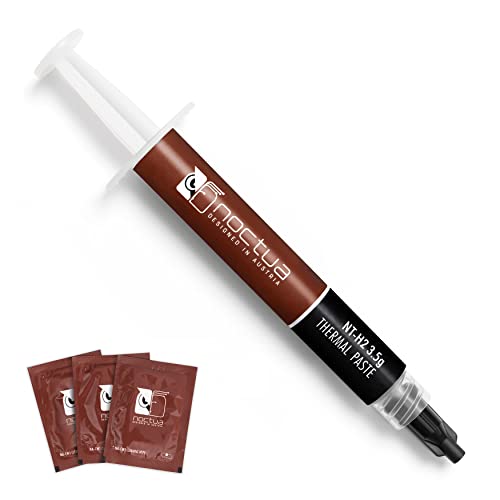
Noctua NT-H2 — the set-and-forget choice
Noctua built its reputation on fans and coolers that people keep for a decade, and the NT-H2 follows the same philosophy: a refined, easy-handling compound positioned as a long-service, fit-and-forget option. It spreads willingly without being runny, cleans off without a fight, and is aimed squarely at builders who want to close the case and not think about paste again for years. It suits first-time builders and quiet-PC enthusiasts alike. Best for: long-term desktop builds and anyone who values easy application. Not suited for: bargain hunters equipping a whole bench of test machines, where its premium positioning adds up. Tier: premium.

Arctic MX-6 — the value all-rounder
Arctic’s MX line has been the default recommendation in countless builds because it balances everything: a consistency most people find easy, a non-conductive formulation, pack sizes from single-build to workshop, and a price position that makes it painless to keep a tube in the drawer. The MX-6 is the current flagship of that line and the paste we would hand a first-time builder without a second thought. Best for: first builds, maintenance drawers and multi-machine households. Not suited for: absolutely chasing the final degree on an extreme overclock, where denser flagship compounds exist. Tier: mid.
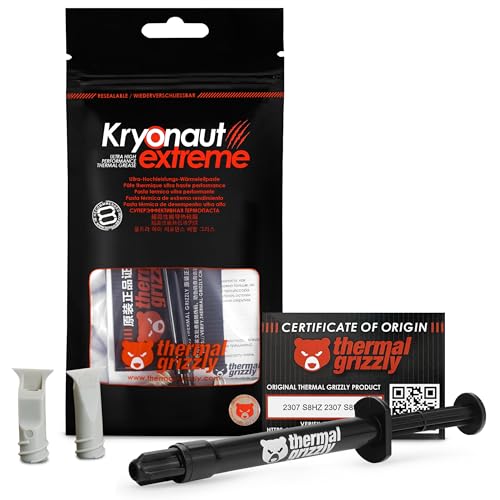
Thermal Grizzly Kryonaut — the enthusiast flagship
Kryonaut is the paste enthusiasts reach for when the build is high-end, the cooler is serious and the last increment of thermal headroom is the point of the exercise. It is a denser, more demanding compound than the all-rounders: application rewards patience, and it is happiest in the hands of someone who has pasted before. In return it offers the strongest conventional-paste performance positioning in its class, without liquid metal’s hazards. Best for: high-end desktops, overclocking and sustained heavy workloads. Not suited for: a first-ever application on a bare laptop die, where its demanding handling is a liability. Tier: premium.

Corsair TM30 — the straightforward starter tube
Corsair’s TM30 is the uncomplicated option from a brand most builders already have somewhere in their case: a zinc-oxide-based, non-conductive compound in a simple syringe, positioned for ordinary builds and ordinary maintenance. It makes no exotic claims and asks for no special technique, which is precisely its appeal for a first cooler install or a like-for-like refresh of an ageing family PC. Best for: simple builds, first applications and brand-loyal Corsair rigs. Not suited for: enthusiasts measuring success in single degrees. Tier: entry to mid.
Thermalright TF9 — the dense, stay-put option
Thermalright’s TF9 sits at the stiff end of the conventional range, and that stiffness is a feature where pump-out is the enemy: bare dies, laptops, consoles and any interface that heat-cycles hard. It takes more deliberate application — warming the tube in a pocket and spreading with patience helps — but once clamped it stays put. Best for: laptops, consoles and direct-die applications. Not suited for: anyone wanting a quick, pressure-spread application on a large heatspreader. Tier: mid to premium.
How the shortlist compares
| Paste | Character | Handling | Best use |
|---|---|---|---|
| Noctua NT-H2 | Long-service all-rounder | Easy, forgiving | Fit-and-forget desktop builds |
| Arctic MX-6 | Balanced value pick | Easy | First builds, maintenance |
| Thermal Grizzly Kryonaut | Enthusiast flagship | Demanding | High-end and overclocked desktops |
| Corsair TM30 | Simple starter compound | Easy | Ordinary builds and refreshes |
| Thermalright TF9 | Dense, pump-out resistant | Deliberate | Laptops, consoles, bare dies |
Read the table as a fit chart, not a league table. The honest summary of every credible comparison in this category is that reputable pastes cluster closely on a desktop heatspreader, and separate mainly on handling, longevity and bare-die behaviour. That is also the conclusion of our broader thermal paste buying guide, which ranks the decision criteria in the order they actually matter.
Strengths and Trade-Offs
Strengths
- Genuinely restorative maintenance: a fresh layer returns an ageing machine’s temperatures and fan behaviour toward as-new, for the cost of a coffee.
- Safe by default: every shortlisted paste is electrically non-conductive, so minor squeeze-out is a tidiness issue, never a short-circuit risk.
- Universal compatibility: conventional paste works on any clamped CPU or GPU interface, with any cooler material, including aluminium.
Trade-offs
- Small margins between good products: once you are shopping among reputable brands, you are choosing handling and longevity more than raw performance.
- It ages: paste is a consumable; heat cycles pump it out and dry it over years, so the job eventually needs redoing.
- Technique-sensitive: too much, too little, a dirty surface or uneven mounting pressure can each erase the advantage of a premium tube.
For the full two-sided treatment — including the arguments people make against premium pastes entirely — see thermal paste pros and cons.
Who Should Buy It and Who Should Skip It
Buy with confidence if: you are assembling a new PC and want a known-good compound rather than whatever is pre-applied; you are changing or reseating a cooler, which always calls for fresh paste; your desktop or laptop is several years old and runs hotter and louder than it did; or you maintain machines for others and want one tube that behaves predictably on everything.
Skip it, for now, if: your temperatures are already healthy and the machine is young — paste is maintenance, not an upgrade to chase on a schedule; your hot component is a graphics card’s memory or a drive, where pads are the correct material; or the machine is under a warranty whose terms you have not checked, since opening some laptops and consoles has warranty implications that vary by maker and region.
Pre-purchase checklist
- Confirm the interface: heatspreader (easy) or bare die (choose a viscous paste).
- Confirm quantity: one build needs very little; a maintenance drawer justifies a larger syringe.
- Have cleaning supplies ready: high-percentage isopropyl alcohol and lint-free wipes or coffee filters.
- Check what your cooler includes — many ship with a competent tube or a pre-applied layer, and buying a second tube may be unnecessary.
- Plan the job: power off, unplug, work unhurried, and keep screws organised.
Setup, Care and Maintenance Essentials
Application is a short job that rewards slowness. Power the machine fully off and unplug it. Remove the cooler with a gentle twist where the design allows, rather than a straight pull, so the processor is not dragged from its socket. Clean both surfaces with isopropyl alcohol on a lint-free cloth until no residue transfers; old paste left behind is the most common cause of a disappointing result. Apply a pea-sized amount at the centre of a square heatspreader, or a thin line along a rectangular one; on a bare die, spread a thin, complete film with a spatula or gloved fingertip. Refit the cooler tightening in a cross pattern, a little at a time, so pressure builds evenly. Our dedicated walkthrough, how to apply thermal paste with a CPU cooler, covers the patterns per socket in more detail.
Care afterwards is mostly about leaving it alone. Do not lift the cooler “just to check” the spread — breaking the layer and reseating on the same paste traps air and guarantees a worse result; if you lift it, clean and re-apply. Store tubes capped, tip-clean and away from heat. Expect a quality desktop application to serve for years; revisit only when temperatures trend upward over months, not because a calendar page turned. And remember the golden quantity rule: more paste is not better. Excess does not add cooling; it adds mess and, squeezed out over a socket, work.
Final Verdict
Thermal paste is the rare PC product where the sensible advice is also the cheap advice: buy a reputable, non-conductive compound matched to your chip type and your confidence, apply it carefully to clean surfaces, and then forget about it for years. Start with the Arctic MX-6 if you want one tube for everything, step up to the Noctua NT-H2 for a fit-and-forget premium build or the Thermal Grizzly Kryonaut for a high-end desktop, keep the Thermalright TF9 in mind for bare dies, and let the Corsair TM30 cover straightforward builds. Whichever you choose, the layer you apply will matter more than the logo on the syringe — and that is the most useful sentence in this entire thermal paste review.
How This Thermal Paste Review Judged the Pastes
A review of a product you cannot meaningfully rank by a single number has to be transparent about its criteria, so here they are, in the order we weighted them. First, handling: how the compound behaves between syringe and clamped cooler, because handling decides real-world results for real people more than any laboratory property. Second, stability over time: resistance to pump-out, dry-out and separation, judged from formulation character and the maker’s track record, because a paste is a multi-year commitment. Third, safety and compatibility: electrical non-conductivity and suitability across cooler materials, which are pass-or-fail gates rather than scored criteria. Fourth, value in the honest sense — not price per gram in isolation, but cost per successful application over the tube’s life, since a syringe serves many jobs. Fifth and last, peak thermal performance positioning, which we deliberately weighted lowest for desktop use because reputable pastes cluster so closely there.
What we did not do is repeat manufacturers’ conductivity figures as findings. Those numbers are produced under different test rigs, pressures and layer thicknesses, and presenting them side by side would manufacture a ranking the underlying data cannot support. Where makers publish figures, treat them as evidence the maker tested something, not as a score. This restraint is a policy across all our cooling coverage, and it is why the shortlist above is organised by fit and use case rather than by a podium.
The Three Ways Paste Fails Over Time
Pump-out
Every heat cycle expands and contracts the chip package and cooler at slightly different rates, and that microscopic scrubbing motion gradually walks soft compound out from between the surfaces. The centre of the interface starves first, which is why a failing application often shows a dry, thin middle and a ring of squeezed-out paste at the edges. Pump-out is the dominant failure mode on bare dies — laptops, consoles and graphics processors — where temperature swings are large and mounting pressure modest. Viscous, stay-put formulations such as the Thermalright TF9 exist precisely to resist it, and on a desktop heatspreader with strong, even mounting pressure it is a far slower process.
Dry-out
The carrier fluid that makes paste spreadable slowly evaporates and migrates over years of heat exposure. What remains is filler with less and less binder: a crust that cracks under thermal cycling and loses intimate contact with both surfaces. Dry-out is accelerated by high sustained temperatures, which is why hard-worked machines need re-pasting sooner than idle office desktops, and why a paste’s claimed service life — the maker’s statement of how long it should remain effective — is a more useful buying signal than its conductivity headline.
Separation and bleed
Cheaper compounds can separate in the tube, filler settling and oil rising, so the first squeeze delivers mostly carrier and the last mostly grit. Oil can also bleed outward from a clamped interface over time, staining surrounding surfaces; on a motherboard this is usually cosmetic, but it is another reason to apply sparingly. Kneading an unopened tube gently and discarding the first small squeeze of any tube that has sat for a long time are cheap insurance against both.
Paste Beyond the CPU: Graphics Cards and Other Interfaces
Everything above was written around processors, but the same material serves the graphics processor in most graphics cards, and re-pasting a GPU is the second most common paste job in PC maintenance. The differences matter. The GPU is a bare die, so the viscous-paste rules apply; the surrounding memory chips and voltage regulators use pads, not paste, and disturbing them means having correct-thickness replacements ready before you start, as detailed in how to install a thermal pad. Cards are also more likely than motherboards to be within a warranty period, and makers’ positions on opening them vary — check before you break a seal.
Elsewhere in a system, paste appears under some chipset and VRM heatsinks and inside many laptops’ combined heat-pipe assemblies. The pattern to internalise is simple: paste for thin, clamped, metal-to-metal interfaces; pads for gaps; and never paste as a substitute for a missing pad, because a layer thick enough to fill a pad gap performs badly and squeezes out under pressure. If you are unsure which material an interface was designed around, the state of the old material tells you — a film means paste, a compressible sheet means pad.
Reading a Paste Product Page Like an Engineer
Product pages in this category reward sceptical reading. Separate the claims into three piles. Pile one, genuinely informative: electrical conductivity stated plainly, consistency described in words, quantity in the syringe, included accessories such as spatulas and cleaning wipes, and any service-life statement. Pile two, context-dependent: temperature ranges and application suggestions, useful as sanity checks rather than scores. Pile three, decoration: conductivity figures without a stated method, dramatic before-and-after temperature claims without a described test setup, and any suggestion that a paste alone transforms a system’s performance. A maker whose page lives mostly in pile one is a maker comfortable being judged on use rather than on theatre — and, not coincidentally, the five shortlisted brands write their pages that way.
One more reading skill: distinguish the product from the listing. Marketplace listings for popular pastes attract third-party sellers, old stock and occasionally outright imitations of well-known tubes. Buying from the maker’s own storefront or an established retailer costs nothing extra in diligence and removes a whole category of doubt about what is actually in the syringe.
Application Patterns by Processor Shape
The pea method is famous because most desktop heatspreaders are roughly square and a central dot, compressed evenly, spreads to cover the die area beneath. Rectangular server and high-end desktop chips prefer a thin line along their long axis, or two smaller dots, so the spread reaches both ends. Very large threadripper-class heatspreaders reward a pattern of several small dots or a thin spread applied with a spatula. On bare dies — GPU, laptop, console — forget dots entirely: the die must be covered completely, edge to edge, because any exposed corner is an overheating corner, so spread a thin film manually and inspect it before the heatsink goes on. In every case the cooler’s mounting pressure finishes the job, which is why tightening in a cross pattern, gradually and evenly, is part of the pattern rather than an afterthought. If you remove the cooler later for any reason, what you find is diagnostic: a thin, even film means the pattern worked; a starved centre means pump-out or too little paste; thick ridges mean too much.
Troubleshooting a Disappointing Result
Temperatures barely moved after re-pasting
Start by questioning the diagnosis rather than the paste. If the old layer came off as a thin, even film and the new one went on the same way, paste was never the bottleneck: look instead at heatsink fins clogged with dust, a fan curve set for silence, a cooler whose mounting bracket has loosened, or case airflow that recirculates hot exhaust. Re-pasting is one variable in a system, and when it changes nothing, it has usefully eliminated itself from suspicion. Also allow for measurement reality: sensor readings vary run to run, ambient temperature shifts results by the same amount it shifts the room, and a test done on a warm afternoon is not comparable to one done on a cold morning.
Temperatures got worse
A worse result after re-pasting is almost always mechanical. The usual suspects, in order: the cooler is not fully seated — one corner a turn behind the others tilts the cold plate and thickens the layer on one side; protective plastic film, present on many new coolers’ cold plates, was left in place; the surfaces were not fully cleaned, so new paste sits on islands of old; or too little paste was used and the film has voids. The fix is unglamorous: remove, clean both surfaces completely, and repeat the job slowly. It is also why experienced builders check mounting before they blame a product, and why we repeat that application beats selection throughout this review.
One core or one corner runs hot
Modern processors report per-core temperatures, and a single outlier usually points at uneven contact rather than at the compound: mounting pressure concentrated on one side, a warped cold plate, or, on a bare die, a film that missed a corner. On a heatspreader chip the internal interface between die and spreader also varies from unit to unit and is beyond anything paste on the outside can influence. Treat a persistent single-hot-spot as a mounting investigation, not a shopping signal.
Pre-Applied Paste Versus a Separate Tube
Many coolers arrive with paste pre-applied to the cold plate or with a small tube in the box, and a fair question is whether either makes a separate purchase pointless. For a single mainstream build, honestly, often yes: factory pre-application is even, correctly dosed and one less step to get wrong, and the included tubes from reputable cooler brands are competent compounds. A separate tube earns its place in three situations: you are re-pasting rather than building new, so there is no factory layer to use; you maintain several machines and need a known quantity on hand; or your application is a bare die, where you want to choose a viscous formulation deliberately rather than accept whatever shipped with a desktop cooler. Note also that a pre-applied layer is single-use by nature — the first time that cooler comes off, you are in the market for paste whether you planned to be or not.
Storage, Shelf Life and Workshop Habits
Paste keeps well if you treat it like the filled chemical product it is. Store syringes capped tightly, tip wiped clean, at ordinary room temperature; a hot garage shelf accelerates separation and dries the tip. If a tube has sat for a long while, knead it gently in its packaging and squeeze the first small amount onto a tissue — if what follows is uniform in colour and texture, it is fit to use; if it emerges as clear oil followed by grit, the tube has separated beyond a stir’s ability to save and should be replaced. Label tubes with the month you opened them if you service many machines; it turns guesswork into a glance. Finally, keep one tube in the parts drawer permanently. Paste is needed at the least convenient moments — a cooler reseated during a late-night fault hunt — and the whole category costs so little per application that being caught without it is the only genuinely expensive outcome.
What the Tiers Really Buy
Because the performance gap between tiers is small, it is worth being precise about what extra money actually purchases, so nobody pays for the wrong thing. At the entry tier you are buying adequacy: a safe, workable compound that will serve a mainstream processor without drama, often in a plain syringe with no accessories. The mid tier buys refinement — a consistency tuned to spread predictably, better resistance to drying over a long service life, sometimes cleaning wipes and a spreader in the box, and the quiet confidence of a maker whose other cooling products you may already own. The premium tier buys margin and specialisation: denser filler loads aimed at the last increment of heat transfer, formulations tuned for high-pressure enthusiast coolers, and in a few cases variants engineered for specific hardships such as extreme temperature ranges. None of the tiers buy you forgiveness for a dirty surface or a tilted cooler. If your budget is fixed, the correct order of spending is cooler first, airflow second, paste last — paste is where a build should save money, because the category’s floor is genuinely high.
When Paste Is Not the Answer
A responsible review should name the situations where buying paste solves nothing. If a heatsink’s fins are matted with dust, clean them; compound cannot compensate for blocked airflow. If a fan has a failing bearing, replace it; no interface material silences a dying motor. If a small case traps hot air around the cooler, the fix is ventilation, not a thinner thermal layer. If a graphics card’s memory runs hot while its core is comfortable, the memory is cooled through pads, and paste on the core will not touch the problem — that diagnosis path runs through thermal pad buying guide. And if a brand-new, correctly built machine runs warm under a workload it was never sized for, the honest answer is a bigger cooler, which is a different purchase entirely. Paste is a maintenance material and a finishing touch. Treating it as either is what separates a cool, quiet machine from a drawer full of half-used syringes and an unchanged temperature graph.
A Note on Bundled Cooler Paste and Warranty Comfort
Two practical reassurances close this review. The first concerns the paste that arrives with a cooler: some buyers treat bundled compound as a placeholder to be replaced immediately, which wastes a perfectly good application. If the cooler is from an established brand, what is in the box or on the cold plate is a considered part of that product’s thermal design, and using it is not a compromise — it is the baseline the cooler’s own performance claims were measured with. Replace it when it is spent, when the cooler comes off, or when your use case is a bare die it was never formulated for, not before.
The second concerns peace of mind. Conventional paste is the interface material every cooler maker designs around, every processor warranty assumes, and every repair shop reaches for first. Choosing any shortlisted name keeps you inside that well-trodden territory: no exotic handling rules, no material incompatibilities, no anxious disclaimers. That ordinariness is easy to underrate in a hobby that celebrates extremes, but for a component you will install and then ignore for years, ordinary and excellent is exactly the right combination — and it is the standard this shortlist was built to.
One last habit separates satisfied builders from frustrated ones: change one variable at a time. If you re-paste, clean the fins and check the fan curve in the same afternoon, you will never know which change earned the improvement, and the next diagnosis starts from confusion. Paste first, measure honestly, and only then move to the next suspect.
Reading the Listings Closely: What to Verify Model by Model
Consistency is the quiet test
Single impressive results are easy; a good thermal paste repeats them on an ordinary day, with ordinary materials, when you are in a hurry. Across the picks in this review, the models that earned their place did so by being predictable: the same setup producing the same outcome, with controls that behave identically every time. In a home where children, pets and visitors all interact with the setup, predictability is worth more than a peak performance figure you will rarely reach. When you read the individual assessments above, treat consistency comments as the highest-value signal in each one.
Fit and feel, judged honestly
Specifications can tell you a thermal paste will fit; only handling tells you whether it feels right doing it. Weight distribution, control placement, surface finish and the force needed for routine adjustments all shape whether you reach for the product gladly or work around it. When picks such as Thermal Grizzly Kryonaut, Corsair TM30 and Thermalright TF9 are on your shortlist, run this check against each listing in turn. If your shortlist comes down to two similar models, this tactile layer is usually the honest tie-breaker, and it is personal: a control layout one reviewer calls cramped, a smaller-handed owner may call perfect. Where possible, judge fit against your own hands, desk and habits, not the reviewer’s.
The detail that dates a design
Every CPU Coolers generation has a detail that quietly dates it: a port standard on its way out, a control app that has stopped receiving updates, a consumable format being phased away. When reviewing a thermal paste, that detail matters because it decides how gracefully the product ages. A model built on current standards and widely stocked consumables will still be serviceable when a flashier rival is orphaned by its own ecosystem. Check the age of the design, not just its feature list, and favour the product whose supporting ecosystem is still actively maintained.
What the box should contain — and what it should not need
Unboxing is a small but telling review checkpoint for a thermal paste: the essentials for the first session should be in the box, the instructions should match the actual unit, and nothing vital should depend on an immediate second purchase. If a pick requires an accessory to perform its core job, that dependency is flagged in its assessment above, because it changes both the real cost and the first-day experience. Equally, beware bundles padded with extras you will never use; in a home where children, pets and visitors all interact with the setup, unused bundle clutter is a cost paid in storage, not a bonus.
Reading the assessments against your own routine
These reviews were written against a general routine, and your routine is the final filter. Map each pick’s stated strengths onto your busiest realistic day with a thermal paste: if a pick’s best quality serves a task you do rarely, it is not the pick for you, however strong the assessment. If a pick’s noted limitation sits in a corner of the workflow you never visit, discount it. This translation step — from review conditions to your conditions in a home where children, pets and visitors all interact with the setup — is where a good review becomes a good decision rather than a borrowed opinion.
Verify the listing, not just the product
A review can only judge the thermal paste in front of it, but what arrives at your door depends on the listing you order from. Before choosing, confirm that the listing names the exact model, generation and bundle contents you think you are buying, because CPU Coolers listings often group variants under one page. When picks such as Thermal Grizzly Kryonaut, Corsair TM30 and Thermalright TF9 are on your shortlist, run this check against each listing in turn. Check which accessories are in the box and which are sold separately, and note the seller’s returns terms while you are there. Ten minutes of listing hygiene prevents the most common review-versus-reality mismatch: a good product judged by the wrong variant.
Keep the notes with the product’s paperwork; they become the baseline every later adjustment is judged against.
Write the conclusion of that check down before you order, so the decision survives contact with a tempting listing.
That single habit separates owners who stay pleased with their choice from owners who quietly start shopping again within a season.
Treat it as part of the purchase itself, not as homework to do after the box arrives.
None of this requires expertise — only the willingness to check your own routine before trusting a generic recommendation.
Five honest minutes at this stage is worth more than five hours of comparison browsing.
If a candidate fails this check, strike it from the list without regret and let the remaining options compete on merit.
Your future self, mid-task on a busy day, is the person this check is really for.
Keep the notes with the product’s paperwork; they become the baseline every later adjustment is judged against.
Write the conclusion of that check down before you order, so the decision survives contact with a tempting listing.
That single habit separates owners who stay pleased with their choice from owners who quietly start shopping again within a season.
Treat it as part of the purchase itself, not as homework to do after the box arrives.
Frequently Asked Questions
How often should thermal paste be replaced?
On a desktop, a quality application typically serves for years — replace it when you remove the cooler for any reason, or when temperatures and fan noise have clearly trended upward over months. Laptops and consoles heat-cycle harder and may benefit sooner, but there is no fixed calendar interval; let the machine’s behaviour, not the date, make the call.
How much thermal paste should I apply?
Less than instinct suggests. A pea-sized amount centred on a mainstream desktop heatspreader, or a thin line on a long rectangular one, is the standard qualitative guidance; mounting pressure spreads it into the thin film that does the work. On a bare die, aim for a thin film covering the whole die. More paste is not better — excess simply squeezes out.
Can I reuse the paste already on my cooler?
No. Once a cooler is lifted, the layer is broken and contaminated with air pockets; reseating on it gives worse contact than before. Every cooler removal means cleaning both surfaces with isopropyl alcohol and applying fresh paste. It is also why you should never lift a cooler merely to inspect the spread.
Is thermal paste electrically conductive?
The conventional pastes in this review are electrically non-conductive, which is a deliberate safety feature: minor squeeze-out cannot short anything. Liquid metal is the exception — it is conductive, which is a large part of why it is an advanced-user material treated separately. If a compound does not clearly state it is non-conductive, assume it is not.
Does expensive paste make a big difference?
On a typical desktop, the gap between a competent mid-tier paste and a flagship is small — a matter of a little headroom rather than a transformation. Premium pastes earn their keep at the extremes: high-end overclocks, sustained workloads, and bare-die applications where consistency and pump-out resistance matter. For most builders, application quality matters more than the tier.
What should I clean old paste off with?
High-percentage isopropyl alcohol on a lint-free cloth, wipe or coffee filter is the standard: it dissolves the carrier, evaporates cleanly and leaves no residue. Work gently, let the alcohol do the dissolving rather than scrubbing, and make sure both surfaces are fully dry and visibly clean before the new application goes on.