Disclosure: As an Amazon Associate, ilcastellomenu.com earns from qualifying purchases. Links on this page are affiliate links; they cost you nothing extra. Prices and availability change often, so check the current Amazon listing before you buy.
Key Takeaways
These thermal paste reviews take a different approach from most roundups: instead of crowning a winner by a fraction of a degree, they review the leading pastes the way owners actually experience them — how they handle, where they shine, where they annoy, and which machine each one belongs in. Thermal paste reviews across the internet tend to obsess over laboratory rankings, but the lived reality of this category is that five reputable compounds, applied well, keep five identical machines within a whisker of each other, while the same five compounds applied carelessly produce a chaos of results that no ranking survives.
Our summary verdict: buy the paste that matches your chip, your cooler and your confidence, and spend the effort you save on application. The Arctic MX-6 is the easiest recommendation for most people; the Noctua NT-H2 is the long-service premium all-rounder; the Thermal Grizzly Kryonaut is the enthusiast’s desktop flagship; the Thermalright TF9 is the bare-die specialist; and the Corsair TM30 is the honest, simple starter. Every one of them is electrically non-conductive, every one is reviewed prose-only here while listing verification is pending, and none of them will rescue a build whose real problem is airflow.
- Best all-round: Arctic MX-6 — balanced handling, sensible pack sizes, painless to recommend.
- Best for a decade-long build: Noctua NT-H2 — fit-and-forget character from a maker known for longevity.
- Best for high-end desktops: Thermal Grizzly Kryonaut — flagship positioning for serious coolers and heavy loads.
- Best for laptops and consoles: Thermalright TF9 — dense and stay-put where pump-out is the enemy.
- Best simple starter: Corsair TM30 — uncomplicated, forgiving, no exotic claims.
In this guide
How These Thermal Paste Reviews Were Put Together
Reviewing thermal paste honestly requires admitting what a review can and cannot establish. A review can establish handling with confidence: viscosity, spreadability, how a compound behaves under a spatula and under mounting pressure, how cleanly it removes, and whether it stays where a bare die needs it to stay. A review can establish positioning: what the maker designed the product for, what is in the box, and how the tiers of a maker’s own range relate. What a single review cannot responsibly establish is a universal temperature league table, because results shift with processor model, cooler, mounting, ambient temperature and workload — and because manufacturers’ conductivity figures are not produced on a shared standard, so quoting them side by side would invent precision that does not exist. You will therefore find no invented conductivity figures and no fabricated temperature charts in these thermal paste reviews. You will find fit, character and judgement, which is what survives contact with your actual machine.
We also weighted longevity heavily, because a paste is not a benchmark-day product. The compound you apply today must still be a supple, complete film after years of heat cycles, and the failure modes that end a paste’s service — pump-out, dry-out and separation, explained in depth in our companion thermal paste review — are properties of formulation character. A slightly thicker, more stable compound that gives up a whisker of day-one performance and keeps its film intact for five years is, in ownership terms, the faster paste. Reviews that ignore this are reviewing the first afternoon of a multi-year relationship.
Finally, a note on scope: everything reviewed here is a conventional, electrically non-conductive paste. Liquid metal is a different material class with a genuinely different risk profile — conductive, corrosive to aluminium, demanding of masking and skill — and it gets its own head-to-head treatment in thermal paste vs liquid metal rather than a seat at this table.
The Reviews

Arctic MX-6 Review — the default recommendation
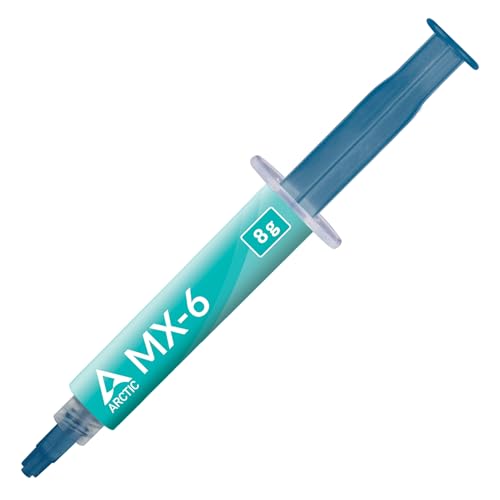
There is a reason the MX name keeps appearing in build guides: Arctic has spent years making the paste equivalent of a reliable family car, and the MX-6 is the current, refined version of that idea. The handling is the headline. It leaves the syringe smoothly, sits where it lands without slumping, and spreads under ordinary mounting pressure into an even film without demanding a spatula technique or a warming ritual. For a first-time builder, that predictability removes the most common failure in the whole category — an application that never became the thin film it needed to be.
In ownership terms the MX-6’s virtues compound. It is electrically non-conductive, so the small squeeze-out every beginner produces is a cosmetic matter. It is sold in sizes that make sense for one build or for a household that maintains several machines, and its positioning in the mid tier means keeping a spare tube in the drawer is an easy decision rather than a considered purchase. On bare dies it behaves acceptably, though a dedicated viscous compound stays put better still; on desktop heatspreaders, which is where most tubes will spend their lives, it is simply well-judged in every direction. Strengths: forgiving handling, sensible range of sizes, safe formulation, honest tier. Trade-offs: it does not chase the flagship’s last increment of headroom, and high-volume system builders may prefer even larger workshop packaging from the maker’s wider range. Best for: first builds, family-PC maintenance, and anyone who wants one tube that never argues back. Not suited for: extreme overclocking projects where every fraction of margin is the point. Tier: mid.

Noctua NT-H2 Review — the long-service premium
Noctua’s entire brand is an argument that PC components should be bought once and kept for a very long time, and the NT-H2 is that argument in a syringe. It is positioned as the refined successor to a first-generation compound that builders used for years, with handling tuned to be easy — it wipes, spreads and cleans with noticeably less fuss than denser rivals — and with long service life as the central promise. The box typically adds the small kindnesses Noctua is known for, such as cleaning wipes, which sound like garnish until you are midway through a re-paste with inky fingers.
Who is the premium for? The builder assembling a machine they intend to keep through several upgrade cycles, who will reseat this cooler perhaps twice in a decade and wants the interface to be a solved problem each time. The NT-H2 also suits quiet-PC enthusiasts, because stable temperatures over years are what keep a carefully tuned fan curve valid. It is less compelling as a bench consumable: if you build and rebuild test systems weekly, its per-application cost buys refinement you will wipe off on Friday. Strengths: easy, clean handling; long-service design philosophy; thoughtful extras. Trade-offs: premium positioning; refinement wasted on short-lived test builds. Best for: keep-for-years desktops and quiet builds. Not suited for: high-turnover bench work. Tier: premium.
Thermal Grizzly Kryonaut Review — the enthusiast flagship
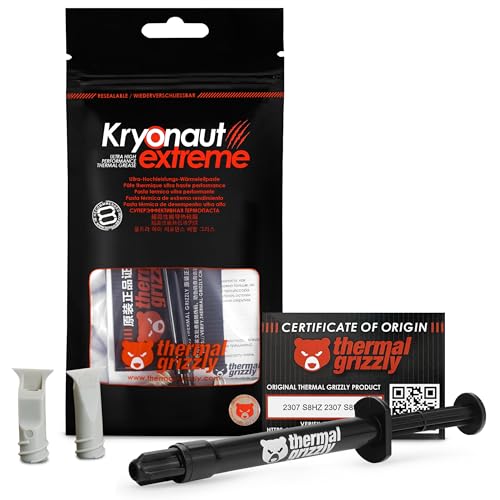
Kryonaut is the paste people buy when the rest of the cooling chain is already serious: a high-end processor, a cooler with real capacity, a case whose airflow has been thought about, and an owner who measures things. Thermal Grizzly built its name in the enthusiast overclocking world, and Kryonaut’s dense, filler-rich character reflects that origin. It is the most demanding handler in this roundup — thick enough that a lazy application stays a thick application — and it rewards the experienced technique of spreading deliberately or letting a high-pressure mount do slow, even work.
Judged on its own terms, it delivers exactly what its audience asks: the strongest conventional-paste performance positioning available without stepping into liquid metal’s hazards, in a formulation that stays electrically non-conductive and therefore keeps a safety margin liquid metal never offers. The honest caveats are about fit, not quality. On a mainstream build with a bundled cooler, Kryonaut’s margin is theoretical, because the cooler saturates long before the interface matters; and in the hands of a first-time builder, its handling can produce a worse film than a forgiving mid-tier paste would have. Buy it for the machine that can use it. Strengths: flagship thermal positioning, enthusiast pedigree, non-conductive safety. Trade-offs: demanding application; wasted on modest coolers. Best for: high-end desktops, overclocking, sustained rendering or compiling rigs. Not suited for: first-ever applications and budget builds. Tier: premium.
Thermalright TF9 Review — the bare-die specialist
Every roundup needs the product that wins a specific, important niche outright, and in these thermal paste reviews that product is the TF9. Its defining trait is density: this is a stiff, heavy-bodied compound that resists the pump-out effect — the slow migration of paste out of an interface under repeated heat cycles — better than softer pastes manage. Pump-out is the main way laptop, console and graphics-card applications fail, because those bare dies cycle hard and clamp lightly. A paste that stays put is not a luxury there; it is the entire job.
The cost of that density is effort. The TF9 does not invite a casual centre-dot application on a big heatspreader; it wants warming, patience and, on bare dies, a manually spread thin film checked edge to edge before the heatsink lands. Desktop builders with strong mounting pressure can use it happily, but they are not its audience. Its audience is the owner re-pasting a gaming laptop that roasts itself every summer, the console refurbisher, and the GPU maintainer — the last of whom should also read thermal pad reviews, because a GPU service done properly usually means pads for the memory at the same sitting. Strengths: outstanding stay-put behaviour; purpose-built for direct-die work. Trade-offs: laborious application; overkill stiffness for easy desktop jobs. Best for: laptops, consoles, GPUs and other bare dies. Not suited for: anyone wanting the quickest possible desktop application. Tier: mid to premium.

Corsair TM30 Review — the honest starter
The TM30 is the least pretentious product in this roundup, and there is real merit in that. Corsair positions it plainly: a non-conductive, zinc-oxide-based compound for ordinary builds, in a simple syringe, from a brand whose cases, coolers and power supplies already sit in millions of machines. It spreads without drama, it asks for no special technique, and it makes no claim to rearrange the thermal order of the universe. For the enormous number of people whose requirement is “a decent paste for this build, today,” that plainness is the feature.
Its limits are the mirror of its virtues. It is not the enthusiast’s margin-chaser, and its packaging and positioning do not court the workshop buyer maintaining a fleet. But judged as the starter tube it is — the one a first-time builder picks up alongside a Corsair case and cooler — it does its job cleanly and safely. Strengths: simple, forgiving, widely available, safe formulation. Trade-offs: no flagship ambitions; fewer size options for heavy users. Best for: first builds, straightforward refreshes, brand-consistent Corsair rigs. Not suited for: margin-hunting enthusiasts. Tier: entry to mid.
Side by Side: Character, Not Just Claims
| Paste | Handling | Service character | Choose it when |
|---|---|---|---|
| Arctic MX-6 | Easy, pressure-spreads well | Balanced all-rounder | You want one tube for everything |
| Noctua NT-H2 | Easy, cleans off readily | Long-service design | The build is a keeper for years |
| Thermal Grizzly Kryonaut | Dense, technique-rewarding | Enthusiast flagship | The cooler and chip are high-end |
| Thermalright TF9 | Stiff, deliberate spreading | Pump-out resistant | The die is bare: laptop, console, GPU |
| Corsair TM30 | Easy, uncomplicated | Honest starter compound | The build is mainstream and simple |
The pattern in the table is the real finding of these thermal paste reviews: the category separates by character and use case far more clearly than by raw thermal claims. If your shortlist conversation starts with “which chip, which cooler, whose hands,” you will land on the right tube; if it starts with printed conductivity numbers, you are reading marketing, not reviews. Our thermal paste buying guide formalises that into a buying sequence, and thermal paste pros and cons argues the honest case for and against spending up at all.
Scenario Verdicts
The ageing desktop that got loud
Diagnosis first: years of heat cycles have dried and pumped the original compound, and the fix is a clean re-paste. Any tube here succeeds; choose the MX-6 for ease or the NT-H2 if you want the longest plausible interval before doing it again. Expect the machine’s manners back, not a transformation beyond its original state.
The new high-end build
With a flagship processor under a serious cooler, Kryonaut’s positioning finally has something to bite on, and the NT-H2 is the calmer alternative for an owner who values clean handling. Whichever you choose, mounting quality — cross-pattern tightening, verified seating — will decide more than the badge.
The gaming laptop refresh
TF9, applied as a thin manual film over the whole die, with the machine fully powered down and unplugged and the battery disconnected where the design allows. While the machine is open, its pads deserve inspection too; how to choose a thermal pad explains when a pad should be replaced rather than reused.
The first build, on a budget
TM30 or MX-6, chosen by which is sensibly available, and no guilt either way: at this level the cooler’s bundled compound, if present, is also a legitimate choice. Save the difference for airflow — a case fan improves a budget build more than a premium syringe does, a hierarchy our best CPU coolers for desktops coverage follows throughout.
Application Notes That Apply to Every Review Here
Power off and unplug before any of this work. Clean old compound from both surfaces with high-percentage isopropyl alcohol and a lint-free cloth until nothing transfers. Use a pea-sized amount on a square heatspreader or a thin line on a rectangular one; spread a complete thin film by hand on a bare die. More paste is not better — excess only squeezes out. Tighten the cooler in a cross pattern, gradually, and if you lift the cooler afterwards for any reason, clean and start again rather than reseating on a broken layer. The full walkthrough lives in how to apply thermal paste with a CPU cooler, and the cooler-side companion is how to install a CPU cooler.
Final Verdict
Five pastes, five honest jobs. The MX-6 is the tube we would hand to the widest range of people; the NT-H2 is the premium for keepers; Kryonaut serves the high end that can actually use it; the TF9 owns bare dies; and the TM30 covers simple builds without fuss. If these thermal paste reviews have a single lesson, it is that the category rewards matching over maximising — match the paste to the die, the cooler and your own experience, apply it to clean surfaces with patience, and your temperatures will take care of themselves for years.
Durability: The Review Criterion Nobody Sees on Day One
Every paste looks identical in a photograph of a freshly built machine: a neat grey film under a cooler. The differences that matter most declare themselves in year three, and since no roundup can wait three years per product, durability has to be judged from formulation character and maker history. Three failure modes govern a paste’s working life. Pump-out is the slow expulsion of compound from the interface as the chip and cooler expand and contract at different rates through thousands of heat cycles; it starves the centre of the film and is the leading killer of laptop and GPU applications. Dry-out is the carrier fluid slowly leaving the filler behind as a cracking crust, accelerated by sustained high temperatures. Separation is the tube-level failure, oil and filler parting company during storage, which good formulations resist and poor ones surrender to within a year on a shelf.
Read the roundup again through that lens and the personalities sharpen. The TF9’s density is a durability argument before it is a performance one: mass that refuses to migrate is mass that is still working in year four. The NT-H2’s entire positioning is a durability claim — a maker famous for fans that outlive the machines around them does not sell a paste it expects to crust early. The MX-6’s balance includes remaining workable and stable in the tube between jobs, which matters to the maintenance-drawer buyer who uses it twice a year. Kryonaut’s dense load serves high-pressure desktop mounts that squeeze softer compounds thin and keep squeezing across cycles. Even the TM30’s simplicity is a durability position of a kind: a mainstream compound with no exotic behaviour is a predictable one. When two pastes seem equal on day one, choose the one whose maker talks most convincingly about year five.
Myths These Reviews Refuse to Repeat
Myth: the highest printed conductivity figure wins
Conductivity figures are generated on different rigs, at different pressures and thicknesses, sometimes by methods that flatter thin samples and sometimes by methods that flatter thick ones. Two figures from two makers are two numbers in two different currencies with no published exchange rate. The real interface in a PC is so thin, and so dominated by contact quality, that a modest-figure paste under a well-seated cooler routinely matches a headline-figure paste under an average one. Any review that sorts products by this number alone is sorting by marketing budget discipline, not by physics.
Myth: a re-paste should transform temperatures
A re-paste restores; it rarely transforms. If a machine ran at a certain temperature when new with factory compound, fresh quality paste returns it to roughly that behaviour — which can feel dramatic if the old compound had truly failed, and underwhelming if it had not. Claims of enormous improvements usually trace to an old application that was dried to dust, a cooler that was also cleaned during the same job, or a fan curve changed in the same afternoon. Change one variable at a time and your own results will make sense; change four and you will credit the paste for the work of a vacuum cleaner.
Myth: more paste means more cooling
The interface’s job is to fill microscopic voids, not to form a layer you could measure with a ruler. Once the voids are filled, additional compound adds thickness, and thickness is resistance. The correct amount is the smallest amount that achieves complete coverage after clamping: a pea or a thin line on a heatspreader, a complete thin film on a bare die. Squeeze-out around the edges is the signature of excess, harmless with the non-conductive pastes reviewed here but still pure waste.
Myth: paste is a one-time, fit-and-forget product
It is a consumable with a long fuse. Years of service is a realistic expectation for a good desktop application, and that is genuinely low-maintenance — but the machine that never gets re-pasted is a machine slowly getting louder. Build the expectation into ownership: when the cooler comes off for any reason, the paste is renewed, every time, as a matter of routine rather than debate.
Re-Pasting a Graphics Card: The Roundup’s Candidates at Work
The GPU is where this roundup’s distinctions stop being academic. The die is bare silicon under a large heatsink assembly, surrounded by memory chips and voltage regulators that are cooled through pads, and the whole card heat-cycles violently between idle desktop and full gaming load. A soft, easy paste that delights on a CPU heatspreader can pump out of a GPU interface within a season, presenting as a core temperature that climbs month by month while the fans work ever harder to hide it. This is the TF9’s home ground, and the reason a viscous specialist belongs in any serious roundup: for this job, stay-put behaviour is performance.
Practical notes for the job itself: the card must be out of the machine, the machine off and unplugged; the die cleaned with the same isopropyl care as a CPU; the old pads measured before anything is disturbed, because replacements must match their thickness — how to install a thermal pad walks through that half of the service; and the maker’s warranty position checked before a seal is broken, since policies on opening cards vary. Done properly, a GPU re-paste with a viscous compound and fresh pads is one of the most satisfying restorations in PC maintenance, returning an ageing card’s acoustic manners along with its temperatures.
Workshop Economics: Cost per Application, Not per Gram
Paste pricing confuses people because the unit on the shelf — the gram — is not the unit anyone consumes. A desktop application uses a small fraction of a gram; a laptop uses less. Priced per application, the entire roundup lives in the territory of pocket change, and the gap between the cheapest and the dearest tube amortises to almost nothing across the years each application serves. This is why our reviews weight fit so heavily and price so lightly: the expensive mistake in this category is never the premium tube, it is the wrong tube — the runny paste pumped out of a laptop by spring, the flagship smeared thick by a nervous first-timer — because the cost of a paste failure is the whole job done twice, plus the worry in between. Buy the right character once, in a size matched to how many machines you keep, and the economics of this category simply disappear.
Head to Head: The Two Easy Pastes
Because most readers of thermal paste reviews are really choosing between the forgiving options, it is worth placing the MX-6 and the TM30 side by side directly. Both are non-conductive, both spread without technique, and both will serve a mainstream desktop for years. They separate on breadth and intent. The MX-6 is a dedicated compound from a cooling specialist, offered in more sizes, with a formulation aimed at being the one tube for desktops, laptops and everything between. The TM30 is a generalist accessory from a broad-line brand, happiest as the simple, known quantity in a mainstream build. If your drawer holds one tube for a household of machines, the MX-6 is the more considered tool; if your basket already holds a case and cooler from Corsair and you want the matching, uncomplicated consumable, the TM30 closes the question without a wrong answer in sight. Neither choice needs defending at this tier — which is, in the end, the most useful thing a roundup can tell you about the forgiving end of any category.
How to Read Any Paste Review, Including This One
Thermal paste reviews are a genre with predictable failure modes, and a reader armed with three questions can sort the useful from the theatrical in minutes. First: does the review describe its test setup in enough detail to be repeated — processor, cooler, mounting, ambient conditions, workload? A result without a method is an anecdote wearing a lab coat. Second: does the review distinguish between products by more than one number? Handling, longevity, bare-die behaviour and pack sizes are all real axes of difference, and a review that collapses them into a single ranking is hiding the information you actually need. Third: does the review tell you who should not buy its winner? Every product in this roundup has a machine it does not belong in, and a review with no exclusions is a sales page.
Apply those questions here and you will find this roundup’s structure is its answer: character first, scenarios second, exclusions stated for every pick. We would rather be the review that talks you out of a flagship you cannot use than the one that sells it to you. That stance also explains our treatment of specifications. Where a property can be stated honestly in words — non-conductive, viscous, long-service — we state it. Where the honest statement would require numbers measured on a standard that does not exist across brands, we say that instead, and we regard any review that does otherwise as owing its readers an explanation.
Consoles, Small PCs and Other Awkward Patients
Two more scenarios deserve space because they generate a disproportionate share of paste questions. games consoles are bare-die machines with tightly packed cooling, long service intervals and owners who often open them for the first time precisely because the fan has become unbearable. The paste inside a years-old console is typically dry at the edges and thin in the middle, and a viscous compound applied as a complete film is the correct restoration — with the standing cautions that the machine must be fully unplugged, that small spring-loaded screws demand organisation, and that some consoles route heat from other chips through pads that must be measured and matched, not improvised. Take photographs at every stage of disassembly; the cheapest tool in console work is a picture of how it looked before you touched it.
Small-form-factor desktops are the second awkward patient. Their processors wear heatspreaders, so any roundup paste applies — but their coolers are compact, their airflow is marginal, and their owners notice every degree because there is so little thermal slack. In these machines the premium end of the roundup earns a fairer hearing than in a roomy tower: when the cooler is small by design, the interface’s small margin is a larger share of the whole. Pair that with honest expectations — paste still cannot create airflow — and a small build is where an NT-H2 or Kryonaut application, carefully mounted, makes its most defensible case outside the overclocking world.
What We Would Buy, Stated Plainly
Roundups owe readers a closing order of preference for the common cases, so here is ours without hedging. For a single tube to live in a drawer and serve whatever the household brings: Arctic MX-6. For a new desktop you intend to keep and upgrade for years: Noctua NT-H2, with Kryonaut substituted when the processor and cooler are genuinely high-end and your hands are experienced. For any laptop, console or graphics card: Thermalright TF9, and budget the extra minutes its application demands. For a simple first build bought in one basket: Corsair TM30, used without a second thought. And for the machine whose temperatures are already fine: nothing at all — the best paste purchase is sometimes the one postponed until the cooler next comes off, a discipline our thermal paste buying guide builds into its decision sequence.
Generations and Ranges: Why the Names Keep Changing
Readers comparing these thermal paste reviews with older ones will notice the surnames evolve: an MX-4 becomes an MX-6, a first-generation Noctua compound gains a successor, and flagship lines refresh. This churn is mostly honest iteration — formulations are retuned for handling, stability and the changing shapes of processors — but it has one practical consequence worth stating. Advice ages. A recommendation written around an earlier generation may describe a consistency or a pack size that the current product no longer matches, and a listing may quietly mix old stock with new. When you buy, confirm you are looking at the current generation’s own listing from the maker or an established retailer, and be wary of marketplace pages that aggregate several generations under one title. The reviews above describe the current products as positioned by their makers today; if a name gains a successor, the character analysis — forgiving all-rounder, long-service premium, flagship, bare-die specialist, honest starter — is the part designed to transfer.
The Accessories Question
Several pastes in this category arrive with companions in the box — spatulas, cleaning wipes, sometimes applicator nozzles — and reviews tend to treat these as trivia. They are not, quite. A spatula is the difference between a controlled film and a hopeful smear on a bare die, which is to say it is equipment for exactly the hardest application in the category. Cleaning wipes pre-soaked with alcohol remove the last excuse for reusing a grubby surface, the single most common cause of a disappointing re-paste. If a tube you already own came without them, the household equivalents are humble: a clean plastic card edge for spreading, high-percentage isopropyl alcohol and lint-free wipes or plain coffee filters for cleaning, and a gloved fingertip as the spreader of last resort. None of this needs to be bought as a kit; all of it needs to be within reach before the cooler comes off, because the middle of a re-paste is the wrong moment to discover the cupboard is bare.
A Word on Bundled Tubes in These Reviews
Every cooler from the brands behind this roundup ships with compound — pre-applied or in a small tube — and readers reasonably ask why bundled paste does not appear as a sixth review. The answer is that bundled compound is not a product you choose; it is a component of a cooler you chose, formulated to be adequate for that cooler’s design and nothing more specific. It deserves neither the suspicion it often gets nor a place in a comparative roundup. Use it confidently for the build it came with. Reach for the reviewed tubes when the job is a re-paste, a bare die, a second machine, or a deliberate upgrade in character — which is to say, whenever the choice of paste is actually yours to make.
Environmental Honesty: Ambient Temperature and Your Results
One variable silently edits every result in every paste review ever published, including the impressions behind this one: the temperature of the room. A processor’s temperature is reported as an absolute figure, but what the cooling system controls is the gap between the chip and the air around the case. Move a machine from a cool room to a warm one and every reading rises by roughly the room’s rise, whatever paste is under the cooler. This is why before-and-after comparisons made on different days mislead, why a summer re-paste can look disappointing next to a winter baseline that was never the paste’s doing, and why serious comparisons are always made back-to-back in the same session. As a reader, apply the discount automatically: any review that does not control for, or at least confess, its ambient conditions is reporting weather along with engineering.
When Reviews Disagree With Each Other
Finally, expect disagreement between roundups, and read it correctly. If one review ranks a flagship first and another calls the mid-tier tube the smarter buy, they are usually not contradicting each other about the products — they are weighting different criteria: peak margin against handling, day-one figures against year-five stability, a test bench against a family PC. The products in this category are mature, close in capability and honestly differentiated mainly by character, so reviewer values show through more than in most categories. The practical response is to decide your own weighting before you read rankings: know whether your machine is a keeper or a testbed, a heatspreader desktop or a bare-die laptop, and the right review — including, we hope, this one — will point at the right tube.
Counterfeits and Stale Stock: A Buyer’s Footnote
Popular consumables attract imitation, and well-known paste tubes are no exception: packaging that looks almost right, sold through marketplace listings at prices that seem like bargains, is a documented nuisance in this category. The defence costs nothing. Buy from the maker’s own storefront or an established retailer, be suspicious of listings that aggregate several generations of a product under one page, and check the tube when it arrives — printing quality, seal and consistency should all match the maker’s presentation. Stale stock is the milder version of the same risk: a genuine tube that has spent years in a hot warehouse can arrive pre-separated. Knead it, test the first squeeze on tissue, and if oil runs ahead of the compound, return it rather than apply it. None of the five names in this roundup is hard to find through clean channels, so there is never a reason to gamble on a murky one.
Keeping a Tube Ready Between Jobs
A closing practical note, because several of these products will spend most of their lives waiting in a drawer. Wipe the nozzle before capping; a crust at the tip is dried compound that will otherwise be the first thing your next application meets. Store tubes at room temperature, away from radiators and sunny shelves, since heat accelerates the separation every formulation resists to some degree. If a tube has rested for a long stretch, knead it gently in its packaging and discard the first small squeeze onto a tissue; what follows should be uniform in colour and texture. And date the tube with a marker when you open it. In a category where a single syringe can serve a household for years, knowing how long yours has been open turns the question of whether it is still good from a guess into a glance — and keeps a good review’s recommendation good in practice, which is where reviews are ultimately judged.
Above all, keep the category in proportion. Paste is a few careful minutes at the heart of a build and then years of silence; choose a character that fits, apply it well, and let the machine get on with being a machine. That restraint, more than any single product above, is what experienced builders actually recommend to one another.
Beyond the First Impression: Checks That Separate the Picks
The detail that dates a design
Every CPU Coolers generation has a detail that quietly dates it: a port standard on its way out, a control app that has stopped receiving updates, a consumable format being phased away. When reviewing a thermal paste, that detail matters because it decides how gracefully the product ages. A model built on current standards and widely stocked consumables will still be serviceable when a flashier rival is orphaned by its own ecosystem. Check the age of the design, not just its feature list, and favour the product whose supporting ecosystem is still actively maintained.
What the box should contain — and what it should not need
Unboxing is a small but telling review checkpoint for a thermal paste: the essentials for the first session should be in the box, the instructions should match the actual unit, and nothing vital should depend on an immediate second purchase. If a pick requires an accessory to perform its core job, that dependency is flagged in its assessment above, because it changes both the real cost and the first-day experience. Equally, beware bundles padded with extras you will never use; in a compact home office where every item has to earn the space it occupies, unused bundle clutter is a cost paid in storage, not a bonus.
Reading the assessments against your own routine
These reviews were written against a general routine, and your routine is the final filter. Map each pick’s stated strengths onto your busiest realistic day with a thermal paste: if a pick’s best quality serves a task you do rarely, it is not the pick for you, however strong the assessment. If a pick’s noted limitation sits in a corner of the workflow you never visit, discount it. This translation step — from review conditions to your conditions in a compact home office where every item has to earn the space it occupies — is where a good review becomes a good decision rather than a borrowed opinion.
Verify the listing, not just the product
A review can only judge the thermal paste in front of it, but what arrives at your door depends on the listing you order from. Before choosing, confirm that the listing names the exact model, generation and bundle contents you think you are buying, because CPU Coolers listings often group variants under one page. When picks such as Arctic MX-6, Noctua NT-H2 and Thermal Grizzly Kryonaut are on your shortlist, run this check against each listing in turn. Check which accessories are in the box and which are sold separately, and note the seller’s returns terms while you are there. Ten minutes of listing hygiene prevents the most common review-versus-reality mismatch: a good product judged by the wrong variant.
Consistency is the quiet test
Single impressive results are easy; a good thermal paste repeats them on an ordinary day, with ordinary materials, when you are in a hurry. Across the picks in this review, the models that earned their place did so by being predictable: the same setup producing the same outcome, with controls that behave identically every time. In a compact home office where every item has to earn the space it occupies, predictability is worth more than a peak performance figure you will rarely reach. When you read the individual assessments above, treat consistency comments as the highest-value signal in each one.
Fit and feel, judged honestly
Specifications can tell you a thermal paste will fit; only handling tells you whether it feels right doing it. Weight distribution, control placement, surface finish and the force needed for routine adjustments all shape whether you reach for the product gladly or work around it. When picks such as Arctic MX-6, Noctua NT-H2 and Thermal Grizzly Kryonaut are on your shortlist, run this check against each listing in turn. If your shortlist comes down to two similar models, this tactile layer is usually the honest tie-breaker, and it is personal: a control layout one reviewer calls cramped, a smaller-handed owner may call perfect. Where possible, judge fit against your own hands, desk and habits, not the reviewer’s.
Your future self, mid-task on a busy day, is the person this check is really for.
Keep the notes with the product’s paperwork; they become the baseline every later adjustment is judged against.
Write the conclusion of that check down before you order, so the decision survives contact with a tempting listing.
That single habit separates owners who stay pleased with their choice from owners who quietly start shopping again within a season.
Treat it as part of the purchase itself, not as homework to do after the box arrives.
None of this requires expertise — only the willingness to check your own routine before trusting a generic recommendation.
Five honest minutes at this stage is worth more than five hours of comparison browsing.
If a candidate fails this check, strike it from the list without regret and let the remaining options compete on merit.
Your future self, mid-task on a busy day, is the person this check is really for.
Keep the notes with the product’s paperwork; they become the baseline every later adjustment is judged against.
Write the conclusion of that check down before you order, so the decision survives contact with a tempting listing.
That single habit separates owners who stay pleased with their choice from owners who quietly start shopping again within a season.
Frequently Asked Questions
Which thermal paste is best overall?
For the widest range of builders, the Arctic MX-6 is the easiest overall recommendation: forgiving handling, a safe non-conductive formulation and sensible pack sizes. “Best” shifts with the job, though — the Noctua NT-H2 suits long-keeper builds, the Thermal Grizzly Kryonaut suits high-end desktops, and the Thermalright TF9 is the right answer for bare dies in laptops and consoles.
Do expensive pastes show big temperature wins in reviews?
Credible comparisons show reputable pastes clustering closely on desktop heatspreaders, with flagships earning a small margin that matters mainly to high-end and overclocked systems. Reviews that promise dramatic gaps are usually measuring application differences, cooler differences or ambient drift. Handling, longevity and bare-die behaviour separate the field more honestly than headline temperatures.
Which paste should I choose for a laptop?
Choose a viscous, stay-put compound — the Thermalright TF9 is our roundup’s specialist — because laptop dies are bare, clamp lightly and heat-cycle hard, which pumps softer pastes out of the interface over time. Apply a thin film covering the whole die, work with the machine powered off and unplugged, and disconnect the battery first where the design allows.
Can I trust the conductivity numbers on paste packaging?
Treat them as indicative at best. Makers measure conductivity under different methods, pressures and layer thicknesses, and there is no shared industry standard making the figures directly comparable. A paste with a modest printed figure can match a rival with a dramatic one on a real processor. Judge by formulation character, handling and the maker’s track record instead.
How much paste is in a syringe, in practical terms?
Far more applications than most buyers expect. A single desktop application uses a small fraction of a gram, so even a small syringe covers multiple builds or years of maintenance for one machine. Buy size by how many machines you maintain: a small tube for a single build, a larger one for a household fleet or a workbench, rather than by the capacity of one processor.
Should I replace the paste that came with my cooler?
Not on day one. Pre-applied layers and bundled tubes from established cooler brands are competent and correctly dosed, and they are the baseline the cooler’s own claims rest on. A separate tube earns its place when you re-paste later, maintain several machines, or need a specific formulation — such as a viscous paste for a bare die — that the bundle was never designed to be.