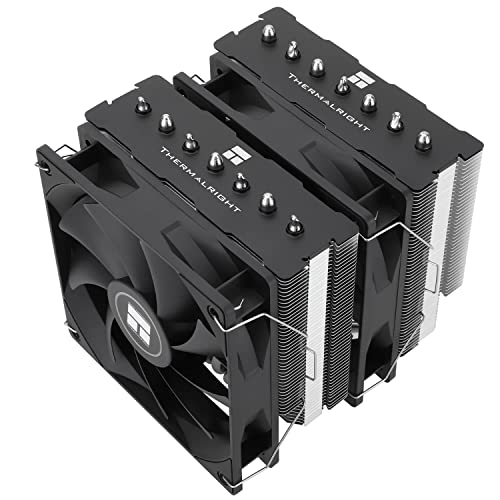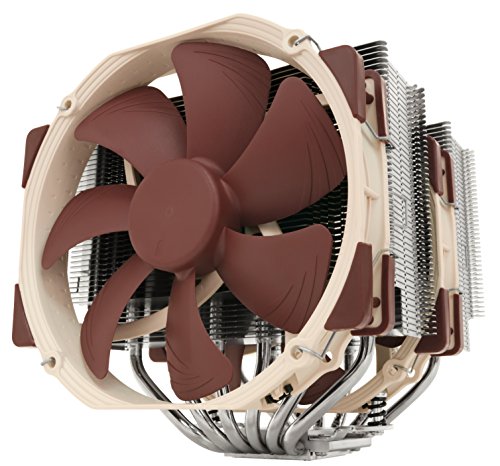
The air cooler vs liquid cooler question has a clear short answer: for most gaming PCs, a good tower air cooler is the better buy — cheaper to own, effectively maintenance-free, and quiet — while liquid cooling (a sealed all-in-one, or AIO) wins when your CPU sustains very high heat output, your case cannot fit a tall tower, or you want the clean showcase look. Neither technology is ‘better’ in the abstract; they trade the same money for different strengths, and this comparison walks through each criterion so you can match them to your build.
Both sides have improved: flagship air coolers now rival 240mm liquid coolers on raw temperature, and AIOs have become reliable, sealed units you install and ignore for years. What has not changed is the physics of fit and the arithmetic of failure points — an air cooler has fans and nothing else to wear out, while an AIO adds a pump, fluid and fittings. Start from your constraints with How to Choose a CPU Cooler, then use the criteria below to break the tie.
Disclosure: As an Amazon Associate, ilcastellomenu.com earns from qualifying purchases. Product examples below link to Amazon, where you can check current availability and specifications; this guide itself lists no fixed prices because pricing and bundles change frequently.
Air cooler vs liquid cooler at a glance.
| Criterion | Tower air cooler | AIO liquid cooler |
|---|---|---|
| Cooling at mainstream loads | Excellent; flagship air matches 240mm AIOs | Excellent; pulls ahead at 280–360mm sizes |
| Sustained high-core-count loads | Very good, limited by fin-stack size | Best option; large radiators shed heat steadily |
| Noise character | Fan noise only; large fans run slow | Fan noise plus a faint pump tone |
| Fit constraints | Height and RAM clearance | Needs a radiator mount; block itself is tiny |
| Failure points | Fans only | Fans, pump, fittings, gradual fluid loss |
| Maintenance | Dusting | Dusting radiator; no refilling (sealed) |
| Lifespan | A decade or more; fans replaceable | Typically pump-limited; plan on years, not decades |
| Looks | Large tower dominates the build | Clean socket area; RGB/display options |
Cooling Performance: Where Each One Actually Wins
At gaming loads, it is closer than marketing suggests
A gaming CPU rarely sustains its maximum all-core draw; it bursts. In that regime a quality dual-tower air cooler and a 240mm AIO land within a few degrees of each other, and both keep the chip far from throttling. The air cooler dumps its heat into the case air (which your case fans then exhaust), while the AIO carries heat to the case edge — a difference in where heat goes, not how much is removed. Case airflow quality often matters more than the choice itself, which is why the builds in Best CPU Coolers for Gaming mix both types freely.
At sustained loads, radiator size is king
Rendering, compiling, scientific work and heavy overclocking hold a CPU at full draw for minutes to hours. There, surface area wins: a 360mm radiator has far more of it than any fin stack that fits above a socket, and liquid’s thermal mass smooths the spikes. If your workload looks like that — or you are cooling one of the flagship chips in best cpu coolers for overclocking — liquid at 280mm or above is the rational choice. Below that workload, you are buying headroom you will never use.
In this guide
Noise: Fan Whoosh Versus Pump Tone
Why big air coolers are so quiet
Noise scales brutally with fan speed, and a large fin stack with two 140mm fans can shed a gaming load at speeds where the fans are barely audible over a room’s ambient sound. There is exactly one noise source, it is smooth broadband whoosh, and it tracks load predictably. This is why the quiet-build crowd defaults to flagship air, and why the models in Best Air Coolers for CPU emphasise fan size over fin density.
The pump is liquid's extra voice
An AIO adds a small pump at the block (or in the radiator). Good pumps are a faint hum at idle that fan noise masks under load; mediocre ones whine at a pitch some people find more annoying than louder fan whoosh. Pump noise also does not scale down the way fan noise does on a good curve, because the pump runs at a near-constant speed. If your PC sits on the desk beside you in a quiet room, this is the criterion to weight heavily — our noise troubleshooting in How to Fix a Loud CPU Cooler explains which sounds are normal and which are faults.
Reliability, Lifespan and Risk
An air cooler has almost nothing to fail
A heatsink is a lump of metal; it cannot leak, clog or wear out. Its fans can fail after years of service and are replaceable in minutes with standard parts. An air cooler bought today will very likely outlive two or three CPU platforms, needing only a new mounting bracket when sockets change. For a PC that must simply work — a family machine, a work PC, anything shipped by courier — this simplicity is a genuine feature, not a lack of ambition.
AIOs are reliable, but they are consumables
Modern sealed AIOs rarely leak, and outright failures are uncommon within their warranty years. But the pump is a mechanical part with a finite life, coolant permeates slowly through the tubes over years, and none of it is user-serviceable: when an AIO fades, you replace the unit. Treat an AIO as a component with a service life measured in years — perfectly reasonable, but different from air’s ‘forever’. Custom loops change this calculus again, for the worse on effort; see AIO vs Custom Loop Cooling before considering one.
Installation and Fit
Air: one part, two clearances to check
Fitting an air cooler means a backplate, a bracket, paste and two screws — the sequence in How to Install a CPU Cooler. The compatibility work is measuring: cooler height against the case, and fin-stack overhang against your memory height, both covered in CPU Cooler Clearance Explained. Once those two numbers pass, installation is the simplest in PC building.
Liquid: more parts, more planning
An AIO adds radiator placement to the puzzle: mount position, fan orientation, tube routing and graphics-card clearance all interact, and the pump and fan headers must be connected to the right places. None of it is hard, but it is a 30–45 minute job with more ways to need a redo. In exchange, the socket area stays empty — the only option in cases too low for towers, and a real aesthetic advantage in windowed builds like those in best pc cases for liquid cooling.
Who Should Buy Which: The Verdict by Use Case
Choose air if…
You are building a mainstream or high-end gaming PC in a standard case, you value silence and longevity, the PC will be moved or shipped, or you simply want the most cooling per unit of money and hassle. That covers the majority of builders, which is why air is the default recommendation in How to Choose a CPU Cooler. Start the shortlist at best cpu coolers under 100 if budget matters.
Choose liquid if…
Your CPU sustains heavy all-core loads or a serious overclock, your case is small or low-profile where towers cannot go (see also Tower Cooler vs Low Profile Cooler), or the build is a showcase and the clean socket area is worth a premium to you. Buy the largest radiator your case mounts well — 280mm or 360mm — because a 120mm AIO is the worst of both worlds: liquid’s complexity with less cooling than a modest tower.
The Cost Picture Over a Whole Ownership
Sticker prices mislead in both directions, so lay the two ownerships side by side across the years you will actually keep the cooler.
What each option really costs
A mid-range tower costs less than a comparable AIO today and nothing thereafter: no consumables, fans replaceable individually if one ever fails, and a realistic second life on your next platform for the price of a mounting bracket. An AIO costs more at purchase and carries a planned replacement at the end of its pump’s service life — if that lands inside your ownership, the AIO’s true cost is its price times two platforms’ worth of units. Neither arithmetic is damning; the AIO’s premium buys real things (fit, looks, sustained-load capacity). But builders comparing a flagship air cooler against a mid-size AIO at the same shelf price should know the air cooler is the one still working, unchanged, a decade later.
Resale, hand-me-downs and the spare-parts shelf
Air coolers hold a quiet advantage in the ecosystem of used parts: a complete tower with its bracket box is a welcome hand-me-down for a relative’s build or a home server, and it works the day it is installed. A used AIO is a gamble on an unknown pump’s remaining life, which is why experienced builders rarely buy them second-hand. If your upgrades cascade parts to other machines, factor that in — the cooler that keeps serving somewhere is worth more than its benchmark delta suggests.
Hybrid Thinking: When the Answer Is 'Both, in Sequence'
The comparison is usually framed as a permanent allegiance. In practice, many builders rationally choose differently at different stages of a PC’s life.
Start on air, move to liquid when the workload does
A gaming build on air that later becomes a rendering workstation has not made a mistake — it has staged its spending. The air cooler retires to the spares shelf as a known-good backup (genuinely valuable when any cooler fails), and the AIO arrives when sustained loads justify it. The reverse journey is just as rational: a builder tired of pump hum at idle in a quiet room moves back to a flagship tower and loses nothing they were using. Choose for the machine in front of you today, using the criteria in this guide and the sizing method in How to Choose a CPU Cooler, and let future-you re-decide with future facts.
Climate, Dust and Environment: The Forgotten Criteria
Comparisons are usually run in a climate-controlled review lab. Your PC lives in your climate, and the environment shifts the balance in ways worth naming.
Hot rooms and dusty rooms
In a hot room, every cooler works harder, but the AIO has one structural advantage: a front-mounted radiator breathes the coolest air available — room air, not case air pre-warmed by the graphics card — which matters most exactly when ambient is high. In a dusty environment the advantage reverses: an air cooler’s fin stack is open and brushable in minutes, while an AIO’s radiator, sandwiched with fans against a case wall, accumulates a mat in its least accessible face and needs partial disassembly to clean properly. Neither effect is decisive alone, but a builder in a hot, dusty climate should recognise that the two criteria pull opposite directions and decide which of their problems is bigger — the same system thinking the case choice in Best PC Cases for Dust demands.
Altitude, humidity and other edges
Air density falls with altitude, and both technologies breathe the same thinner air — fans move less mass per revolution, so marginal coolers reveal themselves sooner in a mountain city than at sea level. Humidity is mostly a non-issue for both, though an AIO’s fittings deserve a glance during cleanings in very humid homes. None of these edges overturns the main verdicts of this comparison; they refine them at the margins, which is where real builds are actually decided.
The Decision in One Sitting: A Self-Assessment
Answer five questions honestly and the comparison resolves itself without further reading.
Five questions, two columns
One: does your workload hold the CPU near full load for many minutes at a time? (Liquid leans yes.) Two: is your case too low or too small for a 160mm-class tower? (Liquid, necessarily.) Three: does the PC share a quiet room with you at idle for hours daily? (Air leans yes.) Four: do you want this cooler still serving, unchanged, in eight years? (Air.) Five: is the build’s appearance through glass a genuine priority you will pay for? (Liquid.) A split decision is normal — weight the answers by how many hours a week each condition actually occurs in your life, not by which sounds more enthusiastically ‘enthusiast’. The machine you are describing with your answers is the machine you own; buy its cooler.
Gear for This Guide
The examples below come from our Creators-API-verified product pool and illustrate the cooler classes discussed in this guide. They are examples, not a ranked list — use the criteria in this article to judge any model, including newer revisions.
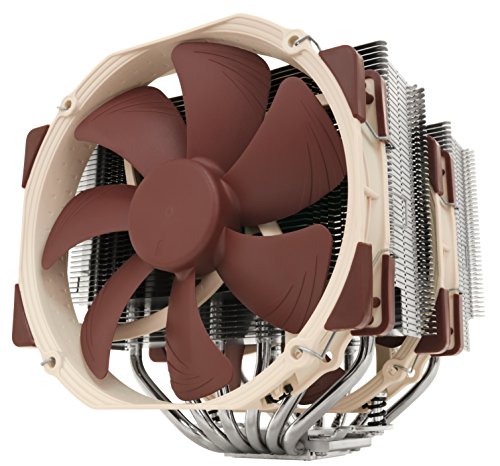
Noctua NH-D15
The benchmark for flagship air: a dual-tower, dual-140mm-fan design that matches mid-size liquid coolers on temperature while having no pump and nothing to leak. Noctua NH-D15 — Check on Amazon

Corsair iCUE H100i Elite CAPELLIX XT
A 240mm AIO with RGB fans and a control hub shows the liquid side’s strengths — compact block over the socket, heat dumped at the case edge, and a showcase look. Corsair iCUE H100i Elite CAPELLIX XT — Check on Amazon

ARCTIC Liquid Freezer III Pro 360
Stepping up to a 360mm radiator is where liquid pulls decisively ahead on sustained loads — if the case can mount it. ARCTIC Liquid Freezer III Pro 360 — Check on Amazon
air cooler vs liquid cooler: The Short Version
Air for simplicity, silence and lifespan; liquid for sustained loads, tight cases and clean looks. Decide by your workload and your case, and either choice, sized one tier generously, will serve you well.
Scenario Head-to-Heads: The Same Two Coolers, Six Different Winners
Bursty gaming loads, session after session
Gaming rarely holds a processor at full power for long; it spikes through loading screens, shader compilation and busy scenes, then settles. In that rhythm a large air tower’s thermal mass is a genuine feature: the fin stack absorbs each spike slowly, the fans respond lazily, and the acoustic result is a machine that sounds calm even while its temperature graph looks busy. A liquid cooler handles the same spikes well, but its advantage — enormous sustained dissipation through a big radiator — is one the workload never asks for. Verdict for pure gaming at a desk: air, on simplicity and silence-per-effort, unless the case physically cannot house a tower.
Sustained all-core work: rendering, compiling, encoding
Flip the workload to hours at full power and the verdict flips with it. Now the radiator’s surface area and its ability to dump heat directly out of the case at the front or top become decisive, and a 360mm liquid system holds temperatures and clock speeds that a tower matches only at noticeably higher fan speeds. The air cooler does not fail this test — a flagship dual-tower is a legitimate workstation cooler — but it works harder and louder to pass it, and it heats the case interior that the graphics card and drives also live in. If your machine earns money by the render, liquid earns its complexity here.
The recording and streaming corner
A microphone changes the judging criteria: it hears tonal noise, pump whine and fan rumble in proportions your ears forgive. Air cooling’s noise is broadband whoosh, which microphones and noise-suppression tools handle gracefully and which sounds natural on a recording. A pump’s fixed tonal hum, even a quiet one, can sit exactly in the frequency band voices occupy and resist every filter. Streamers who keep the PC in the same room as the microphone consistently report better results with a big, slow air cooler — or with the PC moved out of the room entirely, which beats either technology and is worth considering before spending anything.
The always-on home server
Twenty-four-hour duty rewards the technology with fewer mortal parts. An air cooler’s only wear item is a fan you can replace in minutes, and its failure is announced by noise long before it matters. A liquid cooler’s pump is a sealed wear item whose failure is silent until temperatures announce it, and coolant slowly permeates through tubing over years whether the loop is used or not. For a machine that must run unattended for months, that asymmetry settles the question: air, generously sized, fans set conservatively, and a temperature alert configured so the one failure mode left — a stopped fan — phones home before it becomes a shutdown.
The PC in a cabinet, a caravan or a hot spare room
Enclosed and hot environments punish both, differently. Air cooling depends on case air, and cabinet air is pre-heated by definition, so an air cooler in a closed media cabinet starts every fight ten degrees behind. Liquid can relocate the problem: a radiator mounted at the cabinet’s vented edge, or in the one position that breathes room air, gives the processor access to air the cabinet’s interior never sees. If you can place a radiator at a genuine air boundary, liquid wins the enclosed build; if the whole machine must live sealed in the hot box, neither technology rescues you and the honest fix is ventilating the furniture.
Failure at 2 A.M.: How Each Technology Breaks
Compare failures, not just performance, because you will own the failure modes for years. An air cooler fails gradually and noisily. A bearing wears, a fan develops a tick, then a rattle, then stops — over weeks, in plain earshot, with temperatures rising gently as airflow fades. The repair is a fan, fitted with the machine off, in ten minutes, and in the meantime the heatsink’s passive mass still provides meaningful cooling at reduced loads. Nothing about an air cooler’s failure can damage another component; the worst realistic outcome is a thermal shutdown and an annoyed owner.
A liquid cooler has two failure modes, and they differ in kind. The common one is the pump: it slows, grows noisy or stops, and because a stopped pump also stops the water, temperatures climb fast — modern processors protect themselves by throttling and shutting down, so the realistic outcome is still a dead machine rather than a dead processor, but the repair is a whole new cooler, not a fan. The rare mode is a leak, and its rarity deserves respect rather than dismissal: fittings, seals and tubing are engineered and tested, leaks in sealed all-in-one units are genuinely uncommon, and when they occur they are usually slow seeps at a fitting rather than dramatic bursts — but the liquid goes where gravity takes it, which is onto the graphics card and motherboard below. Weigh that honestly: a very small probability of a serious event, against air’s zero probability of that event and higher probability of trivial ones. Your temperament is a legitimate input to this decision. Builders who know they would worry choose air and never think about it again, and that peace is a real product feature no benchmark measures.
Detectability: the quiet advantage of systems that complain
Whichever you choose, set up the tripwires. Enable fan-failure and pump-tachometer alarms where the BIOS offers them, run a monitoring tool that can log temperatures, and glance at idle temperatures weekly the way you glance at a car’s fuel gauge. An air system warns you acoustically; a liquid system warns you through its tachometer signal and a slow upward drift in temperatures as coolant is lost over the years. Both warnings work only if someone is listening, and the five minutes of setup happen once, on build day, when motivation is highest.
Radiator Placement: The Decision Inside the Decision
Choosing liquid is really two choices, and the second — where the radiator lives — can matter as much as the first. Mounted at the front as intake, the radiator breathes the coolest air in the system and the processor gets its best temperatures, while the graphics card inherits air warmed by the processor’s heat. Mounted at the top as exhaust, the processor breathes air the graphics card has warmed, and the card keeps the fresh supply. In a gaming machine the graphics card is usually the hotter, louder and more thermally sensitive component, which argues for top exhaust and a slightly warmer processor; in a rendering workstation the processor is the earner, which argues for front intake and a slightly warmer card. There is no placement that cools both best, and any guide claiming one is selling certainty the physics does not contain. Decide which component’s noise bothers you more in your real workload, give that one the fresh air, and let the other run a few degrees warmer in exchange — a trade both components are engineered to accept without complaint.
One placement rule is not a trade but a constraint: some part of the radiator should sit above the pump, so that the air which inevitably collects in a sealed loop gathers in the radiator’s end tank rather than in the pump housing, where it causes noise and wear. Most case layouts satisfy this naturally with top or front mounts; the configuration to avoid is a front radiator mounted low with the block as the loop’s highest point. Gravity is patient and undefeated — arrange the loop so it works for you.
Years Three to Seven: The Ownership Chapter Reviews Skip
Reviews test coolers in their first week; you will live with yours in year four. An air cooler’s fourth year looks like its first, minus dust: the fin stack is immortal, the fans may want replacing if their bearings have grown audible, and the mounting hardware still fits whatever it fitted on day one, with new-socket kits the only question if you change platforms. Performance drift across those years is essentially zero once cleaning is accounted for. The machine you benchmarked is the machine you still own.
A liquid cooler’s fourth year is a distribution, not a point. Most units are still performing close to new. Some have lost a little coolant to permeation — the slow migration of liquid through tubing walls that no seal fully prevents — and show it as a few degrees of drift and, eventually, audible air in the pump. The pump itself has accumulated four years of continuous bearing wear, a budget that was always finite. None of this makes liquid a bad purchase; it makes it a purchase with a service life, more like a set of tyres than like a case. Plan accordingly: if you build for a decade of untouched service, air’s flat ageing curve fits the plan; if you refresh your machine every few years anyway, a liquid cooler’s lifespan comfortably covers the ownership window and its ageing never becomes your problem. Match the technology’s lifespan to your own upgrade rhythm and both choices become easy to defend.
Moving house, shipping and the transported PC
One more ownership reality separates them. A tall air tower is a heavy mass cantilevered off the motherboard, and shipping a built PC with one fitted is a recognised way to crack a board or tear a socket area in a drop; system integrators pack foam around towers for this reason. A liquid cooler’s heavy part, the radiator, is screwed to the case, and its block is light, so a liquid-cooled machine travels structurally safer — provided the radiator screws are checked and the tubes are not pinched by anything packed inside. If your PC will be shipped, couriered to university, or moved between homes yearly, that difference belongs in the decision beside temperatures and noise, and it is one of the few criteria where liquid wins without any asterisk at all.
A Short Decision Flow, in Prose
Walk it in order and stop at the first decisive answer. Can your case fit a tower cooler of the class your processor needs? If not, liquid or low-profile air decides itself. Is the machine always-on, unattended, or expected to serve untouched for many years? If so, air. Is your workload sustained all-core power for hours, in a case with a genuine radiator position? If so, liquid, sized 360mm if the case allows. Do you record audio in the room, or know that a pump’s tone would prey on your mind? Air. Will the machine be shipped or moved often? Liquid, or air with the cooler removed for transit. If you reached the end undecided, the tiebreaker is temperament: buy the one whose failure modes you think about least, because the performance difference at this level is smaller than the difference between a machine you trust and one you monitor. Readers who want model-level help after the technology is chosen will find it in the best CPU coolers for overclocking shortlist, where both technologies appear with their real strengths attached to real processors.
What the Benchmarks Do Not Tell You
Most cooler comparisons are run on open test benches or in generously ventilated cases, at controlled room temperatures, for runs measured in minutes. Each of those choices quietly favours a different winner than your desk will. An open bench gives an air tower unlimited cool air and hides its one weakness — dependence on case airflow — while flattering nothing about a radiator, whose whole design assumes a case wall to mount on. Short runs hide heat soak: an air tower’s mass and a loop’s water both absorb the first minutes of load, and the technology with more thermal mass looks artificially strong until equilibrium arrives twenty minutes in. Controlled room temperature hides the summer problem entirely. None of this makes reviews useless; it makes them a starting point that must be translated. Prefer reviewers who test inside a real case, run loads to equilibrium, and report noise-normalised results — temperature at a fixed fan noise, or noise at a fixed temperature — because those are the only two honest currencies in this comparison. A chart that shows one cooler three degrees cooler at full fan speed, without saying it was also far louder doing it, has told you the price of nothing and the cost of everything.
The graphics card is the silent third contestant
Every air-versus-liquid test that reports only processor temperature is grading half the system. In a gaming PC the graphics card produces most of the heat and most of the noise, and your CPU cooling choice rearranges its environment. A tower cooler exhausts processor heat into the case’s rear airflow path, largely past the card. A front-intake radiator deliberately feeds the card pre-warmed air, and a top-exhaust radiator competes with the card for the case’s exhaust capacity. It is entirely possible to improve your processor temperature by five degrees with a liquid install and worsen your graphics card’s temperature and noise by more, for a net quieter-nothing. Judge the swap by the whole machine under your real workload: both temperatures, and the loudest fan in the box, whoever owns it. The best cooling decision is the one that quiets the system, not the one that wins a single sensor.
If You Already Own One of Them: The Switching Question
Owners rarely start from zero; they start from a cooler already fitted and wonder whether the other side is greener. Apply a stricter test than a new buyer. A switch costs the full price of the new cooler plus an afternoon, and it must beat a fitted, working incumbent — so demand a specific, named improvement before spending: a measured temperature or noise problem in a workload you actually run, a case change that orphans the old cooler, or a platform change its brackets cannot follow. “Slightly better in reviews” fails this test, because review deltas measured in single degrees and single decibels routinely vanish inside a different case with different air. The most common happy switch is not air-to-liquid or liquid-to-air at all; it is undersized-to-adequate within the same technology, bought after a processor upgrade changed the heat load. Diagnose the inadequacy before you diagnose the technology, and half of all contemplated switches resolve into a fan curve, a cleaning, or a case fan — the three cheapest upgrades in all of PC cooling, and the only ones that improve both technologies equally.
Frequently Asked Questions
Is liquid cooling better than air cooling?
At 280–360mm radiator sizes and under sustained heavy loads, yes on raw temperature. At gaming loads, a flagship air cooler and a 240mm AIO are within a few degrees, and the air cooler is quieter, simpler and longer-lived. ‘Better’ depends on your workload, case and priorities — which is why the comparison in this guide is organised by criterion, not by crown.
Can an AIO leak and damage my PC?
Modern sealed AIOs leak rarely, and their fittings are factory-tested. The risk is not zero, however, and an AIO also has a pump with a finite life and coolant that slowly permeates over years. An air cooler has none of these failure modes — its only wearing parts are fans, which are replaceable in minutes.
Which is quieter, air or liquid?
For most builds, air. A large tower’s fans are its only noise source and they can run slowly; an AIO adds a pump tone that does not scale down with load. Under heavy sustained load a big AIO’s fans may run slower than a small air cooler’s, which is why undersized air is loud — size the cooler properly either way, per What is TDP for CPU Coolers.
How long does an AIO last compared with an air cooler?
An air cooler’s heatsink effectively lasts indefinitely and its fans are replaceable, so a decade or more across several builds is realistic. An AIO is a sealed consumable with a service life measured in years, limited by its pump; when it fades, the whole unit is replaced. Both are reasonable — they are simply different ownership models.
Is a 120mm AIO worth it?
Almost never. A single-fan radiator has less surface area than a modest tower cooler, costs more, and adds a pump and leak paths. It survives as a product because it fits tiny cases where nothing else does. If you go liquid, go 240mm or larger; if space forbids that, a good low-profile or mid-range air cooler is usually the better engineering.
Which should I buy for a PC that will be shipped or moved often?
Air. A tower cooler is a solid block with no fluid, no pump and no fittings to stress in transit (though very heavy towers should still be supported or removed for shipping). An AIO is generally safe to move too, but air removes an entire category of worry for a machine that travels.
Does a liquid cooler need to be refilled or topped up over time?
A sealed all-in-one is not designed to be opened, and for most owners the answer is simply no: you use it for its service life and replace it when performance drifts or the pump tires. Coolant does permeate slowly through the tubing over years, which is one reason an ageing unit’s temperatures creep, but there is no filler port and no maintenance schedule — attempting to open one converts a graceful ageing process into a leak risk and voids the warranty. If refillability matters to you, that is a genuine argument for a custom loop or an expandable design, where reservoirs and ports make topping up a normal service task.
Which is better for a first-time builder?
Air, for reasons of feedback rather than performance. A tower install teaches you mounting pressure, fan orientation and fan curves with parts you can see and touch, and every mistake it allows is reversible in minutes with no consequences beyond a remount. A liquid install adds radiator placement, tube routing, pump wiring and a component you cannot inspect inside, all before you have a feel for what normal looks like. Plenty of first builds use liquid successfully, but the builder who starts on air learns the fundamentals on forgiving hardware and chooses liquid later with informed confidence instead of hope.
Can a high-end air cooler really handle a flagship processor?
Yes, with the honest caveat about acoustics and power limits. A flagship dual-tower dissipates the sustained power of current flagship chips at stock and moderately raised limits, holding safe temperatures indefinitely; what it cannot do is match a large radiator’s combination of temperature and silence at the most aggressive limits, where the liquid system’s extra surface area tells. If your flagship runs at sensible limits for gaming and mixed work, the big tower is not a compromise at all. If you intend to run unlimited all-core loads for hours, you are shopping in the one scenario where liquid’s advantage is structural.
My room gets very hot in summer. Does that change the verdict?
It sharpens it rather than changing it. Every degree of room temperature adds roughly a degree to component temperatures for both technologies, because both ultimately dump heat into the same room air. What heat changes is the value of headroom: a cooler that was comfortably sufficient in spring runs its fans hard in August, so the oversized option — the bigger tower or the 360mm radiator — earns more of its keep in a hot room than in a cool one. If summers are severe, buy the headroom tier in whichever technology your other criteria chose, and treat room ventilation as part of the cooling system, because at some point it is the cooling system.
Is a cheap liquid cooler better than a good air cooler of similar cost?
Generally no, and this is the comparison where the technology label misleads most. A small, inexpensive 120mm or 240mm liquid cooler competes against mature, highly optimised tower designs at the same money, and the towers usually match or beat it on temperature, beat it clearly on noise, and outlast it by years because their only wear part is a fan. Liquid’s structural advantages arrive with radiator size and build quality. If your budget sits in the range where the choice is a modest liquid unit or a respected mid-range tower, take the tower and spend any remainder on a case fan; revisit liquid when the budget reaches the sizes where its physics actually engages.
Which technology holds its resale value better?
Air, and by a wide margin, for a structural reason: a used heatsink is nearly as good as a new one, so buyers pay accordingly. The fins and pipes do not age, the fan can be replaced, and a complete set of brackets makes a five-year-old flagship tower a genuinely attractive used purchase. A used liquid cooler is a sealed box with an unknown amount of pump life and coolant already spent, no way for a buyer to inspect either, and a warranty that usually stays with the original owner — so used prices discount it heavily, fairly. If you rotate hardware often and resell as you go, that difference in retained value is a real, if unglamorous, line in the comparison, and it compounds across a whole build’s worth of upgrade cycles.
Factor that retained value into any honest cost comparison and the long-ownership gap between the two technologies widens further in air’s favour — one more reason the verdict depends on how long, and how restlessly, you actually keep your hardware.
Does either technology affect my other components’ lifespan?
Indirectly, through the air they share. A liquid cooler exhausting at the top removes processor heat from the case quickly, which can leave the motherboard’s regulators and drives in cooler air; a front-intake radiator does the opposite and warms everything downstream slightly. An air tower keeps its heat in the case’s main airflow path, where case fans decide who breathes it. The differences are a few degrees either way — enough to matter to a marginal component over years, not enough to choose a technology by. Good case airflow planning shrinks all of these effects toward zero, which is why experienced builders treat case fans as part of the cooling purchase rather than an afterthought.
Related Guides
Keep exploring with these guides and roundups from the same CPU-cooling collection: