So, what is TDP for CPU coolers? TDP — Thermal Design Power, measured in watts — is a cooler’s rated heat-dissipation capacity: the amount of CPU heat the cooler is designed to carry away continuously while keeping the processor within its temperature limits. Match a cooler whose TDP rating comfortably exceeds your CPU’s heat output and you get cool, quiet operation; undershoot it and the fans run at full speed while the CPU throttles. The catch, covered honestly below, is that TDP is not measured to one shared standard, so the number works best as a tier label, not a precise score.
Confusion comes from the fact that two different TDPs meet in every build: the CPU maker’s TDP, which describes the processor’s heat output class, and the cooler maker’s TDP, which describes dissipation capacity. They share a unit and a name but are defined by different companies for different purposes. This explainer separates them, explains why modern boost behaviour makes CPUs exceed their nameplate figure, and shows how to use cooler TDP ratings sensibly when shopping — the practical application lives in How to Choose a CPU Cooler.
Disclosure: As an Amazon Associate, ilcastellomenu.com earns from qualifying purchases. Product examples below link to Amazon, where you can check current availability and specifications; this guide itself lists no fixed prices because pricing and bundles change frequently.
Two TDPs, One Build
CPU TDP: a class label for heat output
When Intel or AMD lists a processor’s TDP — 65W, 105W, 125W and so on — they are naming the thermal class the chip is designed around at its base configuration. It is a guide for system builders choosing power supplies and cooling, not a promise about maximum draw. In fact both makers publish or specify higher turbo/boost power limits: many 65W-class chips are configured to sustain 1.5–2× that figure under all-core load when the motherboard allows it, and flagship chips go far higher. Your cooler must handle the real sustained figure for your settings, not the badge on the box.
Cooler TDP: a capacity claim
When a cooler maker rates a tower at, say, 220W TDP, they are claiming it can dissipate that much heat under their test conditions — their chosen ambient temperature, their test CPU or heater, their definition of ‘keeping up’. Because the test conditions differ between brands, cross-brand comparisons of the headline number are approximate. Within one brand’s range the ratings are consistent and useful for ranking; across brands, treat them as tier labels (entry / mainstream / high-end / flagship) and confirm with size, heat pipes, fan configuration and independent reviews on a similar CPU.
In this guide
Why Boost Behaviour Broke the Old Rule of Thumb
CPUs now chase their thermal limit on purpose
Modern processors are designed to boost until they reach a power, current or temperature ceiling, then hold there. Give a flagship chip a bigger cooler and it does not necessarily run dramatically cooler — it often runs faster for longer at a similar temperature, converting your cooling headroom into performance. This is healthy behaviour, but it inverts the old intuition: with a modern CPU, the question is less ‘will it overheat’ (the chip protects itself by throttling) and more ‘how much performance and quiet am I leaving on the table with an undersized cooler’. The symptoms of getting it wrong are covered in How to Fix CPU Overheating.
Motherboard settings move the target
Many boards ship with power limits raised or effectively removed, so the same CPU can be a modest thermal load in one system and a heavy one in another. If you enable multi-core enhancement or manual overclocking, your cooler’s required capacity rises with it — which is why the shortlists in Best CPU Coolers for Overclocking sit a full tier above the gaming lists, and why a cooler that was ‘fine’ can become loud after a BIOS update changes default power behaviour.
How to Use Cooler TDP Ratings When Shopping
The headroom rule
Take your CPU’s realistic sustained power — its boost/turbo power figure where published, not its base TDP — and choose a cooler rated meaningfully above it. Headroom is not waste: a cooler working at half its capacity spins its fans slowly and quietly, while a cooler at its limit is at maximum RPM and maximum noise. One tier of headroom is the sweet spot for gaming builds; sustained workstation loads and overclocking justify two. This is the same logic that orders the picks in Best CPU Coolers for Ryzen 9 5950x by chip tier.
Corroborate with physical evidence
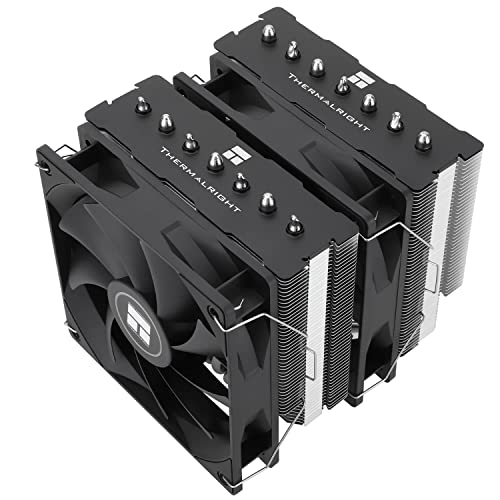
A cooler’s size does not lie as easily as a rating can. Fin-stack volume, heat-pipe count and diameter, fan size and count, and cold-plate design are all visible proxies for capacity. A slim single tower claiming flagship-class TDP deserves scepticism; a dual-tower with six or seven heat pipes and twin 140mm fans claiming it does not. Cross-check the claim against the physical description and at least one independent temperature test before trusting it — the verification habit from How to Check Compatibility of a CPU Cooler applies to thermal claims as much as to dimensions.
Ambient temperature and case airflow are part of the system
Every TDP rating assumes some ambient temperature and reasonable airflow. A cooler in a sealed, unventilated case in a hot room is working against a much harder version of its test. If your case airflow is poor, fix that first or derate your expectations of any cooler — the cases in Best PC Cases for Thermals exist because enclosure thermals and cooler capacity are one system, not two purchases.
Key Terms, Without the Jargon Fog
Heat pipes, vapour chambers and cold plates
Heat pipes are sealed tubes whose internal fluid evaporates at the hot end and condenses at the cool end, moving heat into the fin stack far faster than solid metal alone. A vapour chamber is the same idea flattened into a plate, spreading heat across the whole base. The cold plate (or base) is the metal block that contacts the CPU through thermal paste — its flatness and finish decide how well heat enters the cooler at all, which is why the mounting and paste guidance in How to Apply Thermal Paste with a CPU Cooler matters as much as the rating on the box.
Thermal throttling and Tjmax
Tjmax is the CPU’s maximum rated junction temperature. As the chip approaches it, firmware reduces clocks and voltage to hold the line — that reduction is thermal throttling. It is protection, not damage, but sustained throttling means your cooler (or its mounting, or the case airflow) is undersized for the load you are asking of it. A correctly TDP-matched system under your real workload should sit comfortably below the limit with fan speed to spare.
Common Misconceptions About TDP
'TDP is how much power the CPU uses'
Close, but not exact — and the gap is where builds go wrong. A CPU’s electrical draw and its heat output are nearly equal (almost all the energy becomes heat), but the nameplate TDP is a class figure, and boost limits define the real sustained number. Size cooling for the boost figure.
'A higher cooler TDP rating always means a better cooler'
It means a higher claim under that maker’s conditions. Noise at a given temperature, mounting quality, fit and fan quality separate two coolers with identical ratings — the criteria that fill most of How to Choose a CPU Cooler. Treat TDP as the first filter, never the final ranking.
How Cooler Makers Test, and Why Numbers Drift
Understanding where a TDP rating comes from explains both its usefulness and its limits — and arms you against the listings that abuse it.
Heater blocks, test CPUs and ambient games
A cooler TDP figure is produced on the maker’s own rig: some use a resistive heater block simulating a CPU, others a real processor, at a chosen ambient temperature and a chosen definition of success (a target temperature, a noise ceiling, or simply ‘does not throttle’). Each choice moves the number. A rating earned at a cool ambient with fans at full speed is a larger number than the same cooler earns at a warm ambient with a noise limit — and both are ‘true’ as far as they go. This is why the figure ranks a maker’s own range reliably and cross-brand comparisons loosely, and why marketplace no-name coolers quoting enormous TDP for tiny heatsinks should be read as fiction: the fin stack’s volume, visible in the photograph, cannot be argued with.
The derating you should apply yourself
Translate any rating into your conditions before trusting it. Hot room or a case with mediocre airflow: treat the rating as optimistic and buy a tier up. Sustained workloads rather than bursty games: the same. A small case where the cooler breathes pre-warmed air from the graphics card: the same. Conversely, an open, well-ventilated case in a cool room lets a cooler perform at the top of its class. TDP is the start of a calculation whose other terms are your case, your climate and your workload — the system view that the case shortlists in Best PC Cases for Thermals take from the enclosure side.
TDP Across a Cooler's Working Life
A rating is measured on a new cooler with fresh paste in a clean case. Your cooler will live most of its life in none of those conditions.
Why headroom is also an ageing strategy
Dust narrows fin passages, paste dries over years, and fans lose a little of their edge — each effect shaving capacity the rating assumed was there. A cooler bought exactly at its CPU’s requirement has no slack for any of this; within a couple of years it is a cooler at its limit, loud under loads it once handled calmly, and its owner is reading How to Fix CPU Overheating wondering what changed. A cooler bought a tier up absorbs the same ageing invisibly. Headroom, in other words, is not only about today’s noise — it is the cooler’s pension, and it is why the sizing advice throughout our cooler coverage consistently recommends one tier of generosity.
TDP in the Wild: Reading Three Listings Critically
Apply the explainer to the shelf. These three listing patterns cover most of what a buyer will meet, and each rewards a different reading.
The flagship dual-tower rated around 250W
A large dual-tower with six or seven heat pipes, two 140mm fans and a rating in the mid-200s: the claim and the hardware agree. Such a cooler will handle any mainstream desktop CPU at stock settings and most overclocks, and its real product is not the rating but the fan speed at which it delivers it — low. Buy it for a high-end chip and a quiet room, and the TDP figure’s job is done: it told you the tier correctly.
The slim tower rated like a flagship
A compact single tower with four heat pipes claiming a flagship-class rating is where scepticism earns its keep. The physics of fin volume does not support the number under any plausible test that includes a noise limit or a warm room. Read it as: this cooler was tested to that figure under the maker’s most flattering conditions. It may still be a fine cooler for a mainstream chip — most are — but file the rating under marketing and size it by its hardware: a mainstream tower for mainstream chips, whatever the box says.
The cooler with no rating at all
Some reputable makers decline to print a TDP figure, publishing compatibility lists and test data instead — arguably the most honest position available, and increasingly common. Absence of a rating is not absence of capacity. Judge these by the physical evidence and independent testing, and by the maker’s per-CPU compatibility guidance, which often encodes more real information than a wattage ever did. The mature way to hold TDP, after this whole explainer, is as one dialect in a conversation that also includes size, fans, tests and reputation — fluent buyers listen to all of them.
Gear for This Guide
The examples below come from our Creators-API-verified product pool and illustrate the cooler classes discussed in this guide. They are examples, not a ranked list — use the criteria in this article to judge any model, including newer revisions.
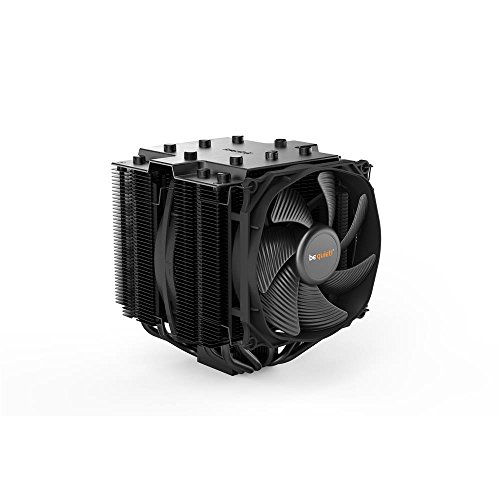
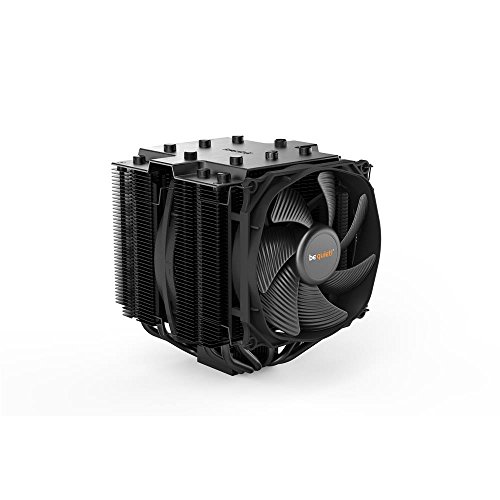
be quiet! Dark Rock Pro 4
Its nameplate carries a 250W TDP rating — a useful example of how flagship air coolers express capacity, and of why that figure should be read as a tier label rather than a laboratory measurement. be quiet! Dark Rock Pro 4 — Check on Amazon

Cooler Master Hyper 212 Black II
A mainstream tower in the class builders pair with 65W-class CPUs every day: the practical end of TDP matching, where one tier of headroom buys quiet. Cooler Master Hyper 212 Black II — Check on Amazon
what is TDP for CPU coolers: The Short Version
TDP is a class label, not a laboratory score: size for your CPU’s real boost power, buy a tier of headroom, and corroborate ratings with physical size and independent tests. Do that and the number serves you instead of misleading you.
A Worked Example: One Processor, Three Honest TDP Stories
Abstractions stick better with a machine attached, so follow a single mainstream processor through three truthful descriptions of its heat. On its box and in its specification table, it carries a base power figure in the familiar 65-watt class — the number its maker guarantees the cooling must handle at base clocks, all day, in a standards-compliant system. In a reviewer’s power test under a sustained all-core workload, the same chip, in a motherboard running the maker’s own recommended boost behaviour, draws roughly double that figure package-wide, because boost is not an overclock or an anomaly; it is the product working as designed. In a gaming session, meanwhile, its draw wanders between the two, spiking through loading and settling far below both during play, because games load a few cores unevenly and leave the rest idling. All three numbers are honest. All three describe the same silicon. The cooling question “what TDP cooler do I need” has no answer until you say which of those stories is your machine’s daily life — and the worked answer for most gaming owners is the third story with headroom, for most workstation owners the second story with margin, and for nobody at all the first story taken alone, because the first story is the only one your processor will never actually limit itself to unless you configure it to.
Configuring the story yourself: power limits as a cooling tool
The underused insight in this whole subject is that the processor’s power behaviour is partly yours to choose. Both major platforms expose their limits in the BIOS — long- and short-duration power caps on one side, package power tracking and thermal limits on the other — and setting a cap is a legitimate, reversible way to fit a processor to a cooler rather than the reverse. A flagship chip capped to a sensible sustained wattage loses little in bursty real-world work, because short boosts still draw from the short-duration budget, and gains a great deal in sustained temperature and silence. Owners of small cases do this as a matter of course; owners of large cases dismiss it as surrender and then buy silence back with a bigger cooler at greater expense. Neither is wrong, but both should know the dial exists. When you read a cooler recommendation that assumes unlimited power, translate it: that recommendation is for the second story above, and if you intend to live in the first or third, you may shop a tier lower with a clear conscience and a quieter room.
TDP for the Other Heat in Your Case
The letters TDP follow you beyond the processor, and the same literacy applies. A graphics card’s board power figure is a whole-card budget — chip, memory, regulators and fans — and it behaves like the honest version of the processor story: sustained, measurable, and the right number to plan case airflow around. Chipset, memory and drive figures are small enough to matter only in fanless and sealed builds, where every watt must leave through a surface you can name. The system-level habit worth building is a heat budget for the whole machine: add the realistic sustained draw of processor and graphics card, and you have the load your case fans and room must jointly handle. That single sum explains experiences that TDP-per-component never does — why a PC heats its room noticeably during a long session, why a small case with two modest components can still overwhelm its airflow, and why the best CPU coolers for Ryzen 9-class flagships assume a case and a room equal to the chip, not merely a socket that fits it.
How to Read a Cooler’s TDP Claim in a Shop, in Ninety Seconds
Stand in front of the shelf — physical or digital — and run this sequence. First, find the claim’s context: is the figure presented with a test processor, a fan speed or a temperature target attached, or is it a bare number in a feature list? Bare numbers are marketing weather, not data. Second, compare within the maker’s own range before comparing across makers: a brand’s internal ladder is usually honestly ordered, because it is generated by one test regime, so a cooler rated a clear step above its sibling will genuinely cool better even if neither figure translates to your chip. Third, sanity-check the claim against the object’s physics — fin volume, heat-pipe count, fan size and radiator dimensions bound what any cooler can do, and a claim that wildly outruns the metal is telling you about its test conditions, not its magic. Fourth, look for the review consensus at a fixed noise level, because that is the only cross-brand currency with any stability. Ninety seconds of that discipline will rank a shelf of coolers more truthfully than an hour of comparing headline TDPs, and it works identically for air and liquid, in every generation, because it reads the evidence instead of the label.
TDP Traps in the Wild: Four Listings Decoded
The laptop chip with a configurable range. Mobile processors publish a base figure and a configurable range, because the laptop maker chooses the cooling and therefore the sustained power. The same chip is a different performer in a thin notebook and a thick one, and neither is lying — the TDP is a design decision the chassis makes. The lesson transfers directly to desktops: your case, cooler and BIOS settings are co-authors of your processor’s real TDP, whether you participate in writing it or not.
The cooler rated above its radiator’s station. A compact liquid cooler claiming a dissipation figure suited to flagship chips is usually reporting a peak test with fans at maximum, in cool room air, for a duration its small water volume flatters. It may genuinely keep such a chip safe — safety is a low bar — while being the loudest object in your home doing it. The rating answered “can it” and the buyer heard “should it,” and that gap between the questions is where most TDP disappointment is manufactured.
The processor whose “TDP” never appears in its own reviews. When every independent test of a chip shows sustained draw far from the headline figure, the headline is a classification, not a measurement, and shopping by it alone systematically undersizes cooling for boost-era silicon. Review power charts — whole-package draw under a named workload — are the replacement document, and they are the first thing to consult for any chip you are cooling seriously.
The passively cooled product with a heroic rating. Fanless coolers and cases rate their dissipation at a specified temperature difference between the heatsink and the room, in open air, in a stated orientation. Move the same product into a cabinet, a hot room or the wrong orientation and its rating evaporates without a single claim having been false. Passive ratings are the purest illustration of this guide’s thesis: TDP is always a sentence with conditions attached, and the conditions are the content.
Glossary: The Power Words, Pinned Down
Base power / TDP (processor): the maker’s guaranteed dissipation at base clocks — a floor for planning, not a ceiling on behaviour. Maximum turbo power: the sanctioned sustained ceiling under boost on platforms that publish one; the most shopping-relevant figure its maker offers. Package power: the whole processor package’s measured draw, cores and uncore together — what monitoring tools report and what your cooler actually meets. PPT, TDC, EDC: the AMD-side limits for package power and current that together shape boost behaviour. PL1 and PL2: the Intel-side long- and short-duration power limits, with the duration between them governed by a time constant often called Tau. Thermal throttling: the processor’s self-protection, reducing clocks as it approaches its temperature limit — the visible symptom of cooling that has run out. Heat soak: the slow warming of the whole cooling system and case air toward equilibrium, the state in which all honest temperature comparisons are made. Keep this list beside the ninety-second shelf test and the vocabulary of the entire subject is yours.
TDP and Noise: The Trade the Charts Hide
There is a second currency in every TDP decision, and it is the one your household actually spends: noise. A cooler meeting a processor’s sustained draw at its limit does so with fans at speeds nobody describes as quiet, while the same cooler meeting the same draw with fifty percent headroom does it at a murmur. This is why two builds with identical processors and identical temperatures can sound completely different — one bought exactly enough cooling, the other bought margin, and margin is measured in decibels as surely as in degrees. When you shop by TDP, then, shop for the operating point, not the survival point. Ask not “can this cooler dissipate my chip’s draw” but “at what fan speed will it dissipate my chip’s draw, sustained, in my case, in August.” Reviewers who publish noise-normalised results are answering precisely that question, and their charts deserve more of your trust than any wattage printed on a box — including the box of the cooler that wins those charts.
Efficiency’s quiet role
One more variable hides inside the wattage: not all processors convert the same power into the same work, and not all samples of the same processor draw the same power for the same clocks. Silicon varies, motherboard voltage regulation varies in generosity, and a chip fed more voltage than it needs turns the excess directly into heat with no performance to show for it. This is why two owners of the “same” build can report different temperatures with the same cooler and both be telling the truth. It is also why undervolting — trimming that excess voltage — appears in so many cooling success stories: it reduces the TDP your specific sample actually presents, at the source, before any heatsink is consulted. TDP, in other words, is partly a property of your individual chip and board, not only of the model line, and your own measurements remain the final authority this guide keeps returning to.
Putting a Number on Your Own Machine: A Fifteen-Minute Protocol
Everything in this guide converges on one practical exercise, so here it is as a protocol. First, set the machine as you actually use it — your normal BIOS settings, your normal fan curve, your case in its normal place with its panels on. Second, run your heaviest real workload and, at the twenty-minute mark when heat soak has done its work, record three numbers: sustained package power, hottest-core temperature, and the CPU fan speed or percentage. Third, repeat once with the heaviest synthetic load you trust, and record the same three. You now own your processor’s true TDP in your system — the first figure — and its worst-case ceiling, the second. Every future cooling decision reduces to arithmetic against those numbers: a cooler whose noise-normalised reviews show it handling your ceiling figure at a fan speed you can live with is a cooler that fits your life, whatever any box claims. Repeat the protocol after any processor, board or BIOS change, because each can rewrite the numbers, and keep the results with your build notes. Fifteen minutes, twice a year at most, and the most argued-about specification in PC building becomes a measurement you took yourself — which is where this subject should always have lived.
Frequently Asked Questions
What does TDP stand for?
Thermal Design Power, measured in watts. For a CPU it names the thermal class the chip is designed around; for a cooler it is the maker’s rated heat-dissipation capacity. The two figures share a name and a unit but are defined independently by different companies — which is why this explainer treats them as related, not interchangeable.
Is a CPU's TDP how much power it actually uses?
Not exactly. Nameplate TDP describes the base configuration class, while modern CPUs boost well above it — many chips sustain 1.5–2× their TDP under all-core load when the motherboard’s power limits allow. Size your cooling for the boost/turbo power figure where one is published, not for the badge on the box.
Can I compare cooler TDP ratings between brands?
Only roughly. There is no single industry test standard for cooler TDP, so each brand’s number reflects its own conditions. Within one brand’s range the ratings rank consistently; across brands, treat TDP as a tier label and corroborate with fin-stack size, heat-pipe count, fan configuration and independent temperature tests on a similar CPU.
How much cooler headroom should I buy?
One tier above your CPU’s realistic sustained draw for gaming builds, two for sustained workstation loads and overclocking. Headroom is not waste: a cooler at half capacity runs its fans slowly and quietly, while a cooler at its limit is at maximum speed and noise whenever you work the machine.
Why does my CPU run at the same temperature with a bigger cooler?
Because modern processors boost toward their thermal limit by design. A bigger cooler often converts headroom into higher sustained clock speeds rather than lower temperatures — the chip takes the cooling as performance. That is healthy behaviour; judge the upgrade by clock stability and noise, not by temperature alone.
What happens if my cooler is undersized for the CPU's TDP?
The CPU protects itself by thermal throttling — cutting clocks as it reaches its temperature limit — and the cooler fan runs at maximum, loudly, trying to keep up. Nothing is damaged, but you paid for performance the cooling cannot deliver. The fix is a correctly sized cooler, chosen with How to Choose a CPU Cooler.
If I cap my processor’s power limit, do I lose the performance I paid for?
You lose the portion of performance that lived above the cap, which for most real workloads is smaller than the numbers suggest. Bursty tasks — launching, loading, gaming, editing — draw on short-duration headroom and responsiveness far more than on unlimited sustained watts, so a sensibly chosen cap is often invisible outside benchmarks. Sustained all-core work is where the cap collects its price, in direct proportion to how far below the unlimited draw you set it. The honest way to decide is empirical: cap, run your own heaviest week of work, and watch whether anything you care about got slower. For many owners the answer is a quieter, cooler machine and no noticed loss at all — which reveals that the unlimited setting was buying benchmark performance with everyday noise.
Why does my monitoring software show power numbers that match none of the published figures?
Because it is measuring your machine, and the published figures describe reference conditions. Your motherboard’s default limits, your BIOS version’s boost policy, your workload’s core usage and even your silicon’s individual efficiency all move the real number away from any table. Treat the software’s sustained package-power reading under your heaviest load as the most truthful TDP your processor will ever have — it is the one your cooler must handle — and use the published figures only to understand the class of chip you own. A builder with one measured number from their own system knows more than a builder with five quoted numbers from other people’s.
Does a cooler’s TDP rating account for my graphics card heating the case?
No, and this is the silent assumption inside every cooler test: the rating was earned breathing air at a controlled temperature, while your cooler breathes whatever your case provides. A powerful graphics card can raise the air around the processor’s cooler by ten degrees or more during gaming, which subtracts directly from the cooler’s effective capacity at exactly the moment both components work hardest. This is why a cooler that handles a processor easily on a review bench can merely cope in a gaming case, and why case airflow is not an accessory to the TDP question but a term inside it. When you size a cooler for a gaming build, add a tier of headroom for the air it will actually breathe.
Will TDP still matter when I upgrade my processor in a few years?
Yes, but as a habit of reading rather than a number to remember. Socket generations change, headline figures drift, and boost behaviour evolves, yet the skill this guide teaches — find the sustained real-world draw, compare coolers at fixed noise, distrust bare numbers — transfers intact to whatever you buy next. Your current cooler may even make the journey with you if its maker supplies a bracket, and its genuine capacity, which you now know how to judge, matters more than the rating printed on its ageing box. Keep your measurements from this build; they are the baseline the upgrade gets judged against.
Do more heat pipes mean a higher real TDP capacity?
Up to a point, and then the fins take over. Heat pipes move heat from the base into the stack; the stack’s surface area and the fan’s airflow dispose of it. A cooler with many pipes feeding a small stack saturates its fins and gains nothing from the extra transport, while a large stack fed by too few pipes leaves its outer fins underused and cool. Balanced designs scale both together, which is why pipe count alone is a weak shopping metric and why the ninety-second test in this guide weighs the whole object’s physics — pipes, fin volume, fan — rather than any single heroic number. Judge the system, because the heat does.
Why do server and workstation chips publish TDP differently?
Because their buyers plan facilities, not desks. In a rack, every watt must be powered and air-conditioned at scale, so workstation and server figures are written as engineering commitments the platform will actually hold, often with configurable levels the operator sets deliberately. Desktop figures evolved as marketing classifications for individual buyers, with boost behaviour layered on top for performance competition. The practical lesson is envy, applied: run your desktop the way a server operator runs a rack, with the sustained limit chosen on purpose and the cooling sized to it, and the desktop’s fuzzier numbers stop mattering, because you have replaced them with your own.
My processor’s temperature is fine but its clocks fall during long loads. Is that a TDP problem?
It is a power-limit story, which is TDP’s other half. Processors manage two budgets at once: temperature and power. A chip can be comfortably cool and still reduce clocks because it has reached its long-duration power limit — the PL1-style ceiling from the glossary — especially on boards that enforce strict limits after a short turbo window expires. Watch the monitoring tool’s power figure and its limit indicators during the fall: if power sits pinned at a round number while temperatures stay modest, the ceiling is electrical, not thermal, and no cooler upgrade will lift it. Raising that limit is a BIOS decision with cooling consequences — which is precisely the joined-up thinking this entire guide exists to teach.
Does TDP matter for choosing case fans, or only the CPU cooler?
It matters for the whole thermal budget, because the case fans are the cooler’s supply line and the room’s delivery service combined. Add your processor’s realistic sustained draw to your graphics card’s board power and you have the heat the case must export every second of a heavy session; case fans sized and curved for a fraction of that load will let the interior air climb until every component’s cooler is breathing soup. This is why a system can gain more from one well-placed intake fan than from a cooler tier upgrade — the upgrade improved the heatsink, while the fan improved the air every heatsink in the box depends on. Budget the watts for the whole machine, and let the case fans be chosen with the same seriousness as the fin stack they serve.
What is the simplest TDP rule that is still honest?
Size your cooling for the sustained power your processor actually draws in your heaviest work — measured on your machine or taken from a trustworthy review of your exact chip — then add one tier of headroom for noise, summer and the graphics card’s contribution to case air. That rule ignores every headline figure from both chip makers and cooler makers, and it outperforms all of them in practice, because it is built from the two quantities that physically determine your temperatures: the watts that arrive, and the air that receives them. Everything else in this guide is commentary on that sentence — useful commentary, but commentary all the same.
Run the fifteen-minute protocol from this guide before your next cooling purchase, write the two numbers it gives you at the top of your shopping list, and let every product you consider answer to them — that is TDP literacy in its final, practical form.
Is a processor with a lower TDP always the cooler, quieter choice?
Not once boost enters the room. Two chips with different headline figures can draw identically under the workloads that matter to you, because the lower-class chip boosts aggressively within a generous board policy while the higher-class chip idles through the same bursty work far below its ceiling. Compare measured sustained draw under your workload class, not the class labels, and remember that efficiency — work done per watt — decides how much performance a given thermal budget buys. A modern, efficient chip at a higher headline figure can be the cooler citizen in practice, because it finishes tasks quickly and returns to idle, while an older, less efficient part grinds at its limit for longer on the same job.
That race-to-idle behaviour is why the protocol in this guide measures your workload rather than a synthetic maximum: a chip that sprints and rests presents a completely different cooling problem from one that plods at its ceiling, and only your own tasks can say which processor you actually own.
Where should I record my measured figures so they stay useful?
With the build’s other permanent documents: the motherboard box, a notes file named for the machine, or a photograph of the monitoring screen saved beside your build photos. Record the date, the workload, the BIOS settings that governed the test and the room’s rough temperature beside the numbers, because a wattage without its conditions is just another headline figure — the very thing this guide taught you to stop trusting. With conditions attached, your two numbers remain interpretable years later, by you or by whoever inherits the machine.
Related Guides
Keep exploring with these guides and roundups from the same CPU-cooling collection: