Disclosure: As an Amazon Associate, ilcastellomenu.com earns from qualifying purchases. Links on this page are affiliate links; they cost you nothing extra. Prices and availability change often, so check the current Amazon listing before you buy.
So, is a wireless presenter remote worth it? Short answer: a wireless presenter remote is worth it if you present standing in front of rooms, screens, and people, because it converts directly into calmer delivery, better eye contact, and talks that feel like conversations. It is not worth it if your presenting life happens seated at your own desk on video calls, where the keyboard already gives you everything a remote would. Everything below unpacks that answer: what you actually get, what it really costs beyond money, who it pays off for, who should skip it, and the checklist to settle the question for your own pattern of work.
Key Takeaways
- Worth it if: you present in rooms, move while you talk, or point at detail on a screen for a living audience.
- Not worth it if: you present only from your desk, or so rarely that the device would live discharged in a drawer.
- The real costs are habits, not money: charging, carrying, rehearsing, and laser safety discipline.
- Digital highlighting extends the value to hybrid and recorded talks; laser models serve projector rooms best.
- Frequency is the multiplier: weekly presenters repay the purchase quickly, yearly presenters should buy entry tier or not at all.
In this guide
What You Actually Get From a Wireless Presenter Remote
You get distance from the laptop, which sounds small and is not. The laptop is where the cables, the notifications, and the next slide’s notes live; the audience is somewhere else. A wireless presenter remote lets you work from the audience’s territory while keeping full control of the deck, and that relocation changes posture, gesture, and eye contact all at once. Presenters describe the first talk with a remote as the first talk where they felt they were in the room rather than operating it.
You get rhythm. Slide changes stop being events and become punctuation inside your sentences. The blank-screen button gives you a deliberate pause, a moment where the room looks at you and listens, which skilled presenters use the way musicians use rests. You get pointing: the ability to land the room’s attention on the one number that matters, by laser on a projector or by digital highlight on a screen. And you get insurance against the commonest presenting fumbles, the walk back to the desk, the hunt for the right key, the turned back at the exact moment of the key message.
You also get portability of skill. A remote feels the same in every room, so your practised gestures travel with you from your office to a client’s boardroom to a conference hall. That consistency is worth real money to people who present for a living, because it removes one variable from rooms that are full of variables. The models differ, as the companion reviews roundup details, but the core purchase, control from anywhere, is identical across the Logitech Spotlight, the Logitech R500s, the Kensington Expert Wireless Presenter, the Canon PR1100-R, and the DinoFire Wireless Presenter.
The Real Costs Beyond Money
The purchase itself sits in familiar tiers, entry through premium, and you should check price on Amazon for the current listing of any model you consider. The costs that decide satisfaction are the other ones. There is a carrying cost: one more object, with its receiver and its cable or spare batteries, that must be in the right bag on the right day. There is a power cost: a charge-or-check routine that, skipped once, fails publicly. There is a learning cost, trivial for a classic clicker and real for software and cursor models, paid in rehearsal time before the first important talk.
There is also a responsibility cost on laser models, and it is absolute. A laser presenter must never be shone into the eyes of a person or an animal, never aimed at aircraft or vehicles, and must be stored out of children’s reach, used only to point at the screen or board in the presentation room. Some venues ban lasers outright, which can strand a laser-only purchase. Digital-highlight models convert that responsibility into a software setting, one reason the premium tier exists. Finally there is an opportunity cost worth naming honestly: for a desk-bound presenter, the same money buys things that would actually be used, and the remote buys a drawer ornament.
Who It Pays Off For
The Weekly Teacher, Trainer, or Lecturer
This is the clearest yes in the category. Dozens of sessions a year, constant movement, constant pointing, and an audience whose attention is the job. The remote repays its cost in the first month of smoother sessions, and the mid-range models, the R500s or the Kensington Expert for demonstrators, are the natural home. The only checks are venue laser policy and a battery routine robust enough for a teaching week.
The Client-Facing Professional
Consultants, salespeople, and agency presenters sell fluency as much as content. Arriving with a remote that works on the client’s machine in seconds, then presenting from beside the screen rather than behind a laptop, is a small, visible professionalism signal that repeats every meeting. For this profile the Canon PR1100-R’s shareable simplicity or the R500s’ universality pays off, and the Spotlight pays off where pitches run on big displays and video calls at once.
The Conference and Hybrid Speaker
Speakers on a circuit get the consistency dividend: the same gestures, the same control, in every hall. Hybrid speakers get a specific extra from digital highlighting, because the streamed audience sees the highlight exactly as the room does, making one performance serve both audiences. For this profile the premium tier can be the rational buy, judged against the fees and stakes of the talks rather than the price of the gadget.
Who Should Skip It
The Desk-Based Presenter
If your talks are screen-shares from your chair, the keyboard is already a perfect remote and the purchase has nothing to attach to. Spend the money on a better microphone or lighting, which your audience will actually notice. Revisit the question only if your work moves into rooms.
The Very Occasional Presenter
Two talks a year does not amortise even an entry-level device that will spend the interval discharging. Borrow the room’s presenter, use a phone app, or buy the DinoFire tier knowingly as a convenience rather than an investment. The full balance behind this judgement is laid out in the pros and cons breakdown.
The Presenter Whose Venue Bans Lasers and Whose Budget Is Entry-Level
This narrower profile is worth naming: if your school or venue prohibits laser pointers and the premium digital models are out of reach, a laser clicker is a compromised purchase. Either use a basic clicker without its beam where rules allow the device itself, or save toward the digital option. Buying the wrong pointing method is the one version of this purchase that reliably disappoints.
Strengths and Trade-Offs of Owning One
Strengths
- Talk quality: movement, eye contact, and rhythm improve in ways audiences feel immediately.
- Consistency: the same practised control works in every room and on almost every computer.
- Attention direction: pointing by laser or digital highlight keeps a room synchronised on the detail that matters.
Trade-Offs
- Upkeep: charging, carrying, and receiver discipline become permanent small duties.
- Laser responsibility: beam models carry strict safety rules and face venue bans in some settings.
- Format dependence: the value collapses to near zero for purely desk-based presenting.
Alternatives to Consider
Before deciding, price the alternatives honestly, because two of them are free. The keyboard costs nothing and works perfectly for seated presenting. A phone remote app costs nothing and suits occasional use, at the price of sleep timers, notifications, and network dependence. A slide-advance pedal or a colleague on clicking duty serves niche formats. Against these, the remote’s case rests on dedication and tactility, and the full buying guide maps the models if the case convinces you.
Logitech Spotlight — premium tier
The Logitech Spotlight takes a different approach from a classic clicker: instead of a laser dot, it places a digital highlight on the screen that you can resize, magnify with, and use to spotlight a figure or a sentence while the rest of the slide dims. Because the highlight is software, it works on video walls, on large LED displays where a laser dot washes out, and in recorded or streamed presentations where a physical beam would never appear on camera. The metal body feels dense and deliberate, the three buttons are easy to tell apart by touch, and the motion sensing lets you move a cursor and click links or play videos without walking back to the laptop. It suits presenters who speak on modern displays, who present over video calls as often as in person, and who want one device that behaves the same in both settings. It asks more of you up front: the companion software needs installing, the highlight size and speed are worth tuning before a big talk, and the rechargeable battery means remembering a cable rather than swapping a cell. For a presenter whose slides live on screens rather than projection, though, it is the most forward-looking design in this group.
Best for: presenters whose needs match the strengths described above. Not suited for: anyone whose main requirement is a feature this model deliberately leaves out, as covered in the trade-offs. Check price on Amazon for the current listing before you buy.
Logitech R500s — mid-range tier
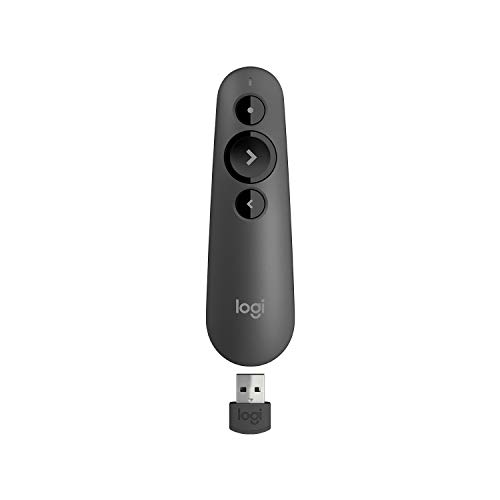
The Logitech R500s is the dependable middle of the presenter market: a comfortable, rubberised clicker with forward and back buttons you can find without looking, a red laser pointer for indicating points on a projected screen, and a plug-and-play USB receiver that stores inside the body so it does not get lost in a laptop bag. It connects over the receiver or over Bluetooth, which matters when every USB port on a thin laptop is already spoken for, and it is recognised by the usual presentation programs without drivers or pairing rituals. The shape fills the hand without bulk, the buttons give a clear click you can feel through a nervous grip, and the whole thing disappears into a jacket pocket between sessions. It suits teachers, trainers, and office presenters who move between rooms and computers and want the remote to simply work on whichever machine is waiting. It is not the choice for presenters who need a timer display, air-mouse control, or a digital highlight for streamed talks, and its laser should only ever be aimed at the screen or board in the presentation room, never at people, animals, aircraft, or vehicles.
Best for: presenters whose needs match the strengths described above. Not suited for: anyone whose main requirement is a feature this model deliberately leaves out, as covered in the trade-offs. Check price on Amazon for the current listing before you buy.

DinoFire Wireless Presenter — entry-level tier
The DinoFire Wireless Presenter covers the essentials at the entry end of the range: slide forward and back, a red laser pointer, volume and screen controls on some layouts, and a USB receiver that plugs in and works without software. For a student, a community speaker, or a teacher equipping a classroom on a tight budget, that simple formula is often exactly enough, and the light body is easy to hold through a long lesson. The trade-offs are the expected ones for the tier: the plastics feel lighter, the button feel is less refined than the Logitech and Kensington models, and you should check the exact button layout of the version you order because entry-level presenters vary more between listings. It suits occasional presenters who need a working clicker without paying for cursor control, timers, or digital highlighting. Keep the same safety habits as with any laser model: point only at the screen or board, never at eyes, animals, aircraft, or vehicles, and keep it stored away from children.
Best for: presenters whose needs match the strengths described above. Not suited for: anyone whose main requirement is a feature this model deliberately leaves out, as covered in the trade-offs. Check price on Amazon for the current listing before you buy.
Laser Safety Rules That Apply to Every Presenter
A presenter with a laser pointer is a tool for pointing at a screen or a board in a presentation room, and nothing else. Never shine the laser into the eyes of a person or an animal, even briefly and even as a joke, because a direct beam can injure eyesight before the person has time to blink or look away. Never aim the beam at aircraft, at vehicles, or through windows toward traffic, where a flash of light can distract a pilot or a driver at the worst possible moment. Keep the remote stored out of the reach of children, treat it as you would any laser device, and switch the pointer off the moment you stop presenting.
Use the pointer only to indicate a chart, a diagram, or a line of text on the screen or board in front of your audience, then let go of the button. Sweeping the beam around a room, bouncing it off mirrors or glass, or handing the remote to a child to play with are all outside what the tool is for. If your venue, school, or employer bans laser pointers outright, choose a model that highlights digitally on screen instead, such as the Logitech Spotlight, which moves a software highlight rather than a beam and is the safer choice wherever lasers are restricted.
How to Get the Most Value If You Buy
Rehearse with the remote before its first real talk, including the media and links in your deck, following the routine in how to use a wireless presenter remote. Build the receiver ritual and the battery ritual on day one. Use the blank-screen button deliberately, point sparingly and only at the screen, and present standing in the audience’s space rather than hovering by the laptop out of habit. Value in this category is extracted by behaviour; the device merely makes the behaviour possible. Presenters who treat the remote as part of their craft get flagship value from mid-range hardware.
The Decision Checklist
- Do I present standing in a room at least once a month?
- Do I need to point at detail on a screen for a live audience?
- Do I present from other people’s computers?
- Are laser pointers allowed where I present, or do I need digital highlighting?
- Will I keep a simple charging and carrying routine?
- Would the same money visibly improve my talks if spent elsewhere?
Four or more yes answers, with the last one answered no, means the purchase is worth it for you. Mostly no answers means skip it with a clear conscience. In between, buy the entry or mid-range tier and let a season of talks arbitrate.
Who Gets Their Money’s Worth and Who Should Skip It
The one-question shortcut
If the full analysis still leaves you undecided, ask the question that cuts through it: if this wireless presenter remote disappeared from your home after a month of use, would you replace it immediately, eventually, or not at all? People answer honestly when the purchase is framed as a loss. Immediate replacers should buy with confidence and choose the better model; eventual replacers should buy modestly; the not-at-all group has its answer too. In a desk or bench that doubles as a workspace for two completely different hobbies, that instinct, checked against the use-frequency count, settles the worth-it question more reliably than any feature comparison.
Count the uses, honestly
The worth-it question for a wireless presenter remote is mostly a frequency question. Estimate how many times a month the product would genuinely be used in your routine — not the enthusiastic first fortnight, but month four, when the novelty has worn off. In a desk or bench that doubles as a workspace for two completely different hobbies, a wireless presenter remote used weekly almost always justifies itself through saved time, avoided workarounds or better results, while the same product used twice a year is usually an expensive storage obligation. If your honest count is low, borrowing, hiring or using a service is the mathematically sound answer, and there is no shame in it.
The workaround you are already paying for
Most people considering a wireless presenter remote are already solving the problem somehow — with a slower method, a borrowed tool, a workaround that costs time or produces worse results. Price that workaround in attention and frustration, not just money: how often does it interrupt you, and what does the interruption cost the rest of your day? A purchase is worth it when it retires a recurring annoyance, not when it merely upgrades a process that was already painless. If your current workaround barely bothers you, the honest verdict for you is probably to skip the purchase.
Lifespan changes the whole calculation
A wireless presenter remote that serves for many years spreads its cost across thousands of uses; one that wears out, dates quickly or loses its supporting ecosystem does not. Judge lifespan by construction, consumable availability and how actively the maker still supports the line, rather than by optimism. This is where the picks discussed earlier differ most meaningfully for value: the model with the longer realistic service life can be the better value even when it is not the cheapest route in, because the cost per year of service is what your household actually pays.
The resale and hand-me-down exit
Value calculations usually assume you keep a wireless presenter remote forever, but a healthy second-hand market changes the risk. Products in the Gaming Mouse category that hold their appeal tend to resell or hand down easily, which means a wrong decision is recoverable rather than total. That exit value argues for buying the respected model over the obscure bargain: if your circumstances change, the known wireless presenter remote finds a new home quickly. An ultra-cheap alternative with no following is the one that becomes pure sunk cost in a cupboard.
When waiting is the right answer
Sometimes the correct verdict is not no, but not yet. If your space, routine or budget is about to change — a move, a new job pattern, a renovation — the wireless presenter remote that suits today’s setup may be wrong for next season’s. Waiting costs nothing and buys information: you learn whether the need survives the change. The exception is when the need is already costing you weekly in time or frustration; then waiting is itself the expensive option, and the analysis earlier in this piece applies with full force. Distinguish a stable recurring need from a temporary itch before deciding.
Write the conclusion of that check down before you order, so the decision survives contact with a tempting listing.
That single habit separates owners who stay pleased with their choice from owners who quietly start shopping again within a season.
Frequently Asked Questions
Is a wireless presenter remote worth it for teachers?
For most teachers, yes, and it is the strongest case in the category. Teaching involves constant movement, pointing, and attention management across many sessions a week, so the remote’s benefits compound quickly while its costs shrink to a battery routine. Check school policy on laser pointers first; where lasers are restricted, choose a digital-highlight model or a clicker used within the rules, and always store the device away from students.
Is a presenter remote worth it for online meetings?
Mostly no, with one exception. Seated screen-sharing is fully served by the keyboard, and a laser pointer is invisible to remote viewers anyway. The exception is the digital-highlight model, such as the Logitech Spotlight, whose on-screen highlight and magnification remote audiences see exactly as a room would. If your online talks involve walking through detailed figures for viewers, that single feature can justify the purchase on its own.
How long does a presenter remote last?
Years, with ordinary care. The devices have few moving parts, and the leading models are built for daily professional use. Longevity is decided by habits: keeping the receiver stored in the body, keeping the remote in a pouch rather than loose in a bag, and treating batteries kindly. Budget for replacement eventually, as with any small electronic, but a well-kept mid-range clicker is a long-service tool, not a consumable.
Should I buy a cheap presenter remote or save for a better one?
Match the tier to your frequency. Occasional presenters are honestly served by the entry tier, whose limitations are tactile rather than functional. Weekly presenters feel button quality, connection flexibility, and build every session, and should buy mid-range. The premium tier is justified by specific capabilities, digital highlighting above all, not by general betterness. Buying one tier above your pattern is the commonest waste in this category.
Can a presenter remote improve my presenting, or is it just convenience?
It removes obstacles rather than adding skill, but removing obstacles is how many skills become visible. Eye contact, movement, timing, and calm are presenter skills that a laptop tether physically suppresses; the remote releases them. It will not rescue weak material, and no honest review should claim otherwise. Think of it as clearing the stage so the presenting you are capable of can actually happen.
What if my workplace provides presenter remotes already?
Then the worth-it question changes rather than disappears. A shared remote covers basic need, and a personal one buys consistency: your device, your settings, your battery routine, in every room including the ones without a drawer remote. Frequent presenters in organisations often conclude the personal device is worth it for the reliability alone, while occasional presenters should simply use the shared pool and spend nothing.
Related Reading
- the pros and cons breakdown
- the companion reviews roundup
- the full buying guide
- how to use a wireless presenter remote
- wireless mouse picks for PC gaming
- wireless keyboard and mouse combos for couch use
- wireless gaming mouse options on a budget
Think about the room before you think about the remote. A small meeting room with a bright television rewards a digital highlight or a confident clicker, while a long lecture hall with a washed-out projector rewards a visible pointer and buttons you can operate without looking down. Presenters who rehearse with the actual room in mind rarely blame their tools, because they have already matched the tool to the throw distance, the lighting, and the screen they will really face.
Rehearsal is where a presenter remote earns its place. Run the full deck once with the remote in your hand, including the video clip, the link you plan to open, and the slide you always forget is a slow build. Note where you naturally stand, whether the receiver stays in range at that spot, and whether you can reach the black-screen button without hunting for it. Ten quiet minutes of this saves the public fumbling that audiences remember longer than the content.
Keep a simple backup plan. A spare battery or a charged cable in the bag, the deck also saved on the presentation computer itself, and the knowledge that the arrow keys advance slides will carry you through almost any failure. The presenters who look unflappable are rarely the ones whose equipment never fails; they are the ones whose failure drill is so practised that the audience barely notices the switch.
Button discipline matters more than button count. The best presenters advance slides decisively, use the blank-screen control when the audience should be looking at them rather than the slide, and resist clicking ahead to peek at what is coming. A remote with fewer, clearer buttons often produces a calmer delivery than a feature-packed one, because every control you might press by accident is a small risk carried through the whole talk.
Consider who else will use the device. A remote that lives in a shared training room should favour instant recognition, a receiver that stores inside the body, and controls a guest can understand in seconds. A remote that is personally yours can justify a learning curve, companion software, and tuned settings, because you will amortise that setup across hundreds of talks.
Wireless reliability is mostly about line of sight and distance. Receivers tucked behind a metal podium or a thick desktop case lose range; a receiver on a short extension lead, placed where it can see the room, transforms a flaky connection into a solid one. Bluetooth models sidestep the receiver entirely but depend on the host computer keeping its radio awake and paired, which is worth testing in the room rather than assuming.
Your voice and your slides should not compete. Use the remote to give the audience permission to look where you want: advance, point once at the screen or board to anchor the key figure, then step out of the beam’s story and talk to the people. The pointer is punctuation, not narration, and the talks that land hardest use it sparingly.
Travel changes the equation. A presenter who flies to speak should think about what survives a bag search and a borrowed laptop: plug-and-play connection, no dependence on admin rights to install software, and a receiver that cannot snap off because it lives inside the remote. Venue rules on laser pointers also vary, which is one more reason a digital-highlight model earns its place in a frequent traveller’s kit.
Accessibility deserves a mention. Large, tactile buttons help presenters with limited grip strength or gloves; backlit controls help in darkened halls; a remote that can be operated entirely by feel helps a speaker who uses a screen reader or who cannot glance down. Trying the device in your own hand, under your own conditions, tells you more than any feature list.
Finally, treat the remote as part of the talk’s choreography. Decide where it lives when you are not holding it, how you will pick it up without breaking eye contact, and what your hands do during questions. These small physical decisions are invisible when they go well and glaring when they do not, and they are entirely within your control before the audience arrives.
Think about the room before you think about the remote. A small meeting room with a bright television rewards a digital highlight or a confident clicker, while a long lecture hall with a washed-out projector rewards a visible pointer and buttons you can operate without looking down. Presenters who rehearse with the actual room in mind rarely blame their tools, because they have already matched the tool to the throw distance, the lighting, and the screen they will really face.
Rehearsal is where a presenter remote earns its place. Run the full deck once with the remote in your hand, including the video clip, the link you plan to open, and the slide you always forget is a slow build. Note where you naturally stand, whether the receiver stays in range at that spot, and whether you can reach the black-screen button without hunting for it. Ten quiet minutes of this saves the public fumbling that audiences remember longer than the content.
Keep a simple backup plan. A spare battery or a charged cable in the bag, the deck also saved on the presentation computer itself, and the knowledge that the arrow keys advance slides will carry you through almost any failure. The presenters who look unflappable are rarely the ones whose equipment never fails; they are the ones whose failure drill is so practised that the audience barely notices the switch.
Button discipline matters more than button count. The best presenters advance slides decisively, use the blank-screen control when the audience should be looking at them rather than the slide, and resist clicking ahead to peek at what is coming. A remote with fewer, clearer buttons often produces a calmer delivery than a feature-packed one, because every control you might press by accident is a small risk carried through the whole talk.
Consider who else will use the device. A remote that lives in a shared training room should favour instant recognition, a receiver that stores inside the body, and controls a guest can understand in seconds. A remote that is personally yours can justify a learning curve, companion software, and tuned settings, because you will amortise that setup across hundreds of talks.
Wireless reliability is mostly about line of sight and distance. Receivers tucked behind a metal podium or a thick desktop case lose range; a receiver on a short extension lead, placed where it can see the room, transforms a flaky connection into a solid one. Bluetooth models sidestep the receiver entirely but depend on the host computer keeping its radio awake and paired, which is worth testing in the room rather than assuming.
Your voice and your slides should not compete. Use the remote to give the audience permission to look where you want: advance, point once at the screen or board to anchor the key figure, then step out of the beam’s story and talk to the people. The pointer is punctuation, not narration, and the talks that land hardest use it sparingly.