Disclosure: As an Amazon Associate, ilcastellomenu.com earns from qualifying purchases. Links on this page are affiliate links; they cost you nothing extra. Prices and availability change often, so check the current Amazon listing before you buy.
Read enough kvm switch reviews side by side and a pattern emerges: nearly all of them describe the same small box in the same breathless terms, yet owners of that box report wildly different experiences — one calls it invisible, the next calls it flaky, and both are telling the truth. The difference is rarely the switch. It is the match between the switch’s design and the desk it landed on: the monitor’s demands, the keyboard’s ambitions, the number of screens, the way its owner likes to switch. This article reviews the KVM switch category the way it deserves to be reviewed — style by style, behaviour by behaviour — so that the verdicts attach to the right desks instead of floating free as generic praise or blame.
The plural in the title is deliberate. Where a single-product review can only tell you about one box, a survey of the category’s reviews can tell you something more useful: which design decisions keep earning praise across hundreds of desks, which keep generating the same complaints, and how to recognise — before you buy — which experience will be yours. We will review the mainstream desktop box, the compact value switch, the cabled minimalist unit, the dual-monitor workhorse, the enthusiast workstation switch and the USB-C era designs, and then distil what the collective verdict actually is.
Key Takeaways From These KVM Switch Reviews
- Best for: readers who want the category’s collective wisdom — which styles satisfy which desks — before narrowing to a single model in the buying guide.
- Not suited for: readers who already know their exact configuration and want a single product verdict; the single-class deep dive and the buying guide serve them faster.
- Across all styles, the happiest owners bought by inventory — computers counted, monitors counted, ports listed — and the unhappiest bought by headline.
- Switching manners dominate long-term satisfaction: EDID behaviour, hotkey or remote design, and USB handling are praised or blamed far more than raw build quality.
- Dual-monitor models earn the strongest loyalty and demand the most installation patience; compact models earn affection for simplicity and criticism only when owners outgrow them.
- Enthusiast switches are reviewed like professional tools — expensive, specialised, and fiercely defended by the desks they fit.
The collective verdict, up front: the KVM switch as a category is mature, dependable and badly served by one-size-fits-all reviewing. Buy the style your desk describes and the reviews suggest you will join the satisfied majority; buy by superlative alone and you are gambling. The sections below review each style on its real-use merits, then gather the cross-cutting lessons — about handshakes, hotkeys and hubs — that recur in every corner of the category.
In this guide
How to Read KVM Switch Reviews Without Being Misled
Before the styles themselves, a short field guide to the reviewing landscape, because KVMs attract a particular kind of misleading verdict. The first trap is the mismatched desk: a reviewer tests a two-computer switch on a three-screen battlestation, or a gaming keyboard through an emulating port, and reports the category’s failure when the failure was arithmetic. Whenever a review complains, ask what desk produced the complaint; whenever one glows, ask the same. The second trap is the first-hour verdict. KVM behaviour is dominated by handshakes and habits that only reveal themselves across days — the window that wanders on the third switch, not the first; the hotkey conflict that appears only in one application. Reviews based on longer ownership, including the patterns gathered in kvm switch pros and cons, are worth several quick unboxings.
The third trap is specification theatre: listings that lead with the largest numbers the silicon can theoretically touch, reviewed by writers who repeat them. A switch’s honest review lives in qualitative territory — does the picture return promptly, do windows stay put, do peripherals keep their personalities, does switching feel like a reflex — and those are the criteria applied throughout this article. Where a specification genuinely matters, it matters as a match: the switch must speak the video language your computers and monitor share, at the level your monitor actually uses, which is a question about your inventory rather than about superlatives. Readers who want the matching exercise formalised will find it in how to choose a kvm switch.
Finally, note what the best reviews in this category share: they name the peripherals. A verdict earned with a plain keyboard and a basic mouse does not transfer automatically to a desk running a macro-heavy gaming board and a wireless headset, and honest reviewers say what they switched with. Hold every review in this roundup — including this one — to that standard.
The Mainstream Desktop Box, Reviewed
The classic desktop box is the category’s reference design, and its reviews read like reviews of a good appliance: unglamorous, consistent, quietly positive. The format — a low metal or plastic chassis, console ports for monitor, keyboard and mouse, paired video and USB runs to each computer, a front button and usually a remote or hotkey option — has been refined by several makers over many product generations, and that refinement shows in the details owners praise: ports that face sensible directions, cables that exit without fighting, switching that behaves the same on the hundredth day as the first.

TESmart KVM Switch — The Reference Mainstream Design
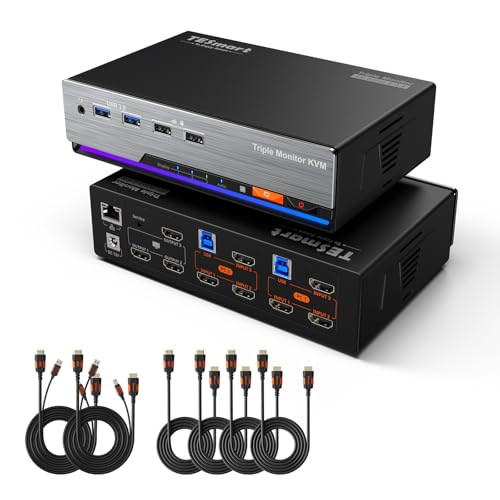
TESmart’s range exemplifies the mainstream box, spanning the common configurations from two computers and one monitor upward, and its reception follows the pattern: strong satisfaction from desks that matched the configuration to their inventory, with criticism concentrating on the usual category edges — specialist peripherals meeting emulated ports, and owners discovering that a dual-monitor variant needs twice the cable patience they budgeted. As a reviewed style, its virtue is predictability. You know what the box will do, the documentation says what it supports, and the desk that fits the diagram is the desk that writes the happy review. Best for: the standard work-plus-personal desk in single or dual monitor form. Not suited for: minimalists who want no visible box at all. A mid-tier representative — check price on Amazon for the configuration matching your screens.

IOGEAR KVM Switch — Longevity as a Feature
IOGEAR’s reviews carry a distinctive flavour: many come from offices and repeat buyers, and they praise the unexciting virtues — a product line that stays recognisably itself across generations, cabled entry models that install in minutes, desktop models that standardise a whole bench of desks. The critical reviews tend to be about frontier features rather than basics: this is a maker whose strength is the refined centre of the category rather than its bleeding edge. For a buyer, that profile is genuinely useful information. If your desk is ordinary in the best sense — standard peripherals, standard displays, two computers — the mature all-rounder is frequently the review-proof choice. Best for: standard desks, offices, and anyone buying their second KVM after learning what they actually need. Not suited for: frontier gaming setups. Mid-tier — check price on Amazon.
The Compact and Cabled Styles, Reviewed
UGREEN KVM Switch — The Compact Value Style
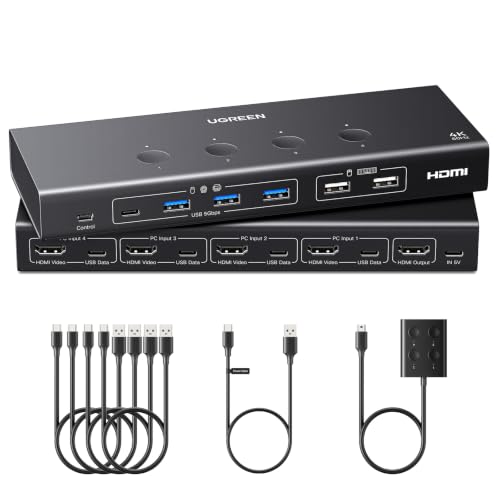
Compact switches earn their reviews on charm and arithmetic: a small unit, a friendly tier, two computers sharing one monitor and a handful of USB devices, installed before a coffee cools. UGREEN represents this style, and the praise pattern is consistent — owners with straightforward desks report that the thing simply works, shares a printer or drive as a bonus, and disappears under or behind the monitor. The criticism pattern is equally consistent and equally fair: these are not the switches for dual monitors, for demanding displays, or for peripheral chains with ambitions, and owners who asked those things of them wrote the disappointed reviews. Judged within its brief, the compact style is one of the category’s best-value ideas; judged outside it, nothing could survive. Best for: two computers, one monitor, mainstream peripherals, tidy desks. Not suited for: growth paths toward more screens. Entry tier — check price on Amazon, and confirm included cables match your machines.
Rybozen KVM Switch — The Cabled Minimalist Style
Rybozen represents the cabled school: the switch as a junction in a bundle of captive leads, with a small wired remote doing the talking. Reviews of this style split by temperament. Owners who value invisibility love it — no box on the desk, a button exactly where they stuck it, an installation measured in plugs rather than projects. Owners who value flexibility note the fixed geometry: cable lengths are what they are, a damaged lead is a retired unit, and re-routing a desk means re-routing the whole bundle. Neither camp is wrong; the style is a commitment to a stable desk layout, rewarded when the layout truly is stable. Best for: settled two-computer desks, minimalists, and anyone whose switch must hide completely. Not suited for: desks that rearrange, grow, or lend their computers around. Entry tier — check price on Amazon.
The Dual-Monitor Workhorse, Reviewed
Dual-monitor KVMs attract the most emphatic reviews in the category, in both directions, and the reason is leverage: they multiply everything. Two screens switching together transforms a two-computer desk — each machine keeps its full panoramic workspace — and owners who live that transformation describe it in the language of revelation. The same multiplication applies to the installation: double the video runs, double the handshake negotiations, double the opportunities for one tired cable to impersonate a faulty switch. Reviews written after a patient, methodical install glow; reviews written after a rushed one blame the box for the cable drawer.
Two design qualities separate the praised dual-monitor models from the panned ones. The first is EDID emulation, which matters twice as much when two displays are involved: without it, every switch risks two renegotiations and a double window-shuffle, and owners notice within a day. The second is honest connection design — the switch’s video inputs and outputs arranged so that both computers connect with the same cable types the monitors use natively, without a thicket of adapters converting in both directions. Desks planning this style should start from the curated shortlists in kvm switches for two computers and two monitors and three-monitor kvm setups, then read individual listings with the EDID question in hand. The mainstream makers in this roundup all field dual-monitor variants; the style, more than the badge, is the decision.
The Enthusiast Workstation Switch, Reviewed
Level1Techs KVM Switch — Reviewed Like a Professional Tool
Enthusiast switches are reviewed the way professional tools always are: the price of admission is acknowledged once, and then the discussion becomes entirely about whether the tool respects the work. Level1Techs represents this tier, and its reception among demanding desks — high-performance gaming rigs beside workstations, specialist peripherals, displays chosen without compromise — is defined by relief: here, at last, is a switch designed by people who understand why the mainstream box flattened their keyboard’s personality or fumbled their display’s handshake. The design priorities are transparency and manners: pass demanding signals faithfully, treat USB devices as themselves, switch with hotkeys that a typist can fire without thinking. The critical reviews, such as they are, come from buyers who purchased capability their desks never used — a fair warning that this tier rewards need, not aspiration. Best for: demanding gaming and workstation desks whose peripherals have defeated lesser switches. Not suited for: ordinary desks, which will never cash the cheque its tier writes. Premium tier — check price on Amazon.
The USB-C Era Designs, Reviewed

Cable Matters KVM Switch — Connectivity-First Thinking
The newest reviews in the category cluster around a changed desk: the computers are no longer two desktops but a USB-C laptop and something older, and the switch must mediate between eras. Cable Matters represents the connectivity-first response — designs that start from the port inventory of real mixed desks and work outward. The praise pattern centres on diagrams that make sense: the laptop connects the way laptops now connect, the desktop connects the way desktops always have, and the monitor is served without adapter archaeology. The caution pattern is about homework: USB-C carries several kinds of signal, and a port’s shape is not a promise about what flows through it, so the reviews reward owners who verified what their laptop’s port actually outputs before ordering. Best for: mixed-era desks and diagram-readers. Not suited for: buyers unwilling to inventory their ports first. Entry-to-mid tier — check price on Amazon once the inventory is done.
The Cross-Cutting Lessons From All These Reviews
Lesson One: The Handshake Is the Product
Read a hundred KVM reviews and the word that matters most never appears in the listings: handshake. The monitor negotiation — EDID — decides whether switching feels instant and whether windows hold their places, and it is the single strongest predictor of whether an owner describes their switch as seamless or as flaky. Models that emulate the display to every computer earn the seamless reviews; models that let each switch look like an unplugging earn the others. This is not a premium-only concern. Even a modest desk switches many times a day, and the accumulated difference between a clean return and a renegotiation is the difference between infrastructure and interruption. When reviews conflict about the same model, the hidden variable is often the monitor itself — some displays renegotiate gracefully, others sulk — which is why verdicts should be read as desk-specific evidence, not universal law.
Lesson Two: Hotkeys, Buttons and Remotes Are Ergonomics
The switching control is the part of the product your body interacts with, and reviews reward designs that respect that. Hotkey switching delights keyboard-centred workers and frustrates owners whose keyboards route through pass-through ports or whose employers’ machines intercept the combinations. Front buttons delight owners whose boxes live within reach and frustrate minimalists who banished the box behind the desk. Wired remotes — the small puck on a lead — quietly accumulate the fewest complaints of any control method, because they decouple the box’s hiding place from the button’s home. The meta-lesson for buyers: decide where your hand will be when you switch, and buy the control that lives there. The meta-lesson for reviewers: a verdict about switching feel is a verdict about one control method, and should say which.
Lesson Three: Shared USB Is the Bonus That Bites
Nearly every modern KVM shares more than keyboard and mouse — headsets, webcams, printers, drives — and reviews praise the tidiness lavishly right up until the first self-inflicted wound: switching away mid-transfer to a shared drive, or mid-call with a shared headset, or discovering that a shared printer has just taken a job from the other computer’s queue. None of these are product faults, and the thoughtful reviews say so; they are the predictable physics of sharing, manageable with one habit — finish the shared device’s business before switching. Owners who adopt the habit keep the praise; the feature is a genuine bonus when its one rule is respected.
Lesson Four: Cables Write More Reviews Than Switches Do
The category’s dirty secret, visible across all styles, is that a large share of faults attributed to switches trace back to cables: the over-long run, the tired lead from the drawer, the bargain cable asked to carry a demanding display’s full signal. A KVM multiplies a desk’s cable count, so it multiplies exposure to the weakest lead in the drawer. The reviews that end happily often contain the same sentence in different words — replacing the cable fixed it. Buyers should budget the same suspicion: install with known-good, appropriately short cables, keep one spare, and interrogate leads before indicting boxes. The sibling display category learned the identical lesson, as the testing behind the hdmi switch reviews records.
Strengths and Trade-Offs of the Category, as Reviewed
Strengths
- The core promise is kept. Across styles and makers, a correctly matched KVM reliably turns multi-computer desks into one workstation with modes — the fundamental review verdict is positive.
- Choice is real, not cosmetic. Compact, cabled, mainstream, dual-monitor, enthusiast and USB-C era designs genuinely differ in behaviour, so an honest inventory can always find its match.
- Maturity shows. The category’s established makers document their switching methods, EDID behaviour and USB design — the information good buying requires is available to anyone who reads.
Trade-Offs
- Matching is the buyer’s job. No review can transfer perfectly between desks; the category demands an inventory and a little diagram-reading that simpler accessories do not.
- Edges remain edges. Specialist peripherals, demanding displays and locked-down work machines can each complicate the picture, and the cheapest units have the least margin for any of them.
- Installation is an hour of honesty. Especially in dual-monitor form, the tidy result is earned with cable patience that the marketing photographs never show.
Who Each Reviewed Style Suits — and the Final Word
Compressing the roundup into decisions: the compact and cabled styles suit the settled two-computer, one-monitor desk and earn their keep through simplicity. The mainstream desktop box suits the standard work-plus-personal desk and the office standardising across many desks, in one or two monitor form. The dual-monitor workhorse suits the panoramic desk and demands installation patience as its admission price. The enthusiast switch suits the desk whose display and peripherals are the point of the setup, and repays genuine need rather than curiosity. The USB-C era designs suit the mixed desk of laptop and legacy machine, provided the port inventory is done first. Readers who want those decisions turned into a guided sequence will find it in the kvm switch buying guide, and those still weighing whether the category belongs on their desk at all should read is a kvm switch worth it.
And a closing word on method, because this article asked you to trust a survey: every style verdict above is qualitative by design. These reviews record how the category behaves — its handshakes, hotkeys, cables and compromises — rather than pinning numbers to specific models, because behaviour is what survives from one product generation to the next and what your desk will actually live with. Check the current listing of any model you shortlist for its exact configuration and included cables, match it against your inventory, and the collective experience of the category’s owners says you will be writing the satisfied kind of review. If you take one habit from this entire roundup, let it be the habit the happiest reviewers share: describe your desk honestly, in computers, screens, ports and peripherals, before you let any verdict — glowing or damning — talk you into or out of a box. The reviews were always about desks. Yours is the only one that counts.
A Month of Switching: The Experience Reviewed Over Time
Most reviews are written in the first week, so let this section stand for the longer test: what a month of daily switching teaches that an afternoon cannot. The first lesson arrives around day three, when the novelty dies and the habit forms. Switching stops being an event and becomes a gesture — the hand learns the button or the hotkey the way it learned the light switch — and from that point the KVM is judged purely on whether it ever breaks the spell. The switches that earn long-term praise are the ones that never do: no morning where the work laptop wakes to a black screen because the switch was left pointing elsewhere and the handshake sulked, no evening where the personal machine’s windows have migrated to a phantom display. Consistency, repeated thirty days running, is the real product.
The second lesson concerns the peripherals’ personalities. In week one, owners test the obvious things — does the keyboard type, does the mouse move. By week four they have exercised the corners: the headset that must follow the active machine into calls on both computers, the webcam whose settings live in software on one machine only, the wireless receiver that occasionally needs reseating after a switch, the shared drive that everyone in the house now treats as belonging to whichever computer is lit. Reviews that mention these corners are the ones written by owners, and their collective verdict is that the corners are where designs separate. A switch with thoughtfully arranged shared USB ports and honest pass-through options handles the month gracefully; a switch bought as a bare minimum reveals its minimums one corner at a time.
The third lesson is about the other people in the house or office. A KVM quietly standardises a desk: a partner sitting down at the shared screen, a colleague covering your calls, a family member borrowing the good monitor — all of them meet the switch, and all of them form an opinion. The designs that survive households are the legible ones: a button whose state you can see, a remote whose position is obvious, an indicator light that says which machine owns the desk. Hotkey-only designs, elegant for their owner, are the ones guests describe as haunted. If your desk is shared by humans as well as computers, weight legibility accordingly.
Documentation, Support and the Review Behind the Review
A KVM is a small computer-adjacent device with an unusual support profile: when it misbehaves, the fault can live in the switch, a cable, a computer’s settings, a monitor’s temperament, or a peripheral’s firmware, and the owner’s first need is not a replacement but a diagnosis. This is where makers separate as clearly as in any hardware test. The well-reviewed support experiences share a shape: documentation that includes a real connection diagram for your exact configuration, a troubleshooting section that names the classic symptoms — window migration, a keyboard that types on the wrong machine’s login screen, a display that returns slowly — and assigns each a cause and a cure, and firmware or guidance updates when operating systems change their USB or display behaviour.
The poorly reviewed experiences share the opposite shape: a folded sheet with a generic diagram, no acknowledgement that peripherals differ, and support scripts that reach for replacement before diagnosis. Since a large fraction of KVM faults are cable faults, the maker who teaches you to suspect the cable first is doing you a genuine service, and the reviews that praise a brand’s documentation are usually praising exactly that honesty. Buyers comparing two otherwise-equal models should treat the quality of the manual — findable before purchase on the maker’s site — as a legitimate review criterion. It predicts your worst day with the product better than any feature list predicts your best one.
Warranty and longevity complete the picture. The category’s switches have no moving parts beyond their buttons and no consumables at all, so a well-made unit should outlive several of the computers it serves. Reviews from long-term owners confirm the expectation for established makers: units still switching after years of daily use are unremarkable, which is the highest compliment infrastructure can earn. The failure modes that do appear with age are mundane — a button that grows tired, a port loosened by a thousand cable swaps, a power supply that gives up — and they argue for the desktop-box style’s quiet advantage: standard cables and a replaceable supply mean the installation survives the unit if the worst happens.
How Each Style Ages: The Second-Year Verdicts
Reviews written in year two have a different centre of gravity: the features have faded into habit, and what remains is fit — whether the switch still matches the desk it serves. This is where the styles’ life stories diverge most instructively. Compact switches age exactly as their owners’ desks do. The settled desk reports a second year identical to the first, which is success. The growing desk reports the category’s most familiar upgrade story: a second monitor arrived, or a third machine, and the little switch that was perfect became the constraint — not through any fault, but because its brief was honestly narrow. The lesson reviewers draw is to buy the compact style with eyes open: it is the right answer for a stable desk and a knowingly temporary one for a growing desk, and either can be the correct purchase.
Mainstream desktop boxes age the most gracefully, because their design assumed change: cables are replaceable, configurations span sizes, and a box bought for two computers and one monitor often has a sibling — or headroom — for the desk’s next shape. Dual-monitor workhorses age in proportion to their installation quality; the patiently cabled desk reports boring reliability, while the rushed installation’s gremlins tend to be re-diagnosed, eventually, as the cables they always were. Enthusiast switches age like other professional tools: their owners’ loyalty hardens, because the desk’s demands usually grow into the headroom rather than away from it. Cabled minimalist units have the starkest ageing curve — flawless until the day the desk rearranges or a captive lead fails, at which point the whole unit’s simplicity becomes its single point of failure. None of these stories indicts its style. Together they write the category’s most useful review advice: buy for the desk you will have in two years, not only the one in front of you, and let the style’s ageing pattern — not its first week — make the final argument.
There is one more second-year pattern worth recording, because it surprises new buyers: the switch changes how its owner buys computers. Once peripherals are shared, a new machine no longer needs its own monitor budget, its own keyboard compromise, its own corner of the desk. Owners report choosing small, quiet, headless-friendly machines they would previously have dismissed, and keeping older computers in service as servers, render helpers or spare seats, because the cost of keeping them at the desk fell to one cable pair. A peripheral switch quietly becoming a purchasing philosophy is not something any listing promises — but the long reviews mention it too often to omit.
The Reviewers’ Disagreements, Adjudicated
Where the category’s reviews argue with each other, the arguments are worth settling, because each one hides a buying decision. The oldest dispute is emulation versus pass-through, fought between owners who prize hotkeys and instant device acceptance and owners who prize peripheral fidelity. The adjudication is that both are describing the same trade from opposite ends, and the correct side depends on your keyboard tray: if your keyboard is a keyboard, emulation’s dependability wins; if your keyboard is a control surface with macros, layers and software, pass-through’s fidelity wins — and the genuinely well-designed switches refuse the binary, offering emulated ports for the primary devices and transparent ports for the exotic ones. A review that declares one approach simply superior is reviewing its author’s peripherals, not the product.
The second dispute concerns automatic switching — designs that flip to whichever computer most recently woke or presented a signal. Admirers call it magic; detractors call it theft, because a background machine waking for an update can steal the screen mid-sentence. Both experiences are real, and they divide by household: a desk whose machines sleep honestly loves automation, while a desk with a chatty server or a work laptop on a vigorous update schedule learns to hate it. The settled position across long-term reviews is that automatic switching is a feature to be able to turn off — present as an option, never as a compulsion — and that a manual override within reach is non-negotiable.
The third dispute is about size: whether a KVM should be a visible box with honest ports or an invisible junction in a cable bundle. The reviews resolve it as a question about the desk’s future rather than its present. Visible boxes forgive change — new cables, new machines, a port that needs reseating at midnight. Invisible bundles reward stability with the cleanest desks in the category. Owners rarely regret either choice when it matched their desk’s rate of change, and frequently regret the mismatch in both directions: the minimalist whose desk grew, the tinkerer whose box stares at them from a surface they wanted empty. Rate your own desk’s restlessness honestly and the dispute settles itself.
What Owners Stop Noticing — and What They Start
The most revealing reviews are the ones owners write accidentally, in passing, months later, when they describe not the switch but the desk around it. They stop noticing the transition between work and personal computing, and start noticing that the boundary has become healthier: the work laptop closes — metaphorically, at a button press — and the evening machine is simply there, with no cable ritual to postpone the change and no shared screen to blur it. They stop noticing their peripherals as belonging to a machine, and start noticing them as belonging to them: the keyboard is my keyboard, whichever computer is lit. They stop noticing the second computer as a second-class citizen with the small screen and the cheap mouse, and start using it for everything it is actually good at.
They also start noticing, with some surprise, the things the switch did not do. It did not make the two computers share files, or printers queues behave, or the work machine’s security policy relax about a personal headset. It did not remove the need for a backup drive, a network share, or a sensible sync habit. The mature reviews hold both truths at once: the KVM solved the peripheral problem completely, and the peripheral problem was only ever one of the desk’s problems. That clarity is the best possible starting point for a buyer, and it is why this roundup has insisted on drawing the category’s borders — against docks, against hubs, against software — as carefully as its benefits. Buy the switch for the job it does, and the reviews promise you will join the owners who stopped noticing it entirely, which is the finest verdict any of them ever wrote.
At the Category Borders: What Reviews of Neighbouring Tools Teach
A roundup of KVM reviews gains depth from its borders, because buyers arrive at this category from three directions and each brings a comparison. From the docking-station direction come laptop owners who bought a dock to solve a two-computer problem and reviewed it bitterly for failing at a job it never claimed. The dock expands one machine beautifully; it shares nothing. Their reviews, redirected here, usually end happily — the KVM was the tool their sentence actually described — and the episode teaches the border’s rule: expansion is for one computer, switching is for several, and the fullest border treatment in this cluster is kvm switch vs laptop docking station. From the HDMI-switch direction come TV-and-console owners graduating to computer desks; their reviews note, correctly, that the KVM is the HDMI switch’s idea completed — the same source-selection instinct, extended to the keyboard and mouse that computers cannot live without. The sibling category’s own verdicts are gathered in the hdmi switch buying guide, and the overlap confuses fewer buyers every year as the two categories’ reviews learn to cite each other.
From the software direction come the remote-desktop converts, and their reviews are the most interesting of all, because software genuinely competes here. Remote access is free, works across rooms and networks, and asks nothing of the cable drawer. Its reviewers-turned-KVM-owners cite the same three conversions: responsiveness, because the KVM shows you the machine itself rather than a stream of it; independence, because the KVM works before boot, at login screens, in setup menus, and when the network is the thing that has failed; and presence, because one desk with one screen feels like a place, while a window inside another machine’s desktop feels like a visit. None of this retires the software — most KVM owners keep it for reaching machines in other rooms — but it explains why the hardware category persists and reviews well in an era when a free alternative is a download away. The borders, properly read, are not threats to the category. They are its definition, drawn by the people who crossed them.
The One-Paragraph Verdict on Every Style
For readers who have absorbed the roundup’s arguments and want its conclusions at pocket size: the mainstream desktop box is the category’s safest pair of hands, reviewed well by the widest range of desks and recommended here as the default starting point. The compact switch is the best first KVM ever made for a stable two-computer desk, and its reviews stay warm exactly as long as the desk stays stable. The cabled minimalist is the connoisseur’s choice for an unchanging, invisible installation. The dual-monitor workhorse earns the category’s most passionate reviews and charges patience as its price. The enthusiast switch is a professional tool whose reviews should be read only by desks with professional demands — and believed completely by them. The USB-C era designs are the category’s present tense, reviewed best by buyers who did their port homework. Choose by desk, not by superlative, and the collective verdict of the category’s owners becomes a prediction: you will stop noticing your switch, and start noticing everything it quietly made possible. That prediction, repeated across every style in this roundup, is the closest thing the category has to a guarantee — not that any particular box is flawless, but that the right shape of box, honestly matched, has been making multi-computer desks feel like single workstations for a very long time, through several generations of computers, monitors and peripherals that all came and went around it.
What a Careful First Week With a Kvm Switch Reveals
The strongest sign in a hands-on check is consistency: the same input should produce the same result on the first attempt and on the twentieth. Revisit the decision after the novelty fades: the right kvm switch should feel almost boring in use, doing its job without negotiation every single time. If two options look identical on paper, choose the one whose controls, layout or handling you understood fastest, since clarity in daily use beats a longer feature list you never touch. Think about storage for the accessories this kvm switch brings with it, so spare parts and tools end up in one known place instead of scattered across drawers.
As a concrete listing check, take the TESmart KVM Switch and the IOGEAR KVM Switch named earlier in this article and confirm, line by line, that each variant offered matches the size, connection and contents described for it here. Take a quick photo of the working setup before you change anything, so cable routes, positions and settings can be restored exactly if the new arrangement disappoints. Separate the features you will use in the first month from the ones that only sound reassuring, and let the first group carry far more weight in the decision. When something behaves oddly, return to the basics first: power, connection, position, cleanliness and the last setting you changed, in that order, before assuming a fault. A fair test repeats the same task at least twice, once while you are paying attention and once while you work normally, because concentration can hide clumsy design.
Check that nothing you place on, under or beside the kvm switch blocks airflow, movement, visibility or access that the design quietly depends on. Keep the instructions somewhere you can find them months later, since the setting or step you skip today is often the one a future problem sends you hunting for. A calm final test is to walk away mid-task, come back later, and see whether the setup still makes sense at a glance without reconstructing what you were doing. Decide in advance what good enough looks like for your use, so a minor cosmetic flaw does not distract you from performance that genuinely meets the brief.
Keep the packaging and any small adapters, feet, brackets or fasteners together until the kvm switch has survived a full week of ordinary use in its final position. Treat any accessory bundled in the box as a starting point, and check whether it suits your setup before assuming the maker has solved that part for you. Compare what the listing promised with what the box actually contained, item by item, and treat any mismatch as a reason to pause before the return window closes. If the kvm switch will be shared, agree on one home position and one simple reset routine, so each person does not undo the previous person’s adjustments. Prefer a setup you can explain to another person in a minute, because simple arrangements are easier to troubleshoot, share and repeat than fragile clever ones.
Plan where the cables or materials connected to this kvm switch will run when the room is tidy, not just while you are testing on an empty surface. Ask whether the benefit you want survives your least favourite conditions, such as low light, a crowded desk, a warm room or a rushed start to the day. When a specification is stated in unfamiliar terms, translate it into your own routine: how long, how often, how far, how loud in practice, before letting it sway you.
Notice how the kvm switch behaves when you are tired or in a hurry, since products that demand perfect technique tend to fail exactly when you have least patience. Note the moment you first had to think about the kvm switch instead of your work, since that moment usually reveals more than any summary of features can. Start this final check away from the listings, with the space, the equipment and the routine you already have written down in plain terms. Give a new kvm switch a fair trial in the position it was bought for before improvising workarounds, since many early complaints disappear once placement is corrected. Test in the order you actually work: power on, connect, adjust, run a real task, then tidy up, rather than judging the kvm switch on a single impressive first impression.
Keep liquids, loose papers and anything that sheds dust or fibres at a sensible distance, unless the kvm switch was clearly designed to work right beside them. Allow a short settling period for your own habits to adapt, but set a firm date to decide, well inside the return window, whether this kvm switch has earned its place.
Frequently Asked Questions
What do most KVM switch reviews agree on?
They agree that the category works: a correctly matched switch reliably shares one monitor, keyboard and mouse between computers, and owners overwhelmingly keep using it daily. They also agree on the failure pattern — disappointment almost always traces to a mismatch of shape or peripherals rather than a defective box, and to cables more often than to switches. Finally, they agree that switching manners, especially how the display handshake is handled, matter more to long-term satisfaction than any headline specification.
Which KVM switch style gets the best reviews overall?
No single style wins universally, because reviews attach to desks. Mainstream desktop boxes earn the most consistently positive verdicts from standard two-computer desks; dual-monitor models earn the most passionate praise from panoramic desks willing to install patiently; enthusiast models earn fierce loyalty from demanding gaming and workstation setups. Compact and cabled styles are reviewed warmly by the settled, minimalist desks they were designed for. The best-reviewed style for you is the one whose design brief matches your inventory.
Why do some reviews call the same KVM switch flaky?
Usually because the desks differed. A switch that behaves beautifully with a standard monitor and keyboard can struggle with a demanding display, an elaborate gaming keyboard routed through an emulating port, or a marginal cable — and each of those variables belongs to the reviewer’s desk, not the box. Handshake behaviour also varies by monitor: some displays renegotiate gracefully on every switch, others are slow to return. Read conflicting reviews as evidence about different desks, and weight the ones describing setups like yours.
Are expensive KVM switches reviewed better than cheap ones?
They are reviewed differently. Higher tiers buy processing — display emulation, transparent USB handling, more flexible switching — and demanding desks review those qualities as essential. Simple desks often review entry models just as warmly, because their needs never reach the edges where the tiers diverge. The pattern in the category’s reviews is not that spending more guarantees satisfaction; it is that spending appropriately for your desk’s demands does. Overspending on unused capability earns no better verdicts than underspending on needed capability.
Do KVM switches work well with gaming setups according to reviews?
For everyday and mid-tier gaming, reviews are comfortably positive: the switch shares the desk, the game runs on its own machine, and play is unaffected. Demanding setups — high-performance displays and specialist gaming peripherals — are where reviews diverge, and where enthusiast-grade switches earn their following by passing signals and devices transparently. The consistent advice from gaming owners is to verify the switch maker’s stated compatibility against your specific monitor and peripherals rather than assuming the category’s mainstream models stretch indefinitely.
What should I check in a KVM switch listing before trusting reviews?
Check the configuration against your inventory: computer count, monitor count, and the video connection types on every machine and screen. Check the switching methods offered and whether display emulation is mentioned. Check how the USB ports behave — dedicated keyboard and mouse ports, shared device ports, any pass-through option — and whether the cables you need are included. Reviews then tell you how that design behaves in the wild; the listing tells you whether the design is even eligible for your desk.
Related Guides
Continue with the single-class deep dive in the kvm switch review, how to set up a kvm switch, and dual-monitor desks and their switches.