Disclosure: As an Amazon Associate, ilcastellomenu.com earns from qualifying purchases. Links on this page are affiliate links; they cost you nothing extra. Prices and availability change often, so check the current Amazon listing before you buy.
This pc fan controller review exists because the humble fan controller is the most misunderstood part in a modern PC build. It does not make a computer faster, it does not add storage, and it never appears in benchmark charts, yet it quietly decides whether a machine feels calm and composed or loud and restless every single hour it runs. After working through what these devices actually do, how the main designs differ, and where each style earns its place, the short verdict is simple: a good controller turns fan noise from something you endure into something you schedule, shape, and mostly forget about.
Key Takeaways: A fan controller sits between your fans and the rest of the system and decides how fast each fan spins. Simple inline controllers adjust one fan by hand and suit a single noisy exhaust. Hub-style controllers gather many fans onto one tidy unit and suit most gaming and workstation builds. Software-driven controllers add temperature-based curves and lighting coordination and suit builders who enjoy fine tuning. The right choice depends on whether your fans use voltage control or pulse-width modulation, how many fans you run, and how much time you want to spend tuning. Buy for control method first, neatness second, and decoration last.
This review is written for builders who already own fans they like and want those fans to behave better. If your case fans roar during light desktop work, if your radiator fans ignore the temperature of the liquid they cool, or if your motherboard simply runs out of headers, a controller is the missing layer. It is not for everyone: a quiet build with two fans and a patient motherboard BIOS may never need one, and this review will say so plainly where that applies.
What a PC Fan Controller Is and Where a Pc Fan Controller Review Should Start
Start with the job itself. Every case fan needs two things: power to spin and a signal that tells it how fast to spin. On a basic build the motherboard supplies both through small headers scattered around the board. That works until it does not. Headers run out quickly once a case fills with intake, exhaust, and radiator fans, and each header is expected to drive only a modest load. A controller steps in as a dedicated manager, drawing its main power directly from the power supply and handing out controlled power to a group of fans from one organised place.
There are three broad families. The simplest is the inline or manual controller, a small dial or slider unit that adjusts voltage to one fan or a small group, with no software and no sensors. The second is the hub, a compact box that gathers many fan plugs into one place, repeats one control signal across them, and keeps cable runs short and tidy. The third is the full software controller, which connects to the motherboard over an internal data link, reads temperatures, applies custom curves, and often coordinates addressable lighting on the same fans. Each family solves a different problem, and much of the confusion in this category comes from buyers expecting one family to behave like another.
Where a controller fits in a build matters as much as which one you pick. Hubs usually live behind the motherboard tray, stuck to a cable-management plate or tucked beside the power supply shroud, where short fan leads can reach them without crossing the main chamber. Software controllers want the same hidden home but also need a clear run for their data cable. Manual controllers are the exception: some are designed to sit in a front bay or on a small bracket where a dial stays within reach, which suits people who like adjusting airflow by feel before a long gaming session or a quiet evening of work.
The control method is the detail that decides everything else. Fans with three pins are controlled by varying the voltage they receive: lower voltage, slower spin, and at very low voltage some fans simply stall and stop. Fans with four pins add a dedicated control wire and use pulse-width modulation, where full power arrives in rapid pulses and the fan’s own electronics translate that signal into speed. Modulation control is smoother at low speeds and keeps low-speed starting more reliable. A controller must match the fans you own. Sending a modulation signal to a voltage-controlled fan, or starving a modulation fan with low voltage, produces exactly the unpredictable behaviour that gives this category a bad name.
For wider context on the fans themselves, see our companion coverage in our pc case fan review and the selection advice in the pc case fan buying guide, because a controller can only organise fans that were sensibly chosen in the first place.
In this guide
Design, Build and Setup
Good controller design is mostly invisible. The unit should feel solid rather than hollow, its fan sockets should grip plugs firmly without needing force, and its power lead should be long enough to reach the power supply area without stretching across hot components. Mounting matters too: adhesive pads are fine for a light hub on a smooth tray, but a heavier software controller deserves screws or a proper bracket, because a unit that peels loose behind a tray can rest against cables and fans in ways nobody planned.
Cable design separates thoughtful products from cheap ones. Fan leads on a hub should be long enough to reach the far corners of a mid-tower case yet not so long that the surplus becomes a nest. The main power lead should be clearly keyed so it cannot be plugged in the wrong way, and the data cable on software models should be flexible enough to route through tray cut-outs without kinking. None of this is glamorous, and all of it decides whether installation takes ten calm minutes or an irritated hour.
Setup follows one golden rule that this review will repeat until it sticks: the PC must be powered fully off and unplugged from the wall before any fan wiring is touched. Fans, headers, and controller sockets are small and closely spaced, and working inside a live system risks shorting a connector against the case or nudging a plug half out of its socket. Work unplugged, ground yourself by touching the case metal, and only reconnect power when every plug is seated and every cable is confirmed clear of fan blades.
The models below are the reference points used throughout this review. They are presented in prose only while verification is pending, each with its honest tier positioning, so you can compare approaches rather than chase links.

Noctua NA-FC1 Fan Controller — The Minimalist Manual Option
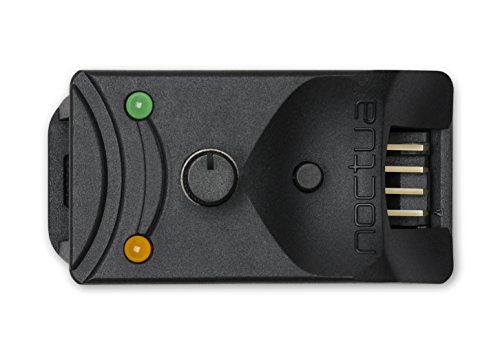
The Noctua NA-FC1 represents the manual family at its most refined. It is a small inline unit built around a single smooth dial, designed to sit between a motherboard header and a modulation-controlled fan, with a small switch that lets it either pass the motherboard’s own signal through untouched or blend that signal with your manual adjustment. That blend is the clever part: the motherboard keeps its protective, temperature-aware behaviour, while you trim the overall speed down for quieter running. A small button can also hold the fan at a stop below a chosen threshold for near-silent idle behaviour.
In real use it suits one job beautifully: taming a single loud fan, most often a CPU cooler fan or a stubborn case exhaust, without opening software ever again. It is an entry-to-mid tier purchase in spirit — a small, focused tool rather than a system. Its honest limitation is scope. One dial means one behaviour, so a case full of fans each needing different treatment will outgrow it immediately, and builders wanting temperature curves per fan group should look at the software family instead.
Best for: owners of one noisy modulation fan who want a set-and-forget trim. Not suited for: multi-fan cases, lighting coordination, or anyone who wants automatic curves that change with load.
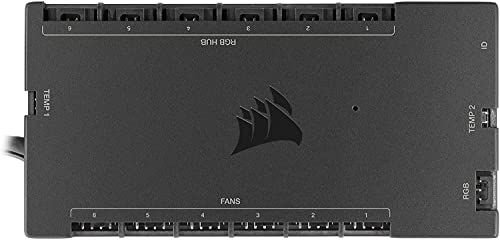
Corsair iCUE Commander Core XT — The Software Control Centre
At the opposite end of the design spectrum sits the Corsair iCUE Commander Core XT, a software controller that manages a group of fans and their lighting from one unit, with temperature probes that can be placed where the builder wants readings taken. Through its companion software you draw fan curves against temperature, set lighting behaviour per fan, and save profiles that change with the work you are doing. It is a premium-tier centrepiece aimed squarely at builders inside that brand’s ecosystem of fans and lighting.
The experience, when it suits you, is genuinely satisfying: one window controls noise and light together, and a well-drawn curve makes a powerful machine whisper through desktop work and only breathe harder under real load. The trade-offs are commitment and complexity. The software becomes another resident program to keep updated, the wiring behind the tray grows because both fan power and lighting leads converge on one box, and the value drops sharply if your fans come from outside the ecosystem it was designed around.
Best for: showcase builds and patient tuners who want curves and lighting in one place. Not suited for: minimalists, mixed-brand fan collections, or anyone who dislikes companion software on principle.
Thermaltake Commander FP — The Practical Hub
The Thermaltake Commander FP is the hub family in its classic form: a compact box that accepts a group of fans, takes its power directly from the power supply, and repeats a single motherboard control signal across every connected fan. A simple indicator shows the unit is powered, and the whole thing is designed to disappear behind the motherboard tray and be forgotten. It sits in the entry-to-mid tier and asks very little money or attention for the order it brings.
Its strength is honest simplicity. When a case has more fans than the motherboard has headers, this style of hub solves the problem in minutes and keeps the visible chamber clean. Its limitation is built into the design: every fan on the hub follows the same signal, so an intake and an exhaust that ideally behave differently will march in step, and only one fan’s speed reading is reported back to the motherboard while the rest follow silently. Builders who understand that bargain get excellent value from it.
Best for: fan-heavy cases that need tidy, unified control on a sensible budget. Not suited for: builders who want independent curves for different fan groups.

Razer PWM PC Fan Controller — The Tuner’s Bridge
The Razer PWM PC Fan Controller occupies the middle ground: a hub-sized unit with software control, designed to gather a group of modulation fans and let you shape their behaviour through a desktop application, including curves linked to component temperatures and coordination with the brand’s wider lighting ecosystem. It is a mid-to-premium tier option for builders whose fans come from many brands but who still want software finesse without replacing the fans themselves.
In practice it rewards the same patience as any software controller: an evening spent drawing curves and testing loads pays back months of quiet. It also inherits the family’s caveats — another application in the background, another data cable to route, and features that overlap with what many modern motherboards already do well. If your motherboard’s own fan software frustrates you, this style of unit is a legitimate upgrade path; if your motherboard behaves, it may be an elegant solution to a problem you do not have.
Best for: mixed-brand builds wanting unified software curves. Not suited for: voltage-controlled three-pin fan collections or software-free setups.
Performance in Real Use
Quiet Desktop and Office Work
The test that matters most happens at idle, because that is where most computers spend most of their lives. A well-set controller drops case fans to a gentle floor during reading, writing, and browsing, where the loudest remaining sound should be your own typing. Manual trims like the Noctua approach shine here because they cannot be undone by a software update or a forgotten profile. Software controllers match them when their curves are drawn with a genuinely low floor rather than a timid one. The common failure is a floor set by fear: builders worry about heat, leave fans spinning briskly at idle, and conclude controllers do not help, when in truth the curve was never given permission to be quiet.
Gaming Loads and Long Sessions
Under gaming load the priorities flip. Heat arrives in waves, and a good curve rises smoothly with temperature instead of surging and falling with every scene change. Hubs that repeat one signal do fine here as long as the signal comes from a sensible temperature source, because a gaming case mostly needs all its fans cooperating. Software controllers earn their keep with finer tools: delays that ignore brief temperature spikes, and separate behaviour for radiator fans tied to liquid temperature rather than processor spikes. The goal is a machine whose noise changes so gradually that you stop noticing it entirely, even across a three-hour session.
Rendering, Compiling and Sustained Work
Sustained professional loads are where honest controllers separate from decorative ones. A render or a long compile holds temperatures high for tens of minutes, and the controller’s job becomes endurance rather than drama: hold an effective speed, do not hunt up and down, and do not let a single overworked header feed more fans than it should. This is also where drawing power from the power supply, as hubs and software units do, proves its worth, because the motherboard header only carries a signal instead of the full electrical load of a fan group.
Small Cases and Tight Builds
In compact cases a controller earns its place through cable discipline as much as cooling. Short, planned runs to a hub behind the tray keep the main chamber open, and open chambers move air better than chambers stuffed with slack cable. The caution is physical: keep every lead clear of fan blades, because in a small case a stray cable sits millimetres from a spinning intake, and a blade clipping a cable makes a noise that will haunt you until you open the case again. Route, check by eye, spin each fan gently by hand while the system is still unplugged, and only then close the panel.
Strengths and Trade-Offs
Strengths
- Noise becomes a choice: curves and trims let the same hardware whisper at idle and work hard under load.
- Headers stop being a limit: power comes from the power supply, so fan count is governed by planning, not by how many sockets a motherboard happens to offer.
- Cable runs get shorter and tidier, which improves both airflow and the simple pleasure of opening your own case.
Trade-offs
- Every family adds a failure point and a learning curve, from a dial you must understand to software you must maintain.
- Hubs trade individuality for simplicity: fans sharing one signal cannot follow different curves.
- Software ecosystems reward loyalty and penalise mixing brands, so today’s bargain can steer tomorrow’s purchases.
Weighed together, the strengths win for any build with four or more fans or a owner who cares about noise, while the trade-offs argue for restraint in simple two-fan machines. A controller is a tool for control, and like any tool it should be bought to solve a named problem — noise, header shortage, cable chaos, or lighting coordination — rather than added because a parts list looked incomplete without one.
How It Compares
Set side by side qualitatively, the four reference designs divide the market cleanly. The manual inline controller offers the least control and the most reliability: nothing to update, nothing to crash, one fan tamed forever. The plain hub offers the most organisation per unit of money and effort, at the cost of shared behaviour. The full software centre offers the deepest control and the richest lighting, at the cost of complexity and ecosystem commitment. The software bridge hub sits between, trading a little depth for broader fan compatibility.
| Approach | Control style | Best setting | Main compromise |
|---|---|---|---|
| Manual inline | One dial, set and forget | One loud fan | No automation |
| Plain hub | One shared signal | Many fans, few headers | Fans move together |
| Software centre | Curves plus lighting | Showcase builds | Ecosystem lock-in |
| Software bridge hub | Curves, brand-neutral fans | Mixed builds | Extra background software |
Against the alternative of doing nothing and relying on the motherboard alone, controllers win whenever fan count, noise sensitivity, or lighting ambitions exceed what a board’s headers and BIOS were designed to juggle. Against each other, there is no universal winner, only a match between temperament and tool. Our fuller installation walkthrough lives in how to install a pc case fan, and the step-by-step wiring companion for controllers themselves is how to set up a pc fan controller.
Who Should Buy It and Who Should Skip It
Buy a controller if your case holds more fans than your motherboard comfortably serves, if fan noise intrudes on calls, recordings, or evening work, if you run a radiator whose fans deserve a curve based on the liquid they cool, or if you are coordinating lighting across several fans and want one place to conduct it. Buy the manual style if your problem is exactly one fan. Buy the hub if your problem is count and clutter. Buy software control if your problem is behaviour — curves, profiles, and coordination.
Skip it if your build has two or three fans that already behave, if your motherboard’s fan tuning genuinely satisfies you, or if you are spending the money to fix a problem actually caused by dusty filters or a badly seated cooler. A controller cannot rescue a fan that is worn out, and it cannot make a hot room cool. Diagnose first: many noise complaints end at a clogged intake filter, not at a checkout page.
Before buying, run this checklist. Confirm whether your fans are three-pin voltage or four-pin modulation types, and count them honestly, including the ones you plan to add. Decide where the unit will physically live and check that fan leads can reach it. Confirm your power supply has the right spare connector for the unit’s power lead. Decide whether you want software in your life or a dial you touch twice a year. Finally, read the sibling roundup in our pc fan controller reviews roundup to see how these same designs rank when judged as a group rather than one at a time.
Setup, Care and Maintenance Essentials
Full instructions live in the dedicated guide, but the essentials belong in any honest review. Power the PC fully off and unplug it before opening the case. Plan the layout on paper first: which fans group together, which header supplies the signal, where the unit mounts. Connect the unit’s main power to the power supply, connect one fan first, restore power briefly to confirm behaviour, then power off and unplug again before adding the rest. Never hang a large group of fans on a single motherboard header without the controller’s own power feed connected — headers are signal sources with modest limits, not power stations, and overloading one invites exactly the instability people blame on their fans.
Keep cables clear of fan blades with ties or channels, and re-check after closing panels, because panels push cables into new places. Every few months, power down, unplug, and clear dust from intakes and filters; a controller working against clogged filters will simply command more speed and more noise. Once a year, revisit your curves: seasons change room temperatures, and a curve drawn in winter may be needlessly shy or needlessly loud in summer. Related upkeep reading: how to clean a printer covers the same dust discipline for the rest of a desk setup, and cooling choices are compared in the best cpu coolers for desktops.
Understanding Fan Curves, the Heart of Every Good Controller
A fan curve is simply a promise: at this temperature, spin this fast. Everything a software controller does flows from that promise, and everything a manual controller does is a simpler version of it, a single fixed point chosen by hand. Understanding curves explains most of the differences between the products in this review. A curve with a low, flat beginning keeps a machine silent through light work. A curve that climbs early and steeply protects a hard-working processor at the cost of constant audible effort. Neither is correct in the abstract; each is correct for a particular owner, room, and workload.
The temperature source behind the curve matters as much as its shape. Processor temperature is jumpy, spiking for seconds during ordinary tasks, and a curve tied directly to it can make fans surge and settle all day long, which most people find more annoying than a steady hum. Better controllers let you smooth that behaviour with delays, averaging, or an alternative source such as a temperature probe placed in the case’s exhaust stream or against a radiator. The Noctua manual approach sidesteps the whole question by trimming the motherboard’s own decisions rather than replacing them, which is why it feels so calm in daily use.
Radiator fans deserve their own logic. The liquid in a loop changes temperature slowly and predictably, so fans governed by liquid temperature can run steady and quiet even while the processor spikes through bursty work. Software centres like the Corsair unit support probe-based control that makes this possible, and for owners of liquid-cooled machines that single feature can justify the entire purchase. Air-cooled builds benefit differently: a case-temperature probe reflects the air your graphics card actually breathes, which is often the temperature that decides gaming noise.
There is also a human factor that specifications never capture. Two owners can sit beside identical machines and disagree completely about whether the noise is acceptable, because hearing, room acoustics, and the distance between chair and case all differ. This is why the best controller is the one whose adjustments you will actually make. A dial you enjoy turning beats a software suite you resent opening, and a hub you forget exists beats a control centre that demands weekly attention. Judge these products by the relationship you want with your machine, not by feature counts.
Noise, Heat and the Honest Trade Between Them
Every fan controller mediates one bargain: silence now versus cooling headroom later. Slowing fans raises component temperatures a little during light work, and that is usually a bargain worth taking, because modern processors and graphics cards are designed to run warm safely and to protect themselves long before heat becomes harm. The owners who get into trouble are not the ones who run gentle idle curves; they are the ones who set aggressive silence, forget it, and then wonder why a summer rendering session behaves strangely. A controller should make its current behaviour obvious enough that you always know which bargain you have struck.
Placement of the machine itself shapes the bargain too. A case under a desk in a carpeted room lives in warmer, dustier air than a case on a desk in a tiled room, and the same curve will sound different in each home. Controllers with probes help here because they respond to the air the machine actually experiences rather than to assumptions made at a test bench. When you read any review in this category, including this one, translate its conclusions through your own room before treating them as promises.
Dust is the silent third party in every cooling decision. Filters and intakes clog gradually, fans work harder to pull the same air, and a curve drawn on a clean machine slowly becomes inadequate on a dirty one. Owners sometimes respond by buying more control when what they needed was a cleaning session. Before upgrading anything, power down, unplug, clean the filters, and listen again. If the machine returns to acceptable behaviour, your controller budget just became optional, and honest reviewing should say so.
How This Review Judged the Field
These designs were judged on the questions owners actually ask after a month of use. Does the unit stay where it was mounted? Do its sockets still grip firmly after fans have been unplugged and replugged during upgrades? Does its software, where present, start reliably and remember its settings? Does the manual dial, where present, move smoothly without dead spots? And above all, did the machine become easier to live with — quieter at idle, calmer under load, tidier inside — or merely more complicated?
Longevity shaped the verdicts as well. A controller is a small purchase expected to survive several upgrades of the parts around it. Units built around standard fan connections and honest power delivery age gracefully, moving from case to case as builds evolve. Units tied tightly to one ecosystem age exactly as well as that ecosystem’s software support does. That is not an argument against ecosystems; it is an argument for entering them deliberately, knowing that the controller is quietly a multi-year commitment to a way of managing your machine.
Finally, value was judged against doing nothing. The motherboard you already own includes fan control that improves every generation, and for many builders it is genuinely enough. The products in this review earn their place only where they clearly out-perform that free baseline: more fans than headers, finer curves than the BIOS offers, probes the board lacks, lighting the board cannot coordinate, or a dial the board will never have. Where a product merely duplicates the baseline with extra steps, this review has said so, because a controller you do not need is clutter with a power lead.
Planning Fan Groups Like a Designer, Not a Collector
The most common controller mistake happens before purchase: fans are bought one at a time, in different types and styles, until the case holds a small crowd that no single control scheme suits. Planning groups from the start prevents that. Decide that your front intakes form one group with one behaviour, your top exhausts another, and your radiator fans a third, then choose fans within each group that share the same control method. A controller then has a clean job: one signal per group, each signal matched to fans built to receive it.
Grouping also clarifies how many channels you genuinely need, which is usually fewer than marketing suggests. Most mid-tower builds live happily with two or three behaviours: gentle intake, responsive exhaust, and radiator control tied to liquid or case temperature. A simple hub repeating one well-chosen signal can serve the first two groups together when their fans are similar, reserving fancier control for the radiator. Buying channels you never differentiate is harmless but pointless, and the money saved buys better fans, which improve noise more than extra channels ever will.
Think about the upgrade path while you plan. Cases change, radiators arrive, graphics cards grow longer and hotter. Leave one free socket on your hub or controller, keep the unit’s power lead reachable, and label groups with small tags on the cables if your memory is human. The five minutes spent labelling during installation saves the archaeological dig that otherwise greets every future upgrade, and it makes guides like how to set up a pc fan controller without guesswork far easier to follow when you revisit your own build.
When a Controller Misbehaves: Reading the Symptoms
Most controller problems announce themselves politely. A fan that ticks at low speed is often a voltage-controlled fan being fed a modulation signal, or a modulation fan starved below the voltage where its motor runs happily; the cure is matching modes, not more force. A group that ignores its curve usually traces back to a signal lead plugged into the wrong socket or a software profile that was never actually applied. A unit that works until the side panel closes has a cable being pressed against a blade or a connector being levered half out of its socket by panel pressure.
The discipline that solves nearly all of it is the discipline this review keeps repeating: change one thing at a time, with the machine powered fully off and unplugged between changes, and test after each step. Builders who rewire everything at once and then troubleshoot face a dozen suspects; builders who move methodically face one. Controllers reward patience disproportionately, because their faults are almost always simple once isolated — a swapped plug, a mismatched mode, a curve saved to the wrong profile — and almost never a reason to replace the hardware.
Keep notes as you tune. A curve that took an evening to perfect deserves a screenshot or a written record of its shape and temperature source, stored with your build documentation. Software updates, operating system reinstalls, and motherboard changes all have ways of resetting careful work, and the owner with notes restores an evening’s tuning in minutes while the owner without them starts again from silence and guesswork.
The Aesthetics Question: Lighting, Windows and Restraint
Many controllers now double as lighting managers, and for owners of windowed cases that dual role is the real product. Coordinating fan lighting from the same unit that controls fan speed produces the composed, deliberate look that separate remotes and mismatched software never quite achieve. If your build is a showcase, judge these products partly as lighting instruments: how gracefully colours transition, whether brightness can be dimmed for evening work, and whether the lighting can simply be switched off without losing your fan curves. A controller that forces a light show on a machine used for midnight writing sessions has misunderstood its owner.
Restraint is a legitimate aesthetic too. Plenty of builders want a dark, silent box that disappears under the desk, and for them the best controller is the one with no lights at all, or with lighting disabled so completely it might as well not exist. Manual and plain hub designs serve this temperament beautifully. There is no wrong answer here, only an honest one: buy the controller that matches the machine you actually look at every day, not the machine in somebody else’s photograph.
Whichever direction you lean, remember that lighting leads double the cable count behind the tray. Every illuminated fan brings both a power lead and a lighting lead to the controller area, and the tidy builds in photographs are tidy because someone planned those runs with the same care as the visible chamber. Budget your installation time accordingly, keep lighting cables grouped separately from fan power cables so future troubleshooting stays simple, and resist closing the rear panel until every fan has been spun gently by hand, unplugged and safe, to prove nothing fouls a blade.
A Word on Second-Hand and Older Controllers
Fan controllers have changed slowly enough that older units appear constantly on the second-hand market, and some are genuine bargains: a well-made manual controller or plain hub from a few generations ago does its job exactly as well today, because fans and their connectors have stayed compatible for years. Inspect before you trust, though. Check that sockets are not cracked, that dials turn without scratchy dead spots, and that any adhesive mounting can be replaced with fresh pads or screws. Treat bundled cables as guilty until proven innocent, since a damaged lead is the most common reason these units were retired.
Software controllers age differently. Their hardware may be perfect while their applications drift out of step with current operating systems, so a second-hand software unit deserves a check that its companion program still installs and runs on your machine before money changes hands. Front-bay controllers from the era of optical drives need a case that still offers a bay, which many modern cases do not. None of this makes older gear a mistake; it makes homework the price of the bargain, and builders who enjoy that homework keep excellent hardware in service for years.
One last practical habit separates satisfied controller owners from frustrated ones: revisit the installation after a week. Cables settle, adhesive pads either hold or begin their slow surrender, and a fan that was clear of every lead on day one can drift into faint contact as the case is moved and panels flex. A five-minute inspection with the machine off and unplugged — a look, a gentle hand-spin of each fan, a nudge to any lead sitting closer than you would like — locks in the quiet you paid for. After that week, a good controller should vanish from your attention entirely, which is the highest praise this category offers: the machine simply sounds right, every day, without being asked.
It is also worth naming the emotional truth underneath every paragraph of this review: people do not really buy fan controllers, they buy the feeling of a machine that respects their space. The dial, the hub, and the software suite are three different dialects of the same request — let the computer be powerful without being present, fast without being loud, and elaborate inside without being chaotic. Choose the dialect that matches your temperament, install it with the patience it deserves, and that feeling is reliably what arrives.
Final Verdict
A pc fan controller is not a glamorous upgrade, and that is precisely its virtue. It takes the fans you already own and makes them behave like a system: quiet when life is quiet, purposeful when work is heavy, and tidy enough that opening the case stops being a chore. Choose the manual dial for a single stubborn fan, the plain hub for order on a budget, and software control when curves and lighting genuinely matter to you. Match the control method to your fans, respect the safety basics, and the smallest box in your build may become the one you appreciate most.
The Second-Pass Review: Consistency, Fit and Fine Print
Fit and feel, judged honestly
Specifications can tell you a pc fan controller will fit; only handling tells you whether it feels right doing it. Weight distribution, control placement, surface finish and the force needed for routine adjustments all shape whether you reach for the product gladly or work around it. When picks such as Razer PWM PC Fan Controller, Noctua NA-FC1 Fan Controller and Corsair iCUE Commander Core XT Fan Controller are on your shortlist, run this check against each listing in turn. If your shortlist comes down to two similar models, this tactile layer is usually the honest tie-breaker, and it is personal: a control layout one reviewer calls cramped, a smaller-handed owner may call perfect. Where possible, judge fit against your own hands, desk and habits, not the reviewer’s.
The detail that dates a design
Every PC Cases generation has a detail that quietly dates it: a port standard on its way out, a control app that has stopped receiving updates, a consumable format being phased away. When reviewing a pc fan controller, that detail matters because it decides how gracefully the product ages. A model built on current standards and widely stocked consumables will still be serviceable when a flashier rival is orphaned by its own ecosystem. Check the age of the design, not just its feature list, and favour the product whose supporting ecosystem is still actively maintained.
What the box should contain — and what it should not need
Unboxing is a small but telling review checkpoint for a pc fan controller: the essentials for the first session should be in the box, the instructions should match the actual unit, and nothing vital should depend on an immediate second purchase. If a pick requires an accessory to perform its core job, that dependency is flagged in its assessment above, because it changes both the real cost and the first-day experience. Equally, beware bundles padded with extras you will never use; in a busy shared workspace where several people use the same setup across the day, unused bundle clutter is a cost paid in storage, not a bonus.
Reading the assessments against your own routine
These reviews were written against a general routine, and your routine is the final filter. Map each pick’s stated strengths onto your busiest realistic day with a pc fan controller: if a pick’s best quality serves a task you do rarely, it is not the pick for you, however strong the assessment. If a pick’s noted limitation sits in a corner of the workflow you never visit, discount it. This translation step — from review conditions to your conditions in a busy shared workspace where several people use the same setup across the day — is where a good review becomes a good decision rather than a borrowed opinion.
Verify the listing, not just the product
A review can only judge the pc fan controller in front of it, but what arrives at your door depends on the listing you order from. Before choosing, confirm that the listing names the exact model, generation and bundle contents you think you are buying, because PC Cases listings often group variants under one page. When picks such as Razer PWM PC Fan Controller, Noctua NA-FC1 Fan Controller and Corsair iCUE Commander Core XT Fan Controller are on your shortlist, run this check against each listing in turn. Check which accessories are in the box and which are sold separately, and note the seller’s returns terms while you are there. Ten minutes of listing hygiene prevents the most common review-versus-reality mismatch: a good product judged by the wrong variant.
Consistency is the quiet test
Single impressive results are easy; a good pc fan controller repeats them on an ordinary day, with ordinary materials, when you are in a hurry. Across the picks in this review, the models that earned their place did so by being predictable: the same setup producing the same outcome, with controls that behave identically every time. In a busy shared workspace where several people use the same setup across the day, predictability is worth more than a peak performance figure you will rarely reach. When you read the individual assessments above, treat consistency comments as the highest-value signal in each one.
None of this requires expertise — only the willingness to check your own routine before trusting a generic recommendation.
Five honest minutes at this stage is worth more than five hours of comparison browsing.
If a candidate fails this check, strike it from the list without regret and let the remaining options compete on merit.
Frequently Asked Questions
Do I really need a fan controller if my motherboard has fan headers?
Not always. If your fan count fits your headers and the board’s tuning software gives you curves you are happy with, a controller adds little. It earns its place when headers run out, when you want fans grouped and powered independently of the board, when lighting needs coordinating, or when you want a manual trim that no software change can undo. Treat it as a solution to a specific frustration rather than a standard part of every build.
Can one controller run both three-pin and four-pin fans?
Mixed groups are where builders get caught out. A four-pin fan expects a modulation signal, while a three-pin fan responds to voltage changes. Some controllers offer per-channel mode switches, and those handle mixed groups properly. A plain hub repeating one signal cannot treat the two types differently, so the safest approach is to group fans of the same type together and match the controller’s mode to that group. When in doubt, keep the collection uniform.
Will a controller make my PC cooler?
Indirectly, sometimes. A controller does not add cooling capacity; your fans and radiators decide that. What it adds is permission to use the capacity you already have more intelligently — full commitment under sustained load without idle noise, or radiator fans following liquid temperature instead of processor spikes. Many owners actually run slightly warmer idle temperatures on purpose, trading a few degrees they do not need for silence they enjoy every minute.
Is it safe to connect many fans to one controller?
Yes, when the controller is powered the way its maker intended — directly from the power supply — and you stay within the maker’s stated channel guidance, expressed qualitatively here as: do not overload a single header or channel. The dangerous pattern is the opposite arrangement, stacking splitters on one motherboard header so the header itself feeds every fan. Let the power supply do the heavy lifting and the header carry only the signal.
Why does only one fan’s speed show up in my monitoring software?
On hub-style units that is normal behaviour. The motherboard receives a speed reading from one designated fan and assumes the group follows, because the signal being repeated is shared. The other fans are spinning; they simply do not each have a reporting line back to the board. If per-fan readings matter to you, that is a genuine reason to choose a software controller with individual channel sensing instead.
Where should I mount the controller inside the case?
Behind the motherboard tray is the usual home: out of sight, close to the power supply, and within reach of most fan leads. Keep it clear of sharp tray edges, keep its own cables from pressing against fan blades, and leave enough slack that you can unplug a fan later without dismantling the whole build. A front-bay manual unit is the exception, mounted where your hand can reach the dial comfortably.
Related Reading
Continue with pc fan controller reviews compared, how to set up a pc fan controller step by step, the pc case fan buying guide, pc cases built for add-in cooling, and tidy desk cable management options.