Disclosure: As an Amazon Associate, ilcastellomenu.com earns from qualifying purchases. Prices and availability change; check Amazon for the latest.
Where to buy
Check the latest price, availability and delivery on Amazon. Orders are placed on Amazon.
- ASUS Phoenix GeForce GTX 1650 OC Edition 4GB GDDR6 — Best Overall. Check on Amazon
- GIGABYTE GeForce GT 1030 Low Profile 2G (GV-N1030D5-2GL) — Best Value Pick. Check on Amazon
- NVIDIA GeForce GTX 1050 Ti 4GB (used budget staple) — Best Used Pick. Value tier; sold through specialist and used-market listings, so check current availability carefully.
- AMD Radeon RX 570 4GB/8GB (legacy mining-era card) — Best Used Gaming Pick. Value tier; sold through specialist and used-market listings, so check current availability carefully.
- NVIDIA GeForce GTX 750 Ti 2GB (legacy, XP-era favourite) — Best Period Pick. Entry tier; sold through specialist and used-market listings, so check current availability carefully.
- MSI GeForce GT 710 2GD3H 4HDMI — Best Display Pick. Check on Amazon
Read the full guide ↓
If you are shopping for the best graphics cards for i5 2400, the honest starting point is that the ‘best’ answer is the one matched to your machine, your setup and the work in front of it — not the one with the longest specification sheet. This guide ranks six picks for this exact brief, from the strongest overall option to the specialist choices that serve narrower needs better, and it is upfront about the compromises in each: every pick below carries its trade-offs in plain language, with no prices frozen in print (they move too fast to trust) and no scores borrowed from marketplace listings.
The Core i5-2400 is a 2011 Sandy Bridge quad-core, and pairing a graphics card with it is an exercise in respecting two era limits at once. The first is the processor itself: four threads of 2011 vintage cap frame rates in modern CPU-heavy games well before a strong graphics card is busy, so this shortlist tops out at the class the chip can feed. The second is the platform around it: PCI Express 2.0 (fully compatible with newer cards, at a small bandwidth cost that matters only to the narrowest-bus models), DDR3 memory, and — in the ex-business desktops where most i5-2400s now live — small proprietary power supplies with no PCIe power cables. The ranking therefore leads with the strongest slot-powered card, keeps the classic value card beside it, and gives the used-market staples of the pairing’s long history their honest places: for many owners the right purchase is a good used card at a fraction of new prices, matched to a machine whose remaining jobs are esports, older AAA libraries, media and everyday use. Nothing here pretends the i5-2400 is a modern gaming platform; everything here is chosen to make it the best version of what it actually is, for the least money and with no power-supply surgery. If your workload sits close to a neighbouring brief, our guide to Best Graphics Cards For Iray Rendering covers that angle in the same depth.
In this guide
Quick Picks
| Badge | Pick | Why it stands out | Link |
|---|---|---|---|
| Best Overall | ASUS Phoenix GeForce GTX 1650 OC Edition 4GB GDDR6 | the strongest card that needs no power connector | Check on Amazon |
| Best Value Pick | GIGABYTE GeForce GT 1030 Low Profile 2G (GV-N1030D5-2GL) | GDDR5 memory makes it dramatically faster than DDR3 GT 1030 variants and fine for light esports gaming | Check on Amazon |
| Best Used Pick | NVIDIA GeForce GTX 1050 Ti 4GB (used budget staple) | slot-powered versions upgrade almost any OEM desktop | Check current listings |
| Best Used Gaming Pick | AMD Radeon RX 570 4GB/8GB (legacy mining-era card) | enormous used supply keeps prices low for tinkerers | Check current listings |
| Best Period Pick | NVIDIA GeForce GTX 750 Ti 2GB (legacy, XP-era favourite) | slot-powered and tiny | Check current listings |
| Best Display Pick | MSI GeForce GT 710 2GD3H 4HDMI | drives four HDMI displays from a single low-profile card, which almost nothing else at this level does | Check on Amazon |
How These Picks Were Chosen
Every product in this guide was verified against manufacturer specifications — core counts, memory configuration, power draw, outputs and physical dimensions — using the GPU vendor’s official specification pages and the board partner’s product documentation, not marketplace listings, which routinely misstate all five. Where a specification could not be verified from a primary source, it was left out rather than repeated from a listing. Products earn Amazon links in this guide only when their exact model and ASIN have been confirmed; equally valid products that could not be confirmed to that standard appear as clearly unlinked, prose-only picks rather than being quietly dropped.
Pairing picks were ranked by balance, not by the biggest number: the test is whether the processor can feed the card at the resolutions and frame rates the card is bought for. Each pick was checked against the CPU’s core/thread count, its single-core performance class, and the platform’s PCIe generation — including the measurable penalty that x8-interface cards pay on PCIe 3.0 motherboards. Cards above the CPU’s honest ceiling appear only where labelled as upgrade-path purchases, with the reasoning stated rather than hidden.
Value over the system’s remaining life was the second filter: a pairing should make sense today and still make sense after the drop-in CPU upgrade most of these platforms offer, because the graphics card will likely outlive the processor it is bought for.
Two exclusions are worth stating openly. First, raw benchmark position alone never earned a place: a card had to fit this brief’s real constraints — the platform, the power supply, the case, the software — to be ranked. Second, near-duplicate models of the same GPU were collapsed to the single version with the best combination of cooler, warranty and availability, because six slots spent on three coolers of one GPU would serve nobody. Readers weighing a closely related brief will also find our analysis of Best Graphics Cards For Hdr Movies useful, since the shortlists overlap more than the titles suggest.
The 6 Best Graphics Cards For i5 2400
ASUS Phoenix GeForce GTX 1650 OC Edition 4GB GDDR6 (Best Overall)
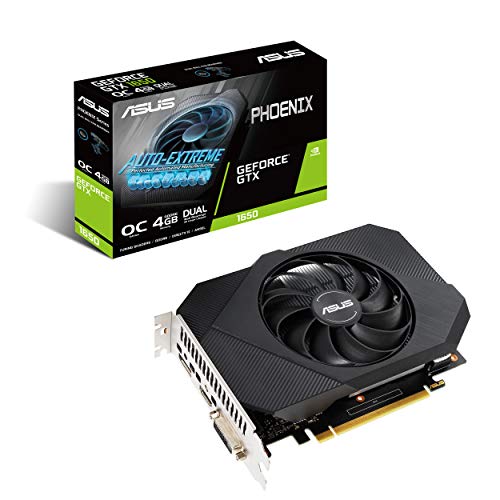
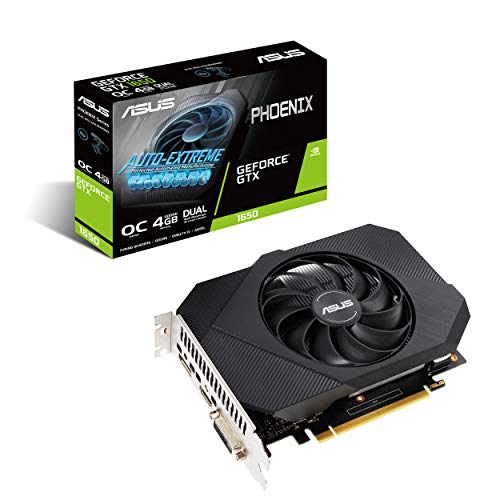
The ASUS Phoenix GeForce GTX 1650 OC Edition 4GB GDDR6 takes the Best Overall badge because it answers this brief’s central question better than anything else in its class: how much NVIDIA GeForce GTX 1650 performance, wrapped in what compromises, at what cost in power and space? Its 4GB GDDR6 of memory and 75 W power envelope set the terms, and the sections below test whether the rest of the design keeps the promise.
Strengths
- Compact single-fan Phoenix design fits short, crowded cases
- The strongest card that needs no power connector — a true drop-in upgrade for OEM desktops
- GDDR6 memory keeps it clearly ahead of the older GDDR5 GTX 1650 revisions
Trade-offs
- 4GB of VRAM forces texture compromises in recent AAA games even at 1080p
- No ray-tracing acceleration worth using; DLSS is not supported on GTX cards
- A single fan works harder and louder than dual-fan designs under sustained load
Key specs
- GPU: NVIDIA GeForce GTX 1650, 896 CUDA cores
- Memory: 4GB GDDR6, 128-bit bus
- Boost clock: up to 1,665 MHz (OC mode)
- Power draw: 75 W — slot powered, no PCIe power cable needed
- Cooling: single Axial-tech fan, compact Phoenix single-fan design
- Outputs: HDMI 2.0b, DisplayPort 1.4, DVI-D
For years the GTX 1650 was the default answer to ‘my prebuilt has a weak power supply and no spare cables’ — and the GDDR6 Phoenix version is the best form of it. Seventy-five watts from the slot, one fan, a short board: it converts almost any mid-tower office PC into a credible 1080p esports and older-AAA machine in about ten minutes. ASUS’s Axial-tech fan pushes air down onto the heatsink as well as out, which matters in the poorly ventilated cases these cards usually land in.
Best for: Upgrading a prebuilt or OEM desktop with no spare power cables into a real 1080p gaming PC / Not suited for: Ray-traced gaming or high settings in the newest AAA releases

GIGABYTE GeForce GT 1030 Low Profile 2G (GV-N1030D5-2GL) (Best Value Pick)
Ranked here as Best Value Pick, the GIGABYTE GeForce GT 1030 Low Profile 2G (GV-N1030D5-2GL) is built around the NVIDIA GeForce GT 1030 with 2GB GDDR5 of memory. It earns its place in this guide on the strength of how completely it fits the brief — not merely on throughput, but on the combination of memory, power draw, physical size and driver support that decides whether a card works in your system or merely benchmarks well in someone else’s.
Strengths
- HDMI 2.0b output plus HEVC/VP9 hardware decode makes it a proper 4K media card
- Runs entirely on slot power at 30 W, so no PSU upgrade is ever needed
- GDDR5 memory makes it dramatically faster than DDR3 GT 1030 variants and fine for light esports gaming
Trade-offs
- 2GB of VRAM caps texture quality in anything beyond older or esports titles
- No NVENC encoder, so it cannot help with game streaming or hardware screen recording
- The narrow 64-bit bus means performance falls away quickly above 1080p
Key specs
- GPU: NVIDIA GeForce GT 1030, 384 CUDA cores
- Memory: 2GB GDDR5, 64-bit bus
- Form factor: low profile, single slot, includes low-profile bracket
- Power draw: 30 W, no power connector
- Outputs: HDMI 2.0b (4K at 60 Hz) and DVI-D
- Hardware decode: H.265/HEVC and VP9 for smooth 4K video playback
The GDDR5 version of the GT 1030 is the card that quietly rescues millions of office PCs. It turns a retired Dell or HP desktop into a machine that plays League of Legends, CS2 at modest settings, Minecraft and older AAA games at 1080p, while also decoding 4K streaming video in hardware so the CPU can idle. Gigabyte’s low-profile D5 model is the one to buy because the memory type is printed right in the model name — the DDR3 versions wearing the same GT 1030 badge are roughly half as fast and are the single most common trap in this price class.
Best for: Rescuing an old or slim desktop for light gaming, 4K video and everyday use / Not suited for: Modern AAA gaming, streaming (no encoder), or anyone expecting more than 2GB of VRAM to stretch
NVIDIA GeForce GTX 1050 Ti 4GB (used budget staple) (Best Used Pick)
The NVIDIA GeForce GTX 1050 Ti 4GB (used budget staple) (Best Used Pick) represents the NVIDIA interpretation of the NVIDIA GeForce GTX 1050 Ti, and board-partner interpretation matters more than spec sheets admit: cooler quality decides sustained clocks, fan behaviour decides whether you can hear your own games or renders, and output selection decides which monitors you can drive. With 4GB GDDR5 and a 75 W power budget, this is the version of the GPU this guide would buy with its own money for this brief.
Strengths
- Slot-powered versions upgrade almost any OEM desktop
- A proven 1080p esports card with a vast used supply
- Low heat and noise suit small cases
Trade-offs
- Used-only; pricing overlaps newer, better cards more often than it should
- 4GB of VRAM caps modern AAA settings
- No NVENC improvements of the Turing generation — Pascal encoder only
Key specs
- GPU: NVIDIA GeForce GTX 1050 Ti, 768 CUDA cores
- Memory: 4GB GDDR5, 128-bit bus
- Power draw: 75 W, most models need no power connector
The GTX 1050 Ti was the original no-power-cable gaming upgrade, and used examples still rescue office PCs daily. Its trap is pricing: listings often ask nearly what a GTX 1650 costs. At the right used price it is a sensible, well-understood card; at the wrong one it is nostalgia taxed.
Best for: Slot-powered 1080p esports in almost any OEM desktop, bought at the right used price / Not suited for: Listings priced near a GTX 1650 — at that point buy the newer card
Value tier — availability runs through specialist retailers and the used market; verify the exact model and condition before buying.
AMD Radeon RX 570 4GB/8GB (legacy mining-era card) (Best Used Gaming Pick)
The AMD Radeon RX 570 4GB/8GB (legacy mining-era card) takes the Best Used Gaming Pick badge because it answers this brief’s central question better than anything else in its class: how much AMD Radeon RX 570 performance, wrapped in what compromises, at what cost in power and space? Its 4GB or 8GB GDDR5 of memory and 150 W power envelope set the terms, and the sections below test whether the rest of the design keeps the promise.
Strengths
- Enormous used supply keeps prices low for tinkerers
- 8GB versions still game respectably at 1080p
- Extensively documented for mining-era tuning and BIOS behaviour
Trade-offs
- Many used units spent years mining — fan and VRM wear is common
- Polaris efficiency is poor by modern standards
- Driver support has moved to legacy status
Key specs
- GPU: AMD Radeon RX 570, 2,048 stream processors
- Memory: 4GB or 8GB GDDR5, 256-bit bus
- Power draw: 150 W, one 8-pin connector
- Historical note: a staple of the 2017-2021 GPU mining era
The RX 570 is the definitive mining-era artifact: bought by the pallet for Ethereum and Scrypt-adjacent rigs, then flooded onto the used market. As a historical object and a cheap experiment platform it is fascinating; as a working card, inspect fans, run stress tests, and assume its previous life was not gentle.
Best for: Mining-era history, cheap experimentation and still-honest 1080p gaming in 8GB form / Not suited for: Efficiency, quiet running, or any card you cannot inspect and test first
Value tier — availability runs through specialist retailers and the used market; verify the exact model and condition before buying.
NVIDIA GeForce GTX 750 Ti 2GB (legacy, XP-era favourite) (Best Period Pick)
Ranked here as Best Period Pick, the NVIDIA GeForce GTX 750 Ti 2GB (legacy, XP-era favourite) is built around the NVIDIA GeForce GTX 750 Ti with 2GB GDDR5 of memory. It earns its place in this guide on the strength of how completely it fits the brief — not merely on throughput, but on the combination of memory, power draw, physical size and driver support that decides whether a card works in your system or merely benchmarks well in someone else’s.
Strengths
- Slot-powered and tiny — the classic rescue card for ancient desktops
- Among the fastest cards with proper Windows XP driver support
- Sips power and runs cool in poorly ventilated retro cases
Trade-offs
- 2GB of VRAM and Maxwell-era performance cap it at older titles
- Used-only; output selection varies a lot between board models
- No modern video decode for current streaming formats
Key specs
- GPU: NVIDIA GeForce GTX 750 Ti, 640 CUDA cores
- Memory: 2GB GDDR5, 128-bit bus
- Power draw: 60 W, no power connector
- Driver note: supported by the last Windows XP GeForce driver branch (368.81)
The GTX 750 Ti earned its reputation as the card that could game on a stock office PSU, and its Maxwell architecture kept Windows XP drivers — making it a cornerstone of retro builds that need one foot in the XP era and enough pace for the games of that period. Check the exact outputs on the used model in front of you; they vary more than on any modern card.
Best for: Windows XP and retro builds needing slot power and period drivers / Not suited for: Anything beyond its era’s games, or modern video formats
Entry tier — availability runs through specialist retailers and the used market; verify the exact model and condition before buying.

MSI GeForce GT 710 2GD3H 4HDMI (Best Display Pick)
The MSI GeForce GT 710 2GD3H 4HDMI (Best Display Pick) represents the MSI interpretation of the NVIDIA GeForce GT 710, and board-partner interpretation matters more than spec sheets admit: cooler quality decides sustained clocks, fan behaviour decides whether you can hear your own games or renders, and output selection decides which monitors you can drive. With 2GB DDR3 and a 19 W power budget, this is the version of the GPU this guide would buy with its own money for this brief.
Strengths
- Passive cooling means zero fan noise and nothing mechanical to wear out
- Sips just 19 W, so it runs happily on small OEM power supplies
- Drives four HDMI displays from a single low-profile card, which almost nothing else at this level does
Trade-offs
- DDR3 memory makes it a display adapter, not a gaming card — modern 3D games are out of reach
- The Kepler architecture no longer receives new Game Ready driver features
- A single 4K display at high refresh is beyond it; it is happiest at 1080p desktop resolutions
Key specs
- GPU: NVIDIA GeForce GT 710, 192 CUDA cores
- Memory: 2GB DDR3, 64-bit bus
- Core clock: up to 954 MHz
- Interface: PCI Express 2.0 x1 — fits x1, x4, x8 and x16 slots
- Outputs: 4x HDMI — drives up to four displays
- Power draw: 19 W, no power connector, passively cooled low-profile design
The GT 710 exists for one job: putting pixels on screens in machines that were never built for it. Office desktops with dead integrated graphics, signage PCs, trading desks and home servers all come back to life with a card like this, and the four-HDMI layout on this MSI version is genuinely unusual — most GT 710s give you a mix of VGA, DVI and a single HDMI. Because it is passively cooled and draws less power than a case fan controller, it is also one of the few cards you can add to a sealed OEM box without thinking about thermals or the PSU at all.
Best for: Driving up to four HDMI displays from a machine with almost no power or space to spare / Not suited for: Any kind of gaming beyond the very lightest, or single high-refresh 4K displays
Comparison Table
| Pick | Type / GPU | Key capacity | Power / Size | Fit / Interface | Price |
|---|---|---|---|---|---|
| ASUS Phoenix GeForce GTX 1650 OC Edition 4GB GDDR6 (Best Overall) | NVIDIA GeForce GTX 1650 (Turing) | 4GB GDDR6 | 75 W | PCIe 3.0 x16 | Check price on Amazon |
| GIGABYTE GeForce GT 1030 Low Profile 2G (GV-N1030D5-2GL) (Best Value Pick) | NVIDIA GeForce GT 1030 (Pascal) | 2GB GDDR5 | 30 W | PCIe 3.0 x4 | Check price on Amazon |
| NVIDIA GeForce GTX 1050 Ti 4GB (used budget staple) (Best Used Pick) | NVIDIA GeForce GTX 1050 Ti (Pascal) | 4GB GDDR5 | 75 W | PCIe 3.0 x16 | Check current listings |
| AMD Radeon RX 570 4GB/8GB (legacy mining-era card) (Best Used Gaming Pick) | AMD Radeon RX 570 (Polaris) | 4GB or 8GB GDDR5 | 150 W | PCIe 3.0 x16 | Check current listings |
| NVIDIA GeForce GTX 750 Ti 2GB (legacy, XP-era favourite) (Best Period Pick) | NVIDIA GeForce GTX 750 Ti (Maxwell) | 2GB GDDR5 | 60 W | PCIe 3.0 x16 | Check current listings |
| MSI GeForce GT 710 2GD3H 4HDMI (Best Display Pick) | NVIDIA GeForce GT 710 (Kepler) | 2GB DDR3 | 19 W | PCIe 2.0 x1 (fits any slot) | Check price on Amazon |
The table compresses the verified facts; the verdicts above carry the judgement. Note how the ranking in this guide does not follow the table’s raw order — capacity, support, compatibility and physical fit all reorder what a specification chart alone would tell you, and the right reading is to find your constraint in the table first, then read that pick’s full review.
How to Choose the Right Graphics Card Pairing
The sections below are the buying guide layer of this article: the deciding specifications explained in plain language, in the order they should be decided. Readers comparing across briefs may also want the companion analysis in Best Graphics Cards For High Graphics, which applies the same framework to a neighbouring budget and workload.
Start with the workload, not the brand
Every graphics-card decision in this guide flows from one question: what will the card actually do all day? A card rendering Blender scenes, a card feeding a 240 Hz esports monitor and a card driving four office displays are three different products that happen to share a PCIe slot. Write down your primary workload, your monitor’s resolution and refresh rate, and the applications or games that matter most. Those three facts eliminate most of the market instantly and turn the remaining choice into a shortlist rather than a research project.
VRAM: the specification that decides what fits
Video memory is the card’s private workspace. Games store textures and frame buffers in it; creative apps store scenes, timelines and models in it; AI tools store model weights in it. When a workload exceeds VRAM, the result is rarely graceful — textures blur or pop in, renders fall back to system memory at a fraction of the speed, and AI models simply refuse to load. Capacity first, then speed: a slower card with enough VRAM beats a faster card that cannot hold the workload. For 1080p gaming, 8GB is the current working minimum; 1440p is comfortable at 12GB; 4K, heavy creative work and local AI argue for 16GB or more.
Architecture and features age faster than raw speed
Two cards with similar benchmark scores can age very differently. Current architectures bring current feature sets: modern upscaling (DLSS, FSR, XeSS), hardware AV1 encoding, efficient ray tracing and — critically — active driver support. A card one or two generations old can be excellent value, but check that its driver branch is still receiving updates for your operating system and applications, and that the features your software uses (CUDA version, encoder generation, ray-tracing support) are present. Raw frames per second is the easiest number to compare and often the least important one over a card’s service life.
Power supply: the unglamorous gatekeeper
Every pick in this guide lists its power draw and connector requirements, because the power supply decides what you can install before performance enters the discussion. Add the card’s TDP to your CPU’s draw, allow headroom for drives, fans and transient spikes — modern GPUs can briefly draw well above their rated TDP — and land on a quality PSU with at least 150-200 W of margin. Check the physical connectors too: a PSU without the 8-pin or 16-pin cable a card needs is a hard stop, and splitter adapters are not a safe workaround for high-draw cards.
Physical fit: length, slots and airflow
Measure before you buy. Card length is published for every model; compare it against your case’s GPU clearance with the front fan or radiator installed, not the empty-case figure. Count slot width honestly — a 2.5-slot card covers the neighbouring slot, which matters if you run a capture card, a sound card or a second GPU. Finally, powerful cards exhaust hot air into the case: a solid front panel with one intake fan will throttle a 250 W card that a mesh case handles easily. Cooling is part of the graphics card you buy, whether it ships in the box or not.
Outputs and monitors
Display outputs look interchangeable and are not. HDMI 2.1 and DisplayPort 1.4/2.1 differ in the resolution and refresh combinations they can drive, in HDR and variable-refresh support, and in what your specific monitor accepts for its headline mode — many high-refresh monitors only reach their top refresh rate over one specific input. Count your displays, note each one’s best input, and confirm the card’s output layout serves all of them before ordering; adapters solve some mismatches and quietly cap others.
What ‘bottleneck’ actually means
A CPU bottleneck is not damage or incompatibility — it is unused GPU capacity. The processor prepares each frame (game logic, draw calls) and hands it to the GPU; if the GPU finishes faster than the CPU can prepare, frame rate is set by the CPU and the extra GPU power idles. It shows most at low resolutions and high frame-rate targets, and least at high resolutions with heavy settings, where the GPU’s own work dominates. That is why the same pairing can be ‘bottlenecked’ at 1080p esports and perfectly balanced at 1440p ultra.
Plan the pairing around the platform’s upgrade path
Most platforms in this series accept faster drop-in CPUs on the same motherboard. That changes the maths: a card one class above today’s balance is a mistake if the CPU stays, and a sensible pre-purchase if a CPU upgrade is genuinely planned. Be honest about which buyer you are — ‘planned’ upgrades that never happen are the most expensive kind.
Every pairing in this series was chosen against a simple principle: the graphics card should be the component that limits frame rate, because it is the component you can most easily upgrade later and the one whose full utilisation you paid for. When the CPU limits instead, you have bought GPU capacity that depreciates unused. That is why these lists sometimes look conservative next to ‘maximum GPU for your CPU’ forum threads — conservative is what balanced looks like from the outside.
The corollary is liberating, though: a well-paired mid-range card on an older platform delivers a genuinely excellent experience in the overwhelming majority of games, because most games are built to sell to the hardware most people own. The upgrade itch usually says more about launch cycles than about your library. Play the games, measure with an overlay, and let data — not launch events — schedule your next purchase.
A note on availability and model variance: graphics cards are sold as GPU models, but manufactured as dozens of board-partner variants whose coolers, clocks, outputs and warranties differ more than their names suggest. When this guide names a specific model, it is because that variant’s combination of those attributes suits the brief; when it names only a GPU (the prose-only picks), any reputable partner’s version of that GPU delivers the same fundamental capability, and the deciding factors become cooler quality, warranty terms and the seller’s return policy. In the used market especially, the individual unit’s condition outweighs the badge on the box.
How Do You Install a Graphics Card and Check the Pairing Is Balanced?
Installation follows the shared steps below; afterwards, verify the pairing empirically rather than trusting forum folklore — five minutes with monitoring tools tells you exactly which component is limiting your games.
- Choose the card against your actual system. Before ordering, confirm four things: your power supply’s wattage and available PCIe power connectors, your case’s GPU length clearance and slot space, your monitor’s inputs and target resolution/refresh, and — for older platforms — that your motherboard BIOS is recent enough to initialise a modern card. Ten minutes with a tape measure and the PSU label prevents the most common return in PC building.
- Prepare the system. Shut the PC down, switch the PSU off and unplug it. Remove the side panel and, if a card is already installed, disconnect its power cables, remove its bracket screw and release the PCIe slot latch before pulling it free. If you are switching GPU brands, download the new driver package now, while the old setup still gives you a display, and consider a clean driver removal with Display Driver Uninstaller in Safe Mode to prevent cross-brand driver conflicts.
- Install the card. Remove the correct rear slot covers for the card’s width, align the card with the top PCIe x16 slot, and press it home firmly and evenly until the latch clicks. Refit the bracket screws — they carry the card’s weight and ground it — then connect the required PCIe power cables, using separate PSU cable runs for high-draw cards rather than one daisy-chained lead. On 16-pin (12VHPWR) connectors, push until fully seated with no gap; an incompletely seated 16-pin connector is a documented failure risk.
- First boot and drivers. Reconnect power, boot, and confirm you have a display. Install the latest driver from the GPU vendor’s site — NVIDIA’s GeForce or Studio branch, AMD Software: Adrenalin, or Intel Arc drivers — choosing the clean-install option when offered. Reboot once more, then verify in the driver control panel that the card is identified correctly, running at its rated PCIe link width and speed, and connected to your monitor at the resolution and refresh rate you expect.
- Configure and validate. Set your monitor’s full refresh rate in the operating system display settings (it frequently defaults to 60 Hz), enable variable refresh (G-SYNC, FreeSync or Adaptive Sync) in both the driver and the monitor’s own menu, and run a ten-minute stress test or a demanding scene from your main application while watching temperatures. A healthy card settles at stable temperatures without fan ramping oscillation; clock speeds should hold near the rated boost under sustained load.
- Maintain it. Every few months, blow dust from the heatsink fins and fans with the fans held still, and check that case intake filters are clean — dust is the leading cause of gradual temperature creep. Keep drivers current for the applications you rely on, but update deliberately: creators mid-project often pin a known-good Studio driver rather than chasing the newest release. Revisit fan curves if your case or room changes; a card that was quiet in winter may need a slightly stronger curve in summer.
- Measure the balance in your own games. Run your main games with an overlay showing GPU utilisation and per-core CPU load. If the GPU sits at 95-100 percent, the pairing is GPU-bound — the healthy state. If the GPU loiters at 60-80 percent while one or more CPU threads are pinned, you are CPU-bound: raise resolution or settings to use the card you bought, or accept the CPU’s ceiling.
- Fix the free things first. Enable XMP/EXPO memory profiles (a shocking number of systems run RAM at base speed), confirm dual-channel memory operation, enable Resizable BAR where the platform supports it, and make sure the card is in the top x16 slot at full link width. These cost nothing and routinely recover performance people pay for in hardware.
- Decide with data whether to upgrade further. If CPU-bound in the games you actually play after the free fixes, the next upgrade is the processor (or platform), not a bigger GPU. If GPU-bound at your target settings, the card was the right purchase and the pairing is done.
Troubleshooting quick reference
- Problem: No display after installing the card → Reseat the card until the slot latch clicks, confirm every power connector is fully home (especially 16-pin), and make sure the monitor cable is plugged into the graphics card — not the motherboard. Clear CMOS if the board was previously configured for integrated graphics only.
- Problem: The PC boots but the card runs slowly → Check the PCIe link in GPU-Z or the driver panel: a card seated in a chipset slot or a dirty connector may run at x4 or at a lower generation. Also confirm the monitor is actually set to its full refresh rate, and that the power plan is not capping performance.
- Problem: Fans spin at full speed constantly → Usually a temperature or software issue: verify case airflow, clean dust from the heatsink, and reinstall the driver and vendor control software so the fan curve is managed correctly. A card reading a failed sensor will default to full speed as a safety behaviour.
- Problem: Crashes only in one game or application → Update (or roll back) the driver — single-title crashes are most often driver or game-patch issues. Verify game files, remove overclocks, and check temperatures under that specific load before suspecting hardware.
- Problem: Coil whine at high frame rates → An annoying but harmless artefact of inductors under rapidly varying load, worst at very high frame rates. Capping frame rate to your monitor’s refresh or enabling V-Sync usually quiets it substantially.
- Problem: GPU utilisation is low and frame rates disappoint → Classic CPU limit: check per-thread loads, memory speed/channel configuration, and background processes. In esports titles this is often simply the CPU’s honest ceiling.
- Problem: Stutter despite high average frame rates → Frame-time spikes from CPU thread saturation feel worse than a lower steady rate. Cap frame rate slightly below the unstable peak for a smoother result while you plan around the limit.
Common Mistakes
Judging balance by one benchmark video. Pairing behaviour varies by game engine, resolution and settings. A pairing that is balanced in a GPU-heavy showcase can be CPU-bound in your actual favourite title — test your own library.
Forgetting memory configuration. Single-channel or base-clock RAM can cost a CPU 15-25 percent of its gaming throughput — enough to fake a ‘CPU bottleneck’ that is really a settings page. Check XMP/EXPO and channel population before blaming silicon.
Ignoring the PCIe generation on x8 cards. On PCIe 3.0 platforms, x8 cards lose a few additional percent that x16 cards do not. It rarely changes the ranking, but on a borderline pairing it is real, and this guide notes it per pick.
Upgrading the GPU to fix an esports frame-rate problem. High-refresh esports is the most CPU-bound gaming there is. If the target is 240 Hz in competitive titles, the processor and memory are usually the correct purchase — the GPU is rarely the wall.
Assuming more cores fixed everything. Games lean on per-core speed and a handful of threads. An older eight-core often games like its four-core sibling; core count headlines mislead pairing decisions more than any other specification.
Final Recommendation
For most readers of this guide, the answer is the ASUS Phoenix GeForce GTX 1650 OC Edition 4GB GDDR6 — it is the Best Overall pick because it satisfies the brief with the fewest conditions attached. If your priorities lean the way the Best Value Pick badge suggests, the GIGABYTE GeForce GT 1030 Low Profile 2G (GV-N1030D5-2GL) is the better instrument, and the NVIDIA GeForce GTX 1050 Ti 4GB (used budget staple) (Best Used Pick) is the right call when its particular strength — covered in its review above — matches the workload you actually run most. The remaining picks are specialists: each is the best answer in this list to a narrower question, and their verdict lines state plainly which question that is.
Whichever you choose, run the pre-purchase checks in the how-to section first — power supply, clearance, outputs, driver branch — because the most common bad graphics-card purchase is a good card in the wrong system. Readers still torn between briefs should compare this shortlist with Best Graphics Cards For Solidworks and Best Graphics Cards Under $1000, and regular readers of the category will find What Is Vram On A Graphics Card a useful companion before ordering.
Frequently Asked Questions
Will a modern graphics card work with an i5-2400?
Yes, with two caveats. PCI Express is forward and backward compatible, so a PCIe 3.0 or 4.0 card runs in the 2400’s PCIe 2.0 slot — losing little except on narrow-bus cards that assume PCIe 4.0 lanes. And the CPU will bottleneck strong cards in modern games, which is why this guide’s shortlist stops at the class the processor can feed and favours slot-powered models for the ex-business desktops these chips usually inhabit.
Will a stronger card still improve anything if my CPU bottlenecks it?
Yes, partially: higher resolutions, heavier settings, ray tracing and upscaling quality all spend GPU power the CPU does not gate. You will not get the card’s full frame rates, but image quality headroom is real — just price it as such.
How do I know if my CPU is the limit without new tools?
Lower the game’s resolution dramatically. If frame rates barely move, the CPU (or engine) is the limit; if they climb steeply, the GPU was. It is the oldest diagnostic in PC gaming and still the most reliable.
Is a drop-in CPU upgrade better value than a new platform?
On platforms with strong late-generation options (AM4 is the famous case), a drop-in upgrade can deliver most of a new platform’s gaming gain for a third of the cost, keeping your motherboard and RAM. It is usually the correct second step after the GPU.
Does Resizable BAR matter for older pairings?
Where supported, it is worth a few percent in many games and occasionally more — free performance for a BIOS setting. Support depends on CPU, board and card generation; this guide notes it where a pick depends on it.
Key Takeaways
- Best Overall: the ASUS Phoenix GeForce GTX 1650 OC Edition 4GB GDDR6 — the strongest card that needs no power connector.
- Best Value Pick: the GIGABYTE GeForce GT 1030 Low Profile 2G (GV-N1030D5-2GL) — gDDR5 memory makes it dramatically faster than DDR3 GT 1030 variants and fine for light esports gaming.
- Best Used Pick: the NVIDIA GeForce GTX 1050 Ti 4GB (used budget staple) — slot-powered versions upgrade almost any OEM desktop.
- Best Used Gaming Pick: the AMD Radeon RX 570 4GB/8GB (legacy mining-era card) — enormous used supply keeps prices low for tinkerers.
- Best Period Pick: the NVIDIA GeForce GTX 750 Ti 2GB (legacy, XP-era favourite) — slot-powered and tiny.
- Best Display Pick: the MSI GeForce GT 710 2GD3H 4HDMI — drives four HDMI displays from a single low-profile card, which almost nothing else at this level does.
- Prices move too fast to print honestly, so every linked pick says check price on Amazon instead of quoting a figure that would age badly.
- Verify your binding constraint — power supply, physical fit, outputs and software support — before ordering; it eliminates more wrong purchases than any benchmark gap.