Disclosure: As an Amazon Associate, ilcastellomenu.com earns from qualifying purchases. Links on this page are affiliate links; they cost you nothing extra. Prices and availability change often, so check the current Amazon listing before you buy.
Hold a modern graphics card in one hand and the question answers itself: gpu sagging support exists because cards became long, heavy slabs of metal and silicon hung from a slot and two screws, and gravity is patient. The far end of a big card droops, a few millimetres at first, more across a year of heat cycles, until the droop is visible in every photograph of the build and, in the worst tellings, is blamed for stressed slots, cracked boards and connections worked loose. This guide separates the real mechanics from the folklore. You will learn why cards sag, how much sag actually matters and to what, how to measure yours honestly, and how to choose and fit a support, from the simple adjustable stands reviewed below to the bracket and case-level solutions, so the card sits level for the life of the machine. Three verified supports are reviewed in detail for the commonest case shapes; the rest of the guide teaches you to judge any support, including the ones already in your parts drawer.
Gpu Sagging Support: Why Cards Sag and What It Actually Stresses
A graphics card is a cantilever. It is fixed at one end, where its bracket screws to the case and its connector plugs into the motherboard slot, and it extends horizontally into the case, carrying a cooler that on performance models outweighs the board itself several times over. The load path is unforgiving: the cooler’s weight hangs from the board, the board hangs from the slot and the bracket screws, and the whole assembly flexes until its materials find their equilibrium, which is a droop at the far corner. Heat makes it worse, because a warm board is a slightly more flexible board and because thousands of warm-cool cycles let the assembly creep. What the droop stresses, in order of honesty, is first the card’s own board near the slot, where bending concentrates; second the slot itself and its solder joints on the motherboard; and third, in the folklore’s favourite chapter, the power connectors, whose cables add their own levering weight, a connection examined in what happens when a GPU power connector works loose. What sag does not do, despite confident tellings, is slow the card down or cook it; a level card and a sagging card perform identically until something physically fails, which on a quality board and slot is a matter of years and millimetres rather than weeks. The case for support is therefore real but calm: it is cheap insurance for expensive hardware, and better aesthetics, bought for the price of a modest accessory, and it should be argued that way rather than as an emergency.
Measure before you buy. Lay a straight edge, or the spirit-level app on your phone, along the card’s top edge and compare the far corner’s height against the bracket end; a millimetre or two on a long card is the factory condition of most builds and needs nothing, while a droop you can see unaided across the room, or one that has grown since installation, earns a support. Photograph the measurement; sag is a slow variable and photographs are how slow variables are tracked, the same discipline the repair guide teaches in repair or replace a failing graphics card. Card size frames the whole question, since length and cooler mass are the sag variables, and how thick a GPU is and why slots matter covers the dimensions that decide which support styles will even fit beneath your card.
In this guide
The Support Styles, and Which Cases Each One Suits
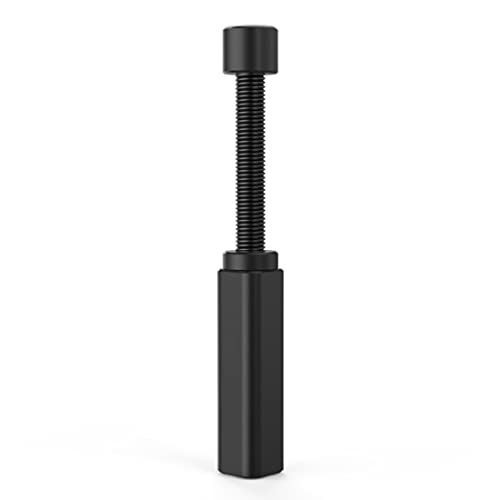
Supports come in four families. The pillar stand is the commonest: a small adjustable column that stands on the case floor or power-supply shroud and lifts the card’s far corner on a padded cradle, telescoping to the height your build needs. It is cheap, universal and removable, and its only demands are a floor to stand on and a card corner free of fans where the cradle lands. The bracket brace bolts to the case’s expansion-slot screws and runs along the card’s length, supporting it from its own mounting points; it is the tidiest and the most structural, and it suits showpiece builds. The case-integrated support, a feature of some larger cases, is a bracket or arm built into the chassis, and where it exists it is usually the best answer of all. The improvised support, the cut-to-length object from the parts drawer, is the hobby’s folk tradition; it works when it is rigid, non-conductive, heat-tolerant and incapable of wandering into a fan, and it fails every one of those tests in the stories people tell afterwards. The three products reviewed next are all pillar stands, because that is the family most builders need; the buying criteria after them apply across all four families. Motherboard and case size set the stage for every family, as motherboard sizes and what fits explains, and multi-card or very long builds, like those in graphics cards for three-monitor setups, should start from the bracket family rather than the pillar.
Three Verified Supports, Reviewed

nkomax GPU Brace Support, Large (74-120mm)
Best all-round pillar stand for standard towers
| Specification | Detail |
| Type | Adjustable pillar stand |
| Height range | 74-120mm (Large size, per API title) |
| Fit note | Suits typical mid-tower floor-to-card gaps |
The nkomax brace is the straightforward answer most builds need: a telescoping pillar with a wide, stable base and a cradle that meets the card’s far corner without drama. Its large size covers the floor-to-card distance found in standard mid-towers with the card in the primary slot, and the adjustment is fine enough to take the droop out without jacking the card past level, which is the mistake this category invites. Fit it by extending it until it just kisses the card, then add the smallest further turn that brings the corner to level; the goal is support, not lift. Its plain finish disappears in dark interiors, and the whole installation is a two-minute job that survives case moves because nothing is glued or screwed.
Choose this size by measuring your own gap first: the distance from the surface the stand will sit on to the underside of the card, at the corner you intend to support. Builds with a power-supply shroud sit the stand on the shroud, which shortens the gap; open-floor cases lengthen it. The large size’s range, stated in its title, covers the commonest span of both.
Strengths
- Measured, honest height range that matches its listing
- Stable base and a cradle that does not mark the card
- Installs and removes in minutes with no fixings
Trade-offs
- Single size per purchase, so measure before ordering
- Plain styling will not satisfy showpiece builders
- Cradle must land on a fan-free part of the card edge
Best for: standard mid-tower builds with a visibly drooping card and a shroud or floor to stand on. Not suited for: very short gaps in compact cases, or cards whose far corner is all fan.

JOYJOM GPU Support Bracket (35-120mm)
Widest height range, for compact and tall gaps alike
| Specification | Detail |
| Type | Adjustable pillar stand with adhesive base |
| Height range | 35-120mm (per API title) |
| Card thickness | Supports cards up to 75mm thick (per API title) |
The JOYJOM bracket’s distinction is its range: starting far lower than most pillar stands, it serves the compact cases and shroud-top installations where the big stands cannot shrink enough, while still extending to full tower gaps. Its listing states support for cards up to 75mm thick, which covers the heavyweight cooler class that sags most and needs support most. The base uses adhesive to stay planted, which keeps it put in cases that travel, at the cost of a little commitment when you rearrange the build.
That low starting height makes this the support to reach for in small-form-factor and desktop-style cases, where the gap between card and floor may be only a few centimetres and where sag, though smaller in absolute terms, stresses a slot with no room for a bracket-style alternative. Set it as with any pillar: contact, then the smallest adjustment that levels the card, verified against your straight edge rather than your enthusiasm.
Strengths
- Lowest starting height in this roundup
- Explicit support for thick flagship-class cards
- Adhesive base stays planted in moved cases
Trade-offs
- Adhesive is a commitment when rearranging
- Busier appearance than the plainest stands
- Still a pillar: needs a landing surface beneath the corner
Best for: compact builds and thick, heavy cards, and anyone whose measured gap is short. Not suited for: builders who rearrange hardware weekly, or glass-floor showcase layouts.

Uyubao GPU Support Bracket, Large (74-120mm)
Magnetic base for steel cases and tool-free moves
| Specification | Detail |
| Type | Adjustable pillar stand |
| Height range | 74-120mm (Large size, per API title) |
| Base | Magnet and non-slip sheet (per API title) |
The Uyubao stand answers the pillar category’s one annoyance, the base that skates across a smooth shroud when the case is moved, with a magnetic foot backed by a non-slip sheet. In a steel case it plants itself and stays planted, yet lifts away cleanly when you want it gone, which makes it the support for machines that travel to desks, events or the workbench and back. Its height range matches the standard tower class, and its adjustment has the same fine, level-seeking character the category needs.
The magnet deserves one honest caution: keep it at the stand’s foot, on the case floor or shroud where it belongs, and there is nothing in a modern build for it to trouble, since the era of magnetic storage inside PCs has passed. Fitted there, it is simply the most convenient base in this roundup, and convenience is what turns a support from a purchase into a permanent resident of the build.
Strengths
- Magnetic, non-slip base is the most secure here
- Tool-free to fit, move and remove
- Standard tower height range covers most builds
Trade-offs
- Magnet wants a steel surface to earn its keep
- Same single-size discipline as rivals: measure first
- No advantage in cases where the stand sits on plastic or glass
Best for: steel mid-towers and machines that get moved. Not suited for: aluminium or glass-floored cases where the magnet cannot grip.
Fitting Any Support Correctly: The Five-Minute Discipline
The fitting matters more than the product. First, choose the landing point: the card’s far lower corner, on a part of the cooler shroud or frame that is solid, never on a fan blade’s arc and never on the bare board. Second, set the machine upright as it will live, because a card supported on a workbench in another orientation is a card supported for a machine that does not exist. Third, adjust to contact, then to level, checking with your straight edge, and stop there; a support wound up hard enough to lift the card past level has simply moved the stress to the other side of the slot, and over-jacking is the one way this harmless accessory can do harm. Fourth, route nothing against the stand: a power cable leaning on a pillar will walk it, and the cable’s own discipline is covered in the connector guides. Fifth, photograph the result and recheck it after the machine’s first move or deep clean. The whole discipline takes five minutes and converts a plastic pillar into a structural decision. Cooling interacts at the margins, since a support must never block a fan’s intake, and the card’s thermal class, the subject of how TDP drives cooling requirements, decides how much clearance around those fans is non-negotiable.
The Physics of the Cantilever, With Numbers You Can Feel
A graphics card’s droop obeys the same rules as a diving board, and a little arithmetic makes the support decision less superstitious. The bending load grows with the cooler’s mass and, cruelly, with the square of the card’s length, because a longer card both weighs more and applies that weight at a longer lever arm from the slot that holds it. This is why the modern flagship, long and wearing a triple-fan brick of a cooler, sags visibly while a short mainstream card of similar board quality sits level for a decade: the mainstream card’s lever is short and its load is modest, and the flagship is fighting geometry with two screws and a slot. It also explains why the support’s position matters as much as its existence. A pillar placed at the card’s far corner shortens the effective lever to nearly nothing, which is why a modest plastic stand defeats a problem that looks structural: it is not overpowering the load, it is deleting the lever. A support placed halfway along the card helps proportionally less, and one placed near the slot is decoration. When you fit any support from the reviews above, fit it at the far corner, on the cooler’s frame, and you are applying the physics rather than merely owning the product.
Temperature writes a footnote to the arithmetic. A board’s stiffness is not constant across its working life; warm polymer and solder are marginally more compliant than cold, and the daily cycle of heating under load and cooling at rest lets a loaded cantilever creep in increments too small to see and too steady to ignore. Owners who measure their card’s droop annually, with the photograph method from the main guide, are watching creep in the only way it can be watched, and the year the photograph changes is the year the support stops being optional.
Bracket Braces and Case Arms: The Other Families, Judged
The pillar stands reviewed in this guide are the universal answer, but the other families deserve their judgements for the builds they suit better. The horizontal bracket brace, which bolts along the expansion slots and runs beneath the card’s full length, distributes support instead of concentrating it at a corner, and in a showcase build it disappears visually in a way no pillar can, becoming a line of the case’s own architecture. Its costs are commitment and compatibility: it must match the case’s slot arrangement, it complicates card removal, and in a build that changes hardware often it will be cursed monthly and loved in photographs. The case-integrated arm is the same idea with the engineering done by the case maker, and where a case offers one it should be used first, since its geometry was designed against that chassis’ own dimensions. The vertical-mount world rearranges the problem entirely, hanging the card from a bracket in a different orientation where sag becomes a question of the mount’s rigidity and the riser’s discipline rather than of pillars. None of these families is the best support; each is the best support for a build shape, and the choosing is the same measurement exercise the main guide teaches, performed against your case rather than against a catalogue.
Sag and the Rest of the Machine: Slots, Boards and Second Cards
A sagging card does not live alone, and its droop is read by its neighbours. The motherboard’s slot carries the bending load’s other end, and boards differ in how that load is received: reinforced slots, with metal shrouding soldered through the board, exist precisely because this load became a design case, and a board with a reinforced primary slot is a genuine, if partial, sag mitigation bought at the motherboard stage. The card below, in a multi-card machine, receives the droop as a narrowing of its air gap, so a support in a dual build is also a cooling component, a fact the dual-GPU guidance in this series prices in. Even the backplate screws and the bracket’s fit at the case participate: a bracket that was forced into alignment during installation stores a twist in the assembly that the support then has to fight. The thorough builder therefore treats level as a system property, checked after the card is seated and screwed without force, after the power cables are routed without side-load, and after the support is fitted to contact and no further. A card level by that process tends to stay level; a card forced level by the pillar alone is a negotiation the pillar may slowly lose.
The Aesthetics Question, Taken Seriously
It is unfashionable to admit and useless to deny that much of the support market is bought by eyes rather than by engineering. The glass-panelled build is a display object, its owner curates cables and lighting with a straight face, and a visibly drooping flagship offends that curation out of proportion to its mechanical risk. This guide’s position is that the aesthetic motive is legitimate and should be spent on knowingly: a support bought for level photographs is a successful purchase when the photographs level, and the engineering benefits arrive as a bonus. What the aesthetic buyer should refuse is the inverse product, the support that performs its appearance at the expense of its function, glowing pillars that flex, decorative props of uncertain height, stands whose cradle lands on a fan because the designer never installed one. Judge the beautiful options by the same five-minute discipline as the plain ones, measure, land on the frame, adjust to level and no further, and the build can be honest and handsome in the same photograph.
Installation Night: A Complete Walk-Through With the Reviews’ Stands
Fit the support while the build is otherwise finished, because everything else in the case conspires to move the card. Begin with the machine upright on its feet, in the orientation it will live, side panel off, and the card fully seated and screwed at its bracket without force. Sight along the card’s top edge from the rear of the case, the angle that exaggerates droop most honestly, and confirm with a straight edge which corner sits low and by roughly how much. Choose the landing point on that corner: a flat of the cooler’s shroud or the frame’s edge, clear of any fan’s sweep and clear of the bare board, and note what surface the stand will occupy, floor, shroud or drive cover, wiping it clean so a magnetic or adhesive base meets what it expects. Extend the stand to just below the gap, set it in place, and raise it in small increments, a quarter-turn at a time, checking the sight line after each, until the card reads level and no further. The discipline of “and no further” is the whole craft: the stand should be discoverable by a fingertip as firm contact, not as a jack still carrying the memory of its turns. Route the power cables so none leans on the stand or pulls the card’s corner, close the panel without pressing anything, and photograph the result from the same rear angle as your first sighting. That pair of photographs, before and after, is the build’s record, and it will settle every future argument about whether the card has moved.
Recheck the installation twice in the machine’s first month, once after its first long gaming week and once after any move, because new assemblies settle: cables relax into their runs, the stand’s cradle seats into the shroud’s texture, and the card finds the exact posture it intends to keep. A quarter-turn found at the first recheck is the system bedding in, not a product failing, and after the second recheck a well-fitted stand typically holds its setting for years, needing attention only when the card is removed and refitted for cleaning. Build the recheck into the same calendar as the dust filters and the ritual costs nothing at all.
Troubleshooting Supports: Wobble, Noise and the Wandering Pillar
Supports have a small fault catalogue of their own, and each fault has a household cure. A stand that wobbles on its base is standing on an uneven or flexing surface, most often a thin shroud panel that drums under it; moving the stand to a solid part of the surface, or choosing the adhesive or magnetic base from the roundup, ends it. A faint new noise after fitting, a buzz at certain fan speeds, is the stand transmitting the card’s vibration into the case like a sounding board; a softer cradle contact, a fraction less preload, or a felt pad under the base breaks the transmission without surrendering the support. A pillar that wanders across weeks is being walked by a cable’s side-load or by the case’s own vibration on a smooth surface, and the cure is routing first and base grip second. A card that reads level at the corner but still twists, its far edge dipping at the back while the front is held, is telling you the cooler’s mass is not symmetric and that a second, shorter support or a bracket-style brace suits its shape better than any single pillar. None of these faults indicts the concept; they are the ordinary fitting notes of a mechanical accessory, and each is cheaper to cure than the droop it replaced.
What the Manufacturers Say, and What the Evidence Adds
Card makers rarely discuss sag in their own documentation, which leaves owners to triangulate between case makers, who increasingly design supports into their chassis, and the repair world, which sees the failures. The triangulated picture is consistent. Slot and board damage from sag alone is uncommon and concentrated in heavy cards that travel, in machines moved without their cards supported or removed. Connector and cable complaints correlate with sag in the repair record more than the folklore admits, because the same cantilever that droops also levers at its power plugs when the case is bumped. And the aesthetic complaint, the visible droop, is by far the most common of all, which the industry has answered by making flagship coolers stiffer and cases more supportive, an arms race between mass and structure that the little pillar stand ends for the price of a pizza. The evidence-based position is therefore the one this guide opened with: support is cheap insurance with a certain aesthetic dividend and a small, real mechanical claim, and it should be bought in that spirit, neither as superstition nor as emergency surgery.
The Support Decision for Special Builds: Vertical, Open and Travelled Machines
Three build shapes rewrite the support question and deserve their own answers. The vertical-mount build hangs its card from a bracket in a showcase orientation, and its sag equivalent is a slow rotation or flex of the mount itself; the cures live in the mount’s rigidity and in choosing riser arrangements that do not add their own flop, and a pillar has no floor to stand on in most such layouts, so the bracket family and the case’s own structure carry the whole duty. The open-frame and bench build has no case floor at all and typically no sag problem either, since its cards are handled constantly and its builders use the bench’s own supports; its lesson for tower owners is that sag is a disease of unattended years, not of hardware. The travelled machine, the LAN and event PC, is where support graduates from insurance to necessity: transport multiplies every load the cantilever sees, and the correct protocol is a fitted support for ordinary moves and the card removed entirely, in its original packaging, for any journey involving couriers or luggage holds. Owners of travelled machines should also re-run the connector audit from this series after every trip, because the same journey that tests the slot tests the plugs, and the two audits together take three minutes.
Sag in the Showpiece Build: Glass Panels and Vertical Displays
The showpiece build changes sag’s terms in ways worth a dedicated word, because the glass panel that displays the card also displays its posture, and the vertical mount that presents the card like a portrait reassigns gravity’s direction across its bracket and riser. A vertically mounted card does not sag in the classic direction; instead its weight hangs from its mount and its riser cable becomes a structural citizen whose quality, addressed in the lane guide in this series, decides both the link’s negotiation and the card’s security. Showpiece owners should therefore choose their support thinking in the mount’s own geometry, verify the riser’s seating as part of the posture audit, and remember that a build designed to be looked at will be judged, by its owner most of all, on the straightness of the lines it displays. The support in such a build is not hidden infrastructure but part of the composition, and it should be chosen with the same eye as the lighting it sits among. Beauty and structure are not rivals here; each is the other’s evidence.
The Support as a Diagnostic Instrument
A final, underappreciated use of the support deserves recording: it is a diagnostic instrument for the card’s installation. A card that changes behaviour, a link that renegotiates, a fan note that alters, when its unsupported end is gently lifted to level has confessed that its slot connection was living under strain, and the confession redirects the whole investigation from silicon to socket. Conversely, a card whose faults are identical level and unlevel has acquitted its installation and freed the diagnostician to look elsewhere with a clear conscience. Builders who perform this ten-second test before the deep diagnosis will, across a lifetime of machines, save themselves at least one long weekend. The support then remains as the cure for the strain the test revealed, which makes the humble bracket the only tool in the kit that diagnoses and treats the same condition.
Sag’s Interaction With the Rest of the Build’s Health
A sagging card does not suffer alone, and the final survey of its consequences should include its neighbours. The slot’s strain is shared, in small part, with the board itself, whose own mounting and standoffs absorb the card’s leverage; a board that flexes visibly under a heavy card is asking for the support as much as the card is. The card’s power cables, routed from above or below, either add their small constant pull to the droop’s direction or, routed thoughtfully, can be dressed to neither help nor hinder, never to hold, since cables are conductors and not structure. Even the case participates: a chassis whose side panel and bracket screws are its only rigidity will let a heavy card find angles a stiffer case denies. The support, installed, quietens the whole system of small strains at once, which is why experienced builders fit one as a matter of course in heavy builds rather than as a response to a symptom. Prevention, in mechanics as in medicine, is the cheapest chapter, and it is the one this guide most hopes its readers will not skip on the grounds that their card looks straight today.
The Aesthetics of Straightness: Why Level Cards Look Faster
It is worth admitting, in a technical guide, that part of sag’s offence is aesthetic, and that the aesthetic offence is legitimate. A build is an arrangement of straight lines, slots, edges, tubes and cables dressed to parallels, and a drooping card breaks the arrangement’s grammar in the place the eye goes first. Owners who feel the wrongness are not being vain; they are reading the machine’s posture the way a carpenter reads a shelf, as evidence of whether forces were respected in the making. The support restores the grammar, and the satisfaction owners report from that restoration is the same satisfaction as a level picture frame’s, disproportionate to the millimetres involved because the eye is a superb instrument for detecting the almost-straight. In a hobby where machines are displayed as well as used, that satisfaction is a real return on a small part’s price, and this guide sees no reason to pretend otherwise. Straight is a specification too.
Sag and the Long Card’s Other End: Bracket Flex and Case Tolerance
The bracket end of a long card has a mechanics of its own that the support conversation usually omits, and it belongs in a complete account. The card is held at two territories, the slot along its edge and the bracket at its rear, and the case’s rear panel is not a rigid reference: its metal flexes, its screw holes have tolerance, and a heavy card’s bracket, tightened firmly, can pull the card’s rear up or down by the small amounts that decide whether the free end reads as level. Builders chasing the last degree of level should therefore work the bracket end deliberately, seating the card fully, supporting the free end at level, and only then tightening the bracket screws in that held position, so the case’s tolerance is spent in the card’s favour rather than against it. Some cases and brackets offer a third screw point or a support ledge; use them. The support at the free end and the care at the fixed end are one system, and a card levelled by both will stay levelled through the case’s moves and seasons, which is the actual goal: not a photograph’s straightness but a decade’s.
When Sag Is Not Sag: Cards That Sit Crooked for Other Reasons
An acquittal section, in this series’ tradition, for the cards accused of sagging that are guilty of something else. A card can sit crooked because its bracket was bent in a previous life, because the case’s slot covers are misaligned from a previous installation’s enthusiasm, because the board itself sits on a standoff pattern that leaves its far corner dreaming, or because the card’s cooler was mounted at the factory with a degree of personality. The diagnostic is the support’s own test in reverse: if a support, correctly fitted, cannot level the card without force, the fault is not gravity and should not be treated as gravity, because forcing a card against a bent bracket or a misaligned case stores the stress this guide exists to relieve. Level what gravity bent; investigate what it did not. The distinction takes one careful look and saves the card from being straightened against its own evidence.
The Support Decision, Filed in One Paragraph
This guide’s whole counsel compresses, at the end, into the paragraph its readers can act on at the point of purchase. Weigh the card in the hand and in the specification; look at its length and its cooler’s ambition; and if the assembly is heavy, long or destined for a displayed case, buy the support with the card, fit it at the build, level the card between bracket care and support adjustment, and photograph the result for the record. Thereafter, glance at the posture at every opening of the case, the way one glances at every connection in this series’ audits, because posture, like seating, is a state that seasons can revise. The cost is a small part and ten minutes; the return is a slot unstrained, a card unflexed and a build whose lines stay as straight as its builder intended. Some purchases in a build are performances and some are promises. The support is a promise, and it is kept by doing almost nothing, correctly, once. Do it once.
The Build’s Standing Orders for Posture
The household that has levelled one card should keep the knowledge as standing orders, the small pre-agreed procedure that outlives the build it was learned on. At every assembly, the posture is set deliberately, bracket care first, support fitted before the panel closes, the level checked with the machine in its working orientation rather than on its side. At every opening of the case, the posture is glanced at with the same attention the connections receive, because seasons and moves revise it silently. At every card change, the support question is asked of the new citizen’s weight and length before the old answer is assumed to transfer. At every handover, the support travels with the card it was fitted for, and its setting is written in the machine’s papers. Four orders, each a sentence, together the whole of this guide reduced to household law. Posture, like seating, like thermals, like every subject in this series, rewards the household that decided its procedure in advance and punishes, gently and eventually, the one that improvises each time. Decide once. The cards will keep their line, and so will the builders.
Standing Orders, Restated for the Fridge Door
The household that keeps its procedures visible deserves this guide’s orders in their shortest public form. Heavy card: support bought with it, not after it. At the build: bracket care first, card seated fully, level held while the screws are turned, support adjusted to meet the card rather than to lift it. At every opening: glance at the posture with the torch already in hand for the connections. At every move: the posture rechecked on arrival, before the first power-on in the new room. At every handover: support travels with its card, setting written in the papers. Five lines, and the slow, silent strain that bends cards and worries slots retires from the household’s list of possible futures. The long version exists to earn the lines their authority, the leverage, the slot’s testimony, the diagnostic trick of the lifted corner. The lines exist for the build day’s last ten minutes, when the panel is about to close and the small part is still in its bag on the desk, asking to be either installed or regretted at leisure. Install it. The card’s straightness, five years from now, is decided in that moment and no other.
The Posture Manifesto: Straightness Is a Promise Kept Slowly
End with the manifesto the subject has earned. A level card is a promise kept slowly, between the builder’s intention on the first day and the machine’s condition on the thousandth, and like all slow promises it is kept by procedure rather than by vigilance: the right part, fitted once, checked in passing, travelling with its card. Gravity is the most patient force in the machine’s life, working every second, in silence, without malice and without rest, and the only answers it respects are the ones that also work every second: geometry, support and a bracket honestly seated. The hobby’s other forces, heat, current, data, all have their governors and their alarms; gravity has none, which is why its damage arrives as a surprise to owners who monitored everything else. This guide exists to remove that one surprise from the list, cheaply and permanently. Fit the support. File the photograph. And let the card hang in its designed line for a decade, a small straight horizon inside the case, testifying that in this household, even the patient forces are answered by patient ones.
A Coda for the Straight Card
The straight card deserves the guide’s last word, because it is the least celebrated success in the whole library: nothing happened, for years, in public, inside a glass case. No slot strained, no joint fatigued, no intermittent fault with a mechanical alibi ever sent its owner into a month of software archaeology. The card simply hung in its designed line while the machine’s whole life passed around it, games, summers, moves, upgrades of everything except the card itself. That nothing was purchased, cheaply, on the build’s first day, by a part most builders consider optional and a procedure most guides consider too small to print. This guide printed it at full length because the library’s philosophy holds that the small, permanent things are the subject, the millimetres and margins and minutes of maintenance out of which a machine’s decade is actually composed. The straight card is that philosophy’s emblem, level as a horizon, silent as a held breath. When the case is next opened and the torch passes over it, let it be noticed, once, with the respect due to a promise that was kept so completely it became invisible. Then close the panel, and let it go on keeping it.
One More Level: The Reader’s Next Card, Met in Advance
A guide should end by handing its level to the reader in advance, against a card that exists so far only as a dimension table and a savings goal. When the next card’s weight and length are first published, perform the posture’s opening moves before the desire hardens into a preorder: the support question asked of the new citizen’s figures rather than assumed from the old one’s answer, the bracket’s territory in the present case re-measured, the support that will travel or be bought named in the plan beside the card itself. The exercise takes ten minutes and a tape, and it converts the card’s arrival from a negotiation with gravity conducted over a weekend into an appointment kept in minutes. Level early, in writing. The card, when it comes, will hang from its first evening in the line its designer drew, and it will still be hanging there, unremarked and unstrained, on the evening the household stops noticing it entirely, which is the support’s whole ambition and the posture’s final, quiet victory.
Frequently Asked Questions
Does GPU sag actually damage the card or motherboard?
It can, over years, in the extreme cases: the bending stress concentrates at the card’s board near the slot and at the slot’s joints, and heavy cards in moved machines are the population at risk. For most stationary builds the honest risk is small and slow, which is why support is best understood as cheap, calm insurance rather than an emergency measure.
How do I know what height support to buy?
Measure the gap the stand must fill: from the surface it will stand on, floor or shroud, to the underside of the card at the corner you will support, with the machine upright and the card installed. Buy a stand whose stated range contains that measurement with room on both sides, never one whose range merely touches it at its extreme.
Can I just prop the card up with something from the house?
People do, and the failures share a pattern: the prop is conductive, melts, slips into a fan, or was the wrong height and jacked the card. If you improvise, obey the same tests as a product: rigid, non-conductive, heat-tolerant, exactly the measured height, and incapable of wandering. A purpose-made stand passes those tests for very little money, which is why this guide reviews them.
Should the support touch the card’s circuit board?
No. Land the cradle on the cooler’s shroud or frame, never on the bare board, its components or a fan. The shroud is the card’s designed exterior and carries the load into the cooler’s structure; the board is the thing you are protecting, not a shelf.
Does a support help with coil whine or temperatures?
No. Sag support is a mechanical intervention with mechanical benefits only. It will not change the card’s acoustics, its temperatures or its performance, and any product implying otherwise is decorating itself. Buy it for level, longevity and looks.
My case came with a support bracket. Should I use it instead?
Usually yes. A case-integrated support was designed for that chassis’ geometry and is typically the most structural option available to you. Fit it with the same discipline, contact then level, never over-jacked, and keep the pillar stands in mind for the next case, which may not be so thoughtful.
The Bottom Line
Sag is gravity doing slow arithmetic on an expensive cantilever, and a support is how you answer it: measure the droop, measure the gap, choose the family that suits your case, and fit it to level and no further. The three stands reviewed here cover the standard tower, the compact build and the travelling machine between them. Level card, quiet conscience, better photographs: that is the whole promise, and it is enough.