ilcastellomenu.com is reader-supported. When you buy through links on our site, we may earn an affiliate commission.
Where to Buy
Buy the camera and the software as one decision, from sellers whose returns cover your first month of real shooting. Amazon stocks every body below; the software is mostly free or already on your computer, which is the first lesson of this guide. If you are choosing the best cameras and software for beginner photography, resist the twin temptations that ruin more beginners than bad equipment ever has: the flagship camera bought to skip the learning, and the professional software suite bought to skip the seeing. Neither shortcut exists. What exists is a friendly camera that explains itself, and an editor simple enough that you finish photographs instead of abandoning them.
This guide pairs six starter cameras with the software path each one implies, because the pairing is the product. A camera whose files flow painlessly into an editor you understand will produce more finished photographs in a year than a superior camera whose workflow you dread. Beginners quit at the desk more often than in the field, and every recommendation below was tested against that melancholy fact.
The encouraging truth is how little money the whole enterprise now requires. Free editors of genuine quality, cameras that teach while assisting, and phones that serve as darkrooms in a pocket have collapsed the cost of a serious photographic education to the price of one sensible camera and a year of walks. The six below are the doors; walk through one and keep walking.
A final buying note: choose the retailer by the returns policy, because a beginner cannot know from specifications whether a camera’s grip, menus and viewfinder suit their hands and habits. A month of honest shooting inside a fair returns window is worth more than any review — including this one — and the camera that survives that month in your hands is, by definition, your correct answer.
Key Takeaways
- Pair the camera with an editor you will actually open; workflow dread kills more beginners than bad gear.
- Free software — the makers’ own editors and open-source tools — is genuinely sufficient for year one.
- Guided camera modes that explain themselves are tuition, not cheating.
- A camera carried daily teaches more than a superior camera carried monthly.
- JPEG-first shooting is a legitimate beginner strategy; add RAW when editing curiosity arrives.
In this guide
Quick Picks
| Camera | Badge | Why it earns its place |
|---|---|---|
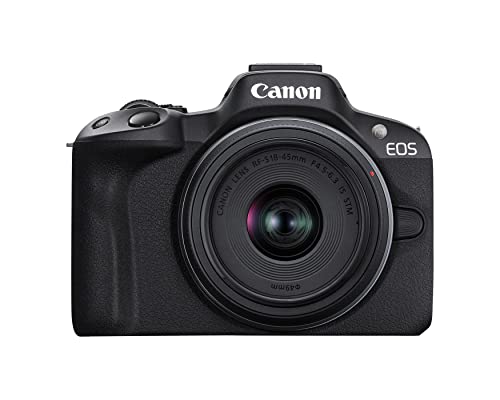
| Canon EOS R50 | Best first camera overall | Friendly Canon with guidance modes that teach while they assist, inside a system worth growing into. |
| Nikon Z30 | Best beginner camera for video diaries | Nikon’s compact creator body: simple video, clean stills and a friendly price of entry. |
| Sony ZV-E10 II | Best beginner camera for creators | Creator Sony with superb autofocus, product-showcase talents and room to grow into E-mount. |
| Fujifilm X100VI | Best camera for falling in love with photography | The fixed-lens phenomenon: one focal length, beautiful JPEGs and a learning experience by constraint. |
| Canon PowerShot G7 X Mark III | Best pocket beginner camera | The social generation’s compact: pocketable, flattering and far better than the phone it replaces. |
| Sony ZV-1F | Best simple starter for talking to camera | Fixed wide lens, face-priority everything: the gentlest possible first step into filming yourself. |
How Did We Choose Starter Cameras and Their Software?
We scored each camera as a teacher. Does it explain its decisions or merely make them? Does its automatic mode produce photographs a beginner can be proud of while its manual mode waits accessibly for growing ambition? Does its system — lenses, community, tutorials — reward the second year as generously as the first? Cameras that are merely small versions of professional bodies scored lower than cameras designed, honestly, for the learning curve itself.
Software was judged by completion rate: how likely is a tired beginner, at a kitchen table, to open it, understand it, finish ten photographs and close it satisfied? That test favours the manufacturers’ free editors, the friendliest subscription editor’s automatic modes, and the great open-source darkroom for the technically curious — and it demotes professional suites whose power arrives wrapped in a hundred unexplained sliders.
Finally, we weighted total cost of the first year honestly: body, one useful lens where relevant, software at its real price, and the storage to hold a beginner’s exuberant output. A cheap camera married to an expensive workflow is not a cheap start, and this guide refused to pretend otherwise.
We also considered the secondhand dignity of each recommendation. Beginners upgrade, lend and occasionally abandon hobbies; cameras that hold value, circulate in healthy used markets and serve as gifts to the next learner scored higher than technically equal bodies in orphaned systems. A first camera is a social object as much as an optical one.
Which Starter Cameras Pair Best With Beginner-Friendly Software?
Six doors into photography, each opening onto a slightly different room. Choose by the photographs you dream about, not the specifications you can pronounce.
Notice, as you read, how often the verdicts mention willingness — to carry, to open the editor, to publish imperfectly. That is deliberate. At the beginner stage, willingness is not a soft virtue around the edges of the decision; it is the decision, and every camera below was chosen because it manufactures willingness in its own way.

Canon EOS R50 — Best first camera overall
Beginners do not need the most powerful camera; they need the camera that makes the second hundred photographs better than the first hundred, and the R50 is engineered around exactly that progression. Its guided interfaces explain what the camera is doing in plain language — why the background blurred, why the shutter slowed — so assistance becomes tuition rather than dependence. Photographers raised on it arrive at manual control understanding the concepts, because the camera narrated them all along.
The RF system underneath matters even for a first purchase. The kit lens teaches composition; the first prime — bought cheaply, used joyfully — teaches light and depth; and every lens remains useful when the inevitable body upgrade arrives. Starting inside a living professional ecosystem is the difference between a first camera and a false start.
Software pairing is painless: Canon’s own free editor handles RAW files competently for a beginner’s first year, and the camera’s JPEGs are honest enough that early editing lessons can concentrate on cropping, exposure and colour rather than rescue. Add dependable autofocus that simply finds faces and eyes, and the R50 removes every excuse between a beginner and a thousand practice frames — which is the whole curriculum.
Its wireless transfer deserves praise for a beginner-specific reason: photographs that reach the phone the same evening get shared, and shared photographs get responses, and responses are the fuel of the first year’s motivation. Workflows that delay sharing by a week quietly starve beginners of the encouragement that carries them to competence.
The body’s size walks the right line for learners: substantial enough to teach two-handed craft, light enough that the daily carry of month one does not become a negotiation. Many a photographic education has died of a camera that felt like luggage; this one feels like a notebook.
Its resale and trade-in path is painless because beginners buy it constantly; a well-kept example is practically currency within the Canon ecosystem. Low-risk purchases encourage the experimentation beginners need.
Its colour science flatters the beginner’s likeliest subjects — family, friends, food, the dog — with a warmth that makes early galleries feel accomplished. Encouragement engineered into skin tones is not a trivial feature in a teaching camera.
Church halls, school plays and rainy sports days — the unglamorous venues of family photography — are where its autofocus and colour quietly earn the purchase price, long after the specification excitement has faded.
- Sensor: APS-C, forgiving and clean in good light
- Guidance: creative assist modes that explain themselves
- Lens system: RF mount, professional upgrade path
- Autofocus: face and eye detection as standard
- Software: free Canon editor covers the first year
Strengths
- Teaches while it assists
- Lenses survive the eventual body upgrade
- Autofocus removes beginner frustration
Trade-offs
- No in-body stabilisation
- Kit lens is a teacher, not a destination
- Advanced video features are limited
Best for: true beginners who want one camera to learn photography properly from zero.
Not suited for: buyers who already shoot confidently in manual and need professional features now.

Nikon Z30 — Best beginner camera for video diaries
Many beginners now begin with motion — a video diary, a family channel, a record of a gap year — and the Z30 was designed by Nikon specifically for them. It is compact enough to be carried without negotiation, its video is clean and simple to start, and its stills carry Nikon’s mature colour for the photographs that punctuate the filming. The absence of a viewfinder, scandalous to traditionalists, matches how its intended owners actually compose: on a screen, at arm’s length, in the middle of the life being recorded.
As a learning tool it is gentler than it first appears. The controls are uncluttered, the menus speak plainly, and the Z system’s lenses wait patiently for the day stills ambition grows. Beginners who discover they love photography itself graduate within the mount; beginners who remain video-first keep a body that serves that purpose without pretending otherwise.
Software pairing suits its audience: Nikon’s free NX Studio handles stills and basic organisation, and the camera’s files drop into every mainstream video editor without conversion rituals. For a first camera whose owner measures success in finished, shared pieces rather than technical conquests, the Z30’s honesty about its purpose is refreshing and rare.
Travel beginners love it for an unglamorous reason: it charges and transfers like the phone it accompanies, fitting the one-bag, one-cable discipline of light travel. Equipment that matches a traveller’s existing habits gets used at altitude, in rain, at dawn — the moments travel photography exists for.
Its stills are the sleeper feature. Owners who bought it for video keep being surprised by the photographs, and some discover their real ambition was stills all along. A first camera that lets its owner change their mind about their own genre, without changing systems, is a first camera designed with unusual empathy.
For students it has a social virtue: it does not look like an exam. Filming friends with it feels like play rather than production, and the resulting performances are natural in a way bigger rigs rarely capture.
It doubles gracefully as the family holiday camera: one adult films, another photographs, nobody reads a manual. Shared fluency is a real feature in household equipment, and this body was clearly designed by people who lend cameras.
Its microphone options respect the beginner podcaster and the family historian equally; clear voices are the difference between recordings relatives keep and recordings they merely store.
- Sensor: APS-C, strong stills and video
- Viewfinder: none — screen composition by design
- Lens system: Z mount with professional future
- Audio: built-in stereo microphones, external input
- Software: free Nikon studio for stills
Strengths
- Genuinely pocketable creator body
- Video that starts simply and looks clean
- Z lenses provide a growth path
Trade-offs
- No viewfinder for bright-day stills
- Stills controls are simplified
- Not a sports or wildlife tool
Best for: video-first beginners, travellers and family documenters who compose on screens.
Not suited for: traditional stills learners who want a viewfinder from day one.

Sony ZV-E10 II — Best beginner camera for creators
Sony’s ZV line exists because the company noticed beginners filming themselves, and the ZV-E10 II is its most complete expression at an attainable level. The autofocus is the headline: faces, eyes and products are tracked with a confidence that lets a solo creator think about content instead of focus, and the product-showcase behaviour — snapping to an object held toward the lens, then back to the presenter — remains the single most useful creator feature any beginner camera offers.
Interchangeable lenses separate it from fixed-lens vlogging compacts: the E-mount catalogue lets a creator begin with the kit zoom and add the wide prime their room demands or the portrait lens their style discovers, all without changing bodies. Stills are entirely respectable too, so the photography learner inside the creator is not short-changed.
On the software side, Sony’s ecosystem of mobile transfer and simple editing apps suits a phone-first workflow, while its files are equally at home in full desktop editors when ambitions grow. The honest limits are stabilisation — plan on a tripod, a gimbal or steady hands for moving shots — and a control layout simplified enough that advanced stills shooters will eventually want more dials. As a first creator camera, those are the right compromises in the right places.
The creator features repay study rather than merely existing. Its background-defocus control teaches depth of field by demonstration; its exposure compensation for faces teaches metering priorities. Sony built a curriculum into the conveniences, and beginners who poke at them learn faster than the marketing suggests.
Battery and heat manners suit its audience’s reality: bedroom studios, desk setups, café corners. It is not an expedition camera and does not pretend to be; it is a production tool for the indoor creator economy, and within that economy its reliability record is its reputation.
Its microphone input respects the creator’s second purchase: audio. Beginners who add a proper microphone to this body leapfrog years of muffled-channel growing pains in a single step.
Its overheating manners in typical creator sessions — short takes, indoor sets — are well within working limits, and its fanless silence suits bedroom studios where a fan’s hum would print onto every recording.
Streaming-curious beginners find its webcam manners painless, which collapses two purchases — channel camera and desk camera — into one body during the fragile first year of a channel.
- Sensor: APS-C, strong in ordinary light
- Autofocus: class-leading face, eye and product tracking
- Lens system: E-mount, the deepest creator catalogue
- Features: product showcase and background defocus aids
- Workflow: phone-friendly transfer and apps
Strengths
- Autofocus that frees solo creators
- Lens growth without body changes
- Creator features that genuinely save takes
Trade-offs
- Stabilisation needs external help
- Simplified controls for stills purists
- Best lenses add up over time
Best for: aspiring creators, reviewers and streamers starting their first real channel camera.
Not suited for: hand-held walking vloggers unwilling to add stabilisation support.

Fujifilm X100VI — Best camera for falling in love with photography
Every generation produces one camera that beginners are warned is impractical and buy anyway for love; the X100VI is this generation’s, and the love is instructive. Its fixed lens — a moderate wide that sees roughly as a thoughtful eye does — removes the beginner’s most paralysing variable. You cannot zoom, so you walk; you cannot swap, so you learn the one view deeply. Photographers consistently report that a season with a fixed lens teaches composition faster than a bag of zooms, because the feet become the zoom and the eye becomes the viewfinder.
The camera’s other tuition is its JPEGs. Fujifilm’s film simulations produce finished, characterful photographs straight from the body, which teaches a beginner the most underrated software lesson of all: much of editing is decided before the shutter, in light and colour choices, and a photographer who can make a finished JPEG can learn any editor in an afternoon. For learners allergic to desk time, this camera minimises it honourably.
The caveats are real: it is scarce, it is premium for its class, its lens will never be a telephoto or an ultra-wide, and its video is a sideline. None of that matters to its true buyer, who is purchasing motivation — a beautiful object that begs to be carried daily. Photography is learned by carrying a camera daily, and no body in this guide is carried more willingly.
Its hybrid viewfinder is a teaching instrument in itself: the optical view shows the world with frame lines, training anticipation, while the electronic view previews exposure, training intention. Switching between them is a small masterclass in the two ways photographers have always seen.
Scarcity has created a rental and borrowing culture around it that beginners can exploit: a borrowed weekend with this camera teaches whether constraint delights or suffocates you, which is the only question its purchase really asks. Borrow before you queue.
Owners join a culture — daily-carry challenges, recipe exchanges, constraint projects — that functions as free tuition and accountability. Buying into a practising community is a legitimate educational strategy.
The constraint teaches zoom-independent seeing that transfers permanently: owners who later buy system cameras compose with their feet first and their rings second, an instinct teachers call the X100 effect. The tuition outlives the camera.
It is also, quietly, a superb travel tutor: one lens through one city for one week produces a coherent body of work that a zoom’s variety would have dissolved into postcards.
- Sensor: high-resolution APS-C
- Lens: fixed moderate wide, leaf-quiet and sharp
- Colour: film simulations, finished JPEGs in camera
- Viewfinder: hybrid optical and electronic
- Role: daily-carry teacher by constraint
Strengths
- Carried daily, which is the real curriculum
- JPEGs that teach colour at capture
- Fixed lens builds compositional feet
Trade-offs
- One focal length, forever
- Premium price and patchy availability
- Video is secondary
Best for: beginners who learn by doing daily, and anyone whose motivation needs a beautiful object.
Not suited for: buyers needing zoom flexibility, sports reach or a tight budget.

Canon PowerShot G7 X Mark III — Best pocket beginner camera
There is a species of beginner who will never carry a camera with interchangeable lenses, and for them the honest recommendation is the best compact — which, for a decade of social documentation, has meant this Canon line. The G7 X Mark III fits a jacket pocket, opens to a bright zoom that covers the social focal lengths, and produces photographs with a warmth and depth that phones simulate and this sensor simply has. Its flip screen made it the default camera of a generation of casual creators, and its used market is correspondingly deep.
As a teacher it is stealthy. Its automatic modes carry beginners gracefully, while its manual controls wait visibly on the dial for the day curiosity arrives; many photographers’ first deliberate aperture decision happened on a camera exactly like this. The files reward gentle editing and punish nothing, and its video is entirely adequate for the diaries and clips its owners actually make.
Software needs are minimal: its JPEGs are the product, and phone transfer is the workflow. The limits are the compact limits — a smaller sensor that asks for light, a lens that cannot be changed, controls that reward small fingers. For the beginner whose alternative is only a phone, it is not a compromise at all; it is an upgrade in every direction that matters to them.
Its colour for skin has a social warmth that flatters the beginner’s most common subjects — friends, family, themselves — and early photographs that flatter their subjects generate the encouragement that sustains practice. Cameras are social instruments before they are optical ones, and this one understands the assignment.
The used market makes it the guide’s easiest recommendation to act on impulsively and regret rarely: buy clean, shoot a season, and resell at a small loss if ambition outgrows it. Few photographic educations come with so gentle a tuition structure.
It is the camera most likely to be in the bag at the unrepeatable moment, because it is the camera that fits the bag. Beginners learn eventually that presence is the first photographic virtue; this compact starts there.
Its macro-ish close focusing delights beginners photographing food, flowers and products for small online shops — an early taste of how a real lens renders the near world, which phones approximate and this camera simply does.
Grandparents master it in an afternoon, which makes it the family camera in the truest sense: the one whose photographs of grandchildren actually exist, because its owner was never afraid of it.
- Sensor: 1-inch class, pocketable body
- Lens: built-in zoom for social focal lengths
- Screen: tilts for selfies and vlogging
- Video: capable for diaries and clips
- Workflow: phone transfer, JPEG-first
Strengths
- Actually pocketable, therefore actually carried
- Flattering colour for people photography
- Deep used market at friendly prices
Trade-offs
- Sensor needs light in dark venues
- Fixed lens, no system to grow
- Controls are compact-sized
Best for: social photographers and casual creators upgrading from a phone without joining a lens system.
Not suited for: ambitious learners who already know they want interchangeable lenses.

Sony ZV-1F — Best simple starter for talking to camera
Some beginners are not, at heart, photographers at all: they are presenters — teachers, reviewers, diarists — who need a camera the way they need a microphone, as a transparent conduit to an audience. The ZV-1F is the gentlest conduit in this guide. Its fixed wide lens is chosen for arm’s-length framing, its face-priority systems handle focus and exposure as a single act of trust, and its product-showcase mode serves the enormous beginner tribe who film objects held in their hands.
As software enters the picture, this camera’s virtue is how rarely it must. Its colour and skin rendering are tuned to be publishable without grading, its files transfer to phones painlessly, and its owners’ editing is typically trimming and captions rather than correction. For a beginner whose bottleneck is confidence and output volume, a camera that deletes the technical middle of the workflow is not dumbed down; it is aimed.
Its boundaries must be respected: stills are competent snapshots rather than a photography education, and the fixed lens forbids reach. But judged by its own purpose — getting a nervous beginner publishing clear, focused, pleasant video of themselves within an afternoon — nothing in this guide onboards faster, and onboarding speed is a legitimate form of quality.
Teachers of practical subjects — cooking, craft, instruments — report that this camera disappears from their attention entirely, which is the highest praise a conduit can earn. When the tool vanishes, the teaching remains, and beginners in front of it relax into presenters.
Its simplicity also future-proofs the beginner’s archive: clean, well-exposed, honestly coloured clips age gracefully, while footage shot through fashionable filters dates like milk. A first year’s work should be a foundation, and this camera lays foundations.
Its guided simplicity makes it the recommendation for the camera-shy: people who believe they are bad at technology discover within an hour that they are, in fact, presenters. Confidence is a curriculum too.
For older beginners returning to a hobby through video diaries and family history projects, its patience is precious: nothing about it hurries, punishes or condescends, and the resulting recordings of grandparents’ stories are priceless in the literal sense.
Its background-defocus switch gives presenters a professional-looking separation without a word of instruction — a small mercy that has launched a great many channels whose hosts never learned what aperture means, and never needed to.
- Lens: fixed wide, arm’s-length framing
- Autofocus: face and eye priority, product showcase
- Screen: fully articulating for self-monitoring
- Audio: built-in directional microphone
- Role: presenter-first, stills secondary
Strengths
- Fastest route from box to publishable video
- Face exposure and focus handled as one
- Product mode serves reviewers and teachers
Trade-offs
- Not a photography-learning system
- No zoom or lens changes
- Battery suits sessions, not expeditions
Best for: presenters, teachers and diarists whose subject is themselves talking.
Not suited for: beginners whose main ambition is still photography craft.
How Do the Six Compare Side by Side?
Compressed, the six divide by intention: learning the craft, filming a life, creating for an audience, or simply carrying something lovely. The software column of your life matters as much as the row you pick.
Read the table as a map of intentions rather than a league ladder: the right row is the one whose daily life sounds like yours, and a beginner who chooses by daily life almost never chooses wrong.
| Camera | Type | Standout strength | Watch out for |
|---|---|---|---|
| Canon EOS R50 | APS-C mirrorless | Learning experience and ecosystem | No in-body stabilisation |
| Nikon Z30 | APS-C mirrorless, creator focused | Video simplicity for beginners | No viewfinder |
| Sony ZV-E10 II | APS-C mirrorless, creator focused | Autofocus and creator features | No in-body stabilisation |
| Fujifilm X100VI | Fixed-lens APS-C compact | Joy, JPEGs and constraint | Fixed lens, scarce and premium |
| Canon PowerShot G7 X Mark III | Compact with 1-inch sensor | Pocketability and simplicity | Small sensor in dark venues |
| Sony ZV-1F | Fixed-lens vlogging compact | Simplicity for presenters | Still photography is a sideline |
Which Software Should a Beginner Actually Learn First?
Start where your files start: the camera maker’s own free editor. Every body in this guide has one, and each is tuned to its maker’s colour, lens corrections and noise character in ways third-party software must approximate. They are deliberately simple — exposure, white balance, cropping, a handful of looks — and that simplicity is the curriculum. A beginner who masters those four decisions has learned eighty per cent of editing; the remaining twenty per cent is refinement that only matters once the eighty is automatic.
Graduate by appetite, not by calendar. When the free editor’s limits start to itch — you want local adjustments on one part of the frame, or serious organisation of ten thousand images — the mainstream subscription editor is the natural second home, with its automatic enhancements as training wheels and its depth as headroom. The technically minded have a magnificent free alternative in the open-source darkroom, whose power rivals the paid suites and whose community tutorials are superb; its learning curve is steeper, and some beginners relish exactly that.
Phones are not cheating. The best mobile editors handle the photographs beginners actually share, and a workflow that finishes a picture on the train home beats a masterpiece abandoned in a desktop queue. Many working photographers run a hybrid: phone edits for the daily stream, desktop sessions for the portfolio pieces. The rule is not which software is respectable; it is which software gets opened.
Whatever you choose, learn organisation before artistry. Name files or folders by date and subject, keep one master folder the software watches, and back up to a second location from the first month — because the beginner’s most common software tragedy is not an ugly edit but a lost year. Editing skill can be relearned in a weekend; a vanished first year of photographs cannot be re-photographed.
A word about presets and filters, because beginners meet them in week one. Used as a starting point and then adjusted, they are harmless and occasionally instructive — dissecting why a preset flatters a portrait teaches real variables. Used as a destination, they homogenise a beginner’s work into everyone else’s. The photographers who develop a look use presets the way cooks use recipes: gratefully, temporarily, and with increasing disobedience.
Backups merit one more emphasis, stated plainly: one copy is none, two copies are one. A beginner’s archive should exist on the computer and on a separate drive or reputable cloud from the first month, because drives fail with a regularity that feels personal and is merely statistical. The five minutes this costs weekly is the cheapest insurance in all of photography, and the only purchase this guide will nag about.
How Should a Beginner’s First Ninety Days of Photography Go?
Month one is for volume and permission. Shoot daily, however briefly; photograph the unglamorous — the kitchen in morning light, the same street at different hours — and forbid yourself from judging until a hundred frames exist. Edit with the simplest tool, keep the photographs that surprise you, and notice, in writing if you can bear it, what the surprises have in common. That noticing is the beginning of a style, and it cannot be rushed or bought.
Month two introduces one control at a time. A week where aperture is your only manual decision; a week for shutter speed; a week of deliberately terrible white balance corrected in the editor, so the software’s power becomes concrete. Cameras with guided modes shine here, narrating each experiment. By the month’s end the exposure triangle stops being a diagram and becomes a set of instincts your hands perform.
Month three is for a project, because projects teach what wandering cannot: coherence. Photograph one subject — a market, a grandparent, a single tree through weather — until you have twenty frames that belong together, then edit them as a set in your chosen software, matching colour and mood across the series. A finished small series is worth more to a developing photographer than a thousand disconnected keepers; it is the first time the work looks back at you and resembles an intention.
Add one administrative ritual to the ninety days: a weekly backup and a monthly sort, done at the same sitting as editing. Ten unglamorous minutes, repeated, are what stand between a beginner and the lost-drive story every photographer over thirty can tell. Make it boring, make it automatic, and never think about it again — that is what a system is for.
Throughout the ninety days, keep one folder sacrosanct: the selects. Only finished photographs live there, and it is the folder you show people, print from and judge your progress by. Watching that folder grow from ten frames to a hundred is the most honest progress chart in photography — no metrics, no followers, just evidence, accumulating at the speed of attention.
And protect the play in it. Set aside one shoot a month with no purpose beyond delight — a foggy morning, a market’s colours, a pet’s biography. Beginners who schedule only improvement eventually resent the camera; beginners who schedule delight improve anyway, carried by the wanting. The whole apparatus of this guide exists to protect that wanting until skill can take over.
Why Does Finishing Photographs Matter More Than Taking Them?
Because photography’s feedback loop closes at the finished image, not at the shutter. A beginner who shoots a thousand frames and finishes none has practised only exposure; a beginner who finishes fifty has practised seeing, selecting, correcting and presenting — the whole art in miniature. Editing is where photographers discover what they actually photographed, as opposed to what they intended to, and that discovery, repeated weekly, is the engine of improvement.
This is why the software half of this guide refuses to be an afterthought. The editor is the classroom where the field notes get marked. A friendly editor that a beginner opens willingly teaches more than a powerful one opened in dread, exactly as a friendly camera carried daily teaches more than a flagship carried monthly. In both halves of the workflow, willingness is the specification that decides outcomes.
There is also a memory argument. Finished photographs get printed, shared, framed and revisited; unfinished archives get lost to failed drives and forgotten folders. The beginner who finishes is building the family and personal record that photography exists to create, while the beginner who only accumulates is building a liability. Choose software that makes finishing feel like the reward it is.
Selection deserves its own sentence in that curriculum, because choosing is editing’s first and most consequential act. Beginners keep everything and therefore finish nothing; the discipline of marking ten frames from a hundred, and three from the ten, is where taste is actually manufactured. Every editor in this guide’s orbit makes that triage easy. The photographer who learns it early owns a skill that no camera upgrade has ever supplied.
What Should a Beginner Spend Money on After the Camera?
Nothing, for ninety days. That is the honest first answer, because the beginner’s early purchases are guesses, and guesses in photography are expensive. After ninety days of shooting, the evidence writes the list: the focal length your files cluster around argues for a prime; the indoor softness in your portraits argues for light; the battery that died at the family wedding argues for a spare. Every one of those purchases will be right, because your own archive requested it.
When spending resumes, the order that serves most beginners is: a fast prime lens at their proven focal length, a comfortable bag or strap that increases daily carry, a spare battery and honest storage with backup, and only then software subscriptions or body upgrades. Notice what is missing — filters, exotic straps, titanium accessories, and the second body that ambition fantasises about long before output justifies it.
The deepest bargain in photography remains tuition in its free forms: library books, community darkrooms, camera clubs and the patient critique of other beginners. A year of honest feedback improves photographs more than any purchase in this guide, and it pairs with every camera here equally well.
One more purchase outranks every accessory for a certain beginner: the train ticket, the tank of fuel, the entrance fee. Photographs are made of subjects before they are made of settings, and a modest camera in an interesting place defeats a magnificent one in a dull room, every single weekend. Budget for going, and let the gear be the excuse rather than the destination.
How Does a Beginner Know When They Have Outgrown a First Camera?
The signals are specific, never vague. You know the menu system by touch and are annoyed by one missing dial you reach for weekly. Your keeper rate is limited by autofocus in a genre you have genuinely committed to, not by your own anticipation. You can name the photograph your camera prevented last month — its light, its subject, its settings — the way a driver names the corner where the car ran out of grip. Vague dissatisfaction is not a signal; it is shopping weather, and it passes.
When the specific signals accumulate, upgrade within the system you started in, which is why this guide weighted ecosystems so heavily. The lenses carry over, the menus rhyme, and the old body becomes the backup or the gift that starts someone else’s education. Photography’s tools are unusually inheritable, and a first camera chosen inside a living system never truly leaves the family.
Until those signals arrive, the correct upgrade is almost always a project, a trip or a class — experiences that generate the photographs the current camera is waiting to take. Beginners consistently overestimate how much of their frustration is optical and underestimate how much is simply the ordinary difficulty of seeing, which no purchase has ever cured.
There is a gentler signal worth naming too: boredom with your own excuses. When a photographer stops blaming the camera in conversation — stops prefacing every shown photograph with what the equipment prevented — the education has quietly completed its first degree, whatever body is in the bag. Upgrades bought after that moment tend to be wise ones, because they are purchased by a photographer rather than by a hope.
Which Habits Separate Beginners Who Improve From Beginners Who Stall?
Reviewing their own work is the first. Improving beginners look at their photographs weekly with a notebook, naming what worked in the language of decisions — I stood closer, I waited for the cloud — rather than luck. Stalled beginners scroll, feel vaguely dissatisfied, and buy something. The notebook converts experience into instruction; without it, experience merely repeats.
Printing is the second habit, and it need not be grand: a handful of small prints a month, pinned where they can be lived with. Prints expose softness, colour lies and compositional cowardice that screens forgive, and living with a photograph for a month teaches more than a hundred likes in a day. Several cameras in this guide produce files that print beautifully at domestic sizes, which is all the quality a first year requires.
The third habit is showing work to one honest person. Not an audience — a person, ideally another beginner, whose only job is to say which three photographs they remember tomorrow. Memorability is the metric that matters, and it cannot be crowdsourced to an algorithm. Beginners who build that small, honest feedback loop improve at a rate that looks, from outside, like talent.
What Mistakes Do Beginners Make With Cameras and Software?
Overspending first is the classic: the flagship body and the professional suite, bought in a flush of ambition, whose combined complexity quietly converts a hobby into homework. The second mistake is the mirror image — the camera so cheap and orphaned that its files, colours and dead-end lens mount teach nothing transferable. This guide’s six were chosen in the fertile middle, where equipment is good enough to reward effort and simple enough to permit it.
Software mistakes rhyme. Beginners collect editors the way they collect presets, hoping the next download contains the style the last one lacked, when style is actually a residue of ten thousand decisions made in one place. They also edit before they organise, and shoot RAW before they can say why, filling drives with files they dread opening. The cure for all of it is monogamy: one camera, one editor, one year — then judge both with evidence.
Third, beginners hide their early work, waiting to share until it is good — which inverts the actual mechanism, since sharing is a large part of how it becomes good. Post the honest attempts, collect the kind and unkind responses with equal curiosity, and remember that every photographer you admire has an embarrassing first year preserved somewhere. Yours is simply your tuition, paid in public at the standard rate.
Fourth: comparing your first year with a professional’s twentieth, daily, on a feed engineered to show you only the twentieth year’s best frames. The comparison is rigged and everyone knows it, yet it still empties more camera bags than poverty ever has. Compete with last month’s folder of selects. That rival is fair, beatable and — this is the secret — the only one who matters.
Final Recommendation
For most beginners the Canon EOS R50 is the safest first door: a teacher that lives inside a system worth keeping. Video-first beginners should take the Nikon Z30; creators, the Sony ZV-E10 II; romantics, the Fujifilm X100VI; pocket minimalists, the Canon G7 X; and presenters, the Sony ZV-1F. Pair whichever you choose with its maker’s free editor for the first season, shoot daily, finish photographs weekly, and let the second year’s ambitions — not the first week’s anxieties — choose your upgrades.
Start this week, with whichever door you choose. Photography forgives beginners everything except delay, and the first year — fumbling, joyful, badly white-balanced and entirely yours — is the one every photographer wishes they could have back. Spend it shooting.
The rest — the lenses, the lights, the lovely complications — will arrive in their own season, announced by your archive. Trust the sequence.
Related guides
Frequently Asked Questions
Do beginners need to shoot RAW from the start?
No, and insisting on it loses more beginners than it saves. Modern JPEGs from the cameras in this guide are good enough to learn composition, exposure and basic editing, and they keep the workflow light while habits form. Add RAW when you start wanting to rescue highlights or shift white balance seriously — the curiosity is the signal, and it usually arrives within the first year, at which point the free editors handle RAW painlessly.
Is free editing software really good enough?
For the first year, unambiguously yes. The manufacturers’ editors are tuned to their own files, and the open-source darkroom is powerful enough for professionals. Paid software earns its subscription later, through organisation at scale, local adjustments and speed — needs a beginner can identify precisely because the free tools taught them where the ceiling is.
How much should a first camera cost?
Enough to be a real system camera with a future, not so much that its price makes you protective instead of playful. The middle tier in this guide is the sweet spot: bodies that reward learning, hold resale value, and accept lenses you will keep. Money beyond that tier buys features a beginner cannot yet use; money below it buys dead ends.
Should a beginner buy a prime lens or use the kit zoom?
Use the kit zoom first — it is a survey of focal lengths that teaches you which view your eye prefers. After a few thousand frames, your editing software can literally show you the focal length you use most; buy the prime at that length. It is the one equipment purchase that should be made from your own data, and it is usually the purchase beginners describe as transformative.
Phone or camera for a beginner — is a phone enough?
A phone is a wonderful sketchbook and a poor teacher of photography’s controls, because it automates the very decisions a beginner needs to practise. If your ambition is a lively visual diary, the phone suffices and this guide is a luxury. If your ambition is to learn photography — to decide exposure, focus and colour deliberately — a camera like these six is the curriculum, and the phone becomes its companion rather than its substitute.
What is the best free software pairing for each system in this guide?
Each maker’s own editor is the tailored answer: Canon’s, Nikon’s and Sony’s free applications are built for their files’ colour and lens corrections, and Fujifilm owners have both the maker’s tools and famously good in-camera JPEGs. Beyond those, the open-source darkroom serves every brand here with professional depth at no cost, and the mainstream mobile editors cover sharing-grade finishing for all of them.
How many lenses does a beginner need?
One, for longer than pride prefers. The kit zoom or the single prime teaches seeing; a second lens bought early usually teaches only shopping. The exception is the deliberate fixed-lens camera in this guide, which makes the one-lens discipline the entire product. When a second lens does come, it should answer a named frustration recorded over months — reach, width or low light — not a general feeling that more glass equals more photography.
Related Guides
Keep exploring with best beginner cameras for video best beach cameras for beginners best cameras and software for beginner photography.


