Disclosure: As an Amazon Associate, ilcastellomenu.com earns from qualifying purchases. Links on this page are affiliate links; they cost you nothing extra. Prices and availability change often, so check the current Amazon listing before you buy.
A coiled keyboard cable buying guide has one job: to stop you buying the wrong version of a simple thing. The wrong versions are bought every day — the coil that dwarfs a small keyboard, the connector that does not match the board’s port, the vivid colour that matched a photograph and nothing in the room — and every one of them was avoidable in five minutes of structured thinking. This coiled keyboard cable buying guide provides that structure: what the product is and its main types, the picks at a glance, the criteria that actually decide satisfaction phrased as the questions buyers really ask, how to prioritise by the kind of user you are, mini-reviews of the picks, and the setup and care essentials that protect the purchase. Read it once and the category becomes small, clear and hard to get wrong.
Key Takeaways
- Compatibility first: confirm the keyboard-end connector, the computer-end connector, and whether a hub sits between them — before looking at a single colour.
- Measure the routed run on your desk and choose a coil that will work in the middle of its stretch range; overstretch is the category’s number-one regret.
- Tiers buy craft, not function: entry for the look, mid for finish and brand coherence, premium for custom-build standards.
- Match colour families under your own lighting, and coil diameter to your keyboard’s size and your desk’s scale.
- Handle the detachable connector by its metal body, every time — the cheapest longevity insurance in the category.
Best for: anyone buying their first coiled cable, or replacing a disappointing one. Not suited for: buyers who have not yet chosen a keyboard — cable decisions come after board decisions, because port and weight drive everything.
In this guide
What a Coiled Keyboard Cable Does and the Main Types
The job is singular: carry data and power between computer and keyboard along a run you can see. Around that job, the category divides into types that matter for buying. Understanding the types first turns the rest of this guide into simple matching.
Fixed Coiled Cables
The simplest type: one continuous cable, coiled in the middle, with a plug at each end and no detachable joint. Fixed coils are the lightest and usually the most affordable way into the format, and they suit single-keyboard desks perfectly. What you give up is the swap convenience — changing keyboards means unplugging at the board and re-routing by hand. For a permanent setup that never rotates, that is no sacrifice at all, and the money saved is real.
Detachable Aviator-Style Cables
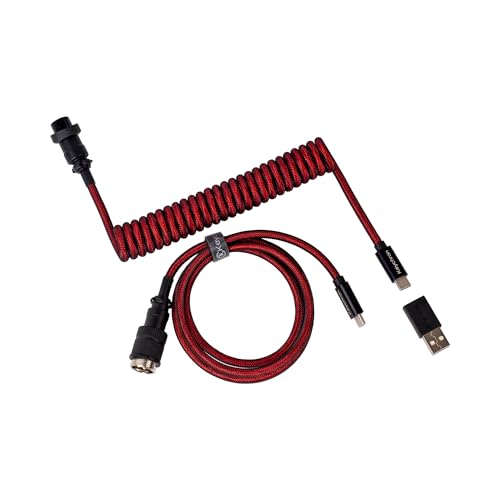
The enthusiast standard: two sections joined by a chunky metal connector — the aviator style — typically placed so the coil section stays dressed on the desk while keyboards connect and disconnect at the joint. This is the type to buy if you own multiple boards, share a desk, clean under the keyboard often, or simply enjoy well-made hardware rituals. The connector is also the type’s main quality tell: it should feel dense, seat precisely and show no wobble, and it should always be handled by its metal body.
Sleeving and Finish Families
Across both constructions, finishes divide into bare or lightly finished cables that show the coil cleanly, braided and fabric sleeves that add texture and colour, and premium double-finished pieces where the cable is frankly a crafted object. Finish affects hand feel, dust behaviour and visual weight, not function. Pale finishes show dust in the grooves sooner; vivid finishes commit your setup’s palette; neutrals go with everything and survive your next keycap set.
Coil Styles: Tight and Statement
Finally, coils divide by diameter and temperament. Tight, narrow coils read technical and tidy, suit small desks and light keyboards, and stay out of the way. Wide, full coils are the statement pieces — rounder, heavier, more present — and belong on larger desks with keyboards heavy enough to ignore them. Neither is better; the buying error is choosing the statement coil for a compact desk, or the tight coil for a wide desk where it visually disappears.
Top Picks at a Glance
Five picks cover the realistic buying intents in this category. All are presented prose-only here, each preceded by a marker where its verified listing details will be attached at publication; tiers are qualitative, and you should check price on Amazon when you buy.
Epomaker Coiled Keyboard Cable — Best Overall starting point
Epomaker’s coiled cables are the enthusiast-community entry point many buyers meet first, sold alongside the brand’s keyboards and aimed squarely at builders who want the dressed-desk look in the brand’s colour language. Treat this as the mid-tier reference point: braided-style sleeving, a metal detachable connector on the aviator-style models, and colours chosen to sit with popular keycap sets. Check the current listing carefully for the exact connector ends and the variant you are ordering, because the range spans several configurations under similar names.
Best for: buyers whose setup and habits match the description above. Not suited for: anyone whose port, desk size or colour plan conflicts with it — check the listing details before ordering, and check price on Amazon at the time you buy.

Keychron Coiled Aviator Cable — Best for a brand-coherent desk
Keychron brings its usual restraint to the format: the coiled aviator cable is designed to match the brand’s keyboards visually and to suit buyers who want one tidy, brand-coherent run rather than a hobbyist mix-and-match. Position it as a mid-tier, design-led option whose strongest argument is how naturally it sits with a Keychron board on the desk. As with every pick here, confirm the keyboard-end connector and the variant on the listing before ordering, and judge the colour against your own lighting rather than the product photography.
Best for: buyers whose setup and habits match the description above. Not suited for: anyone whose port, desk size or colour plan conflicts with it — check the listing details before ordering, and check price on Amazon at the time you buy.

Glorious Coiled Cable — Best for gaming setups
Glorious aims its coiled cable at gaming desks, with tight, crisp coils and colours chosen for the high-contrast setups its keyboards and mice live in. It reads as the gamer-leaning pick of this group: visually assertive, happiest next to a gaming board, and finished to be looked at. The detachable connector makes it friendly for players who swap between a gaming board and a work board at the same desk. Verify the exact ends and colourway on the current listing, and weigh its visual volume honestly against your desk size before choosing it.
Best for: buyers whose setup and habits match the description above. Not suited for: anyone whose port, desk size or colour plan conflicts with it — check the listing details before ordering, and check price on Amazon at the time you buy.
CableMod Coiled Keyboard Cable — Best premium craft
CableMod comes to this category from custom PC cabling, and its coiled keyboard cables carry that bespoke, made-to-be-seen character: premium positioning, careful sleeving work and the kind of finishing that custom-build people inspect closely. This is the premium-tier pick for buyers whose whole setup is a deliberate build and who want the keyboard run to match that standard. Because configurations vary, the listing check matters most here of all — confirm connector ends, coil style and colour precisely, and expect to pay for craft and customisation rather than for any difference in basic function.
Best for: buyers whose setup and habits match the description above. Not suited for: anyone whose port, desk size or colour plan conflicts with it — check the listing details before ordering, and check price on Amazon at the time you buy.
Akko Coiled Cable — Best for themed colour
Akko’s coiled cables lean playful, with colourways that echo the brand’s famously characterful keycap sets, making this the pick for themed builds and desks that treat colour as the main event. Position it in the entry-to-mid tier: an accessible way to test whether the coiled look suits your desk before committing to premium craft. It suits Akko board owners most obviously, but the designs travel well to any setup built around the same palette. Confirm the connector ends on the listing, and choose the colourway against the keycaps you own today, not a future set.
Best for: buyers whose setup and habits match the description above. Not suited for: anyone whose port, desk size or colour plan conflicts with it — check the listing details before ordering, and check price on Amazon at the time you buy.
The Criteria That Decide Satisfaction
Which Connectors Do You Actually Need?
Answer with your hardware in front of you, not from memory. Most modern enthusiast and custom keyboards take a USB-C plug at the board; older and budget boards may differ. At the other end, decide whether the cable will plug straight into the computer or live on a hub, and which connector that destination wants. If a hub is involved, prefer a powered one and plan to test the keyboard’s full behaviour after connecting. This single question, answered exactly, eliminates the most common return in the category — and it must be answered per listing, because ranges like these span several connector configurations under similar product names.
How Long a Run Does Your Desk Really Need?
Measure the route, not the straight line: from the keyboard’s port, around the objects that live on the desk, to where the detachable connector or the computer end will sit. Then think in ranges rather than lengths. A coiled cable lives most of its life at rest length and stretches when you move the keyboard; the right size keeps both of those inside the coil’s comfortable middle — never near full extension at rest, never straining when you pull the board toward you. If your measured route is long, the honest options are a longer coil run, repositioning the connector point closer, or accepting a straight cable for a run this format does not suit. Do not solve a long route by stretching a short coil: the loops will relax unevenly and the cable will look tired within months, which is the single most documented disappointment in this category.
How Much Does Your Keyboard Weigh — and Does It Matter?
It matters more than listings admit. A coil is heavier than a plain cable and its weight hangs at the keyboard’s corner. Heavy aluminium boards shrug it off. Light plastic boards — especially compact ones — can be slowly tugged out of position by a stiff, heavy coil, which owners experience as a keyboard that will not stay put. If your board is light, choose a tighter, lighter coil, route it so its weight rests on the desk surface rather than dangling, and be honest about the match: some board-and-cable pairings are simply wrong for each other.
Which Colour and Coil Diameter Suit Your Setup?
Judge colour by family under your lighting: a cable in the same family as your keycaps or desk mat looks intentional even when shades differ, while a near-exact match attempted from photographs often lands as a visible miss. Judge diameter by proportion: picture the coil’s loops against your keyboard’s footprint and your desk’s width, remembering that product photography is shot on large, styled desks. When the setup is still evolving, neutral colours and moderate coils are the picks that survive change; statement choices are for finished setups.
How Much Craft Should You Pay For?
Spend in proportion to how finished the rest of the setup is and how closely you will look. Entry tiers deliver the format, the order and the colour honestly. Mid tiers add finishing, coherence and consistency of winding. Premium tiers add craft you can inspect — sleeving work, colour precision, connector finishing — which delights owners of deliberate builds and is invisible on accidental desks. No tier changes the typing. This guide’s firm advice: buy one tier below your maximum budget on a first purchase, learn your preferences in diameter, colour boldness and swapping habits, and let a later upgrade be aimed by experience.
Judging value in this category means separating three things buyers often merge. First is function: every cable here moves data and power between computer and keyboard, and a basic one does that job completely. Second is build: connector quality, sleeving, coil consistency and finishing decide how the cable feels and how long it stays handsome. Third is expression: colour, diameter and presence turn a utility into part of the room. Money spent on the first tier buys nothing extra; money on the second buys longevity and tactility; money on the third buys pleasure, which is real but should be spent knowingly. The buyers who regret purchases are usually those who paid third-tier prices expecting first-tier differences, or bought first-tier plainness and then felt the daily itch of a desk that looks unfinished.
How to Prioritise by Use Case
The custom-build finisher. Your priorities are colour accuracy, winding consistency and connector finishing, in that order; the premium tier exists for you, and the checks that matter are photographic honesty — judge colours by family — and variant precision at ordering.
The tidy professional. You want the desk to look composed on video calls and feel calm at 9 a.m. Prioritise a neutral colour, a moderate-to-tight coil, and the detachable connector if the desk is shared or the keyboard ever moves for paperwork. Mid tier is your home.
The multi-keyboard hobbyist. The detachable connector is your headline feature and its quality is your top criterion — dense, precise, wobble-free. Buy the coil for the desk’s main board and let the connector serve the rotation.
The gamer. Prioritise a coil that keeps the run out of the mouse’s sweep and a weight your board can ignore at extreme angles; gaming-leaning picks like the Glorious fit the aesthetic, but the routing and the board’s weight decide the experience more than the brand does.
Going Deeper: Living With the Cable
However carefully you choose, reserve judgement for a week of living with the cable, because the format reveals itself in use rather than at unboxing. In the first days, notice three things. Does the keyboard stay where you put it through a full working day, or does it creep? Does the coil’s run stay composed through your real routine of calls, notebooks and mouse work, or does one loop keep catching on something? And does the colour please you at the hours you actually work, under your lamp rather than at noon? Small failures in the first two are routing problems — shift the run, rest the weight differently — while a colour that fails the third test is a genuine mismatch worth acting on while returns are easy.
A coiled cable does not live alone, and its neighbours belong in the buying decision. A monitor arm’s post, a headphone stand, a desk lamp’s base — each is something the coil’s run must pass without touching, because a loop resting against a warm lamp base or chafing on a stand’s edge ages in that one spot while the rest stays new. Walk the route with your eyes before ordering and count the neighbours; a route with two obstacles is a routing puzzle you will solve once, gladly, while a route through a forest of stands may be telling you the connector point wants to live somewhere else entirely. The cable is the flexible part of the desk — arrange the meeting on its terms.
A coil is not decoration first and function second; it is a spring that happens to look good. Each loop stores a little elastic energy, which is why a coiled keyboard cable can sit in a short, tidy run across the front of a desk and still stretch when you pull the keyboard toward you to clear space for a notebook or a drawing tablet. That give is the whole point. A straight cable of the same working length would either drape in a loose curve that catches on everything, or sit taut and drag against the desk edge. The coil keeps the run compact at rest and forgiving in motion, and it returns to shape when you let go, which is why the front of the desk stays visually calm even on days when the keyboard moves a dozen times.
The detachable connector earns its keep in households and offices where one desk serves several keyboards. Swapping boards becomes a ten-second job: separate the connector, lift one keyboard away, set the next down, reconnect. The coil, the routing and the computer-side connection all stay exactly where they were. The same convenience helps with cleaning, with packing a keyboard for travel while leaving the desk dressed, and with lending a board to a family member without unpicking your whole setup. If you own exactly one keyboard and never move it, this feature is a pleasant luxury. If you rotate boards, test switches for friends, or share a desk, it quietly becomes the reason you would not go back to a fixed cable.
Although these cables are sold for keyboards, buyers reasonably ask what else they can serve. The honest answer is: treat them as keyboard cables. The connectors may physically fit other small USB devices, but the coil’s weight, the connector placement and the cable’s whole design assume a keyboard at a desk. Using one to charge a phone from a wall adapter invites exactly the stretched, dangling loads that ruin coils, and data behaviour with other devices is outside what the maker designed or tested for. Keep the coiled cable in the job it is good at, keep a plain cable for everything else, and both will last longer. Specialisation is not a limitation here; it is why the product exists at all.
Set expectations correctly and a coiled cable is a long-lived object. The electrical job it does is gentle, the connectors are its main wear points, and the coil itself ages mainly through how it is handled: stretching, hanging loads, rough packing and yanking at connectors. A cable routed once, kept in its comfortable range, disconnected by its connector bodies and cleaned occasionally has no obvious reason to be replaced for years. The realistic failure stories are almost all handling stories. That is good news, because handling is entirely within your control — unlike, say, a battery’s chemistry, nothing inside a coiled cable is counting down against you. Buy decent build quality once, treat it as the semi-permanent desk fixture it is, and the cost spreads itself thin across a very long service life.
A small, rarely discussed pleasure of a good coiled cable is how quietly it behaves. A straight cable dragged across a desk edge clicks, slaps and migrates; a coil resting in its run mostly stays where it was put, moving in small, damped increments when the keyboard shifts. On shared desks and in quiet rooms — a bedroom desk at night, a library corner, an open office — that stillness is a genuine quality-of-life detail. It is not absolute: a very stiff coil can tap against a hard desk when the keyboard is moved briskly, and metal connectors should never be dropped onto glass desktops. But day to day, the coiled run is the calmest cable on the desk, and people who work in quiet take to it quickly.
Colour is where coiled cables earn their reputation, and also where buyers waste the most money through optimism. A cable photographed under studio lighting will not match a keycap set sitting under your warm desk lamp, and screens shift shades further. The reliable approach is to match families rather than exact tones: a cable in the same colour family as your keycaps or desk mat will look intentional even when the shades are not identical, while a near-miss at an exact match looks like a mistake. When in doubt, neutral coils — black, grey, white, muted metal tones — pair with almost everything and survive future keycap changes, whereas the vivid statement colour should be bought only when the rest of the setup is stable enough that you will not be re-theming around it next season.
As a gift, a coiled cable sits in a sweet spot: personal enough to show thought, safe enough not to demand the recipient share your taste in switches or layouts. The conditions are compatibility and colour discipline. You must know the recipient’s keyboard port for certain — guessing wrong converts a thoughtful gift into an adapter hunt — and you should choose a colour that matches the setup they have, not the one you think they should build. Neutral and metal-toned coils are the low-risk classics; a colour matched to their existing keycaps is the high-delight option when you know the setup well. Include the quiet advice that comes free with experience: grip the connector body, never stretch the coil to its limit, and it will look this good for years.
In shared spaces — a family desk, a hot-desking office, a studio others photograph — the coiled cable does quiet diplomatic work. A dressed, deliberate cable run signals that the setup is finished and cared for, which changes how other people treat the space around it. It also photographs exceptionally well, which matters more than many admit in an era of setup posts and video calls framed over the desk. The counterweight is taste: a vivid coil is a strong visual opinion, and in a minimalist shared room it can be the one loud object everyone notices. Neutral coils thread this needle — visibly intentional, rarely divisive — while statement colours belong in spaces that are unambiguously your own.
A coiled cable travels better than its looks suggest, with one condition: pack it as a coil, not as a bundle. Wrapped loosely in its natural loops inside a case or a soft pouch, it arrives with its shape intact and deploys in seconds. Jammed into a bag corner, wound tightly around itself, or trapped under a laptop, it arrives with kinks and stretched sections that take days to relax, if they fully do. The detachable connector helps here too — the keyboard-side section can stay with the board while the coil rides separately. For people who work between home and office with the same keyboard, a second coiled cable left at the second desk is often the smarter spend than daily packing, because coils age through handling more than through use.
Knowing when a coiled cable is done saves both money and frustration. Replace it when the coil has permanently lost its shape in the working section — loops hanging open and uneven despite gentle rest — because no care routine restores stretched memory. Replace it when the connection becomes intermittent: a keyboard that drops out when the cable moves is telling you a contact or a conductor is failing, and no amount of re-seating fixes that for long. And replace it when connector bodies loosen, crack or stop seating with that solid, finished feel. Cosmetic tiredness alone — slight dust shadowing on pale sleeving — is a cleaning problem, not a replacement trigger. A cable retired for shape or connection reasons has usually served long enough to justify its successor.
Coiled cables come from the custom keyboard hobby, where every visible component of a build is a choice, and that origin explains their character. In that world the cable is specified alongside the case, plate, switches and keycaps, and makers compete on sleeving, colour accuracy and connector finishing rather than on raw function. Mainstream brands have since brought the format to ordinary desks, which is good for prices and availability, but the enthusiast lens remains the right way to judge these products: as crafted objects with a job to do, not as performance upgrades. Buyers who adopt that lens tend to choose well — they check the craft details, respect the object’s limits, and enjoy it for exactly what it is.
Desk size quietly governs which coiled cable will make you happy. On a compact desk, the coil competes for front-edge space with the mouse, a wrist rest and your own forearms; a tight coil in a short run is the difference between composed and crowded. On a wide desk, the same tight coil can look lost, and a fuller coil with a longer run gives the setup its proportion. Measure the actual route the cable will take — from keyboard port, around whatever lives on the desk, to the connector point — rather than the straight-line distance, and remember the coil needs to work in the middle of its stretch range along that route. Ten honest minutes with a tape measure prevents the single most common disappointment in this category.
Judging value in this category means separating three things buyers often merge. First is function: every cable here moves data and power between computer and keyboard, and a basic one does that job completely. Second is build: connector quality, sleeving, coil consistency and finishing decide how the cable feels and how long it stays handsome. Third is expression: colour, diameter and presence turn a utility into part of the room. Money spent on the first tier buys nothing extra; money on the second buys longevity and tactility; money on the third buys pleasure, which is real but should be spent knowingly. The buyers who regret purchases are usually those who paid third-tier prices expecting first-tier differences, or bought first-tier plainness and then felt the daily itch of a desk that looks unfinished.
The surface under the coil changes how it behaves more than buyers expect. On a bare hard desk the loops rest with a faint tactile crispness and can tap audibly when the keyboard is moved briskly. On a desk mat — the setup most coiled cables are photographed on — the loops settle into the surface, move silently, and hold their arranged position with a little friendly friction. Neither is better, but the pairing is worth a thought: a very smooth, glossy desk lets a light coil creep slowly out of its arranged run over a week, while a mat keeps it composed. If your desk is bare and hard, a slightly heavier coil or a mat under the run are both honest fixes, and either beats re-arranging the cable every morning.
There is a small ergonomic dividend to the coil’s give that rarely gets mentioned. Because the cable stretches gently instead of dragging, the keyboard can live exactly where your hands want it — closer for long writing, further for reading, angled for games — without the subtle resistance and slow migration a taut straight cable imposes. Nobody should buy a cable as an ergonomic intervention, and this page does not sell it as one. But owners who reposition their keyboard through the day consistently report that the board simply stays where they put it, and a keyboard that stays put is one less small friction in a working posture that has enough frictions already.
Coiled cables hold a small, healthy second-hand market inside the keyboard hobby, and that fact is useful even to buyers who never sell anything: it tells you the objects are durable enough to change hands. When buying used, inspect exactly what ownership wears — the evenness of the loops, the connector’s seating action, the sleeving at the transitions — and discount any cable whose coil hangs unevenly, because stretched memory does not recover and no photograph fully admits it. When selling, the same list is your description. Either way, the category’s craft objects circulate for years, which is more than can be said for most small electronics at this price level.
Setups evolve in seasons — a new keycap set in spring, a warmer lamp in winter, a different board for a new job — and the coiled cable is the component most exposed to that evolution because it carries the palette. Owners who chose neutral coils report their cable surviving every change untouched, quietly becoming the oldest dressed object on the desk. Owners who chose statement colours report a different pleasure: the cable becomes the reason a new keycap set gets chosen to match it, the fixed point the rest of the setup rotates around. Both are coherent strategies. The incoherent one is buying a vivid colour for a setup in flux and being surprised when the flux strands it.
A practical word on how these cables are sold, because it shapes the ordering step. The well-known ranges are families, not single products: under one name you may find several connector configurations, coil styles and colourways, sometimes across multiple listings that look nearly identical. The discipline this demands is unglamorous — read the specific variant’s stated connectors and options on the listing you are actually ordering from, and treat photographs of sibling variants as decoration rather than description. Buyers who internalise this one habit skip the category’s most common return entirely, and it costs them ninety seconds.
Since so much of this purchase is visual, judge it under the light it will live in. Cool daylight shows sleeving colours at their most literal; warm evening lamps pull them toward amber and can turn a crisp blue-grey coil almost green at the edges of perception. Metal connector finishes shift too, reading bright and technical at noon and deep and jewellery-like at night. None of this is a defect — it is how physical colour works — but it explains the persistent gap between listing photography and lived experience, and it is why this guide insists on matching colour families rather than exact shades. A family survives a change of light; an exact shade often does not.
First Setup and Care Essentials
Routing decides whether a coiled cable looks composed or chaotic, and it takes five unhurried minutes to get right. The usual arrangement runs the coil from the keyboard’s port across the front or side of the desk to where the detachable connector sits, with the straight device-side lead continuing to the computer or hub from there. Keep the coil’s run clear of mug territory, mouse sweep and the path of chair armrests, and let it rest on the desk surface rather than hang off an edge, where its own weight will stretch the nearest loops all day. Once routed, live with it for a week before judging: small annoyances like a loop catching on a desk mat edge are fixed by shifting the run slightly, not by replacing the cable.
The detachable metal connector fitted to many coiled cables — most buyers know it as an aviator-style connector — exists so the coil section can be separated from the device-side lead without unplugging anything from the computer. It rewards a firm, deliberate hand. Grip the metal body of the connector itself, never the cable behind it, align the two halves without forcing them, and push or twist them together exactly as the design intends until the connection seats with a solid, finished feel. When separating the halves, hold that same metal body and pull straight apart rather than levering sideways. A metal connector handled this way feels reassuringly mechanical for years; the same connector yanked by its cable or wrenched at an angle is where bent contacts and intermittent connections begin.
Safety bears repeating in a buying guide, because it is decided at setup: take a firm grip on the metal body of the detachable connector whenever you join or separate it — the hardware is solid and made to be held — align the halves without force, pull straight apart, and never let the cable behind the connector become the handle. Set that habit on day one and the connector will seat with the same confidence in year three. Add the coil’s own rule — slack in the run, work in the middle of the stretch — and an occasional wipe of the grooves, and ownership asks nothing more of you.
Coiled Keyboard Cable Buying Guide: Mistakes to Avoid
The returns and regrets in this category follow patterns worth learning from other people’s mistakes. Buyers order by photograph alone and receive a coil diameter that dwarfs their small keyboard. They forget to check the keyboard’s port and discover the mismatch only at unboxing. They stretch a short coil across a long run and watch it relax into sad, uneven loops within months. They match a vivid colour to keycaps they were already planning to replace. And they buy the cheapest unbranded coil available, then conclude the whole category is flimsy when its connector loosens. Every one of these is a planning failure, not a product failure, and every one is avoidable with the checks in this guide: measure the run, confirm the ports, respect the coil’s range, and buy the connector quality your swapping habits demand.
Two further mistakes deserve naming because this coiled keyboard cable buying guide sees them constantly. The first is buying the cable before the keyboard: port, board weight and palette all flow from the board, so a cable bought first is a guess three times over. The second is treating the purchase as permanent architecture. A coiled cable is a modest, replaceable object; buy the right one for the desk you have, and let a future setup earn its own. For the deep single-product assessment see our coiled keyboard cable review, for owner consensus our coiled keyboard cable reviews, for the balanced ledger our coiled keyboard cable pros and cons, and for the step-by-step decision our how to choose a coiled keyboard cable. The same discipline — buy by fit, not by photograph — governs the other cables on the desk, as our hdmi cable pros and cons, displayport cable pros and cons and thunderbolt cable pros and cons pages argue for their categories.
Sizing and Compatibility Checks to Run Before You Decide
Decide your return-risk tolerance in advance
Some coiled keyboard cable choices are easy to judge from a listing and some only reveal themselves in the hand, in the room, or in your software. If your shortlist includes a model you are judging on feel, fit or noise, buy from a seller whose returns process you have actually read, and keep the packaging intact until the first full week of use is done. Knowing your exit route in advance lets you choose the bolder option on the shortlist without gambling, and it removes the pressure to keep a coiled keyboard cable that is merely acceptable.
Start with the space, not the shortlist
Before comparing a single coiled keyboard cable, measure the space it has to live and work in, and write the numbers down. Footprint is only the start: allow for cables, ventilation, doors or lids that swing open, and the room your hands need to load, adjust or clean it. In a room where noise, heat or clutter quickly becomes a problem for everyone else in it, a model that fits on paper can still fail in practice because access is blocked or a cable run has nowhere tidy to go. Measuring first turns the Keyboards shortlist from a wish list into a filtered list where every remaining option is physically plausible.
Check compatibility against what you already own
A coiled keyboard cable rarely works alone, so list the devices, mounts, media, software or accessories it must cooperate with, and check each pairing against the listing details rather than assuming standards guarantee harmony. Connector versions, physical clearances, supported formats and control apps are the usual friction points. When picks such as CableMod Coiled Keyboard Cable, Akko Coiled Cable and Epomaker Coiled Keyboard Cable are on your shortlist, run this check against each listing in turn. Where a listing is vague about a pairing you depend on, treat that silence as a risk to resolve before ordering, not a detail to discover afterwards. Compatibility failures are the most common reason a well-reviewed coiled keyboard cable gets returned.
Separate the headline feature from the daily feature
Every Keyboards range has one headline feature that dominates the marketing and one unglamorous feature you will use every single day. For a coiled keyboard cable, the daily feature is usually the control you touch most, the consumable you replace most, or the connection you make and break most often. Weight your shortlist by the daily feature first and let the headline feature break ties, because novelty fades within weeks while a clumsy daily interaction stays annoying for the life of the product.
Plan the consumables and spares shelf
Ownership of a coiled keyboard cable usually involves a small ecosystem of consumables, refills, replacement parts or spares, and availability matters as much as the unit itself. Check that the refills your shortlisted models need are standard, stocked by more than one seller, and replaceable without tools you do not own. A model tied to a single obscure consumable becomes a liability the moment that line is discontinued, whereas a coiled keyboard cable built around common refills stays useful for years. Keep one spare of the fastest-wearing part from day one.
Run the two-week test on paper
Imagine the coiled keyboard cable arriving today and simulate the next two weeks of use in detail: where it sits, what you do with it on a normal weekday, what happens on the busiest day, and where it goes when guests arrive or the room is cleaned. This simple rehearsal exposes storage gaps, missing accessories and workflow clashes that specification tables never show. If the simulation produces friction in a room where noise, heat or clutter quickly becomes a problem for everyone else in it, adjust the shortlist now, while the fix is a different model rather than a return label and a refund wait.
Treat it as part of the purchase itself, not as homework to do after the box arrives.
None of this requires expertise — only the willingness to check your own routine before trusting a generic recommendation.
Five honest minutes at this stage is worth more than five hours of comparison browsing.
Frequently Asked Questions
What is the first thing to check when buying a coiled keyboard cable?
The connectors — exactly, from the hardware in front of you. Identify the port on your keyboard (most often USB-C on modern enthusiast boards, but verify), decide whether the other end plugs into the computer directly or into a hub, and match the listing’s variant to both. Ranges in this category span multiple connector configurations under similar names, so the check is per-listing, not per-brand. Every other decision — length, colour, tier — comes after this one, and most returns trace back to skipping it.
How do I choose the right coil length?
Measure the routed path on your desk — around the objects that live there, not the straight-line distance — and choose so the coil works in the middle of its stretch range both at rest and when you pull the keyboard toward you. A coil living near full extension relaxes unevenly and looks tired within months; a coil with comfortable slack keeps its shape for years. If your route is genuinely long, reposition where the detachable connector sits rather than stretching a shorter coil.
Is a detachable aviator connector worth choosing over a fixed cable?
If you ever swap keyboards, share the desk, or lift the board away for cleaning or paperwork — yes, it is the category’s most useful feature, turning board changes into a ten-second job while the coil stays dressed. If your keyboard never moves, a fixed coil gives you the same look and order for less. Either way, handle a detachable connector by its metal body when joining or separating it; that habit is what keeps it precise.
Which tier should a first-time buyer choose?
Entry-to-mid, deliberately. The first purchase teaches you your real preferences — coil diameter, colour boldness, how much you actually swap boards — and those lessons are cheapest at the lower tiers, where the look and the order are already fully delivered. Premium tiers add craft and colour precision that reward finished, deliberate setups. Owners who start modest and upgrade with aim report far fewer regrets than owners who bought premium first and discovered their preferences afterwards.
Will a coiled cable suit a small desk?
Yes, with the right proportions: a tight, narrow coil in a short, well-routed run is made for compact desks, where it replaces a loose cable loop with something smaller and calmer. The errors to avoid are statement-diameter coils, which visually crowd a small setup, and runs routed through the mouse’s territory. Measure the route, keep the coil’s weight resting on the desk, and a small desk is arguably where the format’s tidiness pays off most.
How do I keep a coiled cable looking new?
Three habits. Keep the coil in its comfortable stretch range so the loops keep their memory. Handle the detachable connector by its metal body, with a firm grip, pulling straight rather than levering. And wipe the coil’s grooves with a soft, slightly damp cloth every month or two — a soft brush helps on braided sleeving — letting it dry fully before reconnecting. None of this is burdensome, and together it is the entire difference between a cable that looks bought-yesterday for years and one that looks tired in a season.
Related Reading
Keep exploring with these guides from the same desk and cable shelf: best keyboards for office typing; best keyboards for gaming and work; best cable management options for desks; best keyboards for small hands.