Disclosure: As an Amazon Associate, ilcastellomenu.com earns from qualifying purchases. Links on this page are affiliate links; they cost you nothing extra. Prices and availability change often, so check the current Amazon listing before you buy.
Roundups of pc fan controller reviews usually fail in the same way: they rank a shelf of near-identical boxes by feature lists nobody can feel. This one takes a different approach. These pc fan controller reviews are organised by the job you are actually hiring the device to do — silencing one fan, organising many, or conducting an entire light-and-air orchestra — because a controller that is perfect for one job is a pointless expense for another. Read the verdicts through your own build, and the right choice usually identifies itself before the end.
Key Takeaways: For one loud fan, the manual inline controller from Noctua is the calmest money in this roundup. For many fans and few headers, the Thermaltake hub is the practical champion. For curves and lighting in one ecosystem, the Corsair software centre leads. For software control without changing your fans, the Razer bridge hub is the flexible pick. Every verdict below assumes the control method matches your fans — four-pin modulation fans with modulation control, three-pin fans with voltage control — because no ranking survives a mismatch that basic.
A note on honesty before the verdicts begin: every model here is treated in prose only, positioned by tier rather than linked, while verification is pending. Prices move and listings change, so this roundup judges design, behaviour, and ownership experience — the things that stay true after checkout — and leaves the final listing check to you, exactly as the disclosure above suggests.
How These Pc Fan Controller Reviews Were Put Together
Each controller was judged against the same five questions. First, what job does it claim to do, and does its design honestly match that claim? Second, how does it behave at idle, where computers live most of their lives and where noise either disappears or grates for hours? Third, how does it behave under sustained load, where curves either stay composed or hunt up and down distractingly? Fourth, what does ownership feel like after the novelty fades — software updates, settings that persist, sockets that still grip? Fifth, who should walk past it without regrets?
The field divides into three families, and the reviews follow that division. Manual controllers adjust by hand and ask nothing of your operating system. Hubs gather fans and repeat one signal, trading individuality for order. Software controllers read temperatures and apply curves, trading simplicity for intelligence. Comparing across families by raw features is meaningless — a dial has no curve editor because it does not need one — so each model is first judged inside its family, then placed in the overall recommendations by job.
Two safety principles run through every installation mentioned here. The PC is powered fully off and unplugged before any wiring changes, every time, without exceptions for quick swaps. And no single motherboard header or controller channel is overloaded: controllers draw their working power from the power supply precisely so that headers carry signals, not the electrical burden of a fan crowd. Builders who respect those two rules find this entire category forgiving; builders who improvise around them meet its only real dangers.
Context on the fans these devices manage lives in our pc case fan review and the pc case fan buying guide, and the single-product deep dive companion to this roundup is our pc fan controller review.
In this guide
The Models, Reviewed One by One

Noctua NA-FC1 Fan Controller — Best for One Loud Fan
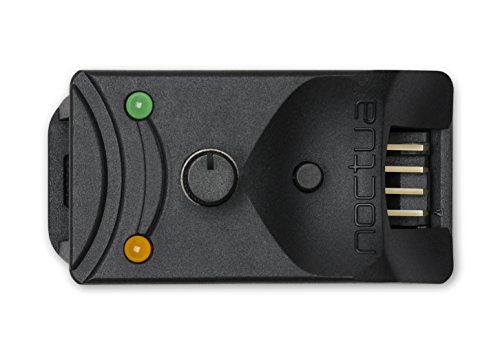
The smallest product in this roundup earns the strongest single recommendation, because it solves the most common fan problem with the least machinery. One fan — often the processor cooler or a determined exhaust — runs louder than its job requires. The NA-FC1 sits inline with that fan and trims its behaviour by hand, with a small dial that adjusts the signal and a mode that lets the fan fall fully silent below a threshold you choose. The motherboard’s own temperature protection stays in charge; you are simply negotiating its enthusiasm downward.
Ownership is where it pulls away from software rivals. There is nothing to install, nothing to update, and nothing that can be reset by an operating system reinstall. You set it during one quiet evening of adjustment, close the case, and the decision holds for years. Its tier is entry-to-mid, its appetite for attention is zero, and its limitation is absolute: one dial, one fan’s behaviour. The moment your problem involves groups, curves, or colours, this is the wrong tool, however beautifully it does its own job.
Best for: a single noisy modulation fan and owners who value permanence. Not suited for: multi-fan management, lighting, or automatic temperature curves beyond what the motherboard already provides.
Thermaltake Commander FP — Best for Many Fans, Few Headers
The Commander FP is the roundup’s plumber: unglamorous, essential, and judged entirely on whether the system works when it is done. It gathers a group of fans onto one powered unit behind the motherboard tray, takes its energy from the power supply, and repeats one motherboard signal across the group so every fan follows the same sensible behaviour. Installation is measured in minutes, and the visible chamber of the case stays free of the splitter nests that make budget builds look haunted.
Judged as a hub, it does everything the family promises. Judged as anything else, it will disappoint, and most negative opinions of hubs trace back to that confusion. All fans share one behaviour, so intakes and exhausts with different ideal curves march together. Only one fan reports its speed to the motherboard. There is no software because there is nothing for software to decide. Within its tier — firmly entry-to-mid — those are not flaws; they are the definition of the product, and buyers who understand the definition get order and reliability for very little money.
Best for: fan-heavy cases, tidy builders, and anyone whose motherboard ran out of headers. Not suited for: per-group curves, mixed fan types needing different control modes, or lighting coordination.
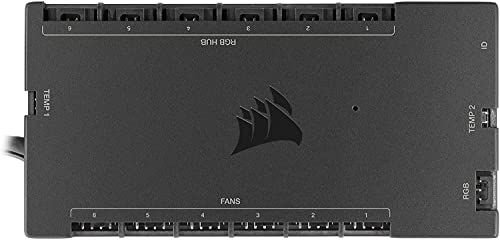
Corsair iCUE Commander Core XT — Best for Curves and Lighting Together
The Commander Core XT is the control centre for builders who think of their PC as an instrument panel. It manages a group of fans and their lighting from one unit, accepts temperature probes you place where readings matter, and hands you curve editing that can follow processor heat, case air, or probe temperature with smoothing that keeps fan behaviour graceful instead of jumpy. Profiles let the same machine present itself differently for work, play, and media, and the lighting follows the same logic instead of running its own separate show.
The premium tier buys genuine capability, and the bill arrives as commitment. The companion software becomes a permanent resident of your system, the wiring behind the tray doubles because lighting leads join fan leads, and the experience is designed around one brand’s fans, so a mixed collection gets only part of the magic. Owners inside that ecosystem tend to be delighted; owners outside it should read this verdict as a description of a country they do not live in. For showcase builds and patient tuners, though, nothing else in this roundup offers the same unified command.
Best for: single-ecosystem showcase builds and owners who enjoy tuning. Not suited for: mixed-brand fans, software minimalists, or anyone who wants to finish setup in one sitting and never reopen it.

Razer PWM PC Fan Controller — Best Bridge Between Hub and Software
Razer’s controller answers a specific and common dilemma: your fans come from several brands, your motherboard’s fan software irritates you, and you want proper curves without replacing a single fan. It gathers a group of modulation fans like a hub, then adds software control — curves shaped against component temperatures, behaviour saved in profiles, and coordination with the brand’s broader lighting world for those who want it. It is a mid-to-premium tier bridge, and bridges are judged by how much traffic they spare you.
In that role it performs well. The setup evening is real — curves want drawing, loads want testing — but the payoff is a mixed build that finally behaves like one machine. The caveats are the family’s usual ones: another background application, another internal data cable to route, and a feature set that overlaps with high-end motherboards more than with cheap ones. If your board already tunes fans beautifully, this unit polishes a finished surface. If your board fights you, this is the upgrade that ends the fight.
Best for: mixed-brand modulation builds wanting unified curves. Not suited for: three-pin voltage-controlled fan collections, or builders avoiding companion software on principle.
Family Deep Dive: Manual Controllers
Manual control is the oldest idea in this category and, for a certain temperament, still the best. A dial or slider adjusts the fan directly, and the adjustment is physical: it cannot be synced away, reset by an update, or buried three menus deep in software you open twice a year. Owners describe a particular satisfaction in reaching down before a long session, nudging the dial, and hearing the machine settle into the exact voice they chose. That tactile relationship is a feature, and reviews that reduce manual controllers to missing software misunderstand their audience completely.
The family’s limits are equally real. Manual control cannot react to temperature, so the setting you choose is a compromise across everything the machine will do until you touch the dial again. Set it for gaming and the desktop sounds busy; set it for the desktop and a surprise heavy load runs warmer than ideal. The inline designs that blend motherboard signal with manual trim solve most of this elegantly, which is why the Noctua unit leads this family: the board keeps watch over temperature while you set the ceiling of its enthusiasm. Pure manual units without that blend belong to undemanding builds and owners who genuinely enjoy adjusting by hand.
Placement decides whether manual control delights or annoys. A dial buried behind a solid side panel will be set once and effectively become a fixed resistor, which is fine but wastes the concept. A dial on a front bay, a small bracket, or an accessible inline position invites the micro-adjustments that make the family sing. Before buying, picture the reach: where will your hand be, what will it pass, and will you still bother in six months? Answer honestly and the manual family either becomes your favourite or removes itself from your shortlist.
Family Deep Dive: Hubs
Hubs exist because cases outgrew motherboards. A modern case can hold a small crowd of fans, while boards still offer a modest row of headers placed for the builds of several years ago. The hub closes that gap with electrical common sense: one power feed from the supply, one control signal from a header, and a row of sockets that let a group of fans share both. Everything else said about hubs — tidiness, simplicity, the single shared behaviour — follows from that one arrangement.
Choosing within the family is mostly about build quality and honesty. Sockets should grip, the housing should not flex alarmingly, the power lead should be keyed and long enough, and the maker should state plainly that connected fans share one signal and report one speed. Hubs that dress themselves as per-channel controllers while repeating one signal underneath are the family’s only real villains, and they are easy to avoid once you know the trick: true per-channel control costs visibly more, because it genuinely requires more electronics.
Hub placement rewards five minutes of thought. Behind the motherboard tray, near the bottom, close to the power supply, is the classic home: fan leads from front, top, and rear all converge there with modest runs. Leave the signal lead’s designated socket populated first, since that is the fan whose speed the motherboard will see, and choose for that honour a fan representative of the group. Route the hub’s power lead so it does not drape across the tray’s sharp edges, and leave enough slack to unplug one fan later without removing the unit. Do that, and a hub becomes the rare component you install once and think about never.
Family Deep Dive: Software Controllers
Software control changes the question from how fast should the fans spin to how should the machine behave. Curves, probes, delays, and profiles let a build express different personalities for different work, and for owners who enjoy that authorship the setup evening is entertainment, not overhead. The best implementations make the common tasks simple — a quiet profile, a balanced profile, a full-commitment profile — while keeping the deep controls available for the evenings when only perfection will do.
The family’s risks are organisational rather than electrical. Software must be maintained, settings must survive updates, and an ecosystem’s fans, lighting, and controller all lean on the same company’s continued support. None of that should frighten a deliberate buyer; it should simply be priced into the decision the way you would price a subscription you actually intend to keep. The owners who regret software controllers are almost never the ones who read about the commitment first — they are the ones who discovered it afterwards.
Probe placement is where software builds separate into good and great. A probe taped thoughtfully into the exhaust path or against a radiator end tank gives curves a truthful signal, and truthful signals produce the eerie steadiness that makes a powerful machine feel expensive. A probe left dangling wherever the cable happened to reach produces curves chasing nonsense. If you buy software control, spend the extra ten minutes placing its senses well; it is the highest-value ten minutes in the entire installation.
Performance in Real Use, Family by Family
Idle Behaviour: Where Roundups Are Won
At idle the manual controller and the hub share an advantage software cannot replicate: their behaviour cannot be accidentally changed by an update, a reinstalled driver, or a profile synced from elsewhere. The machine you tuned in January sounds the same in June. Software controllers can match that stability, and the good ones do, but they ask you to verify after major system changes that curves and assignments survived. For owners who measure a product by how completely they can forget it, that difference is the whole review.
Sustained Load: Composure Under Pressure
Under long loads the ranking inverts. Software curves with probe input hold the steadiest behaviour, because they respond to the temperature that actually matters — case air or liquid — rather than to a processor that spikes with every task. Hubs follow one step behind, entirely dependent on the quality of the single signal they repeat. Manual trims hold whatever line you drew, which is perfect if you drew it for this workload and merely adequate if the workload changed. None of these is a failure mode; they are temperaments, and matching temperament to workload is the buyer’s real job.
Noise Character, Not Just Noise Level
Experienced builders listen for character, not just volume. A steady low hum disappears from attention within minutes, while a quieter but constantly varying tone follows you around the room. Controllers influence character more than level: smoothing, delays, and sensible grouping turn surging into steadiness. This is why two builds with identical fans can feel completely different to live with, and why this roundup keeps returning to curves and signals instead of quoting numbers that would mean little in your room, at your desk, with your hearing.
What a Month of Ownership Actually Feels Like
Reviews are written at installation, but products are lived with afterwards, so this roundup reserves a section for the month after. With the manual controller, the month is uneventful in the best way: the dial is touched perhaps twice, both times with mild pleasure, and the fan that used to announce itself during evening reading simply never does again. The product’s entire personality is that absence. Owners upgrading later often keep the unit and move it to the next build without thinking, the way you keep a good screwdriver.
With the hub, the month is defined by a different absence: you stop thinking about headers entirely. A new fan arrives, a socket is free, the fan joins the group, and the machine’s behaviour absorbs it without drama. The hub’s month also includes one small ritual — the first time you open the rear panel for an unrelated upgrade and feel disproportionate pride at the tidy convergence of cables behind the tray. That pride is not silly; a build you enjoy opening is a build you will maintain, and maintained builds run cooler and quieter than neglected ones.
With the software centre, the month is more active and, for the right owner, more fun. The first week brings refinements: the quiet profile gets quieter, the gaming profile gets a smoother ramp, a probe gets moved two centimetres and behaves better for it. By the second week the profiles settle, and the machine starts to feel authored — its changes of voice are yours, timed to your work, in a way visitors notice without being able to name. The risk in the month is the opposite temperament discovering that authorship feels like homework, which is why this roundup keeps asking the temperament question before the feature question.
The bridge hub’s month splits the difference: one genuine tuning weekend, then profiles that mostly run themselves, with occasional visits when a new game or a new season changes what the machine is asked to do. Owners of mixed builds report a particular relief here, because the assorted fans they accumulated over years finally behave like a set rather than a crowd, and the drawer of leftover splitters and adapters can finally be closed for good.
Common Buyer Regrets and How to Dodge Them
The first regret is buying control for fans that needed replacing. A worn fan with a tired bearing will tick, grind, or wobble under any controller ever made, and no curve fixes mechanics. Spin each fan by hand while the machine is off and unplugged; roughness or grinding means the fan itself is the purchase to make, and the controller decision can wait until the hardware is sound. The second regret is the mirror image: replacing good fans to chase silence that a simple trim would have delivered from the fans already owned.
The third regret is ecosystem drift — buying one illuminated fan from a second brand, then a third, until the lighting that was supposed to unify the build needs three applications and still argues with itself. Controllers sit at the centre of that drift, so decide your lighting allegiance at the controller purchase, not after it. The fourth regret is simpler: mounting everything, closing the panels, and discovering a cable resting against a blade. Every regret in this list is preventable with the same medicine — patience during installation, honesty about temperament, and the willingness to test with panels still open.
The fifth regret deserves its own sentence because it is the most expensive: buying a flagship software controller to solve a noise problem caused by dust. Clean the machine first. Filters, intakes, radiator fins, and fan blades all collect the grey felt that slowly strangles airflow, and a cleaned machine frequently returns to the behaviour its owner remembered fondly. If it does not, the controller conversation resumes with a clear conscience and a clean baseline, and any of the four verdicts above will serve you well.
Strengths and Trade-Offs Across the Field
Strengths
- Every family removes the header bottleneck by drawing working power from the power supply and leaving headers to carry signals.
- Control becomes deliberate: noise, cooling, and lighting follow decisions you made on purpose instead of defaults nobody chose.
- The category spans every temperament, from a dial you touch twice a year to software you can conduct like an orchestra.
Trade-offs
- Simplicity and intelligence pull in opposite directions; each step toward curves costs setup time and software dependence.
- Shared-signal hubs cannot give different fans different behaviour, however tidy they make the wiring.
- Ecosystem products reward loyalty and quietly tax future flexibility when you change fan brands.
The pattern across all four reviews is consistent: there is no defective product here, only mismatched expectations. Every disappointment in this category begins with a buyer asking a hub to think, a dial to automate, or an ecosystem product to be brand-neutral. The recommendations below are therefore organised by expectation, so the mismatch never happens.
Reading the Room: Matching Controllers to Real Machines
Abstract verdicts become useful when they meet actual desks, so consider four machines this roundup keeps returning to. The first is the home-office tower that doubles as the family computer: two case fans, one earnest cooler fan, and an owner who takes calls all day. Its problem is a single voice — the cooler fan — raised above the room. The manual inline controller ends that problem permanently for the smallest outlay in the roundup, and every larger product would be decoration on a solved machine.
The second machine is the enthusiast’s mid-tower with a full fan outfit and a windowed side, built over two years of gradual upgrades. Its fans outnumber its headers, its cables tell the story of every upgrade, and its owner enjoys the hobby. This machine wants the hub at minimum, and if its fans share one brand, the software centre turns a chore into the owner’s favourite evening of the build. The deciding factor is not the hardware; it is whether the owner smiles or sighs at the phrase tuning session.
The third machine is the small, dense workstation in a bedroom corner, rendering overnight while its owner sleeps in the same room. Its problem is behavioural: fans that surge with processor spikes will be heard at three in the morning even at modest levels. This machine needs smoothing — curves with delays, or probe-based control following case air — which places it firmly in software territory, with the bridge hub as the flexible route and the ecosystem centre as the polished one. For this owner, steadiness is worth more than silence, because a constant low voice can be slept through and a varying one cannot.
The fourth machine is the inherited or second-hand build, fans of unknown age from several brands, bought to be useful rather than beautiful. Its owner should start with diagnosis, not purchases: clean it, spin its fans by hand, learn which are three-pin and which are four-pin, and only then choose. Often a plain hub brings such a machine to order for very little, grouping the healthy fans under one signal while the tired ones are retired. Reviews that skip the diagnosis step sell this owner the wrong first product, and this roundup would rather sell the right second one.
Value Judgement: Where the Money Actually Goes
Across the field, money buys three different things and it helps to know which one you are paying for. In manual controllers you pay for build quality in miniature — a smooth dial, honest connectors, a housing that will survive a decade of case moves. In hubs you pay for electrical headroom and tidy execution, the difference between a unit you trust with a full fan outfit and one you quietly worry about. In software controllers you pay mostly for the program: its design, its support, and its future, with the hardware acting as its hands.
That framing explains the roundup’s tier guidance. Entry-to-mid money is entirely sufficient for manual control and hubs, because the jobs are simple and well understood. Premium money only makes sense in software, and only when the software’s ecosystem matches fans you own or genuinely plan to own. Paying premium prices for a hub buys jewellery; paying entry prices for software buys abandonment risk. Match the money to the thing actually being purchased and every product in this roundup becomes fair value on its own terms.
Recommendations by Builder
The quiet professional with one loud cooler fan should buy the manual inline controller and stop reading. The tidy gamer with a case full of fans and a modest motherboard should buy the hub and spend the savings on better fans. The showcase builder committed to one ecosystem should buy the software centre and enjoy the tuning evening as part of the hobby. The mixed-build tinkerer should buy the bridge hub and finally give a drawer of assorted fans one shared behaviour.
Everyone else should consider buying nothing. A two-fan office build with a competent motherboard gains little from any product in this roundup, and honest reviews should protect that reader’s money as carefully as they guide everyone else’s. If your real problem is dust, heat from a clogged filter, or a cooler seated badly, fix that first — our maintenance guidance in how to clean a printer covers the same cleaning discipline for desk equipment, and cooling hardware itself is compared in the best cpu coolers for desktops.
| Your situation | Recommended approach | Tier |
|---|---|---|
| One loud fan | Manual inline controller | Entry to mid |
| Many fans, few headers | Powered hub | Entry to mid |
| Curves plus lighting, one brand | Software control centre | Premium |
| Curves, mixed fan brands | Software bridge hub | Mid to premium |
Installation for whichever you choose follows the companion walkthrough in how to set up a pc fan controller, and case choices that make controller installation easier are surveyed in pc cases built for add-in cooling.
Buying Checklist Before You Commit
Confirm your fans’ control method first: four-pin fans expect modulation control, three-pin fans expect voltage control, and groups should be uniform wherever a shared signal is involved. Count your fans and your motherboard headers honestly, including the radiator fans people forget. Decide where the unit will live and whether your fan leads can reach it without crossing the main chamber. Check that your power supply offers the spare connector the unit wants. Decide, honestly, whether you will enjoy tuning software or resent it, because that answer predicts your satisfaction better than any feature list. Finally, keep cables clear of fan blades in the plan, not as an afterthought, and schedule the whole job for a time when you can work unplugged and unhurried.
Setup and Care Essentials
Every installation in this roundup follows the same skeleton. Power fully off, unplugged from the wall. Mount the unit behind the tray or in its bay. Connect its main power to the power supply. Connect one fan, test briefly, then power off and unplug again before completing the group. Set behaviour — dial position, motherboard curve, or software profile — and test under a real load before closing panels for good. Maintenance afterwards is light: dust discipline every few months, a cable check whenever panels come off, and a curve review when seasons change the temperature of the room the machine lives in. Desk-level organisation helps too; see cable management options for desks and desks for pc setups.
A Note on Compatibility Labels and Confusing Names
Shoppers meet one avoidable confusion in this category: product names that sound like control methods but are really marketing families, and listings that use voltage and modulation language loosely. Protect yourself with the physical evidence. A four-pin plug on the fan means modulation control is available; a three-pin plug means voltage control is the method, whatever the box art implies. On the controller side, look for an explicit statement of which modes each channel supports, and treat a listing that will not say plainly as a listing answering you. The reviews above name the method beside every verdict for exactly this reason.
The same care applies to lighting connectors, which are not interchangeable between the major styles and should never be forced. A plug that needs persuasion is a plug in the wrong socket, and forcing connectors is how small, repairable mistakes become dead fans and dead channels. Work unplugged, work by eye, and let every connector in this category click home with fingers alone. If it will not, stop and identify it again — the pause is always cheaper than the repair.
Finally, remember that this roundup’s four models are representatives of their families, not the whole market. If a verdict’s reasoning matches your situation but the specific model does not match your fans, your region, or your case, apply the reasoning to the equivalent product that does. Good reviewing transfers by logic, not by logo, and the logic here — job first, method match second, temperament third — will steer you correctly through any shelf in this category.
How These Verdicts Age
A fair question for any roundup is how long its advice stays true, and this category ages more gracefully than most. Fans, headers, and control methods change slowly, so the family logic in these reviews — manual for one fan, hub for many, software for behaviour — should serve readers for years. Individual models will be replaced by successors with new names, but successors inherit their family’s temperament almost without exception, and a reader who understands why the Noctua approach suits a single fan will recognise its heir instantly.
What does change is software. Companion applications gain and lose features, operating systems evolve, and an ecosystem verdict written today deserves a fresh look after any major platform shift. That is the one part of this roundup with an expiry date, and it is why the software verdicts are written around commitments and support rather than around this season’s feature list. Features are weather; support is climate, and climate is what a multi-year purchase should be judged on.
The other slow change is the motherboard itself. Board makers keep improving their own fan control, adding headers, better BIOS curves, and quieter defaults, and each improvement narrows the territory where a separate controller is necessary. That is good news wearing a disguise: the products in this roundup increasingly have to earn their place against a strong free alternative, and the ones reviewed here do — by specialising. The dial, the hub, and the control centre each do one thing the board still does not, and specialisation is exactly what survives progress.
There is a temptation, reading any roundup, to treat the longest review as the winner and the premium tier as the podium. Resist it here. The shortest review in this article belongs to the product most likely to be perfect for the most common problem, and the premium verdict carries the longest list of conditions. That inversion is the honest shape of this category: the simpler the job, the simpler the tool that does it flawlessly, and the more a controller promises, the more carefully its promises should be matched against the machine and the owner in front of it. Decide which problem is yours before deciding which product is best, and the roundup has done its work.
One more habit is worth passing on from the builders who contributed their experience to these reviews: keep the controller’s box, spare cables, and any mounting hardware together in one labelled place. Controllers outlive builds, migrate between cases, and get reinstalled on tired evenings when a missing proprietary lead can stall the whole job. The organised drawer is unglamorous infrastructure, but so is everything else in this category — and unglamorous infrastructure, reliably kept, is what separates machines that age gracefully from machines that age into e-waste with good fans still inside them.
If you take only one sentence from this entire roundup to the shops, take this one: match the control method to the fans you already own, and half of every buying mistake in this category becomes impossible. The other half is temperament — dial, hub, or software — and no reviewer can choose that for you, because it is really a question about how you like living with your machine. Answer both honestly and the specific model almost selects itself, which is why these reviews spent more words on the questions than on the products. The products are good. The questions are what make them good for you.
And when the installation is finished and the panels are back on, give the result a fair trial before judging it: live with the machine through a full week of your real routine — calls, games, deadlines, films, and one ordinary evening of nothing much — because fan behaviour is a background pleasure or a background irritation, and backgrounds only reveal themselves over time. The controllers in this roundup were chosen because they pass that week-long test in their respective roles, fading into the furniture of a well-run desk while the machine they serve gets on with being fast, cool enough, and quietly yours.
That week is also when you will learn your own preference properly, perhaps for the first time: some owners discover they like a faint, steady presence of sound because it makes the machine feel alive and accounted for, while others want true absence and will trade a little warmth for it every time. Neither discovery is available from a specification sheet, which is the final reason this roundup ranks by job and temperament instead of by numbers — the right controller is the one whose week in your home feels like the machine finally behaving the way you always pictured it.
Final Verdict
Taken as a field, pc fan controllers are one of computing’s honest bargains: small money, no performance promises, and a daily quality-of-life return that owners feel every hour. The manual dial wins on permanence, the hub wins on order, the software centre wins on command, and the bridge hub wins on flexibility. Choose by the job in front of you, match the control method to your fans, install with the machine safely unplugged, and any of these four will make the computer you already own noticeably easier to live with.
What a Longer Look Reveals: Verification Checks and Listing Details
Verify the listing, not just the product
A review can only judge the pc fan controller in front of it, but what arrives at your door depends on the listing you order from. Before choosing, confirm that the listing names the exact model, generation and bundle contents you think you are buying, because PC Cases listings often group variants under one page. When picks such as Noctua NA-FC1 Fan Controller, Thermaltake Commander FP Fan Hub and Corsair iCUE Commander Core XT Fan Controller are on your shortlist, run this check against each listing in turn. Check which accessories are in the box and which are sold separately, and note the seller’s returns terms while you are there. Ten minutes of listing hygiene prevents the most common review-versus-reality mismatch: a good product judged by the wrong variant.
Consistency is the quiet test
Single impressive results are easy; a good pc fan controller repeats them on an ordinary day, with ordinary materials, when you are in a hurry. Across the picks in this review, the models that earned their place did so by being predictable: the same setup producing the same outcome, with controls that behave identically every time. In a room where noise, heat or clutter quickly becomes a problem for everyone else in it, predictability is worth more than a peak performance figure you will rarely reach. When you read the individual assessments above, treat consistency comments as the highest-value signal in each one.
Fit and feel, judged honestly
Specifications can tell you a pc fan controller will fit; only handling tells you whether it feels right doing it. Weight distribution, control placement, surface finish and the force needed for routine adjustments all shape whether you reach for the product gladly or work around it. When picks such as Noctua NA-FC1 Fan Controller, Thermaltake Commander FP Fan Hub and Corsair iCUE Commander Core XT Fan Controller are on your shortlist, run this check against each listing in turn. If your shortlist comes down to two similar models, this tactile layer is usually the honest tie-breaker, and it is personal: a control layout one reviewer calls cramped, a smaller-handed owner may call perfect. Where possible, judge fit against your own hands, desk and habits, not the reviewer’s.
The detail that dates a design
Every PC Cases generation has a detail that quietly dates it: a port standard on its way out, a control app that has stopped receiving updates, a consumable format being phased away. When reviewing a pc fan controller, that detail matters because it decides how gracefully the product ages. A model built on current standards and widely stocked consumables will still be serviceable when a flashier rival is orphaned by its own ecosystem. Check the age of the design, not just its feature list, and favour the product whose supporting ecosystem is still actively maintained.
What the box should contain — and what it should not need
Unboxing is a small but telling review checkpoint for a pc fan controller: the essentials for the first session should be in the box, the instructions should match the actual unit, and nothing vital should depend on an immediate second purchase. If a pick requires an accessory to perform its core job, that dependency is flagged in its assessment above, because it changes both the real cost and the first-day experience. Equally, beware bundles padded with extras you will never use; in a room where noise, heat or clutter quickly becomes a problem for everyone else in it, unused bundle clutter is a cost paid in storage, not a bonus.
Reading the assessments against your own routine
These reviews were written against a general routine, and your routine is the final filter. Map each pick’s stated strengths onto your busiest realistic day with a pc fan controller: if a pick’s best quality serves a task you do rarely, it is not the pick for you, however strong the assessment. If a pick’s noted limitation sits in a corner of the workflow you never visit, discount it. This translation step — from review conditions to your conditions in a room where noise, heat or clutter quickly becomes a problem for everyone else in it — is where a good review becomes a good decision rather than a borrowed opinion.
Five honest minutes at this stage is worth more than five hours of comparison browsing.
Frequently Asked Questions
Which type of fan controller is best overall?
There is no single best, only a best match. A hub is best when the problem is fan count and cable order. A manual controller is best when the problem is one loud fan. A software controller is best when the problem is behaviour — curves, profiles, and lighting that should change with temperature and task. Ranking them without naming your problem produces the misleading league tables this roundup set out to avoid.
Can a hub damage my motherboard by connecting too many fans?
A properly powered hub protects the motherboard rather than endangering it, because the fans draw their working power from the power supply while the header carries only a control signal and one speed reading. The dangerous arrangement is the opposite: stacking unpowered splitters so one header feeds many fans directly. Stay within the maker’s guidance for each channel, keep the hub’s own power lead connected, and the header stays well within its comfort zone.
Do software fan controllers slow down my PC?
The companion applications are lightweight residents compared with the games and creative tools these machines run, and their practical cost is attention rather than performance: updates to manage, settings to verify after big system changes, and one more program in the startup list. Owners who dislike that bargain on principle are well served by the manual and hub families, which is exactly why this roundup reviews all three families instead of crowning the most complex one.
Why do my fans ignore the curve I set?
Usually because the curve was applied to a different temperature source or profile than the one currently active, or because the fan’s control mode is mismatched — a modulation curve sent to a voltage-controlled fan, or the reverse. Check the mode setting for the channel, confirm which sensor the curve follows, and make sure the profile you edited is the profile in use. Change one thing at a time, with the machine off and unplugged for any wiring change, and the cause normally reveals itself quickly.
Should radiator fans use the same controller as case fans?
They can share a unit, but they should not share a behaviour. Radiator fans serve the liquid, whose temperature moves slowly, while case fans serve the air around the graphics card, which moves faster. Software controllers with probe support handle this split elegantly by assigning the radiator group to a liquid or probe reading. On a simple hub, many builders keep radiator fans on their own motherboard header instead and let the hub manage case fans only.
How long do fan controllers last?
Manual controllers and hubs have little to wear out and routinely outlive several builds, moving from case to case as standard connectors persist across generations. Software controllers last as long as their companion applications remain supported on current operating systems, which is the real lifespan question to ask before buying into an ecosystem. In all cases, gentle handling of the small connectors during upgrades does more for longevity than any specification.
Related Reading
Continue with the single-product pc fan controller review, how to set up a pc fan controller, how to install a pc case fan, and the pc case fan buying guide.