ilcastellomenu.com is reader-supported. When you buy through links on our site, we may earn an affiliate commission.
Where to Buy
A congregation that cannot gather in the room still deserves to feel present in it, which is why the best cameras for church streaming are judged by a stricter standard than ordinary video gear. The camera has to run unattended for two hours, hold focus on a preacher who walks, render a dim sanctuary honestly without turning faces waxy, and feed a clean signal to whatever streaming box or laptop the media volunteer brought that morning. Nobody on a church media team has time to babysit settings between the opening hymn and the sermon, so reliability outranks cleverness at every step of this guide.
Churches also stream from awkward architecture. The camera often sits at the back of a long nave, forty feet from the pulpit, under a balcony, beside a stained-glass window that floods one side of the frame with coloured light while the chancel sits in shadow. That geometry explains the shape of the six picks below: full-frame and APS-C mirrorless bodies with clean HDMI output for the main shot, one proper pan-tilt-zoom camera for sanctuaries that want a broadcast feel without a camera operator, and a small tracking camera for chapels and youth rooms where one volunteer does everything. Each pick was chosen for a real position in a real service, not for a spec sheet.
Budget honesty matters here too. Most churches buy one camera, use it for five years, and hand it to a rotating cast of volunteers, so this guide favours cameras whose automatic modes can be trusted, whose menus a teenager can learn in one rehearsal, and whose output looks dignified straight out of the camera, because nobody is colour-grading a livestream on a Tuesday. Where a pick asks more of its operator, the section says so plainly and explains who should take on that bargain.
Key Takeaways
- One well-placed main camera beats three badly placed ones; spend on the pulpit shot first.
- Clean HDMI output and unlimited recording matter more for services than headline resolution.
- A true PTZ camera is the only pick here that gives a broadcast feel with zero operators.
- Sanctuary light is mixed and dim, so sensor size quietly decides how faces survive it.
- Volunteer-proofing is a feature: the best church camera is the one next Sunday’s helper can run.
- Audio comes from the sound desk, never the camera, so every pick assumes a proper feed.
In this guide
Quick Picks
| Pick | Badge | Why it is here |
|---|---|---|
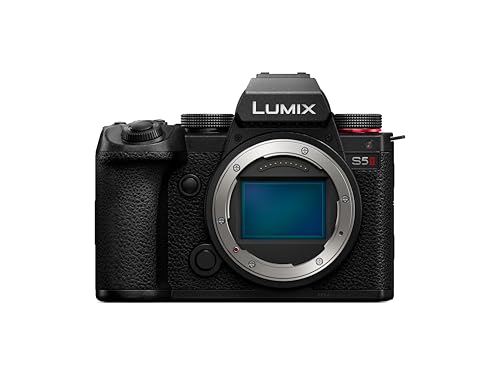
| Panasonic LUMIX S5II | Best main sanctuary camera | A full-frame body built for long, unattended video work, with the cooling and clean output a two-hour service demands. |
| Sony Alpha 7 IV | Best for low-light sanctuaries | The low-light specialist for older buildings where the chancel lighting was designed for mood, not cameras. |
| PTZOptics Move 4K | Best true PTZ for unmanned broadcasts | A genuine pan-tilt-zoom camera that one volunteer can direct from a laptop, giving small teams a multi-angle broadcast. |
| Sony ZV-E10 II | Best compact second camera | The small, affordable angle camera for the worship team, the font, or a tight side view the main camera cannot reach. |
| Canon EOS R50 | Best starter camera for a first stream | The friendly first camera for a church moving from a phone on a tripod to something that looks like a broadcast. |
| OBSBOT Tiny 2 | Best for chapels and youth rooms | A self-tracking camera for the small rooms where one leader teaches, preaches and operates everything alone. |
How Did We Choose These Church Streaming Picks?
We mapped each candidate against the four shots a typical service actually needs: the wide establishing view of the whole sanctuary, the medium shot of the preacher that carries most of the stream, the worship team’s framing during music, and the close detail of baptisms, candles or communion that makes remote viewers feel included. A camera earned its place by owning at least one of those shots convincingly, and the six together cover all four positions across a realistic range of church sizes and budgets.
Three practical filters did the rest of the sorting. First, endurance: the camera must record or output a stream for the length of a long service, plus the pre-service countdown, without overheating habits or arbitrary recording limits interrupting it. Second, signal cleanliness: a clean HDMI feed without interface clutter, because the stream encoder shows the congregation whatever the camera sends. Third, volunteer legibility: controls and menus that a rotating team can be taught once and trusted thereafter. Cameras that failed any filter, however impressive their photography, were left to other guides on this site.
What Does a Livestreamed Service Actually Ask of a Camera?
It asks for stamina disguised as simplicity. A Sunday service is a two-hour live broadcast produced by amateurs in a building designed for acoustics rather than light, and the camera is the only part of that broadcast the online congregation ever sees. Exposure must glide as the preacher steps from shadow into a shaft of window light. Focus must hold on a moving speaker without hunting across the pulpit flowers. White balance must stay believable while candlelight, tungsten spots and blue daylight argue inside the same frame.
The stream also has an emotional register that ordinary event videography does not. A baptism framed too wide feels like surveillance; framed with a gentle close lens it feels like family. The readings, the prayers and the quiet moments need a camera that behaves discreetly, without fan noise reaching the front pews or a tally light glaring at the choir. Every pick below was weighed against that register as carefully as against resolution, because a church stream succeeds when remote viewers forget the technology entirely and simply attend.

Panasonic LUMIX S5II — Best main sanctuary camera
The S5II earns the main position at the back of the nave because Panasonic designed it for exactly this kind of unglamorous endurance work. Its full-frame sensor gathers sanctuary light generously, so faces at the pulpit stay clean and natural at the sensitivities a dim chancel forces on you, and its video toolset treats streaming as a first-class job rather than a photography afterthought. The clean HDMI output feeds an encoder or switcher without menu overlays, and the body is built to keep recording through a long service, a wedding and a funeral on the same Saturday without thermal drama.
For the volunteer team, its appeal is how calmly it behaves once set. Autofocus tracks a walking preacher with a steadiness that lets one person run slides, sound and stream simultaneously, and the image has a gentle, dignified colour character straight out of the camera that suits worship footage far better than a punchy vlogging look. Pair it with a moderately long lens from the balcony and the medium sermon shot, the one your online congregation watches for forty minutes, looks like it came from a body several tiers more expensive.
- Sensor class: full-frame, kind to dim sanctuaries
- Output: clean HDMI for encoders and switchers
- Role: the fixed main camera at the rear
- Cooling: built for long continuous services
Strengths
- Full-frame low-light manners for candlelit rooms.
- Runs a whole service without attention.
- Colour that flatters faces without grading.
Trade-offs
- Needs a longer lens budget for big naves.
- Menus reward one proper setup session.
- Overkill for a tiny chapel’s single shot.
Best for: the medium or large church building one serious main camera. Not suited for: a house-church living room setup.
Setup counsel: lock white balance manually during rehearsal using the actual service lighting, because sanctuary light mixes sources in proportions auto balance keeps renegotiating mid-sermon. Once locked, the S5II’s picture stays serene from processional to benediction.
One more virtue deserves naming for church use specifically: the S5II behaves predictably in the mixed colour temperatures that sanctuaries specialise in. Candlelight at the altar, cool daylight from a clerestory and warm spots on the choir can pull lesser cameras into a different white balance for every framing, while this body holds a chosen balance calmly across all of them. For a stream watched by people who know the building intimately, that colour steadiness reads as reverence for the room itself, and it is a large part of why this camera, rather than a sharper-on-paper rival, anchors the guide.

Sony Alpha 7 IV — Best for low-light sanctuaries
Some sanctuaries are simply dark, and no amount of technique changes the fact that the Victorian chancel or the evening prayer service gives a camera very little to work with. The Alpha 7 IV is the pick for those rooms. Its full-frame sensor produces the cleanest high-sensitivity video in this guide, holding skin tones together when the only light is a warm spot and a row of candles, and its autofocus is famously tenacious about keeping an eye locked even as the subject turns, bows or steps behind a lectern.
It also suits churches that record as much as they stream. The same body that feeds the Sunday livestream can shoot the midweek testimonial video, the Christmas concert and the building appeal film at a quality that makes the media team look professional, and its lens ecosystem is the deepest in this list, which matters when the right answer for a long nave is a particular telephoto the church can hire before it can buy. Treat it as the quality ceiling of the guide: the camera a church grows into and then stops thinking about.
- Sensor class: full-frame, exceptional in darkness
- Focus: eye tracking that survives lecterns
- Output: clean HDMI plus strong recording
- Role: main camera where light is scarce
Strengths
- Faces stay clean in genuinely dim rooms.
- Autofocus a volunteer can simply trust.
- One body for streams and produced videos.
Trade-offs
- Premium tier for a church budget.
- Rolling-shutter manners need gentle pans.
- Its depth is wasted on bright modern halls.
Best for: historic, candlelit or evening-service churches. Not suited for: a bright new-build hall on a tight budget.
A practical pairing: in dark sanctuaries the lens matters as much as the body, so budget for the fastest aperture your framing allows before considering any other upgrade. The Alpha 7 IV rewards that discipline more visibly than any pick here.
Churches considering this body should also weigh its second career. The Alpha 7 IV is the camera a communications volunteer will reach for when the parish needs photographs of the fete, a film for the stewardship campaign or portraits for the new welcome leaflet, and a body that serves the whole communications ministry justifies its tier in a way a stream-only device cannot. Buy it as the church’s camera, not merely the streaming camera, and both the budget conversation and the volunteer’s enthusiasm change character entirely.
PTZOptics Move 4K — Best true PTZ for unmanned broadcasts
Every other pick in this guide is a stills-shaped camera doing video duty, but the Move 4K is a broadcast instrument: a motorised head that pans, tilts and zooms under remote control, designed to live permanently mounted in a sanctuary and be directed from a laptop or joystick by a single volunteer. Preset positions are its superpower. Before the service, the operator saves a framing for the pulpit, one for the choir, one for the font and a wide for the processional; during the service, moving between those shots is a button press, and the stream suddenly looks like a television production instead of a fixed security view.
For churches with a real media rota it changes what is possible, and its streaming outputs speak the language of encoders and networks directly, simplifying the whole signal chain. The honest costs are its tier, the installation effort of mounting and cabling it properly, and an image character that, while very good, belongs to the broadcast world rather than the cinematic one. It is described prose-only here because its configurations and bundles vary; buy it from a broadcast supplier who can advise on mounting, and treat it as infrastructure, like the sound desk, rather than as a camera purchase.
- Form: motorised pan, tilt and zoom head
- Control: presets directed from a laptop
- Mounting: permanent, ceiling or wall
- Role: the unmanned multi-shot broadcast camera
Strengths
- Many saved framings, one operator.
- Installs once, serves for years.
- Broadcast outputs simplify the chain.
Trade-offs
- Installation is a project, not an unboxing.
- Picture character is broadcast, not cinematic.
- Premium infrastructure-level pricing.
Best for: churches with a media rota wanting directed coverage. Not suited for: rented halls or portable church plants.
Prose-only note: this model sits outside the verified pool, so it carries no link. When pricing it, include the mount, cabling and a joystick or software controller in the real budget, because the camera alone is only most of the system.
Churches drawn to this camera should plan the directorial habit as carefully as the hardware. Saved presets only sing when someone has rehearsed the service’s geography: which framing holds during the readings, when the wide shot breathes between items, how the camera glides rather than snaps between positions so the movement feels like attention rather than machinery. Fifteen minutes of preset rehearsal before the first streamed Sunday separates churches that look televised from churches that look remotely surveilled, and the distinction is entirely in the directing, not the device.

Sony ZV-E10 II — Best compact second camera
Most church streams improve more from a second angle than from a better main camera, and the ZV-E10 II is the natural second angle. It is small enough to live unobtrusively near the worship team or beside the font, its APS-C sensor is a clear step above any camcorder the church might already own, and its autofocus handles singers and musicians moving within a fixed frame without fuss. During the sermon it can hold the wide sanctuary shot while the main camera stays tight on the preacher, and a simple switcher turns those two feeds into a stream that feels edited rather than merely captured.
Its creator heritage shows in friendly menus and a picture that looks good with minimal adjustment, which suits the volunteer reality, and its price tier lets a church add the angle this year instead of saving for a second full-frame body. It asks for the usual small-camera courtesies: mains power for long services rather than a battery, and a lens chosen for its position rather than borrowed from the kit drawer. Given those, it is the highest-value upgrade in this entire guide.
- Sensor class: APS-C in a discreet body
- Role: worship-team or font angle camera
- Power: run it from mains for services
- Menus: the friendliest in this guide
Strengths
- A second angle transforms the stream.
- Small enough to place without offence.
- Volunteer-friendly from the first Sunday.
Trade-offs
- Needs mains power for long services.
- APS-C gathers less light than full-frame.
- No viewfinder, irrelevant once mounted.
Best for: the second angle in a two-camera stream. Not suited for: the only camera in a very dark sanctuary.
Placement counsel: put the second camera where the congregation’s own eyes go during music, usually front-side at a modest height, and resist framing it too wide. A close worship shot cut against a tight sermon shot is the whole grammar of a watchable church stream.
A word about its life between Sundays: the ZV-E10 II unclips from its sanctuary mount and becomes the youth worker’s camera, the testimonial camera and the social-media camera for the parish fair. Small churches survive on equipment that works several jobs, and this body’s creator-friendly handling makes it the one volunteers actually volunteer to use. That weekday usefulness is not a footnote to its streaming value; for a small congregation counting every purchase twice, it may be the deciding argument.

Canon EOS R50 — Best starter camera for a first stream
For the many churches whose current stream is a phone clamped to a balcony rail, the EOS R50 is the correct first real camera. Canon’s colour is kind to faces under mixed sanctuary light, the autofocus simply finds the preacher and stays there, and the whole camera is light, unintimidating and easy to hand to a new volunteer with a five-minute briefing. Its video is a decisive step up from any phone: proper depth, proper low-light behaviour, and a clean output path into an inexpensive capture device or streaming laptop.
It is honest about its station. This is the starter tier, so long services want mains power and a sensible lens rather than the kit zoom strained at its longest, darkest end, and a large, dim nave will eventually push a growing church toward the full-frame picks above. But as the camera that gets a congregation streaming properly this term, within a budget a small church council can approve without a special appeal, the R50 has no rival in this list.
- Sensor class: APS-C, kind Canon colour
- Role: the first real streaming camera
- Handling: lightest body in this guide
- Path: clean output into a capture device
Strengths
- The phone upgrade churches actually need.
- Faces look right with minimal effort.
- Easy to teach, hard to frighten.
Trade-offs
- Kit lens is short for long naves.
- Mains power needed for full services.
- Growing churches will outgrow it happily.
Best for: small churches starting a real stream now. Not suited for: a cathedral-scale space with distant pulpits.
A budgeting note: spend the lens money before anything else. A modest fast prime or a longer zoom transforms the R50’s sermon framing more than any accessory, and the body will happily serve as the second angle when the church eventually upgrades its main camera.
The R50 also teaches a church its own future. A team that learns streaming on this body learns the transferable grammar, framing, exposure discipline, desk-fed audio, rehearsal, on a forgiving instrument, and those habits carry intact to any larger camera the congregation later buys. Churches that start on intimidating professional bodies often stall at the volunteer stage; churches that start here tend to discover, a year in, that they have quietly become a media team with opinions about lenses, which is exactly the congregation the full-frame picks are waiting for.

OBSBOT Tiny 2 — Best for chapels and youth rooms
Not every act of worship happens in the main sanctuary. The youth room, the chapel Bible study, the children’s talk recorded for the stream and the pastor’s midweek reflection all share one production reality: a single person, alone, who cannot operate a camera while leading. The Tiny 2 exists for that person. Its motorised gimbal follows the speaker around the room automatically, reframing as they move to the whiteboard or the circle of chairs, and it answers to hand gestures from across the room, so starting, stopping and reframing never requires walking back to a desk.
In the main sanctuary it would be out of its depth as a primary camera, and this guide will not pretend otherwise; its sensor is a webcam-class instrument, however clever the tracking. But in small, bright rooms its combination of autonomy and a genuinely good picture makes services and sessions streamable that otherwise would not be streamed at all. Churches that run several small gatherings through the week often find this little camera quietly becomes their most-used one.
- Form: motorised tracking webcam
- Control: gesture commands, no operator
- Role: solo-led rooms and midweek content
- Picture: strong webcam class, bright rooms
Strengths
- Follows a lone leader automatically.
- Makes small gatherings streamable.
- Gesture control suits teaching and preaching.
Trade-offs
- Not a main-sanctuary instrument.
- Tracking needs a reasonably lit room.
- Premium price for a small camera.
Best for: chapels, youth rooms and solo midweek streams. Not suited for: the principal Sunday sanctuary shot.
Rehearse the gestures once before a real session and mount the camera at standing eye height in the room where it will live. Tracking cameras reward a settled home; moved between rooms weekly, their framing habits never quite settle.
Its other quiet ministry is recording rather than streaming. The midweek talk, the confirmation class session for an absent teenager, the pastor’s short reflection for the parish page: the Tiny 2 captures all of them at a quality that respects the content, with an operator requirement of literally nobody. Churches consistently underestimate how much of their life happens in small rooms with one leader, and how much of it their scattered members would value seeing. This camera is the guide’s answer to that underestimation.
How Do the Six Compare Side by Side?
| Camera | Best church role | Light appetite | Operator needed | Watch out for |
|---|---|---|---|---|
| Panasonic LUMIX S5II | Main sanctuary shot | Generous, full-frame | Set and forget | Lens budget for reach |
| Sony Alpha 7 IV | Dark historic buildings | The most forgiving here | Set and forget | Premium tier |
| PTZOptics Move 4K | Directed multi-shot stream | Broadcast-class sensor | One director, presets | Installation project |
| Sony ZV-E10 II | Second angle | Good in normal light | Fixed, unattended | Mains power required |
| Canon EOS R50 | First real stream | Fine in lit churches | One volunteer | Kit lens reach |
| OBSBOT Tiny 2 | Chapels, youth rooms | Wants a bright room | None at all | Small-room instrument |
How Should a Church Place Its Cameras?
Placement is half the craft, and the congregation’s sightlines are the teacher. The main camera belongs on the centre line, at the rear, raised just above head height so the frame looks slightly down the nave the way a worshipper in the back pew sees it, close enough that the preacher fills a satisfying portion of the frame with the lens the budget allows. A camera stranded in a corner produces the diagonal, surveilling angle that makes online viewers feel like they are watching the service rather than attending it, and no sensor quality redeems a wrong seat in the room.
The second camera, where one exists, earns its keep by contrast: closer, lower, off to the side the musicians occupy, framed for faces and hands rather than architecture. Baptisms and communion want a position rehearsed in advance, because the worst moment to discover the font is invisible from both cameras is during the baptism itself. Walk the building with a phone at each candidate position during a rehearsal, watch the recordings as a stranger would, and let that viewing, not the floor plan, settle the mounts permanently.
What About Sound, Light and the Rest of the Chain?
The camera is the visible half of a church stream; the other half is a feed from the sound desk and whatever light the building honestly has. Take audio from the mixing desk’s auxiliary output, never from a camera microphone across forty feet of echoing nave, and have one volunteer whose only job during the first hymn is listening to the stream on headphones as the congregation at home hears it. That single habit catches more failures, desk feeds left muted, batteries dying, a hum from a lighting dimmer, than any equipment upgrade in this guide.
Light deserves the same realism. Most churches cannot relight a sanctuary, but most can raise the house lights one notch during streamed services, open the curtain that blacks out the chancel window, or move a reading lamp so the preacher’s face is not in permanent shadow. Small, reversible kindnesses to the camera, agreed with the minister before anyone suggests touching the building’s character. The full-frame picks forgive the most darkness, yet even they broadcast a visibly better service when the room gives them a little more to work with.
Which Lens Belongs on the Main Camera?
The lens question decides more church streams than the camera question, because the preacher’s distance from the rear mount is fixed by architecture and only the lens can close it. Work backwards from the framing the stream needs: the preacher occupying a comfortable third of the frame at the pulpit, with headroom for gesture. In a modest church that is a moderate telephoto’s work; in a long nave it demands a genuinely long lens, and the honest response is to budget for that lens before upgrading any camera body in this guide.
Aperture is the second half of the answer. Sanctuary light is scarce, so a faster lens buys clean sensitivity settings on every body here, effectively upgrading the whole system’s low-light performance for less than a body change costs. Zoom flexibility matters for volunteers, who cannot reposition a mounted camera mid-service, while a fast prime rewards churches whose preacher stays at one mark. Choose for your building’s habits, and remember the lens will outlive two camera bodies, which makes it the wisest place in the whole chain to spend bravely.
What Mistakes Do Church Media Teams Make Most?
The founding mistake is the phone-on-a-rail stream kept two years too long: distant, echoing and unsteady, it tells online members they are an afterthought. The second is buying a camera before checking the whole chain, discovering on Sunday morning that the capture device, the cable run or the upload speed was the real bottleneck all along. Third is framing the wide shot and never moving on: a stream that shows the whole sanctuary for ninety minutes reads as a security feed, however good the camera, which is why the second angle and the PTZ presets matter so much.
Fourth is neglecting rehearsal. Every failure in church streaming, the muted desk feed, the camera left on Friday’s funeral settings, the focus locked on the pulpit flowers, is a rehearsal failure wearing a technical costume. Fifth is forgetting the congregation in the room: a media team that pans ostentatiously, blocks aisles with tripods or floods the chancel with work lights has improved the stream by degrading the service, and the picks and placements in this guide were chosen to keep the technology in its proper, unobtrusive place.
Final Recommendation
Most churches should start where their building dictates. A small congregation making its first real stream should buy the Canon EOS R50, a sensible lens and mains power, and be broadcasting properly within the month. A medium church ready for a permanent main camera should choose the Panasonic LUMIX S5II, add the Sony ZV-E10 II as its second angle when funds allow, and consider the picture finished. Dark, historic buildings justify the Sony Alpha 7 IV outright, churches with a genuine media rota should cost the PTZOptics Move 4K as infrastructure, and every church with small rooms and solo leaders will find the OBSBOT Tiny 2 quietly indispensable. Buy for the services you actually hold, rehearse once with honesty, and the stream will start doing its real work: making absent people present.
One last encouragement for the volunteer reading this with a council meeting ahead: the congregation at home cannot see your budget, your cable runs or your rehearsal. They see a face they know, hear words they need, and feel, or fail to feel, expected. Every pick and practice in this guide exists to protect that feeling, and a church that protects it has spent its money in the right order whatever it bought.
Frequently Asked Questions
Does a church stream need 4K?
No. Streaming platforms deliver most church services at modest resolutions, and the online congregation watches on laptops and televisions across variable connections. Sensor quality, placement and light decide how the service looks far more than pixel count does. The full-frame picks here earn their place through low-light behaviour and clean output, not through their headline resolution, and a well-placed HD stream from any of these cameras will look better than a badly placed 4K one.
How long can these cameras run during a service?
The mirrorless picks are intended to output a continuous signal for the length of a service and beyond when powered from the mains, which is how a church should always run them. Battery operation is for weddings in fields, not for Sunday infrastructure. Before the first streamed service, run a full-length private test at the same duration, because discovering a thermal or power habit during the sermon is a rite of passage no media team needs.
Can one volunteer really run a whole stream?
Yes, and most churches in this guide’s audience do exactly that. The recipe is fixed cameras with saved framings, audio taken from the desk, and a simple switcher or streaming program whose scenes are prepared before the service. The PTZOptics pick formalises that model with presets, while the fixed mirrorless picks achieve it with discipline. What one volunteer cannot do is improvise, so the system’s whole design goal is a service with nothing left to improvise.
Where should the camera go in a small chapel?
As close to the speaker as discretion allows, at standing eye height, on the room’s centre line. Small rooms forgive wide lenses and reward proximity: the OBSBOT Tiny 2 or the Canon EOS R50 placed thoughtfully will outperform a distant expensive camera every time. Keep the frame free of the door and the noticeboard, light the speaker’s face with whatever the room offers, and the intimacy of a small gathering becomes the stream’s strength rather than its limitation.
What should a church buy first with a limited budget?
The camera and lens for the main shot, mains power, a capture path into the streaming computer, and headphones for the volunteer monitoring the desk feed, in that order. Lighting improvements and a second angle come next, ahead of any upgrade to the main camera itself. Churches routinely discover that the chain around the camera was the real constraint, so audit the encoder, the cable runs and the building’s upload speed before spending anything at all.
How do we keep the stream from distracting worshippers in the room?
Mount cameras permanently rather than deploying tripods weekly, keep them small and still during the service, avoid panning for its own sake, and agree the whole setup with the minister as part of the room’s furniture. A congregation accepts technology it stops noticing; the picks here were chosen partly for how quietly they can live in a sanctuary, and a media team that behaves like vergers rather than a film crew completes the effect.
Should the whole congregation be told the service is streamed?
Yes, plainly and repeatedly until it becomes ordinary knowledge: in the notices, on a small sign by the door, and in the minister’s welcome from time to time. Announce where the camera-free seating is, and honour it absolutely in framing. Congregations relax about streaming once they trust the boundaries, and visitors choose their seats with the same informed ease. Secrecy is the only real mistake available here; a stream everyone understands becomes as unremarkable as the hearing loop, and considerably better attended.
How Does a Church Grow from One Camera to a Real Broadcast?
In stages, each of which should feel finished before the next begins. Stage one is the honest single camera: centred, close, mains-powered, desk-fed audio, rehearsed. Many churches should stay there happily for years. Stage two adds the contrasting angle, the ZV-E10 II by the musicians or the font, plus a simple switcher, and this is where streams begin to feel directed. Stage three, for churches with the rota to sustain it, replaces effort with infrastructure: the PTZ camera with its presets, a dedicated streaming computer, and a small team whose roles, director, sound listener, slides, are written down rather than remembered.
The discipline that makes growth work is refusing to skip stages. A church that buys the PTZ before it has solved audio owns an expensive way to broadcast silence beautifully. Grow the chain in the order the congregation experiences it: be seen clearly, be heard clearly, then be directed gracefully. Each stage in this guide’s picks remains useful in the next, the starter body becoming the second angle, the second angle becoming the baptism camera, so nothing bought honestly is ever wasted.
What Should the Media Team Check Every Single Week?
A short liturgy of checks, performed at rehearsal rather than discovered in the service. Focus on the pulpit position with the actual preacher’s mark. White balance under the actual lighting state the service will use, including whether the evening sun will be through the west window by the sermon. The desk feed present and clean in the volunteer’s headphones. The stream’s private preview watched for thirty honest seconds. Cables seated, power supplies warm, memory or recording started where the service is also being recorded.
Then, after the service, one reviewing habit that compounds quietly: watch ten minutes of the recording as a stranger, note one thing to improve, and fix only that thing before next Sunday. Church media teams improve by accumulation, not by overhaul, and the teams whose streams feel professional after a year are simply the ones that kept this small weekly covenant with their own work.
How Should a Church Record Services for Later Viewing?
Recording is the stream’s quieter sibling, and many congregations discover their recorded services reach more people, shift workers, the housebound, families in other time zones, than the live broadcast ever does. The discipline differs in one respect: a recording forgives nothing about audio, because viewers will abandon a muffled sermon they might have endured live out of loyalty. Record the desk feed redundantly where the system allows it, keep a simple spoken introduction and ending so the file feels hosted rather than surveilled, and name every file by date and service from the first week, because an archive nobody can search is a cupboard, not a library.
The cameras here all serve recording duty happily alongside streaming, and the wisest small investment is storage routine rather than storage size: one person owns the archive, one folder structure, one backup that leaves the building. Churches lose service recordings to forgotten laptops and departed volunteers far more often than to failed drives, and the fix is administrative, not technical.
What Does a Streaming Rota Need Beyond the Camera?
People, in defined roles, written down. The sustainable church stream has a director who watches the whole, a sound listener who hears what home hears, and a producer who owns the platform, the titles, the welcome message in the chat and the recording afterwards. In a small church one person may hold two roles, but the roles themselves should never blur, because each catches the failures the others are blind to. The chat host deserves special mention: the online congregation’s fellowship happens there, and a named, welcoming human in the chat does more for remote belonging than any camera upgrade in this guide.
Train each role with a shadow Sunday, document the setup in a one-page checklist kept with the equipment, and rotate gently so knowledge never lives in a single volunteer’s head. The technology in this guide was chosen to be teachable; the rota is what makes that teachability pay, Sunday after Sunday, long after the excitement of the new camera has faded into the furniture.
How Do Churches Handle Weddings, Funerals and Baptisms on Stream?
Occasional offices are where church streaming earns its deepest gratitude and its trickiest judgements. A funeral streamed to family on another continent is a genuine pastoral gift, and the same fixed, discreet setup that serves Sundays serves it well, provided the family has chosen streaming knowingly and the camera’s presence has been agreed rather than assumed. Weddings add movement, processions, signing, photographs in the aisle, and reward the second angle and the rehearsed preset more than any ordinary Sunday.
Baptisms ask for the close, gentle framing discussed earlier and for a media team that has rehearsed the font position before the family arrives. Across all three, the rule is that the office leads and the stream follows: no repositioning mid-service, no direction of participants, no technology visible in anyone’s memory of the day. Churches that hold that line find families thanking them for years; the camera’s discretion is remembered as part of the church’s care.
What Will Church Streaming Look Like in Five Years?
The direction is toward invisibility and intelligence: cameras that frame a speaker without a director, platforms that caption the sermon live for the hard of hearing and translate it for the congregation’s other languages, archives that make a decade of preaching searchable by topic. Churches buying today should favour exactly what this guide favours, clean signals, standard connections, cameras that are excellent unaided, because those are the components every future platform will still know how to use. Proprietary cleverness dates; a good lens on a good sensor feeding a standard output is effectively permanent.
What will not change is the human centre. The stream exists so that absence does not become exclusion, and the churches whose broadcasts feel like belonging are the ones where a person hosts, greets and follows up, whatever the cameras become. Buy the technology in this guide, then invest the larger share of imagination in the welcome around it.
How Should a Church Stream on a Very Small Budget?
Begin by refusing the two false economies: the distant phone that makes the congregation invisible, and the bargain camcorder whose low-light picture dissolves exactly where sanctuaries live. The small-budget path that works is the Canon EOS R50 with a lens chosen for the room, mains power, a modest capture device and the sound desk feed, assembled patiently and rehearsed honestly. Churches that cannot yet afford even that should stream audio with a single still image of the sanctuary rather than video that insults the eye, because a clear sermon heard is a ministry, while a smeared one watched is an apology.
Then grow by the chain’s logic rather than by catalogue temptation: the second angle before a better main camera, light before resolution, the rota’s training before any accessory. Small churches that follow that order routinely produce streams that larger, richer churches envy, because every purchase answered a named weakness instead of a general anxiety. The budget was never the real variable; the sequence was.
What Permissions and Safeguards Does Streaming Need?
A church stream publishes people’s worship to the world, and kindness requires thinking about consent before technology. Most congregations settle on a simple, announced settlement: the service is streamed, the front rows are in frame, a camera-free zone exists for anyone who prefers it, and children’s participation is handled with particular care and parental agreement. Music carries its own licensing, which churches should arrange through the usual licensing bodies rather than discovering platform copyright claims mid-hymn. None of this is burdensome once written down, and all of it protects the ministry the stream exists to serve.
Safeguarding extends to the archive as well. Decide who may download recordings, how long occasional offices stay published, and how a family can ask for a service to come down. A church that answers those questions in advance, on one page, kept with the media checklist, will never have the distressed conversation that churches without a policy eventually have. The cameras in this guide are neutral; the policy is where the care lives.
How Does Streaming Serve the Housebound and Distant Well?
The test of a church stream is not its resolution but whether a housebound member feels expected. The practices that create that feeling are mostly human: the minister greeting online worshippers by name at the start, the chat host who notices an absence, the recording sent with a short personal message to the member whose connection failed. Technology supports each of them, a camera framing that includes the congregation’s responses so remote viewers hear the room worshipping, captions enabled on the platform for the hard of hearing, a wide shot held long enough at the peace for online viewers to feel the room turn toward them.
Churches should also ask their remote members, plainly and annually, what would help, because the answers routinely surprise the media team: larger on-screen words matter more than camera quality, a reliable start time matters more than either, and the pre-service minutes of the room settling are treasured rather than skipped. Build the stream around those answers and the equipment in this guide becomes what it should be, the invisible servant of a visible welcome.
Which Accessories Actually Earn Their Place in a Church Setup?
Very few, and naming them saves churches real money. A proper mains power supply for each camera, because batteries are a hobbyist’s power source and a sanctuary is infrastructure. A capture device or streaming encoder matched to the number of cameras, bought after the cameras, not before. A small monitor where the director sits, showing the stream as sent rather than the camera as hoped. Headphones for the sound listener, a labelled cable for every run, and a printed checklist in a sleeve on the media desk. That is the whole honour roll.
Everything beyond it should have to argue its way in against a named problem: a longer lens argues against a measured distance, a second camera against a named blind spot, lighting against a meter reading in the chancel. Accessories bought against arguments compound into a system; accessories bought against anxiety compound into a cupboard. Church cupboards across the country hold the evidence for the second path, and this guide would rather your church’s money became ministry than inventory.
How Should a Media Team Review Its Own Stream?
Once a month, together, with the recording playing and the refreshments out, because review done alone becomes either vanity or despair. Watch the first five minutes, one musical item and ten minutes of the sermon, and judge only three things: could a stranger follow what was happening, could they hear every word without effort, and did the framing ever distract from the content it carried. Score nothing else. Technical polish beyond those three is decoration, and teams that chase decoration before comprehension build beautiful streams nobody can use.
Keep the notes, dated, in the same folder as the checklist, and revisit them quarterly. The pattern that emerges, the recurring hum traced eventually to one cable, the framing that drifts whenever a particular volunteer directs, is the team’s real curriculum, and it is written by the building itself. No course or camera teaches a church its own sanctuary the way its own recordings, honestly reviewed, will teach it.
Related Guides
Churches building out a wider media setup will also find our guides to the best cameras for recording church services and the best cameras for livestream and the best cameras for recording lectures.


