ilcastellomenu.com is reader-supported. When you buy through links on our site, we may earn an affiliate commission.
Where to Buy
A Synology DiskStation running Surveillance Station is one of the most satisfying ways to own your home’s cameras: the recordings live on your own drives, in your own house, under your own rules, with no subscription deciding what you may keep. The best cameras for DiskStation are therefore chosen on a single founding virtue, openness. The camera must speak the standards Surveillance Station understands, ONVIF and RTSP streams, behave on a wired or wireless network without demanding its maker’s cloud, and keep working when the internet does not. Cameras that fail that test, however excellent inside their own apps, are not DiskStation cameras at all, and this guide says so plainly where the famous names are concerned.
That honesty shapes the list. Three picks come from this site’s verified camera pool, chosen because they offer the open streaming paths a DiskStation needs; three are described prose-only because the dedicated surveillance world, Power over Ethernet bullet cameras and Synology’s own camera, lives outside that pool and is where a serious Surveillance Station setup usually ends up. Every recommendation carries the same instruction: confirm the exact model on Synology’s official compatibility list before buying, because firmware and revisions change what a camera permits, and the list is the authority this guide defers to.
The stakes are worth the care. A well-matched camera on a DiskStation is a decade-long arrangement, recording to drives you control, viewable from anywhere through Synology’s own apps, with smart detection improving as the software does. A badly matched one is a return label and a lesson. This guide exists to make you the first kind of buyer.
Key Takeaways
- Openness is the whole game: a DiskStation camera must offer ONVIF or RTSP streams.
- Ring and Blink do not work with Surveillance Station, whatever their other virtues.
- Check the exact model on Synology’s compatibility list before any purchase, every time.
- Wired PoE cameras are the serious end of a DiskStation setup: one cable, total reliability.
- Your recordings live on your drives, which is the point, so size the storage honestly.
- Three picks here are linked from the verified pool; the PoE specialists are prose-only.
In this guide
Quick Picks
| Pick | Badge | Why it is here |
|---|---|---|
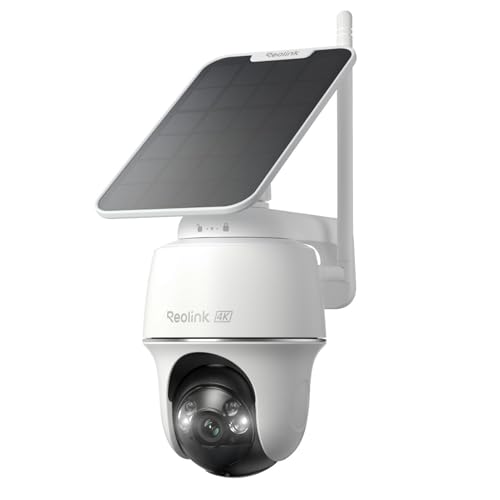
| REOLINK Argus PT Ultra | Best wireless pan-and-tilt for the garden | A battery-powered pan-and-tilt camera from the most NAS-friendly of the consumer brands, for positions no cable can reach. |
| TP-Link Tapo C210 | Best indoor pan-and-tilt value | An inexpensive indoor camera with pan-and-tilt and the standard streaming paths a DiskStation can use, for rooms and entrances. |
| Wyze Cam v4 | Best budget outdoor-capable pick | A small, inexpensive camera with a strong night picture for its class, usable with a DiskStation through its streaming options where available. |
| Reolink RLC-810A | Best wired PoE camera for the front of the house | A dedicated Power over Ethernet bullet camera: one cable for power and data, continuous recording, and the reliability a DiskStation deserves. |
| Amcrest 5MP PoE Turret Camera | Best PoE alternative with a wide ecosystem | A turret-form PoE camera from the other great open-ecosystem brand, for positions where a bullet’s profile is unwelcome. |
| Synology BC500 | Best native choice from Synology itself | Synology’s own camera, designed for Surveillance Station from the first line of its specification, for owners who want the maker’s own answer. |
How Did We Choose These DiskStation Picks?
We applied one filter before all others: can Surveillance Station actually use this camera, through official compatibility or through the standard ONVIF and RTSP paths Synology supports for generic cameras. Models that passed were then judged as surveillance instruments in their own right, night vision honesty, weather tolerance for the outdoor positions, the reliability of their streams across weeks rather than minutes, and how gracefully they behave when the network, the power or the camera itself restarts at 3 a.m. without a human present. A DiskStation system is infrastructure, and infrastructure is judged on its worst night, not its first afternoon.
The pool discipline of this site shaped the final six transparently. Where a verified pool camera offers a genuine compatibility path, it is here with its link and its caveats stated. Where the right tool is a dedicated surveillance model outside the pool, it is described prose-only rather than linked on a guess. And where famous cameras cannot work with a DiskStation at all, the guide spends a section on the warning rather than pretending they belong in the list, because that warning will save more readers more money than any single recommendation in it.
Why Do Some Famous Cameras Refuse to Work with a DiskStation?
Because their makers’ business is the cloud, not the camera. A closed-ecosystem camera is designed to stream to its manufacturer’s servers, be viewed in its manufacturer’s app and be stored on its manufacturer’s subscription, and its firmware offers no standard stream for anyone else’s recorder, which is a commercial decision rather than a technical limitation. Ring and Blink are the famous examples a DiskStation buyer meets first: excellent within their walls, and entirely unable to record to Surveillance Station, because the walls are the product. Understanding that saves the buyer the category’s most common expensive mistake, a box of beloved cameras and a NAS that cannot see any of them.
The open cameras take the opposite commercial bet: they publish standard streams, ONVIF for discovery and control, RTSP for the video itself, and let any competent recorder, a DiskStation above all, take the footage. That openness is why the surveillance industry runs on them, why Synology’s compatibility list is thousands of models long, and why this guide’s first question of any camera is not how good its picture is but whether its picture is available. A DiskStation owner is buying a system, and systems are built from citizens, not from captives.

REOLINK Argus PT Ultra — Best wireless pan-and-tilt for the garden
Reolink occupies a special place in the DiskStation world because the brand built its name on recorders and openness, and its cameras are the consumer names Synology owners reach for first. The Argus PT Ultra brings that heritage to the hardest position in a home system, the wireless one: battery-powered, pan-and-tilt, watching the garden, the driveway’s far end or the side gate where no cable will ever run, with a solar panel option that turns its battery from a chore into a season. Its colour night vision and spotlight give the DiskStation footage worth keeping from a position most systems simply leave blind.
The wireless bargain must be understood clearly. Battery cameras sleep to survive, waking on motion, so they are sentries rather than continuous witnesses, and their relationship with a NAS recorder is about captured events rather than an unbroken stream. For the gate and the garden that is usually the correct trade, and Reolink’s compatibility with Surveillance Station’s world is as good as the consumer tier offers. Confirm the exact model and firmware expectations on Synology’s list before buying, as with every pick here, and let this camera guard the perimeter’s far country.
- Power: battery, solar-panel friendly
- Movement: pan and tilt coverage
- Brand: the NAS owner’s first reach
- Role: wireless perimeter sentry
Strengths
- The cable-free positions, covered.
- Reolink’s recorder-friendly heritage.
- Colour night footage worth keeping.
Trade-offs
- Sleeps between events, by design.
- Continuous recording is not its job.
- Verify the model on Synology’s list.
Best for: gardens, gates and driveways beyond cable reach. Not suited for: the front door’s continuous record.
Sentry counsel: place the Argus where its waking is triggered by the approach you actually fear, the gate’s swing, the path’s bend, rather than by the road’s passing traffic, because a battery sentry’s life is measured in wake-ups. Aim its sensitivity at the property’s story, and its solar panel at the sky’s, and it will stand guard for seasons between visits.
Its pan-and-tilt earns a specific DiskStation mention: from the Surveillance Station interface, a movable camera turns one position into a patrol, and owners use the presets, gate, path, bins, the way a guard uses a round. No other wireless pick in this guide offers that, and for a large garden it is the difference between a camera and a presence.

TP-Link Tapo C210 — Best indoor pan-and-tilt value
The Tapo C210 is the value anchor of many a DiskStation system, an indoor pan-and-tilt camera priced like an accessory and behaving, once configured, like infrastructure. Its relevance here is its openness: the Tapo line provides the RTSP and ONVIF paths that let Surveillance Station take the stream, which transforms a modest consumer camera into a citizen of a serious recording system. Indoors, watching the hallway, the nursery-adjacent landing, the home office or the front door’s inside, its movable head covers a room from one corner and its night vision keeps the watch after lights-out.
The configuration deserves its sentence of honesty: like many consumer cameras, the Tapo asks to be introduced to its maker’s app first, after which the standard streams can be enabled and handed to the DiskStation, and owners should expect that small ceremony rather than a plug-and-play marriage. Firmware changes can move these arrangements, which is why the guide’s standing instruction, check Synology’s list and the current Tapo guidance before purchase, applies to this pick with particular warmth. Configured once, it is forgotten, which is the highest praise in this category.
- Form: indoor pan and tilt
- Streams: RTSP and ONVIF paths
- Price class: the system’s value anchor
- Role: hallway, office and entrance watch
Strengths
- A room covered from one corner.
- Open streams for the DiskStation.
- Value that scales to many rooms.
Trade-offs
- Setup begins in the maker’s app.
- Firmware can rearrange the paths.
- Indoor-only constitution.
Best for: indoor positions on a sensible budget. Not suited for: outdoor or weather-exposed mounting.
Configuration counsel: give the Tapo a fixed address on your network before introducing it to Surveillance Station, because a camera whose address wanders is a camera the recorder loses, and half of all ‘compatibility problems’ in home systems are addressing problems wearing a disguise. Static leases are the DiskStation owner’s quiet superpower.
Its pan-and-tilt has a household use beyond security that owners come to value: the pet check, the delivery at the door, the teenager’s safe arrival, all viewable through the same Surveillance Station app that holds the serious recordings. A system that serves the family’s daily curiosities as well as its emergencies is a system that stays maintained, and maintained systems are the ones awake on the night they are needed.

Wyze Cam v4 — Best budget outdoor-capable pick
The Wyze Cam v4 represents the budget end of the DiskStation conversation, and the guide includes it with its caveats in plain sight. Wyze built its name on startlingly capable inexpensive cameras, and the v4’s picture, particularly after dark, embarrasses models several times its price, which makes it tempting for the shed, the side path and the garage. Its relationship with external recorders has historically depended on streaming options and firmware paths that Wyze has adjusted over the years, so this pick carries the guide’s strongest version of its standing warning: verify the current state of its RTSP availability and Synology’s listing for the exact model before spending anything.
Where that verification succeeds, the v4 is a remarkable amount of witness for its price, weather-tolerant enough for sheltered outdoor positions and small enough to be mounted where larger cameras announce themselves. Where it does not, the honest buyer walks to the Reolink or the Tapo with the guide’s blessing. Budget surveillance is a legitimate strategy, several inexpensive cameras covering more ground than one flagship, but only when every one of them is actually recording to the DiskStation, which is a fact to be established per model, never assumed per brand.
- Class: budget, strong night picture
- Positions: sheltered outdoor and indoor
- Compatibility: verify current streaming state
- Role: sheds, paths and garages
Strengths
- Night footage beyond its price.
- Small, discreet, easily placed.
- Budget coverage across many positions.
Trade-offs
- Streaming availability must be verified.
- Brand’s direction is cloud-first.
- Support is a budget brand’s.
Best for: secondary positions on a verified setup. Not suited for: the front door’s primary record, unverified.
Verification counsel: with this pick, the order of operations is the whole game, research the current firmware and streaming situation first, buy one unit second, prove it on your own DiskStation for a week third, and only then multiply it across positions. The budget strategy works beautifully when it is sequenced like an engineer and disastrously when it is sequenced like a sale event.
Its night picture deserves the final word because it is the reason the pick survives its caveats: the positions budget cameras guard, the path, the shed, the garage’s gloom, are night positions, and a cheap camera that sees in the dark is worth more to a DiskStation than a dear one that merely records the darkness beautifully. Verify, then deploy, then sleep better.
Reolink RLC-810A — Best wired PoE camera for the front of the house
The RLC-810A is what a DiskStation setup grows up to be. It is a proper surveillance instrument, a weatherproof bullet camera powered over the same Ethernet cable that carries its stream, which means one cable run buys a position that never sleeps, never needs a battery, never drops off a congested wireless network, and records continuously to the Surveillance Station with the boring reliability that is this category’s highest compliment. Its smart detection distinguishes the visitors a homeowner cares about, and its night vision is built for the driveway and the street-facing wall it will spend its life watching.
It is described prose-only because the dedicated PoE world sits outside this site’s verified pool, and the guide will not pretend otherwise. The installation is the honest cost: a cable run through the loft or along the eaves, a PoE switch or injector at the network’s heart, and an afternoon’s work that separates a surveillance system from a collection of cameras. Owners who make that investment once describe the same experience, the system disappears into the house’s infrastructure and simply works for years, which is why the professionals install this class of camera and why the DiskStation, itself a piece of quiet infrastructure, deserves it.
- Power: PoE, one cable for everything
- Form: weatherproof bullet camera
- Recording: continuous, recorder-native
- Role: front of house, driveway, street wall
Strengths
- Never sleeps, never drops, never begs.
- Continuous footage, not just events.
- Detection that knows people from weather.
Trade-offs
- Cable run is a real project.
- No link here: buy from surveillance channels.
- Overkill for a rented flat’s hallway.
Best for: homeowners building a permanent system. Not suited for: renters or the cable-averse.
Prose-only note: this model is outside the verified pool and carries no link. Buy it from a surveillance supplier who can also sell the PoE switch and the outdoor-rated cable, and confirm its presence on Synology’s compatibility list, where the Reolink PoE range is a long-standing citizen.
Placement counsel for the front position: mount it high enough to be a witness rather than a target, angled to hold the driveway and the door in one frame, and let its continuous record be the system’s spine. Wireless cameras can then be spent on the perimeter’s awkward corners, each technology doing the work it is honest at.
Amcrest 5MP PoE Turret Camera — Best PoE alternative with a wide ecosystem
Amcrest is the second name DiskStation owners learn, a brand built on open standards whose cameras have populated Synology’s compatibility list for years. The turret form of this pick is its distinction: a ball-shaped camera in a socket that aims freely and presents a lower, friendlier profile than a bullet, which matters at the front door and the porch, where a camera should watch without glaring. Its PoE discipline matches the Reolink’s, one cable, continuous recording, no batteries and no wireless weather, and its night performance serves the entrance’s close geography, faces at the door, better than the long-throw driveway positions.
Prose-only again, and for the same reason: the dedicated surveillance shelf is not this site’s pool, and the guide’s honesty about that is part of its usefulness. Between the two PoE picks, the choice is form and ecosystem rather than quality: the bullet for the wall and the driveway, the turret for the door and the porch, and many finished systems contain both, united by the DiskStation that records them. Amcrest’s configuration depth rewards the methodical owner with streams tuned exactly to the recorder’s appetite.
- Power: PoE, continuous and wired
- Form: turret, door-friendly profile
- Ecosystem: a Synology list veteran
- Role: front door, porch and entrance
Strengths
- Faces at the door, clearly kept.
- A profile neighbours do not resent.
- Open standards, deeply documented.
Trade-offs
- Configuration rewards patience.
- No link: surveillance channels only.
- Cable run required, as with all PoE.
Best for: front doors and porches in a wired system. Not suited for: long driveways needing a bullet’s throw.
Prose-only note: confirm the exact model’s current listing with Synology before purchase, and buy the turret and its junction accessories together, because a turret’s neatness depends on its cable being hidden in its mount rather than dangling beside it. The entrance’s camera should look like architecture, not like wiring.
A word for its microphone: entrance cameras that record the doorstep’s audio, where local law permits, settle the delivery disputes and doorstep conversations that video alone leaves ambiguous. Check your jurisdiction’s rules on audio recording, as this guide advises for all such features, and let the law, not the feature list, make that decision.
Synology BC500 — Best native choice from Synology itself
The BC500 is the DiskStation’s own sibling, a camera Synology designed for Surveillance Station with the integration that only the platform’s maker can offer: discovery that simply works, settings that live where the recorder’s settings live, and intelligent features, people and vehicle detection, loitering and boundary alerts, computed with the platform’s roadmap in mind. For the owner who values a system that feels like one product rather than a federation, it is the natural flagship, in a weatherproof bullet form suited to the house’s principal outdoor positions.
It is prose-only here because it lives in Synology’s own channel rather than this site’s pool, and its price reflects its first-party status, which the guide states without complaint: integration is a real feature and this is its price. The BC500 makes most sense as the spine of a system, the front and rear principals, with the open-ecosystem picks covering secondary positions at their friendlier prices, all recorded by the same DiskStation. Owners who begin with one often describe the setup experience as the moment the whole Surveillance Station idea clicked, because nothing needed translating.
- Maker: Synology, for Surveillance Station
- Form: weatherproof bullet, PoE class
- Integration: the platform’s native citizen
- Role: the system’s principal positions
Strengths
- Setup without translation or guesswork.
- Detection designed with the recorder.
- One maker to hold responsible.
Trade-offs
- First-party pricing throughout.
- No link: Synology’s channels only.
- Ecosystem youth beside the veterans.
Best for: owners wanting the native, integrated system. Not suited for: budget multi-room coverage.
Prose-only note: buy through Synology’s normal retail channels and confirm the current Surveillance Station version requirements, because a first-party camera’s features march with the platform’s software. Keep the DiskStation’s software current and the BC500’s firmware with it, as a matched pair.
Its licence economics deserve a buyer’s attention in the pleasant direction: Synology’s camera licencing has historically been generous with its own hardware compared with the per-camera licences third-party cameras can require beyond the DiskStation’s included allowance. Count licences when costing any system in this guide, because the recorder’s software economics are part of the camera decision whether buyers remember them or not.
How Do the Six Compare Side by Side?
| Camera | Best DiskStation role | Power | Recording style | Watch out for |
|---|---|---|---|---|
| REOLINK Argus PT Ultra | Wireless perimeter | Battery, solar option | Event sentry | Sleeps between events |
| TP-Link Tapo C210 | Indoor rooms | Mains, Wi-Fi | Continuous indoor | App-first setup |
| Wyze Cam v4 | Budget positions | Mains, Wi-Fi | Verify streaming first | Firmware direction |
| Reolink RLC-810A | Front of house | PoE wired | Continuous | Cable installation |
| Amcrest 5MP PoE Turret Camera | Door and porch | PoE wired | Continuous | Configuration depth |
| Synology BC500 | Principal positions | PoE class | Native continuous | First-party price |
How Does Surveillance Station Licensing Work, in Plain Terms?
A DiskStation typically includes licences for a small number of cameras, and cameras beyond that allowance need additional licences, which are a one-time purchase rather than a subscription, in keeping with the system’s own-your-infrastructure philosophy. Synology’s own cameras and certain bundled arrangements have historically softened that arithmetic, which is why this guide keeps mentioning licence counts alongside camera prices: the true cost of a position is the camera, its cable or mount, and its licence where one applies. None of this is a trap; it is simply a line item that surprises buyers who budgeted for hardware alone.
The planning habit that follows is to design the system on paper first, positions, cameras, licences, storage, and to let that total, rather than a camera’s headline price, be the number the household approves. DiskStation owners who plan that way describe their systems with a particular calm, because every part of the cost was a decision, and the system’s famous freedom from subscriptions survives intact: after the licences, the recordings are yours at no monthly toll.
How Much Storage Does a DiskStation Camera System Need?
More than the first guess and less than the fear, governed by three honest variables: how many cameras record continuously, at what quality, and how many days of history the household wants to keep. Event-only wireless sentries sip storage; continuous PoE principals drink it steadily. Synology’s own surveillance storage calculators exist for exactly this arithmetic and should be used with your real camera count rather than with optimism, because a system that overwrites its history in four days is a system that will, one day, overwrite the one incident that mattered on the fifth.
Drive choice matters as much as drive size. Surveillance-rated drives are built for the constant writing a recorder imposes, and a DiskStation’s redundancy options can protect the archive against a single drive’s failure, which is worth weighing for the principal cameras’ footage. The recordings are the system’s memory and, in the incident that justifies the whole expense, its evidence; treat their home with the same seriousness as the cameras that fill it.
How Do You Set Up a Camera on Surveillance Station, Step by Step?
The rhythm is the same for every pick in this guide, and learning it once teaches the whole system. First, install the camera in its position and give it a fixed address on the network, through the router’s reservations, so the recorder can always find it. Second, complete any maker-side setup the camera requires, the Tapo’s app introduction being the type example, and enable the standard streams where the camera asks. Third, add the camera in Surveillance Station’s IP Camera application, choosing the exact model where it is listed or the ONVIF path where it is not, and enter its credentials. Fourth, set the recording schedule, the stream profile and the retention, per camera, according to that position’s job. Fifth, and most neglected, watch it for a week, checking the night footage and the restart behaviour, before declaring the position finished.
Troubleshooting follows the same order in reverse: address, credentials, stream path, then compatibility. Most home failures live in the first two, which is why the guide’s counsel is boring on purpose. A DiskStation system is not difficult; it is merely systematic, and it rewards the owner who treats the setup as a small piece of engineering rather than as an unboxing.
What Mistakes Do DiskStation Camera Buyers Make?
Buying the beloved closed-ecosystem cameras first and discovering the DiskStation cannot see them is the category’s founding heartbreak, and it is why the Ring and Blink warning appears in this guide’s second paragraph rather than its last. Second is assuming a brand’s compatibility from another model’s, when revisions and firmware make compatibility a per-model, per-moment fact that only Synology’s list can settle. Third is under-sizing storage, so the system’s memory is shorter than the household’s holidays. Fourth is leaving cameras on wandering network addresses and blaming the recorder for losing them.
Fifth is forgetting the licences in the budget, and sixth is never watching the footage until the incident, discovering the mis-aimed camera and the failed night mode at the moment of need. Every one of these is a planning failure rather than a product failure, and the picks in this guide, open, checkable and honestly caveated, were chosen to make the planning succeed.
Final Recommendation
Build the system from the recorder outward. Homeowners ready for the permanent installation should make the wired PoE picks the spine, the Reolink RLC-810A on the street-facing wall, the Amcrest turret at the door, or the Synology BC500 where native integration justifies its price, and then spend wireless wisely: the Reolink Argus PT Ultra on the perimeter’s unreachable corners, the Tapo C210 covering rooms, and the Wyze Cam v4, verified first, on the budget positions. Check every model on Synology’s list, count the licences, size the drives honestly, and the result is the thing the DiskStation promised all along: your cameras, your recordings, your house, watched by a system that answers to you alone.
Frequently Asked Questions
Will my Ring or Blink cameras work with Surveillance Station?
No, and this guide will not soften it: those ecosystems are closed by design, offering no standard stream for a DiskStation or any other outside recorder to use. Their footage lives in their makers’ clouds under their makers’ subscriptions. Owners who want a DiskStation system should plan to replace or supplement them with open cameras like this guide’s picks, keeping the closed ones, if at all, as a separate, parallel convenience rather than as part of the recording system. It is the single most valuable fact in this article, which is why it appears in the introduction, the lead section and here.
What is ONVIF, and why does it matter for a DiskStation?
ONVIF is the surveillance industry’s common language, a standard that lets cameras and recorders from different makers discover each other, exchange streams and share controls like pan and tilt. For a DiskStation owner it is the difference between a camera that is a citizen of your system and a camera that is a guest of its maker’s cloud. A model with proper ONVIF support can usually be added to Surveillance Station even beyond the named compatibility list, which is why the standard, more than any brand, is the buyer’s best friend in this category.
Can wireless cameras record continuously to a DiskStation?
Mains-powered wireless cameras like the Tapo can and do, subject to the home network’s strength at their position, which should be tested rather than assumed. Battery cameras generally cannot, because continuous streaming would spend their charge in hours; they serve as event sentries instead, which is a legitimate role when it is chosen knowingly. The honest architecture of most finished systems is a wired or mains-powered core recording continuously, with battery sentries extending the perimeter, and this guide’s picks were arranged to make that architecture easy to copy.
How many cameras can one DiskStation handle?
More than most houses need, with the real limits set by the DiskStation model’s processing capacity, the network, and the licence count rather than by a simple number. A modest DiskStation runs a family home’s handful of cameras comfortably; larger models and the surveillance-specific configurations scale far beyond that. The practical advice is to size the DiskStation for the system you have honestly planned, including the two cameras you will add next year, because recorders, like the houses they watch, are easier to grow into than to move out of.
Do I need to pay monthly for a DiskStation camera system?
No subscription is required to record your own cameras to your own DiskStation, which is the founding reason the platform exists. The costs are the honest one-time ones this guide has itemised: the cameras, any licences beyond the included allowance, drives, and the electricity a small server sips. Optional cloud services exist around the edges for those who want them, but the system’s core promise, your footage on your drives under your control, carries no monthly toll, and for many owners that sentence alone justifies the entire project.
What should I check before buying any camera for my DiskStation?
Four things, in order. The exact model, including its hardware revision where the list distinguishes, on Synology’s official compatibility list. The streaming paths the current firmware offers, through the maker’s current documentation rather than a forum post from two years ago. The licence your plan requires beyond the included allowance. And the position’s practicalities, power, network reach and mounting, because a compatible camera in an impossible position is still an impossible position. Buy one unit first for any new model, prove it for a week, and then multiply it with confidence.
How Should a DiskStation System Be Arranged Around a Real House?
By thinking in rings rather than in rooms. The outer ring is the perimeter’s story, the gate, the driveway’s approach, the side path, where the wireless sentry and the street-facing PoE camera divide the work according to cable’s reach. The middle ring is the thresholds, the doors and the porch, where faces are identified and deliveries are witnessed, the turret’s and the BC500’s natural posts. The inner ring is discretion itself: most households keep indoor cameras few, purposeful and honestly placed, the hallway and the office rather than the family’s private rooms, because a system the household trusts is a system the household maintains.
Each ring makes different demands of recording, the perimeter continuous where wired, the thresholds sharp and close, the interior event-minded and privacy-respecting, and Surveillance Station’s per-camera schedules exist to express exactly those differences. The plan drawn this way, on paper, before the first purchase, is the difference between a system and a pile of cameras, and it costs nothing but an evening’s thought.
What Privacy Duties Come with Owning Your Own Recordings?
Owning the footage means owning the responsibilities the cloud used to carry for you. Neighbours’ gardens and windows deserve the courtesy of masking, which Surveillance Station supports through privacy zones, and the legal position on recording beyond your own boundaries varies by place in ways worth a few minutes’ reading. Household members, guests and anyone who works in the home should know the system exists and where it watches; a camera discovered is a trust destroyed, while a camera disclosed is a household appliance. The system’s admin password and remote access deserve the same seriousness as the house’s locks, because that is what they now are.
Retention is a privacy decision as well as a storage one. Keeping a fortnight of the street’s life is a different act from keeping a year of it, and households should choose their retention as a policy rather than inheriting it from a drive’s capacity. The DiskStation will faithfully execute whatever policy it is given; the policy itself is the owners’ character, expressed in settings.
How Does a DiskStation System Grow over the Years?
Gracefully, when it was planned as a system. A position added here, a camera promoted there, the budget indoor pick replaced by a PoE principal when the loft is finally wired, the archive migrating to larger drives as the family’s history on them grows. The open standards underneath are what make that growth cheap: no generation of cameras orphans the recorder, no subscription renegotiates the terms, and the compatibility list lengthens rather than shortens with time. Owners of decade-old DiskStation systems describe the same satisfaction as owners of good tools, that the thing has simply continued, absorbing improvements as they came.
The growth habit worth cultivating is the annual review: one evening a year to watch a night clip from every position, check the list for firmware news, confirm the retention is behaving, and walk the perimeter as the cameras see it. Systems fail by neglect more than by defect, and a DiskStation, which asks so little, deserves the little it asks on a schedule rather than in a crisis.
Why Do Professionals Respect the DiskStation Approach?
Because it restores the surveillance system’s original architecture, cameras as instruments, a recorder as a servant, footage as property, after a decade in which the industry’s consumer tier inverted all three. Professionals who install dedicated recorders for businesses recognise Surveillance Station as the same philosophy at household scale, with an interface a homeowner can actually run. That recognition is why the open camera brands court the platform, why the compatibility list is an industry document, and why a well-built DiskStation system holds its value, in use and in the household’s confidence, long after the cloud cameras of the same year have been orphaned by their makers’ pivots.
For the buyer, the practical translation is confidence in the direction of travel. Every year, the cameras get better at being citizens, the platform gets better at using them, and the recordings remain where they always were, in the house, on the drives, under the owner’s hand. Systems that age in that direction are the ones worth building, and building one begins, as this guide began, with a camera that is willing to be part of it.
How Should a DiskStation System Handle Internet Outages and Remote Access?
The local-first architecture shows its character when the internet fails: the cameras keep recording to the DiskStation because the system never depended on a distant server to function, and the household’s watch continues uninterrupted while cloud cameras elsewhere sit blind. That resilience is one of the platform’s least advertised and most decisive virtues, and it extends to the power cut’s shorter cousins, the router’s reboot and the provider’s bad evening, all of which a well-arranged local system rides over without losing the night’s record.
Remote access, when it is wanted, should be arranged through Synology’s own relay and security practices, with strong credentials and two-step protection, because a window into the house’s cameras is a door into the house. The platform gives the owner the tools to make that door a locked one; the owner’s part is to use them, and to treat the system’s admin account with the respect due to anything that can see the front door.
What Detection and Alerts Should a Home System Actually Use?
Fewer than it offers, tuned more carefully than the defaults. The finished home system alerts on the events the household has decided are news, a person at the door after midnight, a vehicle entering the drive, a presence in the garden’s inner ring, and records everything else silently for the archive. Alert fatigue is the silent killer of home surveillance: a system that telephones its owner forty times a day trains the owner to ignore it within the month, and the one alert that mattered arrives in a deadened channel. The cameras’ person and vehicle detection, tuned per position with honest zones, is what makes a short alert list possible.
Zones deserve their sentence: draw them around the property’s story, the path, the gate, the door, and exclude the street’s public theatre and the neighbour’s comings, because detection drawn greedily is notification spam with a settings page. The annual review this guide prescribes should include the zones, since gardens grow, cars change and the system’s idea of the property should be refreshed to match the property itself.
How Do You Migrate from a Cloud Camera System to a DiskStation?
In parallel, not in a leap. Stand the DiskStation up with its first open camera at the most important position, the front door or the drive, and let it prove itself for a month alongside the cloud system it will replace, while the household learns the app and the archive’s habits. Then move position by position, keeping the cloud cameras running at the secondary posts until their open replacements arrive, so the house is never unwatched and never double-subscribed for longer than the transition needs. The old cameras, where they cannot join the new system, are retired honestly rather than left as decorative decoys nobody checks.
The migration’s pleasant surprise is usually the archive’s feeling: footage that loads instantly, scrubs without a subscription’s permission and belongs, in a sense the cloud never offered, to the house itself. Owners describe the completed migration less as an upgrade than as a repossession, and the calm that follows, a system with no monthly negotiation and no maker’s pivot to fear, is the platform’s deepest selling point, best appreciated a year in, when nothing has happened, repeatedly, at no charge.
What Should Renters Do Differently with a DiskStation System?
Renters trade the cable run for ingenuity, and the system in this guide divides accordingly: the mains-powered wireless picks become the whole architecture, placed without drilling, powered from existing sockets, and arranged so the installation can leave with the tenant and the deposit intact. The Tapo’s rooms and the Argus’s perimeter translate naturally; the PoE spine waits for the owned home, and there is no shame in that sequencing, because a renter’s system that exists beats an owner’s system that is still being saved for. Landlord courtesy, a conversation about the cameras that watch the shared entrance, keeps the arrangement as neighbourly as it is legal in most places.
The DiskStation itself is the renter’s friend in a way the cloud never was: it moves house in a box, keeps the archive across the move, and asks nothing of the new building but a router and a shelf. Tenants who build their system on open cameras own a portable asset; tenants who built on a landlord-era cloud account own a cancellation form. Choose accordingly, and the system will follow you up the housing ladder until the house with the loft worth cabling finally arrives.
How Does a Camera System Help Beyond Security?
The watched house turns out to be useful in ways the security framing never promised: the delivery’s truth, the dog’s afternoon, the teenager’s safe arrival, the elderly parent’s morning routine visible to a caring eye with their knowledge, the storm’s damage documented for the insurer before the owner even gets home. These daily mercies are why home systems stay switched on and maintained long after the burglary fear that sold them has faded, and a maintained system is, as this guide keeps noting, the only kind that is awake for the emergency.
There is a craft in keeping those mercies proportionate: the family’s cameras should be known, their positions agreed, their indoor reach modest, because a home is not a facility and its people are not its suspects. The DiskStation’s local custody helps here in a way owners feel instinctively, the footage of family life stays in the family’s house, on the family’s drives, which makes the system’s everyday usefulness feel like a tool rather than a watcher. Build it with that spirit and it will serve the household’s peace in every sense.
How Should You Position Cameras Without Making the House a Fortress?
Placement is a negotiation between the witness and the welcome. A camera at the door should be visible enough to do its deterrent work and neat enough to read as household care rather than as suspicion; a camera in the garden should watch the gate without performing surveillance of the street’s whole life. The turret’s friendlier profile and the wireless picks’ small footprints exist in this guide partly for that diplomacy, and the finished system’s compliment, the one owners actually receive, is that visitors do not notice it until the owner mentions it, which is the correct amount of noticing for a home.
The family’s own feeling is the deeper test. Children should grow up in a house whose cameras are furniture with known purposes, not in a panopticon of their parents’ anxiety, and the indoor restraint this guide prescribes, thresholds watched, private rooms unwatched, is what keeps the system’s protection from taxing the life it protects. A DiskStation’s local custody supports that spirit: the house watches its boundaries, keeps its own counsel, and leaves its interior life alone.
What Internet and Network Habits Keep a Camera System Healthy?
The recorder’s network is its circulatory system, and a few habits keep it strong: the DiskStation and the PoE switch on the network’s most reliable power, ideally behind the small battery backup that rides out the short outages when incidents, opportunistically, like to happen; the cameras on their own tidy corner of the address plan; the router’s firmware and the DiskStation’s software kept current on a schedule rather than in a panic. None of this requires expertise beyond the willingness to treat the system like the appliance it is, serviced occasionally and otherwise left to its work.
Bandwidth honesty completes the picture: a house whose cameras, televisions and game consoles all contend on one tired wireless network will blame its cameras for the network’s sins. The wired spine this guide recommends is partly a bandwidth decision, removing the principals from the wireless contention entirely, and owners who make it describe the whole house’s connectivity improving as a side effect, which is infrastructure’s way of rewarding those who build it properly.
How Does a DiskStation System Support a Household Member Living Alone?
For the person living alone, and for the family watching over them from a distance with their full knowledge, the system becomes a quiet welfare instrument: the morning’s first motion in the kitchen, the door’s ordinary rhythm, the absence that means something is wrong, all legible in the archive without a single alarm needing to sound. Configured with consent and restraint, indoor cameras stay out of the private rooms and the system’s story is told by thresholds and timings, which is usually all that love requires and all that dignity allows.
The DiskStation’s local custody matters here more than anywhere: the record of a vulnerable person’s routines should live in a house, under a family’s hand, not in a corporation’s cloud under a subscription’s terms. That sentence, more than any specification in this guide, is why the platform’s owners speak of it the way they do, and why the cameras chosen for it should be citizens of the household rather than tenants of a platform.
Related Guides
DiskStation owners researching neighbouring security topics will also find our guides to the best cameras for blue iris and the best bang for buck security cameras and the best cameras for a shed.


