ilcastellomenu.com is reader-supported. When you buy through links on our site, we may earn an affiliate commission.
Where to Buy
Livestream is no longer a genre; it is a utility. Congregations worship through it, teachers teach through it, shops sell through it, families attend weddings through it, and creators build entire livelihoods inside it. The best cameras for livestream are therefore not a single champion but a small parliament of specialists — because the camera that should carry a product launch from a studio desk is not the camera that should carry a baptism, a board meeting, a bass tournament or a bedroom DJ set, and any guide pretending otherwise is selling you its convenience rather than your answer.
This article takes the general question seriously. Rather than assuming a platform or a format, it sorts livestreaming into its real families — seated talk, presentation and teaching, commerce and demonstration, roaming and field, institutional ceremony — and assigns each family the camera philosophy that serves it. The six picks span webcams that operate themselves, a mirrorless body that anchors serious productions, and field cameras that stream from places with no desk at all.
Certain truths apply across every family, and they structure the whole guide. A livestream is a chain — camera, light, sound, network, software — and it fails at its weakest link in front of a live audience, which is the least forgiving audience there is. Reliability outranks brilliance: the stream that starts on time at honest quality builds more trust than the dazzling one that starts twenty minutes late twice a month. And the operator is part of the equipment: a setup one person can run while also being the show beats a superior rig that needs a crew you do not have.
We should also name what this guide is not. It is not a platform tutorial — the companion guides cover YouTube’s specifics and the Mevo ecosystem’s switched-studio approach in depth. This is the hardware-and-craft foundation beneath all of them: how to choose the camera genus for your broadcast, how to light and mic it, how to rehearse it, and how to avoid the five or six mistakes that end more livestreams than any camera limitation ever has.
If you read only the verdicts, read them by family, not by order. The first pick is not the best livestream camera; it is the best answer to the most common question. Your question — the room, the content, the operator, the audience — is printed in the best-for lines, and matching it honestly matters more than any ranking we could impose.
A note on vocabulary, since the market abuses it: ‘streaming camera’ on a box can mean anything from a webcam with a logo to a broadcast body. This guide uses plain words for plain things — webcam, anchor camera, tracking camera, field camera — and reserves its enthusiasm for behaviour you can verify in your own rehearsal rather than adjectives you cannot.
Key Takeaways
- Livestreaming is a family of formats, not one format — choose the camera genus for your content’s geography.
- Reliability beats brilliance live: on-time, honest quality builds more audience than dazzling lateness.
- The chain decides quality — camera, light, sound, network, software — and it fails at its weakest link.
- One-operator feasibility is a headline specification; a rig needing a crew you lack is the wrong rig.
- Rehearsing on a private stream is the universal professional habit, whatever the camera.
- Buy for the stream you will run weekly, not the spectacular one you might run once.
- Keep a one-line-per-stream log; after twenty entries it names your true bottleneck better than any review.
- Freeze a working setup — taped positions, saved settings, printed checklist — and change it only in rehearsal.
In this guide
Quick Picks: From Desk Streams to Field Broadcasts
| Pick | Badge | Why it earns its place |
|---|---|---|
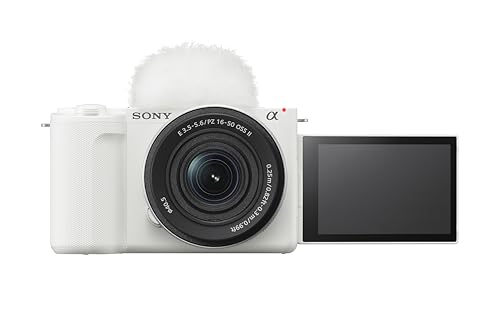
| Sony ZV-E10 II | Best Anchor Camera for Serious Streams | Mirrorless quality and streamer-savvy autofocus for productions built around a desk, a set or a stage position. |
| OBSBOT Tiny 2 | Best for Presenters and Teachers | The self-operating tracking camera: it follows the lesson, the workout or the demonstration so the performer can perform. |
| Logitech Brio 4K | Best Fit-and-Forget Desk Camera | The professional default: 4K headroom, honest colour and years of silent reliability for seated streams. |
| Elgato Facecam | Best for Gaming and Commentary Desks | Fixed-focus, software-tuned and built by streaming specialists — the facecam that never hunts, heats or hesitates. |
| DJI Osmo Pocket 3 | Best for Roaming and Field Livestreams | Gimbal-smooth, big-sensor streaming from streets, venues and events — the field broadcaster’s pocket rig. |
| Insta360 Ace Pro 2 | Best Action Livestream All-Rounder | A rugged action camera with serious low-light chops and streaming — for sport, water and weather broadcasts. |
How Did We Choose Cameras for Livestreaming in General?
Our first sort was by operator model. Some livestreams are run by their star, alone, mid-performance; some by a volunteer with a tablet; some by a small crew. Each model rewards different machinery — self-operating tracking cameras for the solo performer, app-simple systems for the volunteer, honest webcams and mirrorless bodies for software-switched desks. Every pick here was judged first on whether its intended operator can actually run it during a live show, because a camera that demands a second pair of hands is a staffing decision disguised as a purchase.
Second, we judged the picture after the journey it actually takes: through an encoder, up a domestic or institutional network, through a platform’s transcoding, onto a phone in daylight. Cameras were rewarded for clean, stable, well-exposed images that survive that journey — and for the headroom (resolution, dynamic range, lens quality) that keeps the image dignified when the journey gets rough. Laboratory sharpness that compression shreds earned no points.
Third, stamina and failure manners. Livestreams run long and fail publicly, so we favoured cameras that run cool for hours, power from mains or USB without battery anxiety, recover gracefully from a dropped connection, and tell the operator the truth — tally lights, honest monitoring, settings that persist. A camera’s behaviour in its worst five minutes matters more, live, than its behaviour in its best five.
Finally, we audited the true cost of the seat: mounts, lights, microphones, capture hardware, subscriptions and the operator-hours each system consumes per broadcast. Several picks are bargains because they arrive nearly complete; others are platforms whose real price includes their ecosystem. Both shapes are legitimate; the reviews price them openly so your committee, channel or household can decide with the whole ledger visible.
We also excluded, deliberately, the cinema-camera route for general livestreaming. Magnificent as dedicated film bodies are, their manual temperament, thermal management and operator demands fail the livestream tests of stamina and one-person feasibility for all but professional crews. Readers running crewed broadcast productions live in a different guide’s territory; this one serves the overwhelming majority who stream with the crew they have, which is usually themselves.
What Are the Main Families of Livestream, and Why Do They Need Different Cameras?
Seated talk — interviews, commentary, meetings, podcasts — is the largest family by hours and the easiest to serve: a fixed camera, a lit face, a close microphone. Its cameras win on colour honesty, focus stability and zero daily fuss. Presentation and teaching form the second family: the performer moves between desk, board and demonstration, so the camera must follow or be followed — tracking heads, wide forgiving frames and wireless audio define it. Commerce and demonstration, the third family, lives on the close-up: a product held to the lens must snap into focus and look expensive, which rewards product-aware autofocus and honest colour above all.
The fourth family roams: field reporting, events, sports, tours and worship in motion. Stabilisation, weather tolerance, battery systems and network improvisation rule it, and its cameras look like action and gimbal devices rather than studio tools. The fifth family is institutional ceremony — services, graduations, council meetings — where the operator is a volunteer, the content is seated, and the supreme virtues are simplicity, permanence and a setup that survives being run by whoever is available this week.
Notice that no family asks primarily for resolution. They ask for followership, focus behaviour, stamina, simplicity or toughness — the operational virtues. That is why this guide’s picks look so different from one another, and why a reader shopping by megapixels for a livestream is shopping by the one metric the format cares about least.
A sixth, hybrid family deserves acknowledgement because it is quietly becoming the default: the recorded-live hybrid, where a stream is simultaneously a content shoot — clips, shorts and edited videos harvested from the same session. Hybrid producers should weight recording quality and file handling alongside live behaviour, which pushes them toward the anchor and field cameras here and away from pure webcams, however excellent the webcams are at the live half of the job.
How Much Does the Camera Matter Compared With Light, Sound and Network?
Less than the industry admits, and more than the minimalists claim. Rank the chain by audience impact and the order is consistent: intelligible sound first, because viewers leave bad audio within a minute; adequate light second, because it decides whether any camera looks professional; network stability third, because a frozen stream has no picture at all; and the camera fourth — the polish on a foundation the other three pour. A modest camera correctly lit and mic’d produces streams audiences describe as professional; a flagship in a dark, echoing room on congested Wi-Fi produces streams they describe as a shame about the quality, briefly, before leaving.
Yet the camera is not a rounding error. It sets the ceiling the other links approach: focus that holds a moving presenter, colour that flatters skin under real lights, stamina that never interrupts hour two, and the operational simplicity that gets the show started on time. The correct reading of the hierarchy is sequencing, not dismissal — fund the chain in order, and when you reach the camera link, buy the genus that matches your family and stop, because the next upgrade that matters is almost never a camera.
This guide therefore spends as many words on light, audio and rehearsal as on the six cameras. That is not padding; it is the honest shape of livestreaming competence, and any guide that spends ninety percent of its length on the fourth-most-important link is teaching you to lose beautifully.
One link in the chain deserves its own warning because it is the only one that can fail invisibly: your own confidence. Streamers who have not rehearsed monitor themselves anxiously, speak to the room instead of the lens, and rush segments to escape the discomfort — all of which audiences read as low quality regardless of the picture. Rehearsal is therefore a picture-quality technology, and the cheapest one in this entire guide.
Which Six Cameras Cover the Livestream Families Best?
Links below point only to listings from our verified pool. Each owns a family: read the badge as the family name, the review as the evidence, and the verdict as the address of the streamers it serves. Between them they cover every livestream most readers will ever run.
Prices enter the discussion only as shapes — webcam money, platform money, production money — because livestream economics turn on the whole seat rather than the camera’s tag, and because a figure printed in a guide ages faster than the advice around it. The shapes, and the families they serve, are stable enough to plan a year of broadcasts on.

Sony ZV-E10 II — Best Anchor Camera for Serious Streams
When a livestream grows into a production — a set, a second angle planned, recordings that become edited content — it needs an anchor camera, and the ZV-E10 II is this guide’s. Its autofocus was designed around the streamer’s actual behaviour: faces that lean and turn, products held to the lens that must seize focus and release it back to the face, eyes that stay locked while their owner reads a chat window. Its 4K image gives software room to crop and reframe, its colour can run ungraded without apology, and it feeds a computer cleanly for the overlays and switching that serious shows are built from.
The anchor’s life is one of disciplined permanence: mounted, cabled, powered from the mains, its settings saved and its position marked, waking for each show exactly as it slept after the last. The ZV-E10 II suits that life — long sessions without thermal drama, USB power for indefinite operation, controls that a solo operator can reach without leaving the frame’s geography. Add the fast prime its low-light manners deserve and the anchor is complete; the interchangeable mount means the same body anchors next year’s bigger show without replacement, which is the definition of production infrastructure.
Its demands are the platform’s usual ones: a lens budget beyond the body, a tripod-and-set permanence that roaming formats cannot use, and no in-body stabilisation for anyone tempted to hand-hold it. Within the anchor role those are footnotes. Streamers building a show they intend to run for years should start here and spend their remaining budget on the light and microphone this camera’s honesty will reward.
- Sensor: 26MP APS-C
- 4K capture with clean computer feed
- Product Showcase and eye autofocus
- USB streaming and continuous power options
- E-mount interchangeable lenses
Strengths
- Autofocus fluent in streamer behaviour
- Production headroom for growing shows
- Dual life as a content-creation camera
Trade-offs
- Lens budget is part of the price
- Needs a set or tripod to live on
- No in-body stabilisation
Best for: Serious desk, studio and stage streams with growth ambitions.
Not suited for: Roaming formats or zero-setup casual broadcasts.

OBSBOT Tiny 2 — Best for Presenters and Teachers
The Tiny 2 exists for the livestream family that moves. Its gimbal head tracks the presenter across a room — to the whiteboard, the workbench, the yoga mat and back — reframing with a competence that replaces a camera operator for most presentation-shaped content. Teachers streaming lessons, trainers streaming classes, demonstrators streaming crafts and commerce all share the same liberation: the frame is handled, so the whole mind can go to the material and the audience. Its 4K sensor gives the tracking genuine cropping authority, and its low-light picture leads its class.
Performing with a follower is a craft of calibration. You learn its tracking speed and move inside it; you set the framing presets your show returns to; you discover which gestures it reads at your room’s light level and build them into your presenting vocabulary like a stage actor’s marks. The audio must follow too — a wireless microphone is this camera’s mandatory partner, because a frame that follows a voice that fades is a half-kept promise. Set up with that care, the Tiny 2 produces the most produced-looking solo streams in this guide, nightly, with a crew of one.
Its limits are the frame’s edges: a second person confuses its loyalties, cluttered backgrounds challenge its tracking, and it remains a computer-attached device rather than a standalone broadcaster. Presenters who are truly solo, in rooms they control, will never meet those limits in anger. For them, this is the closest purchase in livestreaming to hiring staff.
- Sensor: 4K, large for a webcam
- Gimbal tracking with intelligent zoom
- Gesture and voice control
- USB-C computer connection
- Strong low-light imaging
Strengths
- Follows movement automatically
- Turns solo presenters into produced shows
- Excellent picture for its class
Trade-offs
- One subject at a time, ideally
- Premium pricing for a webcam
- Needs a computer in the chain
Best for: Teachers, trainers, demonstrators and moving solo presenters.
Not suited for: Panel shows, roaming field work, or standalone streaming.

Logitech Brio 4K — Best Fit-and-Forget Desk Camera
A large share of the world’s livestreams are a seated person talking — meetings that became broadcasts, commentary, interviews, office hours, the daily show from the spare room — and for that majority the Brio 4K remains the reference answer. Its 4K sensor allows a crisp cropped 1080p stream or a wider desk frame from one mount; its exposure and colour behave predictably under ordinary room light improved by one decent lamp; and its software story is so mature that it effectively has no story, which for a daily streamer is the highest praise available.
The Brio’s ownership experience is measured in years of not thinking about it. It survives computer changes, platform changes and house moves; its foibles are documented everywhere; its picture, given light and a close microphone, reads as professional to every audience that matters. The craft it teaches is the seated streamer’s real curriculum — eyeline, background, light placement, microphone distance — because an honest camera returns exactly the room you give it, and improving the room becomes the streamer’s education.
Choose it when your stream’s geography is a chair and its ambition is consistency. It will not follow you, flatter you or film your documentary; it will present you, sharply and reliably, on the five hundredth consecutive show exactly as on the first, and for working streamers that reliability is not a compromise — it is the product.
- Sensor: 4K with digital zoom
- Adjustable field of view
- Broad software and platform compatibility
- Privacy shutter
- HDR exposure handling
Strengths
- Years of zero-drama service
- 4K cropping headroom at a desk
- Universally compatible
Trade-offs
- Entirely static framing
- Needs good light for its best
- No tracking or automation
Best for: Seated talk, meetings-as-streams, commentary and professional appearances.
Not suited for: Movement, demonstration or field formats.

Elgato Facecam — Best for Gaming and Commentary Desks
Elgato’s Facecam was designed by people who watch streams for a living, and its choices show it: a prime lens with fixed focus at desk distance, so the picture never pulses with hunting during a tense match or a serious sentence; image processing tuned for faces in overlays; and software that puts the controls streamers actually adjust — exposure, white balance, zoom crop — in one panel whose settings persist. As a gaming facecam it is legible at corner size, and as a full-frame commentary camera it is crisp and honest. It is the specialist’s webcam, bought by people who have already owned the generalist’s.
Its streaming character is refusal: no battery to die, no thermal ceiling to negotiate, no focus motor to misbehave, no app demanding an account. In the ecology of a gaming or commentary desk — where the computer, the game and the chat already consume the operator’s whole attention — a camera that contributes zero management is worth more than a camera that contributes features. The Facecam’s owners spend their production energy on overlays, audio and the show itself, which is where audiences actually live.
The debits are deliberate design, honestly labelled: 1080p is the ceiling, fixed focus assumes your chair stays roughly where chairs stay, and the picture’s honesty requires your lighting to be an adult. Streamers who accept those terms describe the same experience — they stop thinking about the camera entirely, some time in the first week, and never resume.
- Output: 1080p USB video
- Fixed-focus prime lens
- Camera Hub software with persistent settings
- No battery or thermal constraints
- Monitor-mount design
Strengths
- Never hunts focus mid-show
- Zero-management daily operation
- Legible at facecam sizes
Trade-offs
- 1080p ceiling
- Fixed focus, desk distances only
- Lighting quality is your responsibility
Best for: Gaming facecams, commentary and always-on desk streams.
Not suited for: Presenters who move or productions needing 4K headroom.

DJI Osmo Pocket 3 — Best for Roaming and Field Livestreams
The field family — reporting, tours, events, IRL content, behind-the-scenes access — cannot use a desk camera at any quality, and the Pocket 3 is its champion. A three-axis gimbal makes walking footage look professionally tracked; a large sensor keeps evening streets and indoor venues presentable; subject tracking holds the roaming presenter; and the DJI ecosystem streams through the phone that field creators already carry as monitor, modem and chat screen. It converts a single operator into a moving broadcast unit with a setup time shorter than most desk rigs’ boot sequence.
Field streaming craft is expedition craft: connectivity scouted like scenery, battery rotation planned like film stock, audio solved with wireless microphones because street noise is the genre’s default soundtrack, and a presenter’s patter that narrates the walk into a story. The Pocket rewards all of it and forgives the rest — footsteps, crowds, weather’s beginnings. Back indoors it serves as a static or second camera without complaint, but its soul is outdoors and moving, and buyers should honour that in their expectations.
Its constraints are logistics rather than quality: data costs and dead zones govern IRL ambitions, long events need a power routine, and a one-camera walk is one viewpoint however smooth. For the growing class of creators whose channel is a journey, those are the ordinary terms of trade — and no other pick in this guide can sign them at all.
- Sensor: 1-inch class, 4K
- Three-axis gimbal stabilisation
- Face and subject tracking
- Streaming via DJI app ecosystem
- Wireless microphone pairing
Strengths
- Walking streams of uncanny polish
- Strong low-light for a pocket device
- Complete field unit in one hand
Trade-offs
- Network and battery logistics are constant
- One viewpoint only
- Small screen; phone monitoring preferred
Best for: IRL, travel, tours, events and roaming creators.
Not suited for: Desk shows or switched multi-angle productions.

Insta360 Ace Pro 2 — Best Action Livestream All-Rounder
The Ace Pro 2 serves the livestream family that gets wet, shaken and frozen: sport on the water and the trail, events in weather, workplaces with dust and vibration. Its action-camera armour — waterproofing, mounting to anything, indifference to drops — combines with imaging a class above the action norm, including low-light performance that keeps evening events watchable, and its app ecosystem supports live streaming for the occasions that justify broadcasting from a kayak, a finish line or a festival’s front row. It is the field pick for streamers whose content has a pulse and a weather forecast.
Working it well is the action craft adapted to live stakes: mounts tested before the show because there is no second take, lenses wiped on a schedule, batteries rotated at natural breaks, and the network plan — hotspot placement, venue Wi-Fi, or the honest decision to record now and premiere later — made before the audience is promised anything. Its flip screen helps the solo field streamer frame and monitor alone, a small feature that field operators consistently rank above resolution in their affection.
As a desk or ceremony camera it would be a fish on a bicycle, and the guide says so to protect it: buy the Ace Pro 2 for the streams where its armour is the admission ticket, and it will also serve as a superb general action recorder between broadcasts. Versatility across the rough half of life is its entire proposition, and within that half it has no superior here.
- Imaging: high-resolution action sensor, strong low light
- Waterproof, rugged action build
- Flip touchscreen for solo framing
- Live streaming via Insta360 app
- Deep mounting ecosystem
Strengths
- Streams from water, weather and motion
- Low-light ability unusual for action cameras
- Solo-friendly flip screen
Trade-offs
- Wide action lens suits scenes, not portraits
- Streaming depends on app and network
- Overkill and under-suited for desks
Best for: Sports, outdoor and adventure livestreams, harsh environments.
Not suited for: Seated talk, ceremonies or desk productions.
How Do the Six Livestream Picks Divide the Territory?
The table maps picks to families rather than ranking them against each other — the honest comparison for a format this various.
If your family is missing from the table, it is probably a blend — the teaching stream that roams a workshop, the ceremony that sells merchandise afterwards — and blends should be served by the pick owning their dominant half, with the other half accepted as the compromise every real production contains.
| Pick | Sensor / Format | Standout trait | Watch out for |
|---|---|---|---|
| Sony ZV-E10 II | Production anchor | Autofocus, 4K headroom, growth | Needs set, lens budget |
| OBSBOT Tiny 2 | Presentation/teaching | Self-tracking operation | Solo subjects, computer required |
| Logitech Brio 4K | Seated talk | Reliability for years | Static frame only |
| Elgato Facecam | Gaming/commentary | Zero-management focus honesty | 1080p, fixed focus |
| DJI Osmo Pocket 3 | Roaming/field | Gimbal smoothness, big sensor | Data and power logistics |
| Insta360 Ace Pro 2 | Action/outdoor | Armour plus low-light imaging | Wide lens, app-dependent stream |
What Does a Minimal Viable Livestream Kit Look Like Around Any of These Cameras?
Strip any successful stream to its skeleton and the same five bones appear: the camera from this guide matched to your family; one soft light source large enough to flatter a face; one microphone close enough to the speaker to defeat the room; a network connection tested at showtime rather than at noon; and a mounting solution that puts the camera at eyeline and leaves it there. Everything else — overlays, second angles, graphics, chat bots — is clothing on that skeleton, added when the bones are proven.
Budget the skeleton as one purchase even if you assemble it over months, because a stream missing a bone does not limp at eighty percent quality; it fails at the missing bone’s percentage. The most common version is the camera-first kit with a laptop microphone and a ceiling light, which is a skeleton missing its spine and its voice. Build in the chain’s order and even the humblest camera here will make you look like you know what you are doing — because, by then, you will.
How Do You Choose a Streaming Platform Setup Without Marrying Your Camera to It?
Cameras outlive platform strategies. Channels migrate, simulcast, and change formats; institutions discover their audience lives somewhere unexpected. The durable approach is to keep the camera layer platform-agnostic — standard USB or HDMI feeds into software you control — so the broadcast’s destination is a setting rather than a solder joint. Every pick in this guide honours that principle, feeding mainstream streaming software cleanly, which is precisely why none of them is the cheapest possible route to any single platform.
The exception proves the rule thoughtfully: ecosystem cameras that stream directly, phone in hand, trade that agnosticism for radical simplicity, and for field and institutional users the trade can be right. Make it knowingly, with the exit considered — can this camera feed a computer if the strategy changes? — and the marriage becomes a contract instead of a capture.
How Do Two-Camera Livestreams Change the Choosing Logic?
A second camera transforms a stream’s grammar — wide and close, host and guest, stage and audience — and it rearranges this guide’s advice into pairs. The classic growth path keeps your first camera as the wide shot and graduates a better face camera to the close role: the Brio holding the room while a ZV-E10 II takes the portrait, or a Pocket 3 roaming while an anchor holds home base. Buying the first camera with its second role in mind is the cheapest studio planning there is, and it is why the anchor pick’s growth path features so prominently in its review.
Switching discipline matters more than the second camera’s quality. Cuts should land on sentence boundaries, holds should feel intentional, and the wide shot is the home the show returns to — grammar learned in rehearsal, on unlisted streams, until the audience stops noticing the machinery. A modest second camera switched well beats a flagship switched nervously, which is this guide’s reliability doctrine wearing a production costume.
What Should Institutions Look for That Creators Can Ignore?
Institutional streams — services, meetings, ceremonies — run on rotas, budgets and safeguarding policies, and their camera virtues reorder accordingly: permanence over portability, because the rig lives installed; simplicity over flexibility, because next month’s operator is unknown; documented repeatability over peak quality, because the show must be identical whoever runs it. A camera that a deputy can operate from a one-page runbook beats a superior camera that only its purchaser understands, every single Sunday.
Creators can ignore almost all of that and should: their operator is themselves, their format evolves, and their equipment’s flexibility is their growth path. The confusion to avoid is shopping with the other tribe’s criteria — the institution buying a creator’s fiddly marvel, the creator buying an institution’s locked-down appliance — and this guide’s family sorting exists largely to prevent that single expensive misunderstanding.
How Does Latency Change What a Good Livestream Camera Is?
Every digital chain delays the show — capture, encoding, network, platform — and the delay shapes formats. Interview and chat-driven streams feel latency as a conversational lag, which is why low-latency feeds from camera to software matter for interactive shows and why hosts learn to pause a beat longer than feels natural. Ceremony and presentation formats barely notice latency at all. Judge your shortlist partly on the delay your format can forgive: interactive creators should prize clean, direct feeds and simple chains; ceremonial streamers may spend that money on light instead.
Latency also governs monitoring honesty. The operator who watches the platform’s delayed output makes decisions thirty seconds stale; the operator who monitors the local feed sees the show as it is, while a designated watcher tracks the audience’s delayed reality. Professional setups respect both clocks. Solo streamers can approximate the wisdom by glancing at the real stream on a phone at natural breaks — a small habit that catches big problems while they are still small.
Why Do Regular Streamers Eventually Build a ‘Stream Deck’ of Habits Around the Camera?
Watch any veteran’s setup and the camera is surrounded by a sediment of small solutions: the footswitch that mutes, the labelled cable loom, the printed checklist, the spare battery that lives charged in the same drawer, the scene in the software named with the date it was perfected. None of it was bought in a single decision; all of it was earned from specific failures. This sediment, more than the camera at its centre, is what a mature livestream actually is — and it explains why veterans defend modest cameras fiercely: the camera is the one part of their system that has never embarrassed them, because the system around it absorbed every embarrassment first.
New streamers should take the hint as encouragement rather than homework. Your sediment begins with the first labelled cable and the first checklist taped to the wall. Buy the camera that fits your family, then let each broadcast deposit one small improvement, and within a season you will own the thing beginners mistake for talent: a setup that simply works, every time, in front of everyone.
What Role Does the Recording Play in a Livestream Programme?
Every stream should leave a recording, because the recording is where the long value hides: the edited highlights that recruit tomorrow’s audience, the archive that institutions are legally or sentimentally obliged to keep, the evidence when a moment is disputed, and the mirror in which the streamer studies their own craft. Cameras and workflows that record locally at full quality while streaming at platform quality serve both masters, and several picks here were chosen partly for how gracefully they do the double duty.
Treat the archive as a library from the first broadcast: dated folders, titles that describe content rather than chronology, and a backup that does not live on the streaming computer alone. Streamers who begin this discipline late spend a miserable weekend reconstructing it; streamers who begin it on day one own an asset that compounds quietly for years behind the live show’s noise.
How Do You Run a Livestream Rehearsal That Actually Prevents Failures?
A rehearsal prevents failures only if it is cruelly realistic: same hour, same network load, same operator, full show length, on an unlisted stream, with a second person watching the audience’s actual view on a phone in another room. That watcher is the rehearsal’s soul — they hear the echo you cannot, see the frozen frame your preview hides, and read the chat experience you are too busy to notice. Write down every fault they catch, fix the top three, and repeat until a full run produces a fault list too trivial to fear.
Rehearse the failures deliberately once: pull the network for ten seconds, let a battery die, have the software crash, and learn what your recovery looks like before an audience grades it. Professional broadcasters call this failure drill; streamers who adopt it develop the eerie calm that audiences describe as professionalism, which is usually just rehearsed recovery wearing a smile.
Finally, freeze the setup after the successful rehearsal. The frozen configuration — positions taped, settings saved, checklist printed — is the show’s constitution. Improvements queue for the next rehearsal cycle rather than ambushing tonight’s broadcast, because live television’s oldest law is that the change you make an hour before air is the one that fails on air.
Keep a stream log — one line per broadcast: date, faults, fixes, one thing that worked. It reads like a diary and functions like an engineering record, and after twenty entries it will tell you your true bottleneck with a precision no review can match. Most streamers who keep the log discover the bottleneck was never the camera; the ones who discover it was can finally upgrade with a clear conscience and a precise target.
How Should You Light and Mic a Livestream in an Ordinary Room?
Light for the camera you have, not the studio you want. One large soft source near the camera — a diffused panel, a bounced lamp, a curtained window — plus the discipline of turning off or dimming competing overhead lights will carry every pick in this guide to professional-looking results. Place the source slightly above eyeline, keep one colour temperature in the room, and lock exposure and white balance once it looks right, so the picture does not breathe as you move.
Microphone placement is a distance game with a runaway winner: every halving of the distance between mouth and microphone improves clarity more than any equipment upgrade at the same money. Desk streamers park a USB microphone just out of frame; movers and roamers wear wireless; institutions feed the room’s existing audio or place a microphone at the lectern rather than the back wall. Monitor through headphones for the first minute of every stream — the audience’s ears are your responsibility, and they cannot tell you what they hear until the chat catches up with the problem.
One more environmental fix with outsized returns: treat the room’s acoustics with soft furnishings before buying a costlier microphone. Curtains, rugs and a bookshelf wall calm the echo that makes every microphone sound cheap, and the improvement follows you across every future camera and microphone you will ever own — the rare upgrade that never becomes obsolete.
What Mistakes End Livestreams More Often Than Camera Choice?
Testing the network at a quiet hour and trusting it at showtime. Evening congestion, the institution’s own audience arriving on the same Wi-Fi, a neighbour’s streaming habits — showtime networks are different animals. Test under show conditions or do not claim to have tested.
Judging your own stream from the presenter’s chair. Your preview is not the audience’s picture: their version is compressed, phone-sized and possibly in sunlight. Assign a watcher with a phone, or become your own watcher in rehearsal recordings, and light and frame for the rectangle they actually see.
Building the rig anew for every broadcast. Reassembly is where cables vanish, settings reset and confidence leaks. The frozen, taped, checklist-guarded setup is the professional’s open secret, and it costs nothing but the humility to leave a working thing alone.
Buying resolution and neglecting the microphone. The audience’s forgiveness is asymmetric — soft pictures are forgiven, bad sound is not — and the budget that ignores this buys a beautiful silent film. Mic first, light second, camera third is not a slogan; it is an ordering derived from thousands of abandoned streams.
Going live without a plan for the first sixty seconds. Audiences decide in the opening whether the show is run by someone. A rehearsed cold open — the greeting, the promise of the show, the housekeeping in one breath — converts arrivals into regulars more reliably than any camera in this guide.
Promoting the premiere before the rehearsal. Announce the series after the third clean private run and nobody can tell the difference; announce the first fumbling attempt and everybody can. Anticipation is a resource that spends once — spend it on a show that deserves it.
Comparing cameras on the manufacturer’s demo stream. Demo streams are shot in studios by crews; your stream will be shot in your room by you. Judge candidates by owner footage from rooms resembling yours — the internet is full of it — and weight the worst credible example more heavily than the best staged one.
Final Recommendation
Match the genus to the family and the shortlist writes itself. Productions with ambition anchor on the Sony ZV-E10 II. Presenters and teachers hand the framing to the OBSBOT Tiny 2. Seated talk and professional appearances default to the Logitech Brio 4K, while gaming and commentary desks take the Elgato Facecam’s zero-management honesty. The field belongs to the DJI Osmo Pocket 3, and the weather-beaten, water-borne half of life belongs to the Insta360 Ace Pro 2.
Notice what that paragraph did not do: it did not crown a winner, because livestreaming does not have one — it has fits. The reader who chooses by fit, funds the light and microphone in the same breath, and rehearses like a broadcaster will out-stream the reader who buys the ‘best’ camera for someone else’s format, on any platform, in any year.
Start with the stream you will actually run next week. Buy the camera that makes that stream easy, rehearse it privately until it is boring, and go live on schedule. Boring, punctual and clear is not the floor of livestreaming success — measured in audiences kept, it is most of the ceiling too.
A closing word about ambition: the livestreams that matter in five years are being started this month on imperfect equipment by people who showed up weekly. Let this guide shorten your choosing, not postpone your starting — the audience you want is gathering around someone else’s punctual, well-lit, clearly heard stream right now, and every week of delay is a week they spend becoming regulars there.
And if the choice still feels heavy, remember the arithmetic of audiences: they subscribe to people and programmes, and they merely watch through cameras. Choose the pick that serves your programme’s family, set it up once with care, and then spend a year becoming undeniable at the content — the camera’s job is to not be the reason you didn’t.
Related guides
- Best Cameras for Monitoring Employees: Six Picks for a Fair, Transparent Workplace
- Best Cameras for Motorsports: Six Picks for Bikes, Cars and Track Days
- Best Cameras for Microsoft Teams: Six Picks for a Professional Rectangle
Frequently Asked Questions
What is the single best camera for livestream if I can only buy one?
For the most common case — a seated or lightly moving presenter at a desk or small set — the Sony ZV-E10 II covers the widest future, with the Brio 4K as the zero-fuss alternative. If your content moves or roams, the answer changes entirely, which is why this guide sorts by family first.
Do I need 4K for livestreaming?
Delivery is usually 1080p or lower after platform compression, but 4K capture buys cropping room, cleaner punch-ins and recordings worth editing. Buy it as production headroom where the budget allows; do not sacrifice light, audio or tracking to afford the badge.
Can I livestream without a computer?
Some ecosystems stream through phones — the field picks here do — and institutional systems can stream directly. The mainstream workflow still runs through a computer or phone running streaming software for overlays, alerts and switching. Choose the camera that fits the workflow you will genuinely run every week.
How much upload bandwidth does a good livestream need?
A stable upload with comfortable headroom above your stream’s bitrate, sustained for the whole show — stability outranks headline speed. Test at the real hour, prefer wired connections for fixed rigs, and keep a rehearsed fallback because live audiences grade recovery as part of the show.
Why does my expensive camera look worse than my old webcam on stream?
Usually light and settings, not the camera: a larger sensor under a ceiling light with auto-everything enabled will lose to a humble webcam in a lit, locked-down setup. Light the scene, lock exposure and white balance, move the microphone close — then judge the camera again before replacing it.
What is the best first upgrade after the camera?
A microphone, then a light, in that order for most streamers — unless your format’s pain is framing, in which case tracking or a better mount jumps the queue. Let your rehearsal recordings diagnose the order; they will point at the true bottleneck without flattery.
How long should a livestream setup take before each show?
Five to fifteen minutes once the rig is frozen and checklist-driven. If your ritual takes longer, the rig — not your discipline — is the problem, and simplifying it will do more for your channel’s consistency than any camera upgrade on this page.
Which pick suits a house of worship best?
For a fixed sanctuary with volunteer operators, simplicity and permanence rule: a mounted camera feeding a simple, documented setup, rehearsed by a rota — the anchor body for larger rooms, or the ecosystem approach covered in our Mevo guide for switched multi-angle services. Judge every option by whether next month’s substitute volunteer can run it from one page of notes.
How do I stop my stream looking different every week?
Freeze the variables: fixed camera position, fixed light, locked exposure and white balance, saved software scenes, and the same pre-show checklist. Variation creeps in through helpful little adjustments; the discipline of changing things only during rehearsal week is what professionals mean by a ‘look’, and any camera here can hold one once its owner stops renegotiating it nightly.
What should be ready before a stream in case the connection drops mid-show?
Picture the failure first: forty minutes into a launch, comments freeze, the preview stutters, then viewers report a spinning wheel while your camera, lights and microphone remain perfectly healthy. Nothing in the room has broken; the path out of the building has. Preparation therefore splits into three layers, and rehearsing only one of them leaves a hole. Inside your streaming software, enable dynamic or adaptive bitrate where the platform supports it, so a brief dip lowers picture quality instead of severing the connection outright, and confirm that automatic reconnect is switched on before you ever need it. Alongside the main connection, keep a second route that is genuinely independent of it — a phone or portable hotspot on a different mobile network, already paired, logged in and tested under load, not a device you will configure while apologising to chat. Bonding services can merge connections, yet even a manual switch practised twice beats an elegant system nobody has operated under pressure. Finally, record locally at full quality throughout, whatever the audience happens to see; a dropped segment can then be uploaded afterwards as a clean replay, with a pinned comment explaining where the interruption sits. Say one prepared sentence on air when trouble starts, switch routes, and let a moderator post updates while you work. Afterwards, note the time and circumstances in a small log, because patterns across those entries reveal whether you need a different carrier, a wired upgrade, or simply an earlier start before neighbourhood congestion builds.
Related Guides
Keep exploring with best cameras for live streaming youtube and best cameras for live streaming mevo and best cameras for internet streaming.


