ilcastellomenu.com is reader-supported. When you buy through links on our site, we may earn an affiliate commission.
Where to Buy
Most camera shopping starts with sensors and frame rates, but the best cameras for youtube videos with mic inputs are bought with the ears. A microphone input is the single socket that separates a camera you merely record with from a camera you can actually produce a channel on: it lets a lavalier ride on a presenter’s collar, a shotgun sit in the hot shoe, or a podcast-grade dynamic microphone reach the track through an adapter, all without a separate recorder and the syncing session that follows. Every camera on this page has a real external microphone input. That was the entrance exam, and plenty of pretty cameras failed it.
Passing the exam, though, is only the beginning, because mic inputs are not all equal. Some cameras pair the input with a headphone socket, so you can hear clipping, room echo and the refrigerator’s hum while there is still time to fix them. Some offer proper gain control with a visible level meter; others bury a single auto setting and hope for the best. One body here can even accept professional XLR microphones through an adapter, which changes what a solo creator’s desk can sound like. This guide reads the audio spec sheet first and the video one second — the opposite of most roundups, and the right order for a talking-head medium.
Channels live or die on watch time, and watch time is an audio statistic wearing a video costume. Viewers tolerate a slightly soft image while a recipe is explained or an argument unfolds; they leave within seconds when voices distort, pump with auto-gain or drown in room echo. Treat the microphone input not as a checkbox but as the foundation, then choose among these six bodies by how far their audio tooling lets you grow.
One promise before the rankings begin: every limitation named below is named where it belongs, inside the pick that carries it, rather than in a footnote after the shopping is done. A missing headphone socket, an adapter sold separately, a preamp that prefers strong microphones — you will meet each fact beside the camera it describes, because audio disappointments are almost always specification surprises, and surprises are a choice reviewers make on a reader’s behalf.
Key Takeaways
- A microphone input was mandatory here; several famous creator cameras were cut for lacking one.
- Headphone monitoring is the second socket that matters — hearing trouble live beats repairing it later.
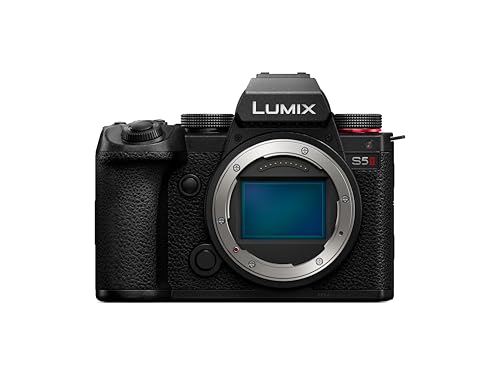
- The Panasonic LUMIX S5II goes furthest, accepting XLR microphones through an optional adapter unit.
- Manual gain control with on-screen meters separates production tools from hopeful gadgets.
- Compact picks from Sony, Canon and Nikon trade monitoring sockets for size and simplicity.
- Budget for the microphone itself before upgrading the body that receives it.
In this guide
Quick Picks
| Camera | Badge | Why it earns its place |
|---|---|---|
| Panasonic LUMIX S5II | XLR-ready flagship | An adapter path to professional microphones, plus line-level input. |
| Sony Alpha 7 IV | Complete audio desk | Mic input, headphone monitoring and a digital audio interface in one body. |
| Sony ZV-E10 II | Creator’s audio sweet spot | Both sockets, sensible controls, and a body built around talking to lens. |
| Canon EOS R6 Mark II | Guest-proof hybrid | Monitoring for two-microphone interviews and colour guests forgive. |
| Canon EOS R50 | Starter with a real input | A genuine mic socket at an entry tier, with one honest workaround needed. |
| Nikon Z30 | Smallest serious input | A proper mic port in a body that vanishes into a desk setup. |
How Did We Judge Cameras by Their Audio Sockets First?
Our first pass through the candidate list was brutal and quick: no external microphone input, no place in this guide. That removed several fashionable compacts and action cameras whose internal microphones are fine for shouting over wind but hopeless for a presenter explaining something nuanced in a kitchen. What remained was auditioned on the audio chain a creator actually builds — microphone, cable, input stage, monitoring path, and the file that lands in the editor.
Gain behaviour came next. We favoured cameras that let the operator set input level manually and watch a meter while recording, because auto-gain is the sound of amateur hour: it pumps room tone up during pauses and crushes the first syllable after every silence. Bodies also earned marks for how their preamps behave with modest microphones — a quiet input stage forgives an affordable lavalier, while a hissy one taxes every recording with cleanup work.
Monitoring decided the upper half of the ranking. A headphone socket turns guesswork into knowledge: you hear the lavalier rustling against a zip, the echo the meter never showed, the guest whose microphone slipped inside a scarf. Cameras without one can still serve — two picks below manage it — but they demand test recordings and faith, and we scored them accordingly. Finally we weighed the surrounding video craft, because an audio-first camera still has to hold focus on a face and survive a long recording session at a desk.
We also listened for the sins that spec sheets never confess. Some bodies record a faint whine from their own electronics when gain climbs; some make level adjustments in coarse steps that jump audibly mid-sentence; some hide their meters behind menus a presenter cannot check without breaking character. Each candidate was asked to record a quiet room, a normal voice and a sudden laugh, and the files were judged on headphones — the same courtroom your subscribers’ ears will use, with no appeal.
Price tiers were read last, deliberately. A cheaper body with both sockets and civilised preamps outranks a dearer one that treats audio as decoration, because this guide’s readers buy with a channel’s survival in mind. Where a pick’s audio story is incomplete, its entry says so in daylight and explains the ritual that compensates — a reader should never discover a missing socket from a comment section after the return window closes.
What Is the Difference Between a Mic Input, a Line Input and an XLR Adapter?
A microphone-level input expects the whisper-quiet signal a microphone produces and amplifies it inside the camera. That amplification is where quality is won or lost: good preamps add level without adding hiss, mediocre ones raise a faint frying sound beneath every quiet passage. Nearly every input in this guide is a 3.5mm microphone socket, and the practical advice is universal — set the camera’s gain low and let a strong microphone signal do the work, because quiet preamp hiss usually comes from asking the camera to amplify too much.
Line level is a different animal: the stronger, already-amplified signal that mixers, podcast interfaces and field recorders output. Feeding line level into a mic-only input overloads it into harsh distortion, which is why the Panasonic’s ability to switch its input sensitivity matters to desk setups built around a mixer. If your channel’s audio runs through an interface — common for interview and commentary formats — a camera that accepts that feed gracefully saves a whole recorder from the workflow.
XLR is the professional microphone connector: balanced, robust, and standard on the dynamic and condenser microphones studios actually use. No camera here has XLR sockets built in, but the S5II accepts Panasonic’s adapter unit on its hot shoe, converting the body into a genuine two-channel XLR recorder with phantom power for condensers. For a creator graduating from a USB microphone to a broadcast dynamic, that adapter is the bridge that keeps the camera at the centre of the rig instead of demoting it to a picture-only device synced by hand.
Which Cameras Hear a YouTube Channel Best?
Six bodies with real microphone inputs, ranked by how completely they let you control, monitor and grow a channel’s sound.

Panasonic LUMIX S5II — XLR-ready flagship
Picture a commentary channel eighteen months in: the USB microphone has been replaced by a broadcast dynamic on a boom arm, the desk has a small mixer, and the creator’s remaining frustration is feeding all that lovely audio into a camera that only understands a 3.5mm whisper. The S5II is the body that ends that frustration. With Panasonic’s XLR adapter mounted, it records professional microphones directly — two channels, balanced connections, phantom power when a condenser joins the desk — while its standard socket still accepts ordinary camera microphones and, unusually, can be switched to accept a line-level feed from a mixer or interface.
That flexibility rewrites the upgrade path. Instead of buying a separate recorder and syncing waveforms forever, the creator’s whole audio evolution happens at the camera: lavalier today, shotgun next quarter, XLR dynamic when the channel can justify it, each step landing on the video file already in sync. Panasonic’s video heritage shows in the supporting tools as well — monitoring aids and level displays that treat audio as a production discipline rather than a settings-menu afterthought.
The picture side refuses to be a footnote. This is a full-frame body with a video-first design, dependable autofocus for seated presenters and the session endurance that long explainers and interview recordings demand. A creator can build a whole studio practice around it — main angle today, and still the main angle after the set grows chairs, lights and a second camera for guests.
- Format: full-frame mirrorless, L-mount
- Audio path: 3.5mm mic input, switchable for line-level feeds
- Growth step: optional XLR adapter adds two pro channels
- Monitoring: headphone socket for live checks
- Session style: long desk recordings, interview days
Strengths
- The deepest audio upgrade path of any pick here
- Line-level acceptance suits mixer-based desks
- Full-frame video craft behind the audio story
Trade-offs
- The XLR adapter is a separate purchase
- More production machinery than a starter channel needs
- L-mount lens shopping rewards a little patience
Consider who benefits most: the educator whose courses are hour-long talking-head sessions, where a single hissy recording wastes a day of teaching; the interviewer whose guests arrive with their own favourite microphones; the podcaster crossing into video who refuses to abandon a studio mic collection. For those desks the S5II is less a camera than the recording studio’s front door, and its audio ceiling is the highest in this guide by a clear margin.
There is also a quieter dividend for teaching channels: the adapter route records two XLR channels independently, so a presenter and a guest can sit on separate tracks and be balanced afterwards instead of baked into one compromise. Anyone who has tried to rescue an episode where the guest whispered and the host boomed, both frozen into a single track, will recognise that as the difference between a five-minute mix and a lost recording. The S5II’s audio architecture keeps that rescue permanently available.
Best for: creators building toward XLR microphones, mixers and a permanent desk studio. Not suited for: first-channel minimalists who want one cable and no decisions

Sony Alpha 7 IV — Complete audio desk
Sony’s hybrid flagship treats sound as a first-class citizen in a way that still surprises photographers who meet it through video work. The Alpha 7 IV carries the classic pair — a 3.5mm microphone input and a headphone socket for monitoring — and then adds a trick none of its rivals here match: its multi-interface shoe accepts digital audio interfaces and compatible microphones, passing sound into the body without an analogue cable stage at all. A creator can begin with an ordinary wired lavalier, graduate to a shoe-mounted digital microphone, and hear every step of that journey through headphones while recording.
Monitoring is where this body quietly wins working days. Put the headphones on during a sound check and the room confesses everything: the air conditioner’s cycle, the chair’s squeak on stressed syllables, the guest who keeps touching the lavalier cable. Catching those faults costs thirty seconds before recording; missing them costs an evening of repair or a sheepish reshoot. Channels that publish on a schedule are built from exactly these saved evenings.
Beyond audio, the body brings full-frame depth to the picture — the gentle background separation that makes a bookcase look like a set — plus face and eye autofocus that holds a presenter through laughter, lean-ins and glasses adjustments. It is the camera a channel buys when the programme has become a small business and the desk has become a studio, and it tends to stay in that job for years.
- Format: full-frame mirrorless, E-mount
- Audio path: 3.5mm mic input plus digital shoe audio
- Monitoring: dedicated headphone socket
- Focus: face and eye tracking for seated hosts
- Growth role: main camera through several studio eras
Strengths
- Both sockets plus a cable-free digital audio route
- Headphone checks that rescue whole sessions
- Full-frame look sponsors and guests recognise
Trade-offs
- The surrounding lens system joins the budget
- Digital shoe microphones tie you to Sony’s accessory family
- Serious overkill for a bedroom-corner starter setup
Its natural owner is the creator whose channel crossed the line from hobby to livelihood: courses, sponsored explainers, a guest chair that hosts people with publicists. That owner needs audio failures to be impossible rather than unlikely, and the Alpha 7 IV’s combination of inputs, monitoring and digital expansion is the closest thing here to a guarantee that the sound department — all one person of it — will not be the reason an episode dies.
Sony’s digital shoe path deserves a second mention for tidy desks: a compatible shoe microphone draws power from the body and sends audio digitally, deleting the cable that otherwise drapes across keyboards and catches on coffee cups. Cable-free audio also deletes a failure class — the half-seated 3.5mm plug that crackles whenever the desk is bumped — which matters on channels where the presenter is also the entire technical crew and cannot watch a meter while performing.
Best for: established channels wanting monitored, expandable audio on a full-frame main camera. Not suited for: tight starter budgets or creators who record away from a desk

Sony ZV-E10 II — Creator’s audio sweet spot
Some cameras tolerate video creators; this one was designed at a whiteboard with their complaints pinned to it. The ZV-E10 II keeps the pairing this guide cares about — a proper microphone input and a headphone socket for monitoring — inside a compact APS-C body whose menus, product-showcase habits and background-defocus tricks all assume the operator is also the presenter, the lighting department and the editor. For the enormous middle of YouTube, the solo explainer filming at a desk or a kitchen counter, that assumption is simply correct.
The monitoring socket deserves emphasis at this tier, because many cheaper creator cameras quietly omit it and leave their owners recording on faith. Here you can plug in headphones, clap once, speak a test sentence at your real presenting volume, and hear exactly what subscribers will hear — including the moment your enthusiastic emphasis clips. That thirty-second ritual, available on a body this size, is worth more to a growing channel than a spec-sheet resolution bump.
Picture quality plays its supporting role well: interchangeable lenses let a creator start with the kit zoom and add a fast prime when the background deserves to melt, while autofocus bred for presenters tracks a face that turns to a whiteboard and back. Battery and session manners suit desk recording, especially with mains power, and the whole package stays light enough to relocate when the spare room becomes a nursery and the channel moves to a corner of the bedroom.
- Format: APS-C mirrorless, E-mount
- Audio path: 3.5mm mic input, wired or shoe accessories
- Monitoring: headphone socket, rare at this size
- Presenter tools: defocus and product modes built in
- Desk style: mains-powered long sessions welcome
Strengths
- Input and monitoring together in a compact body
- Menus that assume a one-person crew
- A lens mount with room to grow into
Trade-offs
- No XLR or line-level path for studio expansion
- APS-C depth needs a fast lens for the full effect
- Heavy menus for photographers who dislike touch logic
Imagine the channel it serves best: a language teacher filming three lessons a week from a desk that is also where she marks homework. She cannot rebuild a studio each session; she needs to sit down, plug the lavalier in, check the headphones, and teach. The ZV-E10 II was drawn for her whiteboard, and the audio sockets that headline this guide are present and correct in a body she can actually leave set up.
One more working habit this body encourages: because checking levels is so quick, owners tend to record a five-second voice memo of the room itself — the silence between sentences — and listen for what the space adds. That little ritual teaches a creator more about their room’s echo and appliance noise in a week than a forum thread teaches in a month, and the lessons transfer to every future camera they will ever own. Tools that make verification cheap quietly manufacture expertise.
Best for: solo explainers and teachers wanting monitored audio without a flagship invoice. Not suited for: mixer-based studios or creators planning XLR microphones soon

Canon EOS R6 Mark II — Guest-proof hybrid
Interviews are where microphone inputs stop being a solo convenience and become a production system: two people, two microphones, one camera that must receive at least the presenter’s channel while a guest is captured cleanly alongside. The R6 Mark II earns its place in that room. Its microphone input and headphone socket let a host monitor the mix while recording, its face and eye tracking holds a guest through the theatre of conversation, and Canon’s colour science renders skin in a way that makes visitors share their own episode — free marketing delivered by a colour profile.
The monitoring habit matters doubly with guests, because guests commit audio sins hosts would never dare: they lean away from the microphone mid-anecdote, they laugh directly into it, they fiddle with a lavalier cable while telling the story of their life. Headphones turn those moments into gentle real-time corrections — a raised eyebrow, a pause, a microphone repositioned between questions — instead of discoveries made alone in the edit at midnight.
As a stills camera it covers the rest of a modern channel’s homework: episode artwork, guest portraits for announcement posts, behind-the-scenes frames for community tabs. Its handling suits producers who adjust between segments with dials rather than menus, keeping a recording day’s hospitality flowing. The system around it prices like the professional instrument it is, yet channels that monetise guests rarely regret buying the camera guests look best on.
- Format: full-frame mirrorless, RF mount
- Audio path: 3.5mm mic input for presenter or mixed feed
- Monitoring: headphone socket for live guest checks
- Guest gift: tracking plus flattering skin tones
- Second job: channel stills and episode artwork
Strengths
- Monitored recording for two-microphone formats
- Guests look and sound like honoured visitors
- One body covers video and channel photography
Trade-offs
- Professional pricing across body and lenses
- A second recorder still helps true two-track interviews
- More camera than a solo desk requires
Its signature production is a founder-interview series recorded in a converted office: host monitored through headphones, guest on a wireless lavalier, the Canon holding both faces in turn as the editor cuts. Episodes survive because nothing about the sound was left to hope. Channels built on other people’s time cannot afford reshoots, and this body behaves like it understands that arithmetic.
Producers also praise a humble behaviour: the body remembers its audio settings between sessions like a colleague who keeps the studio as you left it. A channel recording three interviews a week cannot renegotiate gain structure every morning, and a camera whose levels, monitoring and input choices persist turns setup into a checklist rather than an investigation. Multiply those saved minutes across a year of publishing and the Canon has quietly bought its owner a free month of production time.
Best for: interview and guest formats needing monitored audio and flattering faces. Not suited for: solo creators recording short pieces in untreated rooms

Canon EOS R50 — Starter with a real input
Every term, a new cohort of creators asks the same hopeful question: what is the least camera that still counts as real? For a YouTube channel built on talking, the honest answer must include a microphone input, and the R50 is where Canon’s range starts providing one without flagship money attached. That single socket transforms the purchase: instead of a camera whose sound ceiling is fixed forever, the beginner gets a body that accepts the lavalier bought in month two and the shotgun bought in month six, growing with the channel instead of expiring on schedule.
Now the honest asterisk, stated plainly because this guide’s whole subject is audio: the R50 has no headphone socket. You cannot monitor live. The workaround is discipline — record a test at presenting volume, play it back through the camera or after a quick file transfer, check levels and room noise, then record for real. It costs two minutes per session and a little humility, and thousands of channels have shipped fine episodes under exactly that regime. What the workaround cannot do is rescue a fault that begins mid-recording, so R50 owners learn to keep microphone cables short, connections seated and batteries fresh.
Everything else about the body flatters a beginner: friendly menus, reliable face tracking for a seated presenter, interchangeable RF lenses for the day the kit zoom’s look gets old, and a size that does not intimidate a small desk. Paired with an affordable lavalier and the test-recording ritual, it produces channel audio that embarrasses far pricier cameras still using their built-in microphones.
- Format: APS-C mirrorless, RF mount
- Audio path: 3.5mm mic input, external mics welcome
- Monitoring: none built in — test-and-playback ritual required
- Learning curve: menus written for first-time owners
- Growth role: accepts better microphones as the channel earns
Strengths
- A genuine mic input at the starter tier
- Beginner handling without beginner sound ceilings
- Lens mount leaves a real upgrade path
Trade-offs
- No live monitoring, ever — plan around it
- Mid-recording faults are discovered afterwards
- Kit-lens depth is modest until a prime arrives
Its typical first year looks like this: unboxing in a bedroom, a lavalier clipped to a jumper, test recordings deleted by the dozen while its owner learns what echo sounds like. By the channel’s fiftieth video the ritual is muscle memory and the sound is clean, consistent and entirely unbothered by the missing socket — because the owner built a habit where other beginners built a hope. Buy it knowing the habit is part of the price.
There is a budget choreography worth copying here: buy the R50, buy the lavalier in the same order, and postpone every other accessory until the channel has twenty published videos. Beginners routinely invert that sequence, decorating the camera with cages and monitors while its sound still comes from a built-in microphone across the room. The R50’s input exists precisely to break that pattern — it makes the first accessory a microphone, which is the only accessory subscribers can actually hear.
Best for: first channels that need a real mic input and accept a test-recording routine. Not suited for: live-streamed formats where unmonitored audio is a public risk

Nikon Z30 — Smallest serious input
Nikon aimed the Z30 squarely at creators and, refreshingly, did not forget the socket this guide exists to celebrate. Its 3.5mm microphone input sits on a body small enough to live permanently on a mini tripod beside a monitor, with a front-facing screen arrangement and a prominent recording lamp that tells a solo presenter the camera is rolling — the two desk anxieties, framing and recording status, answered by hardware rather than hope. For commentary, study-with-me channels and compact desk formats, it is the least camera that still behaves like a production tool.
Like the R50 it asks for one compromise, and we will not bury it: there is no headphone socket for live monitoring. The Z30’s defence is its intended stage — short-to-medium desk pieces recorded in a known room, where a test clip at the start of a session genuinely characterises the hour that follows. Owners who record in the same corner daily build an instinct for levels that serves them well; owners who record interviews in strange rooms should look up this list to the monitored bodies.
Within its parish the little Nikon is delightful. Stereo microphones on the body are better than most for emergency use, the Z mount accepts lenses far beyond a starter’s needs, and the whole rig — body, small prime, wired lavalier — fits in a drawer when the desk must become a desk again. Channels filmed in shared flats and family kitchens, where the studio must vanish by dinner, are this camera’s natural congregation.
- Format: APS-C mirrorless, Z mount
- Audio path: 3.5mm mic input on the top plate
- Monitoring: none built in — session test clips instead
- Desk signals: tally lamp and presenter-first layout
- Storage life: whole rig fits in a drawer
Strengths
- Serious input on the smallest body here
- Recording-status clarity for solo presenters
- Vanishes when the room has other jobs
Trade-offs
- Unmonitored recording demands a trusted room
- No path to line-level or XLR growth
- Small body, small battery — mains power for marathons
Picture its happiest owner: a graduate student whose channel explains journal articles from a desk wedged between a wardrobe and a window. She records in the morning quiet, checks one test clip with her laptop’s earbuds, and films three explainers before the house wakes. The Z30 asks little of her space and nothing of her patience, and its microphone input means her voice — the entire product — arrives at the quality her ideas deserve.
Renters and students form a second fan club for a less obvious reason: nothing about this rig is permanent. No wall-mounted boom, no mixer screwed under the desk, no acoustic panels glued where a landlord forbids them — the whole production packs into a shoebox when the tenancy or the semester ends. A camera that respects temporary housing is a camera whose owner keeps filming through life’s moves, and continuity of publishing beats almost any specification a channel can buy.
Best for: compact desks, shared rooms and solo formats in familiar spaces. Not suited for: guest interviews, live events or any recording you cannot afford to redo
Which Microphone Belongs on Which Kind of Channel?
Lavalier microphones are the introverts of the audio world: small, close to the voice, and largely uninterested in the room around them. They suit seated presenters, teachers and reviewers whose hands are busy elsewhere, and they forgive untreated bedrooms better than any other family. Their weaknesses are wardrobe-shaped — rustling fabric, jewellery collisions, a cable that tugs — and they capture one voice at a time, so interview formats need one per chair plus a plan for mixing them.
Shotgun microphones are the extroverts, gathering a voice from just out of frame with a reach that flatters standing presenters, cooking demonstrations and product benches. That reach is also their trap: in a bare, echoing room a shotgun collects the echo with enthusiasm, and beginners who buy one for a tiled kitchen often end up sounding further away, not closer. Room treatment decides whether a shotgun is an upgrade or an expensive way to document your acoustics.
Dynamic microphones, the broadcast family, ask to be worked closely and reward the effort with a voice that sounds like radio even in imperfect rooms, because their design ignores much of what happens beyond the presenter’s mouth. The price of admission is the chain: most speak XLR, which in this guide means the Panasonic’s adapter path or an external interface. Commentary, podcast-crossing and voice-led channels that can accept that chain rarely go back.
Wireless kits cut the last cord and earn their keep whenever the presenter moves — workshops, kitchens, whiteboards, unboxings at a bench across the room. Their discipline is battery and level management: receivers must be charged, outputs matched to the camera, and a spare wired lavalier kept in the drawer for the day a transmitter dies mid-series. Freedom in audio is wonderful; freedom with a backup plan is professional.
How Do You Tame a Room Before Blaming the Camera?
Record thirty seconds of yourself reading in the exact chair and at the exact hour you usually film, then listen on headphones with your eyes closed. The room will introduce itself honestly: the flutter echo off a bare wall behind the camera, the hard reflection from a desk surface, the low hum that only exists when the heating runs. Most “bad microphone” complaints are this recording, faithfully reproduced. The camera and microphone were witnesses, not culprits.
Soft furnishings are the cheapest acoustic treatment ever sold. A rug between presenter and camera, curtains drawn during recording, a bookshelf’s irregular spines breaking up the wall behind the presenter, cushions in the corners where echo likes to gather — none of it photographs as “studio”, and all of it moves a voice recording from bathroom-adjacent to intimate. Presenters who record in wardrobes full of hanging clothes, an old creator trick, are exploiting exactly this physics.
Microphone distance finishes the job. Halving the distance between mouth and microphone does more for clarity than doubling the microphone budget, because the voice grows louder relative to everything the room contributes. This is why lavaliers at the collarbone embarrass expensive microphones across the room, and why every pick in this guide should be judged with its microphone placed rudely close. Set the room soft, set the microphone near, set the gain low — in that order — and the input socket you paid for can finally show its quality.
How Do You Record Two Voices Through One Camera Input?
A single 3.5mm socket looks like a solo instrument until you learn its three workarounds. The simplest is the dual-lavalier kit: two microphones wired into one plug, mixed by proximity and politeness. It works surprisingly well for seated interviews where both speakers sit at similar distances and volumes, and it fails exactly when one guest is soft-spoken and the other performs opera — the shared track cannot separate them afterwards, so balance must be achieved in the room, with microphone placement and a gentle word about leaning in.
A small mixer is the grown-up answer. Both microphones land on their own channels, levels are set per voice, and a single balanced feed travels into the camera — ideally into a body like the Panasonic that can accept a line-level signal without complaint, or through a padded cable into a mic-level input with the camera’s gain kept low. The host gains a mute for coughs, a fader for the guest who warms up and gets louder, and a headphone feed of the actual mix. Interview channels that record weekly usually arrive at this desk within a year.
The third route records the second voice elsewhere: a pocket recorder with its own lavalier on the guest, synced in the edit by a clap or by waveform. It is the most flexible and the most fragile — flexible because each voice gets its own track and its own rescue options, fragile because a forgotten record button on the guest’s device is invisible until the session ends. Professionals who use this route build a ritual around it: start the guest recorder first, say its status out loud on the main recording, and check its lamp before the first question.
Whichever route a channel chooses, the camera’s role stays constant: receive a healthy signal, meter it honestly, and — on the four monitored bodies in this guide — let the host hear the truth while guests are still in the building. Two-voice recording is where audio stops being a setting and becomes a craft, and the cameras here were ranked with that graduation in mind.
What Should a Sound-First Buying Order Look Like?
Write the shopping list in the order subscribers will perceive it. First, the microphone that fits your room and format — this is the purchase ears will judge. Second, the means of hearing your own recordings honestly: headphones you trust, and a camera whose monitoring matches your format’s risk. Third, the camera body itself, chosen from this page by input, monitoring and growth path. Fourth, the unglamorous connective tissue: spare cables, a small stand that puts the microphone where it belongs, mains power so sessions never negotiate with a battery.
That ordering protects beginners from the classic inverted basket — a flagship body, its built-in microphone, and a promise to “sort audio later” that later never survives contact with a publishing schedule. It also protects improvers: when a channel’s sound plateaus, the next purchase in the sequence is usually treatment for the room or a better-placed microphone, not a new sensor. Bodies age out of fashion in three years; a well-bought microphone chain serves three bodies in a row.
Keep one line of the budget permanently unspent, labelled in your head as the rescue fund. Audio failures announce themselves at the worst moments — the night before a sponsored recording, the morning a guest flies in — and the creator with a spare cable, a backup lavalier and a rented-interface option already researched simply continues the day. The cameras in this guide reduce the odds of needing that fund; no camera yet built has abolished it.
How Do the Six Mic-Input Cameras Compare?
| Camera | Mic input | Monitoring | Remember before buying |
|---|---|---|---|
| Panasonic LUMIX S5II | 3.5mm, line-switchable, XLR via adapter | Headphone socket | Adapter unlocks the studio tier |
| Sony Alpha 7 IV | 3.5mm plus digital shoe audio | Headphone socket | System costs follow the body |
| Sony ZV-E10 II | 3.5mm | Headphone socket | The compact pick with both sockets |
| Canon EOS R6 Mark II | 3.5mm | Headphone socket | Built for guest formats |
| Canon EOS R50 | 3.5mm | None — test and play back | The ritual is part of ownership |
| Nikon Z30 | 3.5mm | None — test and play back | Trusted rooms only |
Read the monitoring column as the guide’s spine. Four bodies let you hear trouble as it happens; two ask you to prevent trouble by ritual instead. Neither answer is wrong — but they suit different formats, different rooms and different tolerances for reshooting, and choosing between them honestly is most of what buying a mic-input camera actually involves.
How Do You Set Gain So Voices Stay Clean?
Start from a principle that reverses most beginners’ instinct: the camera’s job is to amplify as little as possible. Bring the microphone close to the mouth — a lavalier at the collarbone, a shotgun just out of frame — so its signal arrives strong, then set the camera’s input gain low enough that your loudest laugh stays safely below the top of the meter. Strong signal plus gentle amplification is the recipe for quiet backgrounds; a distant microphone plus heroic gain is the recipe for hiss seasoned with refrigerator.
Run the calibration out loud before every new setup. Speak the actual opening line of the video at full presenting energy — not a mumbled “testing” — and watch where the meter peaks and what your headphones report. Presenting voice is louder and brighter than conversation voice, and levels set on a murmur will clip on the performance. Ninety seconds of calibration has saved more channels than any microphone upgrade in history.
Then lock the habit in place. Note the gain setting that worked, tape it into the camera bag or the desk drawer, and return to it as your starting point in that room. Audio consistency across episodes is a brand asset — subscribers feel it as professionalism without naming it — and consistency is mostly the discipline of starting every session from the last session’s proven numbers rather than from inspiration.
Leave headroom like a professional, not like an optimist. A track that peaks a little lower than maximum can be raised in the edit without penalty on any modern camera file; a track that clips has lost those syllables to physics, and no plugin resurrects them honestly. New presenters always want the meter to look busy and loud. Experienced ones want it calm, with room for the laugh, the gasp and the moment the guest says the thing nobody expected — the moments, not coincidentally, that audiences clip and share.
Recheck the calibration whenever anything in the chain changes: a new microphone, a different chair position, a seasonal swap from jumpers to t-shirts that moves a lavalier’s world by centimetres. Gain is a relationship between a voice, a microphone and a room, and relationships renegotiate quietly. The thirty-second test exists so the renegotiation happens before the audience is invited in.
What Mistakes Ruin Channel Audio Most Often?
Trusting auto-gain leads the parade of sorrows. It sounds helpful and behaves like a saboteur, raising room tone in every thoughtful pause and flattening every emphatic peak, until the voice breathes like a diver. Switch to manual levels wherever your camera allows it. Second comes the untested guest microphone, discovered silent or buried under clothing only in the edit; a ten-second playback check with the guest present is the entire cure, and skipping it is a choice, not an accident.
Third is buying microphones in the wrong order — a glamorous shotgun for a reverberant room, where its reach mostly gathers echo, when a humble lavalier close to the chest would have sounded intimate and dry. Microphone choice follows room and format, not price or appearance on camera. Fourth, and quietest, is the cable draped across a desk’s vibrating laptop fan or a presenter’s fidgeting hands: handling noise enters through the cable as surely as through the air, and routing it calmly is free.
A fifth mistake hides in the edit rather than the recording: processing a decent voice track to death. Aggressive noise reduction smears consonants into underwater mumbling, heavy compression flattens the dynamics that make a presenter sound human, and loudness-chasing plugins polish a good take into a tiring one. The cameras and microphones in this guide exist to make the raw recording so clean that the edit becomes a light touch — a little trimming, a gentle level match between episodes, and the discipline to leave a healthy voice alone.
Sixth is the forgotten backup habit on recording day. Camera inputs fail rarely, but cables fail cheerfully and batteries fail silently, usually during the best anecdote of the session. A spare cable in the desk drawer, a phone recording a safety track across the room, or the camera’s own internal microphone left enabled on a second file where the body allows it — any of these turns a catastrophe into a footnote. Channels are marathons; redundancy is how they survive their own recording days.
Final Recommendation
Match the body to the audio future you actually intend. Creators building a studio desk with mixers or XLR ambitions should start and finish with the Panasonic LUMIX S5II. Established channels wanting monitored, expandable sound on a flagship picture choose the Sony Alpha 7 IV, while interview formats belong to the Canon EOS R6 Mark II and its guest-flattering manners. Solo explainers get the guide’s sweet spot in the Sony ZV-E10 II — both sockets, honest size. Beginners on real budgets take the Canon EOS R50 or Nikon Z30, accept the test-recording ritual, and spend the savings on the microphone itself, which is where subscribers will actually hear the money.
Whichever body leaves with you, run one ceremony before the first public video: record yourself reading a page of something you love, at presenting volume, in the chair and the room you will actually use, then listen all the way through on the headphones your audience’s world most resembles. That single take will teach you your gain setting, your room’s manners and your microphone’s honest distance. Write the settings on a card, tape the card inside the camera bag, and begin the channel with its sound already solved — a head start most of your competitors will spend a year of comments discovering they needed.
Related guides
- Best Dog Cameras for Pet Monitoring
- Best Cameras With Mic Input for YouTube: Sound-First Picks for Real Creator Workflows
Frequently Asked Questions
Can I just use a USB microphone and skip the camera input?
You can, and many commentary channels do, recording sound into the computer while the camera handles pictures. The cost is synchronisation: separate files drift and must be aligned in the edit, and a crashed audio application can orphan a perfect take. A camera input keeps sound married to picture from the first frame, which is why this guide treats the socket as foundational rather than optional.
What microphone should a first channel buy?
For a seated presenter in an ordinary room, a wired lavalier is the forgiving first purchase: it sits close to the voice, ignores much of the room, and plugs straight into every camera here. Shotgun microphones reward treated rooms and precise placement; dynamic microphones reward XLR chains like the Panasonic’s adapter path. Buy for your room and format, in that order.
Why do my recordings hiss even with a good microphone?
Usually the camera is amplifying too hard because the microphone is too far away or its own output is low. Move the microphone closer, raise its output if it offers gain, and lower the camera’s input level until peaks sit comfortably below maximum. Hiss is almost always a gain-structure problem wearing the disguise of a faulty product.
Is a headphone socket worth paying more for?
If you record guests, record live, or cannot reshoot, yes — monitoring converts audio from a hope into a verified fact while correction is still free. Solo creators in one familiar room can thrive without it using disciplined test recordings, as the R50 and Z30 picks show. The socket’s value is really the price of your reshoots.
Do wireless microphone systems work with these cameras?
Yes — the receiver of a typical wireless kit outputs a camera-ready signal into the same 3.5mm input, and several systems also offer digital shoe connections on compatible bodies. Wireless freedom suits demonstrations, cooking and walk-through formats. Keep the receiver’s output level matched to the camera’s input, and monitor or test exactly as you would with a wired microphone.
What does phantom power mean and do I need it?
Phantom power is a voltage sent down an XLR cable that condenser microphones need in order to operate. Camera 3.5mm sockets supply a much smaller plug-in power for lavaliers instead. You only enter phantom territory with studio condensers, which in this guide means the Panasonic’s XLR adapter route — one more reason that path suits creators graduating toward a studio desk.
Related Guides
Creators planning their first channel rather than their next upgrade can start with cameras for a beginner’s first YouTube setup, desk-bound teachers may prefer cameras for online lessons and courses, and interviewers building a two-chair format should read cameras for video podcasts and guest shows.


