Every router in this guide is a wired gateway with no Wi-Fi radios of its own, and every one of them is published by its maker as manageable through that maker’s own cloud — a named console or app, run by the manufacturer, through which the gateway is configured, monitored and updated from anywhere. That second property, not the port count or the throughput figure, is the subject of this guide. A cloud managed router is really two purchases in one box: the hardware that moves packets at a site, and a management arrangement that decides where the network’s configuration lives, who can reach it, what it costs per year, and what still works on the day the internet connection — or the vendor’s cloud — is unavailable. The five gateways below were chosen because their makers document that arrangement openly for the exact model, and they divide into three genuinely different answers to the question of where control should sit.
A note on how this page is put together: the links here are affiliate links, and if a purchase follows one of them, this site may earn an affiliate commission at no extra cost to the reader. That commission supports the research behind guides like this one, and research is the basis of every judgement on the page. The gateways below were selected and compared from manufacturer datasheets, product pages and documentation, and nothing here comes from a sales arrangement with any network maker. Where a maker’s own figures carry conditions — a throughput number measured with security features off, a cloud service bundled for one year rather than for life — those conditions are stated in the review rather than smoothed over, because in this category the conditions are usually the decision.
The three management designs are the spine of the guide. In the first, the controller lives inside the gateway itself, self-hosted at the site, with the vendor’s cloud acting as the remote doorway rather than the brain — the shape the other designs are measured against, though no pick in this guide carries it now. In the second, the cloud is the brain: Cisco’s Meraki Go gateway has no full local console at all, and everything is configured through the maker’s app and web portal. In the third, the cloud is an optional layer over a complete local interface: NETGEAR’s PR60X and EnGenius’s ESG510 can be run from their own web consoles indefinitely, with cloud management added for remote reach, and TP-Link’s ER605 takes a fourth practical shape — a gateway designed to be adopted by a controller that lives elsewhere, on separate hardware, in software, or in the maker’s cloud. A reader who decides which of these arrangements they trust has made the real decision; the port tables below then settle which box expresses it.
Two boundaries keep the category honest. The first is the entry condition: a gateway qualifies here only if its maker publishes a cloud management platform of its own for that exact model — UniFi Site Manager, Omada Cloud, Meraki Go, NETGEAR Insight, EnGenius Cloud — and a router that merely offers a phone app for setup, or remote access by VPN to a local page, is not cloud managed in this sense and does not appear. The second boundary separates this guide from its neighbours on the same site. The guide to covers one maker’s ecosystem end to end; this guide compares the management plane across five makers and deliberately holds UniFi to a single pick so the comparison stays a comparison. And the guide to covers the familiar home Wi-Fi router, a box that combines routing and radios and is administered locally, one home at a time — the opposite arrangement from these wired, access-point-free gateways built to be run centrally, often across several sites at once.
In this guide
Quick picks: best cloud managed routers
| # | Product | Where to buy |
|---|---|---|
| 1 | TP-Link Omada ER707-M2 | Check on Amazon |
| 2 | TP-Link Omada ER605 | Check on Amazon |
| 3 | Cisco Meraki Go Router Firewall Plus GX50 | Check on Amazon |
| 4 | NETGEAR PR60X | Check on Amazon |
| 5 | EnGenius ESG510 | Check on Amazon |
What to look for in a cloud managed router
Start with where the controller lives
The controller is the software that holds the network’s configuration — its address plan, its firewall rules, its VLANs, its list of adopted devices — and the three designs in this guide differ precisely in where that software runs. An embedded controller, inside the gateway, means the site owns its configuration outright: the console answers on the local network, the vendor’s cloud is a remote window into it, and the arrangement survives the vendor’s servers having a bad day. A cloud-native design means the configuration lives in the maker’s cloud and the gateway is, in management terms, a terminal: the console is the app, the local device offers little beyond status, and the simplicity is real but so is the dependence. A cloud-optional design keeps a full local console and treats the cloud as an additional vantage point, which suits owners who want remote reach without surrendering the local keys. None of the three is a defect in the others. They are answers to different questions about trust, staffing and how many sites one person is trying to run from one chair.
Read the fee model as carefully as the port count
Cloud management has a price structure, and it varies more between these five than their hardware does. TP-Link’s Omada arrangement centres on a controller the owner hosts or a cloud access layer without a per-device subscription in the configurations described here. Cisco’s Meraki Go line is likewise published with no licence fee for management and automatic security updates as part of the offer. NETGEAR takes the other documented path: Insight management of the PR60X is bundled for the first year, and continuing it is a paid renewal — a perfectly respectable model, but one that belongs in the purchase arithmetic from the start, because a gateway is a five-to-ten-year object and a yearly fee compounds across that life and across every additional Insight-managed device at the site. The question is never whether a fee is fair in the abstract; it is whether the buyer has seen it, priced it over the hardware’s working life, and chosen it knowingly rather than meeting it in year two as a surprise.
Throughput figures come with conditions attached
Every gateway here advertises a speed, and every speed was measured by its maker under stated conditions that differ between models in ways a headline number hides. The honest variables are three. The first is which port the figure describes: a 9.4 Gbps LAN-to-WAN figure through a 10-gigabit port and a 1 Gbps routing figure through gigabit ports are both real, and they belong to different leagues of internet connection. The second is what the security stack was doing during the measurement: a routing figure quoted with intrusion detection and prevention running is a more conservative and more useful number than the same hardware’s raw forwarding rate, because most buyers will run the security features they paid for. The third is which traffic the figure covers: firewall throughput, VPN throughput and plain routing throughput are three different numbers on the same datasheet — EnGenius, for example, publishes 4 Gbps for its gateway’s firewall and 970 Mbps for its VPN — and a buyer whose sites lean on VPN tunnels should shop by the VPN column, not the largest one. This guide takes each figure from the maker’s own documentation for the exact model and keeps it attached to its conditions.
Ports: WAN count, multi-gig lanes and PoE where it counts
Beneath the management story, the port table decides what the gateway can physically anchor. Dual WAN is the working feature of the small-site class: a second internet connection, or a cellular modem on a USB port, that keeps a shop trading when the main line fails — four of the five provide for it in one form or another. Multi-gigabit ports mark the step up: 2.5-gigabit LAN and WAN serve the growing class of faster fibre and cable connections, and the 10-gigabit class, represented here by one rack-mount pick, serves sites whose internal backbone has already outgrown gigabit. SFP and SFP+ slots matter where fibre runs between buildings or to an optical termination. PoE is the rarest entry in the table and appears in one form here: a single PoE+ LAN port on the ESG510, enough for one access point at a small site. A buyer counting access points should count their watts against these budgets before counting ports.
VPN: tunnels, types and one honest limitation
For multi-site owners, the VPN section of the datasheet is where cloud managed gateways justify themselves, and it repays the same conditional reading as throughput. The useful figures are the count of simultaneous tunnels the maker publishes — twenty IPsec LAN-to-LAN tunnels on the ER605’s specification, up to two hundred concurrent VPN tunnels on the EnGenius — and the types supported, with IPsec site-to-site the working standard across the business class. One limitation in this guide deserves its prominence: the Meraki Go gateway’s site-to-site VPN speaks to other GX50 units, a same-model arrangement that is entirely coherent inside a fleet of identical small sites and a genuine constraint for anyone hoping to tunnel into a different maker’s network. Client VPN, for individual remote users, is a separate feature from site-to-site and the two should not be conflated when a datasheet lists both. As with throughput, the makers’ figures here are quoted for the exact model and left in their own terms.
What happens when the cloud or the connection goes down
The question every cloud managed purchase should answer in advance is what the site looks like on a bad day. A gateway with an embedded controller keeps its configuration and its local console regardless of the vendor’s cloud state; the site loses remote visibility, not its network. A cloud-optional gateway behaves the same way, falling back on the local console it never surrendered. A cloud-native gateway keeps forwarding traffic on its last configuration — the packets do not stop — but changes, adoption of new devices and console access wait on the connection and the platform, which is the documented trade its simplicity makes. The internet connection itself is the other half of the bad day: a site whose only line is down cannot be reached through any vendor’s cloud, which is why the dual-WAN and cellular-failover provisions in the port section are management features as much as connectivity features. None of this disqualifies any design; all of it belongs in the decision before the hardware is racked.
The security stack is part of the gateway, not a garnish
Every unit in this guide is sold as a security gateway as much as a router, and the layers of that claim deserve separating. The baseline is the stateful firewall, present across all five: the gateway tracks connections and admits return traffic for sessions the inside started, which is the foundation everything else stands on. Above it sit the active layers — intrusion detection and prevention, which inspect traffic against known attack patterns, and DNS-layer or content filtering, which refuses whole categories of destination. The makers distribute these layers differently, and the differences are decisions: Cisco keeps its Umbrella DNS security as an optional addition beyond the GX50’s bundled offer; the EnGenius and NETGEAR datasheets fold their firewall figures into the headline throughput in their own documented terms. Two practical consequences follow. A buyer comparing speeds should compare them at the security level they intend to run, since a gateway’s raw forwarding rate and its inspected rate are different numbers. And a buyer whose compliance or household rules require filtering should confirm which layer provides it — gateway, cloud service or access point — because in a managed estate the feature can live in more than one place and be licensed in only one of them.
The fleet question: one site, or many
Finally, the scale question quietly sorts the five. A single-site owner — one shop, one office, one large house — needs the console to be clear and the gateway to be dependable, and any of the three designs serves. A multi-site owner needs the fleet view: every site in one console, configurations pushed rather than repeated, a dead gateway visible before the site telephones to report it. That is the use case Meraki Go answers by making every site a citizen of the same app, and the use case the cloud-optional platforms answer by enrolling each site’s gateway into one remote account. It is also the use case where the fee arithmetic of the earlier section multiplies, since per-device or per-site costs are paid once per location. The reader who knows their site count — present and honestly projected — will find the five picks sort themselves quickly.
The five cloud managed routers, reviewed

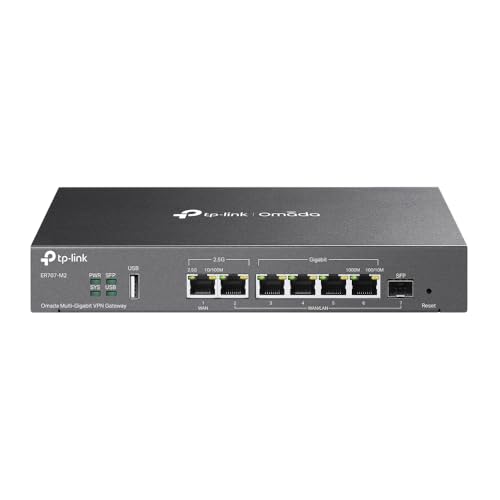
TP-Link Omada ER707-M2: the multi-gigabit Omada gateway
The ER707-M2 is the multi-gigabit answer to the ER605’s open question, and the pick for the site whose internet connection has already outgrown the gigabit class. TP-Link builds it as an Omada SDN gateway: dual 2.5-gigabit WAN ports, multi-gigabit routing capacity, a stateful SPI firewall and VPN support, all managed through the Omada platform — and, like the ER605 below, it does not host a controller itself. Full Omada management requires a controller somewhere: the maker’s hardware controllers, the OC200 or OC300; the controller software running on a local machine; or TP-Link’s cloud-based controller service. A buyer who understands that owns a fast, flexible gateway; a buyer who misses it owns a router waiting for its other half.
The hardware is sized for the faster tier of small-site connections and honest about it. Two 2.5-gigabit WAN ports take dual multi-gigabit internet connections, so a site can load-balance across two fast lines or fail over from one to the other, and the multi-gigabit routing keeps the gateway ahead of the connection rather than behind it. The VPN specification is businesslike, in the Omada tradition, and the port set serves the growing class of faster fibre and cable connections that the gigabit picks in this guide cannot. For a site standardising on Omada access points and switches, the ER707-M2 is the natural head of the system at multi-gigabit speed; for a site with no Omada estate, it is the invitation to start one at the faster tier, and the review of its trade-offs takes that seriously.
Strengths
- Dual 2.5-gigabit WAN ports with multi-gigabit routing — the fastest Omada gateway in this guide.
- Omada SDN management with dual-WAN failover and load balancing, once a controller is in place.
- Stateful SPI firewall and VPN support in a gateway sized for faster fibre and cable connections.
Trade-offs
- The controller condition is the standing trade-off, and it is structural: the gateway does not host a controller, so the controller arrangement belongs in the purchase arithmetic from the start.
- Multi-gigabit ports need multi-gigabit connections and switches to matter — a gigabit site gains nothing from them.
- Omada’s ecosystem gravity: the gateway is at its best with the maker’s own access points and switches behind it.
Who it suits: the small site whose internet has outgrown gigabit and who wants Omada management at multi-gigabit speed. Owners entering Omada at the faster tier can check price on Amazon.
Check price on Amazon: TP-Link Omada ER707-M2

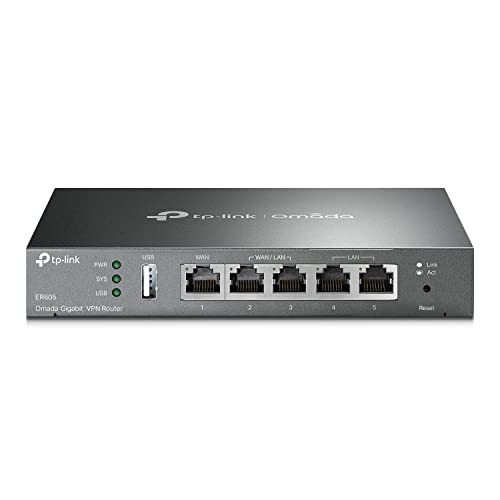
TP-Link Omada ER605: the value gateway that borrows its controller
The ER605 is the most instructive pick in this guide, because its management design is the one most often misunderstood. TP-Link builds it as an Omada SDN gateway: it supports Zero-Touch Provisioning and Centralized Cloud Management through Omada Cloud and the Omada app, and it is a genuinely cloud managed router — on one condition that this guide states as plainly as the maker’s own documentation implies. The ER605 does not host a controller itself. Full Omada management requires a controller somewhere: the maker’s hardware controllers, the OC200 or OC300; the controller software running on a local machine; or TP-Link’s cloud-based controller service. A buyer who understands that owns a flexible and inexpensive gateway; a buyer who misses it owns a router waiting for its other half. The version matters as well — this review describes the current v2 hardware, whose port arrangement the maker revised.
As a gateway in its own right, the ER605 is a compact gigabit VPN router with a flexible port map: five gigabit ports configurable with up to three as WAN Ethernet, plus a USB WAN port that accepts a 4G or 3G modem for failover — a small feature with an outsized effect on a small shop’s worst day. The VPN specification is businesslike: twenty IPsec LAN-to-LAN tunnels, and a session capacity the maker puts at 150,000 concurrent sessions. Nothing in the hardware reaches beyond the gigabit class, and nothing in the proposition tries to: this is the entry point to a managed platform, priced and specified as one, and its role in this guide is to show how far the Omada architecture can be entered into cheaply when the controller question is answered deliberately rather than by accident. Buyers comparing it against the ER707-M2 above should therefore compare totals rather than ticket prices — gateway alone against gateway plus the controller arrangement they will actually run — because the honest comparison is between two complete management designs, not between a finished one and half of another.
Strengths
The entry cost into a properly centralised platform is the first strength: Omada’s cloud management, zero-touch provisioning and app control at the gateway tier least expensive in this guide. The WAN flexibility is the second — up to three Ethernet WAN ports plus USB modem failover is failover depth the embedded-controller picks do not match. The third is the VPN grounding: twenty site-to-site tunnels is a real multi-branch figure, not a token.
Trade-offs
The controller condition is the standing trade-off, and it is structural: add a hardware controller and the price advantage narrows; run the software controller and the site maintains a small server task; choose the cloud-based controller and the design’s centre of gravity moves. The gigabit ceiling is the second limit, shared with the GX50. And the version history demands care at purchase — the v2 is the model described here, and earlier hardware differs in its port configuration.
Who it suits
The ER605 suits the small business or branch site entering the Omada platform with its eyes open about the controller — above all the buyer who already runs, or happily will run, an Omada controller and wants an inexpensive, failover-rich gateway in front of it. Value-led Omada adopters can check price on Amazon.
Check price on Amazon: TP-Link Omada ER605

Cisco Meraki Go Router Firewall Plus (GX50): the pure cloud-native
The GX50 is the second architecture in its purest form: there is no local console to speak of, because Cisco intends the Meraki Go app and web portal to be the console. Configuration, monitoring, alerts and updates live in the maker’s cloud, and the gateway — model code GX50-HW — is the managed endpoint of that arrangement. Cisco publishes the offer with no licence or management fee and automatic security updates as part of it, which makes this the simplest ownership story in the guide in exchange for the deepest cloud dependence. It is also the most deliberately small-scoped: the maker recommends a ceiling of fifty clients, positioning the unit for the small business whose entire network department is the owner and a phone.
The hardware follows that positioning. Firewall throughput is published at above 500 Mbps, with one gigabit WAN port and four gigabit LAN ports — figures that fit the broadband connections of the cafés, salons, small offices and short-let properties the line is drawn for, and that sit honestly below the gigabit-class routing of the embedded-controller picks. The security set is the small-business essentials: a stateful firewall, client VPN for individual remote access, and site-to-site VPN — with the limitation this guide flags wherever it matters, that the site-to-site tunnels speak to other GX50 units, so a fleet of identical small sites meshes cleanly while a tunnel into a different maker’s network is not this product’s promise. Cisco Umbrella DNS-layer security is available as an optional addition rather than a bundled component, and the review records it as such. Judged as a small-site appliance run entirely from an app, the GX50 is coherent in a way the more configurable picks deliberately are not.
The fleet case is worth picturing concretely, because it is where the design stops looking limited and starts looking fitted. Consider the owner of four small premises — cafés, salons, clinics — each with a till, a card terminal, a staff network and a guest network. With a GX50 at each site, that owner holds all four networks in one app: a guest password changed everywhere from one chair, a site’s outage announced by the platform before the staff notice, a replacement unit adopted into an existing site’s configuration rather than configured from a blank page. The fifty-client recommendation fits each premises honestly, the GX50-to-GX50 VPN condition is satisfied by the fleet’s own uniformity, and the absence of a local console is never felt because there was never local expertise to use one. Designs should be judged against the reader they were drawn for, and this one’s reader is recognisable.
Strengths
Simplicity is the first strength, and it is total: no controller to host, no console to learn, no licence to renew, with security updates arriving automatically under the maker’s published offer. The second is the fleet logic — identical small sites are adopted into the same app and run as one estate, which suits owners of several small premises precisely. The third is the maker itself: the Meraki Go line carries the documentation and support habits of a large networking vendor into a price class that usually lacks them.
Trade-offs
The cloud dependence is the design’s price, and it is not negotiable: without the platform there is no full management, because there is no full local console to fall back on. The fifty-client recommendation and the 500 Mbps-class firewall figure bound the unit to genuinely small sites. And the GX50-to-GX50 limit on site-to-site VPN closes the door on mixed-maker tunnels, which mixed estates should weigh before standardising.
Who it suits
The GX50 suits the small business owner with no IT staff and no wish to become any — one site, or several small identical ones — who would rather manage the network from a phone and let the maker’s cloud carry the complexity. Owners buying simplicity as the main feature can check price on Amazon.
Check price on Amazon: Cisco Meraki Go Router Firewall Plus GX50
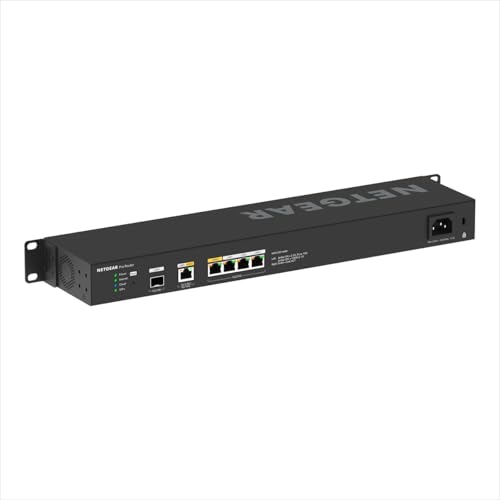
NETGEAR PR60X: the 10-gigabit performance pick, cloud optional
The PR60X is the ceiling of this guide in raw capability and the clearest example of the third management design. NETGEAR builds it as a dual-WAN Pro Router in a 19-inch rack-mount form, and its management options are published as a pair: NETGEAR Insight Remote Cloud Management, or the gateway’s own local Web GUI — a complete console at the site, with the cloud as a layer the owner may add rather than a home the configuration must live in. The review places it in the cloud-optional group on the maker’s own description, and records the fee arrangement with the same directness: Insight is included for the first year with the hardware, and continuing it afterwards is a paid renewal. Neither fact diminishes the machine; both belong in its arithmetic.
The port and performance tables are written for sites that have outgrown gigabit. One 10-gigabit multi-gig port can be configured as LAN or WAN, joined by a 2.5-gigabit WAN, three 2.5-gigabit LAN ports and a 10-gigabit SFP+ slot; NETGEAR quotes LAN-to-WAN throughput of 9.4 Gbps through the 10-gigabit port, driven by a quad-core ARM A73 processor at 2.2 GHz. Dual WAN is native rather than improvised, and IPsec site-to-site VPN is part of the set. This is the gateway for the site whose connection is multi-gigabit, whose internal backbone already runs at 10 gigabits, or whose rack holds the rest of a serious small network — and it is correspondingly the largest, most installation-minded unit here, a piece of infrastructure rather than an accessory. Nothing else in the guide operates in its throughput class, which is precisely its position: it is what the other five are stepped up from.
Strengths
Performance headroom is the first strength: 9.4 Gbps of quoted LAN-to-WAN throughput and a full multi-gig port set put this gateway beyond the reach of every growth plan a small site is likely to draw. The management freedom is the second — a full local console with cloud as a genuine option is the least dependent arrangement in the guide. The third is dual-WAN at speed, failover that does not require stepping down to a slower path.
Trade-offs
The Insight fee after the first year is the standing consideration: the cloud layer is a subscription, and over a long service life it is a real component of the cost, even though the local console means the gateway never depends on it. The rack-mount scale and the performance class are the second trade — this is oversized hardware for a single small site on a gigabit line. And the capability invites spending around it: 10-gigabit switching and access points are needed before the backbone figure means anything.
Who it suits
The PR60X suits the larger small site — the office with a multi-gigabit connection, a media or design studio moving serious files, the headquarters of a small multi-site business — that wants performance first and cloud management on its own terms. Owners who refuse to choose between speed and control can check price on Amazon.
Check price on Amazon: NETGEAR PR60X

EnGenius ESG510: the balanced 2.5-gigabit cloud gateway
The ESG510 sits in the guide’s middle altitude and makes its case on balance. EnGenius publishes it as a cloud-managed security gateway in its Fit gateway line, run through EnGenius Cloud alongside the maker’s access points and switches, and — like the NETGEAR — it belongs to the cloud-optional family in spirit, a full gateway whose cloud platform is the maker’s central console for the whole estate. Its port set is the modern small-site pattern: four 2.5-gigabit Ethernet ports, one LAN port of which carries PoE+ to the 802.3af and at standards, enough to power a single access point directly; dual WAN; and a USB 3.0 port for cellular failover. Nothing is at the PR60X’s altitude and nothing is confined to the gigabit past, either.
The security and VPN figures are where the ESG510 argues hardest. EnGenius publishes SPI firewall throughput of 4 Gbps and VPN throughput of 970 Mbps for this model — the VPN figure in particular stands out in this company, close to the gigabit line rate and several times what tunnel-heavy sites extract from lesser gateways — alongside capacity for up to two hundred concurrent VPN tunnels and ninety-six VLANs, figures that describe a gateway ready to be the hub of a genuinely segmented, multi-branch estate. A quad-core processor at 1.6 GHz and a TPM chip for hardware-backed security round out a specification that reads as though drawn for the site between the café and the headquarters: several departments or locations, real VPN dependence, 2.5-gigabit infrastructure arriving or planned. It is the least famous name in this guide in some markets, and on the published figures it earns its seat without that mattering.
Strengths
The VPN specification is the first strength: 970 Mbps of published VPN throughput with two hundred concurrent tunnels is hub-class capacity in a mid-range box. The 2.5-gigabit port set with dual WAN and cellular failover is the second, matched to where small-site connections actually are now. The third is the single PoE+ LAN port, a small inclusion that removes an injector from the commonest installation — one gateway, one ceiling access point.
Trade-offs
The single PoE+ port is also the boundary: a site powering several access points needs a PoE switch behind this gateway, where a PoE switch would carry the budget instead. The 2.5-gigabit ceiling, while current, is a ceiling — the 10-gigabit class above it belongs to the NETGEAR alone here. And the EnGenius Cloud estate is at its best with the maker’s own access points and switches behind the gateway, the same ecosystem gravity any platform pick carries, in a smaller catalogue.
Who it suits
The ESG510 suits the growing multi-branch or segmented site — the business whose VPN tunnels and VLAN plan are real, whose cabling is moving to 2.5 gigabits, and who wants the estate visible in one cloud console. Owners building the network between small and serious can check price on Amazon.
Check price on Amazon: EnGenius ESG510
How the five compare
The table compresses the comparison into the makers’ documented facts, and the management column is again the one that predicts the ownership experience. Throughput figures are each maker’s own for the exact model, quoted under that maker’s conditions — with security features running, in the UniFi case — and they should be read as class markers rather than as a single league table.
| Gateway | Management design | Maker’s cloud | Ports in brief | Headline maker figure | Best for |
|---|---|---|---|---|---|
| TP-Link Omada ER707-M2 | Adopted by a controller hosted elsewhere — hardware, software or cloud-based | Omada Cloud, once a controller is in place | Dual 2.5GbE WAN, multi-gigabit | Multi-gigabit VPN routing; Omada SDN management | Multi-gigabit sites entering Omada management |
| TP-Link Omada ER605 (v2) | Adopted by a controller hosted elsewhere — hardware, software or cloud-based | Omada Cloud, once a controller is in place | 5 GbE ports, up to 3 WAN, plus USB WAN for a modem | 20 IPsec LAN-to-LAN tunnels; 150,000 concurrent sessions | The least expensive entry into Omada management |
| Cisco Meraki Go Router Firewall Plus (GX50) | Cloud-native; no full local console | Meraki Go app and portal, no licence fee per the maker | 1 WAN at GbE, 4 LAN at GbE | Firewall throughput above 500 Mbps; up to 50 clients recommended | Owner-managed small sites and identical fleets |
| NETGEAR PR60X | Cloud optional over a full local Web GUI | NETGEAR Insight, first year included, then a paid renewal | 10G multi-gig LAN/WAN, 2.5G WAN, 3 LAN at 2.5G, SFP+ 10G | 9.4 Gbps LAN-to-WAN through the 10G port | Multi-gigabit sites that keep local control |
| EnGenius ESG510 | Cloud-managed gateway in the maker’s estate platform | EnGenius Cloud | 4 ports at 2.5 GbE, one LAN with PoE+, dual WAN, USB 3.0 | 4 Gbps firewall and 970 Mbps VPN throughput; 200 tunnels, 96 VLANs | VPN-heavy, segmented, growing estates |
Matching the gateway to the site
The decision sequence in this category runs from the management question outward. First, where should the configuration live: in the building, in the vendor’s cloud, or in the building with the cloud as a window? That answer alone halves the list — the cloud-native single, the cloud-optional group, or the borrowed-controller pair. Second, what is the honest scale: the client count, the site count and the connection speed, present and projected over the hardware’s life, which sorts the gigabit class from the 2.5-gigabit middle and from the 10-gigabit ceiling. Third, the supporting cast: a gateway’s controller is worth most with its own maker’s access points and switches behind it, so an estate already committed to one platform should weigh that platform’s gateway first, and an estate buying everything new should choose the platform and the gateway in the same decision. Run the three questions in that order and the five picks narrow without any reference to headline throughput at all.
Two arithmetic checks close the purchase. The fee check prices the management arrangement across the hardware’s working life — free-forever platforms against a first-year-included subscription — at the buyer’s real site count, not the count in the brochure. The power check applies where PoE is in play: the ESG510’s single PoE+ port is genuine and finite, and a site whose access points and cameras exceed it needs a PoE switch in the plan regardless of which gateway heads it. Neither check is visible in a product title, and together they account for most of the regret this category produces.
One tiebreaker resolves the commonest deadlock, between an embedded-controller pick and a cloud-optional one of similar speed. Ask who will stand in front of the gateway when something is wrong at nine in the evening. If the answer is the owner or an employee with a laptop and the site’s credentials, the local console is a genuine asset and the cloud-optional design earns its premium in independence. If the answer is a remote administrator — an IT provider, a head-office technician, the owner at home — then the console’s location matters far less than the quality of the remote doorway, and the embedded designs with their free cloud access, or even the cloud-native design at small scale, give that administrator the shorter path. The hardware in both cases is nearly the same price; the evening is different.
Living with a vendor cloud: operating notes
Day to day, a cloud managed estate rewards a few habits. Keep the local credentials and the cloud account in the same safe place, and decide at installation — not during an outage — who else in the organisation can sign in; the cloud console is now the front door of the network, and its account security, including a second factor where the platform offers one, deserves the same seriousness as the firewall rules behind it. Turn on the platform’s alerting for gateway and connection loss, since the fleet view’s chief gift is learning about a dead site before its occupants telephone. And when a site’s internet connection is the fragile element, spend on the failover path — the second WAN, the cellular modem — before spending on a faster gateway, because no management plane of any design can reach a site that is not connected to anything.
Adoption day deserves one decision made in advance: naming and grouping. Managed platforms think in sites, and the estates that stay comprehensible are the ones whose sites, networks and device names follow a scheme chosen before the third location is added — the premises named as the business names them, the networks named by function rather than by the order they were created. The same discipline applies to the wireless networks and VLANs the controller defines behind these gateways: a plan drawn once, on paper, survives every hardware change, while a plan that lives only inside one gateway’s configuration has to be reverse-engineered on the day that gateway is replaced. The cloud consoles make all of this easier to see and therefore easier to keep tidy; they do not supply the tidiness itself.
Firmware and configuration housekeeping follow the architecture. Embedded-controller sites hold their own configuration and should keep an exported backup with the site’s records after any significant change; cloud-native sites hold theirs in the platform, where the equivalent discipline is simply knowing which account and which organisation the network lives under, recorded somewhere that survives staff changes. None of this is burdensome, and all of it is cheaper than reconstructing a network’s intent from its behaviour after the person who built it has left.
Frequently asked questions
What makes a router cloud managed rather than just app-configured?
The distinction used throughout this guide is whether the maker runs a management platform of its own — a named cloud console through which the gateway is configured, monitored and updated as part of an estate. Every pick here has one: UniFi Site Manager, Omada Cloud, Meraki Go, NETGEAR Insight or EnGenius Cloud. A router with a phone app for initial setup, or one reached remotely by VPN to its local page, is remotely accessible but not cloud managed in this sense, and it will not give the fleet view or central configuration that define the category.
Do these gateways provide Wi-Fi?
No — all five are wired gateways with no radios, which is a deliberate property of the class rather than an omission. Wireless coverage comes from access points behind the gateway, which is why the controllers’ device counts and the PoE budgets matter: the gateway is chosen as the head of a system. Households wanting one box that routes and radiates are shopping for a wireless router, a different product covered elsewhere on this site.
What happens to the network if the vendor’s cloud goes down?
The traffic keeps flowing in all three designs, because gateways forward on their current configuration; what changes is management. Embedded-controller and cloud-optional gateways keep their full local consoles, so the site can be reconfigured on the spot and only remote visibility is lost. A cloud-native gateway such as the GX50 has no full local console to fall back on, so changes wait for the platform — the documented price of its simplicity, and the reason the design suits sites whose configuration rarely changes.
Is the ER605 cloud managed on its own?
It is cloud managed as part of the Omada platform, with a condition this guide states wherever the model appears: the ER605 does not host a controller itself. Centralized Cloud Management and Zero-Touch Provisioning arrive when an Omada controller exists — the maker’s OC200 or OC300 hardware, the software controller, or the cloud-based controller service. Buyers who want the controller in the gateway should look elsewhere — no pick in this guide embeds one; buyers happy to host or rent the controller get the ER605’s lower entry cost.
Which of these suits several sites under one administrator?
All five are built with that reader in mind, and the choice turns on the fleet’s shape. Identical small sites are Meraki Go’s home ground, adopted into one app with no local consoles to visit. Sites already invested in one maker’s access points should take that maker’s gateway — Omada or EnGenius — so the fleet view covers the whole estate. The PR60X heads a larger headquarters within such a plan, with its local console keeping the most important site the least dependent.
A cloud managed router is finally a decision about where a network’s memory should live — in the building, in the vendor’s cloud, or in the building with the cloud looking in — and the five gateways here are simply that decision, made at three altitudes of speed, in hardware form.