The best tri band mesh routers solve the problem that a single router cannot: a house is bigger than one box can cover, and the rooms farthest from the router get the worst signal. A mesh system spreads the network across several units that talk to each other, and a tri-band system gives those units a third radio band to talk on, so the traffic between the units does not steal bandwidth from the phones, laptops, and televisions using the network. The result is Wi-Fi that is fast in the far bedroom, not just next to the router.
This guide looks at eight tri-band mesh router systems, from the TP-Link Deco XE75 that defines the Wi-Fi 6E mid-range, through the Deco 7 Pro that brings Wi-Fi 7 and 10-gigabit wired backhaul, to the Amazon eero Pro 7 and the Netgear Orbi systems that cover the largest homes. Every pick is a genuine mesh system with three bands, and every pick is linked to the exact model shown. Single routers, dual-band systems, and renewed units were left out, because this guide is about tri-band mesh, and the picks should be exactly that.
A note on what tri-band means, because the term is used loosely. A tri-band mesh system has three radio bands: the usual 2.4GHz and 5GHz bands for devices, plus a third band that the mesh units use to talk to each other. On Wi-Fi 6E systems that third band is usually the 6GHz band; on Wi-Fi 7 systems it is a second 5GHz band or a 6GHz band, depending on the model. The dedicated band is the whole point: without it, the mesh units share the same bands as the devices, and the network slows down exactly when it is busiest. The comparison table calls out the band and the standard on every pick, so the choice is easy to make.
In this guide
Quick picks: best tri band mesh routers
| # | Product | Where to buy |
|---|---|---|
| 1 | TP-Link Deco XE75 AXE5400 Tri-Band WiFi 6E System (3-Pack) | Check on Amazon |
| 2 | Deco 7 Pro Tri-Band WiFi 7 BE10000 Whole Home Mesh System | Check on Amazon |
| 3 | TP-Link Deco XE75 AXE5400 Tri-Band WiFi 6E Mesh System (2-Pack) | Check on Amazon |
| 4 | Amazon eero Pro 7 Tri-Band Mesh Wi-Fi 7 Router (Newest Model) | Check on Amazon |
| 5 | TP-Link Deco XE75 Pro AXE5400 Tri-Band WiFi 6E Mesh System (2-Pack) | Check on Amazon |
| 6 | NETGEAR Orbi 770 Series WiFi 7 Mesh System (3-Pack) | Check on Amazon |
| 7 | NETGEAR Orbi Whole Home Tri-Band WiFi 6 Mesh Network System (RBK663) | Check on Amazon |
| 8 | TP-Link Deco XE75 AXE5400 Tri-Band WiFi 6E Mesh System (1-Pack) | Check on Amazon |
How the picks were chosen
The picks were chosen from the site's own product listings, and only tri-band mesh systems made the list. Single tri-band routers were left out, because a single router is not a mesh system, however good its radios are. Dual-band mesh systems were left out too, because they lack the dedicated backhaul band that defines this guide. Renewed and like-new units were left out as well, because a router is the foundation of the home network and should be bought new.
The band and the standard were the first test. A tri-band system had to say tri-band in its listing, and the standard had to be Wi-Fi 6E or Wi-Fi 7, because those are the current standards and the ones worth buying now. Wi-Fi 6E brings the 6GHz band, which is fast and uncrowded, and Wi-Fi 7 brings faster speeds still, with wider channels and better handling of many devices at once. The picks below cover both, and the guide says which is which, so the choice is honest.
Coverage and backhaul were the second test. A mesh system is bought for coverage, and the listing gives it in square feet, so the picks range from a single Deco XE75 unit for a small flat to a three-pack Orbi 770 for a large house. The backhaul matters as much as the coverage: the Deco 7 Pro models in this guide have 2.5-gigabit ports for wired backhaul, which is the fastest way to connect the mesh units, and the eero Pro 7 supports internet plans up to 5 gigabits. Check the coverage figure against the size of the home before ordering, and add a unit if the home is on the edge of it.
Quick comparison
| Product | Standout detail |
|---|---|
| TP-Link Deco XE75 AXE5400 Tri-Band WiFi 6E System (3-Pack) | TP-Link Deco XE75, AXE5400, Wi-Fi 6E, 3-pack |
| Deco 7 Pro Tri-Band WiFi 7 BE10000 Whole Home Mesh System | TP-Link Deco 7 Pro, BE10000, Wi-Fi 7, 10 Gbps |
| TP-Link Deco XE75 AXE5400 Tri-Band WiFi 6E Mesh System (2-Pack) | TP-Link Deco XE75, AXE5400, Wi-Fi 6E, 2-pack |
| Amazon eero Pro 7 Tri-Band Mesh Wi-Fi 7 Router (Newest Model) | Amazon eero Pro 7, Wi-Fi 7, up to 5 Gbps |
| TP-Link Deco XE75 Pro AXE5400 Tri-Band WiFi 6E Mesh System (2-Pack) | TP-Link Deco XE75 Pro, AXE5400, Wi-Fi 6E, 2-pack |
| NETGEAR Orbi 770 Series WiFi 7 Mesh System (3-Pack) | Netgear Orbi 770, Wi-Fi 7, 3-pack, tri-band |
| NETGEAR Orbi Whole Home Tri-Band WiFi 6 Mesh Network System (RBK663) | Netgear Orbi RBK663, AX5400, Wi-Fi 6, tri-band |
| TP-Link Deco XE75 AXE5400 Tri-Band WiFi 6E Mesh System (1-Pack) | TP-Link Deco XE75, AXE5400, Wi-Fi 6E, 1-pack |

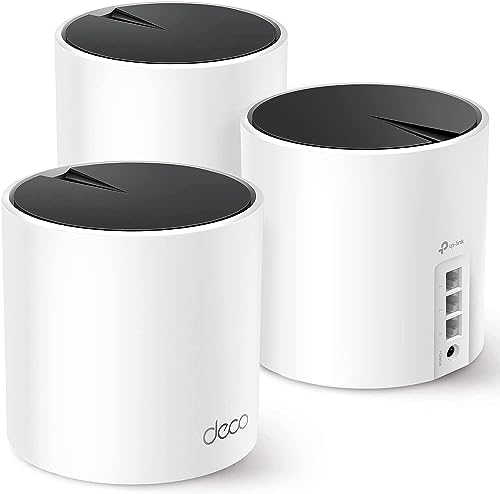
1. TP-Link Deco XE75 AXE5400 Tri-Band WiFi 6E System (3-Pack)
Key specs
Tri-band WiFi 6E mesh system, 3-pack, AXE5400, covering up to 7,200 square feet.
Strengths
- Three units cover a large home, with the tri-band backhaul keeping the speed up in the far rooms.
- Wi-Fi 6E adds the 6GHz band, which is fast and uncrowded, so the mesh has room to breathe.
- The three-pack is the reference mesh system in this guide, and it is rated as the best for most people.
Trade-offs
- The 6GHz band has a shorter range than 5GHz, so the units need to be placed with care.
- The system is Wi-Fi 6E, not Wi-Fi 7, so it will age sooner than the Wi-Fi 7 picks below.
- Three units are more than a small flat needs, and the extra unit will sit in a drawer.
Who it fits
Large homes that want the proven Wi-Fi 6E mesh system, with three units and room to spare.
Best for: Whole-home Wi-Fi in a large house, with fast speeds in every room.
Not suited for: A small flat, where a one-pack or two-pack system is enough.
In daily use
The Deco XE75 three-pack is the default answer in this guide, and defaults earn their place. It covers up to 7,200 square feet, it uses the 6GHz band for backhaul, and it is the system most reviewers recommend for most people. Set the units up one at a time, starting with the one connected to the modem, and let the app guide the placement of the other two.
Place the satellite units halfway between the main unit and the dead zone, not in the dead zone itself, because a satellite with a weak signal passes a weak signal on.
Check price on Amazon: TP-Link Deco XE75 AXE5400 Tri-Band WiFi 6E System (3-Pack)

2. Deco 7 Pro Tri-Band WiFi 7 BE10000 Whole Home Mesh System
Key specs
Tri-band WiFi 7 mesh system, BE10000, 6-stream, 10 Gbps, with 4 x 2.5G ports for wired backhaul.
Strengths
- Wi-Fi 7 with 10-gigabit speeds is the fastest standard in this guide, and it will stay current for years.
- The four 2.5-gigabit ports allow wired backhaul, which is the fastest and most reliable way to connect the mesh units.
- The six-stream design handles many devices at once, which matters in a house full of phones, laptops, and smart devices.
Trade-offs
- The Wi-Fi 7 specification costs more than the Wi-Fi 6E picks, and most devices cannot use its full speed yet.
- The system is new, so long-term reports are still thin.
- The 10-gigabit speeds need a fast internet plan and fast wired devices to show their worth.
Who it fits
Buyers who want the fastest mesh system available and are willing to pay for Wi-Fi 7.
Best for: A future-proof home network with wired backhaul and room for many devices.
Not suited for: A home with a slow internet plan, where Wi-Fi 7 speeds would never be used.
In daily use
The Deco 7 Pro is the fastest mesh system in this guide, and it is built for the future. Wi-Fi 7, 10-gigabit speeds, and four 2.5-gigabit ports for wired backhaul make it the pick for a home that is being wired properly, with ethernet between the units. The wireless backhaul is fast too, but wired backhaul is what makes a mesh system truly reliable.
If the home has ethernet cabling, use it for backhaul on the first day; the difference between wired and wireless backhaul is the difference between a network that never drops and one that sometimes does.
Check price on Amazon: Deco 7 Pro Tri-Band WiFi 7 BE10000 Whole Home Mesh System
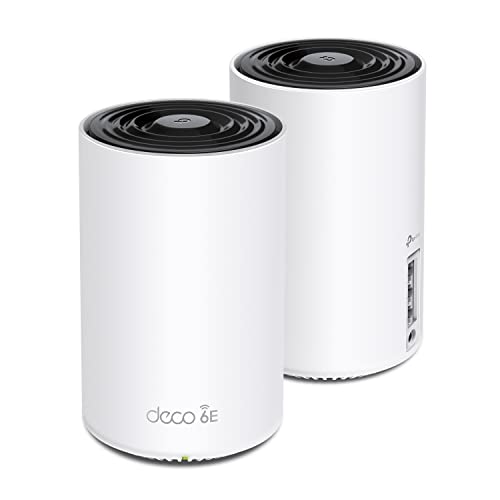
3. TP-Link Deco XE75 AXE5400 Tri-Band WiFi 6E Mesh System (2-Pack)
Key specs
Tri-band WiFi 6E mesh system, 2-pack, AXE5400, covering up to 5,500 square feet.
Strengths
- Two units cover a medium to large home, with the same tri-band backhaul as the three-pack above.
- The 5,500 square feet of coverage suits most houses without paying for a third unit.
- The Wi-Fi 6E standard with the 6GHz band keeps the mesh fast and uncrowded.
Trade-offs
- A very large home will need the three-pack instead, because two units have their limits.
- The 6GHz band has a shorter range than 5GHz, so placement matters.
- The system is Wi-Fi 6E, not Wi-Fi 7, so it will age sooner than the Wi-Fi 7 picks.
Who it fits
Medium to large homes that need two units and no more.
Best for: Whole-home Wi-Fi for a typical family house, at a fair price.
Not suited for: A very large home, or a home that wants Wi-Fi 7.
In daily use
The two-pack XE75 is the sensible middle of this guide: the same system as the three-pack, with one fewer unit and a lower price, covering up to 5,500 square feet. For most houses, two units are enough, and the money saved buys a better modem or a longer ethernet cable. Place the second unit halfway to the far rooms and the whole house is covered.
Start with two units and add a third only if a dead zone remains, because a mesh system can be extended, and buying the third unit later costs the same as buying it now.
Check price on Amazon: TP-Link Deco XE75 AXE5400 Tri-Band WiFi 6E Mesh System (2-Pack)

4. Amazon eero Pro 7 Tri-Band Mesh Wi-Fi 7 Router (Newest Model)
Key specs
Tri-band mesh Wi-Fi 7 router, newest model, supporting internet plans up to 5 Gbps and coverage up to 6,000 square feet.
Strengths
- Wi-Fi 7 in an eero system that is famously easy to set up, with an app that guides every step.
- Support for internet plans up to 5 gigabits means the router will not be the bottleneck on a fast connection.
- Coverage up to 6,000 square feet from the system suits a large home without extra hardware.
Trade-offs
- The eero system works best inside the eero app and ecosystem, which some buyers will not want.
- The single-unit listing here is the start of a system, and a large home will need more units.
- Advanced settings are fewer than on the TP-Link and Netgear systems, which power users will notice.
Who it fits
Buyers who want Wi-Fi 7 with the simplest setup in this guide.
Best for: A large home on a fast internet plan, set up in an afternoon.
Not suited for: A power user who wants full control over every router setting.
In daily use
The eero Pro 7 is the easiest mesh system in this guide to live with. The setup is guided, the app is clear, and the Wi-Fi 7 radios are fast, with support for plans up to 5 gigabits. It is the pick for the buyer who wants the network to work and to be forgotten, rather than a hobby to manage.
Let the app place the units: it measures the signal between them and says when a unit is too far away, which is more reliable than guessing.
Check price on Amazon: Amazon eero Pro 7 Tri-Band Mesh Wi-Fi 7 Router (Newest Model)

5. TP-Link Deco XE75 Pro AXE5400 Tri-Band WiFi 6E Mesh System (2-Pack)
Key specs
Tri-band WiFi 6E mesh system, 2-pack, AXE5400, with one 2.5 Gbps WAN/LAN port and two 1 Gbps LAN ports.
Strengths
- The 2.5-gigabit WAN/LAN port accepts a faster internet connection than the standard XE75, so the router is not the bottleneck.
- The two-pack covers a medium to large home with the same tri-band backhaul as the other XE75 systems.
- The Pro model adds the faster port without changing the setup, so it is an easy upgrade.
Trade-offs
- The 2.5-gigabit port is only useful with a fast internet plan; on a slow plan it makes no difference.
- The system is Wi-Fi 6E, not Wi-Fi 7, so it will age sooner than the Wi-Fi 7 picks.
- The two-pack will not cover a very large home on its own.
Who it fits
Buyers with a fast internet plan who want the XE75 with a faster wired port.
Best for: A home on a gigabit-plus plan, where the router must keep up with the connection.
Not suited for: A home on a slow plan, where the standard XE75 is enough.
In daily use
The XE75 Pro is the XE75 for the buyer whose internet plan is faster than a gigabit. The 2.5-gigabit WAN/LAN port is the difference: it lets the full speed of the connection into the house, where the standard XE75 would cap it at a gigabit. For a home on a slower plan, the standard model is the better buy; for a fast plan, the Pro is the right one.
Check the internet plan speed before ordering, because the Pro model only earns its price when the plan is faster than a gigabit.
Check price on Amazon: TP-Link Deco XE75 Pro AXE5400 Tri-Band WiFi 6E Mesh System (2-Pack)

6. NETGEAR Orbi 770 Series WiFi 7 Mesh System (3-Pack)
Key specs
Tri-band WiFi 7 mesh system, 3-pack, covering up to 8,000 square feet, with speeds up to 11 Gbps and support for 100 devices.
Strengths
- Three units covering up to 8,000 square feet make this the largest-coverage system in this guide.
- Speeds up to 11 gigabits and support for 100 devices suit a large, busy household.
- The Wi-Fi 7 standard with a dedicated backhaul band keeps the network fast even when many devices are active.
Trade-offs
- The flagship specification costs flagship money, and most homes do not need 8,000 square feet of coverage.
- The Orbi system is larger and more visible than the Deco and eero units.
- The full speed needs a fast internet plan and Wi-Fi 7 devices to show its worth.
Who it fits
Large homes with many devices that want the biggest Wi-Fi 7 mesh system in this guide.
Best for: A big house full of phones, laptops, televisions, and smart devices, all online at once.
Not suited for: A small flat, where a one-pack or two-pack system is more than enough.
In daily use
The Orbi 770 three-pack is the biggest system in this guide, and it is built for the biggest homes. Up to 8,000 square feet, up to 11 gigabits, and 100 devices supported: those are numbers for a house, not a flat. Set it up with the units spread evenly, and the far rooms get the same speed as the room with the router.
Orbi units work best with a clear line of sight between them, so place them in open rooms rather than behind furniture or in cupboards.
Check price on Amazon: NETGEAR Orbi 770 Series WiFi 7 Mesh System (3-Pack)

7. NETGEAR Orbi Whole Home Tri-Band WiFi 6 Mesh Network System (RBK663)
Key specs
Tri-band WiFi 6 mesh network system with a router and 2 satellite extenders, with security features built in.
Strengths
- The router plus two satellites covers a large home with a dedicated tri-band backhaul.
- The built-in security features protect the network without extra software.
- The Wi-Fi 6 standard is proven and stable, with years of real-world use behind it.
Trade-offs
- The system is Wi-Fi 6, not Wi-Fi 6E or Wi-Fi 7, so it lacks the 6GHz band.
- The Orbi design is larger than the Deco units, so the satellites are more visible.
- The price sits above the Deco XE75 systems for similar coverage.
Who it fits
Buyers who want a proven Orbi system with security built in.
Best for: A large home that wants reliable Wi-Fi 6 mesh with a trusted name.
Not suited for: A buyer who wants the newest standard, or the 6GHz band.
In daily use
The Orbi RBK663 is the proven pick in this guide. Wi-Fi 6 is not the newest standard, but it is the most proven, and the tri-band backhaul with two satellites covers a large home reliably. The built-in security is a genuine bonus: it protects the network and the devices on it without the buyer having to think about it.
Enable the security features during setup, because they are the reason to choose this system over a cheaper one, and they only work if they are turned on.
Check price on Amazon: NETGEAR Orbi Whole Home Tri-Band WiFi 6 Mesh Network System (RBK663)

8. TP-Link Deco XE75 AXE5400 Tri-Band WiFi 6E Mesh System (1-Pack)
Key specs
Tri-band WiFi 6E mesh system, 1-pack, AXE5400, covering up to 2,900 square feet.
Strengths
- A single unit covers up to 2,900 square feet, which is enough for a flat or a small house.
- The tri-band Wi-Fi 6E radios are the same as in the multi-packs, so the speed is not compromised.
- The system can be extended later with more units, so it grows with the home.
Trade-offs
- A single unit cannot cover a large home, and the buyer will need to add units.
- The 6GHz band has a shorter range than 5GHz, so placement matters even with one unit.
- The price of one unit is a large share of the two-pack, so the two-pack is better value for most homes.
Who it fits
Small homes and flats that need one good tri-band unit, with room to grow.
Best for: A flat or a small house, with the option to add units later.
Not suited for: A large home, where a single unit will leave dead zones.
In daily use
The one-pack XE75 is the starting point of the Deco system, and it is a good one. A single unit covers up to 2,900 square feet with tri-band Wi-Fi 6E, and more units can be added later if the home grows or a dead zone appears. Buy one now, and the system is ready when the home needs more.
Place the single unit centrally and high up, because a central unit covers more of the home than one tucked in a corner.
Check price on Amazon: TP-Link Deco XE75 AXE5400 Tri-Band WiFi 6E Mesh System (1-Pack)
Buying guide: best tri band mesh routers
Tri-band vs dual-band: the third band is the whole point
A dual-band mesh system has two bands, and the mesh units share them with the devices, so the network slows down when it is busy. A tri-band system adds a third band for the units to talk to each other, so the device traffic gets the full speed of the two main bands. The difference is noticeable in the evening, when the television is streaming, the phones are updating, and the laptop is on a video call, all at once. Buy tri-band if the house has many devices; buy dual-band only if the budget is tight and the house is small.
Wi-Fi 6E vs Wi-Fi 7: buy for the devices owned, and the ones coming
Wi-Fi 6E adds the 6GHz band, which is fast and uncrowded, and it is the right standard for most buyers today. Wi-Fi 7 is faster still, with wider channels and better handling of many devices, and it is the right standard for a buyer who keeps a router for years and wants the newest technology. The devices in the house matter: a Wi-Fi 7 router is only as fast as the devices connected to it, so a house full of Wi-Fi 6 phones will not see the full benefit yet. Buy Wi-Fi 7 for the future, Wi-Fi 6E for the present, and either is a good choice.
Coverage: buy for the size of the home, then add one unit
The listing gives coverage in square feet, and it should be matched to the home, with a margin. A home of 3,000 square feet needs a system rated for more than that, because walls, floors, and furniture all reduce the real coverage. The picks in this guide range from a single unit at 2,900 square feet to a three-pack at 8,000, and the right size is the one that covers the home with one unit to spare. A mesh system can be extended, so starting with two units and adding a third is a sensible plan.
Backhaul: wired is best, dedicated wireless is second best
Backhaul is the connection between the mesh units, and it decides how fast the far rooms are. Wired backhaul, over ethernet, is the fastest and most reliable, and the Deco 7 Pro models in this guide have 2.5-gigabit ports for it. Dedicated wireless backhaul, on the third band, is the next best thing, and it is what every tri-band system in this guide does. Shared backhaul, where the units use the same bands as the devices, is the worst option, and it is what dual-band systems do. If the home has ethernet cabling, use it; if it does not, tri-band wireless backhaul is the answer.
Placement: halfway to the dead zone, not in it
A satellite unit should be placed halfway between the main unit and the dead zone, not in the dead zone itself, because a satellite with a weak signal passes a weak signal on. Place the units in open rooms, high up, and away from thick walls and metal objects. The app that comes with the system measures the signal between the units and says when one is too far away, and it should be trusted over guesswork. A well-placed two-unit system beats a badly placed three-unit system every time.
Security and updates: the network protects itself
A mesh system should update itself and protect the network without being asked. The Orbi RBK663 in this guide has security features built in, and the other systems have their own protections, and they should all be enabled during setup. Keep the firmware updated, use a strong password, and set up a separate network for smart home devices if the system offers one. A home network is only as secure as its router, and the router is the easiest thing in the house to protect.
The modem and the mesh: two boxes, one network
A mesh system does not replace the modem; it works with it. The modem connects to the internet, and the first mesh unit connects to the modem, usually by ethernet. Some internet providers supply a combined modem and router, and in that case the provider's router should be put into bridge mode, so the mesh system does the routing and there is only one network in the house. Two routers on one network cause double NAT, which breaks gaming, video calls, and some smart devices, so the provider's box should be a modem only.
When to upgrade: the signs the mesh is too small
A mesh system is too small when the far rooms are slow, when video calls freeze, and when the network drops under load. Adding a unit fixes coverage, and a wired backhaul fixes speed between units, but if the standard itself is old, no number of units will make it fast. A Wi-Fi 5 mesh system in a house full of Wi-Fi 6 and 7 devices is a bottleneck, and the answer is a new system, not another satellite. The tri-band systems in this guide are the upgrade that fixes the problem properly.
Usage and care
Use the mesh system every day, and it will keep the whole house online. The units are designed to run continuously, and they should be left on, because turning them off and on clears the routing tables and the network takes time to settle again. Keep the units out of direct sunlight and away from radiators, because heat is the enemy of electronics, and a cool router is a reliable router.
Keep the firmware updated, and the system will stay secure and fast. The app will offer updates, and they should be installed promptly, because they fix security problems and improve performance. Restart the system once a month, through the app, to clear the memory and let the units re-negotiate their connections. A monthly restart is the simplest maintenance a mesh system needs.
Check the placement every few months, especially after moving furniture. A unit that was well placed can become badly placed when a bookcase moves in front of it, and the app will show the signal between the units if it is checked. Move a unit that has a weak connection closer to the main unit, and the whole network will speed up. A mesh system is not a fit-and-forget device; it is a network that rewards a little attention.
Common mistakes
The most common mistake is buying a mesh system that is too small for the home. A single unit in a large house leaves dead zones, and a two-pack in a very large house does the same. Match the coverage figure to the home, with a margin, and add a unit if the home is on the edge of the rating. A mesh system can be extended, so starting small and adding a unit is better than living with dead zones.
Another common mistake is placing the satellite in the dead zone instead of halfway to it. A satellite in a dead zone has a weak signal from the main unit, and it passes that weak signal on to the devices, so the far room is still slow. Place the satellite where it still has a good signal from the main unit, and the far room will be fast. Trust the app's placement advice over guesswork.
The third mistake is buying a dual-band system to save money and then wondering why the network slows down in the evening. Dual-band mesh shares its bands between the units and the devices, and it slows down exactly when the house is busiest. Tri-band costs more, and it is worth it, because the dedicated backhaul band is what keeps the network fast when it matters most.
Smart home devices and the mesh: more devices, more demands
A modern home has dozens of connected devices, from light bulbs to doorbells, and they all use the network. A tri-band mesh system handles them better than a single router, because the mesh spreads the load across units and the third band keeps the backhaul clear. The Orbi 770 in this guide supports 100 devices, and the Deco 7 Pro handles many with its six-stream design. Put the smart home devices on their own network if the system offers one, because a separate network keeps them from slowing the main one, and it keeps the main network safer if a cheap smart device has a security flaw.
The future of mesh: Wi-Fi 7 and beyond
Wi-Fi 7 is the current standard, and it brings faster speeds, wider channels, and better handling of many devices. The Deco 7 Pro, the eero Pro 7, and the Orbi 770 in this guide are all Wi-Fi 7, and they will stay current for years. The next standard will be faster still, but a mesh system is not bought every year; it is bought for five years or more. Buy the standard that will still be good in five years, which today means Wi-Fi 7 for the future and Wi-Fi 6E for the present, and either will serve the house well.
Final recommendation
If one system has to win this guide, it is the TP-Link Deco XE75 three-pack, because it is the proven tri-band mesh system that most homes need, at a fair price, with coverage up to 7,200 square feet. The Deco 7 Pro is the fastest alternative, with Wi-Fi 7 and wired backhaul, and the eero Pro 7 is the easiest to set up. The Orbi 770 three-pack is the biggest system for the biggest homes, and the single-pack XE75 is the starting point for a small home.
For most buyers, the choice comes down to the size of the home and the speed of the internet plan. A large home wants the three-pack XE75 or the Orbi 770, a medium home wants the two-pack XE75, and a small home wants the one-pack XE75 with room to grow. A fast internet plan wants the Deco 7 Pro or the eero Pro 7, and a slow plan is well served by the XE75. Match the coverage to the home, buy tri-band, and the whole house will be fast.
Whatever system is chosen, place the units properly, use wired backhaul if the home has ethernet, and keep the firmware updated. A mesh system is the foundation of the home network, and it is worth setting up properly on the first day. The eight systems in this guide all do the job; the right one is the one that covers the home, matches the internet plan, and stays fast when the whole household is online at once.
Frequently asked questions
What is a tri-band mesh router?
A tri-band mesh router system has three radio bands: the usual 2.4GHz and 5GHz bands for devices, plus a third band that the mesh units use to talk to each other. The dedicated band keeps the backhaul traffic off the device bands, so the network stays fast in the far rooms, not just next to the router.
Is tri-band mesh better than dual-band mesh?
Yes, for most homes. A dual-band mesh system shares its bands between the mesh units and the devices, so it slows down when the house is busy. A tri-band system gives the units their own band, so the device traffic gets the full speed of the main bands. Dual-band is only worth it for a small home on a tight budget.
Do I need Wi-Fi 7 or is Wi-Fi 6E enough?
Wi-Fi 6E is enough for most homes today, because it adds the fast, uncrowded 6GHz band and it is the standard most current devices use. Wi-Fi 7 is faster and handles many devices better, and it is worth buying if the router will be kept for years or the home has many devices. Either standard is a good choice.
How many mesh units do I need?
Match the coverage figure in the listing to the size of the home, with a margin. A flat or small house needs one unit, a medium house needs two, and a large house needs three. Walls and floors reduce the real coverage, so buy for more than the home measures, and add a unit later if a dead zone remains.
Where should I place mesh satellite units?
Place a satellite halfway between the main unit and the dead zone, not in the dead zone itself, because a satellite with a weak signal passes a weak signal on. Put the units in open rooms, high up, and let the app check the signal between them, because the app measures what guessing cannot.
Is wired backhaul better than wireless backhaul?
Yes. Wired backhaul over ethernet is the fastest and most reliable way to connect mesh units, and the Deco 7 Pro models in this guide have 2.5-gigabit ports for it. Dedicated wireless backhaul on the third band is the next best thing, and it is what every tri-band system in this guide does.
Can I add more units to a mesh system later?
Yes. Mesh systems are designed to be extended, and a unit can be added later if the home grows or a dead zone appears. Start with the number of units the home needs now, and add one later if it is needed, because adding later costs the same as buying it now.
Do mesh routers replace the modem?
No. A mesh system works with the modem: the modem connects to the internet, and the first mesh unit connects to the modem by ethernet. If the internet provider supplies a combined modem and router, put it into bridge mode so the mesh system does the routing and there is only one network in the house.
More from ilcastellomenu.com
Mesh routers for 1-gig service: more whole-home picks