The best non wifi routers are wired routers, and the distinction is the whole point of this guide. A wired router has no wireless radio: it routes traffic between networks over Ethernet cables, and it does not broadcast a WiFi network at all. Buyers want one for a few clear reasons: a wired network is harder to attack from outside the building, a router without WiFi cannot be misconfigured to broadcast an open network, and a business or a school may have a policy that forbids wireless entirely.
The search results mix wired routers with WiFi routers, extenders and switches, and this guide keeps only the wired routers. A WiFi router is not a non-WiFi router, however good it is. A switch is not a router either, however many ports it has, because a switch connects devices on one network and a router connects networks together. The eight picks below are all routers, and all of them are wired: Ethernet ports, no wireless radio, and VPN and firewall features in most cases.
Eight routers made the list, from the TP-Link ER605 that suits a small office to the MikroTik RB4011's stablemates and the Grandstream with eleven ports. They cover gigabit and multi-gigabit speeds, VPN tunnels, multi-WAN load balancing, and OpenWRT, and each one was chosen because its listing names it as a wired router. What follows is what each one does well, where it falls short, and who should buy it. The eight routers below were all checked the same way: the listing had to be a wired router, not a WiFi router, an extender, a mesh system, or a switch.
In this guide
Quick picks: best non wifi routers
| # | Product | Where to buy |
|---|---|---|
| 1 | TP-Link ER605 Wired Gigabit VPN Router | Check on Amazon |
| 2 | Omada ER707-M2 Multi-Gigabit VPN Router | Check on Amazon |
| 3 | Mikrotik hEX RB750Gr3 5-Port Ethernet Gigabit Router | Check on Amazon |
| 4 | MikroTik hEX S (2025) E60iUGS Wired Router | Check on Amazon |
| 5 | Omada Fusion 2.5G Multi-WAN Wired VPN Router | Check on Amazon |
| 6 | Cudy Gigabit Multi-WAN Router R700, OpenWRT | Check on Amazon |
| 7 | Mikrotik hEX E50UG 5 Port Gigabit Router | Check on Amazon |
| 8 | Grandstream GWN7003 Wired Gigabit VPN Router | Check on Amazon |
How the picks were chosen
The picks were chosen from the site's own product search, looking only at routers whose listings state wired, Ethernet, or no WiFi. A listing was dropped if it was a WiFi router, a WiFi extender, a mesh system, or an Ethernet switch, because none of those is a wired router. The remaining routers were sorted by speed and by ports, because a router's ports and its speed decide what network it can serve.
VPN support was counted next, because most buyers of a wired router want one for a VPN: a tunnel to the office, or a secure connection between two sites. The TP-Link ER605, the Omada ER707-M2, the Omada Fusion, the Cudy R700 and the Grandstream GWN7003 in this guide all name VPN support, and the guide says so for each one, because VPN is the feature that most often decides the purchase.
Finally, each router was checked against the way it will actually be used. A router for a small office needs multi-WAN and a firewall, so the TP-Link and Omada picks earn their place. A router for a tinkerer needs OpenWRT, so the Cudy pick earns its place. A router for a large wired network needs many ports, so the Grandstream pick earns its place. The notes below say which use each router fits. A router for a small office was judged on multi-WAN and VPN, while a router for a tinkerer was judged on OpenWRT and RouterOS, because the two buyers want different things.
Quick comparison
| Product | Standout detail |
|---|---|
| TP-Link ER605 Wired Gigabit VPN Router | Small office, multi-WAN, VPN |
| Omada ER707-M2 Multi-Gigabit VPN Router | Multi-gigabit, dual 2.5G WAN |
| Mikrotik hEX RB750Gr3 5-Port Ethernet Gigabit Router | Classic 5-port MikroTik |
| MikroTik hEX S (2025) E60iUGS Wired Router | Newer hEX, SFP + PoE out |
| Omada Fusion 2.5G Multi-WAN Wired VPN Router | 2.5G, controller built in |
| Cudy Gigabit Multi-WAN Router R700, OpenWRT | OpenWRT, multi-WAN, load balance |
| Mikrotik hEX E50UG 5 Port Gigabit Router | Current hEX, 512MB RAM |
| Grandstream GWN7003 Wired Gigabit VPN Router | 11 ports, dual PoE out |

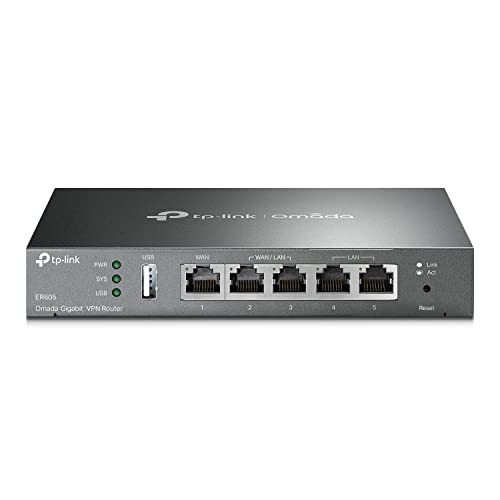
1. TP-Link ER605 Wired Gigabit VPN Router
Key specs
TP-Link ER605, wired gigabit VPN router, up to 3 WAN Ethernet ports plus 1 USB WAN, SPI firewall, SMB router, Omada SDN integrated.
Strengths
- Up to 3 WAN Ethernet ports plus a USB WAN port allow multiple internet connections.
- The SPI firewall protects the network from outside traffic.
- Omada SDN integration means the router can be managed with other TP-Link Omada devices.
Trade-offs
- There is no WiFi, so wireless devices need a separate access point.
- The setup asks for networking knowledge, because multi-WAN and VPN need configuration.
- The gigabit ports are fast, but not multi-gigabit.
Who it fits
A small office buyer who wants a wired VPN router with multiple internet connections.
Best for: A small office with two internet lines, or a VPN to another site.
Not suited for: A household that wants WiFi from the router itself.
In daily use
Connect the internet lines to the WAN ports, set the load balancing to share the traffic, and test the VPN tunnel before the office depends on it. Keep the router's software updated, because the firewall rules and the VPN are only as good as their latest version.
The TP-Link ER605 is the small-office pick: the wired VPN router most small businesses should start with.
Before you buy
Before buying the TP-Link ER605 Wired Gigabit VPN Router, check that it is a router and not a switch, because the two look alike and the switch is often cheaper. A router connects networks together, and a switch connects devices on one network, and the buyer who needs a router should not be sold a switch, however many ports it has.
Check price on Amazon: TP-Link ER605 Wired Gigabit VPN Router

2. Omada ER707-M2 Multi-Gigabit VPN Router
Key specs
Omada ER707-M2, multi-gigabit VPN router, dual 2.5 Gigabit WAN ports, high network capacity, SPI firewall, Omada SDN integrated.
Strengths
- Dual 2.5 Gigabit WAN ports carry faster internet than gigabit ports.
- The high network capacity suits a larger office than the ER605.
- The SPI firewall and Omada SDN integration match the rest of the Omada range.
Trade-offs
- The 2.5 Gigabit ports need a 2.5 Gigabit modem or switch to be useful.
- There is no WiFi, so wireless needs a separate access point.
- The setup is more involved than a home router's.
Who it fits
An office with faster-than-gigabit internet, who wants a wired router to match.
Best for: A growing office with multi-gigabit internet and a VPN.
Not suited for: A home with standard gigabit internet, where the ER605 is enough.
In daily use
Check the internet speed first, because a multi-gigabit router only helps if the internet connection is faster than gigabit. Connect the modem to a 2.5 Gigabit WAN port, and test the speed before configuring the VPN, because the speed test shows whether the ports are doing their job.
The Omada ER707-M2 is the fast pick: the multi-gigabit wired router for offices with fast internet.
Before you buy
Before buying the Omada ER707-M2 Multi-Gigabit VPN Router, plan the access points, because a wired router has no WiFi, and the wireless devices need access points to join the network. Count the rooms that need WiFi, plan one access point per area, and buy the router with the ports and the PoE to power them.
Check price on Amazon: Omada ER707-M2 Multi-Gigabit VPN Router

3. Mikrotik hEX RB750Gr3 5-Port Ethernet Gigabit Router
Key specs
Mikrotik hEX RB750Gr3, 5-port Ethernet gigabit router.
Strengths
- The five gigabit Ethernet ports cover a small wired network in one box.
- The MikroTik RouterOS software is powerful, with firewall, VPN and routing rules.
- The hEX is small, quiet and low-power, so it can sit anywhere.
Trade-offs
- RouterOS has a learning curve, and beginners should expect to read the documentation.
- There is no WiFi, so wireless needs a separate access point.
- The five ports are all gigabit, with no multi-gigabit option.
Who it fits
A buyer who wants a small, powerful wired router and is willing to learn RouterOS.
Best for: A small wired network, a home lab, or a VPN endpoint.
Not suited for: A buyer who wants a router that configures itself.
In daily use
Start with the default configuration, which routes and protects the network out of the box, and learn RouterOS one feature at a time. The firewall and VPN are worth learning, because they are the reason to buy a MikroTik, and the documentation is thorough.
The MikroTik hEX RB750Gr3 is the classic pick: the small wired router that enthusiasts have recommended for years.
Before you buy
Before buying the Mikrotik hEX RB750Gr3 5-Port Ethernet Gigabit Router, check the internet speed, because a gigabit router suits gigabit internet and a multi-gigabit router suits faster internet. A multi-gigabit router on a gigabit connection wastes money, and a gigabit router on a faster connection wastes speed, so the router should match the line it serves.
Check price on Amazon: Mikrotik hEX RB750Gr3 5-Port Ethernet Gigabit Router

4. MikroTik hEX S (2025) E60iUGS Wired Router
Key specs
MikroTik hEX S (2025), model E60iUGS, a compact affordable wired router with a 2.5G SFP port, 5x gigabit Ethernet, PoE out.
Strengths
- The 2.5G SFP port allows a fibre or multi-gigabit uplink.
- Five gigabit Ethernet ports cover a small wired network.
- PoE out powers a device, such as an access point, from the router itself.
Trade-offs
- RouterOS needs learning, as with every MikroTik.
- There is no WiFi, so wireless needs a separate access point.
- The SFP port needs the right module, which is a separate purchase.
Who it fits
A buyer who wants the newer hEX, with an SFP port and PoE out.
Best for: A small network with a fibre uplink, or an access point powered by the router.
Not suited for: A buyer who wants the cheapest hEX, where the older model is enough.
In daily use
Use the SFP port for the uplink if the internet comes by fibre, and use the PoE out to power the access point, because one cable then carries power and data. The 2025 model is the current hEX, and its SFP port is the reason to choose it over the older one.
The MikroTik hEX S is the current pick: the newer hEX, with an SFP port and PoE for the access point.
Before you buy
Before buying the MikroTik hEX S (2025) E60iUGS Wired Router, think about the VPN, because most buyers of a wired router want one, and the tunnel should be set up and tested before the business depends on it. A VPN that has never been tested is a VPN that may not work when it is needed, and the test takes an hour at most.
Check price on Amazon: MikroTik hEX S (2025) E60iUGS Wired Router

5. Omada Fusion 2.5G Multi-WAN Wired VPN Router
Key specs
Omada Fusion 2.5G multi-WAN wired VPN router, 5x 2.5Gb ports, Omada controller built in, quad-core CPU, touch screen.
Strengths
- Five 2.5 Gigabit ports cover a fast wired network without a separate switch.
- The Omada controller is built in, so no separate controller is needed.
- The quad-core CPU handles VPN and multi-WAN traffic without slowing down.
Trade-offs
- The touch screen is a bonus, not a reason to buy the router.
- There is no WiFi, so wireless needs a separate access point.
- The price reflects the 2.5 Gigabit ports and the built-in controller.
Who it fits
An office that wants 2.5 Gigabit wired networking with the controller built in.
Best for: A fast office network with VPN and multi-WAN.
Not suited for: A small home network, where gigabit ports are enough.
In daily use
Use the built-in controller to manage the access points as well as the router, because one controller for the whole network is simpler than two. The touch screen shows the status at a glance, which is useful when the network is checked in person.
The Omada Fusion is the complete pick: the 2.5 Gigabit wired router with the controller built in.
Before you buy
Before buying the Omada Fusion 2.5G Multi-WAN Wired VPN Router, check that it is a router and not a switch, because the two look alike and the switch is often cheaper. A router connects networks together, and a switch connects devices on one network, and the buyer who needs a router should not be sold a switch, however many ports it has.
Check price on Amazon: Omada Fusion 2.5G Multi-WAN Wired VPN Router

6. Cudy Gigabit Multi-WAN Router R700, OpenWRT
Key specs
Cudy gigabit multi-WAN router, OpenWRT, load balance, 5x GbE, model R700, OpenWRT-ready multi-WAN tunnel gateway.
Strengths
- OpenWRT support means the router's software can be changed and extended.
- Load balancing shares traffic across multiple internet connections.
- Five gigabit Ethernet ports cover a small wired network.
Trade-offs
- OpenWRT needs knowledge to use well, and the stock software is simpler.
- There is no WiFi, so wireless needs a separate access point.
- The Cudy name is less familiar than TP-Link or MikroTik.
Who it fits
A tinkerer who wants OpenWRT on a wired router, with multi-WAN load balancing.
Best for: A home lab, a multi-WAN setup, or an OpenWRT project.
Not suited for: A buyer who wants the router to work with no configuration.
In daily use
Start with the stock software, and move to OpenWRT only when the stock software cannot do what is needed, because OpenWRT is powerful and the stock software is simpler. The load balancing is worth setting up first, because two internet lines are only useful when the traffic is shared between them.
The Cudy R700 is the tinkerer's pick: the wired router for buyers who want OpenWRT and multi-WAN.
Before you buy
Before buying the Cudy Gigabit Multi-WAN Router R700, OpenWRT, plan the access points, because a wired router has no WiFi, and the wireless devices need access points to join the network. Count the rooms that need WiFi, plan one access point per area, and buy the router with the ports and the PoE to power them.
Check price on Amazon: Cudy Gigabit Multi-WAN Router R700, OpenWRT

7. Mikrotik hEX E50UG 5 Port Gigabit Router
Key specs
Mikrotik hEX, 5 port gigabit router, 512MB RAM, model E50UG.
Strengths
- Five gigabit ports cover a small wired network in one box.
- 512MB of RAM gives the router room for firewall rules and VPN tunnels.
- The MikroTik RouterOS software is the same powerful system as the other hEX models.
Trade-offs
- RouterOS needs learning, as with every MikroTik.
- There is no WiFi, so wireless needs a separate access point.
- The E50UG is a newer hEX variant, so community notes are thinner than for the RB750Gr3.
Who it fits
A buyer who wants a current hEX with more memory for rules and tunnels.
Best for: A small wired network with many firewall rules or VPN tunnels.
Not suited for: A buyer who wants the best-documented hEX, where the RB750Gr3 has more guides.
In daily use
Use the extra memory for firewall rules and VPN tunnels, because that is what it is for, and keep the configuration backed up, because a router whose configuration is lost must be rebuilt from memory. The E50UG is the current hEX, and its memory is the reason to choose it.
The MikroTik hEX E50UG is the memory pick: the hEX with room for more rules and more tunnels.
Before you buy
Before buying the Mikrotik hEX E50UG 5 Port Gigabit Router, check the internet speed, because a gigabit router suits gigabit internet and a multi-gigabit router suits faster internet. A multi-gigabit router on a gigabit connection wastes money, and a gigabit router on a faster connection wastes speed, so the router should match the line it serves.
Check price on Amazon: Mikrotik hEX E50UG 5 Port Gigabit Router

8. Grandstream GWN7003 Wired Gigabit VPN Router
Key specs
Grandstream GWN7003, 11-port wired gigabit VPN router, dual PoE output ports.
Strengths
- Eleven ports cover a larger wired network without a separate switch.
- Dual PoE output ports power two devices, such as access points, from the router.
- The VPN router design suits a business with a remote office.
Trade-offs
- Eleven ports are more than a small network needs, and the router is larger for it.
- There is no WiFi, so wireless needs separate access points.
- Grandstream's interface is its own, so the buyer should be comfortable with it.
Who it fits
A business with a larger wired network, who wants many ports and PoE in one box.
Best for: An office with many wired devices and two access points to power.
Not suited for: A small home network, where five ports are enough.
In daily use
Use the PoE ports for the access points, because powering them from the router means one fewer power supply and one fewer point of failure. The eleven ports mean the switch can wait, and the network can grow without new hardware.
The Grandstream GWN7003 is the many-ports pick: the wired router for the network with many devices and two access points to power.
Before you buy
Before buying the Grandstream GWN7003 Wired Gigabit VPN Router, think about the VPN, because most buyers of a wired router want one, and the tunnel should be set up and tested before the business depends on it. A VPN that has never been tested is a VPN that may not work when it is needed, and the test takes an hour at most.
Check price on Amazon: Grandstream GWN7003 Wired Gigabit VPN Router
Buying guide: best non wifi routers
A router is not a switch, and a switch is not a router
A router connects networks together: the home network to the internet, or one office to another. A switch connects devices on the same network: computers to each other. The switches in the search results were left out of this guide, because a buyer who needs a router should not be sold a switch, and a buyer who needs a switch should not buy a router with too few ports.
Wired means no WiFi at all
A wired router has no wireless radio, so it cannot broadcast a WiFi network, however it is configured. That is the point for buyers who want it: no wireless to attack, no wireless to misconfigure, and no wireless to explain to an auditor. Wireless devices need a separate access point, which is a separate purchase, and the access point is where the WiFi lives.
Multi-WAN: two internet lines, one network
A multi-WAN router connects to two internet lines at once, and shares the traffic between them, or uses one as a backup when the other fails. The TP-Link ER605, the Omada Fusion and the Cudy R700 in this guide all support it. A business that cannot afford to lose its internet should buy a multi-WAN router and a second internet line, because the second line is the insurance.
VPN: the reason most buyers want a wired router
A VPN tunnel connects two networks securely over the internet: an office to a branch, or a worker at home to the office. The TP-Link, Omada, Cudy and Grandstream routers in this guide all name VPN support. Set the tunnel up and test it before the business depends on it, because a VPN that has never been tested is a VPN that may not work when it is needed.
Gigabit or multi-gigabit: match the internet
A gigabit router carries internet up to a gigabit, and a multi-gigabit router carries faster internet. The router should match the internet connection: a gigabit router for gigabit internet, and a 2.5 Gigabit router for faster internet. A multi-gigabit router on a gigabit connection wastes money, and a gigabit router on a faster connection wastes speed.
PoE powers the access point
Power over Ethernet sends power down the same cable as data, so an access point can be powered by the router, with no separate power supply. The MikroTik hEX S and the Grandstream GWN7003 in this guide have PoE out. Put the access point where the WiFi is needed, run one cable to it, and the router powers it, which is simpler and tidier than a power supply in the ceiling.
OpenWRT and RouterOS need learning
The Cudy router supports OpenWRT, and the MikroTik routers run RouterOS, and both are powerful systems that reward learning. A buyer who wants a router that configures itself should buy the TP-Link or the Omada instead, because they are simpler. A buyer who wants control should buy the MikroTik or the Cudy, and should expect to read the documentation, because the power is in the learning.
What to do when the internet fails
A wired router with multi-WAN should fail over to the second line automatically, but the failover should be tested before it is needed. Unplug the main line, check that the network stays up, and plug it back in. A failover that has never been tested is a failover that may not work, and the test takes five minutes.
Document the network
Write down the network: the router's address, the WiFi names and passwords, the VPN settings, and which cable goes where. A documented network can be rebuilt in an hour after a failure, and an undocumented one takes a day. Keep the document where the person who fixes the network can find it, not where only the person who built it knows.
Test the backup internet line
A second internet line is only a backup if it works, and the only way to know is to test it. Unplug the main line once a quarter, check that the network stays up on the second line, and plug the main line back in. The test takes five minutes, and it is the difference between a backup and a hope.
Usage and care
Keep the router's software updated, because the firewall rules, the VPN and the security fixes all come through updates. A router that is never updated is a router with known holes, and the holes are what attackers look for. Check for updates monthly, and apply them promptly.
Label every cable, because a wired network with unlabelled cables is a puzzle when something fails. The WAN cables, the LAN cables and the PoE cables should each be labelled at both ends, so the router can be traced without guessing, and a failed cable can be found in minutes.
Keep the router cool and ventilated, because a router in a closed cupboard with no airflow will overheat and fail. Put it where air can move around it, away from heat, and check it occasionally, because a hot router is a slow router and a failing router.
Common mistakes
The most common mistake is buying a WiFi router when a wired router was wanted, because the listings look alike and the WiFi router is often cheaper. Check the listing for the word wired, and check that there is no wireless radio mentioned. The second most common mistake is buying a switch instead of a router, because a switch has more ports for less money, and it cannot route.
The second mistake is not planning the access points. A wired router has no WiFi, so the wireless devices need access points, and the access points need cables and power. Plan the access points before buying the router, because a wired network without access points is a network that phones cannot join.
The third mistake is never updating the router. A router's software has security fixes, and a router that is never updated keeps the holes it was shipped with. Check for updates monthly, and apply them, because the update is the cheapest security a network ever gets.
Wired networks and security
A wired network is harder to attack than a wireless one, because the attacker must be physically connected to a cable. That is why schools, businesses and government offices use wired routers: the network's boundary is the building's walls, not the reach of a radio signal. A wired router with a firewall and a VPN is the foundation of that security, and the access points are added only where wireless is genuinely needed.
Wired networks for gaming and streaming
A wired connection is faster and more stable than WiFi for gaming and for streaming, because the cable has no interference and no contention. A gaming computer and a television should be wired where possible, even in a house with WiFi, because the cable removes the lag spikes that WiFi can cause. The routers in this guide are the wired core of such a network, with access points for the devices that must be wireless.
Wired routers and the smart home
A smart home runs on WiFi for its sensors and switches, but its core should be wired: the router, the hub and the storage should all be on cables, because a wired core does not drop out when the WiFi is busy. The routers in this guide are that wired core, with access points for the smart devices, and the combination is more reliable than a network that is wireless throughout.
When to replace a wired router
A wired router should be replaced when its software is no longer updated, because an unpatched router is a security risk, or when the internet outgrows its ports, because a gigabit router cannot carry multi-gigabit internet. A router that is updated and fast enough should be kept, because a working router is a quiet router, and the best routers are the ones nobody thinks about.
Final recommendation
If one router has to win this guide, it is the TP-Link ER605, because it is the wired VPN router most small offices need: multi-WAN, a firewall, and Omada management, at a sensible size. The MikroTik hEX RB750Gr3 is the best alternative for buyers who want power and are willing to learn RouterOS, and the Grandstream GWN7003 is the best choice for a larger network with many ports.
For most buyers, the choice comes down to simplicity and speed. Buyers who want a simple setup should buy the TP-Link or the Omada. Buyers who want control should buy the MikroTik or the Cudy with OpenWRT. Buyers with fast internet should buy the multi-gigabit Omada models, and buyers with many devices should buy the Grandstream.
Whatever router is chosen, plan the access points first, label the cables, and keep the software updated. A wired router is the quiet core of a network, and the habits around it decide whether the network is fast, stable and secure.
Frequently asked questions
What is a non-WiFi router?
A router with no wireless radio: it routes traffic between networks over Ethernet cables, and it does not broadcast a WiFi network. Wireless devices need a separate access point. Buyers want one for security, for policy reasons, or because a wired network is faster and more stable than WiFi.
Can I get WiFi from a non-WiFi router?
Not from the router itself, because it has no wireless radio. Add a separate access point, connected by Ethernet cable, and the access point provides the WiFi. The routers in this guide are designed to be used with access points, and some, such as the MikroTik hEX S and the Grandstream GWN7003, can power an access point over the same cable.
What is the difference between a router and a switch?
A router connects networks together, such as the home network to the internet. A switch connects devices on the same network, such as computers to each other. The switches in the search results were left out of this guide, because a buyer who needs a router should not be sold a switch.
What is multi-WAN?
Multi-WAN means the router connects to two internet lines at once, sharing the traffic between them, or using one as a backup when the other fails. The TP-Link ER605, the Omada Fusion and the Cudy R700 in this guide support it. A business that cannot afford to lose its internet should buy a multi-WAN router and a second line.
Do I need a VPN router?
Only if the network needs a secure tunnel to another network, such as an office to a branch, or a worker at home to the office. Most routers in this guide support VPN, and the tunnel should be set up and tested before the business depends on it.
Is a wired router more secure than a WiFi router?
Yes, in the sense that an attacker must be physically connected to a cable to reach it, while a WiFi network can be attacked from outside the building. A wired router with a firewall and a VPN is the foundation of a secure network, and wireless is added only where it is genuinely needed, through access points.
Can I add WiFi to a wired network later?
Yes, by adding access points, which are separate devices connected to the router by Ethernet cable. The access points provide the WiFi, and the router provides the routing, the firewall and the VPN. Some routers in this guide, such as the MikroTik hEX S and the Grandstream GWN7003, can power an access point over the same cable.
How many ports does a wired router need?
As many as the wired devices, plus one for the internet connection, plus one spare for growth. A five-port router suits a small network, and an eleven-port router, such as the Grandstream in this guide, suits a larger one. A switch can add ports later, but the router's own ports should cover the devices that matter most.
What is the difference between a VPN router and a normal router?
A VPN router can build encrypted tunnels to other networks, so an office can connect securely to a branch, or a worker at home can connect to the office. A normal router can also do this if its software supports it, but a VPN router is built and sold for the job, with the processing power to keep the tunnel fast.
Should I buy a wired router for my home?
Only if the home's devices are mostly wired, or if the household wants the security of a wired network. Most homes are better served by a WiFi router, because phones and tablets need wireless. A wired router suits a home office, a home lab, or a household that games and streams over cables, with access points for the wireless devices.
More from ilcastellomenu.com
1-gig routers for fast home internet