The best whole house WiFi routers are the mesh systems that put a strong signal in every room, not just the room with the router in it. A whole-house router earns its place in a home by ending the dead zones: the bedroom where video buffers, the kitchen where calls drop, and the far room where the signal fades to one bar. A mesh system does that by placing two or three units around the home, all sharing one network name, so a phone moves from one unit to the next without dropping the connection.
Eight mesh systems made the list, led by the TP-Link Deco X55 and the NETGEAR Orbi RBK753, with Google Nest WiFi Pro, ASUS ZenWiFi, Amazon eero and more Deco picks alongside them. Every one is a genuine mesh Wi-Fi system sold as a complete set, with a router and its satellites in one box. The list runs from the two-unit sets that suit a flat to the three-unit sets that cover a large house, so it covers the small home, the family home, and the large home with a garden office.
A word on what a whole-house WiFi router is, and what it is not. It is a mesh system, which means several units working as one network, and the coverage figures in this guide are the makers' stated figures for the set as sold. It is not a single router with a bigger antenna, and it will not fix a slow internet plan, and this guide does not pretend otherwise. What it is, when the choice is made well, is a network the household stops thinking about, because the signal is there in every room, and the video, the calls and the games simply work.
In this guide
Quick picks: best whole house wifi routers
| # | Product | Where to buy |
|---|---|---|
| 1 | TP-Link Deco X55 AX3000 WiFi 6 Mesh System | Check on Amazon |
| 2 | NETGEAR Orbi RBK753 Whole Home Mesh WiFi System | Check on Amazon |
| 3 | Google Nest WiFi Pro 6E Mesh System | Check on Amazon |
| 4 | ASUS ZenWiFi AX6600 Tri-Band Mesh WiFi 6 System | Check on Amazon |
| 5 | Amazon eero Pro 6E Mesh WiFi System | Check on Amazon |
| 6 | TP-Link Deco XE75 AXE5400 WiFi 6E Mesh System | Check on Amazon |
| 7 | TP-Link Deco S4 Mesh AC1900 WiFi System | Check on Amazon |
| 8 | NETGEAR Orbi 370 Series WiFi 7 Mesh System | Check on Amazon |
How the picks were chosen
The picks were chosen from the site's own product search, looking only at genuine mesh Wi-Fi systems sold as complete sets: a router with its satellites in one box, sharing one network name. Single routers, range extenders sold on their own, and add-on satellite units were left out, because they are parts of a system, not a whole-house system, and this guide is about whole-house systems. Listings that were only an add-on extender for a mesh system were judged as accessories and dropped, and listings whose titles belonged to a single router, which covers one room rather than a whole house, were dropped too.
Coverage was the first test after the system itself, because a whole-house router lives or dies on how much of the house it covers. The coverage figures were read from the listing where the maker states them, and the picks run from a single room to several thousand square feet, so the guide covers the flat, the family home and the large house. The number of units in the set was read alongside the coverage, because a three-unit set covers more than a one-unit set, and the guide marks the set size in every section.
Wi-Fi generation and device count were the remaining tests. The picks here run from Wi-Fi 6 to Wi-Fi 7, and the guide says so plainly where the listing states it, because a newer generation suits a household with more devices and faster plans. The device count was read from the listing where the maker states it, and the picks run from dozens of devices to more than a hundred, so the guide covers the household with a few phones and the household with a smart home full of connected devices.
Quick comparison
| Product | Standout detail |
|---|---|
| TP-Link Deco X55 AX3000 WiFi 6 Mesh System | Deco X55, 3-pack, up to 6500 sq ft |
| NETGEAR Orbi RBK753 Whole Home Mesh WiFi System | Orbi RBK753, up to 7500 sq ft, AX4200 |
| Google Nest WiFi Pro 6E Mesh System | Nest WiFi Pro, 6E, 3-pack |
| ASUS ZenWiFi AX6600 Tri-Band Mesh WiFi 6 System | ZenWiFi XT8, 1-pack, up to 2750 sq ft |
| Amazon eero Pro 6E Mesh WiFi System | eero Pro 6E, 3-pack, 100+ devices |
| TP-Link Deco XE75 AXE5400 WiFi 6E Mesh System | Deco XE75, 6E, up to 7200 sq ft |
| TP-Link Deco S4 Mesh AC1900 WiFi System | Deco S4, 3-pack, up to 5500 sq ft |
| NETGEAR Orbi 370 Series WiFi 7 Mesh System | Orbi 370, Wi-Fi 7, up to 5 Gbps |

1. TP-Link Deco X55 AX3000 WiFi 6 Mesh System
Key specs
TP-Link Deco X55 AX3000 WiFi 6 mesh system, 3-pack, covers up to 6500 square feet, replaces wireless router and extender, 3 gigabit ports per unit, supports Ethernet backhaul.
Strengths
- The 3-pack covers up to 6500 square feet, which is the widest stated coverage in this guide after the Orbi picks.
- Three gigabit ports per unit mean each satellite can be wired to a device, which suits a home with a wired television or a games console.
- Ethernet backhaul means the satellites can be wired to each other, which keeps the wireless signal free for the household's devices.
Trade-offs
- The listing gives no device count to quote, so the buyer should check the listing for how many devices the system supports.
- Wi-Fi 6 is the generation in this listing, so a household that wants Wi-Fi 7 should take the Orbi 370 pick below.
- A 3-pack suits a large home, so a buyer with a small flat should take a smaller set in this guide.
Who it fits
A large household that wants the widest Deco coverage in this guide.
Best for: Large homes, where three units and a wide coverage figure matter most.
Not suited for: Buyers who want Wi-Fi 7, who should take the NETGEAR Orbi 370 below.
In daily use
Place the first unit beside the modem, the second halfway across the home, and the third in the far room, because a mesh system works best when the units are spread evenly rather than clustered together. Wire the satellites to each other with Ethernet where the home allows it, because a wired backhaul keeps the wireless signal free.
The TP-Link Deco X55 is the default pick in this guide: the three-unit mesh system with the widest Deco coverage.
Check price on Amazon: TP-Link Deco X55 AX3000 WiFi 6 Mesh System

2. NETGEAR Orbi RBK753 Whole Home Mesh WiFi System
Key specs
NETGEAR Orbi whole home tri-band mesh WiFi 6 system, RBK753, router with 2 satellite extenders, coverage up to 7,500 square feet and 40+ devices, AX4200 up to 4.2Gbps.
Strengths
- The coverage of up to 7,500 square feet is the widest in this guide, and it is what makes the RBK753 the pick for the largest homes.
- Tri-band Wi-Fi gives the system a dedicated band for the satellites to talk to each other, which keeps the household's band free.
- The AX4200 speed of up to 4.2Gbps is the fastest stated speed in this guide, and it suits a household with a fast internet plan.
Trade-offs
- The 40+ device count is the smallest device count in this guide, so a household with a large smart home should check the listing carefully.
- Wi-Fi 6 is the generation in this listing, so a household that wants Wi-Fi 7 should take the Orbi 370 pick below.
- A three-unit set suits a large home, so a buyer with a small flat should take a smaller set in this guide.
Who it fits
A large household that wants the widest coverage in this guide.
Best for: Large homes, where coverage and speed matter most.
Not suited for: Buyers who want Wi-Fi 7, who should take the NETGEAR Orbi 370 below.
In daily use
Place the router beside the modem, and the two satellites in the far rooms, because a mesh system works best when the units are spread evenly. Let the system update its software on the first day, and test the signal in the farthest room before the return window closes, because the farthest room is where a mesh system earns its keep.
The NETGEAR Orbi RBK753 is the coverage pick: the mesh system with the widest coverage in this guide.
Check price on Amazon: NETGEAR Orbi RBK753 Whole Home Mesh WiFi System
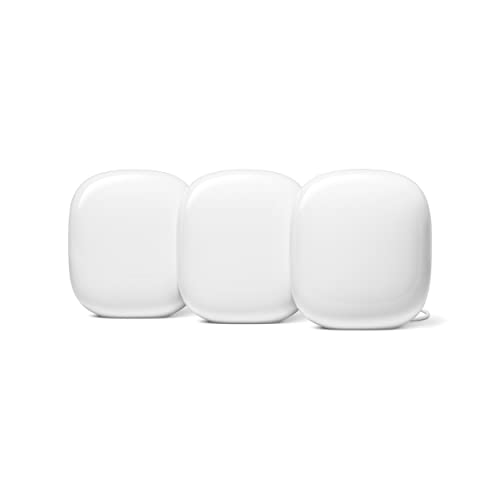
3. Google Nest WiFi Pro 6E Mesh System
Key specs
Google Nest WiFi Pro, 6E, reliable home Wi-Fi system with fast speed and whole home coverage, mesh router, 3 pack, snow.
Strengths
- Wi-Fi 6E adds a band the older generations do not have, which gives the system more room for the household's devices.
- The 3-pack design means the system is built for a whole home from the start, not for a single room with extenders added later.
- Google is the household name in this guide for a smart home, and the system is built to sit alongside the other Google devices in the home.
Trade-offs
- The listing gives no coverage figure to quote, so the buyer should check the listing for the coverage of the 3-pack.
- The listing gives no device count to quote, so the buyer should check the listing for how many devices the system supports.
- The snow colour is the only colour in the listing, so a buyer who wants a different colour should check the listing for the other options.
Who it fits
A household with Google devices that wants a Wi-Fi 6E mesh system.
Best for: Google smart homes, where Wi-Fi 6E and a matching system matter.
Not suited for: Buyers who want a stated coverage figure, who should take the TP-Link Deco X55 above.
In daily use
Place the three units around the home, one beside the modem and the other two in the far rooms, and let the system set itself up through the app, because the app guides the placement. Test the signal in the farthest room, and move a satellite closer to the router if the far room is still weak, because a satellite too far from the router is the most common cause of a weak mesh.
The Google Nest WiFi Pro is the Google pick: the Wi-Fi 6E mesh system for a Google home.
Check price on Amazon: Google Nest WiFi Pro 6E Mesh System

4. ASUS ZenWiFi AX6600 Tri-Band Mesh WiFi 6 System
Key specs
ASUS ZenWiFi AX6600 tri-band mesh WiFi 6 system, XT8 1PK, whole home coverage up to 2750 square feet and 4+ rooms, AiMesh, included lifetime internet security, easy setup, 3 SSID, parental control, white.
Strengths
- Lifetime internet security is included, which is a feature no other pick in this guide offers, and it protects every device on the network.
- Parental control is included, which suits a family home where the children's devices need limits.
- The 3 SSID design means the system can run separate networks, for the family, for guests, and for smart-home devices.
Trade-offs
- The 1-pack covers up to 2750 square feet, so a buyer with a larger home should take a 3-pack in this guide.
- Wi-Fi 6 is the generation in this listing, so a household that wants Wi-Fi 7 should take the Orbi 370 pick below.
- AiMesh is the ASUS system for adding units, so a buyer who wants to expand later should check the listing for the compatible units.
Who it fits
A family home that wants security and parental control built into the router.
Best for: Family homes, where security and parental control matter most.
Not suited for: Buyers who want a 3-pack for a large home, who should take the TP-Link Deco X55 above.
In daily use
Place the unit beside the modem, and turn on the lifetime internet security on the first day, because it protects every device on the network from the start. Set up the parental control for the children's devices, and create a separate network for guests, because a guest network keeps the family network private.
The ASUS ZenWiFi AX6600 is the security pick: the mesh system with lifetime internet security and parental control.
Check price on Amazon: ASUS ZenWiFi AX6600 Tri-Band Mesh WiFi 6 System

5. Amazon eero Pro 6E Mesh WiFi System
Key specs
Amazon eero Pro 6E mesh wifi system, supports internet plans up to 2.5 Gbps, coverage up to 6,000 square feet, connect 100+ devices, 3-pack.
Strengths
- The 100+ device count is the largest in this guide alongside the Deco XE75, and it suits a household with a smart home full of connected devices.
- Support for internet plans up to 2.5 Gbps means the system is ready for a fast plan, not only for an ordinary one.
- The 3-pack covers up to 6,000 square feet, which suits a large family home.
Trade-offs
- The listing gives no Wi-Fi generation detail beyond 6E in the name, so the buyer should check the listing for the full specification.
- A 3-pack suits a large home, so a buyer with a small flat should take a smaller set in this guide.
- Amazon is the maker, and the system is built to sit alongside the other Amazon devices in the home, which suits an Alexa household best.
Who it fits
A large household with many connected devices that wants a 3-pack mesh system.
Best for: Large smart homes, where the device count matters most.
Not suited for: Buyers who want the widest coverage, who should take the NETGEAR Orbi RBK753 above.
In daily use
Place the three units around the home, one beside the modem and the other two in the far rooms, and let the app guide the placement, because the app tests the signal between the units. Connect the devices that need the fastest connection by Ethernet where the home allows it, and test the signal in the farthest room before the return window closes.
The Amazon eero Pro 6E is the devices pick: the mesh system that connects more than 100 devices.
Check price on Amazon: Amazon eero Pro 6E Mesh WiFi System

6. TP-Link Deco XE75 AXE5400 WiFi 6E Mesh System
Key specs
TP-Link Deco XE75 AXE5400 tri-band WiFi 6E system, 3-pack, Wi-Fi up to 7200 square feet, replaces WiFi router and extender, AI-driven, 6GHz band, WPA3.
Strengths
- Wi-Fi 6E with a 6GHz band gives the system a band the older generations do not have, which suits a household with many devices.
- The coverage of up to 7200 square feet is the second widest in this guide, after the Orbi RBK753.
- Tri-band Wi-Fi gives the system a dedicated band for the satellites, and WPA3 is the newest Wi-Fi security in this guide.
Trade-offs
- The listing gives no device count to quote, so the buyer should check the listing for how many devices the system supports.
- The listing gives no port detail to quote, so the buyer should check the listing before ordering a system for wired devices.
- A 3-pack suits a large home, so a buyer with a small flat should take a smaller set in this guide.
Who it fits
A large household that wants Wi-Fi 6E with the widest Deco coverage.
Best for: Large homes with many devices, where Wi-Fi 6E and coverage matter.
Not suited for: Buyers who want Wi-Fi 7, who should take the NETGEAR Orbi 370 below.
In daily use
Place the three units around the home, one beside the modem and the other two in the far rooms, and let the AI-driven setup guide the placement. Turn on WPA3 security on the first day, and test the signal in the farthest room, because the farthest room is where a mesh system earns its keep.
The TP-Link Deco XE75 is the Wi-Fi 6E pick: the tri-band mesh system with the widest Deco 6E coverage.
Check price on Amazon: TP-Link Deco XE75 AXE5400 WiFi 6E Mesh System
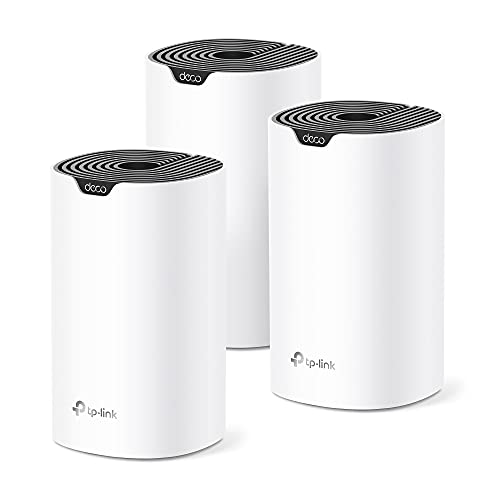
7. TP-Link Deco S4 Mesh AC1900 WiFi System
Key specs
TP-Link Deco S4 mesh AC1900 WiFi system, 3-pack, up to 5,500 square feet coverage, replaces WiFi router and extender, gigabit ports, works with Alexa.
Strengths
- The 3-pack covers up to 5,500 square feet, which is enough for a family home at the most affordable end of this guide.
- Gigabit ports on the units mean a television or a games console can be wired in, which suits a home that streams and games.
- Alexa compatibility means the system can be controlled by voice in an Alexa household.
Trade-offs
- AC1900 is the oldest Wi-Fi generation in this guide, so a household that wants Wi-Fi 6 or newer should take a different pick.
- The listing gives no device count to quote, so the buyer should check the listing for how many devices the system supports.
- A 3-pack suits a family home, so a buyer with a small flat should take a smaller set in this guide.
Who it fits
A family home that wants a 3-pack mesh system at the most affordable end of this guide.
Best for: Family homes, where a 3-pack and gigabit ports matter most.
Not suited for: Buyers who want Wi-Fi 6 or newer, who should take the TP-Link Deco X55 above.
In daily use
Place the three units around the home, one beside the modem and the other two in the far rooms, and wire the television or the games console to the nearest satellite, because a wired connection is steadier than a wireless one for streaming and gaming. Test the signal in the farthest room before the return window closes.
The TP-Link Deco S4 is the value pick: the 3-pack mesh system at the most affordable end of this guide.
Check price on Amazon: TP-Link Deco S4 Mesh AC1900 WiFi System

8. NETGEAR Orbi 370 Series WiFi 7 Mesh System
Key specs
NETGEAR Orbi 370 series WiFi 7 mesh system, up to 6,000 square feet, 3 pack, up to 5 Gbps, 70 devices, easy setup, dual-band, security features, 2.5 Gig port, router plus 2 satellite extenders, RBE373.
Strengths
- Wi-Fi 7 is the newest generation in this guide, and it is the pick for a household that wants the longest useful life from its router.
- Up to 5 Gbps is the fastest stated speed in this guide, and it suits a household with the fastest internet plan.
- The 2.5 Gig port means the router can take a fast internet connection and pass it on to the home network.
Trade-offs
- Dual-band Wi-Fi means the system has two bands rather than three, so a household that wants a dedicated satellite band should take the Orbi RBK753 above.
- The 70 device count is smaller than the eero Pro 6E count, so a household with more than 70 connected devices should check the listing carefully.
- Wi-Fi 7 is new, and a household whose devices are all older should know that the system will still serve them, but the newest features will wait for newer devices.
Who it fits
A household that wants the newest Wi-Fi generation in this guide.
Best for: Future-proof homes, where Wi-Fi 7 and the fastest speed matter.
Not suited for: Buyers who want a tri-band system, who should take the NETGEAR Orbi RBK753 above.
In daily use
Place the router beside the modem, and the two satellites in the far rooms, and use the 2.5 Gig port for the internet connection where the plan supports it, because the port is what lets the fast plan reach the home. Let the system update its software on the first day, and test the signal in the farthest room before the return window closes.
The NETGEAR Orbi 370 is the Wi-Fi 7 pick: the newest mesh system in this guide, with the fastest stated speed.
Check price on Amazon: NETGEAR Orbi 370 Series WiFi 7 Mesh System
Buying guide: best whole house wifi routers
Mesh or single router: which suits the home
A mesh system suits a home with dead zones, because it places several units around the home, all sharing one network name. A single router suits a flat, because one unit can cover a small space, and a mesh system in a flat is a waste of units. The rule is simple: a home where the signal fades in the far rooms needs a mesh system, and a home where the signal is strong everywhere needs only a single router. Every pick in this guide is a mesh system, because the keyword is whole-house coverage, and a single router cannot cover a whole house.
Coverage: how much house does the set cover
Coverage is stated in square feet, and the picks in this guide run from 2750 square feet for a single unit to 7500 square feet for a three-unit set. The coverage figure is the maker's stated figure for the set as sold, and it assumes the units are placed well, with clear paths between them. A home with thick walls, several floors, or a garden office will need more units than a home with thin walls and one floor, because walls and floors block Wi-Fi. Buy the set for the home as it is, not for the home as the listing imagines it, and add a unit later if the far room is still weak.
Wi-Fi 6, 6E and 7: what the generations mean
Wi-Fi 6 is the generation most homes use, and the Deco X55, the Orbi RBK753 and the ZenWiFi XT8 in this guide are Wi-Fi 6 systems. Wi-Fi 6E adds a 6GHz band, which the Google Nest WiFi Pro, the eero Pro 6E and the Deco XE75 offer, and which gives the system more room for devices. Wi-Fi 7 is the newest generation, offered by the Orbi 370 in this guide, and it is the pick for a household that wants the longest useful life. A household whose devices are all older will not notice the difference between the generations, and a household with many new devices will, so buy the generation for the devices, not for the number on the box.
Bands: why tri-band matters
A mesh system uses one band for the household's devices and, in a tri-band system, a dedicated band for the satellites to talk to each other. The Orbi RBK753, the ZenWiFi XT8 and the Deco XE75 are tri-band systems, and the dedicated band is what keeps the household's band free when the satellites are busy. A dual-band system, like the Orbi 370, shares its bands between the household and the satellites, which is simpler and cheaper, but can slow down when the network is busy. A large home with many devices should take a tri-band system. A smaller home will never notice the difference.
Device count: how many devices the system supports
The device count is the number of connected devices the system is built to serve, and the picks in this guide run from 40+ devices to 100+ devices. A household with a few phones and a laptop will never reach the limit of any pick here. A household with a smart home, with lights, cameras, speakers and sensors, will reach it quickly, and should take a system with the largest device count, such as the eero Pro 6E with 100+ devices. Count the connected devices in the home before ordering, because the count is larger than most households expect.
Placement: where the units go
Placement decides whether a mesh system works, because a satellite too far from the router is the most common cause of a weak mesh. Place the first unit beside the modem, the second halfway across the home, and the third in the far room, so the units are spread evenly rather than clustered together. Keep the units out in the open, on a shelf rather than in a cupboard, because a unit in a cupboard is a unit whose signal is blocked. Test the signal in the farthest room on the first day, and move a satellite closer to the router if the far room is still weak.
What to check before ordering
Before ordering, check three things in the listing: the set size, the coverage, and the Wi-Fi generation. The set size decides how many units arrive in the box. The coverage decides how much house the set is built for. The generation decides how long the system will stay current. Check the model name, because a system with a similar name from the same maker can be a different set size entirely, and the picks in this guide are named exactly, so the listing should match the name before the order is placed.
Mesh systems for large homes
A large home needs a three-unit set, because one unit cannot cover several thousand square feet, however good it is. The Deco X55, the Orbi RBK753, the Deco XE75 and the eero Pro 6E are the three-unit picks in this guide, and they cover from 6000 to 7500 square feet between them. Place the units evenly, wire the satellites to each other where the home allows it, and test the farthest room, because the farthest room is where a mesh system for a large home earns its keep.
Usage and care
Place the first unit beside the modem, the second halfway across the home, and the third in the far room, because a mesh system works best when the units are spread evenly rather than clustered together. Let the system set itself up through the app, and let the software update finish on the first day, because the first update is usually the largest and it fixes the things the factory software got wrong. Test the signal in the farthest room before the return window closes.
Look after the system by keeping the units out in the open, on a shelf rather than in a cupboard, because a unit in a cupboard is a unit whose signal is blocked. Keep the units away from thick walls and metal objects where possible, because walls and metal block Wi-Fi more than any other obstacle. Restart the system once a month, by switching it off and on again, because a monthly restart clears the memory and keeps the network running smoothly.
Store the spare Ethernet cables where they can be found, and wire the devices that need the steadiest connection, such as a television or a games console, to the nearest satellite, because a wired connection is steadier than a wireless one for streaming and gaming. Turn on the security features the system offers, and set up a guest network for visitors, because a guest network keeps the family network private. Update the software when the maker offers it.
Common mistakes
The most common mistake is buying on the coverage figure alone: a system that claims 7500 square feet will not cover a home with thick walls and three floors, because walls and floors block Wi-Fi, and the coverage figure assumes clear paths between the units. Choose the system for the home as it is, then for the generation, then for the coverage, and add a unit later if the far room is still weak.
The second mistake is placing the satellites too far from the router. A satellite that is too far away has a weak connection to the router, and it passes that weak connection on to the devices in its room, which is worse than no satellite at all. Place the satellites halfway across the home, not in the farthest room, and test the signal in the farthest room on the first day, because the farthest room is where the placement shows its faults.
The third mistake is expecting a mesh system to fix a slow internet plan. A mesh system spreads the internet the household already has, and it cannot make a slow plan fast. A household with a slow plan should upgrade the plan first, and a household with a fast plan and dead zones should buy a mesh system, because the two problems have different fixes, and buying the wrong fix wastes the money.
Mesh systems for gaming
A mesh system for gaming wants a wired connection, a tri-band design, and a fast plan, because gaming needs a steady connection more than a fast one. The Orbi RBK753 and the Deco XE75 are the picks for that job, because they are tri-band systems with the speed to support a fast plan. Wire the console to the nearest satellite, because a wired connection is steadier than a wireless one, and place the satellite close enough to the router that its connection is strong, because a weak satellite passes a weak connection on to the console.
Mesh systems for working from home
A mesh system for working from home wants a strong signal in the office, a guest network for visitors, and security features that protect the work devices. The ASUS ZenWiFi AX6600 is the pick for that job, because it offers lifetime internet security, parental control and separate networks. Place a satellite in or near the office, turn on the security features on the first day, and create a separate network for work devices, because a work network should be kept apart from the smart-home devices.
Mesh systems for smart homes
A mesh system for a smart home wants a large device count, because a smart home has lights, cameras, speakers and sensors, all connected at once. The Amazon eero Pro 6E is the pick for that job, because it connects more than 100 devices. Count the connected devices before ordering, place the units evenly, and create a separate network for the smart-home devices where the system offers it, because a separate network keeps the smart-home traffic away from the phones and laptops.
Final recommendation
If one mesh system has to win this guide, it is the TP-Link Deco X55, because it is the most complete all-rounder at this level: a three-unit set, wide coverage, gigabit ports, and Ethernet backhaul. The NETGEAR Orbi RBK753 is the pick for the largest homes, and the NETGEAR Orbi 370 is the pick for households that want the newest Wi-Fi generation.
For most buyers, the choice comes down to three questions. How big is the home? If the answer is large, the three-unit sets are the answers. How many devices are connected? If the answer is many, the eero Pro 6E is the answer. Does the household want the newest generation? If yes, the Orbi 370 is the answer. Answer those three, and the right mesh system in this guide picks itself.
Whatever mesh system is chosen, place the units evenly on the first day, let the software update finish, and test the farthest room before the return window closes. A mesh system bought carefully is a network the household stops thinking about, and the eight systems in this guide are all systems that can do that, in different sizes and for different homes.
Frequently asked questions
What is the best whole house WiFi router?
The best whole house WiFi router is the TP-Link Deco X55, because it offers a three-unit set, wide coverage, gigabit ports and Ethernet backhaul. The NETGEAR Orbi RBK753 is the best alternative for the largest homes, and the NETGEAR Orbi 370 is the best alternative for households that want the newest Wi-Fi generation.
What is a mesh WiFi system?
A mesh Wi-Fi system is several units working as one network, all sharing one network name, so a phone moves from one unit to the next without dropping the connection. A single router covers one room well, and a mesh system covers a whole house, because the units are placed around the home and pass the signal between them.
How many units do I need?
A flat needs one or two units, a family home needs two or three, and a large home needs three. The picks in this guide are mostly three-unit sets, with the ASUS ZenWiFi XT8 as a one-unit set for a smaller home. Buy the set for the home as it is, and add a unit later if the far room is still weak, because a satellite too far from the router is worse than no satellite at all.
What is the difference between Wi-Fi 6, 6E and 7?
Wi-Fi 6 is the generation most homes use. Wi-Fi 6E adds a 6GHz band, which gives the system more room for devices. Wi-Fi 7 is the newest generation, and it is the pick for a household that wants the longest useful life. A household whose devices are all older will not notice the difference, and a household with many new devices will.
Do I need a tri-band mesh system?
A large home with many devices should take a tri-band system, because the dedicated band keeps the household's band free when the satellites are busy. The Orbi RBK753, the ZenWiFi XT8 and the Deco XE75 in this guide are tri-band systems. A smaller home will never notice the difference, and a dual-band system like the Orbi 370 will serve it well.
Where should I place the mesh units?
Place the first unit beside the modem, the second halfway across the home, and the third in the far room, so the units are spread evenly. Keep the units out in the open, on a shelf rather than in a cupboard, because a unit in a cupboard is a unit whose signal is blocked. Test the signal in the farthest room on the first day.
Will a mesh system make my internet faster?
No. A mesh system spreads the internet the household already has, and it cannot make a slow plan fast. A household with a slow plan should upgrade the plan first, and a household with a fast plan and dead zones should buy a mesh system, because the two problems have different fixes.
More from ilcastellomenu.com
Best Wi-Fi routers under 100: Wi-Fi routers for a smaller budget
Best Wi-Fi routers under 200: Wi-Fi routers for a bigger budget
Best mesh routers for 1-gig service: mesh systems for a gigabit plan