The best 1 gig routers are the ones that actually let you use a gigabit internet plan, and that is a lower bar than it sounds: a router with slow ports or old WiFi can leave half your gigabit speed unused, while a router with gigabit ports and modern WiFi can deliver it to every room. This guide covers the routers that do the job, from the affordable WiFi 6 models that suit a gigabit plan today to the WiFi 7 models with 2.5-gigabit ports that suit a faster plan tomorrow. Every router below is a current listing with its brand and model confirmed, and each one states its WiFi standard and its port speeds in the listing, so there is no guessing about whether it can carry a gigabit.
What makes one 1 gig router better than another is mostly a question of WiFi standard, port speed and coverage. A WiFi 6 router such as the TP-Link Archer AX21 or the AX73 is the right pick for a gigabit plan today, because WiFi 6 is fast enough for gigabit speeds and the routers cost less than the newer standards. A WiFi 6E router such as the Archer AXE5400 adds the 6GHz band for less congestion, which suits a busy home with many devices. A WiFi 7 router such as the Archer BE230 or the BE400 adds 2.5-gigabit ports, which suit a home that will upgrade to a faster plan later. The eight routers in this guide span all three standards.
Port speed is the first filter to apply. A router needs gigabit Ethernet ports to carry a gigabit plan to a wired device, and a 2.5-gigabit WAN port to carry a faster plan, so check the port speeds in the listing before ordering. A router with only 100-megabit ports cannot carry a gigabit plan at all, and a router with gigabit ports but slow WiFi cannot deliver gigabit speeds to a wireless device. Check your internet plan speed, count the wired devices you own, and measure the area the router must cover, because a router that is fast but cannot reach the far bedroom is still the wrong router.
In this guide
Quick picks: best 1 gig routers
| # | Product | Where to buy |
|---|---|---|
| 1 | TP-Link AX1800 WiFi 6 Router Archer AX21 V5 | Check on Amazon |
| 2 | TP-Link BE6500 Dual-Band WiFi 7 Router BE400 | Check on Amazon |
| 3 | NETGEAR Nighthawk WiFi 6 Router R6700AX | Check on Amazon |
| 4 | TP-Link Dual-Band BE3600 Wi-Fi 7 Router Archer BE230 | Check on Amazon |
| 5 | TP-Link AC1200 Gigabit Dual Band WiFi Router Archer A6 | Check on Amazon |
| 6 | TP-Link Dual-Band AX3000 Wi-Fi 6 Wireless Gigabit Internet Router | Check on Amazon |
| 7 | TP-Link AX5400 WiFi 6 Router Archer AX73 | Check on Amazon |
| 8 | TP-Link AXE5400 Tri-Band WiFi 6E Router | Check on Amazon |
How the picks were chosen
The picks were chosen from current router listings, with three hard filters. First, the product must be a complete wireless router with gigabit-capable ports, not a switch, a travel router or a modem: the Ethernet switch, the MikroTik wired routers and the travel router that appeared in the search results were excluded. Second, the listing must name the exact model, so the Archer AX21, the AX73, the AX10, the AXE5400, the BE230 and the BE400 are treated as the distinct models they are, not lumped together as TP-Link routers. Third, the router must be a current, new listing with its WiFi standard and port speeds stated.
Within those filters the guide favours variety: three WiFi 6 routers at different levels for a gigabit plan today, one WiFi 6E router for the 6GHz band, two WiFi 7 routers with 2.5-gigabit ports for a faster plan tomorrow, one NETGEAR Nighthawk for buyers who want a different brand, and one affordable WiFi 6 router for a smaller home. WiFi standard was weighed more heavily than brand, because the standard decides the speed and the congestion handling, while the brand decides the app and the support. Coverage was noted where the listing states it, because a fast router that cannot reach the far room is no use.
One judgement call is worth stating plainly. The word gig in the keyword means a gigabit internet plan, not a gigabit of WiFi speed on its own, and this guide treats it that way: the picks are routers that can carry a gigabit plan from the modem to your devices, over wires and over WiFi. A router that claims gigabit WiFi but has slow ports cannot do that, and a router with 2.5-gigabit ports is included because it carries a gigabit plan with room to spare and suits a faster plan later. The guide says which is which so the choice is deliberate, not accidental.
Quick comparison
| Product | Standout detail |
|---|---|
| TP-Link AX1800 WiFi 6 Router Archer AX21 V5 | WiFi 6, AX1800, gigabit, EasyMesh |
| TP-Link BE6500 Dual-Band WiFi 7 Router BE400 | WiFi 7, BE6500, dual 2.5G ports |
| NETGEAR Nighthawk WiFi 6 Router R6700AX | WiFi 6, 1.8 Gbps, 1,500 sq ft |
| TP-Link Dual-Band BE3600 Wi-Fi 7 Router Archer BE230 | WiFi 7, BE3600, 2×2.5G + 3x1G ports |
| TP-Link AC1200 Gigabit Dual Band WiFi Router Archer A6 | WiFi 6, AC1200, gigabit, MU-MIMO |
| TP-Link Dual-Band AX3000 Wi-Fi 6 Wireless Gigabit Internet Router | WiFi 6, AX3000, gigabit, EasyMesh |
| TP-Link AX5400 WiFi 6 Router Archer AX73 | WiFi 6, AX5400, gigabit, long range |
| TP-Link AXE5400 Tri-Band WiFi 6E Router | WiFi 6E, AXE5400, 2.5Gbps WAN, 6GHz |

1. TP-Link AX1800 WiFi 6 Router Archer AX21 V5
Key specs
WiFi 6 router, AX1800, dual band, gigabit ports, EasyMesh, works with Alexa. The Archer AX21 is the affordable gigabit pick in this guide, for a gigabit plan in a normal home.
Strengths
- AX1800 WiFi 6 is fast enough for a gigabit plan in most homes.
- Gigabit ports carry the full plan speed to wired devices.
- EasyMesh lets you add another TP-Link router later for wider coverage.
Trade-offs
- AX1800 is slower than the AX3000 and AX5400 routers here for many devices at once.
- Dual band only, so no 6GHz band for congestion relief.
- Basic feature set suits a home network, not a small business.
Who it fits
Homes on a gigabit plan who want a good WiFi 6 router at a fair cost.
Best for: an affordable WiFi 6 router for a gigabit plan.
Not suited for: anyone who needs the fastest WiFi, or coverage for a very large home.
In daily use
In daily use, the Archer AX21 is the router that quietly does its job. It sits by the modem, the gigabit ports carry the full plan speed to the television and the games console, and the WiFi 6 signal covers a normal home without fuss. Set it up with the TP-Link app, put it in the open rather than inside a cabinet, and the connection will stay steady through streaming, gaming and video calls. It is the router to buy when the gigabit plan is new and the router should simply work.
Check price on Amazon: TP-Link AX1800 WiFi 6 Router Archer AX21 V5

2. TP-Link BE6500 Dual-Band WiFi 7 Router BE400
Key specs
WiFi 7 router, BE6500, dual 2.5Gbps ports, USB 3.0, covers up to 2,400 sq ft, 90 devices. The BE400 is the WiFi 7 pick in this guide, with 2.5-gigabit ports for a faster plan later.
Strengths
- WiFi 7 with BE6500 speeds is ready for faster internet plans than gigabit.
- Dual 2.5Gbps ports carry more than a gigabit to wired devices.
- Covers up to 2,400 sq ft and 90 devices, which suits a busy home.
Trade-offs
- WiFi 7 costs more than WiFi 6, and most devices today are still WiFi 6 or earlier.
- Dual band only, so no 6GHz band in this model.
- 2.5-gigabit ports only help if the modem and the devices support them.
Who it fits
Homes who want a WiFi 7 router with 2.5-gigabit ports for the next plan upgrade.
Best for: a WiFi 7 router for a gigabit plan today and a faster plan tomorrow.
Not suited for: anyone on a tight budget, or with only a few devices.
In daily use
In daily use, the BE400 is the router for a home that plans ahead. The WiFi 7 signal handles many devices at once, the 2.5-gigabit ports carry more than a gigabit to a wired computer or a network drive, and the coverage reaches the far rooms of a larger home. Set it up with the app, use the 2.5-gigabit port for the modem if your plan supports it, and the router will still be fast when the internet plan gets faster. It is the router to buy when you want to upgrade the plan, not the router, next time.
Check price on Amazon: TP-Link BE6500 Dual-Band WiFi 7 Router BE400

3. NETGEAR Nighthawk WiFi 6 Router R6700AX
Key specs
WiFi 6 router, up to 1,500 sq ft, 1.8 Gbps, 20 devices. The R6700AX is the NETGEAR pick in this guide, for buyers who want a Nighthawk router for a gigabit plan.
Strengths
- Nighthawk design is proven, with a straightforward app and reliable performance.
- 1.8 Gbps WiFi 6 is fast enough for a gigabit plan in a normal home.
- Covers up to 1,500 sq ft, which suits a flat or a small house.
Trade-offs
- 1.8 Gbps is slower than the AX3000 and AX5400 routers here for many devices.
- 20-device limit suits a normal home, not a house full of smart devices.
- No 2.5-gigabit port, so it cannot carry a faster plan later.
Who it fits
Homes who want a NETGEAR Nighthawk router for a gigabit plan.
Best for: a reliable WiFi 6 router from a different brand.
Not suited for: anyone with dozens of smart devices, or a plan faster than gigabit.
In daily use
In daily use, the R6700AX is the router for a buyer who trusts the Nighthawk name. It sets up quickly with the NETGEAR app, the WiFi 6 signal covers a flat or a small house, and the gigabit ports carry the plan speed to the television and the console. Keep it in the open, not behind the television, and the signal will stay strong in every room. It is the router to buy when you want a proven brand and a simple setup.
Check price on Amazon: NETGEAR Nighthawk WiFi 6 Router R6700AX

4. TP-Link Dual-Band BE3600 Wi-Fi 7 Router Archer BE230
Key specs
WiFi 7 router, BE3600, 4-stream, 2×2.5G plus 3x1G ports, USB 3.0, 2.0 GHz quad core. The Archer BE230 is the affordable WiFi 7 pick in this guide, with 2.5-gigabit ports at a fair cost.
Strengths
- WiFi 7 at a fair cost, with 2.5-gigabit ports for a faster plan later.
- Two 2.5-gigabit ports plus three gigabit ports cover wired devices well.
- Quad-core processor keeps the router responsive with many devices.
Trade-offs
- BE3600 is slower than the BE6500 router here for the busiest homes.
- Dual band only, so no 6GHz band in this model.
- WiFi 7 benefits only show with WiFi 7 devices, which are still new.
Who it fits
Homes who want WiFi 7 and 2.5-gigabit ports without paying flagship money.
Best for: an affordable WiFi 7 router for a gigabit plan.
Not suited for: anyone who needs the fastest WiFi 7 speeds, or the 6GHz band.
In daily use
In daily use, the Archer BE230 is the router for a buyer who wants the new standard without the new-standard cost. The WiFi 7 signal handles the home network smoothly, the 2.5-gigabit ports carry a fast plan to a wired computer, and the quad-core processor keeps the app responsive. Set it up with the TP-Link app, connect the modem to a 2.5-gigabit port if the plan supports it, and the router will be ready when the plan gets faster. It is the router to buy when WiFi 7 matters but the budget does not stretch to the flagship.
Check price on Amazon: TP-Link Dual-Band BE3600 Wi-Fi 7 Router Archer BE230

5. TP-Link AC1200 Gigabit Dual Band WiFi Router Archer A6
Key specs
WiFi router, AC1200, gigabit dual band, MU-MIMO, 4 antennas, OneMesh. The Archer A6 is the budget pick in this guide, for a small home on a gigabit plan.
Strengths
- Gigabit ports carry the full plan speed to wired devices at a low cost.
- MU-MIMO handles several devices at once better than older routers.
- Four antennas give decent coverage for a flat or a small house.
Trade-offs
- AC1200 WiFi is slower than the WiFi 6 routers here, so wireless speeds will not match the plan.
- Older WiFi standard means less capacity for many devices at once.
- No WiFi 6 or 6GHz, so it is a budget choice, not a future-proof one.
Who it fits
Small homes on a gigabit plan who want the lowest-cost router with gigabit ports.
Best for: a budget router with gigabit ports for a small home.
Not suited for: anyone who wants gigabit speeds over WiFi, or coverage for a large home.
In daily use
In daily use, the Archer A6 is the router for a small home that needs gigabit ports without gigabit cost. The wired devices get the full plan speed, the WiFi covers a flat well enough for streaming and browsing, and the four antennas keep the signal steady in the next room. It will not deliver gigabit speeds over WiFi, because AC1200 WiFi cannot, so use a cable for the television and the console if you want the full speed. It is the router to buy when the budget is tight and the home is small.
Check price on Amazon: TP-Link AC1200 Gigabit Dual Band WiFi Router Archer A6

6. TP-Link Dual-Band AX3000 Wi-Fi 6 Wireless Gigabit Internet Router
Key specs
WiFi 6 router, AX3000, dual band, gigabit, EasyMesh, VPN clients and server, HomeShield. The AX3000 is the mid-range WiFi 6 pick in this guide, for a busy home on a gigabit plan.
Strengths
- AX3000 WiFi 6 handles more devices at once than the AX1800 routers here.
- Gigabit ports and EasyMesh cover wired devices and wider coverage.
- VPN and HomeShield features suit a home that wants more control.
Trade-offs
- AX3000 is slower than the AX5400 router here for the busiest homes.
- Dual band only, so no 6GHz band for congestion relief.
- More features mean a longer setup than the simplest routers here.
Who it fits
Busy homes on a gigabit plan who want a mid-range WiFi 6 router with extra features.
Best for: a mid-range WiFi 6 router for a gigabit plan.
Not suited for: anyone who needs the fastest WiFi, or the simplest possible setup.
In daily use
In daily use, the AX3000 is the router for a home with many devices. The AX3000 WiFi 6 signal keeps phones, laptops, televisions and smart speakers connected without slowing down, the gigabit ports carry the plan speed to wired devices, and the VPN and HomeShield features give the household more control. Set it up with the app, put it centrally and in the open, and add an EasyMesh node later if the coverage needs widening. It is the router to buy when the home is busy and the router should keep up.
Check price on Amazon: TP-Link Dual-Band AX3000 Wi-Fi 6 Wireless Gigabit Internet Router

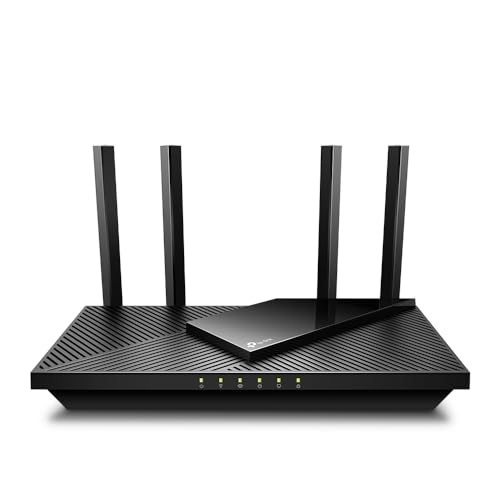
7. TP-Link AX5400 WiFi 6 Router Archer AX73
Key specs
WiFi 6 router, AX5400, dual band, gigabit, long range coverage. The Archer AX73 is the long-range WiFi 6 pick in this guide, for a larger home on a gigabit plan.
Strengths
- AX5400 WiFi 6 is the fastest WiFi 6 in this guide, for many devices at once.
- Long-range coverage suits a larger home better than the compact routers here.
- Gigabit ports carry the full plan speed to wired devices.
Trade-offs
- AX5400 costs more than the AX1800 and AX3000 routers here.
- Dual band only, so no 6GHz band for congestion relief.
- No 2.5-gigabit port, so it cannot carry a faster plan later.
Who it fits
Larger homes on a gigabit plan who want fast WiFi 6 with long range.
Best for: a long-range WiFi 6 router for a gigabit plan.
Not suited for: anyone who wants WiFi 7, or a plan faster than gigabit.
In daily use
In daily use, the Archer AX73 is the router for a larger home. The AX5400 signal reaches further than the compact routers here, the gigabit ports carry the plan speed to the television and the console, and the WiFi 6 capacity keeps many devices connected at once. Place it centrally and high up, not on the floor behind furniture, and the coverage will reach the far rooms. It is the router to buy when the house is big and the WiFi should reach all of it.
Check price on Amazon: TP-Link AX5400 WiFi 6 Router Archer AX73

8. TP-Link AXE5400 Tri-Band WiFi 6E Router
Key specs
WiFi 6E router, AXE5400, tri-band, 2.5Gbps WAN port, 6GHz band. The AXE5400 is the WiFi 6E pick in this guide, with a 6GHz band for less congestion and a 2.5-gigabit WAN port.
Strengths
- 6GHz band gives a clear channel for WiFi 6E devices, with less congestion than 2.4GHz and 5GHz.
- 2.5Gbps WAN port carries a faster plan than gigabit from the modem.
- Tri-band design separates devices across three bands for smoother performance.
Trade-offs
- 6GHz benefits only show with WiFi 6E devices, which are still new.
- AXE5400 costs more than the WiFi 6 routers here.
- 6GHz range is shorter than 5GHz, so it suits the same room more than the far bedroom.
Who it fits
Homes with WiFi 6E devices who want a clear 6GHz band and a 2.5-gigabit WAN port.
Best for: a WiFi 6E router for a gigabit plan with less congestion.
Not suited for: anyone with only older devices, or a very large home.
In daily use
In daily use, the AXE5400 is the router for a home full of devices. The 6GHz band gives WiFi 6E phones and laptops a clear channel away from the crowded 2.4GHz and 5GHz bands, the tri-band design keeps the network smooth when many devices are online, and the 2.5-gigabit WAN port is ready for a faster plan. Keep the router central, use the 6GHz band for devices in the same room, and the network will stay fast even in the evening when every device is on. It is the router to buy when congestion, not raw speed, is the problem.
Check price on Amazon: TP-Link AXE5400 Tri-Band WiFi 6E Router
Buying guide: best 1 gig routers
Port speed first
Check the ports before the WiFi. A router needs gigabit Ethernet ports to carry a gigabit plan to a wired device, and a 2.5-gigabit WAN port to carry a faster plan from the modem. A router with only 100-megabit ports cannot carry a gigabit plan at all, no matter what its WiFi claims. Check the port speeds in the listing, count the wired devices you own, and connect the modem to the fastest WAN port the router has.
WiFi 6, 6E or 7
WiFi 6 is fast enough for a gigabit plan and costs the least, which is why most of the picks here are WiFi 6. WiFi 6E adds the 6GHz band, which suits a busy home with many devices and WiFi 6E phones and laptops. WiFi 7 adds faster speeds and 2.5-gigabit ports, which suits a home that will upgrade to a faster plan later. Buy WiFi 6 for a gigabit plan today, WiFi 6E for congestion relief, and WiFi 7 for the next plan upgrade.
Coverage and placement
Coverage decides whether the far bedroom gets a signal at all. A router that covers 1,500 sq ft suits a flat or a small house, while a router that covers 2,400 sq ft suits a larger home, and a mesh system suits a house the single router cannot reach. Place the router centrally, high up and in the open, not inside a cabinet or behind the television, because walls and furniture weaken the signal. If the far room is still slow, add a mesh node rather than buying a faster router.
Devices and congestion
Count the devices before you buy: phones, laptops, televisions, consoles and smart speakers all share the same WiFi, and a router that handles 20 devices will struggle with 50. MU-MIMO and OFDMA help a router serve many devices at once, which is why the WiFi 6 and WiFi 7 routers here handle busy homes better than the older AC1200 model. If the evening slowdown is the problem, a tri-band router or a 6GHz band will help more than a higher headline speed.
Modem, plan and setup
Check that your internet plan is actually gigabit before buying a gigabit router, because a slower plan will not get faster with a better router. Connect the modem to the router's WAN port with a good Ethernet cable, set up the router with the app, and test the speed with a wired device first, because a wired test shows what the plan delivers and a wireless test shows what the WiFi delivers. Change the default admin password, turn on automatic updates, and set a strong WiFi password, because a router is the front door of the home network.
Usage and care
Set up a new router by connecting the modem to the WAN port, plugging in the power, and following the app setup to name the network and set a strong password. Place the router centrally, high up and in the open, test the speed with a wired device to confirm the plan, then test the WiFi in each room. Turn on automatic firmware updates, because updates fix security issues and improve performance, and restart the router once a month if the connection feels slow, because a restart clears the temporary issues that build up over time.
Maintain the router by checking the firmware every few months, changing the WiFi password if a device you no longer own is still connected, and keeping the router ventilated and dust-free. If the WiFi slows down in the evening, check whether a device is uploading or downloading heavily, because one busy device can slow the whole network. If a room is still slow, move the router closer to the centre of the home or add a mesh node, rather than turning up the transmit power, which rarely helps and can cause interference.
Live with the router by keeping it updated and ventilated: turn on automatic firmware updates, because updates fix security issues and improve performance, and keep the router out of a closed cabinet, because heat shortens the life of any network device. Check the connected devices every few months and remove the ones you no longer own, because a device you forgot about is a device with access to your network. If the connection feels slow, restart the router once a month, because a restart clears the temporary issues that build up over time, and test the speed with a cable before blaming the WiFi.
Common mistakes
The most common mistake is buying a router with slow ports for a gigabit plan, so the plan speed never reaches the devices. Another is hiding the router inside a cabinet or behind the television, which weakens the signal for no reason. A third is judging the router by a wireless speed test in the far bedroom, when the plan speed should be tested with a cable first. Buyers also forget to change the default admin password, which leaves the home network open.
Do not buy the fastest router for a slow internet plan, because the plan, not the router, sets the limit. Do not buy a WiFi 7 router for devices that are all WiFi 5 or earlier, because the new standard cannot speed up old devices. Do not place the router next to a microwave or a thick wall, because both interfere with WiFi. And do not ignore the device count: a router that handles 20 devices will struggle in a house with 50, no matter how fast its headline speed is.
Do not buy a router for its headline speed alone, because the headline is the combined speed of all bands, not the speed one device will get. Do not place the router next to a microwave, a thick wall or a metal cabinet, because all three interfere with WiFi. Do not ignore the device count, because a router that handles 20 devices will struggle in a house with 50, no matter how fast its headline speed is. And do not forget the modem: a gigabit router behind a slow modem is still a slow network, so check the modem supports the plan too.
WiFi bands explained
WiFi uses three bands: 2.4GHz reaches furthest and passes through walls best, but it is slow and crowded; 5GHz is faster and less crowded, but its range is shorter; 6GHz is the fastest and clearest, but its range is the shortest and only WiFi 6E and WiFi 7 devices can use it. Use 2.4GHz for smart devices far from the router, 5GHz for phones and laptops in the same rooms, and 6GHz for WiFi 6E devices near the router. A tri-band router such as the AXE5400 in this guide separates devices across all three bands, which keeps the network smooth when many devices are online.
Security basics for a home router
A router is the front door of the home network, so secure it properly: change the default admin password, turn on automatic firmware updates, and set a strong WiFi password that is not the one printed on the router. Turn off remote management unless you need it, because an open management page is an open door, and check the connected devices list every few months for devices you do not recognise. A few minutes of setup on day one protects the network for years, and it costs nothing.
Final recommendation
For most homes on a gigabit plan, the TP-Link Archer AX21 is the best 1 gig router in this guide: an affordable WiFi 6 router with gigabit ports that simply works. If the home is busy, the Archer AX3000 or the AX73 give more WiFi 6 speed and range, and the AXE5400 adds the 6GHz band for congestion relief. If the plan will get faster, the Archer BE230 or the BE400 give WiFi 7 with 2.5-gigabit ports at a fair cost.
The NETGEAR Nighthawk R6700AX is the pick for buyers who want a different brand with a proven design, and the Archer A6 is the pick for a small home on the tightest budget. Whichever router you choose, check the port speeds first, place it centrally and in the open, and test with a cable before judging the WiFi: a router is only as fast as the plan and the placement allow.
Set the router up properly on day one: modem to the fastest WAN port, strong admin password, automatic updates on, and the router placed centrally and in the open. Test the speed with a cable first, then test the WiFi in each room, and add a mesh node if a room is still slow rather than buying a faster router. The eight routers in this guide cover every home from a small flat to a large house, so the right one is the one that matches your plan, your devices and your rooms.
Frequently asked questions
What is the best 1 gig router?
The TP-Link Archer AX21 is the best all-round pick in this guide: an affordable WiFi 6 router with gigabit ports that suits a gigabit plan in a normal home. The Archer AX73 is the best long-range WiFi 6 pick, and the Archer BE400 is the best WiFi 7 pick for a faster plan later.
Do I need a WiFi 7 router for a gigabit plan?
No, a WiFi 6 router is fast enough for a gigabit plan, and it costs less. Buy WiFi 7 if you plan to upgrade to a faster internet plan later, or if you want 2.5-gigabit ports, because WiFi 7 on its own will not make a gigabit plan faster.
Why is my gigabit internet slow on WiFi?
The plan speed should be tested with a cable first, because WiFi is always slower than a cable. If the wired speed is gigabit but the WiFi is slow, the router may be badly placed, the device may be far away, or the band may be congested. Move the router centrally, use the 5GHz band near the router, and check the device count.
What is the difference between WiFi 6, 6E and 7?
WiFi 6 is the standard for a gigabit plan today, with better capacity than older WiFi. WiFi 6E adds the 6GHz band for less congestion. WiFi 7 adds faster speeds, lower latency and 2.5-gigabit ports, which suit a faster plan later. All three can carry a gigabit plan, and the right one depends on your devices and your next plan upgrade.
How many devices can a 1 gig router handle?
The routers in this guide handle from 20 devices on the compact models to 90 devices on the WiFi 7 BE400. Count your phones, laptops, televisions, consoles and smart speakers before buying, and pick a router with room to spare, because a router that is full will slow down for everyone.
Do I need a mesh system for a gigabit plan?
Not always: a single good router such as the Archer AX73 or the BE400 covers a flat or a small house well. A mesh system suits a large house, a house with thick walls, or a home where the far rooms are slow even with a good router placed centrally. Try the single router first, placed centrally and in the open, and add a mesh node only if a room is still slow, because a mesh node costs less than replacing the router.
What is the difference between a router and a modem?
A modem connects your home to the internet, and a router shares that connection with your devices over WiFi and Ethernet. Most homes need both, and the modem usually comes from the internet provider while the router is yours to choose. Connect the modem to the router's WAN port with an Ethernet cable, and the router will handle the WiFi, the wired devices and the home network.
More from ilcastellomenu.com
Best Routers for 1 Gig Internet: routers for gigabit internet
Best Mesh Routers for 1 Gig Service: mesh routers for gigabit service