The best keyboards for composition are the instruments that turn a musical idea into a recording, whether that idea is a melody hummed in the kitchen or a full arrangement built track by track. For most home composers, that keyboard is a MIDI controller: a compact keyboard that connects to a computer over USB, plays virtual instruments in a DAW, and adds drum pads, knobs and an arpeggiator for building beats and textures. This guide covers the MIDI controllers that dominate home composition, from the 25-key Akai MPK Mini models that fit on any desk to the 37-key MPK Mini Plus with a built-in step sequencer, plus a 49-key keyboard piano for composers who want full-size keys and a traditional feel. Every product here is a current listing verified against the site product feed, and the guide explains how key count, pads, knobs and software change the way a keyboard works for composition.
The other decision a composer faces is whether the keyboard should make sound on its own. A MIDI controller makes no sound: it sends note data to a computer, where virtual instruments do the sounding. A keyboard piano like the RockJam in this guide has built-in sounds and works standalone, which suits players who want to sit down and play without a computer. Most home composers end up with a MIDI controller, because the computer offers thousands of sounds and full recording, but the standalone piano has a simplicity that a computer setup cannot match. The guide covers both, and each product description states clearly which type it is.
In this guide
Quick picks: best keyboards for composition
| # | Product | Where to buy |
|---|---|---|
| 1 | Akai Professional MPK Mini IV 25-Key MIDI Keyboard, Black | Check on Amazon |
| 2 | Akai Professional MPK Mini Plus 37-Key MIDI Keyboard | Check on Amazon |
| 3 | Akai Professional MPK Mini MK3 25-Key MIDI Keyboard | Check on Amazon |
| 4 | Donner USB-C MIDI Keyboard Controller, 25 Key | Check on Amazon |
| 5 | Donner Mini MIDI Keyboard N-25, 25 Key | Check on Amazon |
| 6 | DaierTek MIDI Keyboard Controller, 25 Key | Check on Amazon |
| 7 | RockJam RJ549 49-Key Keyboard Piano | Check on Amazon |
| 8 | Akai Professional MPK Mini IV 25-Key MIDI Keyboard, White | Check on Amazon |
How the picks were chosen
The picks were chosen from current keyboards for music composition, with the requirement that each product is a real keyboard with keys that play notes, either as a MIDI controller or as a keyboard piano. Books about composition, manuscript notebooks, keyboard stickers and drum pads without keys were excluded, since none of them is a keyboard for composition. The guide covers the key counts composers actually shop: 25-key controllers for portable and desk setups, a 37-key controller for two-handed playing and sequencing, and a 49-key piano for composers who want a wider range and full-size keys. Velocity-sensitive keys, drum pads, knobs and arpeggiators are noted where the listing states them, because those are the features that decide how the keyboard feels in a real session.
The guide also weighed software support, since a MIDI controller is only as good as its integration with the DAW in use. Akai controllers are the safest choice here because every major DAW supports them and tutorials are everywhere, while smaller brands can need more setup. Key feel was considered too: velocity-sensitive keys are essential for expressive playing, since they let the player control volume by touch, and every controller in this guide has them. Finally, the guide includes one keyboard piano for composers who think in piano terms, because a MIDI controller with mini keys is a poor substitute for a pianist who wants full-size keys.
Quick comparison
| Product | Standout detail |
|---|---|
| Akai Professional MPK Mini IV 25-Key MIDI Keyboard, Black | 25-key USB-C MIDI controller, velocity-sensitive, 8 MPC pads, black |
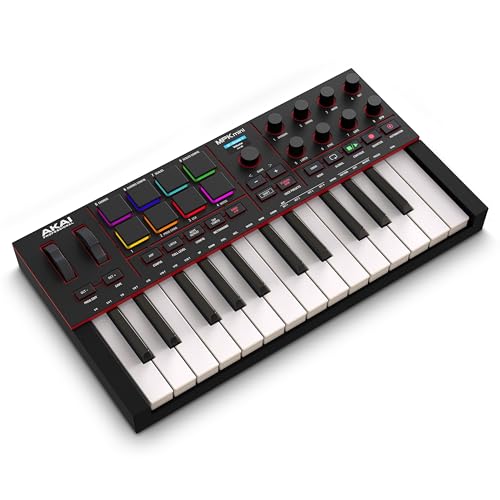
| Akai Professional MPK Mini Plus 37-Key MIDI Keyboard | 37-key USB MIDI controller, 8 MPC pads, 64-step sequencer |
| Akai Professional MPK Mini MK3 25-Key MIDI Keyboard | 25-key USB MIDI controller, 8 MPC pads, 8 knobs |
| Donner USB-C MIDI Keyboard Controller, 25 Key | 25-key USB-C MIDI controller, 8 drum pads, OLED display, smart scales |
| Donner Mini MIDI Keyboard N-25, 25 Key | 25-key mini MIDI controller, velocity-sensitive, light-up keys |
| DaierTek MIDI Keyboard Controller, 25 Key | 25-key MIDI controller, Bluetooth and USB, 8 backlit pads, 8 knobs |
| RockJam RJ549 49-Key Keyboard Piano | 49-key keyboard piano, note stickers, power supply included |
| Akai Professional MPK Mini IV 25-Key MIDI Keyboard, White | 25-key USB-C MIDI controller, velocity-sensitive, 8 MPC pads, white |

1. Akai Professional MPK Mini IV 25-Key MIDI Keyboard, Black
Key specs
25-key USB-C MIDI keyboard controller in black, with velocity-sensitive mini keys, 8 MPC pads, and 3 assignable knobs. Newest MPK Mini generation.
Strengths
- USB-C connection works with modern laptops without an adapter.
- Velocity-sensitive keys respond to how hard they are played, which matters for expressive parts.
- 8 MPC pads give a proper surface for programming drums and triggering samples.
Trade-offs
- 25 mini keys limit two-handed playing and wide chord voicings.
- Mini keys feel cramped for players used to full-size piano keys.
- 3 knobs are fewer than the 8 knobs on the older MK3 model.
Who it fits
Composers who want the newest MPK Mini with USB-C for a modern laptop setup.
Best for: desk composers who want a 25-key USB-C MIDI controller with MPC pads.
Not suited for: pianists who need full-size keys and a wide range.
In daily use
In daily use, the MPK Mini IV is the controller that lives on the desk and gets used every day. It is small enough to sit in front of the monitor without crowding the keyboard and mouse, and USB-C means one modern cable does the job. The velocity-sensitive keys reward gentle playing with quieter notes, which is what makes a programmed piano part sound human rather than mechanical. The MPC pads are where beats start: tap out a rhythm, quantise it, and the track has a groove. Keep the controller on a stable surface, since a sliding controller makes for sloppy takes.
Before you buy
Before buying the Akai Professional MPK Mini IV 25-Key MIDI Keyboard, Black, check two practical things. First, confirm it works with the DAW already in use, since most controllers work with the major DAWs but some need extra setup. Second, check the connection: USB-C suits modern laptops, older USB may need an adapter, and Bluetooth adds convenience for tablets but adds latency for recording. Also check the desk space: a 25-key controller fits anywhere, while a 37-key controller and a 49-key piano need a wider surface or a stand.
Check price on Amazon: Akai Professional MPK Mini IV 25-Key MIDI Keyboard, Black

2. Akai Professional MPK Mini Plus 37-Key MIDI Keyboard
Key specs
37-key USB MIDI keyboard controller with velocity-sensitive mini keys, 8 MPC pads, and a 64-step sequencer.
Strengths
- 37 keys give room for two-handed playing and wider chords than 25-key models.
- 64-step sequencer builds patterns without the computer, which suits hardware-style workflows.
- 8 MPC pads cover drums, samples and clip triggering.
Trade-offs
- Larger than the 25-key models, so it needs more desk space.
- Mini keys still feel small to players used to full-size keys.
- Sequencer adds a learning curve for composers who only want a keyboard.
Who it fits
Composers who want more keys and a built-in sequencer for pattern-based music.
Best for: pattern-based composers who want a 37-key controller with a sequencer.
Not suited for: minimalist desk setups where a 25-key controller is the maximum that fits.
In daily use
In daily use, the MPK Mini Plus is the controller for composers who think in patterns. The 37 keys cover enough range for bass and chords together, and the 64-step sequencer lets a beat or bassline run on the hardware while the composer works on the next layer. That workflow suits electronic, hip-hop and dance music, where patterns are the building blocks. The extra size is the trade: it needs a wider desk space than the Mini models, and the sequencer takes an evening to learn. Once learned, it changes how fast ideas become tracks.
Before you buy
Before buying the Akai Professional MPK Mini Plus 37-Key MIDI Keyboard, think about the playing style. A beat maker needs drum pads and a sequencer, a melody writer needs keys and expression, and a pianist needs full-size keys and a wide range. Match the controls to the music actually made, not to the longest feature list. Also check the software bundle: many controllers include a DAW or virtual instruments, which can save money for a beginner starting from nothing, and the included software should be checked against what is already owned.
Check price on Amazon: Akai Professional MPK Mini Plus 37-Key MIDI Keyboard

3. Akai Professional MPK Mini MK3 25-Key MIDI Keyboard
Key specs
25-key USB MIDI keyboard controller with velocity-sensitive mini keys, 8 MPC pads, and 8 knobs. The established MPK Mini model.
Strengths
- 8 knobs give more hands-on control than the 3 knobs on the newer Mini IV.
- Long-established model with wide software support and community tutorials.
- Compact 25-key size fits the smallest desks and travel bags.
Trade-offs
- USB connection is older-style rather than USB-C, so an adapter may be needed.
- 25 mini keys limit two-handed playing.
- Older model, so it lacks the newest generation refinements.
Who it fits
Composers who want the most knobs and the widest tutorial support in a 25-key controller.
Best for: budget-conscious composers who want an MPK Mini with 8 knobs.
Not suited for: buyers who need USB-C and the newest hardware.
In daily use
In daily use, the MPK Mini MK3 is the known quantity: millions of these controllers are on desks around the world, and every DAW and tutorial knows it. The 8 knobs are the reason to pick it over the newer Mini IV: filter sweeps, volume rides and effect tweaks all get a physical control. The older USB connection is the only real compromise, and a cheap adapter solves it. For a first MIDI controller, the MK3 remains a sensible choice precisely because so many people have already solved every problem a new owner will meet.
Before you buy
Before buying the Akai Professional MPK Mini MK3 25-Key MIDI Keyboard, consider where composing happens. A portable controller that fits in a laptop bag suits composers who work in different places, while a larger controller or piano suits a fixed studio corner. Check the weight and the cable: a controller that needs a power supply as well as USB is less portable than a bus-powered one. Also check the return policy, since key feel is personal and a controller that looks right can feel wrong after an hour of playing.
Check price on Amazon: Akai Professional MPK Mini MK3 25-Key MIDI Keyboard

4. Donner USB-C MIDI Keyboard Controller, 25 Key
Key specs
25-key portable mini MIDI keyboard with USB-C, 8 drum pads, OLED display, and 16 smart scale modes.
Strengths
- OLED display shows settings clearly without looking at the computer screen.
- 16 smart scale modes keep melodies in key, which helps beginners compose.
- USB-C connection suits modern laptops, and the compact size travels well.
Trade-offs
- 25 mini keys limit the playing range for two-handed parts.
- Smaller brand than Akai, so community tutorials are fewer.
- Smart scales help beginners but can become a crutch if never switched off.
Who it fits
Beginners who want scale help, a clear display and USB-C in a compact controller.
Best for: beginning composers who want smart scales and an OLED display.
Not suited for: advanced players who need full-size keys and 8 knobs.
In daily use
In daily use, the Donner USB-C controller is the friendly option. The OLED display shows what the knobs and pads are doing without a glance at the monitor, and the 16 smart scales mean a beginner can play a melody that stays in key while learning how scales work. That is a genuine help in the first months, though the scales should be switched off sometimes so the ear learns to hear wrong notes too. The compact size fits a laptop bag, which makes it the controller for composing on the move as well as at the desk.
Before you buy
Before buying the Donner USB-C MIDI Keyboard Controller, 25 Key, check two practical things. First, confirm it works with the DAW already in use, since most controllers work with the major DAWs but some need extra setup. Second, check the connection: USB-C suits modern laptops, older USB may need an adapter, and Bluetooth adds convenience for tablets but adds latency for recording. Also check the desk space: a 25-key controller fits anywhere, while a 37-key controller and a 49-key piano need a wider surface or a stand.
Check price on Amazon: Donner USB-C MIDI Keyboard Controller, 25 Key

5. Donner Mini MIDI Keyboard N-25, 25 Key
Key specs
25-key mini MIDI controller with velocity-sensitive mini keys and light-up keys, designed for beginners.
Strengths
- Light-up keys show which notes are playing, which helps beginners learn.
- Velocity-sensitive keys give expressive control over note volume.
- Compact and light, suited to small desks and travel.
Trade-offs
- 25 mini keys are limiting for advanced two-handed playing.
- Light-up keys are a learning aid, not a professional feature.
- Beginner-focused design may feel basic to experienced composers.
Who it fits
Beginners who want a light-up keyboard to learn notes and start composing.
Best for: new composers who want light-up keys and velocity sensitivity.
Not suited for: experienced composers who need pads, knobs and a sequencer.
In daily use
In daily use, the Donner N-25 is the learning controller. The light-up keys show the notes as they play, which turns practice into a visible exercise rather than a guessing game, and velocity sensitivity means the keyboard responds to touch from the start. It is not a controller for advanced production, and it does not pretend to be: it is the keyboard that gets a beginner composing in the first week. Keep it on the desk where it is visible, since a controller in a drawer does not get played, and graduate to a larger controller when the 25 keys start to feel small.
Before you buy
Before buying the Donner Mini MIDI Keyboard N-25, 25 Key, think about the playing style. A beat maker needs drum pads and a sequencer, a melody writer needs keys and expression, and a pianist needs full-size keys and a wide range. Match the controls to the music actually made, not to the longest feature list. Also check the software bundle: many controllers include a DAW or virtual instruments, which can save money for a beginner starting from nothing, and the included software should be checked against what is already owned.
Check price on Amazon: Donner Mini MIDI Keyboard N-25, 25 Key

6. DaierTek MIDI Keyboard Controller, 25 Key
Key specs
25-key portable mini MIDI keyboard with Bluetooth and USB connection, 8 backlit drum pads, 8 knobs, and a MIDI piano design.
Strengths
- Bluetooth as well as USB means it can connect to tablets and phones, not just computers.
- 8 backlit drum pads and 8 knobs give full hands-on control in a 25-key controller.
- Portable size suits mobile composing setups.
Trade-offs
- Bluetooth adds latency compared with a wired USB connection, which matters for precise playing.
- Smaller brand with less community support than Akai.
- 25 mini keys limit two-handed playing.
Who it fits
Mobile composers who want Bluetooth for tablets and phones plus full pad and knob control.
Best for: tablet and phone composers who want a Bluetooth MIDI controller.
Not suited for: players who need the lowest possible latency for precise performance.
In daily use
In daily use, the DaierTek is the controller for composing away from the desk. Bluetooth connects it to a tablet or phone for sketching ideas on the sofa or on a train, and USB takes over at the desk when latency matters. The 8 backlit pads and 8 knobs give it more hands-on control than most 25-key controllers, which makes it feel like a bigger instrument than it is. Use USB for recording takes where timing is critical, and save Bluetooth for sketching, since wireless latency is real even when it is small.
Before you buy
Before buying the DaierTek MIDI Keyboard Controller, 25 Key, consider where composing happens. A portable controller that fits in a laptop bag suits composers who work in different places, while a larger controller or piano suits a fixed studio corner. Check the weight and the cable: a controller that needs a power supply as well as USB is less portable than a bus-powered one. Also check the return policy, since key feel is personal and a controller that looks right can feel wrong after an hour of playing.
Check price on Amazon: DaierTek MIDI Keyboard Controller, 25 Key

7. RockJam RJ549 49-Key Keyboard Piano
Key specs
49-key keyboard piano for beginners with note stickers, a power supply, sheet music stand, and learning features. Beginner electric keyboard.
Strengths
- 49 full-size keys give a much wider range than 25-key MIDI controllers.
- Note stickers help beginners find the notes while learning.
- Power supply included, so it works as a standalone piano without a computer.
Trade-offs
- 49 keys are still short of a full 88-key piano for advanced repertoire.
- Beginner keyboard piano, not a MIDI controller, so DAW integration is limited.
- Larger than any MIDI controller here, so it needs a proper stand or desk.
Who it fits
Beginners who want full-size keys and a standalone piano for learning and composing melodies.
Best for: piano learners who want a 49-key keyboard with note stickers.
Not suited for: DAW-based producers who need MIDI pads, knobs and software integration.
In daily use
In daily use, the RockJam RJ549 is the piano in this guide rather than the controller. Full-size keys change the feel completely for anyone who learned on a piano, and 49 keys cover enough range for melodies, chords and simple arrangements without a computer in sight. The note stickers help in the first weeks and can come off when they are no longer needed. It needs a stand or a sturdy desk, since it is bigger than the MIDI controllers, and it is the right choice for composers who think in piano terms rather than in pads and sequencers.
Before you buy
Before buying the RockJam RJ549 49-Key Keyboard Piano, check two practical things. First, confirm it works with the DAW already in use, since most controllers work with the major DAWs but some need extra setup. Second, check the connection: USB-C suits modern laptops, older USB may need an adapter, and Bluetooth adds convenience for tablets but adds latency for recording. Also check the desk space: a 25-key controller fits anywhere, while a 37-key controller and a 49-key piano need a wider surface or a stand.
Check price on Amazon: RockJam RJ549 49-Key Keyboard Piano

8. Akai Professional MPK Mini IV 25-Key MIDI Keyboard, White
Key specs
25-key USB-C MIDI keyboard controller in white, with velocity-sensitive mini keys, 8 MPC pads, and 3 assignable knobs. Newest MPK Mini generation.
Strengths
- Same newest-generation MPK Mini IV as the black model, with USB-C and velocity-sensitive keys.
- White finish is bright and easy to spot on a dark desk.
- 8 MPC pads give a proper surface for drums and samples.
Trade-offs
- 25 mini keys limit two-handed playing and wide chords.
- White finish shows dirt and marks more than black.
- 3 knobs are fewer than the 8 knobs on the older MK3.
Who it fits
Composers who want the newest MPK Mini IV in a bright white finish.
Best for: desk composers who want a white 25-key USB-C MIDI controller.
Not suited for: pianists who need full-size keys and a wide range.
In daily use
In daily use, the white MPK Mini IV is the same capable controller as the black version, with a finish that stands out on a dark desk and is easy to find in a bag. The USB-C connection, velocity-sensitive keys and MPC pads all work the same way, and the compact size fits any desk. The white finish shows marks more readily than black, so a quick wipe now and then keeps it looking fresh. Keep it on the desk where it can be reached, since a controller that is visible gets played and a controller in a drawer does not.
Before you buy
Before buying the Akai Professional MPK Mini IV 25-Key MIDI Keyboard, White, think about the playing style. A beat maker needs drum pads and a sequencer, a melody writer needs keys and expression, and a pianist needs full-size keys and a wide range. Match the controls to the music actually made, not to the longest feature list. Also check the software bundle: many controllers include a DAW or virtual instruments, which can save money for a beginner starting from nothing, and the included software should be checked against what is already owned.
Check price on Amazon: Akai Professional MPK Mini IV 25-Key MIDI Keyboard, White
Buying guide
Key count first
Key count decides what can be played. A 25-key controller suits basslines, melodies and beats, and it fits any desk. A 37-key controller adds room for two-handed playing and chord work. A 49-key piano suits players who think in piano terms and want full-size keys. Choose the key count for the music actually made, not for the largest number on the box.
Mini keys or full-size keys
Mini keys keep controllers small and portable, but they feel cramped to players used to a piano. Full-size keys feel natural but need a larger instrument. Beginners usually adapt to mini keys quickly, while piano-trained players should try mini keys before committing, or choose the 49-key piano in this guide.
Pads, knobs and sequencers
Drum pads are for beats and samples, knobs are for filters and effects, and a sequencer builds patterns without the computer. A composer who makes electronic or hip-hop music will use pads and a sequencer daily, while a composer who writes piano melodies may never touch them. Match the controls to the genre, not to the feature list.
Software and connection
Most MIDI controllers work with the major DAWs without extra drivers, and USB-C models suit modern laptops while older USB models may need an adapter. Bluetooth controllers add convenience for tablets and phones but add latency, so use USB for recording takes where timing matters. Check that the controller works with the DAW already in use before ordering.
DAW and software
A MIDI controller needs a DAW to make sound, and the choice of DAW matters as much as the controller. Most controllers work with the major DAWs, and many include a starter DAW or virtual instruments in the box. Check what software is included before buying more, and learn one DAW well rather than collecting several. The controller mapping should be saved as a template so every session starts ready.
Velocity and expression
Velocity sensitivity lets the keyboard respond to how hard the keys are played, which is what makes programmed parts sound human. Without it, every note plays at the same volume and the music sounds mechanical. All the controllers in this guide have velocity-sensitive keys, and the setting can usually be adjusted in the DAW or on the controller itself. Learn the velocity curve early, since it shapes everything played.
Warranty and returns
Check the warranty length and the return policy before ordering, since key feel is personal and a controller that looks right can feel wrong after an hour of playing. Keep the packaging for the first weeks and play the controller for several sessions inside the return window, testing the keys, the pads and the knobs rather than just plugging it in once. Also check the software bundle: some controllers include a DAW or instruments that are registered to the buyer, and the return terms for bundled software vary.
Usage and care
Place the controller on a stable, flat surface at a comfortable height, since a sliding or tilted controller makes for sloppy takes. Connect over USB for recording, and save Bluetooth for sketching ideas where timing is less critical. Learn the DAW mapping for the pads and knobs once, and save it as a template so every session starts with the controls working. Keep the controller dust-free with a soft cloth, and store it flat rather than on edge. For the keyboard piano, use a proper stand, keep it away from radiators and damp, and remove the note stickers once they are no longer needed so the keys stay clean.
Learn the controller slowly: start with the keys and the pads, then add the knobs, and then the sequencer if the model has one. Trying to learn everything on day one leads to frustration and an unused controller. Save a DAW template with the controller mapped the way it is liked, so every session starts ready to play rather than needing setup. Keep the controller firmware updated if the maker provides updates, and back up the DAW template and any custom mappings, since losing them means setting everything up again. For the keyboard piano, use a proper stand and keep it away from radiators and damp, which affect the keys and the electronics over time.
Common mistakes
The most common mistake is buying a 25-key controller and then discovering that two-handed piano parts need more keys, so think about the playing style first. Another is relying on Bluetooth for recording takes and then wondering why the timing feels loose. A third is never learning the pad and knob mappings, which leaves half the controller unused. Beginners also leave smart scales on forever, which stops the ear from learning, and buyers of keyboard pianos sometimes expect full DAW integration from an instrument designed to work standalone. Finally, do not store a controller where it slides around: a stable surface is part of the instrument.
Another common mistake is buying a controller with features for a genre that is never made: a sequencer is wasted on a composer who writes piano melodies, and full-size keys are wasted on a beat maker who only taps pads. Buy the controller for the music made now, not for the music imagined for later. Beginners also leave smart scales on forever, which stops the ear from learning to hear wrong notes, and some never learn the pad mappings, which leaves half the controller unused. A further mistake is composing only with the mouse and never touching the keyboard: the controller is there to be played, and even rough takes capture ideas that mouse-clicked notes never will.
Final recommendation
For most home composers, the Akai MPK Mini IV in black is the best starting point: current USB-C hardware, velocity-sensitive keys, MPC pads, and a size that fits any desk. If more keys and a sequencer matter, the MPK Mini Plus with 37 keys is the step up, and if the budget is tight, the MPK Mini MK3 gives 8 knobs and the widest tutorial support. Pianists who want full-size keys should choose the RockJam RJ549 49-key piano instead. Whichever keyboard fits, put it on the desk where it can be reached, because a controller in a drawer composes nothing.
The keyboard is the instrument that turns ideas into music, so it should be within reach whenever an idea arrives. Put the controller on the desk where it can be played in seconds, not in a drawer or on a shelf, and leave the DAW template ready so a session starts with playing rather than setup. Start with the keys, add the pads and knobs as they become familiar, and let the music decide what the next upgrade should be. A controller that is played every day is worth more than an expensive one that stays in its box.
Frequently asked questions
What is a MIDI controller?
A MIDI controller is a keyboard that sends note and control data to a computer rather than making sound itself. It connects over USB or Bluetooth to a DAW, where virtual instruments turn the key presses into piano, synth, drum and orchestral sounds.
How many keys do I need for composition?
25 keys suit melodies, basslines and beats, and fit any desk. 37 keys add room for two-handed playing and chords. 49 keys suit piano-style playing with full-size keys. The right count depends on the music made: electronic and beat-based music works well on 25 keys, while piano-led composition benefits from 49.
Do I need drum pads on a keyboard?
Drum pads help a lot for programming beats and triggering samples, and they are standard on the Akai MPK models in this guide. A composer who writes mainly piano melodies may never use them, while a beat maker will use them in every session.
Is Bluetooth MIDI good enough for recording?
Bluetooth MIDI is fine for sketching ideas, but it adds latency compared with USB, which can make precise playing feel loose. Use USB for recording takes where timing matters, and save Bluetooth for mobile sketching on a tablet or phone.
Can I use a MIDI keyboard without a computer?
Most MIDI controllers need a computer or tablet running a DAW to make sound, since they produce no sound themselves. The RockJam keyboard piano in this guide is different: it has built-in sounds and a power supply, so it works standalone as a piano.
Do I need a computer to use a MIDI keyboard?
Most MIDI controllers need a computer or tablet running a DAW to make sound, since they produce no sound themselves. The RockJam keyboard piano in this guide is different: it has built-in sounds and works standalone. For MIDI controllers, a computer or tablet is part of the instrument.
What DAW should I use with a MIDI keyboard?
Any major DAW works with the controllers in this guide, including Ableton Live, FL Studio, Logic Pro, Cubase and GarageBand. The choice depends on the music made and the computer owned: GarageBand is free on Mac and good for starting, while Ableton Live and FL Studio suit electronic and beat-based music.
Why do some keys sound louder than others?
That is velocity sensitivity working as designed: the keyboard plays notes louder when the keys are pressed harder. If the difference feels too extreme, adjust the velocity curve in the DAW or on the controller, since most controllers offer several curves from soft to hard. A fixed-velocity setting is also available in most DAWs for parts that should play at one volume, and practising even key pressure helps too.
More from ilcastellomenu.com
Best Customizable Keyboards for Android List
Best Keyboards for Business Use