The best mini 11 inch touch screen laptops are the ones that disappear into a bag and still do the work. An 11 inch laptop is small enough to carry everywhere, light enough to hold in one hand, and cheap enough to buy for a student or a traveller, and the touchscreen adds a way to work that a keyboard alone cannot: tap, swipe and pinch, or flip the screen around and use it as a tablet. The eight laptops in this guide come from Dell, Lenovo, HP, Acer and ASUS, and they cover the two kinds of 11 inch touch laptop that are actually sold today: Windows convertibles that flip into tablet mode, and Chromebooks that run the web and Android apps. Every laptop below is a current listing with its brand and model confirmed, so there is no guessing about what you are buying.
What makes one 11 inch touch laptop better than another is mostly a question of the operating system, the processor and the weight. A Windows convertible such as the Dell 2027 Portable, the Lenovo 2027 Convertible or the HP 2023 Premium runs full Windows software, which suits schoolwork, office documents and the programs a student or a worker already uses. A Chromebook such as the HP Fortis G1m runs the web and Android apps, which suits a buyer who lives in a browser and wants a simple, secure system. The processor decides how smooth the laptop feels: an Intel N100 or N150, or a Pentium, suits browsing and documents, while a heavier workload needs a bigger laptop, not a mini one.
Size is the point of this guide, and it is also the limit. An 11 inch screen is small for a spreadsheet or a long document, and the keyboard is small for large hands, so a mini laptop suits a second computer, a school computer or a travel computer more than a main work computer. The touchscreen helps, because tapping a small screen is easier than moving a mouse on a small trackpad, and the 360 degree hinge on the convertibles here lets the laptop fold into a tablet for reading and video. Check the storage in the listing before ordering, because 128GB fills up quickly and a card slot or cloud storage matters more on a mini laptop than on a large one.
In this guide
Quick picks: best mini 11 inch touch screen laptops
| # | Product | Where to buy |
|---|---|---|
| 1 | Dell 2027 Portable 11-inch Touchscreen Convertible Laptop | Check on Amazon |
| 2 | Lenovo 2027 11 inch HD IPS Convertible Laptop with Touchscreen | Check on Amazon |
| 3 | HP 2023 Premium 2-in-1 Convertible Laptop 11 inch Touchscreen | Check on Amazon |
| 4 | Acer Gateway 11.6 inch Convertible Laptop with Touchscreen | Check on Amazon |
| 5 | Asus BR1102FGA 11.6 inch Touchscreen 2-in-1 Laptop | Check on Amazon |
| 6 | ASUS 11.6 inch HD Touchscreen 2-in-1 Educational Laptop | Check on Amazon |
| 7 | HP Fortis G1m 11.6 inch HD Touchscreen Chromebook | Check on Amazon |
| 8 | Lenovo ThinkPad Yoga 11e 5th Gen Touchscreen Laptop | Check on Amazon |
How the picks were chosen
The picks were chosen from current 11 inch laptop listings, with three hard filters. First, the product must be an 11 inch touch screen laptop, not a tablet, not a 14 or 15 inch laptop, and not a laptop without a touchscreen: the Lenovo Idea Tab tablets and the 15.6 inch laptops that appeared in the search results were excluded, because a guide about 11 inch touch laptops should only recommend 11 inch touch laptops. Second, the listing must name the brand and the model, so the Dell, Lenovo, HP, Acer and ASUS models here are the distinct models they are. Third, the laptop must be a current, new listing, not a renewed one: the renewed Dell Latitude 3190 models in the results were excluded.
Within those filters the guide favours variety: two Dell and Lenovo 2027 convertibles, one HP 2023 convertible, one Acer Gateway convertible, two ASUS 11.6 inch touch laptops, one HP Chromebook with a touchscreen, and one Lenovo ThinkPad Yoga 11e, so every budget and every system has a pick. Windows convertibles were favoured, because they run the software most buyers already use, and one Chromebook was kept, because it suits a buyer who lives in a browser. The ThinkPad Yoga 11e is the business-class pick, with a proven design for school and work.
One judgement call is worth stating plainly. The Dell 2027 and Lenovo 2027 listings are seller listings for current convertible models, and they are included because they state the screen size, the touchscreen and the processor plainly. The Svikou and dahongyun laptops in the results are genuine 11 inch touch laptops, but they come from brands with no track record in this guide, and the eight laptops here come from brands with proven support. Buyers who want the cheapest laptop here should look at the Acer Gateway first, and buyers who want the most proven design should look at the ThinkPad Yoga 11e first.
Quick comparison
| Product | Standout detail |
|---|---|
| Dell 2027 Portable 11-inch Touchscreen Convertible Laptop | 11 inch IPS touchscreen, convertible, Pentium |
| Lenovo 2027 11 inch HD IPS Convertible Laptop with Touchscreen | 11 inch HD IPS touchscreen, convertible, Intel N |
| HP 2023 Premium 2-in-1 Convertible Laptop 11 inch Touchscreen | 11 inch HD IPS touchscreen, 2-in-1, Pentium |
| Acer Gateway 11.6 inch Convertible Laptop with Touchscreen | 11.6 inch convertible, HD IPS touchscreen |
| Asus BR1102FGA 11.6 inch Touchscreen 2-in-1 Laptop | 11.6 inch touchscreen, 2-in-1, Celeron N100 |
| ASUS 11.6 inch HD Touchscreen 2-in-1 Educational Laptop | 11.6 inch HD touchscreen, 2-in-1, Celeron N100 |
| HP Fortis G1m 11.6 inch HD Touchscreen Chromebook | 11.6 inch HD touchscreen, Chromebook |
| Lenovo ThinkPad Yoga 11e 5th Gen Touchscreen Laptop | 11.6 inch touchscreen, 2-in-1, Pentium N5000 |

1. Dell 2027 Portable 11-inch Touchscreen Convertible Laptop
Key specs
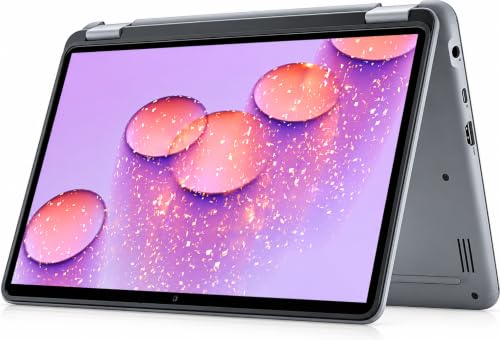
Dell 2027 Portable 11-inch IPS touchscreen convertible laptop, Intel Pentium processor up to 3.3GHz, 8GB RAM, 128GB SSD. The Dell 2027 is the Dell pick in this guide, with an 11 inch IPS touchscreen and a convertible design.
Strengths
- 11 inch IPS touchscreen is bright and clear for schoolwork and video, in a laptop that fits in a small bag.
- Convertible design flips into tablet mode, so the touchscreen works for reading and video as well as for work.
- 8GB RAM and a 128GB SSD suit browsing, documents and schoolwork without waiting.
Trade-offs
- Intel Pentium processor suits light work, not heavy programs, so buyers who edit video should look at a larger laptop.
- 128GB storage fills up quickly, so cloud storage or an external drive matters.
- 11 inch screen is small for a spreadsheet or a long document.
Who it fits
Buyers who want a light Dell convertible for school, travel or a second computer.
Best for: a mini Dell touchscreen laptop for school and travel.
Not suited for: anyone who edits video, or works with large spreadsheets.
In daily use
In daily use, the Dell 2027 is the laptop for a bag that should stay light. Open it on a train, tap the touchscreen to scroll, flip it into tablet mode to read, and the 8GB RAM keeps browsing and documents smooth. The 128GB SSD boots quickly and opens programs at once, and the 11 inch screen is big enough for a document and small enough for a tray table. It is the laptop to buy when the computer should be small, light and touchable.
Check price on Amazon: Dell 2027 Portable 11-inch Touchscreen Convertible Laptop

2. Lenovo 2027 11 inch HD IPS Convertible Laptop with Touchscreen
Key specs
Lenovo 2027 11 inch HD IPS convertible laptop with touchscreen, Intel N processor up to 3.60GHz, 8GB DDR5, 128GB SSD, HDMI. The Lenovo 2027 is the Lenovo pick in this guide, with an 11 inch HD IPS touchscreen and DDR5 memory.
Strengths
- 11 inch HD IPS touchscreen is clear for schoolwork and video, with a convertible design for tablet mode.
- 8GB DDR5 memory is fast for browsing and documents, and the Intel N processor suits light work.
- HDMI port lets the laptop connect to a television or a monitor for a bigger screen.
Trade-offs
- Intel N processor suits light work, not heavy programs.
- 128GB storage fills up quickly, so cloud storage matters.
- HD resolution is less sharp than a Full HD screen at the same size.
Who it fits
Buyers who want a light Lenovo convertible with DDR5 memory for school or travel.
Best for: a mini Lenovo touchscreen laptop with a convertible design.
Not suited for: anyone who edits video, or works with large spreadsheets.
In daily use
In daily use, the Lenovo 2027 is the laptop for a student who carries it everywhere. The 11 inch touchscreen flips into tablet mode for reading, the DDR5 memory keeps browsing smooth, and the HDMI port connects to a classroom display or a television for a bigger picture. The 128GB SSD boots quickly, and the laptop fits in a small bag without weighing it down. It is the laptop to buy when the computer should be a Lenovo, light and touchable.
Check price on Amazon: Lenovo 2027 11 inch HD IPS Convertible Laptop with Touchscreen

3. HP 2023 Premium 2-in-1 Convertible Laptop 11 inch Touchscreen
Key specs
HP 2023 Premium 2-in-1 convertible laptop, 11 inch HD IPS touchscreen, Intel 4-Core Pentium processor up to 3.30GHz, 8GB RAM. The HP 2023 is the HP pick in this guide, with an 11 inch HD IPS touchscreen and a 2-in-1 design.
Strengths
- 11 inch HD IPS touchscreen with a 2-in-1 design, for work as a laptop and reading as a tablet.
- Intel 4-Core Pentium processor up to 3.30GHz suits browsing, documents and schoolwork.
- 8GB RAM keeps several browser tabs and a document open at once without slowing down.
Trade-offs
- Intel Pentium processor suits light work, not heavy programs.
- HD resolution is less sharp than a Full HD screen at the same size.
- 2023 model is older than the 2027 models here, so the design is less new.
Who it fits
Buyers who want an HP 2-in-1 laptop with an 11 inch touchscreen for school or work.
Best for: a mini HP touchscreen laptop for school and work.
Not suited for: anyone who edits video, or works with large spreadsheets.
In daily use
In daily use, the HP 2023 is the laptop for a desk that should stay small. Open it as a laptop for documents, flip it into tablet mode for reading, and the touchscreen makes both easy. The 4-core Pentium keeps browsing smooth, and the 8GB RAM holds a document and a browser at once. It is the laptop to buy when the computer should be an HP, small and touchable.
Check price on Amazon: HP 2023 Premium 2-in-1 Convertible Laptop 11 inch Touchscreen

4. Acer Gateway 11.6 inch Convertible Laptop with Touchscreen
Key specs
Acer Gateway 11.6 inch convertible laptop, HD IPS touchscreen with 360 degree rotation, Intel processor up to 2.79GHz, 4GB DDR4 RAM. The Gateway is the budget pick in this guide, with a 360 degree touchscreen for the lowest cost here.
Strengths
- 360 degree rotation turns the laptop into a tablet, a tent or a stand, for reading, video and work.
- HD IPS touchscreen is clear for schoolwork and video, at the lowest cost here.
- 11.6 inch size is the largest mini size here, so the keyboard is a little roomier.
Trade-offs
- 4GB RAM is less than the other laptops here, so heavy multitasking is slower.
- Intel processor up to 2.79GHz suits light work, not heavy programs.
- HD resolution is less sharp than a Full HD screen at the same size.
Who it fits
Buyers who want the cheapest 11 inch touchscreen laptop here, with a 360 degree hinge.
Best for: a budget mini touchscreen laptop for school or travel.
Not suited for: anyone who multitasks heavily, or edits video.
In daily use
In daily use, the Gateway is the laptop for a tight budget that still wants a touchscreen. Flip it into tablet mode to read, tent it on a desk to watch a video, or use it as a laptop for documents, and the touchscreen makes each mode easy. The 4GB RAM suits one thing at a time, so close the browser before opening a document, and the laptop stays smooth. It is the laptop to buy when the cost should be the lowest and the screen should still touch.
Check price on Amazon: Acer Gateway 11.6 inch Convertible Laptop with Touchscreen

5. Asus BR1102FGA 11.6 inch Touchscreen 2-in-1 Laptop
Key specs
Asus BR1102FGA-YS14T 11.6 inch touchscreen 2-in-1, rugged and spill resistant notebook, HD 1366 x 768, Intel Celeron N100. The BR1102FGA is the rugged pick in this guide, with a spill resistant design for school.
Strengths
- Rugged and spill resistant design suits a school bag, a classroom and a young user.
- 11.6 inch touchscreen 2-in-1 design, for work as a laptop and reading as a tablet.
- Intel Celeron N100 processor suits browsing, documents and schoolwork.
Trade-offs
- HD resolution is less sharp than a Full HD screen at the same size.
- Celeron N100 suits light work, not heavy programs.
- Rugged design is thicker and heavier than the other mini laptops here.
Who it fits
Buyers who want a tough 11 inch touchscreen laptop for school or for a young user.
Best for: a rugged mini touchscreen laptop for school.
Not suited for: anyone who wants the thinnest laptop here, or edits video.
In daily use
In daily use, the BR1102FGA is the laptop for a school bag. It survives a knock, a spill and a crowded desk, and the touchscreen flips into tablet mode for reading. The Celeron N100 keeps browsing and documents smooth, and the rugged design means the laptop does not need to be handled gently. It is the laptop to buy when the user is young, the bag is crowded, and the laptop should survive the school year.
Check price on Amazon: Asus BR1102FGA 11.6 inch Touchscreen 2-in-1 Laptop

6. ASUS 11.6 inch HD Touchscreen 2-in-1 Educational Laptop
Key specs
ASUS 11.6 inch HD touchscreen 2-in-1 educational laptop, Intel Celeron N100 processor, 4GB RAM, 128GB SSD, Wi-Fi 6, Bluetooth. The ASUS Educational is the school pick in this guide, with Wi-Fi 6 and a 2-in-1 design.
Strengths
- 11.6 inch HD touchscreen 2-in-1 design, built for education and for schoolwork.
- Wi-Fi 6 keeps the connection fast in a classroom or a library with many devices.
- 128GB SSD boots quickly and opens programs at once.
Trade-offs
- 4GB RAM is less than the other laptops here, so heavy multitasking is slower.
- Celeron N100 suits light work, not heavy programs.
- HD resolution is less sharp than a Full HD screen at the same size.
Who it fits
Buyers who want an ASUS educational laptop with a touchscreen and Wi-Fi 6.
Best for: a mini ASUS touchscreen laptop for school.
Not suited for: anyone who multitasks heavily, or edits video.
In daily use
In daily use, the ASUS Educational is the laptop for a classroom. The 11.6 inch touchscreen flips into tablet mode for reading, the Wi-Fi 6 connection stays fast in a crowded room, and the 128GB SSD boots quickly between lessons. The 4GB RAM suits one thing at a time, so close the browser before opening a document. It is the laptop to buy when the classroom is the workplace and the laptop should be simple and touchable.
Check price on Amazon: ASUS 11.6 inch HD Touchscreen 2-in-1 Educational Laptop

7. HP Fortis G1m 11.6 inch HD Touchscreen Chromebook
Key specs
HP Fortis G1m 11.6 inch HD 1366 x 768 touchscreen Chromebook, ARM Cortex A76/A55, 8GB RAM, 64GB eMMC. The Fortis G1m is the Chromebook pick in this guide, with a touchscreen and 8GB RAM.
Strengths
- Touchscreen Chromebook with 8GB RAM, for the web, Android apps and schoolwork.
- Chromebook system is simple and secure, with automatic updates and no antivirus to manage.
- Rugged Fortis design suits a school bag and a classroom.
Trade-offs
- 64GB eMMC storage is small and slower than an SSD, so cloud storage matters.
- Chromebook cannot run full Windows software, so buyers who need it should look at the Windows laptops here.
- HD resolution is less sharp than a Full HD screen at the same size.
Who it fits
Buyers who live in a browser and want a simple, secure touchscreen Chromebook.
Best for: a mini touchscreen Chromebook for school and the web.
Not suited for: anyone who needs full Windows software.
In daily use
In daily use, the Fortis G1m is the laptop for a buyer who lives in a browser. Open Chrome, sign in, and the documents, the email and the classroom apps are there, with no software to install and no antivirus to manage. The touchscreen makes scrolling and tapping easy, and the 8GB RAM keeps several tabs open at once. Keep files in the cloud, because 64GB fills up quickly. It is the laptop to buy when the work is on the web and the system should stay simple.
Check price on Amazon: HP Fortis G1m 11.6 inch HD Touchscreen Chromebook

8. Lenovo ThinkPad Yoga 11e 5th Gen Touchscreen Laptop
Key specs
Lenovo ThinkPad Yoga 11e 5th Gen 20LM000YUS 11.6 touchscreen LCD 2-in-1 notebook, Intel Pentium N5000 quad-core. The Yoga 11e is the business-class pick in this guide, with a proven ThinkPad design.
Strengths
- ThinkPad Yoga design is proven for school and business, with a durable build and a good keyboard for its size.
- 11.6 inch touchscreen 2-in-1 design, for work as a laptop and reading as a tablet.
- Pentium N5000 quad-core processor suits browsing, documents and schoolwork.
Trade-offs
- 5th generation design is older than the 2027 models here, so the processor and the ports are less new.
- 11.6 inch screen is small for a spreadsheet or a long document.
- Battery life is less than a new Chromebook, because the design is older.
Who it fits
Buyers who want a proven ThinkPad convertible for school or business.
Best for: a business-class mini touchscreen laptop for school and work.
Not suited for: anyone who wants the newest processor, or the longest battery here.
In daily use
In daily use, the Yoga 11e is the laptop for a buyer who trusts ThinkPad. The keyboard is good for its size, the touchscreen flips into tablet mode for reading, and the durable design survives a bag and a desk. The Pentium N5000 keeps browsing and documents smooth, and the 11.6 inch screen is big enough for a document and small enough for a tray table. It is the laptop to buy when the design should be proven and the brand should be ThinkPad.
Check price on Amazon: Lenovo ThinkPad Yoga 11e 5th Gen Touchscreen Laptop
Buying guide: best mini 11 inch touch screen laptops
Windows or Chromebook
Decide the operating system before anything else, because it decides what software can run. A Windows convertible runs full Windows software, which suits schoolwork, office documents and the programs a student or a worker already uses. A Chromebook runs the web and Android apps, which suits a buyer who lives in a browser and wants a simple, secure system. If the school or the workplace uses Windows software, buy Windows. If the work is on the web, a Chromebook is simpler and cheaper.
Processor and memory
The processor decides how smooth the laptop feels, and the memory decides how many things can be open at once. An Intel N100, N150 or Pentium suits browsing and documents, which is what a mini laptop is for. 8GB of RAM suits a browser and a document at once, while 4GB suits one thing at a time, so close the browser before opening a document on a 4GB laptop. A mini laptop is not for video editing or heavy programs, and buyers who need those should look at a larger laptop, not a mini one.
Storage and the cloud
Storage on a mini laptop is small, usually 128GB, and it fills up quickly, so cloud storage matters more here than on a large laptop. Keep documents in the cloud, delete downloads that have been watched, and use an external drive for large files. A laptop with a card slot can add storage cheaply, and a laptop with an SSD boots faster than one with eMMC storage. Check the storage type in the listing before ordering, because an SSD is worth having even at 128GB.
Size, weight and the keyboard
An 11 inch laptop is small for a spreadsheet and a long document, and the keyboard is small for large hands, so a mini laptop suits a second computer, a school computer or a travel computer more than a main work computer. The touchscreen helps, because tapping a small screen is easier than moving a mouse on a small trackpad. Test the keyboard if possible, because a cramped keyboard slows typing, and a 360 degree hinge lets the laptop fold into a tablet for reading and video.
Battery and the charger
Battery life on a mini laptop is usually a school day or a flight, not a full working day, so carry the charger on a long trip. A Chromebook often lasts longer than a Windows laptop at the same size, because the system is lighter. Turn the brightness down when the battery is low, because the screen uses the most power, and close the browser tabs that are not needed, because each tab uses memory and power. And keep the charger in the bag, because a mini laptop without a charger is a paperweight by the afternoon.
Usage and care
Set up a new mini laptop by charging it fully, connecting it to Wi-Fi, and signing in to the account that holds the documents and the email. Update the system when the maker offers it, because updates fix issues and improve the battery life. Install the programs needed for school or work, and sign in to the cloud storage, because the local storage is small and the cloud is where the files should live. Set the touchscreen to the sensitivity that feels natural, and learn the flip gesture, because the 360 degree hinge is the point of a convertible.
Maintain the laptop by keeping it charged between 20 and 80 percent where the battery allows it, because a battery kept at full charge for long periods ages faster. Keep the screen clean with a soft, dry cloth, and use a sleeve or a case, because an 11 inch laptop in a crowded bag can be bent or scratched. Update the system when the maker offers it, and keep the storage tidy, deleting downloads that have been watched and files that are no longer needed, because a full laptop slows down. And back up the files to the cloud, because a small laptop is easy to lose and a backup is the only recovery.
Use the laptop well by flipping it into tablet mode for reading and video, tent mode for a film on a desk, and laptop mode for documents, because each mode suits a different job. Use the touchscreen to scroll and tap, because tapping a small screen is easier than moving a mouse on a small trackpad. For a long document, connect an external keyboard and a monitor where the desk allows it, because the mini keyboard is small for large hands. And for a flight or a train, download the files and the video before leaving, because the Wi-Fi may be slow or absent.
Common mistakes
The most common mistake is buying a mini laptop as a main work computer, because an 11 inch screen is small for a spreadsheet and a long document. Another is buying a Chromebook when the school or the workplace needs Windows software, because a Chromebook cannot run it. A third is buying a renewed laptop when a new one is available, because the battery and the condition are worth the difference. Buyers also forget the charger on a long trip, and a mini laptop without a charger is a paperweight by the afternoon.
Do not buy a laptop without a touchscreen when the guide says touchscreen, because the touchscreen is the point of a mini laptop. Do not fill the 128GB storage to the last gigabyte, because a full laptop slows down and leaves no room for the next file. Do not ignore the memory, because 4GB suits one thing at a time and 8GB suits a browser and a document at once. And do not buy a tablet when the guide says laptop, because a tablet cannot run the same software and has no keyboard.
Do not expect a mini laptop to edit video or run heavy programs, because the processor is built for light work. Do not leave the laptop in a hot car or in direct sunlight, because heat ages the battery. And do not forget the case: a mini laptop without a sleeve is a laptop waiting to be bent in a crowded bag, and a bent laptop costs more than the sleeve would have.
Mini laptops for school: what teachers ask for
Teachers ask for three things from a school laptop: it should be light, it should be tough, and it should run the software the school uses. A mini 11 inch laptop is light enough for a school bag, and the rugged models in this guide, such as the Asus BR1102FGA, are tough enough for a classroom. The software is the question to ask the school before ordering, because a school that uses Windows software needs a Windows laptop, and a school that uses the web needs a Chromebook. Check the school's list before ordering, because a laptop that cannot run the school's software is a laptop that cannot do the homework. And buy a sleeve, because a mini laptop in a crowded school bag can be bent, and a bent laptop costs more than the sleeve would have.
Chromebook vs Windows for students
The choice between a Chromebook and a Windows laptop for a student comes down to the software. A Chromebook runs the web and Android apps, which suits a student whose work is in a browser, with documents, email and classroom apps online. A Windows laptop runs full Windows software, which suits a student whose school uses programs that only run on Windows. A Chromebook is simpler and more secure, with automatic updates and no antivirus to manage, while a Windows laptop is more flexible, with more programs available. Ask the school which system it uses, because the school's answer decides the laptop. If the school has no preference, a Chromebook is the simpler choice, and a Windows convertible is the more flexible one.
Final recommendation
For most buyers, the Dell 2027 Portable 11-inch Touchscreen Convertible is the best mini 11 inch touch screen laptop in this guide: an 11 inch IPS touchscreen, a convertible design and 8GB RAM, for school and travel. If the brand should be Lenovo, the Lenovo 2027 Convertible is the pick, with DDR5 memory and an HDMI port.
For HP, the HP 2023 Premium 2-in-1 is the pick, and for the lowest cost, the Acer Gateway is the pick, with a 360 degree hinge. For a rugged school laptop, the Asus BR1102FGA is the pick, and for a Chromebook, the HP Fortis G1m is the pick. For a proven ThinkPad, the Yoga 11e is the pick. Whichever laptop you choose, buy the operating system first, carry the charger, and use the cloud: a mini laptop is only as good as the bag it travels in.
Frequently asked questions
What is the best mini 11 inch touch screen laptop?
The Dell 2027 Portable 11-inch Touchscreen Convertible is the best pick in this guide: an 11 inch IPS touchscreen, a convertible design and 8GB RAM, for school and travel. The Lenovo 2027 Convertible is the best Lenovo pick, and the ThinkPad Yoga 11e is the best business-class pick.
Should I buy a Windows laptop or a Chromebook?
Buy a Windows convertible when the school or the workplace uses Windows software, because a Chromebook cannot run it. Buy a Chromebook when the work is on the web, because it is simpler, more secure and cheaper. The HP Fortis G1m is the Chromebook pick in this guide.
Is 4GB of RAM enough for an 11 inch laptop?
4GB suits one thing at a time, so close the browser before opening a document. 8GB suits a browser and a document at once, and it is worth having. The Dell, Lenovo and HP laptops here have 8GB, while the Acer Gateway and the ASUS Educational have 4GB.
Can an 11 inch laptop be a main work computer?
An 11 inch laptop suits a second computer, a school computer or a travel computer more than a main work computer, because the screen is small for a spreadsheet and the keyboard is small for large hands. For a main work computer, a 14 inch laptop is the better size.
How long does a mini laptop battery last?
Battery life on a mini laptop is usually a school day or a flight, not a full working day, so carry the charger on a long trip. A Chromebook often lasts longer than a Windows laptop at the same size, because the system is lighter. Turn the brightness down when the battery is low, because the screen uses the most power.
What is a 2-in-1 laptop?
A 2-in-1 laptop has a 360 degree hinge, so the screen flips around and the laptop becomes a tablet. Use it as a laptop for documents, as a tablet for reading and video, and as a tent on a desk for a film. Every convertible in this guide has a 360 degree hinge or a 2-in-1 design in the listing.
Do I need a touchscreen on a small laptop?
A touchscreen helps on a small laptop, because tapping a small screen is easier than moving a mouse on a small trackpad. It also lets the laptop flip into tablet mode for reading and video. If the laptop will only ever sit on a desk with a mouse, a touchscreen matters less, but for a bag and a train, it matters more.
More from ilcastellomenu.com
Best Business 2-1 Laptops: business 2-in-1 laptops
Best 17 Inch and Up Gaming Laptops: large gaming laptops
Best Laptops with Extended Keyboards for College Students: laptops for college