The best laptops with extended keyboards for college student life solve a problem every student with a laptop knows: the built-in keyboard is cramped, the number pad is missing, and long essays and spreadsheets become a chore. An extended keyboard, meaning a full-size keyboard with a number pad and proper spacing, turns a dorm desk into a real workstation, and it is one of the cheapest upgrades a student can make. This guide compares full-size keyboards that pair with a laptop, from wired workhorses to wireless models that move between the dorm, the library and the classroom.
A note on the search itself: laptops with built-in extended keyboards are rare, because a full-size keyboard with a number pad needs a wide body that most laptops do not have. The practical answer, and the one this guide follows, is a full-size external keyboard that connects to the laptop by USB or wireless receiver. That is how students actually get an extended keyboard, and it has a bonus: the same keyboard works with a desktop, a library computer or a second laptop, and it can be replaced cheaply if a key breaks during finals week.
There is also a health angle that students ignore until it hurts. Hours of typing on a cramped laptop keyboard, with wrists bent and shoulders hunched, is a reliable recipe for wrist and neck pain, and a full-size external keyboard with proper spacing is the cheapest fix available. Raising the laptop screen to eye level on a stand and typing on an external keyboard at elbow height transforms the ergonomics of a dorm desk, and the difference is felt within days. A keyboard is not just a typing tool; it is the difference between a desk that hurts and a desk that works.
In this guide
Quick picks: best laptops with extended keyboards for college student
| # | Product | Where to buy |
|---|---|---|
| 1 | Logitech K270 Full Size Wireless Keyboard | Check on Amazon |
| 2 | Logitech Signature K650 Comfort Full-Size Wireless Keyboard | Check on Amazon |
| 3 | Logitech K120 Full Size Wired Keyboard | Check on Amazon |
| 4 | Logitech Signature Slim K950 Wireless Keyboard | Check on Amazon |
| 5 | Logitech MK540 Full Size Advanced Wireless Keyboard and Mouse Combo | Check on Amazon |
| 6 | Logitech MK850 Performance Wireless Keyboard and Mouse Combo | Check on Amazon |
| 7 | Dell Wired Keyboard KB216 | Check on Amazon |
| 8 | Microsoft Wired Keyboard 600 | Check on Amazon |
How the picks were chosen
The picks were chosen from current full-size keyboard listings, with three hard filters. First, the keyboard must be full-size, with a number pad and standard key spacing, which rules out compact, tenkeyless and mini keyboards that appeared in the search results. Second, the listing must name the exact model, so buyers know whether they are getting a keyboard alone or a keyboard and mouse combo. Third, the keyboard must suit student life: affordable, durable, and easy to connect to a laptop without extra software.
Within those filters the guide favours variety: wired keyboards for students who never want to think about batteries, wireless keyboards for students who move between rooms, and combos for students who need a mouse as well. Logitech dominates the list because it makes the most full-size student keyboards, and Dell's KB216 earns a place as the classic wired workhorse. Every keyboard here is a current listing with its brand and model confirmed.
Durability was weighed alongside price, because a student keyboard lives a hard life: it gets carried in bags, knocked by books, splashed by coffee, and typed on for hours a day. Wired keyboards win on durability because they have no batteries to leak and no wireless parts to fail, while wireless keyboards win on convenience because they move between rooms. The guide includes both, and the choice comes down to whether the keyboard stays on one desk or travels. Either way, the keyboard should survive the degree, not just the first semester.
Quick comparison
| Product | Standout detail |
|---|---|
| Logitech K270 Full Size Wireless Keyboard | Full-size wireless, number pad, 8 multimedia keys |
| Logitech Signature K650 Comfort Full-Size Wireless Keyboard | Full-size wireless, wrist rest, Bluetooth or Logi Bolt |
| Logitech K120 Full Size Wired Keyboard | Full-size wired, spill-resistant, USB plug-and-play |
| Logitech Signature Slim K950 Wireless Keyboard | Full-size wireless, number pad, quiet typing |
| Logitech MK540 Full Size Advanced Wireless Keyboard and Mouse Combo | Full-size wireless combo, quiet keyboard, number pad |
| Logitech MK850 Performance Wireless Keyboard and Mouse Combo | Full-size wireless combo, Bluetooth or USB-A receiver |
| Dell Wired Keyboard KB216 | Wired, chiclet keys, multimedia controls, USB |
| Microsoft Wired Keyboard 600 | Wired USB keyboard, full-size, plug-and-play |
1. Logitech K270 Full Size Wireless Keyboard
Key specs
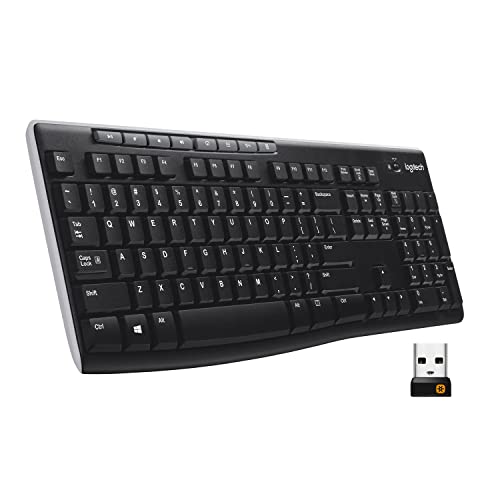
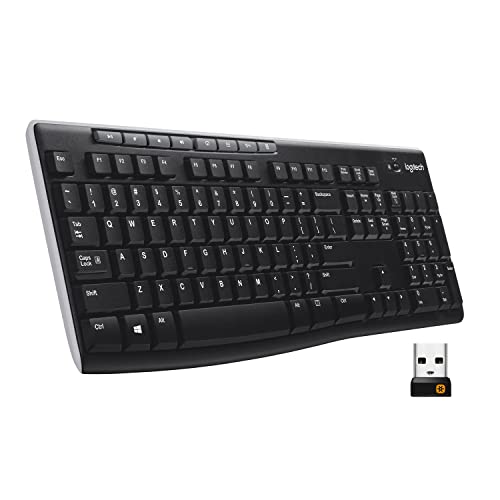
Full-size wireless keyboard for Windows in black, with a number pad, 8 multimedia keys and an integrated design. The K270 is the classic affordable full-size wireless keyboard.
Strengths
- Full-size layout with a number pad suits spreadsheets, data entry and long essays.
- Wireless connection keeps the dorm desk tidy with no cable to the laptop.
- 8 multimedia keys give quick control of volume and playback without reaching for the mouse.
Trade-offs
- Needs batteries, so keep spares in the desk drawer.
- No backlight, which makes late-night typing harder in a dark room.
- Basic key feel is functional rather than premium.
Who it fits
Students who want a cheap, reliable full-size wireless keyboard for a dorm desk.
Best for: budget buyers who need a number pad for coursework.
Not suited for: anyone who types mainly at night and needs a backlit keyboard.
In daily use
In daily use, the K270 is the keyboard that just works. Plug the tiny receiver into the laptop, switch the keyboard on, and start typing: no software, no pairing dance, no fuss. The full-size layout with a number pad makes a real difference for accounting, statistics and data-heavy coursework, where the laptop's own keyboard forces awkward finger stretches. Keep a spare pair of batteries in the drawer, wipe the keys now and then, and the K270 will last through the degree.
Worth knowing: the K270 is the keyboard that other student keyboards are measured against, and the reason is simplicity. There is nothing to learn, nothing to charge, and nothing to go wrong: plug in the receiver, switch on, type. The 8 multimedia keys are the small luxury, letting you control volume and playback without touching the mouse, which matters during long study sessions with music or lecture videos. Keep spare batteries in the drawer and the keyboard will never let you down.
Check price on Amazon: Logitech K270 Full Size Wireless Keyboard

2. Logitech Signature K650 Comfort Full-Size Wireless Keyboard
Key specs
Full-size wireless keyboard in graphite, with a wrist rest, Bluetooth or Logi Bolt connection. The K650 adds comfort features to the full-size formula.
Strengths
- Built-in wrist rest supports long typing sessions during essays and revision.
- Bluetooth or Logi Bolt connection gives a choice of wireless options.
- Full-size layout with a number pad covers spreadsheets and data work.
Trade-offs
- Larger footprint needs more desk space than a compact keyboard.
- No backlight in the listing, so dark-room typing is harder.
- Costs more than the basic K270 for what is mostly comfort.
Who it fits
Students who type for hours and want a wrist rest and a comfortable full-size layout.
Best for: essay writers and spreadsheet users who type all day.
Not suited for: anyone with a tiny dorm desk and no room for a wrist rest.
In daily use
In daily use, the K650 is the keyboard for long study sessions. The wrist rest takes the strain out of hours of typing, and the full-size keys with a number pad make data work faster and less error-prone. Bluetooth connects to the laptop without using a USB port, which matters on laptops with few ports, and the Logi Bolt receiver is there if Bluetooth is unreliable. It needs a little more desk space than the K270, so measure the desk before ordering, and keep the keyboard clean, because the wrist rest collects dust.
Worth knowing: the wrist rest is the feature that matters most over a four-year degree. It is easy to dismiss as a luxury, but hours of typing with unsupported wrists add up to real strain, and the K650's built-in rest is always there, unlike a separate rest that slides around the desk. Bluetooth connects without using a USB port, which matters on laptops with only one or two ports, and the Logi Bolt receiver is a reliable fallback when Bluetooth is flaky in a crowded dorm.
Check price on Amazon: Logitech Signature K650 Comfort Full-Size Wireless Keyboard

3. Logitech K120 Full Size Wired Keyboard
Key specs
Full-size wired keyboard with USB plug-and-play, in black, with a spill-resistant design and curved space bar. The K120 is the wired workhorse of this guide.
Strengths
- Wired USB connection means no batteries and no wireless dropouts ever.
- Spill-resistant design survives a knocked-over coffee during a late study session.
- Plug-and-play setup works on any laptop with a USB port.
Trade-offs
- The cable ties the keyboard to the desk, so it does not travel well.
- Basic key feel and no extra features beyond the essentials.
- No backlight, so night typing needs a desk lamp.
Who it fits
Students who want the cheapest, most reliable full-size keyboard and never want to buy batteries.
Best for: dorm-desk setups where the keyboard stays in one place.
Not suited for: anyone who needs a portable keyboard for lectures and the library.
In daily use
In daily use, the K120 is the keyboard that cannot let you down. It has no batteries to die, no wireless signal to drop, and no software to install: plug it in and type. The spill-resistant design is a genuine student feature, because coffee and keyboards meet often during revision week, and the curved space bar is comfortable over long essays. It stays on the desk, which is fine, because that is where the work happens. Keep the cable tidy with a clip so it does not drag the keyboard off the desk.
Worth knowing: the K120 is the keyboard to buy when reliability matters more than features. It has no batteries, no wireless signal and no software, which means there are three fewer things that can fail during an exam or a deadline. The spill-resistant design is the student feature that earns its keep: coffee and keyboards meet often during revision, and the K120 survives what would kill a wireless keyboard. It stays on the desk, and that is exactly where it belongs.
Check price on Amazon: Logitech K120 Full Size Wired Keyboard

4. Logitech Signature Slim K950 Wireless Keyboard
Key specs
Wireless keyboard with quiet typing in graphite, full size with a sleek design and a number pad. The K950 is the slim, quiet full-size option.
Strengths
- Quiet typing suits shared dorm rooms and silent library areas.
- Slim, sleek full-size design with a number pad looks modern on a desk.
- Wireless connection keeps the workspace tidy.
Trade-offs
- Slim keys have less travel, which some typists find less satisfying.
- No wrist rest in the listing, so long sessions need good posture.
- Costs more than the basic full-size models for the slim design.
Who it fits
Students in shared rooms who need a quiet, slim full-size keyboard with a number pad.
Best for: library users and dorm sharers who type late at night.
Not suited for: anyone who prefers deep, chunky keys with long travel.
In daily use
In daily use, the K950 is the polite keyboard. Its quiet keys mean a roommate can sleep while you finish an essay, and a librarian will not glare at you during a study session. The slim design looks smart on a small dorm desk, and the number pad is there when the coursework turns numerical. The keys are shallower than a classic keyboard, so try the feel if you can, and keep the keyboard charged or stocked with batteries so it never dies mid-essay.
Worth knowing: quiet keys are a social feature as much as a technical one. In a shared dorm room, a loud keyboard at 2 a.m. is a relationship problem, and the K950's quiet typing keeps the peace. The slim design looks modern and takes up less visual space on a small desk, which matters when the desk also holds a laptop, books and a lamp. The keys are shallower than a classic keyboard, so give yourself a day to adjust before judging the feel.
Check price on Amazon: Logitech Signature Slim K950 Wireless Keyboard

5. Logitech MK540 Full Size Advanced Wireless Keyboard and Mouse Combo
Key specs
Full-size advanced wireless keyboard and mouse combo, with a full-size quiet keyboard, number pad and integrated palm rest. The MK540 covers keyboard and mouse in one box.
Strengths
- Keyboard and mouse in one purchase covers the whole dorm workstation.
- Quiet full-size keyboard with a number pad and an integrated palm rest.
- Wireless connection for both devices keeps the desk free of cables.
Trade-offs
- Combo means replacing one device is harder if the other still works.
- The mouse is basic, so gamers and designers will want a better one.
- Needs batteries for two devices, so keep spares on hand.
Who it fits
Students setting up a dorm desk from scratch who need a keyboard and a mouse together.
Best for: first-year students buying their first workstation in one box.
Not suited for: gamers who need a high-performance mouse.
In daily use
In daily use, the MK540 is the one-box workstation. Unpack it, plug in the receiver, and the desk is done: full-size quiet keyboard with a number pad for coursework, palm rest for long sessions, and a mouse that handles everyday pointing without fuss. It is the fastest way to turn a laptop into a desktop-style setup, and the quiet keys keep the peace in shared rooms. Keep spare batteries for both devices, and remember that the mouse is a general-purpose one: if you game seriously, budget for a gaming mouse later.
Worth knowing: the MK540 is the fastest way to set up a dorm workstation, because one box gives you both the keyboard and the mouse. The integrated palm rest is the comfort feature, and the quiet keys suit shared rooms. The mouse is a general-purpose one, so it handles coursework and browsing well, and you can always add a gaming mouse later if you need one. Keep batteries for both devices in the drawer, and remember that the receiver serves both, so losing it means losing both.
Check price on Amazon: Logitech MK540 Full Size Advanced Wireless Keyboard and Mouse Combo

6. Logitech MK850 Performance Wireless Keyboard and Mouse Combo
Key specs
Performance wireless keyboard and mouse combo in graphite, connecting via Bluetooth or the included USB-A receiver. The MK850 is the premium combo in this guide.
Strengths
- Bluetooth or USB-A receiver gives a choice of connections for any laptop.
- Performance keyboard and mouse suit heavier daily use than the basic combos.
- Full-size keyboard covers number-pad work alongside the mouse.
Trade-offs
- Costs more than the basic combos, so it suits students who type all day.
- The combo format means the keyboard and mouse are bought together.
- Performance features add complexity that casual users may not need.
Who it fits
Students who type and work all day and want the most capable keyboard and mouse combo.
Best for: heavy users who want Bluetooth and receiver options.
Not suited for: anyone who only needs a basic keyboard for occasional use.
In daily use
In daily use, the MK850 is the combo for students who live at their desk. The keyboard feels solid and responsive, the mouse tracks smoothly, and the choice of Bluetooth or the USB-A receiver means it connects to almost any laptop, including ones with few ports. It is the most expensive combo here, but for a student who types for hours a day across four years, the comfort is worth it. Keep the receiver in the laptop when travelling so it does not get lost, and keep spare batteries in the desk.
Worth knowing: the MK850 is the combo for students who type for a living, whether that living is essays, code or data. The performance keyboard feels solid and responsive, the mouse tracks smoothly, and the choice of Bluetooth or USB-A receiver means it connects to almost any laptop. It is the most expensive combo here, but spread over four years of daily use, the cost per day is small, and the comfort is real. Keep the receiver in the laptop when travelling so it does not get lost.
Check price on Amazon: Logitech MK850 Performance Wireless Keyboard and Mouse Combo

7. Dell Wired Keyboard KB216
Key specs
Wired keyboard with multimedia controls in black, with a USB interface, chiclet keys and a plunger mechanism, plus volume, mute and play controls. The KB216 is Dell's classic wired keyboard.
Strengths
- Chiclet keys give a laptop-like feel that students find familiar.
- Multimedia controls for volume, mute and play sit above the keyboard.
- Wired USB connection means no batteries and no dropouts.
Trade-offs
- The cable limits where the keyboard can sit on the desk.
- Chiclet keys have short travel, which some typists dislike.
- No number pad is mentioned in the listing title, so confirm the layout before ordering if a number pad matters.
Who it fits
Students who like laptop-style chiclet keys and want a dependable wired keyboard with media controls.
Best for: Dell laptop owners who want a matching wired keyboard.
Not suited for: anyone who must have a number pad and cannot confirm this layout has one.
In daily use
In daily use, the KB216 feels like an extension of a Dell laptop. The chiclet keys are familiar to anyone who types on a laptop all day, and the multimedia controls make it easy to pause a lecture video or adjust the volume without reaching for the mouse. It is wired, so it never needs batteries and never drops a connection, which is exactly what you want during an online exam or a timed assignment. Keep the cable routed behind the desk so it does not snag, and the KB216 will last for years.
Worth knowing: the KB216's chiclet keys are familiar to anyone who types on a laptop all day, which makes the transition to a full-size keyboard painless. The multimedia controls are the convenience feature: volume, mute and play without reaching for the mouse, which matters during lecture videos and music. Check the layout in the listing before ordering, because the number pad is not mentioned in the title, and if a number pad is essential for your coursework, confirm it is there.
Check price on Amazon: Dell Wired Keyboard KB216

8. Microsoft Wired Keyboard 600
Key specs
Wired keyboard by Microsoft, with USB connectivity. The Microsoft Wired Keyboard 600 is the classic wired full-size keyboard.
Strengths
- Wired USB connection means no batteries and no wireless dropouts.
- Microsoft's classic full-size layout with a number pad suits coursework.
- Plug-and-play setup works on any laptop with a USB port.
Trade-offs
- Wired design ties the keyboard to the desk.
- Basic key feel with no extra features beyond the essentials.
- Older model, so check availability before ordering.
Who it fits
Students who want a classic wired Microsoft keyboard for a fixed dorm desk.
Best for: budget buyers who need a reliable full-size keyboard.
Not suited for: anyone who needs a portable wireless keyboard.
In daily use
In daily use, the Microsoft Wired Keyboard 600 is the keyboard that has been on desks for years for a reason. It plugs in, it types, and it never needs a battery or a pairing step. The full-size layout with a number pad covers spreadsheets and data work, and the quiet keys suit shared rooms. Keep the cable tidy and the keys clean, and it will last through the degree and beyond.
Worth knowing: the Microsoft Wired Keyboard 600 has been a desk staple for years because it does the basics well and never asks for attention. It plugs in and types, with a full-size layout that covers coursework, and it costs little enough that replacing it is painless if a key breaks. It is the keyboard to buy when you want a known quantity rather than a gamble, and it pairs naturally with a Microsoft mouse if you need one later.
Check price on Amazon: Microsoft Wired Keyboard 600
Buying guide: best laptops with extended keyboards for college student
Why an extended keyboard helps
A laptop keyboard is a compromise: small keys, no number pad, and a layout squeezed to fit the laptop's width. An extended keyboard restores the full-size layout, with a number pad for data work, proper spacing for touch typing, and a comfortable angle for long sessions. For students in accounting, statistics, engineering or any course with numbers, the number pad alone can save hours over a semester. For essay writers, the spacing reduces typos and wrist strain.
Wired or wireless
Wired keyboards never need batteries and never drop a connection, which makes them the safest choice for exams, timed assignments and long study sessions. Wireless keyboards keep the desk tidy and move easily between rooms, but they need batteries or charging, and they can drop out at the worst moment. If the keyboard stays on the dorm desk, wired is the sensible pick; if it travels to the library, wireless is worth the battery habit.
Keyboard and mouse combos
Combos such as the Logitech MK540 and MK850 give you a keyboard and a mouse in one box, which is the fastest way to set up a dorm workstation. The trade-off is that the mouse is a general-purpose one, so gamers and designers will want a better mouse later, and replacing one device means buying the other again. If you already own a good mouse, buy the keyboard alone; if you own neither, a combo is good value.
Desk setup for long study sessions
Put the keyboard at elbow height with your wrists straight, the laptop screen at eye level on a stand or a stack of books, and the mouse at the same level as the keyboard. A wrist rest helps for long sessions, and a desk lamp matters more than a backlit keyboard for night work. Take a short break every hour: no keyboard, however comfortable, makes eight hours of non-stop typing healthy.
Usage and care
Plug a wired keyboard into the laptop's USB port and start typing: no software is needed. For a wireless keyboard, plug in the receiver or pair by Bluetooth, then test every key, including the number pad, before the first assignment is due. Keep spare batteries in the desk drawer for wireless models, and keep the receiver in the laptop's USB port when travelling so it does not get lost. Clean the keyboard weekly with a soft brush or a quick shake upside down, because crumbs and dust under the keys are the most common cause of sticky keys.
Learn the multimedia keys and shortcuts on your keyboard: volume, play and pause, and the function keys that control brightness and search. A few shortcuts save minutes every day, which adds up over a semester. If the keyboard has a wrist rest, use it properly, with the wrists straight rather than bent upward. And if the keyboard is shared between a laptop and a library computer, wipe it down before and after use, because shared keyboards collect more than dust.
Set up the keyboard once and leave it set up. Find the right height, the right angle and the right distance, then mark the position with a small piece of tape on the desk if it keeps moving. Keep the keyboard in the same place every day, because muscle memory builds faster when the layout never changes, and your typing speed will improve noticeably over the first month. If you share the desk with a roommate, agree on a setup that works for both of you rather than moving the keyboard back and forth.
Common mistakes
The most common mistake is buying a compact or tenkeyless keyboard while expecting a number pad: check the listing for the words full-size and number pad before ordering. Another is buying a wireless keyboard and forgetting batteries, then discovering it is dead on the morning of an exam. A third is placing the keyboard too high or too low, which strains the wrists over a semester. Students also buy a keyboard with a US layout while expecting another layout, so check the layout in the listing before ordering.
Do not spill drinks on the keyboard and expect it to survive: even spill-resistant models have limits, so keep drinks in a bottle with a lid. Do not force a stuck key, because the mechanism underneath breaks easily; clean under it instead. Do not leave a wireless keyboard switched on in a bag, because it drains the battery and can type randomly against the laptop. And do not ignore wrist pain: if typing hurts, change the setup, take breaks, and ask for advice rather than pushing through it.
Another mistake is buying the cheapest keyboard available without checking it is full-size. A compact keyboard without a number pad is cheaper, and it looks similar in a small photo, but it will not help with spreadsheets or data work, and you will end up buying a second keyboard within weeks. Check the listing for the words full-size and number pad, check the photo for the number pad on the right, and check the dimensions against your desk before ordering.
Final recommendation
For most college students, the Logitech K270 is the best extended keyboard in this guide: full-size, wireless, with a number pad and 8 multimedia keys, at a price that fits a student budget. If you type for hours, step up to the Logitech Signature K650 for its wrist rest, or the Logitech MK540 combo if you need a mouse as well. If you never want to think about batteries, the Logitech K120 wired keyboard is the most reliable choice of all.
The Logitech MK850 is the premium pick for students who live at their desk, the Signature Slim K950 is the pick for shared rooms where quiet keys matter, and the Dell KB216 is the pick for students who like laptop-style chiclet keys. Whichever keyboard you choose, check that it is full-size with a number pad, test it before the first deadline, and keep spare batteries if it is wireless. A good keyboard is the cheapest upgrade a student laptop can have.
One last thought: the keyboard is the tool you will touch more than any other in college, for more hours than the laptop screen or the phone. Spending a little more on a comfortable full-size keyboard is the best value in a student's setup, because it pays off in every essay, every spreadsheet and every late-night revision session. Buy the full-size keyboard, set up the desk properly, and the work gets easier from the first day.
Frequently asked questions
Do laptops come with extended keyboards built in?
Rarely. A full-size keyboard with a number pad needs a wide body that most laptops do not have, so only a few large desktop-replacement laptops include one. The practical answer is a full-size external keyboard, which is what this guide covers: it connects to the laptop by USB or wireless and gives you the number pad and spacing a built-in keyboard cannot.
What is an extended keyboard?
An extended keyboard is a full-size keyboard with a number pad on the right, standard key spacing and usually multimedia keys. It is also called a full-size keyboard. Compact and tenkeyless keyboards leave the number pad out, so check the listing for the words full-size and number pad before you buy.
Should a student buy a wired or wireless keyboard?
Wired keyboards are best for a fixed dorm desk: no batteries, no dropouts, and the lowest cost. Wireless keyboards are best if the keyboard moves between the dorm, the library and lectures. If the keyboard stays in one place, buy wired; if it travels, buy wireless and keep spare batteries.
Is a keyboard and mouse combo good for students?
Yes, for setting up a desk from scratch. Combos such as the Logitech MK540 and MK850 give you both devices in one box at good value. The mouse is a general-purpose one, so gamers and designers may want a better mouse later, but for coursework the combo mouse is fine.
How do I connect a full-size keyboard to my laptop?
A wired keyboard plugs into a USB port and works immediately with no software. A wireless keyboard either uses a small USB receiver that plugs into the laptop or connects by Bluetooth through the laptop's settings. Test every key, including the number pad, after connecting, and keep the receiver in the laptop when travelling so it does not get lost.
Do I need a number pad on a student keyboard?
If your course involves numbers, yes: accounting, statistics, engineering, data analysis and finance all benefit from a number pad, which is faster and less error-prone than the number row. For essay-only courses it matters less, but a full-size keyboard costs little more and is useful for everyone.
Can I use a full-size keyboard with a laptop?
Yes. A wired keyboard plugs into a USB port and works immediately, while a wireless keyboard uses a small USB receiver or Bluetooth. The laptop's own keyboard stays available, and many students use the external keyboard at the desk and the built-in keyboard when they travel.
How much should a student spend on a keyboard?
A good full-size keyboard for college costs little, and the keyboards in this guide cover the range from the cheapest wired models to premium combos. Spend enough to get a full-size layout with a number pad and comfortable keys, because that is the keyboard you will use for thousands of hours. A wrist rest is worth paying for if you type for hours, and a combo is worth it if you also need a mouse.
Are wireless keyboards reliable for exams?
A wireless keyboard is reliable for exams if it is charged or has fresh batteries and the receiver is secure, but a wired keyboard removes all doubt: no batteries, no signal, no pairing. For timed exams and important deadlines, many students keep a wired keyboard as a backup even if they normally use a wireless one, because the cost is low and the peace of mind is real.
More from ilcastellomenu.com
Best Keyboards for Business Use: full-size office keyboards
Best Keyboards for Composition: keyboards for writers and musicians
Best Portable Keyboards for Android Tablet: keyboards that travel
Best Tablet Keyboards for PC: keyboard options for tablets and PCs