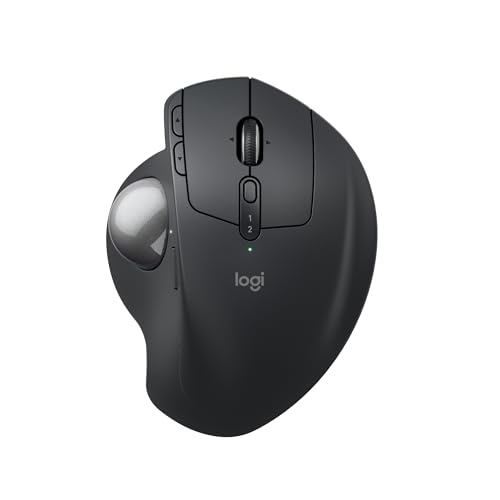
The best wireless gaming mouse with no bells and whistles is a mouse that does the core job well and skips the rest: a good sensor, a comfortable shape, a weight that suits the hand, and a battery that lasts for weeks rather than days. No charging dock taking up desk space, no little screen on the side, no row of extra buttons that never get pressed, and no software that demands attention before the first game. The eight mice below are picked on that test, and each one earns its place by being simple to live with.
The list covers the names that have defined this kind of mouse for years: Logitech's G305, G703 and G502 LIGHTSPEED, Razer's Viper V3, DeathAdder V2 X, DeathAdder V3 and Basilisk V3 X HyperSpeed models, and Redragon's M810 PRO. Between them they cover every hand size and grip style, from the 55-gram DeathAdder V3 HyperSpeed to the weight-adjustable G502, and every battery from 100 hours to 285 hours. A few of them have lighting, and the guide says so plainly for each one, because lighting can be switched off, while a bad shape cannot be fixed.
Simple does not mean weak. The sensors in this guide run from 12,000 DPI to 30,000 DPI, the wireless connections are the low-latency links each maker builds for gaming, and the batteries are measured in hundreds of hours on the best picks. What is missing is the clutter: these mice have six to eleven buttons, not nineteen, and they charge over a plain cable or run on a single AA battery. The guide below explains what each mouse does well, where it falls short, and who should buy it.
In this guide
Quick picks: best wireless gaming mouse no bells and whistles
| # | Product | Where to buy |
|---|---|---|
| 1 | Logitech G305 LIGHTSPEED Wireless Gaming Mouse, Black | Check on Amazon |
| 2 | Razer Viper V3 HyperSpeed Wireless Gaming Mouse, Black | Check on Amazon |
| 3 | Razer DeathAdder V2 X HyperSpeed Wireless Gaming Mouse, Black | Check on Amazon |
| 4 | Razer DeathAdder V3 HyperSpeed Wireless Gaming Mouse, Black | Check on Amazon |
| 5 | Logitech G703 LIGHTSPEED Wireless Gaming Mouse, Black | Check on Amazon |
| 6 | Logitech G502 LIGHTSPEED Wireless Gaming Mouse, Black | Check on Amazon |
| 7 | Razer Basilisk V3 X HyperSpeed Wireless Gaming Mouse, Black | Check on Amazon |
| 8 | Redragon M810 PRO Wireless RGB Gaming Mouse | Check on Amazon |
How the picks were chosen
The picks were chosen from the site's own product search, looking only at genuine wireless gaming mice sold as complete mice: a named sensor, a wireless connection built for gaming, and a battery or a standard battery the buyer can replace. A listing was dropped if it was a wired-only mouse, a charging dock sold on its own, a different colour of a model already picked, or a mouse whose extra buttons made it the opposite of simple. The Razer Naga V2 HyperSpeed, with nineteen programmable buttons, was dropped for exactly that reason, and replaced with the DeathAdder V3 HyperSpeed, which keeps the same wireless system in a plain six-button shape.
Weight was checked first, because it is the number that decides how a mouse feels after an hour. The picks run from 55 grams to around 114 grams with weights fitted, and the guide names the weight of each mouse so a buyer who likes a light flick mouse and a buyer who likes a planted mouse can both choose with confidence. Sensor resolution came next, because it decides how precisely the mouse tracks, and the guide names the sensor of each pick rather than hiding behind a single DPI number.
Finally, each mouse was checked for the practical things that decide whether a simple mouse stays simple: how it charges, how long the battery lasts, and how many buttons it actually has. A mouse that needs a dock to charge is not a simple mouse, so every pick here charges over a cable or runs on a standard battery. The eight picks below cover all of those choices, and the guide notes which mouse does each thing best, so the buyer can spend on the feature that matters most to them and skip the ones that do not.
Quick comparison
| Product | Standout detail |
|---|---|
| Logitech G305 LIGHTSPEED Wireless Gaming Mouse, Black | Logitech G305, 12K sensor, 250h battery |
| Razer Viper V3 HyperSpeed Wireless Gaming Mouse, Black | Razer Viper V3, 30K sensor, 280h battery |
| Razer DeathAdder V2 X HyperSpeed Wireless Gaming Mouse, Black | Razer DeathAdder V2 X, ergonomic, 235h |
| Razer DeathAdder V3 HyperSpeed Wireless Gaming Mouse, Black | Razer DeathAdder V3, 55g ultralight, USB-C |
| Logitech G703 LIGHTSPEED Wireless Gaming Mouse, Black | Logitech G703, Hero 25K, weight choice |
| Logitech G502 LIGHTSPEED Wireless Gaming Mouse, Black | Logitech G502, adjustable weights, 11 buttons |
| Razer Basilisk V3 X HyperSpeed Wireless Gaming Mouse, Black | Razer Basilisk V3 X, 285h battery, 9 controls |
| Redragon M810 PRO Wireless RGB Gaming Mouse | Redragon M810 PRO, 10K DPI, macros |

1. Logitech G305 LIGHTSPEED Wireless Gaming Mouse, Black
Key specs
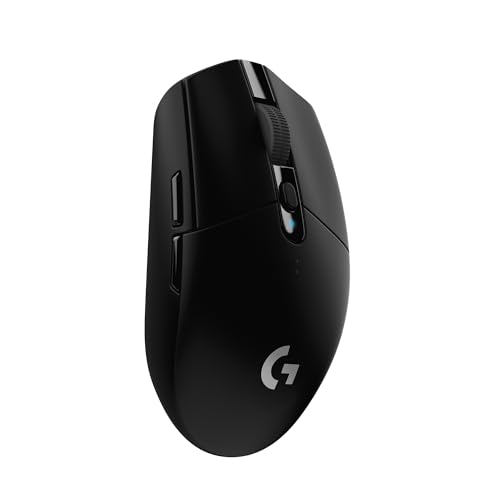
Logitech G305 LIGHTSPEED wireless gaming mouse, black, Hero 12K sensor, 12,000 DPI, lightweight, 6 programmable buttons, 250-hour battery life, on-board memory, PC and Mac.
Strengths
- The Hero 12K sensor tracks precisely at 12,000 DPI, which is more than most players ever use.
- The 250-hour battery life on a single AA battery means months of play between changes.
- The six-button shape is the simplest in this guide, with nothing extra to learn.
Trade-offs
- There is no rechargeable battery built in, so the mouse needs a fresh AA battery now and then.
- There is no RGB lighting, which is a strength for this guide but a drawback for buyers who want it.
- The shape is small and light, so a buyer with very large hands should try a bigger pick first.
Who it fits
A buyer who wants the simplest good wireless gaming mouse, and who likes a light mouse with a long battery life.
Best for: Everyday gaming and desk work in a light, simple mouse.
Not suited for: Buyers who want RGB lighting or a rechargeable battery built in.
In daily use
Put a single AA battery in and the G305 runs for months, so keep a spare battery in the desk drawer rather than a charging cable on the desk. Set the DPI to a comfortable level once and leave it there, because the strength of this mouse is that it needs no further attention. The on-board memory keeps the settings when the mouse moves between computers.
The Logitech G305 is the default pick in this guide: the simplest wireless gaming mouse that still plays properly.
Check price on Amazon: Logitech G305 LIGHTSPEED Wireless Gaming Mouse, Black

2. Razer Viper V3 HyperSpeed Wireless Gaming Mouse, Black
Key specs
Razer Viper V3 HyperSpeed wireless PC gaming mouse, black, 82 grams, 30K DPI optical sensor, up to 280 hours of battery life, mechanical switches Gen-2, 6 programmable buttons, 1 AA battery included.
Strengths
- The 30K DPI optical sensor is the sharpest in this guide, and it tracks cleanly at high speeds.
- The 280-hour battery life is the longest here, on a single AA battery.
- At 82 grams it is light without feeling hollow, and the six-button shape stays simple.
Trade-offs
- The mouse runs on a AA battery rather than a rechargeable cell, so a spare battery is worth keeping.
- There is no RGB lighting, which suits this guide but not buyers who want a lit mouse.
- The symmetrical shape suits palm and claw grips, but a buyer who wants a right-handed ergonomic shape should look at the DeathAdder picks.
Who it fits
A buyer who wants the sharpest sensor and the longest battery in a light, plain mouse.
Best for: Fast games where a light mouse and a sharp sensor matter most.
Not suited for: Buyers who want an ergonomic right-handed shape or RGB lighting.
In daily use
Use the Viper V3 at a DPI that matches the game rather than the maximum, because 30,000 DPI is far more than any hand can use, and the mouse is at its best in the middle of its range. Keep a spare AA battery handy, and the 280-hour rating means the battery is changed rarely enough to forget about.
The Razer Viper V3 HyperSpeed is the sensor pick: the sharpest tracking in this guide.
Check price on Amazon: Razer Viper V3 HyperSpeed Wireless Gaming Mouse, Black

3. Razer DeathAdder V2 X HyperSpeed Wireless Gaming Mouse, Black
Key specs
Razer DeathAdder V2 X HyperSpeed wireless gaming mouse, black, HyperSpeed wireless, 235-hour battery life, 7 programmable buttons, Gen-2 mechanical switches, 14K DPI optical sensor.
Strengths
- The DeathAdder shape is the most comfortable ergonomic shape in this guide, and it suits long sessions.
- The 235-hour battery life covers months of play on standard batteries.
- Seven buttons is enough for gaming without cluttering the mouse with extras.
Trade-offs
- The 14K DPI sensor is the lowest resolution in this guide, though it is still more than most players use.
- There is no RGB lighting on this model, which suits the simple brief but not every buyer.
- It runs on standard batteries rather than a rechargeable cell, so spares are needed now and then.
Who it fits
A buyer who wants the classic DeathAdder shape without wires, and who values comfort over extra features.
Best for: Long sessions where the ergonomic shape matters more than the sensor number.
Not suited for: Buyers who want the sharpest sensor or RGB lighting.
In daily use
Let the DeathAdder shape do its work: rest the palm on the mouse rather than gripping it, and the ergonomic curve supports the hand through a long session. The seven buttons cover the essentials, and the HyperSpeed wireless link keeps the response immediate without a cable.
The Razer DeathAdder V2 X HyperSpeed is the comfort pick: the classic ergonomic shape, wireless and simple.
Check price on Amazon: Razer DeathAdder V2 X HyperSpeed Wireless Gaming Mouse, Black

4. Razer DeathAdder V3 HyperSpeed Wireless Gaming Mouse, Black
Key specs
Razer DeathAdder V3 HyperSpeed ergonomic wireless gaming mouse, black, 55 grams, Focus X 26K optical sensor, optical switches Gen-3, HyperSpeed wireless, up to 100 hours of battery, USB-C charging.
Strengths
- At 55 grams it is the lightest mouse in this guide, and the difference is felt immediately.
- The Focus X 26K sensor and Gen-3 optical switches give sharp tracking and a crisp click.
- USB-C charging means the mouse recharges over the same cable as a phone or a headset.
Trade-offs
- The 100-hour battery life is the shortest in this guide, so it needs charging more often.
- There is no RGB lighting, which fits the simple brief but not buyers who want it.
- The ultralight shape is so light that a buyer who likes a planted mouse may find it too airy.
Who it fits
A buyer who wants the lightest DeathAdder ever made, with a modern sensor and USB-C charging.
Best for: Fast, light play where every gram counts.
Not suited for: Buyers who want the longest battery life or a heavier mouse.
In daily use
Charge the DeathAdder V3 over USB-C when the battery runs low, and it is ready again quickly, so keep the cable on the desk rather than in a drawer. The 55-gram weight suits a fingertip or claw grip best, and the mouse rewards a light touch rather than a heavy palm.
The Razer DeathAdder V3 HyperSpeed is the ultralight pick: the lightest mouse in this guide.
Check price on Amazon: Razer DeathAdder V3 HyperSpeed Wireless Gaming Mouse, Black
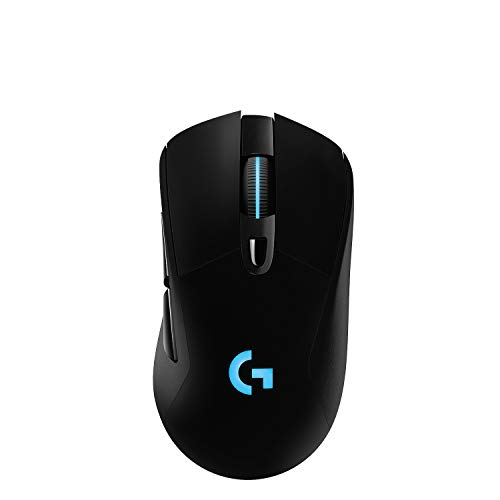
5. Logitech G703 LIGHTSPEED Wireless Gaming Mouse, Black
Key specs
Logitech G703 LIGHTSPEED wireless gaming mouse, black, Hero 25K sensor, lightweight, PowerPlay compatible, Lightsync RGB, 95 grams plus 10-gram optional weight, 100 to 25,600 DPI, rubber side grips.
Strengths
- The Hero 25K sensor covers 100 to 25,600 DPI, which is more range than any player needs.
- The optional 10-gram weight lets the buyer choose between 95 and 105 grams.
- The rubber side grips keep the mouse steady in the hand during long sessions.
Trade-offs
- The Lightsync RGB lighting is the one extra here, though it can be switched off entirely.
- The battery life is shorter than the G305, so it needs charging more often.
- PowerPlay wireless charging needs a separate charging mat, which is an extra purchase.
Who it fits
A buyer who wants a Logitech mouse with a top sensor and a weight choice, and who does not mind lighting.
Best for: Players who want to tune the weight and the sensor to their own hand.
Not suited for: Buyers who want the longest battery life in this guide.
In daily use
Switch the Lightsync lighting off if it is not wanted, because the G703 is at its simplest with the lights dark and the sensor doing the work. Try the mouse first without the extra weight, then add the 10 grams only if the lighter feel is too airy.
The Logitech G703 is the tunable pick: the Logitech mouse with a weight choice.
Check price on Amazon: Logitech G703 LIGHTSPEED Wireless Gaming Mouse, Black

6. Logitech G502 LIGHTSPEED Wireless Gaming Mouse, Black
Key specs
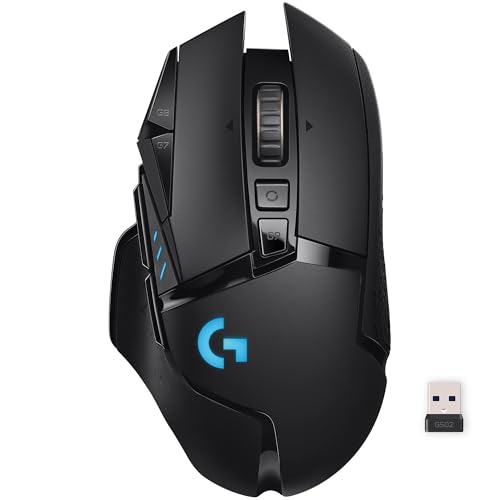
Logitech G502 LIGHTSPEED wireless gaming mouse, black, RGB, adjustable weights, 11 programmable buttons, POWERPLAY compatible, on-board memory, for PC and Mac.
Strengths
- The adjustable weights let the buyer tune the mouse from light to planted, which no other pick here does.
- Eleven programmable buttons cover more commands than the simpler picks, without reaching the excess of a nineteen-button mouse.
- The on-board memory keeps the settings when the mouse moves between computers.
Trade-offs
- The RGB lighting and the eleven buttons are the most extras of any pick in this guide, so it is the least plain mouse here.
- It is heavier than the ultralight picks, even before the weights are added.
- POWERPLAY wireless charging needs a separate mat, which is an extra purchase.
Who it fits
A buyer who wants the most adjustable Logitech mouse, and who accepts a few extras for the tuning.
Best for: Players who want to tune weight and buttons to their own hand.
Not suited for: Buyers who want the plainest mouse in this guide, who should take the G305.
In daily use
Start with no extra weights fitted and add them one at a time, because the G502 changes character with each weight. The eleven buttons are best set once and left alone, so the mouse stays simple in daily use even though it can do more.
The Logitech G502 LIGHTSPEED is the adjustable pick: the most tunable mouse in this guide.
Check price on Amazon: Logitech G502 LIGHTSPEED Wireless Gaming Mouse, Black

7. Razer Basilisk V3 X HyperSpeed Wireless Gaming Mouse, Black
Key specs
Razer Basilisk V3 X HyperSpeed customizable wireless gaming mouse, black, mechanical switches Gen-2, 5G Advanced 18K optical sensor, Chroma RGB, 9 programmable controls, 285-hour battery.
Strengths
- The 285-hour battery life is the longest in this guide, on a single battery.
- The 5G Advanced 18K sensor tracks sharply, and the Gen-2 switches click cleanly.
- Nine programmable controls give room for extra commands without cluttering the mouse.
Trade-offs
- The Chroma RGB lighting is the most visible extra here, though it can be switched off.
- The shape is larger than the Viper picks, so a small hand should check the fit.
- The extra controls need setting up once, which is a few minutes of software work.
Who it fits
A buyer who wants the longest battery life and a few extra controls, in a larger Razer shape.
Best for: Long sessions where battery life matters most.
Not suited for: Buyers with small hands, who should take the Viper V3 instead.
In daily use
Switch the Chroma lighting off for the plainest experience, and set the nine controls once so the mouse needs no further attention. The 285-hour battery means the battery is changed rarely, and the larger shape suits a palm grip best.
The Razer Basilisk V3 X HyperSpeed is the battery pick: the longest-running mouse in this guide.
Check price on Amazon: Razer Basilisk V3 X HyperSpeed Wireless Gaming Mouse, Black

8. Redragon M810 PRO Wireless RGB Gaming Mouse
Key specs
Redragon M810 PRO wireless RGB gaming mouse, 10000 DPI, remapping keys, cable-free, rapid-fire macro keybinds, vibing backlight, ergonomic grip body.
Strengths
- The 10,000 DPI sensor and the macro keybinds cover gaming needs at a lower level than the big brands.
- The ergonomic grip body suits a palm grip, and the wireless link is cable-free.
- The remapping keys let the buyer set the buttons once and forget them.
Trade-offs
- The RGB backlight is always part of this mouse, so it is the least plain pick in this guide.
- The 10,000 DPI sensor is the lowest resolution here, though it is enough for most play.
- The macro features need the software to set up, which is a few minutes of work for a simple mouse.
Who it fits
A buyer who wants a lower-cost wireless gaming mouse with macro keys, and who likes RGB lighting.
Best for: Budget play where macros and lighting are wanted.
Not suited for: Buyers who want the plainest mouse, who should take the G305 or the Viper V3.
In daily use
Set the macros once in the software and then leave them alone, because the M810 PRO is at its best when it is used as a simple wireless mouse with the extras already set. The RGB backlight can be dimmed if the room is dark, and the ergonomic grip suits a relaxed palm grip.
The Redragon M810 PRO is the budget pick: the lowest-cost wireless gaming mouse in this guide.
Check price on Amazon: Redragon M810 PRO Wireless RGB Gaming Mouse
Buying guide: best wireless gaming mouse no bells and whistles
Sensor first: DPI is not the whole story
The sensor decides how precisely the mouse tracks, and the numbers in this guide run from 10,000 DPI to 30,000 DPI. More DPI is not automatically better: most players use between 800 and 3,200 DPI, and the sensor matters more for how cleanly it tracks at speed than for its maximum number. The Viper V3 has the sharpest sensor here at 30K DPI, and the G305 has the lowest at 12K DPI, yet both track well enough for serious play. Choose the sensor that is clean and consistent, not the one with the biggest number.
Weight: light, planted, or adjustable
Weight decides how a mouse feels after an hour, and the picks here run from 55 grams to around 114 grams with weights fitted. A light mouse suits fast flicks and a fingertip grip, while a heavier mouse suits a planted palm grip and steady aiming. The G502 and the G703 let the buyer adjust the weight, which is the honest solution for a buyer who does not know which they prefer. Try the mouse light first, then add weight only if the light feel is too airy.
Battery: AA, rechargeable, or PowerPlay
The mice in this guide use three kinds of power: a single AA battery, a built-in rechargeable cell charged over USB-C, or Logitech's PowerPlay wireless charging mat. A AA battery lasts for months and is replaced in seconds, which is the simplest system of all. A rechargeable cell needs a cable now and then, and PowerPlay needs a separate mat, which is an extra purchase. The battery lives here run from 100 hours to 285 hours, and the guide names each one, so the buyer can choose the system that suits their desk.
Buttons: how many is enough
The mice here have six to eleven buttons, and that range is the heart of the no-bells-and-whistles brief. Six buttons cover the essentials: left, right, wheel, and three more for the common commands. Eleven buttons, on the G502, cover more commands without cluttering the mouse. Nineteen buttons, on the dropped Naga V2, is a different kind of mouse entirely, built for games that need a dozen commands on the mouse itself. For most players, six to nine buttons is enough, and the extra buttons on the G502 and the Basilisk V3 X should be set once and left alone.
Shape and grip: palm, claw, or fingertip
A mouse shape suits a grip style, and the wrong pairing is uncomfortable within the hour. The DeathAdder shape suits a palm grip, with the hand resting on the mouse. The Viper shape suits a claw or fingertip grip, with the hand arched over it. The G305 suits a small to medium hand in any grip, and the G502 suits a larger hand that wants weight. Hand size matters as much as grip: a buyer with large hands should look at the DeathAdder and G502 picks, and a buyer with small hands should look at the Viper and G305 picks.
Wireless that plays properly
Every mouse in this guide uses its maker's low-latency wireless link, not plain Bluetooth, and that is what makes a wireless mouse play properly. The link should feel immediate, with no lag between the hand and the screen, and all eight picks meet that test. Bluetooth alone is fine for office work but not for gaming, so a mouse that only offers Bluetooth is not a gaming mouse, and none of the picks here is limited to it.
Lighting: the one extra most mice carry
Four of the mice in this guide have RGB lighting, and it is the one extra that even simple mice often carry. Lighting does nothing for play, and it can be switched off on every pick that has it, which is the point that matters for this guide. A buyer who wants no lighting at all should take the G305, the Viper V3 or either DeathAdder, which have none. A buyer who likes lighting should take the G703, the G502, the Basilisk V3 X or the M810 PRO, and set it once to a calm colour.
What was left out, and why
Charging docks, little screens, swappable side panels and nineteen-button layouts were all left out of this guide on purpose, because each one adds cost, desk clutter or learning time without improving the core job of the mouse. A dock is a second device to find space for, a screen is a distraction during play, and a nineteen-button mouse is a specialist tool for a narrow set of games. The eight mice here are the ones that do the core job well and skip the rest, and that is the whole point of the guide.
Usage and care
Set the mouse up by choosing a DPI that matches the game, then leave it there, because changing DPI mid-game is the surest way to miss. Keep the mouse on a clean, flat mat, and wipe the sensor lens gently with a dry cloth once a month, because dust on the lens is the most common cause of a mouse that skips. Charge a rechargeable mouse overnight, and keep a spare AA battery in the desk drawer for the battery mice, so a dead battery never ends a session.
Clean the mouse with a dry cloth, and never spray cleaner directly onto it, because liquid in the switches is the fastest way to kill a mouse. Keep the feet clean, because worn or dirty feet drag and make the mouse feel slow, and replacement feet are cheap when they are needed. Store the USB receiver in the mouse itself when travelling, because a lost receiver is a mouse that cannot connect.
Update the mouse software once when the mouse is new, set the buttons and the lighting, and then leave the software alone, because a simple mouse should not need weekly attention. If the mouse starts to double-click, clean around the buttons first, because dust is the usual cause, and only then consider whether the switches themselves are worn. A mouse looked after this way lasts years longer than one that is left dusty on a cluttered desk.
Common mistakes
The most common mistake is buying on DPI alone: a mouse with a 30,000 DPI sensor is no better in play than a mouse with a 12,000 DPI sensor when both are used at 1,600 DPI, which is where most players live. Choose the shape and the weight first, then the battery system, and only then look at the sensor number, because the shape is what the hand feels every minute of every session.
The second mistake is ignoring the battery system. A mouse with a 100-hour battery that needs a cable every few days is a different purchase from a mouse with a 280-hour battery that needs a new AA battery every few months, and the buyer should know which they are buying. Check the battery life and the charging method before ordering, not after the first dead battery.
The third mistake is buying too many buttons. A mouse with nineteen buttons is a specialist tool, and a buyer who does not play the games that need it will never use half of them, while paying for all of them. Six to nine buttons covers most play, and the extra buttons on the G502 and the Basilisk V3 X should be set once and left alone, so the mouse stays simple in daily use.
Wireless mice for small hands
A small hand wants a light, compact mouse, and the G305 and the Viper V3 are the picks here, because both are light and neither is wide. The DeathAdder shape is too long for a small hand, and the G502 is too heavy, so both should be skipped by a small-handed buyer. Try the mouse with the hand resting naturally, and if the fingers reach past the wheel, the mouse is too small, while if the palm cannot rest on the back, it is too big.
Wireless mice for large hands
A large hand wants a longer, heavier mouse, and the DeathAdder V2 X, the G502 and the Basilisk V3 X are the picks here, because all three fill a large palm. The G305 and the Viper V3 are too small for a large hand, and the ultralight DeathAdder V3, while the same shape as its brother, is so light that a large hand may find it skittish. A large hand should choose the shape first and the weight second.
Wireless mice for work as well as play
A wireless gaming mouse works as a work mouse when the buttons are set sensibly, and the G305 and the DeathAdder V2 X are the most work-friendly here, because their shapes are calm and their batteries last for months. Set two buttons for back and forward in the browser, leave the rest alone, and the same mouse serves both jobs without the desk looking like a gaming setup during work hours.
Final recommendation
If one mouse has to win this guide, it is the Logitech G305 LIGHTSPEED, because it is the simplest wireless gaming mouse that still plays properly: a good sensor, a light shape, six buttons, and a 250-hour battery on a single AA cell. The Razer Viper V3 HyperSpeed is the pick for buyers who want the sharpest sensor and the longest battery, and the DeathAdder V3 HyperSpeed is the pick for buyers who want the lightest mouse in this guide.
For most buyers, the choice comes down to three questions. Does the hand want light or planted? Light points to the Viper V3 or the DeathAdder V3, planted points to the G502 or the Basilisk V3 X. Does the battery need to last for months? If yes, the Basilisk V3 X and the Viper V3 are the answers. Does the shape need to be ergonomic? If yes, the DeathAdder picks are the ones to compare. Answer those three, and the right mouse in this guide picks itself.
Whatever mouse is chosen, set the DPI once, switch the lighting off if it is not wanted, and keep a spare battery or a charging cable at hand. A simple wireless gaming mouse bought carefully is a mouse that serves for years, and the eight mice in this guide are all mice that can do that, in different shapes and weights, for different hands.
Frequently asked questions
What is the simplest wireless gaming mouse?
The simplest wireless gaming mouse is one with a good sensor, a comfortable shape, six buttons and a long battery, and the Logitech G305 is the clearest example in this guide. It has no lighting, no dock and no extra buttons, and it runs for 250 hours on a single AA battery, which is the simplest power system of all.
Is wireless as good as wired for gaming?
A modern low-latency wireless link plays as well as a wired connection for most players, and every mouse in this guide uses its maker's gaming wireless link rather than plain Bluetooth. The difference is felt only at the highest level of play, and for most buyers the freedom of no cable matters more than the last fraction of latency.
How long does a wireless gaming mouse battery last?
The mice in this guide run from 100 hours to 285 hours on a charge or a battery, with the Basilisk V3 X at the top and the DeathAdder V3 at the bottom. A mouse with a AA battery lasts for months of ordinary play, while a rechargeable mouse needs a cable every few days to a few weeks, depending on the lighting.
Do I need RGB on a gaming mouse?
No, RGB lighting does nothing for play, and it can be switched off on every mouse in this guide that has it. The G305, the Viper V3 and both DeathAdder picks have no lighting at all, which suits buyers who want the plainest mouse, while the G703, the G502, the Basilisk V3 X and the M810 PRO offer lighting for buyers who like it.
How many buttons should a gaming mouse have?
Six to nine buttons covers most play, and the mice in this guide have six to eleven buttons. Six buttons covers the essentials, eleven buttons on the G502 covers more commands, and nineteen buttons is a specialist layout for games that need a dozen commands on the mouse, which is why the nineteen-button Naga V2 was left out of this guide.
What is the lightest wireless gaming mouse?
The lightest mouse in this guide is the Razer DeathAdder V3 HyperSpeed at 55 grams, followed by the Viper V3 HyperSpeed at 82 grams. A light mouse suits fast flicks and a fingertip grip, while a heavier mouse suits a planted palm grip, so the right weight depends on the hand and the grip rather than the number alone.
More from ilcastellomenu.com
Best gaming mouse for 10: gaming mice at the 10 level
Best top 10 gaming mouse under 50: ten gaming mice under 50
Best wireless keyboard and mouse combo for gaming: one-USB wireless sets