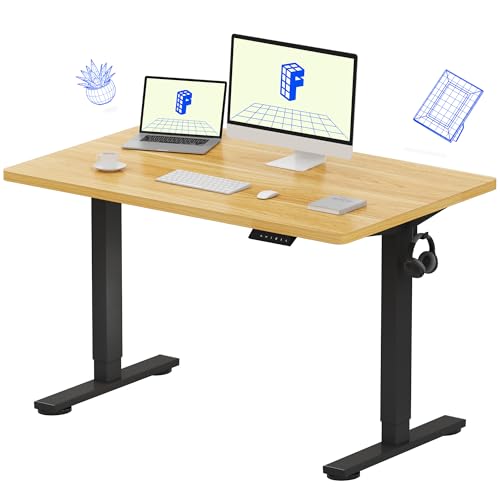
The electric vs manual standing desk choice decides how often you will actually change posture, because the best mechanism is the one you will use several times a day without thinking about it. Electric desks adjust at the touch of a button, often with memory presets; manual desks — hand-crank or pneumatic — adjust with physical effort and no power supply. Both can hold a desk at the right height. They differ in speed, convenience, cost tier, and what can go wrong over years of use.
This comparison goes criterion by criterion — adjustment experience, precision, stability, reliability, and value — and finishes with recommendations for different users and rooms.
Disclosure: As an Amazon Associate, ilcastellomenu.com earns from qualifying purchases. Product examples below link to Amazon, where you can check current availability and specifications; this guide itself lists no fixed prices because pricing and bundles change frequently.
Quick Verdict
Choose electric if you will adjust several times a day, share the desk between users, carry a heavy multi-monitor load, or know that friction kills your habits — presets make posture change a two-second habit. Choose manual if the desk sits away from power, adjusts occasionally, carries a light load, or you prefer mechanical simplicity with nothing electronic to fail. If you are still deciding whether to stand at all, start with Standing Desk vs Regular Desk before choosing a mechanism.
In this guide
The Adjustment Experience
This is the criterion that decides real-world use. An electric desk glides from sitting to standing in seconds while you keep your hands on your work; with memory presets, each user’s heights are one press away. A hand-crank desk asks for a short workout per adjustment — not strenuous, but noticeable — and pneumatic (gas-lift) desks sit between the two, moving quickly with a lever and a guiding hand, though they can feel less controlled under heavy loads.
Why friction matters more than specifications
Ergonomics advice assumes you alternate posture regularly. Every barrier — cranking, wobbling loads, re-levelling accessories afterwards — reduces how often that happens. Users who switch four times a day get the benefit the category promises; users who switch twice a week own an expensive fixed desk with a handle. Be honest about which user you are; it is the most predictive question in this whole comparison.
Electric desks also adjust in small increments effortlessly, which matters for fine-tuning your exact elbow height as described in What is the Ideal Desk Height. Manual desks can hit the same heights, but the fine-tuning takes patience.
Noise and the shared room
Electric motors produce a low hum during adjustment — brief, but audible in a quiet shared room or on a call. Cranks are quieter mechanically but slower, so the disturbance lasts longer. Pneumatic desks are the quietest of the three in practice, moving in a second or two with minimal sound. In a bedroom-office or a shared living space, this row of the table deserves real weight.
Precision, Range, and Load
Electric desks typically offer the widest height ranges and the most precise positioning, and their lifting capacity handles heavy loads — multiple monitors, a desktop PC on the surface, books — while still moving smoothly. Dual-motor designs lift more evenly than single-motor ones, particularly on wide desktops.
Manual desks have lower practical load limits: a crank mechanism can be geared for heavy loads but becomes slow and effortful, and pneumatic lifts are balanced for a designed weight band — too little load and they rise eagerly, too much and they sink or refuse. If your setup is heavy, weigh this criterion heavily; if it is a laptop and one screen, every mechanism copes.
Stability and Feel
At a given height, stability depends more on frame design than on mechanism, but patterns exist. Manual frames are often simpler and can feel very solid because nothing in them moves except when cranked. Electric frames at full standing extension can show slight lateral play, more noticeable with heavy off-centre loads; crossbar-equipped frames reduce it on both types.
Pneumatic desks deserve a specific note: because the lift is always live, a pneumatic surface can have a faint springiness under leaning weight that crank and electric desks (which lock mechanically or by motor brake) do not. Typists rarely notice; people who lean hard on the desk while thinking sometimes do. Developing wobble on any frame is a maintenance matter covered by How to Fix a Wobbly Desk.
Reliability and What Can Fail
Manual mechanisms fail simply: a worn crank gear, a tired gas strut after many years. Repairs are mechanical and often user-serviceable, and there is no control box to diagnose. Electric desks add a motor (or two), a control box, and a handset — more capable, and more components. When an electric desk does misbehave, the fix is usually a reset or a cable check rather than a repair, as the safe diagnostic sequence in How to Fix Standing Desk Not Rising shows; you should never open the control box or motor housing yourself.
Power dependence is the other reliability axis: an electric desk in a room with one awkward socket, or during an outage, is a fixed desk at whatever height it stopped. A manual desk works anywhere, including rooms where running a cable to the desk is impractical.
Cost and Value Tiers
Manual desks occupy the lower tiers of the standing category and electric desks the middle and upper tiers, with dual-motor electric frames at the top. The premium buys the adjustment experience, presets, range, and capacity described above. Judged per adjustment over years of daily use, electric desks justify themselves for frequent switchers; judged as furniture that will sit at one height, the manual desk’s simplicity is the better value.
Remember to budget the whole workstation: whichever mechanism you choose, the mat, monitor arm, and chair decisions in How to Set Up Ergonomically a Desk matter as much to daily comfort as the lift type.
Side-by-Side Summary
| Criterion | Electric standing desk | Manual standing desk |
|---|---|---|
| Adjustment effort | Button press; memory presets on many models | Crank turns, or lever plus guiding hand (pneumatic) |
| Adjustment speed | Seconds, under full load | Slower with a crank; pneumatic is quick with light loads |
| Precision and range | Fine increments, typically widest range | Good, but fine-tuning takes patience |
| Load capacity in practice | Highest, especially dual-motor frames | Moderate; pneumatic lifts have a designed weight band |
| Power needed | Yes — socket and cable management with slack | None |
| Noise | Brief motor hum | Crank is slow but quiet; pneumatic near-silent |
| Failure modes | Electronics, control box, handset — usually reset-level fixes | Worn gears or gas struts — mechanical, often user-serviceable |
| Cost tier | Mid to high within the standing category | Entry to mid within the standing category |
Electric vs Manual Standing Desk: Who Should Choose Which
Choose electric if you work long desk hours and intend to alternate posture several times daily, if the desk is shared (presets end height arguments), if your load is heavy, or if you have any mobility or strength consideration that makes cranking a barrier. Current electric options are rounded up in Best Sit Stand Desks for Home Office.
Choose manual if the desk lives in a room without convenient power, your setup is light, your budget tier is firm, or you are furnishing a space where mechanical simplicity and independence from electronics are worth more than one-press convenience — a workshop-adjacent office, a cabin, a classroom.
The Third Option: Pneumatic and Counterbalance Desks
Between crank and motor sits a third mechanism worth understanding: the pneumatic or counterbalance desk, which uses a gas lift — the same principle as an office chair’s height cylinder, scaled up — released by a lever. You lift or press the desktop with a guiding hand while the strut does the heavy work. At its best it is the fastest adjustment of all three types and completely silent, with no power and no cranking.
Its constraints are the weight band and the feel. The strut is balanced for a designed load range: well under it, the desk floats upward eagerly and must be pressed down; well over it, the strut cannot lift and the desk sinks slowly under load. Your setup’s weight must land inside the band, which makes pneumatic desks a deliberate match for a known, stable equipment list — a laptop and one monitor, say — and a risky one for a setup that keeps gaining hardware. Judge it as a specialist: superb within its band, unforgiving outside it.
Desktop Converters: The Mechanism You Do Not Buy a Desk For
A sit-stand converter — a platform that sits on an existing desk and raises the keyboard and screens together — sidesteps the mechanism question entirely, and for some buyers that is its virtue: no desk replacement, no installation, and a genuine trial of standing work. Its compromises are real, though. The platform consumes desk depth, the keyboard and screen rise locked together (so screen height relative to keyboard is fixed by the converter’s geometry), stability at full extension is less than a full desk’s, and the weight capacity is modest.
As a diagnostic — ‘do I actually stand?’ — a converter is excellent and cheap research. As a permanent workstation for long hours, a purpose-built desk of either mechanism type generally serves better. Let the converter answer the habit question; let this article’s comparison answer the mechanism question.
What the Warranties Tell You
Mechanism confidence is written in warranty structure, if you read it closely. On electric desks, separate the warranties: frame and desktop on one term, motor and electronics on another, often shorter. The electronics term is the manufacturer’s own estimate of the mechanism’s risk, and a long one is a meaningful quality signal. On manual desks, look for the crank mechanism and (for pneumatic) the gas strut’s coverage — struts are wear items with a finite cycle life, and a maker who warrants them generously is telling you something.
Also check what servicing looks like in practice: whether replacement handsets, control boxes, and struts are sold as spare parts at all. A desk whose wear parts are replaceable is a desk designed for a long life; a desk whose mechanism is a sealed mystery is a desk with an expiry date, whichever mechanism it uses.
Living With Each Mechanism: A Month in the Life
Specifications flatten differences that daily life exaggerates, so consider a month of real use. The electric desk’s month is uneventful in the best way: adjustments happen mid-thought, the desk is simply always at the right height, and the standing habit survives busy weeks because it costs nothing to keep. Its bad days are rare and binary — a controller that wants a reset after a power cut, a morning spent checking cables — memorable precisely because they are exceptional.
The manual desk's month, honestly told
The crank desk’s month has a rhythm: adjustments cluster at natural breaks — morning start, after lunch, the afternoon slump — because each change is a small deliberate act. For many users that rhythm is enough, and some genuinely prefer the ritual, the way some prefer a manual coffee grinder. The failure mode is the busy week: deadlines compress the breaks, the crank stays untouched for days, and the desk quietly becomes a fixed desk at sitting height. Neither month is a caricature; both are common. The question this comparison finally asks is which month sounds like yours.
Pneumatic desks split the difference in daily feel — adjustment is quick enough to survive busy weeks — at the cost of the weight-band discipline described earlier. If your equipment list is stable and light, its month may be the best of the three.
Noise at night, guests, and other edge cases
Edge cases decide close calls. A desk in a bedroom used while a partner sleeps favours the quietest adjustment — pneumatic, or an electric desk adjusted before bed. A desk in a rental where you cannot run cables neatly favours manual’s independence from sockets. A desk that will be operated by a child for homework favours electric’s effortlessness and anti-collision sensors. List your own edge cases before ordering; the mechanism that wins your ordinary days but fails your edge cases will be remembered for the failures.
Installation and Ownership Differences
The mechanisms diverge again after purchase. An electric frame assembles with a wiring stage — control box mounted, cables routed with slack for travel, handset positioned — and thereafter wants a socket and occasional cable checks. A crank frame assembles as pure furniture and wants nothing thereafter except the standard bolt checks. A pneumatic frame assembles as furniture too, but its strut’s behaviour should be verified under your real load during the return window, because the weight-band question can only be answered by your actual equipment on the actual desk.
Upgrading, repairing, and the spare-parts question
Ownership over a decade favours whichever mechanism your specific model supports with parts. Electric desks from makers who sell replacement handsets and control boxes age gracefully: the wear items are swappable in minutes with a screwdriver, from outside the sealed units. Crank mechanisms wear their gears slowly and visibly, and a worn crank is usually replaceable as an assembly. Pneumatic struts are sealed gas units — replaceable whole, never refillable — so confirm a replacement strut exists for your model before the original’s warranty expires.
The pattern generalises beyond this comparison: for any mechanism, the question ‘what wears, and can I buy that part?’ predicts ownership satisfaction better than the showroom feel. Ask it of both types, and let the answers break close ties.
A note on hand-crank placement and handedness
One small, decisive detail for crank buyers: the crank’s position and your handedness. Cranks typically mount at the front edge, left or right, and some designs allow either — verify before ordering if you have a strong preference or a wall on one side that would block the crank’s swing. The crank also folds or removes on many designs for a clean look; a crank that must be detached to avoid knee contact will, in practice, be detached permanently, and the desk’s adjustability with it. Small ergonomic truths like this one are invisible in specifications and obvious in a month of use.
Resale, Handing Down, and the Second Owner
Mechanisms age differently into their second lives, and a desk bought well is often handed down or sold rather than discarded. An electric desk’s second-owner value depends on its electronics: a model whose handset and control box are still sold as spares is a working desk indefinitely, while one with orphaned electronics is a single failure away from being a heavy fixed desk. A manual desk’s value is more robust — a crank or strut can be assessed by turning it — but a pneumatic desk with a tired strut sells its problem invisibly, which is an argument for testing any used pneumatic desk under load before money changes hands.
The deciding question, once more
Strip away every table in this article and one question remains, the one the verdict opened with: how often will you actually change this desk’s height, in your real week, in your real room? Electric exists to make the answer ‘several times a day, without thinking’. Manual exists for ‘a few times, deliberately’ and for rooms where power is a problem. Answer honestly, and the mechanism chooses itself — the rest of this comparison is commentary on that single, behavioural fact.
The Behaviour Question: How Often Will You Honestly Adjust It?
Every comparison of these mechanisms is secretly a comparison of two futures. In one, you adjust the desk many times a day because adjusting costs a button-press and two seconds of attention. In the other, adjusting costs a walk around the desk, a minute of cranking, and the small social awkwardness of doing it mid-call — so you adjust it twice a day, then twice a week, then on the occasions you remember. The mechanisms’ specifications differ modestly; the behaviour they produce differs enormously, and behaviour is where the health value of a standing desk actually lives.
Be honest about which future is yours, using evidence rather than intention. Think of the last friction-based habit in your life — the water bottle you would drink from if it were filled, the stretches you would do if the mat were unrolled. If friction reliably defeats your intentions, the manual desk’s daily tax will defeat this one too, and the electric premium is not a luxury but the price of the habit existing at all. If you are the person who sharpens pencils, files paper, and maintains systems without being reminded, the crank will not stop you, and the manual desk’s simplicity is genuinely free.
There is a middle population worth naming: the scheduled adjuster. Some users change height at fixed anchors — standing for the morning calls, sitting after lunch — and for them the manual desk’s cost is two planned minutes a day, no more corrosive than making tea. Electric convenience buys this user almost nothing. The mechanism question is therefore not how strong or lazy you are; it is whether your adjustments will be impulsive or scheduled, and only you know, from your own history, which kind of person is answering.
Noise in Real Rooms: Calls, Bedrooms, and Open-Plan Offices
Manufacturers rarely publish noise figures for desk motors, and crank mechanisms are assumed silent, but the lived comparison is more interesting than either assumption. An electric frame’s motor runs for the length of a height change — a low whir that a microphone across the room may catch and a sleeping partner in the next room may not. A manual crank is quieter per second but operates for much longer, and it adds the incidental sounds of the operation: the desk’s contents shifting as you circle it, the chair rolled aside, the small performance of adjusting that announces itself to a whole open-plan office.
Context decides which noise matters. In a bedroom office where a partner sleeps on a different schedule, the electric desk’s brief, predictable hum at the start of your day is usually the lesser disturbance, and many frames let you pre-set the desk before the household wakes. In a recording environment — podcasting, streaming, voice work — any mechanism noise during a session is unacceptable, which argues for adjusting between sessions, where both types are equally silent, and the question evaporates. In an open-plan office, the electric desk’s normality is its camouflage: everyone adjusts, nobody watches, while the crank user performs a small ceremony that some people enjoy and others quietly dread.
Test before buying if noise is a deciding factor, and test in the right way: not the showroom’s daytime hum, but a phone recording from where your partner sleeps or your microphone sits, during an actual height change with your actual equipment aboard. A loaded desk sounds different from an empty one — bottles rattle, monitor arms tremble faintly — and it is the loaded sound you are buying.
Power Independence and the Places Each Mechanism Can Live
The electric desk is an appliance: it needs a socket, it draws a trickle on standby, and during a power cut it becomes a fixed desk at whatever height the outage found it — almost always a usable one, since desks spend their lives at working heights, but the fact deserves a sentence in any honest comparison. The manual desk is furniture in the old sense: it works in a cabin, a workshop, a room with one contested socket, a country with an unreliable grid, and it will work identically in thirty years, because there is nothing in it that can become obsolete.
That independence has a modern echo in the electronics’ lifecycle. An electric frame’s control box and handset are its most failure-prone and least standardised parts; a decade from now, the maker’s willingness to sell you a compatible handset decides whether your desk adjusts or merely stands. Manual mechanisms — a crank, a gearbox, a gas spring in the pneumatic cousins — are mechanical standards that any competent workshop understands. Buyers who keep furniture for decades, or who live far from the brand’s service network, should weigh this heavily; buyers who refresh their setups every few years will never meet the problem.
There is also the rental and the temporary: the manual desk can be lent, stored, and deployed without a thought for cables or controllers, and it survives the garage years that kill stored electronics through damp and forgotten batteries in handsets. None of this makes the manual desk better. It makes it differently durable — and durability profile, like adjustment behaviour, is a property of your life as much as of the desk.
Safety Around a Moving Surface: Children, Pets, and Pinch Points
Both mechanisms move a heavy surface through space occupied by people, and their safety profiles differ in instructive ways. The electric desk moves at the press of a button — including a button pressed by a exploring toddler, a cat walking across a handset, or a bag sliding against the controls — which is why handset locks, press-and-hold controls, and collision detection that halts and reverses on resistance are features to demand rather than admire. Its virtue is that it stops the instant the button is released and, with anti-collision fitted, the instant it meets an obstruction.
The manual desk cannot be started by accident — nobody cranks a desk unknowingly — but it offers no collision detection either: the crank turns, the surface rises or falls, and the only sensor is the operator’s attention, which is usually adequate and occasionally, mid-conversation, is not. Its descent is also operator-powered, so a forgotten object underneath is crushed at exactly the speed of your inattention. In practice both are safe in attentive households and both deserve the same rule, borrowed from workshop machinery: nothing stored in the travel path, ever, and the under-desk zone kept as clear as the mechanism’s full range demands.
For households with small children, the practical verdict is specific. Electric with a lock and anti-collision, used with the lock on, is the most controllable option; manual is safe by inertia but its crank handle at child height is an invitation to experiment, and a half-raised desk left mid-crank can drift or be wound down by small hands onto small fingers. Remove the crank handle if the design allows, or choose the locked electric. Either way, the desk’s travel zone is a machine’s travel zone, and the household should treat it with a machine’s respect.
Four Owners, Two Mechanisms: Scenario Verdicts
The customer-service professional takes calls standing and notes sitting, changing height a dozen times a day in rhythm with the queue. For this owner the electric desk is not a preference but a job tool — a manual crank would be abandoned by the second day, and the desk would live at one compromise height that serves neither posture. Memory presets matter here more than anywhere: the change must be one touch, mid-conversation, without looking down. Verdict: electric, and the best handset the budget allows.
The drafter, illustrator, or maker works at one posture for hours, changes height rarely and deliberately, and often works with materials — boards, tools, a drawing slope — that crowd the desk’s edges where handsets live. The manual desk’s absence of electronics is a positive feature at a bench where solvents, dust, and knocks are routine, and its fine, slow control suits micro-adjustments of a working surface. Verdict: manual, chosen proudly rather than by default. The shared household desk — two adults, opposite heights, alternating days — belongs to the electric mechanism for the memory buttons alone; a crank shared between two users is a crank left at whoever’s height was last, which means one user always works wrong. And the gamer who stands for shooters and sits for strategy, changing with the session rather than the hour, sits exactly on the border: few changes, but impatient ones, which usually tips the scale electric once the first manual week teaches them how a crank feels at midnight.
Retrofits and Hybrids: Changing Your Mind After Purchase
Buyers fear this decision partly because it feels irreversible, and it is less irreversible than it looks — in one direction. A manual desk generally cannot become electric: its columns were not built to take motors, and conversion kits for crank frames are rare and compromised. An electric desk, by contrast, contains a manual desk’s worth of furniture inside it; if its electronics die in a decade and spares vanish, the frame can usually be locked at a height and used indefinitely as a fixed desk. The asymmetry argues a small bias: the electric purchase degrades gracefully into the manual one’s neighbour, while the manual purchase that disappoints must be replaced whole.
A third path exists for the undecided: buy the regular fixed desk now, run the standing experiment with a desktop converter, and let a season of evidence specify the eventual mechanism — the route our standing versus regular comparison recommends for the posture question itself. Converters come in both electric and manual forms, so the experiment can even rehearse the mechanism question at small scale: if you find yourself never bothering to raise a manual converter, you have learned something about your future crank desk that no review could tell you.
Whatever you choose, keep the mechanism’s paperwork and spares route alive from day one: the handset’s model number, the control box’s label, the crank’s spare handle if one was included. The owners who regret this comparison’s outcome are rarely those who chose wrong; they are those who chose well and then could not maintain the choice for want of a part number nobody recorded.
The Decision in One Pass: Weighting What Actually Differs
Strip the marketing from both sides and the differences that remain are few and weighable. Frequency of adjustment: the strongest factor, and it favours electric in proportion to how impulsive your changes will be. Precision and presets: electric, clearly, for shared desks and exact returns to a posture. Independence and longevity: manual, clearly, for decades-long ownership and socket-poor rooms. Silence: a draw that depends on the room. Safety: electric with lock and anti-collision for households with children; either, attentively used, for adults. Cost: manual at purchase, though the whole-setup arithmetic from the standing-desk comparison still applies — do not fund the mechanism by starving the chair.
Score your own life against those six, in that order, and the answer is usually audible before the list ends. The buyers who struggle are those weighting factors their lives do not contain — pricing a child’s safety with no child, fearing a handset’s obsolescence in a setup they refresh every three years. Buy for the household and the decade you actually have, and both mechanisms will look, in hindsight, like what they are: two honest engineering answers to the same simple wish, which is a desk that meets you where you are.
Living at the Extremes: Height Range, Speed, and the Tall User’s Test
Specifications list a height range for both mechanisms, but the extremes behave differently and the difference matters to the users who live there. An electric frame travels its whole range at one unhurried pace, indifferent to whether it is lifting through the middle or straining at the top of its columns, and its stability at full extension is a designed property you can test in a showroom. A manual crank’s effort is not uniform across the range: gearing and column friction make some stretches of the travel noticeably heavier, and a tall user who lives at the top of the range performs the heaviest part of the crank’s day, every day, twice a day.
Tall and petite users should therefore test the mechanism at their height, not at the showroom’s mid-range demo setting. Raise the display model to your standing figure with your equivalent of a full setup’s weight aboard — a cooperative showroom will let you stack the display units — and perform the whole adjustment as you would at home, tired, at the end of a day. The mechanism that feels charming at noon in a shop must still feel acceptable in that rehearsal, because that rehearsal is the purchase’s true preview.
Speed deserves its honest sentence too. Electric travel is slow enough that impatient users learn to press the button and do something else for the seconds it takes; manual travel is slower, and its duration is spent, not passed. Across a day of many changes the electric desk’s total adjustment time is measured in seconds and the manual’s in minutes, and while minutes are not much, they are spent standing beside a desk holding a crank, which is why the behaviour section of this comparison keeps returning to friction. The mechanism you will still be using in month six is the better mechanism, whatever the specifications say.
Gear for This Guide
Whichever mechanism you choose, standing comfort is decided at floor level. These two verified mats represent the flat and contoured schools of standing support.

ComfiLife Anti Fatigue Floor Mat
A thick cushioned anti-fatigue mat that softens hard floors for standing work — the simple, effective companion to either mechanism. ComfiLife Anti Fatigue Floor Mat — Check on Amazon

FluidStance 360° Plane Balance Board
A balance board for standing desks that introduces gentle movement while you stand, for users who find static standing as stiffening as static sitting. FluidStance 360° Plane Balance Board — Check on Amazon
Frequently Asked Questions
Do electric standing desks use much electricity?
Very little: the motor draws power only during the seconds of adjustment, and standby draw on modern control boxes is minimal. Electricity cost is not a meaningful factor in this choice; the need for a socket and tidy cabling is the practical consideration.
Can a manual desk handle two monitors?
A crank desk in good condition generally can, though adjustment becomes slower and more effortful as load rises. Pneumatic desks are the sensitive case: they are balanced for a weight band, and a heavy dual-monitor load can exceed it. Check the stated capacity against your real load for any manual design.
What breaks first on an electric standing desk?
In practice, most electric-desk problems are not breakages at all but control issues resolved by a reset or a cable reseat. Genuine component failures — a motor or control box — do happen over long service, which is why warranty length on the frame and electronics is worth comparing at purchase.
Is a hand-crank desk good exercise?
It is light effort, a few seconds of cranking — treat it as a minor ritual, not a workout. Its real effect on your routine is friction: if cranking makes you postpone standing, the desk has failed its purpose regardless of the tiny calorie count.
Can I convert a manual desk to electric later?
Generally not as a simple upgrade; the frames, columns, and crossbars differ. Some brands sell frame-only kits, but plan on the mechanism being a purchase-time decision. If you suspect you will want electric convenience, buying it first is cheaper than replacing the desk.
Is a manual crank desk hard work to adjust, honestly?
It is light work, but it is not no work. Raising a loaded desk takes a sustained half-minute or so of easy turning — comparable to winding a large window blind — and the effort rises with the load on the surface and falls to nearly nothing on an empty desk. For most adults it is trivial; for users with arthritis, grip problems, or shoulder injuries it can be the difference between adjusting and not adjusting, which makes it a deciding factor rather than a footnote. If your hands are a consideration, the electric mechanism is the accessible choice, full stop.
My electric desk stopped during a power cut at standing height. What are my options?
Work standing, wait for the power, or check whether your frame has a battery accessory — some makers offer a small battery pack that runs the desk through outages and cordless spells, originally sold for tidy installations. What you should not do is force the columns manually or climb to reach the control box mid-outage; the desk is a fixed desk until the power returns, and it will resume exactly where it left off. If outages are routine in your area and height changes during them matter to you, that is a genuine point for the manual mechanism at purchase time.
Can I add memory presets to a manual desk?
Not in the electronic sense, but you can build the equivalent: mark your seated and standing heights on the column or the wall behind it with small tape flags, and the crank becomes a dial you wind to the mark. It lacks the one-touch return, but it removes the guesswork that makes manual adjustment feel vague, and many manual owners find that two tape marks are ninety percent of what a memory button would have given them.
Which mechanism is better for a very heavy setup — multiple monitors and a desktop PC?
Check the rated load first, because both mechanisms have limits and heavy rigs approach them. Within rating, the electric desk handles heavy loads with less drama: the motors do the work, the lift is even across both columns, and anti-collision protects the rig on the way down. A manual crank under a heavy load is where the effort stops being trivial, and an unevenly loaded top can make a single-crank frame rack slightly as it rises. Heavy setups are the electric mechanism’s home ground; just confirm the capacity figure includes your desktop itself, not only the equipment on it.
Do electric desks use much power on standby?
Very little — the control box sips rather than drinks, comparable to leaving a small charger plugged in — but it is not zero, and a household counting every standby load can switch the desk at the wall or choose the manual mechanism and delete the question entirely. The honest framing: standby draw is a rounding error in a home’s electricity use and a legitimate principle for some buyers. Both things are true, and the second group should buy the crank without apologising for it.
How long do the two mechanisms realistically last?
A quality manual mechanism is close to immortal in furniture terms: gears, a crank, and columns that a competent person can service indefinitely, with wear measured in decades. A quality electric frame’s structure lasts similarly, but its electronics — handset, control box, motor brushes in some designs — run on a shorter clock, commonly the span of the warranty and well beyond it, with replacement parts deciding whether a failure is a repair or a replacement. The fair summary is that the manual desk asks nothing of the future, while the electric desk asks for a maker who still answers the phone in ten years. Buy the electric from a brand you expect to exist, and the gap narrows to a rounding error.
Can I use an electric desk where there is no spare socket?
Only by solving the power honestly: a nearby socket with a properly rated extension lead routed so it neither trails across the floor nor pulls tight at the desk’s full height — remembering the lead must serve the desk’s whole travel, with slack at the top of the range. If no socket can serve it safely, the room is telling you something, and the manual mechanism is the desk that room is asking for.
The Bottom Line
Electric desks win on the adjustment experience — and therefore on how much standing actually happens — plus range, capacity, and shared use. Manual desks win on simplicity, silence, power independence, and tier. Match the mechanism to your honest switching frequency and your room, not to the feature list.
Related Guides
Decide whether to stand at all, learn the safe reset sequence for electric desks, and browse standing roundups: