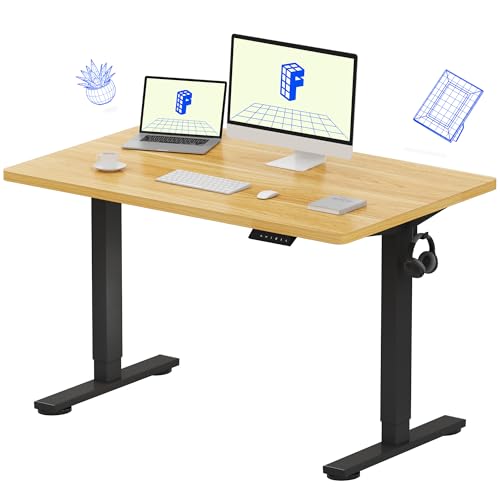
Desk ergonomics explained in one sentence: it is the practice of fitting the workstation to the human body, instead of forcing the body to adapt to the workstation for eight hours a day. Every ergonomic rule you have heard — screen at eye level, elbows at ninety degrees, feet flat — is a consequence of that single principle applied to a specific joint. Once you see the principle, the rules stop being a checklist to memorise and become decisions you can reason about for any desk, chair, or screen.
This explainer covers what ergonomics is actually optimising, the neutral-posture idea behind the rules, how the main workstation elements interact as a system, and the misconceptions that lead people to buy accessories while leaving the underlying problem untouched.
Disclosure: As an Amazon Associate, ilcastellomenu.com earns from qualifying purchases. Product examples below link to Amazon, where you can check current availability and specifications; this guide itself lists no fixed prices because pricing and bundles change frequently.
Desk Ergonomics Explained: What It Is Optimising
Ergonomics minimises the physical cost of holding a working position over time. The costs are real even when they are invisible: muscles holding a static contraction fatigue, joints held at the ends of their range complain, and soft tissues compressed against hard edges protest. None of this requires heavy loads — a word processor’s posture is ‘light work’ — because duration multiplies small strains. Eight hours of a slightly raised shoulder is a training programme for a sore shoulder.
Neutral posture: the reference position
The field’s central concept is neutral posture: the position where joints sit near the middle of their range and muscles work least to hold you there. For desk work that means head balanced over shoulders rather than craned forward, upper arms hanging vertically, elbows near a right angle, wrists straight rather than bent up, down, or sideways, back supported in its natural curve, and feet supported flat. Every workstation adjustment exists to move some joint closer to its neutral.
Neutral is a reference, not a cage. Bodies are built to move, and the healthiest setup is one that makes neutral easy to return to between the position changes you naturally make through the day.
Fit the task, not just the body
Ergonomics also fits the workstation to the task. A data-entry clerk, a drafter, and a gamer impose different demands: screen time versus paper time, mouse intensity, phone use. The same desk arranged identically can be ergonomic for one and wrong for another, which is why generic ‘perfect setup’ diagrams are starting points rather than answers.
In this guide
The Workstation as a System
The most useful idea in this whole explainer is that the workstation is a chain: feet support thighs, thighs and backrest set pelvis and spine, spine sets shoulder height, shoulders set elbow position, elbows set where hands meet keyboard, and eyes set where the screen must be. Adjust one link and the forces on the others change. This is why ergonomic setup follows a strict order — chair, then desk, then screen, then accessories — and why random adjustments so often move discomfort rather than removing it.
Why the chair comes first
Your seated base determines your elbow and eye heights, and those two measurements determine the correct desk and screen positions. Set the desk first and you have anchored the system to a posture you are about to change. The practical sequence, with the measurements for each step, is walked through in How to Set Up Ergonomically a Desk.
The desk's role in the system
The desk’s job is to present the work surface at your elbow height with enough depth for the screen to sit at viewing distance and enough legroom for the base of the chain to work. Its height logic is derived in What is the Ideal Desk Height. A desk that fails on height or depth cannot be fully rescued by accessories, which is why selection matters; the criteria are in How to Choose a Desk.
The Main Risk Factors, in Plain Language
Ergonomists describe desk-work risk with a short list of factors, and each maps to a familiar setup fault. Awkward posture: a low screen bending the neck, a far mouse rotating the shoulder. Static load: holding any position, even a good one, without change for hours. Contact stress: a hard desk edge pressing into forearms or wrists. Repetition: the same small motions thousands of times, as in mouse and keyboard work. Insufficient recovery: breaks skipped until discomfort is the day’s background noise.
Notice that only some of these are furniture problems. Static load and recovery are habit problems, which is why the best-equipped workstation can still produce an aching user who never moves, and why posture variety — including the option explored in Standing Desk vs Regular Desk — is part of ergonomics rather than a lifestyle extra.
Key Terms You Will Meet
A short glossary for the vocabulary used across our desk guides. Neutral posture: the low-effort joint alignment described above. Lumbar support: support for the inward curve of the lower back, provided by a chair’s backrest shape or an added cushion. Viewing distance: the eye-to-screen gap, roughly an arm’s length for typical monitors. Reach envelope: the area you can access without leaning, where frequent items belong. Sit-stand ratio: the pattern by which a user alternates postures — any regular alternation beats any fixed position. Anti-fatigue mat: cushioned flooring that reduces the cost of standing work. Task lighting: light directed at your work materials rather than the room generally, arranged to avoid screen glare.
Common Misconceptions
The first misconception is that ergonomics is a product category — that buying an ‘ergonomic’ chair or keyboard completes the job. Products help only when they are adjusted to the user; an ergonomic chair at the wrong height is just an expensive chair. The second is that good posture means sitting bolt upright at rigid right angles all day; the right angles are references for setting furniture heights, not a pose to hold under tension. The third is that discomfort is a personal failing or a fitness problem; at a workstation, discomfort is usually information about fit, and fit is adjustable.
A fourth, subtler misconception: that standing desks made seated ergonomics obsolete. Standing changes which joints are loaded; it does not repeal the system. Screen height, elbow height, and foot support must be solved again in the standing position, as Electric vs Manual Standing Desk notes when comparing how the mechanisms handle presets.
Putting It Together: A Worked Example
Consider a shorter-than-average user at a standard desk with a laptop. The chain fails at every link: feet dangle because the chair is raised to meet the high desk; shoulders shrug because even raised, the surface sits above elbow level for typing; the laptop screen, down on that surface, pulls the head forward and down. The ergonomic fix is systematic, not expensive: chair set for feet and back first with a footrest restoring support, laptop raised on a stand or books to eye level, an external keyboard and mouse at elbow height on the surface. Same desk, same chair — a different system, because each link was set in order against the body’s measurements. That transformation, applied to a full desktop setup, is exactly what desks designed around these principles — surveyed in Best Ergonomic Desks for Home Office — try to make effortless.
A Brief History: From Time Studies to the Modern Desk
Ergonomics began in factories and cockpits, not offices: its founders measured how workers and pilots interacted with machines under real conditions, and discovered repeatedly that designing for the ‘average’ operator fit almost nobody and that small mismatches, repeated thousands of times, produced fatigue, errors, and injury. When office work computerised in the late twentieth century, the same lessons had to be relearned at the desk — the workstation became a machine interface used for eight hours a day, and the mismatch injuries followed the same pattern at lower force and higher repetition.
The modern guidance in this article — neutral posture, the adjustment chain, posture variety — is the distilled result. It survives because it keeps predicting correctly: set the workstation to the body, in order, and discomfort falls; skip the order or fit the body to the furniture, and it does not.
Ergonomics on a Budget: The Free Fixes Ranked
Because ergonomics is mostly arrangement, its highest-value interventions cost nothing, and it is worth ranking them so a limited budget lands where it matters. First, free: chair height and position, screen raised on books or a box to eye level, keyboard and mouse pulled close, feet supported on any stable object. These four rearrangements deliver the majority of the benefit for the majority of users. Second, cheap: a footrest if feet still dangle, an external keyboard for a laptop user, a cushion for lumbar support. Third, considered purchases: a monitor arm, a chair that fits, an adjustable desk — in that order for most people, because each removes a constraint the previous tier could not.
Notice what is not on the list: exotic input devices, posture gadgets, and wearable correctors. They address narrow problems for specific users. The chain comes first; gadgets are for the gaps the chain cannot close.
How to Tell If Your Setup Is Working
The test of an ergonomic setup is not how it looks in a photograph but how you feel at the end of a working week. Working signs: you stop noticing your body during work; end-of-day tiredness feels like mental fatigue rather than localised aches; you change position naturally without discomfort forcing the change; and Monday does not begin with the residue of Friday. Warning signs are equally concrete: a specific joint or muscle group that complains at the same time daily, numbness or tingling anywhere, headaches that track screen hours, and the feeling of ‘bracing’ — holding yourself in position with effort.
Treat a warning sign as a diagnostic prompt, not a shopping prompt. Identify which link of the chain it maps to — neck to screen height, shoulders to desk or mouse position, wrists to keyboard geometry, lower back to chair and feet — adjust that link, and give it a week. Ergonomics done this way is a method, and the method is the real content of this explainer.
Ergonomics Beyond the Desk: Laptops, Phones, and the Couch
The chain logic travels with you, and it is worth applying where modern work actually leaks: the sofa, the kitchen table, the train. A laptop on a lap places its screen at the worst height in your life and its keyboard at the second worst; an hour is a shrug, a working day from the couch is an ergonomic debt collected nightly. The travelling version of the setup sequence — raise the screen on whatever the room offers, add any external keyboard, sit with feet supported and back against something — recovers most of the chain with hotel furniture.
Phones deserve the same honesty: hours of downward-gazing scrolling load the neck exactly as a low monitor does, in smaller, more frequent doses. Raising the phone toward eye level for long reads and using stands for video are not affectations; they are the screen-height rule applied to the screen you use most. Ergonomics, understood as a principle rather than a product line, follows the body into every room — which was the founders’ point all along.
What ergonomics cannot do
A clear-eyed explainer should state the limits. Ergonomics reduces the physical cost of work; it does not make eight sedentary hours healthy, does not treat existing injuries, and does not compensate for workload, stress, or sleep — all of which present as bodily complaints that no chair can answer. It also cannot help a user who will not adjust anything: the best-designed workstation in the world, left at its shipping settings, is furniture sculpture.
Hold the field to its real promise — fit the workstation to the body, in order, and keep the body moving — and it delivers reliably. Ask it for more, and the disappointment says nothing about ergonomics and everything about the asking.
Ergonomics for Gamers and Creators: Same Chain, Different Loads
Gaming and creative work stress the workstation differently from office work, and the chain adapts rather than breaks. The gamer’s loads are intensity and duration: high mouse mileage, a grip under tension, sessions that outlast office hours. The ergonomic answers are the same joints treated more seriously — mouse close and at elbow height so the shoulder is not the engine of every flick, a chair that supports reclined postures as well as upright ones, and screen distance set for the display’s size rather than the desk’s depth. Tournament players arrange their stations with the same sequence as any ergonomist; the chain does not care what is on the screen.
Creators: pen displays, instruments, and second surfaces
Digital artists split their surface between a pen display — low, tilted, treated by screen rules rotated toward drawing-board logic — and a reference monitor at conventional height. Musicians add an instrument’s geometry: a MIDI keyboard’s height joins the chain as a second work surface, and the desk must present both it and the typing keyboard without either compromising the elbows for long. Streamers add a microphone’s position to the audit, because a mic placed for sound alone routinely pulls the head and shoulders toward it for hours.
In each case the method survives intact: enumerate the postures the work actually holds, set each surface and screen to the body’s joints in that posture, and audit the result as a system. Ergonomics is not a setup; it is this method, applied to whatever you do.
The Office Chair Industry, Translated
Since the chair anchors the chain, its marketing vocabulary deserves the same translation this article gave the desk’s. ‘Ergonomic chair’ asserts design intent, not fit: the chair must still match your body’s dimensions — seat depth against your thigh length, lumbar height against your back’s curve, seat height range against your leg length and desk. ‘Lumbar support’ ranges from a fixed curve (right for some backs, wrong for others) to adjustable height and depth (adaptable to most). ‘Synchro-tilt’, ‘4D arms’, and their cousins describe adjustment ranges — valuable exactly insofar as they let the chair meet your neutral posture, and decorative beyond it.
The purchasing rule mirrors the article’s method: sit in the chair if you possibly can, run the chain’s first links — feet, knees, lumbar — and let your body’s measurements vote. A chair that fits a colleague’s back is evidence about your colleague, not about the chair’s fit for you.
Why this explainer refuses to end with a product list
A reader who arrived wanting a shopping list may find this article’s ending austere, so it is worth stating the reason plainly: ergonomics is one of the few consumer topics where the knowledge is worth more than the merchandise. The chain, the order of adjustment, the symptom-to-link diagnosis — these transfer to every workstation you will ever sit at, including the ones in offices, hotels, and homes you do not control. Products serve a setup; the method creates it. Learn the method once, and every future desk, chair, and screen is evaluated by a standard no marketing department can argue with: your own body, measured.
The Core Mechanism: Dose, Load, and Recovery
Strip ergonomics to its engine and three variables do nearly all the work. Load is how much force a tissue bears — the weight of your head borne by neck muscles when it drifts forward, the pressure under your thighs from a seat edge. Duration is how long the load is applied without relief, and it is the variable office work abuses most, because desk loads are individually tiny and collectively enormous: a posture that would be harmless for ten minutes becomes an injury mechanism at six unbroken hours. Recovery is the third variable, the unloading that lets tissues restore themselves — the stand, the stretch, the walk to the window — and it is the one entirely within your diary’s control.
This trio explains most of the field’s practical advice in one breath. Neutral postures matter because they minimise load per minute. Breaks matter because they cap duration and buy recovery. Adjustable furniture matters because it lets the load be shared around the body across the day instead of billed to one joint. And it explains the failures too: the expensive chair sat in for eleven unbroken hours fails on duration no matter how perfectly it distributes load, while the modest chair inside a varied day quietly succeeds. When any ergonomic advice confuses you, translate it into load, duration, and recovery and ask which variable it is moving — advice that moves none of them is decoration.
It also explains why ergonomics resists the single-product fix. A product can reduce one load at one joint; the dose pattern of your whole day is a property of your work’s organisation. That is the explainer’s central, slightly uncomfortable message: the desk setup is the visible half of ergonomics, and the calendar is the other half.
What an Ergonomic Assessment Actually Does, Step by Step
Professional assessments sound mysterious and are mostly methodical observation. The assessor begins by watching you work — not posed, but mid-task — because the posture that matters is the one your concentration chooses when nobody is performing. They note the head’s forward drift, the shoulders’ height, where your feet have actually gone, and how often you reach, twist, or perch. Only then do they measure: chair height against your legs, desk height against your elbows, screen distance and height against your eyes, using the same chain this site’s setup guide walks through for the do-it-yourself version.
The second half is an interview disguised as conversation. When do symptoms arrive — morning, evening, after calls, after deadline weeks? What has already been tried? What does the workload look like across a month rather than a day? Assessors ask because the dose pattern lives in the answers, and because a setup corrected for the average day fails on the deadline day that actually produces the symptoms. The report that follows typically changes less furniture than clients expect and more behaviour: a screen raised on books as an interim, a chair adjusted rather than replaced, a break structure written into the day, and one or two purchases where the furniture genuinely cannot reach the body it serves.
Knowing the method lets you run a fair self-assessment. Photograph yourself working from the side, unposed, timer on the camera. Measure the five numbers. Log symptoms against tasks for a week. You will miss the professional’s pattern-recognition across hundreds of workstations, but you will catch the large errors, and large errors are where most of the benefit lives. Save the professional for persistent symptoms, complex jobs, or a body with a history — the cases where pattern-recognition earns its fee.
Discomfort and the Mind: The Concentration Tax
Ergonomics is usually argued in the language of pain, but its daily cost is mostly cognitive. Low-grade discomfort — the shoulder that is not quite painful, the eye strain that is not quite a headache — consumes attention continuously and invisibly. You do not decide to think about your neck; the neck simply files reports all afternoon, and each report is paid for from the same attention your work was using. Studies of office workers consistently find the pattern in self-reports: the days the setup feels wrong are the days the work feels stupid, and the mechanism is not mysterious. A brain fielding complaints has less left for the spreadsheet.
This reframes ergonomic spending for people unmoved by injury arguments. You may never develop a diagnosable condition at a mediocre desk; you will simply do slightly worse work, slightly more tiredly, for years, and attribute it to yourself. The corrected setup’s benefit is equally unglamorous — an afternoon that ends with energy left — and equally real. It also explains why the first week after a proper setup feels disproportionately good: the change people notice is rarely the absence of pain. It is the return of the attention the pain was taxing.
The same logic runs in reverse for employers, which is why assessments survive budget rounds that kill other perks: discomfort is a productivity leak with a furniture-shaped plug. None of this requires believing dramatic claims. It requires only noticing that the body is part of the workstation’s processing capacity, and that ergonomics, at bottom, is maintenance for the operator.
Strong Bodies and Good Setups: What Exercise Can and Cannot Do
A fair challenge to everything in this explainer: if the body is adaptable and trainable, why not train it to tolerate the desk, instead of adjusting the desk to the body? The honest answer is that the two are complements with different jurisdictions. Strength and mobility work raises your capacity — the load your tissues can bear and recover from — and a stronger back genuinely shrugs off doses that would tax a weaker one. What training cannot change is geometry: a screen two inches too low bends the neck of the strong and the weak alike, and the strong neck simply pays the bill later and with less warning, because capacity masks accumulation until it does not.
The evidence-informed position is unglamorous: exercise is the highest-value general intervention for desk workers’ backs, and setup is the highest-value specific one, and neither excuses skipping the other. The desk worker who trains has bought margin; the one who also sets up correctly rarely needs to spend it. Beware the two failure modes that pose as philosophies — the gym devotee who treats furniture as weakness and accumulates a decade of bad geometry on a strong frame, and the equipment collector who treats the body as fixed and buys a new accessory for every sensation a month of walking would have answered.
There is also a timing truth: capacity is built away from the desk, in the hours the dose model calls recovery. The walk, the swim, the weights session are not breaks from the ergonomic programme; they are its foundation, and the workstation’s job is merely to stop billing you faster than that foundation can repay.
Ageing at the Desk: Ergonomics Across a Career
Ergonomic needs are not a fixed property of a worker; they are a property of a worker at an age. The twenty-five-year-old body forgives a dreadful setup nightly and reports nothing, which is why young workers underrate ergonomics precisely when its habits are cheapest to build. The bill arrives on a delay: the dose accumulated across the forgiving years meets the less forgiving tissue of the forties, and the setup that was fine becomes the setup that hurts, without the setup having changed at all. This is the single most common story assessors hear, and it is a story about arithmetic, not about anyone’s failure.
The practical consequences are gentle. Recheck your setup as the decades turn, because the body it must fit is revising itself — eyes first, usually, as reading distances lengthen and screens need to grow or come closer; then the slow revisions of stature, strength, and recovery speed that argue for more variety and less heroism in the working day. Adjustable furniture earns its keep across a career for this reason above all: it is the only furniture that can follow a body through its editions. The fixed desk that fit you at thirty is a photograph of a person you no longer entirely are.
There is an encouraging symmetry. The older worker typically brings the two assets the young one lacks: knowledge of their own symptoms’ patterns, and the seniority to organise work sanely. Ergonomics across a career is less a decline narrative than a transfer — from the body’s raw forgiveness to the worker’s accumulated judgement — and the setups that serve veterans best are the ones that let judgement, not endurance, do the work.
A Second Worked Example: The Video Editor’s Deadline Posture
Consider an editor in the final week of a project: twelve-hour days, a timeline on the main screen, reference footage on the second, one hand on a jog wheel and the other on the keyboard, headphones on for hours. Her setup was assessed in a calm week and passed; the deadline week defeats it in specific, instructive ways. The jog wheel has migrated her right hand far from her body’s centre, so one shoulder works extended all day. The second screen, used constantly under deadline, sits at an angle that keeps her head turned a few degrees for hours — a trivial load at ten minutes, a genuine one at ten hours. The headphones, negligible in a normal week, become a neck load across twelve.
The corrections are deadline-specific and mostly free. The screens swap roles for the project’s duration, putting the timeline dead centre and the reference at the angle, because the calm-week layout served the calm week’s proportions. The jog wheel comes inboard, sacrificing a little desk tidiness for a shoulder. Headphone hours get scheduled relief — speakers for the rough-cut passes where audio detail is not the point. And the day gets a hard structure of short breaks, because at twelve hours the duration variable dominates every other term in the dose equation and no chair can out-argue it.
The example generalises: assess your setup against your worst week, not your average one, because symptoms are written by the extremes. A workstation that survives the deadline, the tax season, the launch, with its geometry intact is an ergonomic setup; one that only works in calm weeks is a fair-weather arrangement waiting for its season to end.
Ergonomic Labels and Marketing: Reading Claims Like an Assessor
The word ergonomic on a product is a claim about a relationship — between that object and a body — and like all relationship claims it deserves a request for specifics. Assessors read such labels with three questions. Adjustable how, and over what range? A chair whose arms adjust only in height serves fewer bodies than one whose arms also move in width and depth, and the range’s endpoints decide whether the extremes of the population are included or merely mentioned. Shaped for whom? A aggressively sculpted seat or a curved keyboard is a bet on one body’s geometry; it fits its intended body beautifully and everyone else worse than a neutral design would, which is why assessors favour adjustability over sculpture whenever they must choose.
The third question is the sharpest: what problem, measured how? Claims about posture improvement should name the posture and the evidence; claims about comfort should be testable by sitting, and any maker confident in comfort offers a trial long enough for the second week’s verdict, because first impressions of ergonomic products are notoriously reversed by experience — the chair that feels extraordinary in the showroom’s ten minutes can be the chair your back files against by Friday. Treat your own second week, not the label and not the first sitting, as the court of final appeal — and keep the returns window open until it has ruled.
Ergonomics Where There Is No Desk: Travel, Sofas, and Improvised Work
The modern worker’s dose increasingly accumulates away from the workstation entirely — trains, hotel rooms, a partner’s kitchen table, the sofa for the last hour of the day. These environments cannot be set up, but they can be managed with the dose model as the guide. Since load cannot be minimised on a sofa, duration must be: improvised postures are for short bouts, with the laptop-on-cushion position treated as a twenty-minute tool rather than an evening’s furniture. The traveler’s highest-value accessory is not a gadget but a rule — the worse the posture, the shorter the session and the longer the walk that follows it.
A few improvisations genuinely help and cost nothing. A hotel room’s ironing board is an adjustable-height surface hiding in plain sight, and its range covers both sitting at the room’s chair and standing — road warriors have sworn by it for decades. A rolled towel restores a strange chair’s lumbar curve; the room’s cushions raise a low seat so the elbows can meet a high table; the laptop goes on a stack of the room’s books with the keyboard borrowed from your bag, separating screen from hands exactly as at home. The principle transfers even when the furniture does not: raise the screen, free the hands, cap the duration.
What does not transfer is worry. An evening of sofa work inside an otherwise well-set-up week is a rounding error in your dose, and ergonomics pursued anxiously becomes its own burden. The explainer’s model is meant to liberate judgement, not to police it: know which variable you are spending, spend it knowingly, and let the home workstation — properly set up, honestly used — carry the bulk of your hours in a posture that costs you nothing.
Gear for This Guide
Three verified products that each fix one link of the chain described above: the chair’s support, the screen’s height, and glare-free light for paper work.

SIHOO M18 Ergonomic Office Chair
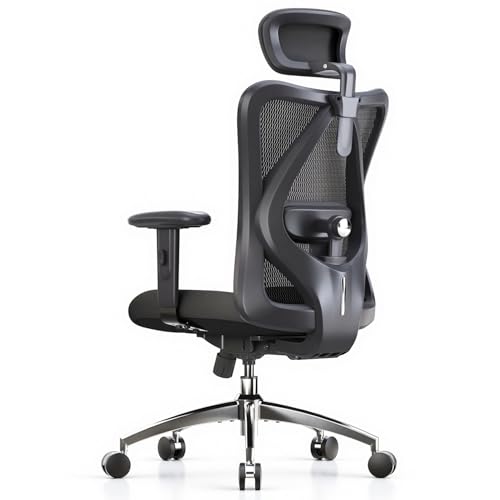
A mesh-back desk chair with headrest and adjustable lumbar support — the first link of the chain, and the adjustment every other measurement keys off. SIHOO M18 Ergonomic Office Chair — Check on Amazon

Ergotron LX Monitor Arm
A monitor arm for screens up to 34 inches that sets viewing height and distance from your eye level rather than from the desk, and frees the surface below. Ergotron LX Monitor Arm — Check on Amazon

BenQ e-Reading Desk Lamp
A wide, dimmable desk lamp with auto-dimming designed to light documents evenly without screen glare — task lighting as the system intends it. BenQ e-Reading Desk Lamp — Check on Amazon
Frequently Asked Questions
What is the single most important ergonomic adjustment?
If forced to pick one: screen height. A low screen bends the neck forward for hours, and neck strain is the most common desk-work complaint. But the honest answer is the sequence — chair, desk, screen — because each adjustment’s correctness depends on the one before it.
Are ergonomic accessories worth it, or is it all setup?
Setup first, accessories second. Correct heights and distances cost nothing and deliver most of the benefit. Accessories earn their place when they solve a specific residual problem: a footrest when feet dangle at correct chair height, an arm when a monitor stand cannot reach eye level, a mat when you stand.
How often should I change position?
Regularly and before discomfort forces it. Any rhythm that interrupts static posture — brief standing, walking, stretching intervals across the day — serves the purpose. The exact ratio matters far less than the fact of regular change; no posture is good for eight unbroken hours.
Can good ergonomics fix existing pain?
Ergonomic correction removes ongoing causes of strain, which often reduces discomfort that the workstation was producing. It is not a treatment: pain that persists, radiates, or includes numbness or weakness deserves assessment by a qualified professional rather than another accessory.
Do children and teenagers need ergonomic setups too?
Yes, and arguably more urgently, because they are usually placed at adult-sized furniture where nothing fits: feet dangling, screens low, shoulders shrugged. A footrest, a raised chair, and a screen lifted to their eye level apply the same chain logic at a smaller scale.
Does ergonomics really matter for young, healthy workers?
It matters differently. A young body will not usually report today’s bad setup as today’s pain, so the feedback loop that teaches older workers is silent — but the dose is still being recorded, in habits of posture and in the slow education of tissues. The young worker’s ergonomic task is not symptom management; it is not building the debt. The good news is that the young also form setup habits cheapest: a correct chair height learned at twenty-five is a lifetime of not thinking about it, which is the best outcome ergonomics offers anyone.
Are posture-corrector straps and wearable reminders worth using?
They treat the signal rather than the geometry. A strap can remind you that you have slumped, and as a short-term awareness trainer some people find that useful for a few weeks. But if the screen is too low, you will slump again the moment the strap comes off, because the slump was the correct response to the workstation’s demands. Correct the setup first; if a reminder still helps you notice old habits while new ones form, use it as the temporary scaffolding it is, not as the building.
Is standing all day just as bad as sitting all day?
Unbroken standing is a fixed posture with its own bill — feet, knees, lower back, and circulation all charge for it — and the dose model predicts exactly that: load is modest, duration is extreme, recovery is absent. The goal was never to swap one fixed shape for another. It is variety: sitting, standing, and moving in proportions your body votes for across the day, which is why this explainer keeps returning to the calendar as an ergonomic tool equal to any chair.
How do I know if a product labelled ergonomic fits me specifically?
By range and by trial. Check the product’s adjustment ranges against your own measurements — the five body numbers from our setup guide — rather than against its marketing photographs, whose models are chosen from the middle of every distribution. Then trial it in your real work for at least a week if the seller allows, judging by end-of-day symptoms rather than first-sitting impressions. A product that fits the population and not you is, for the only purpose that matters, not an ergonomic product.
Can a bad setup cause permanent damage?
Prolonged high-dose exposure can contribute to conditions that outlast the setup — chronic tendon and nerve problems are the usual examples — which is why persistent symptoms deserve professional assessment rather than another accessory. The reassuring half of the answer is that most desk-related discomfort, caught at the stage of symptoms rather than diagnosis, resolves when the dose is corrected. The explainer’s practical line is this: discomfort is information, pain is an instruction, and numbness, tingling, or weakness is an appointment. Act at the earliest stage you can, because each stage is cheaper than the next.
What is the one ergonomic change with the best return for a healthy worker?
Movement variety, and it is not close. A healthy worker at a mediocre desk who stands, walks, and changes posture through the day will out-feel a healthy worker at a perfect desk who never moves, because duration is the variable doing most of the damage in modern office work and variety is the only intervention that addresses it directly. Set the desk up correctly — it is a weekend’s work, once — and then spend your ongoing effort on the calendar rather than the catalogue. The furniture is the stage; the day is the performance.
How often should a healthy worker think about ergonomics at all?
Rarely, once the system is set — and that rarity is the goal. A correct setup plus a varied day should fade into the background entirely, asking for a quarterly recheck and attention only when something changes: new furniture, new symptoms, a new job’s workload. Ergonomics that demands daily thought has failed at its purpose, which is to make the body’s maintenance automatic so the mind can be spent on the work.
The Bottom Line
Ergonomics is one principle — fit the workstation to the body — expressed as a chain of adjustments made in order: feet and chair, desk at elbow height, screen at eye level, accessories for the gaps that remain. Learn the chain and you can evaluate any desk, chair, or gadget claim for yourself.
Related Guides
Turn principles into settings with the setup walkthrough and height explainer, and browse posture-focused desk picks: