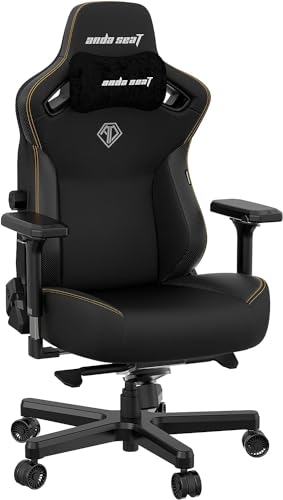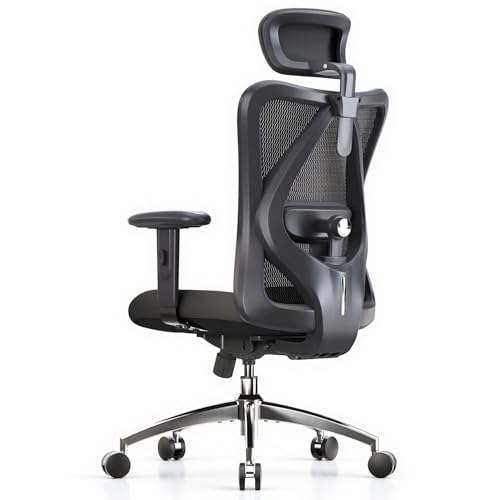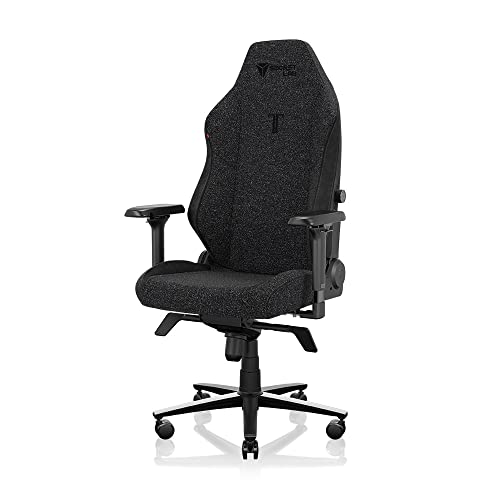
Learning how to choose a gaming chair starts with a simple truth: the right chair is the one that fits your body, your desk and your session length — not the one with the loudest racing stripes. This guide walks through the measurements, materials and adjustments that actually decide comfort, in the order you should check them. By the end you will know how to shortlist chairs with confidence, whether you are browsing Best Gaming Chairs for Long Hours for marathon sessions or a first chair for a teenager’s setup.
Disclosure: As an Amazon Associate, ilcastellomenu.com earns from qualifying purchases. Product links on this page may earn us a commission at no extra cost to you. Prices and availability change on Amazon, so check the product page for the current details before you buy.
How to Choose a Gaming Chair: Start With Your Body, Not the Box
Every chair decision flows from three numbers: your height, your weight and the height of your desk. Manufacturers publish a recommended height and weight range for each model, and those ranges matter more than the marketing photos. A chair built for a 5’6″ player will leave a 6’2″ player with a headrest pressing into their shoulder blades, while a wide XL seat can leave a smaller player unable to rest their feet flat on the floor — and feet that dangle quietly wreck your posture over a long session.
Weight capacity is the second filter. Stay comfortably inside the stated limit rather than right at it: foam compresses faster and tilt mechanisms wear sooner when a chair lives at the edge of its rating. If you are near a boundary, the roundups in Best Gaming Chairs for Big Guys focus on models with wider seats, steel frames and higher capacities, which is a better starting point than hoping a standard chair stretches.
Finally, measure your desk height before you fall in love with any chair. Most desks sit around 28–30 inches high, and your chair’s seat height range plus armrest height need to let your elbows rest near desk level with relaxed shoulders. Our companion guide on measurements, How to Measure for a Gaming Chair, covers the tape-measure routine in detail.
In this guide
Seat Size and Foam: The Comfort Foundation
Seat width and depth decide whether a chair feels supportive or like a park bench. You want roughly an inch or two of space on either side of your hips, and a seat deep enough that the front edge stops a couple of fingers’ width behind your knees. Too deep and the edge presses into your calves, nudging you into a slouch; too shallow and your thighs lose support, shifting load onto your lower back.
Cold-cure foam vs cut foam
Most gaming chairs use one of two cushion types. Cold-cure (moulded) foam is poured into a mould and tends to be denser and more consistent, holding its shape for years. Cut foam — sliced from a large block — is softer at first but can develop permanent soft spots where you sit most. Neither is automatically better: lighter players often prefer the initial softness of cut foam, while heavier players and long-session users usually do better with firmer moulded foam that does not bottom out.
Bolsters deserve a mention too. Racing-style side bolsters look sporty and can feel great if your shoulders and thighs match their width, but wide-shouldered players often find them pushing their arms forward. If you sit cross-legged or shift positions a lot, a flatter seat pan — common on ergonomic-leaning models — is usually the happier choice. The debate is covered head-on in Bucket Seat vs Ergonomic Gaming Chair.
Backrest, Lumbar and Headrest Support
A gaming chair’s backrest should follow the natural S-curve of your spine. The critical zone is the lumbar region: when you sit back, something — a built-in adjustable lumbar mechanism, a memory-foam pillow, or at minimum a firm cushion — should fill the small of your back so you are not forced to choose between slouching and perching. Built-in adjustable lumbar support is the premium option because it stays put and can be dialled in; loose pillows are cheaper and replaceable but tend to wander during a session.
Recline range matters for variety. Most gaming chairs recline somewhere between 90 and 135 degrees, with some going further for console-style lounging. For desk gaming you will live between 95 and 110 degrees; the deep recline is a bonus for watching streams or playing with a controller. What matters more day to day is a tilt mechanism that lets the whole chair rock gently and lock at your preferred angle, so you can shift weight instead of sitting frozen.
Headrests are the most misjudged part. A headrest or neck pillow should meet the back of your head or the curve of your neck when you lean back — not push your head forward when you sit upright. Magnetic and strap-on pillows can be repositioned; fixed headrests cannot, which is another reason matching the chair’s height range to your own height matters. Readers managing existing discomfort should also look at Best Gaming Chairs for Back Pain, where support features take priority over styling.
Armrests, Base and Casters: The Hardware That Wears
Armrests are described with a shorthand: 1D adjusts up and down, 2D adds forward/back or width, 3D adds the other axis, and 4D does height, width, depth and angle. For gaming, height adjustment is essential, depth helps you get close to the desk without the rests colliding with the desktop, and angle helps mouse-and-keyboard players angle the right rest inward. Padded or soft-touch tops matter more than an extra axis if you play in short sleeves.
Underneath, look for a steel frame and a metal five-star base. Nylon bases are common at lower prices and are fine for lighter users, but aluminium or steel bases feel noticeably more planted and survive years of leaning back. The gas lift (the piston that sets seat height) should be class 3 or class 4 — class 4 is the heavier-duty standard and worth having if you are near the chair’s weight limit.
Casters are a small detail with a big effect on floors. Standard hard casters suit carpet; softer polyurethane or rollerblade-style wheels roll quietly on hardwood and laminate and are far less likely to mark them. If your setup is on hard flooring, a chair mat also protects the surface and smooths rolling — see the gear section below. Long-session players should cross-check their shortlist against Best Gaming Chairs for Long Hours, where cushion durability is the deciding factor.
Upholstery: Fabric, PU Leather and Real Leather
PU (polyurethane) leather is the classic gaming-chair finish: it wipes clean, resists spills and gives that racing look. Its weakness is time — in hot rooms or with heavy use, the surface can crack and peel after a few years, and it breathes poorly, so long summer sessions can feel sticky. Fabric upholstery breathes far better and ages more gracefully, at the cost of absorbing spills and needing proper cleaning. Genuine leather is rare and expensive in this category and needs conditioning, but it is the most durable of the three.
The full head-to-head, including how each material behaves in hot climates and homes with pets, is in Fabric Vs Leather Gaming Chair. As a rule of thumb: fabric for warm rooms and long sessions, PU leather for easy wipe-downs and a sleeker look, and consider your room temperature before your colour scheme.
A Simple Shortlisting Method That Works
- Measure yourself and your desk: height, weight, desk height, and the floor space the chair must fit in.
- Set your filters: height/weight range first, then seat width and depth, then upholstery for your climate.
- Pick your support style: built-in adjustable lumbar if budget allows, or a chair whose lumbar pillow is thick and well-shaped.
- Check the hardware: steel frame, class 4 gas lift if you are heavier, metal base, floor-appropriate casters.
- Decide your armrest minimum: height-adjustable at least; 4D if you split time between desk work and gaming.
- Read the warranty: frame and mechanism coverage tells you more about build quality than any product photo.
Once your shortlist is down to two or three models, the tie-breaker is adjustability you will actually use. A chair with a lumbar dial you tweak daily beats a chair with five features you set once and forget. And when the box arrives, How To Assemble A Gaming Chair and How To Adjust A Gaming Chair will get you from parts on the floor to a properly dialled-in setup.
Common Mistakes When Choosing a Gaming Chair
The most common mistake is buying by appearance: matching the chair to your PC’s RGB lighting while ignoring the size chart. The second is assuming a higher price automatically means more comfort — beyond a point you are paying for branding, licensed designs and extras like footrests, not better support. Third is ignoring your floor type until the casters have scratched it. Fourth is forgetting the desk: a chair whose armrests sit too high to slide under the desktop will annoy you every single day.
Finally, do not skip the returns policy. You cannot judge a chair from a showroom sit of ninety seconds; you judge it in hour three of a session. Buy from sellers with a reasonable trial or return window, keep the packaging until you are sure, and give your body a few days to adapt before deciding — new support often feels strange before it feels right.
Gaming Chairs vs Office Chairs: Which Category Serves You Better?
Shoppers often arrive at gaming chairs after considering office chairs, and the categories overlap more than marketing admits. Office chairs prioritise upright task posture, breathable backs and a look that survives a video call; gaming chairs prioritise recline range, headrests, bold styling and a seat you can lounge in with a controller. If your day is eight hours of work with gaming after, an ergonomic office chair or an ergonomic-leaning gaming chair usually serves both masters better than a deep-bolstered racing seat.
The deciding factors are recline and support style. Do you actually recline to watch or play with a controller? Gaming chairs do this brilliantly and most office chairs barely tilt. Do you need a mesh back because your room is hot and your workdays are long? Office chairs own that territory, though fabric gaming chairs close the gap. Neither category has a monopoly on quality — judge individual models by frame, foam and lumbar design, exactly as you would within the gaming category itself.
Budget behaves differently across the two categories as well. Entry-level gaming chairs bundle a lot of visible features — pillows, footrests, styling — at prices where office chairs offer plainer but sometimes sturdier basics. In the middle ranges the two converge, and at the premium end both sell you the same things: moulded foam, real adjustability and long warranties. Shop the overlap deliberately and you will find the best value sits precisely where the categories compete.
Trying Before Buying and Reading Reviews Like an Adult
If you can sit in a chair before buying, do it properly: spend at least ten minutes in it, adjust the lumbar and armrests, recline, and sit the way you game rather than the way you pose for a photograph. Ninety seconds of perching tells you nothing except the foam’s first impression, which is the least reliable data point in the whole purchase — soft foam feels wonderful in minute one and dreadful in hour three.
When you cannot try, read owner reviews for patterns rather than verdicts. One person’s ‘too firm’ is noise; twenty owners of your height and weight saying the headrest lands on their shoulder blades is signal. Filter mentally for reviewers built like you, playing your session lengths, in your climate. Reviews that mention month-six condition are worth ten that unbox the chair, because foam compression and upholstery behaviour only declare themselves with time.
Finally, protect the purchase: buy where returns are painless, keep all packaging until the trial ends, and assemble carefully enough that a return is physically possible. A chair is one of the most returned items in gaming gear precisely because fit is personal — using the return window is not failure, it is the process working as intended.
Reading a Product Listing: Translating the Spec Sheet
Product listings bury the deciding numbers in marketing copy, so read them in a fixed order. First, the recommended height and weight range — if the listing hides it, that silence is itself an answer. Second, seat dimensions: width between armrests or bolsters, depth, and the seat height range’s minimum and maximum. Third, the frame and lift: steel or nylon frame, gas lift class, base material. Fourth, the lumbar type, stated plainly — built-in adjustable, pillow, or none worth the name.
Fifth, the warranty, split by component. Listings that trumpet a ten-year warranty in the headline sometimes apply it only to the frame, with foam and upholstery covered for a fraction of that. The split tells you where the manufacturer expects wear, which is the most honest sentence on the page. Compare the splits between your finalists and you will learn more than any photograph can teach.
Sixth, the returns terms: trial length, who pays return shipping, and whether the chair must be disassembled. A generous trial from a confident seller is worth a small price premium, because it converts your biggest risk — fit — into a reversible experiment. Chairs are personal equipment; buy them like it.
Finally, weigh the accessory bundle last. Footrests, massage pillows, cup holders and RGB trim are the cheapest things on the chair and the most photographed. A chair that wins on the first five checks and loses the accessory count is the better chair, every time. Accessories can be added later; geometry cannot.
Matching the Chair to Your Games
Different games load a chair differently, and your main genre deserves a vote. Competitive FPS and MOBA players sit forward in bursts, valuing a stable base, firm seat and armrests that stay exactly where they were set — tilt theatrics are a distraction. Strategy and RPG players settle for hours, valuing foam that does not bottom out and a recline they can vary as the session deepens.
Racing and flight players should think about what bolts to the chair or sits in front of it: a wheel stand changes leg geometry, pedals change the ideal seat height, and a chair that creeps on its casters under braking force ruins both. Sim-focused players often prefer heavier chairs with lockable or removable casters, or they graduate to a fixed rig and keep the gaming chair for desk work.
Console and couch-adjacent players recline deepest and should weight recline range, headrest comfort and footrest quality accordingly — the chair is half furniture in this life. Streamers add one more variable: the chair is on camera, so its silhouette and colour are part of the production, a legitimate criterion as long as it votes last, after fit, support and hardware have had their say.
A Word on Chairs for Couples, Families and Shared Setups
Shared chairs are chosen by committee and judged by whoever fits worst, so shop for the least-served body first. If one player is tall and the other petite, the chair’s adjustment ranges — not its styling — decide whether both can use it: check that minimum seat height serves the shorter player with a footrest, and that the headrest reaches the taller player’s head at the same chair’s maximum settings.
Pillows beat built-in mechanisms for shared chairs in one respect: they can be swapped or repositioned in seconds between users, and some households keep two lumbar pillows of different thicknesses, one per player. It looks eccentric and works beautifully, because the alternative — one compromise setting — serves nobody at their best.
Durability also votes harder in shared setups, because the chair accumulates two players’ hours. Steel frames and replaceable casters stop being premium talking points and become arithmetic. If the chair will genuinely serve two people daily, buy it a tier up from what either player would buy alone.
Gaming Chairs for Specific Rooms: Heat, Cold and Noise
The room votes on materials and mechanisms more than most buyers expect. In a hot room, fabric or mesh is not a preference but a survival trait, and dark colours near windows compound the problem by absorbing heat through the day. In a cold room, PU’s initial chill is a daily tax, and fabric’s neutrality wins again — the room keeps choosing fabric, which is worth noticing if your heart was set on the racing look.
Noise is the room’s third vote, and it matters in shared housing and thin-walled apartments: chairs creak, casters rumble on hard floors, and recline mechanisms clunk at midnight. Soft casters or a mat quiet the rolling, and a chair whose bolts you maintain stays silent — another reason the maintenance habit in this batch keeps reappearing as the answer to unrelated questions.
Small rooms add a fourth vote: the chair’s reclined footprint. A deep-recline chair in a small bedroom needs clear space behind it that may not exist, and wall-scraped backrests are the visible result. Measure the recline arc, not just the chair, and let compact rooms choose compact reclines.
The Decision, Compressed: A Five-Minute Version
If time is short, the whole guide compresses into five checks that eliminate most bad purchases. One: your height and weight sit comfortably inside the chair’s stated range. Two: the seat’s usable width gives your hips clearance and its depth leaves fingers of space behind your knees. Three: lumbar support exists in a form you can position at belt height. Four: the frame is steel and the lift is class 4 if you are anywhere near the weight limit. Five: the upholstery matches your room’s temperature and your spill habits.
A chair passing all five will please you. A chair failing one can sometimes be rescued by a workaround described in this batch; a chair failing two should be crossed off however beautiful its product page is. Shopping discipline is mostly the willingness to cross things off.
And keep the five checks in your phone permanently. Chairs are bought rarely but judged daily, and the next purchase — for a partner, a child, a second room — starts from the same five lines. Good criteria compound like good habits.
The Seven-Day Home Trial: Testing a Chair Like You Mean It
Most chair returns happen because the trial was a single evening of novelty rather than a structured test. If the seller gives you a return window, spend it deliberately. Day one is for assembly and adjustment only: build the chair by the method in this batch, set it up at your desk, and resist judging comfort while everything is new — day-one impressions measure foam freshness, not fit.
Days two and three are for your normal sessions at your normal lengths. Note three things at the end of each session, in writing: where your body complains first, whether the lumbar support stayed where you put it, and whether the armrests ended up where your elbows wanted them. Written notes matter because day-three memory of day-two discomfort is unreliable, and the return decision deserves data rather than vibes.
Day four is the stress test: your longest realistic session, the marathon you actually bought the chair for. This is the day foam bottoming-out declares itself, the day a slightly-too-deep seat starts pushing you into a slouch, and the day heat build-up in the upholstery becomes a verdict rather than a suspicion. If the chair passes day four, it will pass almost anything in your routine.
Day five tests the second life of the chair: recline with a controller, watch a film, take a call in it. Day six, if you work from home, is a full workday test — typing posture is less forgiving than gaming posture, and a chair that only works for play is a chair that fails five days a week. Day seven is the verdict: re-read your notes, run the five checks from this guide one last time, and decide. A chair you keep should be a chair that passed, not a chair you merely got used to.
The Column Under You: Gas Lift Classes and Stroke Length
The gas lift is the least examined part of most listings, yet it decides two things you feel daily: how high and low the seat can go, and how the chair behaves after years of use. Lifts are sold in classes, from class 1 to class 4, which describe the wall thickness of the cylinder and the load cycling the unit is built to survive. Class 4 is the heavy-duty end of the range and the sensible minimum for heavier players or anyone near a chair’s weight limit; class 3 serves lighter players adequately; classes 1 and 2 belong to chairs built down to a price and are a quiet warning sign in a listing.
The second number almost nobody checks is stroke — the distance the piston travels, which sets the gap between the chair’s minimum and maximum seat heights. Two chairs can share the same minimum height while one rises two inches higher than the other, and that difference decides whether a tall player at a tall desk can ever get their elbows level. When a listing gives you the seat height range, it is giving you the stroke’s consequences; a narrow range on a chair you otherwise love is a real limitation, not a footnote.
Lift behaviour is also a lifespan tell. A quality lift rises smoothly, holds its height indefinitely and rotates without grinding. Because the unit is sealed, there is no maintenance to schedule and no repair to attempt — selection is the whole game. When comparing finalists, treat a class 4 lift the way you treat a steel frame: not a luxury, but the difference between a chair that ages as furniture and one that ages as a countdown.
Buying Second-Hand: Inspecting a Used Chair Like a Mechanic
The used market is full of gaming chairs, and it rewards buyers who inspect mechanically rather than cosmetically. Start with the lift: sit down, raise the chair to full height, and wait two minutes. Any sinking in that window means the lift is at end of life — replaceable, but the replacement belongs in your price negotiation, not in your surprises. Then stand and press the seat foam hard with both thumbs at the front edge and the centre. Foam that stays dented, feels crunchy, or lets you feel the base board through it has done its years already.
Flip the chair — with the seller’s permission — and read the underside like a report. Look for cracks radiating from the base’s centre socket, bracket bolts with chewed heads (a history of over-tightening), and casters that no longer swivel. Smell is data too: smoke and deep mustiness live in foam and survive surface cleaning, so a chair that smells wrong in the seller’s hallway will smell wrong in your room.
Set your ceiling before you visit: a used chair only makes sense when its price, plus any lift or caster replacement it plainly needs, stays well clear of what the same money buys new with a warranty — the current budget end of the market, covered in roundups such as best gaming chairs for under 200, is stronger than most sellers assume. Walk away from any chair whose frame or mechanism is damaged, however good the upholstery looks; cosmetics are the cheap half of a chair.
Choosing a Chair You Can Keep: Replaceable Parts and the Service Tail
Two chairs can be identical on day one and opposites by year four, and the difference is usually the service tail: whether the parts that wear can be replaced, and whether the manufacturer still sells them. Casters are universal and easy. Armrest pads, lumbar pillows and gas lifts are model-specific but commonly stocked by better brands. Tilt mechanisms and backrest brackets are where support usually ends — if those are not listed as spares, a mechanism failure is a whole-chair failure.
Make this a selection criterion while you shop, not a discovery after something breaks. Check the manufacturer’s site for a spare-parts page before you buy; its existence is one of the most honest quality signals in the category, because a brand that plans to support a chair for a decade builds it differently from one that plans to sell you another in three years. Keep the model number and purchase date in the chair’s file from day one, so a year-four parts order is a two-minute task.
This is also the strongest argument for buying from established ranges rather than one-off designs. A chair from a long-running line inherits years of stocked spares and documented fixes; a limited design, however striking, orphans you the moment its production run ends. Longevity is a supply chain as much as a material.
Chairs for Sit-Stand Desks: When Standard Height Is Not Enough
A height-adjustable desk creates a chair problem most buyers discover late: at standing-adjacent heights and tall seated settings, a standard gaming chair runs out of lift. The solutions form a small family of their own. Drafting-height chairs pair a longer-stroke lift with a foot ring, so your feet rest supported even with the seat set high. Some standard chairs accept a taller replacement lift, though the swap must match the mechanism’s socket exactly and stays within the sealed-unit rules — replace the whole unit, never modify one.
If your desk spends most of its life at one seated height, the honest answer is usually simpler: set the desk to your chair rather than stretching the chair to the desk. The drafting route earns its compromises — a foot ring is less free than the floor, and tall chairs feel less planted — only when your work genuinely alternates heights through the day. Players building a two-posture setup can compare the seating side of the equation in best chairs for standing desks alongside this guide’s fit checks.
Whichever route you take, run the measurement routine again at the new working height: popliteal clearance, elbow level and headrest position all move when the seat does, and a chair chosen for one height is not automatically chosen for another.
Choosing for the Camera: Chairs for Streamers and Creators
If your chair appears on stream, it acquires a second job, and that job has its own technical requirements. The first is colour discipline: a green chair in front of a green screen is a chroma-key disaster, dissolving your outline into the background, and saturated reds can bloom on cheaper cameras. If you use a green screen, choose any colour except green and keep the chair’s finish matte where possible, because glossy PU throws specular highlights that read as flicker on compressed video.
The second is frame geometry. Your chair’s backrest occupies the visual space behind your shoulders for the entire broadcast, so its width and silhouette are set design: a wide XL backrest reads as a throne and can crowd a small frame, while a slimmer back keeps the focus on you. Headrest pillows with large logos sit exactly where viewers look; decide whether that branding is part of your look before the chair arrives, not after your first VOD review.
The third is behaviour in motion. A chair that creaks, rocks unpredictably or rolls backward out of frame taxes every broadcast. Prefer firm tilt tension you can set and forget, casters that do not drift on your floor, and armrests that stay where they were set when you gesture. None of this outranks fit — the five checks still govern — but between two chairs that pass them, the one that behaves on camera is the working tool and the other is furniture.
Delivery Day: Inspecting the Chair Before You Commit to the Build
The hour between delivery and assembly is your maximum-leverage hour as a buyer, because a chair still in its packaging is the easiest chair in the world to exchange. Open the box methodically and inspect before you build: run a hand over every upholstery panel for transit damage, check the base for cracks while it is unloaded and easy to see, and confirm the gas lift’s cap is intact and its tube unscratched. Photograph anything questionable before a single bolt is turned.
Cosmetic damage deserves a calm decision rather than a reflex. A scuff on a hidden panel of a chair that fits you perfectly may be worth a partial-refund conversation with the seller; a crack in the base or a torn seat panel is an exchange, full stop, because both worsen under load. What you should not do is assemble first and complain later: an assembled, used chair is a warranty negotiation, while a photographed, unassembled one is a simple swap.
Count the hardware against the manual’s parts list at the same time, as the assembly guide in this batch insists, and keep the box until the trial described earlier in this guide has run its course. Delivery inspection feels like pessimism; it is actually what makes the optimistic parts of buying — the trial, the easy return — physically possible.
One Chair, Two Stations: Choosing for a Chair That Commutes
Plenty of players run one chair between two stations — a work desk by day and a gaming desk by night, sometimes in different rooms. That commute quietly rewrites the choosing criteria. Adjustment speed becomes a feature: if the two desks differ in height, you will reset seat height and armrests twice a day, and a chair whose controls are stiff, vague or buried will simply stop being adjusted, which means it will be wrong at one station permanently. Favour chairs whose levers work blind and whose settings you can count — notches, clicks, repeatable positions — rather than infinitely variable controls you must re-judge every time.
The journey itself votes too. A chair that commutes crosses thresholds, turns corners and rolls over floor transitions daily, which punishes flimsy casters and rewards a base that tracks straight. Measure the route the way the measuring guide measures doorways: the narrowest point decides whether the chair passes assembled or becomes a twice-daily disassembly project. Heavy chairs with steel bases feel wonderful at a desk and miserable in a doorway; if your stations are far apart, weight becomes a choosing criterion in its own right, not a spec-sheet afterthought.
Finally, pillows and loose accessories migrate badly. A lumbar pillow that wanders during play will emigrate entirely during a commute, so built-in support earns a premium in the two-station life that it does not earn at a single desk. The honest summary: a commuting chair should be chosen like travel equipment — light enough to move, quick to set, and with nothing detachable to lose along the way.
Seat Sliders and Depth Adjustment: The Premium Feature, Examined
Most gaming chairs fix their seat depth at the factory, which is why the measuring guide treats depth as a buy-it-right decision. A minority offer a sliding seat pan that moves the cushion forward or back by a couple of inches, and that small range changes the choosing maths considerably. A slider converts depth from a gamble into a setting: two players of different thigh lengths can share the chair properly, a growing teenager’s chair stops expiring every year, and your own fit can be fine-tuned after the purchase instead of predicted before it.
Judge a slider the way you judge any mechanism: it should move smoothly under your weight, lock positively at each position, and add no wobble or noise to the seat. A slider that creeps forward during play is worse than no slider at all, because it reintroduces the too-deep seat — and the slouch that follows — gradually enough that you blame your back instead of the chair. Test it in the trial period by marking your chosen position and checking it after your longest session.
Is it worth paying for? For a single player whose measurements sit comfortably inside a fixed chair’s geometry, honestly, no — you are buying adjustability you will set once. For shared chairs, growing players, and anyone whose thigh length falls between the market’s standard sizes, the slider is one of the few premium features that solves a fit problem no pillow can. Spend on it for those reasons and it earns its place; spend on it as a luxury badge and it does not.
Gear for This Guide
You do not need to buy anything to follow most of this guide, but the items below are the ones that genuinely come up again and again in this topic. Each one is a current, widely sold model rather than a placeholder pick.
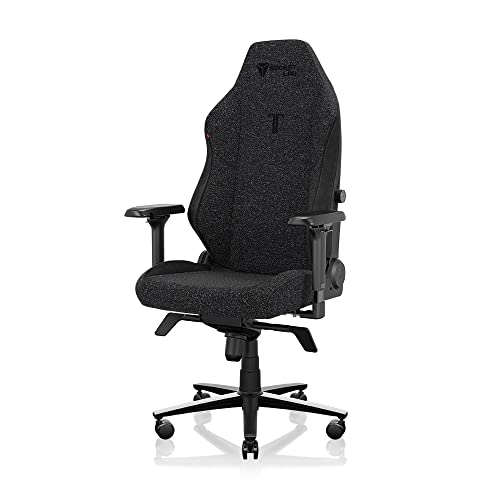
Secretlab Titan Evo (Fabric)
Secretlab’s Titan Evo in its fabric finish is a useful reference point for what a well-sorted modern gaming chair looks like: built-in adjustable lumbar support, a magnetic memory-foam head pillow and 4D armrests, in a breathable soft-weave upholstery that suits long sessions in warm rooms. Check on Amazon

CORSAIR TC100 RELAXED Fabric Gaming Chair
Corsair’s TC100 Relaxed takes the opposite styling route — a wider, flatter seat with less aggressive bolstering, plus a lumbar pillow and detachable neck pillow. It is a good example of the comfort-first end of the market for players who dislike being hugged by a bucket seat. Check on Amazon

GORILLA GRIP Chair Mat for Carpet Floors
Whichever chair you choose, a chair mat like this Gorilla Grip mat protects carpet, stops casters from digging ruts into the pile and makes rolling noticeably smoother — a cheap upgrade that extends the life of both floor and chair. Check on Amazon
Frequently Asked Questions
What is the most important thing to check before buying a gaming chair?
The size chart. Match the chair’s recommended height and weight range to your own body first; a chair that fits will outperform a more expensive chair that does not, every time. After fit, prioritise lumbar support and seat foam quality.
Are gaming chairs good for working at a desk all day?
They can be, provided the chair fits you and has proper lumbar support and adjustable armrests. Many people split the difference with ergonomic-leaning gaming chairs that keep the recline and headrest but use flatter seats and mesh or fabric backs.
How long should a gaming chair last?
With daily use, a well-built chair typically lasts several years before foam softens or upholstery wears. Our explainer on How Long Do Gaming Chairs Last breaks down what wears first and how to extend a chair’s life.
Is a footrest worth it on a gaming chair?
Only if you genuinely recline with a controller or watch content in the chair. For mouse-and-keyboard play a footrest goes unused, and a separate under-desk foot rest usually does the job better while you sit upright.
Should tall players just buy the biggest chair?
Not automatically — check the backrest height and where the headrest lands, plus seat depth. Tall-focused roundups such as Best Gaming Chairs For Tall Guys filter for those dimensions rather than overall size alone.
What does gas lift class actually mean when choosing a chair?
The class describes the cylinder’s construction and the load cycling it is built to withstand, with class 4 the heavy-duty standard. It does not change how the chair feels on day one; it changes how the lift behaves in year four. Heavier players and anyone near a chair’s weight limit should treat class 4 as a minimum.
Is it risky to buy a gaming chair second-hand?
It is risky only if you buy cosmetically. Inspect the lift for sinking, press the foam for dead spots, and check the base and brackets for cracks. A sound used chair from a good range can be excellent value; a chair with frame or mechanism damage should be refused at any price.
How long should I trial a chair before deciding to keep it?
Use the full return window if you can, and structure it: a few normal sessions, one longest-session stress test, one reclined controller session and one workday if the chair will double for work. Judge from written notes taken after each session, not from a single first impression.
Is a sliding seat depth worth paying for on a gaming chair?
For a single player who fits a standard chair’s fixed depth, usually not. For shared chairs, growing teenagers, or players whose thigh length falls between standard sizes, yes — it converts the hardest fit dimension to get right into an adjustment you can change after purchase. Judge the mechanism itself: it should lock positively and never creep during play.
The Short Version
Choose by fit first: match the size chart to your body, confirm the seat and desk heights work together, then pick your upholstery for your climate and your lumbar style for your back. Hardware — steel frame, class 4 lift, suitable casters — decides how long the chair stays comfortable. Get those right and almost any reputable model in your shortlist will serve you well.