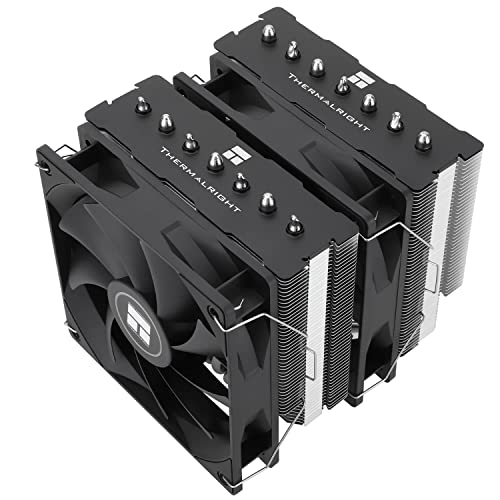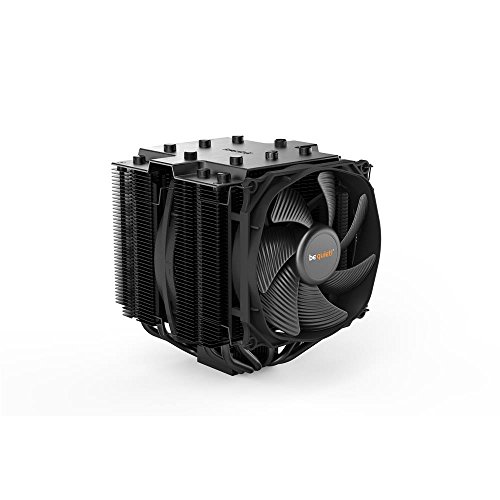
Learning how to fix a loud CPU cooler starts with identifying the sound, because each noise has a different cause: a smooth whoosh that tracks your workload is a fan-curve or sizing issue, a rattle or buzz is usually a cable or loose fitting, a grinding or clicking fan has a failing bearing, and a constant hum or gurgle from a liquid cooler points at its pump. This guide works through the sounds in order of likelihood, with the fixes kept safe and reversible — settings first, hardware last.
Before changing anything, reproduce the noise deliberately: open a heavy application, note when the sound starts and what it follows (CPU temperature, fan RPM, or nothing at all). A noise that exists at idle in a stone-quiet PC is a different problem from one that appears only in games. If heat accompanies the noise, work through How to Fix CPU Overheating alongside this guide — the two share several causes.
Disclosure: As an Amazon Associate, ilcastellomenu.com earns from qualifying purchases. Product examples below link to Amazon, where you can check current availability and specifications; this guide itself lists no fixed prices because pricing and bundles change frequently.
Identify the Sound Before Touching Anything
Whoosh, rattle, grind, hum: a field guide
A clean whoosh that rises and falls with load is simply air moving — the question is whether it moves more than it should. A rattle or intermittent buzz that changes when you press the case panel is vibration or a cable touching a fan blade. A grinding, clicking or chirping that follows one fan’s speed is a bearing at end of life. A steady hum independent of fan speed in a liquid-cooled system is the pump; gurgling or trickling sounds mean air moving through the loop, often a radiator-orientation issue. Localise the source by stopping case fans one at a time with a fingertip on the hub (briefly, and only the case fans) or by listening through a rolled sheet of paper — never poke anything into a spinning fan.
Check the numbers while you listen
Open a hardware monitor and correlate: which fan’s RPM matches the noise’s pitch changes? A cooler fan at maximum RPM while the CPU sits at desktop loads is a settings problem, not a cooling problem. A fan whose RPM reading flickers or reads zero while it audibly strains is failing electrically. Record idle and load RPM and temperatures now; every fix below gets verified against them.
In this guide
How to Fix a Loud CPU Cooler: Fixes in Safe Order
Fix 1: Fan curve and header settings
The most common cause of a ‘loud cooler’ is a fan curve that panics: a default curve ramping to full speed at a temperature your CPU reaches while opening a browser. In the BIOS, set a curve that stays near-silent to a moderate temperature, then ramps progressively, reaching full speed only near the thermal limit. Confirm the CPU fan header is in the correct control mode (PWM for 4-pin fans) and that the fan is on CPU_FAN so the curve you are editing is the one driving it. Smooth the ramp with any hysteresis/step-delay setting your board offers, so the fan stops surging up and down with every temperature spike. The sizing logic behind ‘the fan should rarely need full speed’ is in What is TDP for CPU Coolers.
Fix 2: Cables, clips and vibration
Power off and unplug before opening the case. Look for the classic offenders: a fan cable drooping into a blade’s path, a front fan clipped loosely to the fin stack, a side panel touching a tall cooler, or a radiator screwed down unevenly so its fans buzz against the case. Reroute cables with slack away from blades, reseat fan clips until they click, and make sure all cooler and radiator screws are snug — snug, not forced. Dust-caked blades also thrum out of balance, so clean the cooler properly per How to Clean a CPU Cooler before condemning any part.
Fix 3: Reduce the heat the cooler must shed
A cooler working at its limit is loud by definition. If your fan curve is sane and the mount is good, the remaining lever is the load itself: restore the CPU’s default power limits if a motherboard preset raised them, improve case airflow so the cooler breathes cooler air, and repaste if the mount is old — the sequence in How to Fix CPU Overheating covers the thermal side. In a small or quiet-focused build, also reconsider cooler class: the comparison in Air Cooler vs Liquid Cooler explains why a larger cooler at low RPM beats a small one screaming, every time.
When the Sound Is a Failing Part
Bearings and pumps do not heal
A fan that grinds, clicks or wobbles has a worn bearing; oiling sealed PC fan bearings is at best a brief reprieve and usually impossible. Replacement fans are standard sizes and inexpensive — match diameter, thickness and PWM control, and your cooler is quiet again. An AIO pump that whines, rattles or gurgles persistently after you have checked radiator orientation (radiator’s highest point above the pump, so air collects there instead) is a cooler at end of life: AIOs are sealed, so the fix is replacement of the unit. Choose the successor with the noise-first criteria in How to Choose a CPU Cooler, and compare classes in Best Air Coolers for CPU if you are switching back to air for good.
Coil whine and other impostors
Not every annoying sound is the cooler. A high-pitched whine that changes with frame rate is usually the graphics card or power supply (coil whine) and no cooler work will touch it; a rhythmic ticking can be a hard drive. Confirm the source before buying parts — swap the suspect fan’s header to a fixed low speed temporarily and listen for whether the sound follows. Misdiagnosis is how a quiet new cooler ends up installed in a PC that still whines.
Prevention: Keeping the PC Quiet
Habits that keep noise away
Keep filters and fins dust-free on the schedule in How to Clean a CPU Cooler, leave the fan curve you tuned alone unless hardware changes, and re-check for cable droop whenever you work inside the case — cables migrate toward fans over months of thermal cycling. When you next choose a cooler, buy one tier above your CPU’s minimum: headroom is quiet, bought once. The quiet-focused shortlists at Best CPU Coolers for Gaming and the case airflow picks in Best PC Cases for Airflow Under 50 complete a low-noise build.
The Quiet-PC Audit: Every Noise Source in One Pass
Before the next gaming session, spend ten minutes auditing the whole machine’s acoustics. The cooler is the usual suspect, but the audit often finds accomplices.
Case fans, GPU fans and drives
Case fans on a motherboard’s default curve are frequently louder than the CPU cooler — they respond to a different sensor and can surge independently. Set their curves with the same philosophy: quiet floor, progressive ramp, step delay. The graphics card’s fans are outside your curve control but inside its maker’s software, where a slightly earlier, gentler ramp often beats the stock behaviour of silence-then-blast. Mechanical hard drives contribute a hum and seek chatter that no fan work touches; if a drive is the residual noise, isolating its mount or retiring it to external backup duty ends it. The audit’s point is sequence: fix the loudest source, re-listen, repeat — because the ear only ever hears the current loudest thing, and ‘the cooler’ is often just the first layer of the onion.
Panel resonance and desk coupling
A PC can be acoustically fine in the hand and loud on the desk: side panels resonate like drum skins at particular fan speeds, and a hard desk couples vibration into a sounding board. Test by pressing a palm to each panel while the noise occurs — if it fades, the panel is the instrument. Fixes are humble: ensure panel screws are snug, add the case’s intended rubber mounts where fans meet metal, move the PC off a hollow desk surface or onto a mat, and nudge the fan curve so its common speeds avoid the resonant band. These are the fixes nobody puts in a headline, and they are responsible for a large share of ‘my quiet build is not quiet’ resolutions.
Setting a Fan Curve You Will Never Touch Again
The curve is the highest-leverage ten minutes in quiet computing. Here is a template philosophy rather than magic numbers, because every CPU’s temperature scale differs.
Anchor points and the step delay
Set four anchors: a floor speed (typically 30–40% for a quality fan) held until a temperature your CPU only reaches under real work; a mid anchor around half speed at a solid working temperature; a high anchor near 75–80% approaching the chip’s comfort limit; and 100% reserved for the last few degrees before throttling. Between anchors the curve interpolates smoothly. Then set the step-up delay — hysteresis — to several seconds, so a two-second temperature spike from opening an application does not launch the fans at all. Verify with your real workload, not a stress test: the curve should be inaudible on the desktop, a background presence in games, and only honestly loud in the heaviest sustained work. If it fails that test, the cooler is undersized for the chip — the sizing conversation in How to Choose a CPU Cooler — and no curve can negotiate with physics.
Noise Budgets: Deciding How Quiet Is Quiet Enough
Troubleshooting ends at a target, and the target is personal. Setting it explicitly prevents both under-fixing and endless tweaking.
Match the target to the room and the work
A PC in a living room competing with a television needs only to disappear under the programme; a PC in a bedroom used for late work needs to disappear under silence itself; a recording or streaming setup needs to disappear under a microphone’s unforgiving ear, which is the strictest standard of all and the one that justifies flagship coolers, fanless-leaning curves and even relocating the machine. Name your standard before you start: it decides whether the fix is a fan curve (most rooms), a cooler class change (quiet rooms), or a system redesign (microphones). Builders who skip this step chase an absolute silence they may not need, spending on the last three decibels — the most expensive decibels in computing — while builders with a named target stop, satisfied, at the fix that meets it.
The partner test and other realities
Shared spaces impose shared standards: the relevant question for a PC in a family room is whether anyone else can hear it during a quiet scene, not whether its owner can detect it while listening for it. Test fixes in the real setting, at the real distance, with the real content. A machine that passes the household test is fixed, whatever the meter app says — and a machine that fails it is not, whatever the specifications promised. Acoustics is the one area of PC building where the subjective verdict is the objective one, because the product being optimised is, in the end, an experience in a room.
When Quiet Costs Performance: The Honest Trade
One lever remains when curves, cleaning and hardware are exhausted: asking the CPU to do slightly less so the cooler can be much quieter. It deserves an honest paragraph rather than a dismissive one.
Power limits as an acoustic tool
Modern CPUs convert power into performance with diminishing returns at the top of their range: the last increment of boost costs a disproportionate share of heat. Setting a modest power limit — through the BIOS, using the CPU maker’s own mechanisms — can cut fan noise dramatically under sustained load while costing a few percent of performance in the heaviest tasks and nothing at all in ordinary use and most gaming. This is not the forbidden move of disabling protections; it is configuring the chip within its designed envelope, the same dial the TDP explainer in What is TDP for CPU Coolers describes from the sizing side. For a quiet-room machine, it is often the single most satisfying adjustment available — and unlike a new cooler, it is free, reversible and testable in five minutes.
Gear for This Guide
The examples below come from our Creators-API-verified product pool and illustrate the cooler classes discussed in this guide. They are examples, not a ranked list — use the criteria in this article to judge any model, including newer revisions.
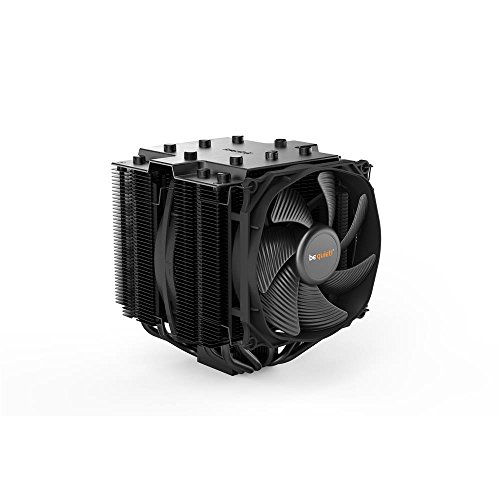
be quiet! Dark Rock Pro 4
A cooler engineered around low-noise fans is the reference for what ‘quiet under load’ sounds like — the replacement class to consider when an old cooler’s bearing, not its settings, is the problem. be quiet! Dark Rock Pro 4 — Check on Amazon
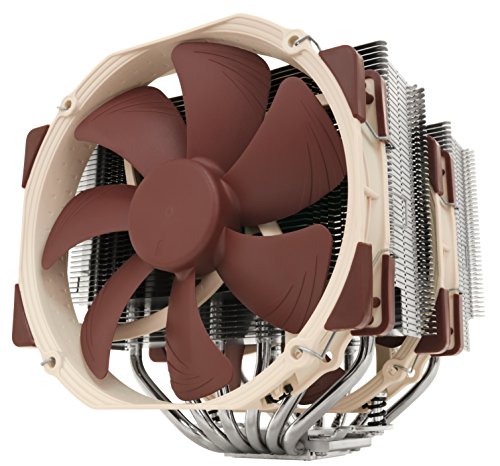
Noctua NH-D15
Twin 140mm fans moving air slowly is the physics of quiet cooling in one product: the same heat at far lower fan speed than a small cooler can manage. Noctua NH-D15 — Check on Amazon
how to fix a loud CPU cooler: The Short Version
Name the sound before touching a screw: curves for whoosh, cables for rattle, bearings for grind, pump for hum. The fix follows the diagnosis, and the diagnosis is free.
A Sound Library: Matching the Noise to the Culprit
Descriptions of noise are useless until they are specific, so here is the vocabulary worth learning, because each sound in this library points at a different repair. A smooth whoosh that rises and falls with load is air doing its job — the fix is curve, capacity or expectations, not parts. A ticking or clicking that keeps time with one fan’s rotation is something touching a blade: a cable, a zip-tie tail, a piece of debris, or a blade cracked at its root flexing as it passes. A grinding or rattling that comes and goes with orientation or temperature is a bearing in its last season, and it will not heal. A high tonal whine that holds one pitch regardless of fan speed is electrical or pump-borne — coil whine from nearby power circuitry wearing the cooler’s name unfairly, or a pump running dry-ish and singing through its mount. A buzz that changes when you press the case panel is resonance: a vibration finding a loudspeaker. A gurgling or trickling sound from a liquid cooler is air where water should be. Record the sound on your phone before you open anything; a thirty-second clip, played to a technician or compared against your own machine next month, is worth a paragraph of adjectives, and it freezes the evidence if the noise — as noises love to do — refuses to perform once the panel is off.
The fingertip test and other safe diagnostics
With the machine running and the panel off, you may stop each fan briefly — a fingertip on the centre hub, never on the blades — for two seconds at a time. The noise that vanishes owns the fan you are touching. This one test, done fan by fan including the graphics card and power supply if they are reachable, settles most “CPU cooler” complaints by reassigning them to their true author. A pump is tested by ear and by exclusion: set its speed constant in the BIOS if you can, and listen for whether the tone follows the pump setting or the fan curve. Case resonance is tested by touch — a palm flat on each panel while the noise plays. Every one of these tests is free, reversible and safe around a running machine provided you touch only hubs and panels, keep sleeves and hair clear, and never insert tools into a live case. Diagnose with your hands and ears first; the screwdriver’s turn comes after the sound has a name.
Room Acoustics: Why the Same PC Sounds Louder at Your Desk
Before replacing anything, audit the room, because rooms are amplifiers with opinions. A PC on a hard desk in a bare-walled corner sits in a reflective box that returns its noise to your ears doubled; the same machine on carpet, under a desk with a modesty panel, in a room with curtains and soft furniture, can measure and feel dramatically quieter with no part changed. Hard floors, glass desks and PCs placed at ear height on shelves all raise the perceived noise; so does the silence of the house at 1 a.m., when the background falls away and a fan you never noticed at noon becomes the room’s loudest citizen. Placement fixes are unglamorous and free: move the case off the desk and onto carpet or a foam pad, give its exhaust an unobstructed path so fans work less, and break the corner reflections with anything soft. Judge your fix attempts at the hour and in the chair where the noise actually bothers you, because a cooler quieted for the afternoon test can still fail the midnight one — and it is the midnight one that decides whether you love the machine.
When the Loud Part Is Not the Cooler at All
Every experienced technician keeps a private list of noises that arrived wearing a CPU cooler’s name and left as something else. The power supply’s fan, ageing in a part nobody opens, grinding quietly behind its grille. The graphics card’s fans spinning up in a game while the processor idles — and the owner, watching a temperature overlay that shows only the CPU, blaming the visible number. A hard drive’s seek chatter transmitted through a metal bay. A case fan whose bearing only complains at one specific speed in the curve. Coil whine that follows frame rates, rising in menus and silent in heavy scenes, from a graphics card or motherboard that no cooler purchase will ever quiet. The fingertip test and the sound library exist to catch these before money moves. If your diagnosis ends at another component, you have not failed the guide; you have used it correctly, and the fix — a fan, a setting, an uncapped-frame-rate menu tamed by a limiter — will be cheaper and more effective than the cooler you were about to buy for a sound it never made. The parts roundups, including the best CPU coolers for gaming, will still be there if the evidence eventually convicts the cooler itself.
Quieting for an Audience: Streamers, Calls and Shared Rooms
Some noise budgets are set by other people. A microphone hears your PC differently from your ears: it is closer to the case than you are, it favours the tonal sounds — pump hum, coil whine, a fan’s blade-pass note — that brains filter out, and noise-suppression software can only subtract what is steady. If your machine must share a room with recordings or calls, the hierarchy of fixes changes order. Distance first: a metre of extra separation between case and microphone beats any component swap, and a longer cable is the cheapest acoustic treatment in existence. Direction second: most fans are loudest on their exhaust axis, so a case turned to fire its noise at a wall or a curtain rather than across the desk buys real quiet. Character third: broadband whoosh suppresses gracefully in software while tones punch through, which is why recording rooms favour big slow air coolers and treat pump pitch as a purchasing criterion. And the room itself last: one soft furnishing near the desk does more for a recording than a shelf of acoustic foam panels bought in hope. Test with the actual microphone, in the actual application, because the audience’s ears are the specification — a machine can pass your judgement and fail the recording, and only one of those verdicts reaches your listeners.
The Seasonal and Situational Loudness Nobody Warns You About
Some loud coolers are calendar events. Summer raises room temperature, which raises fan speeds, which raises noise — a machine tuned to inaudibility in January can cross your threshold in July with nothing broken and nothing changed except the weather. Dust does the same work on a slower clock, which is why a noise complaint and a temperature creep arriving together should always be diagnosed as one problem. Even the time of day participates: background noise in a home falls by a startling amount late at night, so a fan curve that is genuinely silent at noon is merely quiet at midnight. Set your expectations and your curve for the worst honest case — the hot, still, late room — and the machine will be silent everywhere else by a comfortable margin. Owners who tune for the average case spend the year chasing a noise that keeps moving; owners who tune for the worst case fix it once, in an afternoon, and stop thinking about it, which is the true definition of a quiet PC: not the absence of sound, but the absence of attention paid to it.
Two Machines, Two Verdicts: Worked Noise Diagnoses
Case one: a two-year-old gaming PC that has grown loud over a month, worst in long sessions. The sound library says whoosh, rising with load — air, not bearings. The fingertip test confirms the cooler’s fans as the authors. Temperatures have crept six degrees since spring on the owner’s log, and the torch test shows the fin stack’s intake face felted with dust. Verdict: no part is failing; the cooling has been slowly suffocating, and the fans are compensating exactly as designed. The fix is a cleaning, a filter habit, and a curve re-check — an hour, no purchases — and the proof is that the same session now runs at the fan speeds of two springs ago. Case two: a liquid-cooled workstation with a new tonal hum at idle, constant under all loads. The library says pump or electrical. Setting the pump to a fixed lower speed moves the hum’s pitch with it, convicting the pump; temperatures are normal and the unit is within its warranty period. Verdict: not a fan curve problem, not dust — a pump ageing early, and the correct action is a warranty claim with the phone recording attached, not a season of curve experiments. Two loud machines, two opposite prescriptions, and the only thing that separated them was twenty minutes of listening before touching. That is the whole method of this guide, and it scales to every noise a PC will ever make at you.
Keeping a Noise Log: The Quiet Twin of the Temperature Log
Sound is even more forgettable than temperature, so give it the same written courtesy. When the machine is newly quiet, record thirty seconds of it at idle and thirty under your usual load, in the room and from the chair where you sit, and save the clips with a date. That recording is your baseline, and baselines convert future impressions into comparisons: when a noise seems new in November, you will not have to trust an August memory, because August is on your phone, at the same distance, in the same room. Note alongside it the fan speeds and the curve you settled on, because a BIOS reset, a board swap or an enthusiastic utility can silently restore defaults, and the first symptom of that amnesia is a machine that sounds wrong in a way you can now prove and reverse in minutes. Owners of quiet PCs are not luckier than owners of loud ones; they are simply the ones who can demonstrate what their machine used to sound like, and work backwards from evidence instead of forwards from annoyance.
Frequently Asked Questions
Why is my CPU cooler suddenly loud?
Work out what changed: dust build-up forcing higher fan speeds, a fan curve reset by an update, a cable that migrated into a blade’s path, or a bearing reaching end of life. A smooth whoosh points at settings or dust; a rattle at something loose; a grind at a failing fan. Identifying the sound first, as this guide does, prevents replacing the wrong part.
Can a fan curve really make that much difference?
Yes — it is the most common fix. Default curves often ramp to full speed at temperatures a CPU reaches opening a browser, producing constant surging. A curve that stays quiet to a moderate temperature and ramps progressively, with a step delay to ignore brief spikes, transforms the same hardware’s behaviour without changing temperatures materially under real loads.
Is pump noise from an AIO normal?
A faint hum is normal; the pump runs at near-constant speed by design. Whining, rattling or persistent gurgling is not. First check radiator orientation — the radiator’s highest point should be above the pump so air collects there — then fan settings. A pump that stays loud after that is a cooler at end of life; AIOs are sealed and replaced as units.
Should I oil a noisy fan bearing?
Almost never. Most PC fans are sealed designs with no serviceable bearing, and oil is at best a short reprieve on the few that are not. A grinding or clicking fan is telling you it is finished; replacement fans are standard sizes, inexpensive, and turn the repair into a ten-minute job.
Why is the cooler loud even at idle?
Either the fan curve has an aggressive floor, the fan is plugged into a header running it at constant full speed, the CPU is not actually idle (check background processes and power plan), or the noise is not the cooler at all — a pump, a case fan or coil whine from the graphics card. Correlate the sound with RPM readings in a hardware monitor before changing parts.
Will a bigger cooler definitely be quieter?
If sized and set up properly, yes — that is the physics of the thing. A larger fin stack with bigger fans sheds the same heat at much lower RPM, and RPM is noise. This is why Air Cooler vs Liquid Cooler favours flagship air for quiet builds, and why buying one tier above your CPU’s minimum, per How to Choose a CPU Cooler, is buying quiet.
My cooler is loud only for the first minute after booting. Should I worry?
Usually not. Many motherboards run all fans at full speed from power-on until the BIOS hands control to the fan curve a few seconds into the boot, and some liquid pumps prime noisily while air settles. A loud first minute followed by normal behaviour is a firmware handshake, not a symptom. Worry instead about the opposite patterns: a machine that starts quiet and grows loud over a session is describing heat it cannot shed, and a machine whose boot roar never subsides has a fan-control problem — a disconnected tachometer signal, a header in the wrong mode, or a curve that was never actually applied. Judge the noise by where it settles, not by how it arrives.
Can I just unplug one of my cooler’s two fans to make it quieter?
You can, and on a dual-tower cooling a modest processor it may even work thermally — but understand what you are trading. The second fan contributes most at high loads, so the single-fan configuration will run hotter and the remaining fan will be asked for more speed precisely when the machine works hardest, which can return the noise you removed wearing a different badge. The better first moves are a curve that caps both fans at a tolerable speed and accepts the resulting temperatures, which are usually still safe. If you do experiment with one fan, verify under your longest real load, keep the removed fan and its clips with the machine’s parts, and treat the experiment as reversible data rather than a permanent amputation.
Why does the noise change when I open or close the case panel?
Because the panel is part of the instrument. Closed, it can resonate with a fan’s vibration, muffle high frequencies while passing low ones, and force air through paths that whistle at grilles and gaps. Open, the direct sound escapes but the resonance and the whistling vanish, and temperatures usually fall, which slows the fans and confuses the comparison further. Use the panel test diagnostically: a noise that exists only with the panel closed is a resonance or airflow-path problem, solved with mounting pressure, foam tape at contact points, or a grille obstruction removed — not with a new cooler. A noise unchanged by the panel lives in a bearing or a pump, and no amount of case treatment will reach it.
Is a louder cooler ever a sign of something dangerous?
Rarely dangerous, often informative. The sounds that deserve prompt attention are a grinding fan that is clearly failing — its eventual stop removes cooling you are counting on — a pump that has gone suddenly much louder or silent, which can mean circulation is failing with it, and any noise accompanied by a burning smell or visible damage, which is not a cooling question at all: power off and investigate before anything else. Ordinary loudness, even annoying loudness, is a comfort and maintenance issue. Let the machine’s temperatures arbitrate urgency — a loud cooler holding safe temperatures has given you time to fix it properly, and time is best spent on the diagnosis this guide lays out rather than on the fastest purchase.
Should I replace a fan that is loud only at one specific speed?
Not before you have tried simply not living at that speed. Many fans have a resonance band — a narrow RPM range where blade, bearing and mount conspire to hum — and a fan curve can step over that band, dwelling below it at light loads and jumping past it under load, so the machine never sits at the offending speed. If the hum follows the fan to every speed, or the workaround leaves the curve unusable, then replacement is right, and it is one of the cheapest repairs in computing: match the size, thickness and connector, keep the old fan as a case fan candidate, and the whole job is four screws and a clip. Diagnose the band first, though, because a new fan of the same model may hum at the same speed, and then you will have bought the same note twice.
My PC is quiet at my desk but my housemates complain through the wall. What travels?
Low frequencies and structure-borne vibration travel; the whoosh you hear mostly does not. A case sitting directly on a hard floor or a hollow desk couples its fan and pump vibration into the building, where it can present in the next room as a hum whose source nobody can locate. Decouple first: rubber feet, a foam pad or carpet under the case, and a check that no cable or panel is pressed against a wall. Then look for the tonal sources — pump hum and a fan’s low blade note — because those are the frequencies walls pass. It is a solvable problem, and solving it starts with believing the complaint: sound behaves differently through a building than across a desk, and the quietest machine in the room can still be the loudest one in the house.
Do fan shrouds, grills and dust filters make a cooler louder?
They can, by taxing the air rather than the fan. Anything placed close in front of or behind a fan — a tight grill pattern, a dense filter, a decorative shroud — forces the fan to work against resistance, and fans answer resistance with speed and turbulence noise. A clogged filter is the extreme case, but even a clean, restrictive one has a voice. Test by removing the filter for one session, in a room you keep reasonably clean, and listen: if the machine drops a clear notch in loudness at the same temperatures, the filter’s density is part of your noise budget, and the remedies are a freer-flowing filter, a larger intake area, or a cleaning interval short enough that the filter never becomes a wall. Air that enters easily is the quietest air there is.
When is the right answer simply a bigger cooler?
When the diagnosis has eliminated everything else and the arithmetic still condemns the current one: a healthy, clean, well-curved cooler that must run fast to hold safe temperatures under your sustained workload is undersized for that workload, and no setting changes physics. The signature is stable loudness under load with normal idle behaviour, normal temperatures bought only with speed, and a processor whose measured sustained draw sits at the top of the cooler’s class. Buy the replacement from that measurement — one class up in surface area, with a larger fan — and keep the old cooler as the diagnostic spare it has earned the right to be. That is a purchase made by evidence, and it is the only kind this guide endorses.
Make that evidence-based habit your default and loud coolers stop being a recurring expense: each noise gets a name, each name gets its cheapest honest fix, and purchases happen only when the physics — not the frustration — demands them.
Can headphones-friendly volume still damage my hearing over years?
The PC itself, no — a loud cooler at a desk sits far below any level associated with hearing risk, and its danger is to concentration, sleep and temper, not to ears. The honest concern in a loud-PC household is the compensating behaviour: turning game, call and headphone volumes up to compete with the fans, hour after hour. Fix the room’s noise floor and the volumes you choose fall with it, which is one more reason a quiet machine is a health feature in disguise. If a PC genuinely must be endured at industrial loudness, something in it is broken; healthy hardware, however hard it works, should never approach that territory.
Does the direction my case faces really change how loud it seems?
Yes, measurably, because fans and exhausts are directional. A case whose rear exhaust fires into open room sounds different from one firing at a wall a hand’s breadth away, which reflects the noise back and can add a resonant cavity hum; a top exhaust under a desk shelf behaves like a megaphone aimed at the desktop. Turning the case a few degrees, pulling it a short distance from the wall, or giving the exhaust a soft target — a curtain, a carpeted floor, open air — are legitimate acoustic fixes that cost nothing and offend no warranty. When you have done the component work and a residue of noise remains, aim the machine before you open it again; sound, like light, goes where it is pointed.
What is the quickest meaningful quieting I can do in five minutes?
Three moves, in order. First, open your fan-control settings and add a delay or hysteresis so the fans stop chasing every two-second temperature spike — the revving pattern is the single most annoying sound a healthy PC makes, and it is pure software. Second, check for the cable, tie or debris touching a blade, because ticking reads as brokenness out of all proportion to its cause. Third, lift the case off a hard surface onto carpet, a mat or its own proper feet if they have gone missing, and pull it a little away from the wall behind it. Five minutes, no purchases, and a surprising share of “loud cooler” complaints do not survive contact with those three — which is exactly why they belong at the front of every diagnosis, before the catalogue comes out.
Keep those five minutes in mind as the standing first response to any new noise this machine ever makes, and most future episodes will end there — quickly, cheaply, and with the evidence still fresh enough to act on.
Related Guides
Keep exploring with these guides and roundups from the same CPU-cooling collection: