ilcastellomenu.com is reader-supported. When you buy through links on our site, we may earn an affiliate commission.
Where to Buy
The one-sentence version for busy teachers: the best animal cameras for schools are chosen by habitat, not by headline specifications, and this guide is organised that way. Each camera below is sold through Amazon, and the product links in this guide go to the current listing for that exact model, where a school or a parent-teacher group can check delivery, mounting accessories, and the memory cards or plans a particular installation needs. Buy through a school account where your district requires it, keep the order paperwork with the safeguarding file described later in this guide, where an inspector or a governor can find it without a treasure hunt, and treat the camera itself as the smallest part of the purchase — the mount, the power arrangement, and the permissions matter more.
The best animal cameras for schools are not bought for security, and that single fact rearranges every buying rule. A camera watching a robin’s nest above the playground, a hamster asleep in Year 3, or tadpoles rearranging a classroom tank is a teaching instrument: it must be safe around children, boringly reliable across a whole term of weather and timetable changes, gentle with a school network that a hundred devices already share, and capable of producing, unassisted at three in the morning, the one clip — the egg hatching, the first flight, the nocturnal hedgehog inspecting the new house — that a class will talk about for the rest of the year.
Schools also carry duties that homes simply do not. Any camera on a school site sits squarely inside safeguarding policies, parental expectations, and data rules, which means the right choice is as much about privacy shutters, account control, and where footage lives as it is about lenses. The good news is that the same features that make a camera responsible in a classroom — a physical privacy mode, local recording, restricted sharing — tend to make it practical there too, because a teacher has no time to be a systems administrator between lessons.
Six cameras earned places here after that sifting, each matched to a distinct school habitat: the window bird feeder, the class pet’s enclosure, the aquarium or terrarium, the playground nest box, the school garden and grounds, and the entrance-adjacent wildlife corner where a camera must behave with particular discretion. Read the picks by habitat rather than by rank, therefore, because in a school the question is never which camera is best in the abstract, on a specification sheet, in a laboratory — it is which camera belongs in front of that particular animal, in that particular room, under that particular policy.
Key Takeaways
- Choose by habitat first — feeder, enclosure, tank, nest box, garden, and grounds each reward a different camera shape.
- A physical privacy shutter or a true off mode is close to non-negotiable for cameras used inside classrooms.
- Battery and solar models free outdoor projects from the location of the nearest socket, which is rarely near the nest.
- Local recording to a memory card keeps footage inside the school and off any family’s personal cloud account.
- Put the camera on a school-owned account from day one; a teacher’s personal login is a safeguarding problem waiting to happen.
In this guide
Quick Picks
| Pick | Badge | Why it made the list |
|---|---|---|
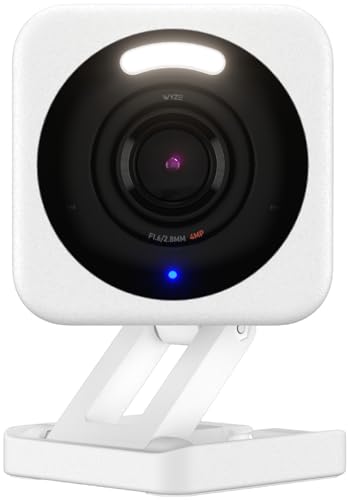
| Wyze Cam v4 | Best for Window Feeders and Class Pets | Covers the two commonest school projects — the window bird feeder and the small mammal enclosure — with sharp colour night vision and free local recording. |
| eufy Indoor Cam E220 | Best Pan-and-Tilt for Enclosures | Pans and tilts to follow an animal around a large enclosure or vivarium, with on-device detection that tells a guinea pig from a passing shadow. |
| TP-Link Tapo C210 | Best Budget Pick for Tanks and Terrariums | A pan-and-tilt camera at a gentle price that sits close to glass, follows a fish tank’s or gecko’s day, and records locally without any plan. |
| Blink Outdoor 4 | Best Battery Camera for Nest Boxes | Runs for long stretches on replaceable batteries with no cable at all, so a nest box or hedgehog house can be watched without a single visit to disturb it. |
| REOLINK Argus PT Ultra | Best for School Grounds and Big Habitats | A battery pan-and-tilt camera with solar options that can survey a whole garden, pond, or field corner, and turn to follow the fox when it finally calls. |
| Ring Indoor Cam (2nd Gen) | Best Privacy Shutter for Sensitive Rooms | A compact indoor camera whose physical privacy cover closes over the lens — the clearest possible answer when an animal project shares a room with children. |
How Did We Choose Cameras for School Animal Projects?
We began with the school’s constraints rather than the camera market’s. Any candidate had to be viewable on the devices schools actually use — a teacher’s laptop, a classroom display, a managed tablet — without exotic software. It had to tolerate school Wi-Fi, which is filtered, busy, and occasionally restructured over the holidays, and it had to offer a recording arrangement a school can defend: local storage, or a clearly administered account, rather than footage drifting into a personal cloud.
Animal welfare acted as the second filter, and it eliminated more candidates than price did. Cameras for enclosures and nests must work without bright visible lights that disturb nocturnal animals, must not need frequent physical visits that stress a nesting bird, and must survive being ignored for a half-term holiday while still capturing the event the project exists for. The six survivors each passed both filters for at least one habitat, and the verdicts below say plainly where each one’s welcome ends.
Which Habitats Do School Animal Cameras Actually Serve?
Start with the animal, because habitat dictates hardware with unusual force. Window feeders and nest boxes want small cameras with wide views and night vision that does not blast visible light at roosting birds. Class pets — hamsters, gerbils, guinea pigs, a venerable school rabbit — are mostly nocturnal or crepuscular, so their cameras earn their keep after the children go home, recording the wheel marathons and midnight rearrangements that make Monday’s lesson. Aquariums and terrariums need a camera that can sit close, focus near, and cope with glass reflections and humid air without fogging into uselessness.
Outdoor projects widen the brief again. A school garden camera watching a pond or a hedgehog house needs weatherproofing, a power plan that survives the holidays, and enough range to cover a bed or a compost corner. Grounds-scale watching — the fox that visits the field, the owl box on the boundary tree — pushes toward pan-and-tilt or long battery life, because nobody can aim a fixed camera at a whole playing field and expect the animal to cooperate. The picks below map onto these habitats deliberately, and a school running two projects should expect to buy two different cameras without any sense of failure.
What Safeguarding and Privacy Rules Govern a Classroom Camera?
A camera pointed at an animal in a classroom will inevitably see children, so it must be governed as if it were pointed at children — because in every way that matters, it is. Site the camera so its view is the enclosure and as little else as the room allows, use privacy modes or physical shutters outside project hours, and record to storage the school controls. The account holding the camera belongs to the school, with access granted to named staff, and it should be reviewed when staff change, like any other key to the building.
Parents deserve a sentence in the project plan rather than a surprise in a newsletter photograph: what the camera watches, when it records, who can view it, and how long footage is kept. Most parents, told plainly, become the project’s loudest supporters — a nest camera with a clear policy is a delight, while the same camera discovered accidentally is a complaint. Schools with an existing CCTV policy should extend it to cover animal cameras explicitly, because the term’s most enthusiastic project deserves better than a grey area, and governors asked in advance almost always say yes with conditions a thoughtful teacher would have chosen anyway.
How Should a School Power and Connect Cameras Outdoors?
The nest box is never beside a socket; that is the first law of school wildlife projects. Battery cameras have become the default answer because they collapse the whole problem — mount, aim, and leave — and modern models stretch their charge across the weeks a project needs, especially when recording is event-based rather than continuous. Solar panels, offered for several outdoor picks, extend that further and suit a south-facing fence or nest post, turning a term’s project into a year’s without a single ladder visit during the nesting season, which the birds will appreciate as much as the caretaker does.
Connectivity is the quieter constraint. School Wi-Fi often stops at the building’s walls, and the nest box sits precisely beyond them. Test the signal at the exact mounting point with a phone before buying anything — a camera that cannot reach the network is a diary nobody reads. Where Wi-Fi fails, the honest options are a camera recording locally to its card for weekly retrieval, a relocated access point arranged with the school’s IT support, or a different tree. All three are respectable; the only failure is discovering the problem after the eggs are laid.
What Makes Footage Into a Lesson Rather Than a Clip?
The camera is the easy half of the project; the teaching is the other. The classes that get famous value from animal cameras build small rituals around them: a two-minute nest check at registration, a weekly vote on the clip of the week, a logbook — paper, gloriously — in which children record predictions and observations in the manner of field scientists. Recorded highlights should be exported and kept in the class’s own folder, because the camera’s app is a river, and the lesson needs a pond: a small, curated archive the class can revisit in June to see how the robins, and the children, have grown.
Cross-curricular value arrives uninvited once the footage exists. Life cycles and habitats teach themselves; data handling appears when the class charts feeding visits; persuasive writing improves markedly when its subject is a real hedgehog with real opinions about mealworms. None of this requires a better camera — it requires a reliable one, a teacher with ten structured minutes a week, and footage stored where the school can find it. Choose the camera that makes those ten minutes effortless, and the curriculum will do the rest.
How Do You Keep Animals Safe Around the Camera Itself?
A camera is an object introduced into an animal’s home, and it should behave like a polite guest. Keep installation visits short and early — a nest box camera goes in before the season, never as an adjustment while eggs are present — and prefer models whose night vision uses infrared the animals cannot see over any design that floods a habitat with visible light. Cables within reach of teeth need conduit or routing behind panels, enclosures should be checked so a curious hamster cannot reach a warm electronic box, and cleaning routines for tanks and cages must include a plan for the camera rather than discovering it mid-scrub with a wet sponge.
Disturbance is the subtler harm. A camera that needs its card changed weekly teaches a nesting bird that the box is visited by giants; the same footage recorded by a battery model visited twice a term leaves the family in peace. When in doubt, choose the setup that asks the least of the animal — fewer visits, no lights, no noise, no heat — and accept a slightly less perfect picture as the price of the project’s ethics. Children notice how the adults treat the animals, and that lesson outlasts every clip the camera will ever record.
What Should a School Budget Beyond the Camera?
The camera’s price is the beginning of a short list, and projects go wrong when the list is discovered item by item. A memory card sized for the recording style, a mount that suits the actual surface — nest boxes, feeder poles, and tank glass each want different hardware — and weather protection for any connection left outdoors belong in the first order. Outdoor projects may add a solar panel or a spare battery; indoor ones may add a longer cable so the camera can live where the animal is rather than where the socket happens to be.
Recurring costs deserve the same honesty. Some ecosystems keep local recording entirely free, which suits school budgets beautifully, while others reserve longer history or smarter detection for a plan that a school account must then administer and renew. Neither is disqualifying, but the bursar should meet the whole cost at the proposal stage, presented as a per-year figure for the project. A camera approved with its true running costs is a project with a future; a camera approved on its box price alone is a future awkward conversation wearing feathers.
How Should Schools Handle the Footage Afterwards?
Footage is a school record the moment it exists, and a light-touch routine keeps it an asset rather than a liability. Export the highlights the class chooses into the school’s own storage, on the project’s folder, with dates in the filenames; let the camera’s rolling storage overwrite the rest on its natural cycle; and review, once a term, who still holds app access and whether every name on the list still works in the building. None of this needs a committee. It needs a named owner and ten minutes in the termly calendar, which is why the project plan in the setup section assigns both.
Sharing beyond the school deserves the same calm deliberation. A fledging clip sent to parents through the school’s usual channels, with the habitat framed and no classroom in view, is the project’s best ambassador. A live link circulated casually is its greatest risk. The difference is not the footage; it is whether an adult chose the audience. Keep choosing audiences deliberately and the camera will remain what it was bought to be — a window onto an animal’s life that a whole school community can enjoy with a clear conscience.
Which Cameras Belong in Which School Habitat?

Wyze Cam v4 — Best for Window Feeders and Class Pets
The window feeder is where most school camera projects begin, usually because a teacher sticks a feeder to the classroom glass in October and watches a class of seven-year-olds lose their minds over a blue tit. The Wyze Cam v4 suits that beginning remarkably well: it is small enough to live on a windowsill or a shelf edge, its colour night vision turns dawn and dusk feeding visits into footage worth showing, and its view is wide enough that a feeder, a nest shelf, and a stretch of branch can share one frame without constant re-aiming.
For the class pet, the same qualities translate. Pointed at a hamster enclosure from a respectful distance, the camera records the night shift — the wheel sessions, the food-pouch logistics, the architecture of moved bedding — that children otherwise only infer from the evidence each morning. Motion events are marked in the app, so a teacher can find the thirty seconds that matter during a spare moment rather than scrubbing a night of an animal sleeping in a tube, and memory-card recording keeps the whole archive inside the school at no ongoing cost.
Practicalities are kind to school budgets and school networks alike. The camera is mains powered, so a windowsill socket ends the power question; Wi-Fi setup through the app is quick; and the unit’s modest size makes it unobtrusive in a room where visual calm matters. Its smart detection extras are partly plan-based, but the core school jobs — live view on the classroom display, event clips, card playback — stand on the free foundation, which is exactly where a school needs them.
Place it with the safeguarding habits from earlier in this guide: aimed at the feeder or the enclosure, privacy scheduled outside project hours if the room demands it, and the account in the school’s name. So arranged, it is the easiest first camera a school can buy, and the one most likely to convert a single feeder into a whole corridor of habitats by spring.
- Imaging: high-resolution sensor with colour night vision
- Power: mains powered via USB — a windowsill socket suffices
- Recording: memory card locally, optional cloud plans available
- Mounting: compact body with magnetic and screw mounting options
Strengths
- Colour night vision makes dawn feeder visits genuinely watchable
- Local card recording keeps footage and costs inside the school
- Small, quiet presence suits windowsills and enclosure shelves
Trade-offs
- Mains power ties placement to a reachable socket
- Richest detection labels sit in the optional paid tier
- Indoor design — not for unsheltered outdoor mounting
Best for: window feeders, class-pet enclosures, and a first project on a tight budget.
Not suited for: unsheltered outdoor sites or positions far from any socket.

eufy Indoor Cam E220 — Best Pan-and-Tilt for Enclosures
Some school animals refuse to perform in one corner. A pair of guinea pigs with a run to patrol, a bearded dragon whose basking spot migrates with the sun, a rabbit with opinions about several hiding places — these subjects defeat a fixed camera, and they are the reason the E220 earns its place. Its pan-and-tilt head lets a teacher sweep the whole enclosure from the app, settle on where the animal actually is, and let the camera’s own movement do the following that a fixed lens cannot.
The detection story matters in a school day. The camera distinguishes, on the device, between a person and a pet, so the events list separates the animal’s activities from the classroom’s comings and goings — a teacher hunting for the moment the tortoise flipped can filter to pet events rather than wading through every child who walked past with a reading book. Recording can live on a memory card in the camera, keeping the arrangement local and the running costs at zero, which the bursar will notice approvingly.
Privacy handling is built for rooms with children in them: the camera can be scheduled, switched to a privacy mode, and aimed by rule rather than left to wander, and its physical presence — a small, friendly dome — reads as classroom equipment rather than surveillance. Used with the enclosure-first framing this guide recommends, it gives a class the closest thing to a documentary crew their pet will ever have, at the price of a modest gadget and one careful setup session.
One discipline completes the picture: resist the joystick. Children will beg to drive the camera, and the occasional supervised pan across the enclosure is a treat worth granting, but a camera forever chasing an animal teaches the animal to avoid it. Set the view, let the detection mark the moments, and review together at the logbook session — the footage improves, the animal relaxes, and the class learns the first rule of wildlife filming, which is patience.
- Movement: motorised pan and tilt controlled from the app
- Detection: on-device distinction between people and pets
- Recording: memory card in the camera; hub and cloud options exist
- Power: mains powered, suited to a fixed indoor position
Strengths
- Follows animals across large enclosures a fixed camera would lose
- Pet-event filtering saves teachers real time every week
- Local recording keeps the project free of subscriptions
Trade-offs
- Moving head tempts constant fiddling unless the class sets rules
- Mains power and indoor design fix it to one room
- Person detection in a classroom needs thoughtful scheduling
Best for: large enclosures, vivariums, and class pets that roam their whole habitat.
Not suited for: outdoor projects or rooms where a moving camera would distract.

TP-Link Tapo C210 — Best Budget Pick for Tanks and Terrariums
Aquariums and terrariums are the introverts of school animal projects — quiet, self-contained, and easy to overlook beside a noisy hamster — and they reward a camera that can sit close and pay attention. The Tapo C210 is that camera at a price that lets a school buy one without a fundraising campaign. Its pan-and-tilt head covers a whole tank from a shelf beside it, its night vision watches nocturnal geckos and the after-dark society of a fish tank, and its app is polished enough that a teacher can run the whole project from a phone without a manual.
Glass is the technical challenge in this habitat, and placement is the answer the C210 makes easy: angled slightly rather than square-on, close enough that reflections fall away, with the camera’s own night illumination positioned so it does not bounce off the pane into a white fog. Ten experimental minutes during setup — the app open, the tank lights cycling — finds the sweet spot, and the camera’s memory then holds it. Memory-card recording keeps every clip in the school, browsable on a timeline that punches above the camera’s price.
The Tapo app adds quiet school-friendly virtues: sharing that lets a second teacher or a technician hold access properly, a privacy mode for the hours when the room is used for other things, and automations that can dim the project’s ambitions to a schedule — recording through the school day and the animal’s active night, resting when nobody, feathered, furred, or scaled, is performing.
As the budget pick it asks a few compromises in return: the catalogue of refinements is shorter than the premium ecosystems offer, and very fine detail at distance is not its sport — but a tank camera lives at arm’s length from its subject, where the C210 is entirely at home. For a science department equipping several tanks across several rooms, its combination of price, movement, and free local recording is the arithmetic that wins.
- Movement: motorised pan and tilt with preset viewpoints
- Recording: memory-card timeline in the Tapo app; optional cloud tier
- Night mode: infrared viewing for nocturnal tank residents
- Power: mains powered for a fixed shelf position
Strengths
- Gentle price lets departments equip several tanks at once
- Pan-and-tilt covers a whole aquarium from one shelf spot
- Free local playback with a timeline beyond its price class
Trade-offs
- Fine detail at long range is not its strength
- Glass reflections demand careful angled placement
- Advanced features trail the premium ecosystems
Best for: aquariums, terrariums, and multi-room science projects on a budget.
Not suited for: long-range outdoor watching or very large enclosures.

Blink Outdoor 4 — Best Battery Camera for Nest Boxes
Every outdoor school project collides with the same two facts: the interesting places have no power, and the animals resent visitors. The Blink Outdoor 4 dissolves both. It runs on replaceable batteries for extended periods — long enough that installation in autumn can plausibly meet the spring’s fledglings without a battery pilgrimage — and it talks wirelessly to its indoor sync hub, so the nest box at the garden’s end needs nothing but the camera itself, mounted once, early, and then left in peace.
That peace is the project’s ethics and its image quality at once. A nesting bird that is never approached lays, broods, and fledges on camera; the class watches a complete story instead of a disturbed fragment. Motion-activated clips suit the rhythm perfectly — arrivals, feedings, the first wobbly appearance at the hole — and the camera’s weatherproofing shrugs off the school year’s rain. Live view exists for the occasional registration-time check, used sparingly, as battery courtesy and bird courtesy agree it should be.
The system shape deserves a note: the sync hub lives indoors on the school network, the camera lives outside beyond the reach of sockets, and footage can be kept locally on the hub’s storage or in the optional cloud. For a school, local storage on a hub in a locked cupboard is a tidy safeguarding story, and the absence of any cable to the nest removes the caretaker’s favourite objection to wildlife projects in a single stroke.
Choose it for the habitats that define it — nest boxes, hedgehog houses, the pond’s edge, a bat box on the boundary wall — and accept its nature: this is an event camera, not a television channel, and its clips-over-streams philosophy is precisely what battery life and animal welfare jointly demand. Schools that understand that trade describe this little camera the way birders describe a good hide: unobtrusive, patient, and there for the moment that matters.
- Power: replaceable batteries designed for long service between changes
- Connection: wireless link to an indoor sync hub on the school network
- Recording: local storage via the hub or optional cloud plan
- Build: weatherproof for unsheltered outdoor mounting
Strengths
- No cable and long battery life leave nesting animals undisturbed
- Weatherproof build suits nest boxes, ponds, and hedgehog houses
- Hub storage keeps footage inside the school’s own cupboard
Trade-offs
- Event-clip model, not continuous recording
- Live view should be used sparingly to protect the batteries
- Requires the sync hub as part of the system
Best for: nest boxes, hedgehog houses, and any habitat that must not be visited.
Not suited for: projects wanting continuous all-day footage of an active enclosure.

REOLINK Argus PT Ultra — Best for School Grounds and Big Habitats
Scale changes the camera you need. A school garden with a pond, beds, a compost corner, and a rumoured fox is not a habitat a fixed lens can cover, and the Argus PT Ultra is built for exactly that geography: a battery-powered pan-and-tilt camera that can sweep the whole plot, settle on preset viewpoints — pond at registration, hedgehog house at lunch — and record locally to its memory card with no cable and no recorder. Paired with its solar panel option, it can hold a sunny fence post for a season of watching with maintenance visits counted on one hand.
The picture it returns justifies the ambition. Its high-resolution sensor and colour night viewing turn dusk — the hour when gardens actually happen — into footage a class can study: the fox’s route, the badger’s opinion of the fence, the pond’s nightly parliament of frogs. Person, vehicle, and animal detection help the events list stay readable across a whole grounds, and the app lets staff share the watch properly, so the site manager and the science lead can both hold the keys.
Battery honesty applies here as everywhere: pan-and-tilt movement and busy detection spend charge, and a camera surveying an active field works harder than one watching a sleeping nest. The solar pairing is therefore less an accessory than the completion of the idea for most school sites, and mounting should plan for it — a post or wall with sky above it, the panel angled to the season, and a test week before the project is announced to expectant children.
For a school with land to watch, this is the camera that turns grounds into curriculum: biodiversity audits with evidence, a fox diary with dates, a pond study that runs through the holidays and greets the class in September with a summer of footage. It asks more of its installer than the indoor picks — a ladder, a drill, a signal test — and returns a project’s worth of wonder per visit, which is the correct exchange rate for school wildlife.
- Movement: battery pan-and-tilt with preset viewpoints
- Power: rechargeable battery with solar panel option
- Recording: memory card in the camera; detection for people, vehicles, animals
- Build: weatherproof for fences, posts, and outbuildings
Strengths
- Surveys a whole garden or field corner from one mounting point
- Solar option stretches service across holidays and seasons
- Strong night picture captures the dusk hours when wildlife performs
Trade-offs
- Movement and busy scenes spend battery faster
- Installation needs a signal test and a proper mount
- Larger and more visible than the indoor picks
Best for: school gardens, ponds, grounds, and large outdoor habitats.
Not suited for: small indoor enclosures, where its scale is wasted.

Ring Indoor Cam (2nd Gen) — Best Privacy Shutter for Sensitive Rooms
Some animal projects live in rooms where the safeguarding conversation leads: a nurture room with a therapy rabbit, a special-needs classroom whose guinea pigs are part of the provision, a library corner tank in a space used for interventions. In those rooms the winning feature is not resolution but legibility — a camera whose privacy state a headteacher, a parent, or an inspector can see from the doorway. The Ring Indoor Cam’s physical privacy cover, which clicks over the lens and disables viewing, is exactly that: privacy you can point at.
The camera behind the cover is a competent, compact indoor unit: quick to install, happy on a shelf or wall, with live view and motion events through an app that schools in the Amazon ecosystem will find easy to administer across staff. The cover also answers the out-of-hours question elegantly — project time, the lens is open and the rabbit is a star; the room’s other hours, the lens is visibly closed and the camera is furniture. No schedule, app toggle, or policy document communicates as clearly as that click.
The ecosystem’s terms should be entered knowingly. Ring’s strengths are its app polish and its sharing model, while recorded history is a plan-based affair, so a school choosing this camera for its shutter should budget the subscription as part of the project and hold it on the school account. For many rooms that exchange — a modest plan for the clearest privacy signal in the roundup — is not merely acceptable but the entire point of the purchase.
Deploy it where trust is the curriculum’s foundation and the animal is part of a room’s care: the camera that can be seen to be off protects the project, the staff, and the school’s relationship with its families more surely than any specification. In the habitats where it belongs, that shutter is not a feature on a list. It is the reason the project gets approved.
- Privacy: physical cover that closes over the lens and disables viewing
- Recording: plan-based cloud history through the Ring app
- Sharing: member access with roles for staff administration
- Form: compact indoor camera for shelf or wall mounting
Strengths
- A visible, physical off state that settles safeguarding questions instantly
- Polished app and sharing suit administration by school staff
- Compact and quick to install in multi-use rooms
Trade-offs
- Recorded history requires the paid plan
- Cloud-first design may not suit every school’s data policy
- Indoor only, and less suited to continuous local archiving
Best for: nurture rooms, SEND classrooms, and animal projects in sensitive spaces.
Not suited for: projects needing free local recording or outdoor mounting.
How Do the Six School Animal Cameras Compare?
Read this table by habitat and by the question your setting asks loudest. Feeders and pets ask for convenience, tanks for closeness, nests for absence, grounds for reach, and sensitive rooms for visible privacy. The standout trait column names the answer each camera gives, and the right purchase is the one whose answer matches the question your particular animal, room, and policy are asking.
| Pick | Badge | Standout trait |
|---|---|---|
| Wyze Cam v4 | Best for Window Feeders and Class Pets | The starter camera: feeders and hamsters, filmed in colour, recorded for free. |
| eufy Indoor Cam E220 | Best Pan-and-Tilt for Enclosures | The documentary crew: a camera that can look where the animal went. |
| TP-Link Tapo C210 | Best Budget Pick for Tanks and Terrariums | The tank specialist: close attention to quiet animals, at a kind price. |
| Blink Outdoor 4 | Best Battery Camera for Nest Boxes | The good hide: patient, cable-free, and gone from the animals’ minds. |
| REOLINK Argus PT Ultra | Best for School Grounds and Big Habitats | The groundskeeper: one camera that can patrol a whole school garden. |
| Ring Indoor Cam (2nd Gen) | Best Privacy Shutter for Sensitive Rooms | The trust camera: privacy you can see from the doorway, in one click. |
How Do You Set Up a School Animal Camera Project?
One careful afternoon in the holidays or at a term’s start sets a project up to run itself. Work in this order and the animals, the network, and the governors will all be equally untroubled.
- Write the one-page project plan first. Name the animal, the camera position, the account owner, who may view footage, how long clips are kept, and when the camera is private. Have it approved through the school’s usual safeguarding route before any hardware is ordered — approval first is faster than forgiveness later, every time.
- Create the school account and prepare the camera indoors. Register the camera to a school-owned account, add the staff who need access, update firmware, insert the memory card, and learn the app’s privacy controls at a desk. Name the camera for its habitat — Nest Box, Tank Room 4 — so every member of staff speaks the same language about it.
- Test at the exact position before fixing anything. Hold or temporarily mount the camera where it will live. Check the view on the classroom display, the Wi-Fi strength for outdoor positions, and the night picture after dark if the animal is nocturnal. Adjust the angle for the animal’s stage, not for the room’s furniture.
- Install with the animal’s calendar in mind. Mount permanently outside breeding and nesting sensitivity, route cables away from teeth and weather, and set detection zones, schedules, and privacy hours in the app. For enclosures, reintroduce the camera as furniture for a day before expecting natural behaviour on film.
- Build the classroom ritual and the archive. Create the class folder for exported highlights, schedule the weekly logbook session, and put a monthly five-minute check — card space, battery, one played-back clip — into the calendar. Projects die of neglect in the holidays far more often than of hardware failure, so name a holiday owner too.
A project set up this way presents itself to children as science rather than as a gadget: a question, an instrument, a logbook, and a season of evidence. The camera becomes the least interesting part of it within a month, which is precisely what a good instrument should do.
What Mistakes Undermine School Animal Camera Projects?
Running the camera on a teacher’s personal account. It feels faster and creates a small safeguarding incident with a time delay: footage of a school space held in a private cloud, access that leaves when the teacher does. School account, named staff, reviewed termly — the ten minutes saved are never worth the conversation later.
Installing beside a nest after the season starts. A camera fitted late teaches the birds that the box is disturbed and can end the very story the class gathered to watch. Fit early, fit once, and let the battery and local-recording picks earn their keep by needing no visits until the fledglings have gone.
Aiming the camera at the room instead of the animal. A wide shot of a classroom with an enclosure in the corner fails safeguarding and storytelling simultaneously. Frame the habitat tightly, let the animal fill the story, and treat every visible child in the background as a framing error to be corrected at setup.
Forgetting the holidays. Projects peak in the six weeks nobody is there: eggs hatch in May half-term, tadpoles leg it in August. Choose recording that runs unattended, storage that will not fill by week two, and a named adult who glances at the app weekly, or the class will return to a story with its ending missing.
Letting the footage river run past uncollected. Apps overwrite, cards fill, and clouds expire. The clip of the year must be exported into the class archive the week it happens, or the project’s crown jewel will be discovered missing in June, during the assembly slideshow, in front of everyone.
Weather writes its own small print on outdoor projects, and a sentence of planning covers most of it. Cameras and solar panels should be checked after the autumn storms, nest-box mounts tightened before the spring season rather than during it, and any cable or panel angle adjusted in the holidays when the site is quiet. A grounds project that receives fifteen minutes of seasonal care will outlast one with twice the specifications and none of the attention, which is a fair summary of school wildlife work in general.
Final Recommendation
Match the camera to the habitat and the project largely runs itself: the Wyze Cam v4 for feeders and first class pets, the eufy E220 where an animal roams a big enclosure, the Tapo C210 across a row of tanks, the Blink Outdoor 4 where a nest must be left in peace, the Reolink Argus PT Ultra for gardens and grounds, and the Ring Indoor Cam wherever a visible privacy shutter is what gets the project approved. Buy the mount and the card with the camera, put everything on the school account, and write the one-page plan before the drill comes out.
Do those unglamorous things and the glamorous ones follow on their own schedule: an egg tooth at dawn, a hedgehog at midnight, a class of children who have learned — from evidence, across a season — how another creature actually lives. That is what the best animal cameras for schools are really for, and it is worth the small administrative care it takes to earn it.
There is a final, unfashionable selection criterion worth naming: how a camera behaves in the hands of a supply teacher. Projects outlive their founders’ timetables, and the camera that a covering colleague can glance at, understand, and leave alone — a familiar app, a labelled view, a privacy control that explains itself — keeps the project alive through staff changes that quietly kill more elaborate setups. When two candidates seem equal, choose the one a stranger to the project could operate kindly. Schools are relay races, and equipment should be chosen for the next runner as much as for the present one.
Related guides
Frequently Asked Questions
Are animal cameras allowed in classrooms?
Generally yes, when they are governed like any other camera on a school site: a written purpose, a school-owned account, tight framing on the habitat, privacy controls outside project hours, and retention limits for footage. Schools should fold animal cameras into their existing CCTV and safeguarding policies and tell parents plainly what the camera watches and why. The projects that thrive are the ones approved in advance with those conditions, not the ones discovered by accident.
Which camera is best for watching a nest box?
A battery camera fitted before the season, and in this roundup that means the Blink Outdoor 4 for most school sites: no cable to run, long battery service, and event clips that suit a nesting family’s rhythm. Where the box sits within strong Wi-Fi and the school wants to survey the surrounding garden too, the Reolink Argus PT Ultra’s pan-and-tilt earns its place. Either way, install early and visit rarely — the birds grade the project, not the governors.
How do we stop a classroom camera from filming children?
You cannot remove children from a classroom, so you govern the camera instead: frame tightly on the enclosure, use privacy shutters or scheduled privacy modes outside project hours, restrict viewing to named staff on a school account, and keep retention short. The Ring Indoor Cam’s physical cover is the clearest tool for rooms where that governance must be visible at a glance. Treat incidental footage of children with the same care as any school recording, because that is what it is.
Do school animal cameras need Wi-Fi?
Live viewing and app alerts do; recording itself often does not. Several picks record to memory cards entirely offline, which suits nest boxes and gardens beyond the school’s Wi-Fi — footage is then retrieved on a schedule or reviewed when the card is swapped between terms. Test signal at the exact mounting point before assuming, because school networks end at walls that look, to a radio, like cliffs. Where Wi-Fi truly cannot reach, an offline card camera is a respectable scientific instrument, not a compromise.
What does a school animal camera project cost to run?
With local-recording cameras, close to nothing beyond electricity and the occasional memory card or battery set — one reason the Wyze, Tapo, eufy, Blink-with-hub, and Reolink arrangements suit school budgets. Cloud-plan ecosystems add a per-camera subscription that should be presented to the bursar as an annual project cost. Either way, the honest figure includes mounts, cards, and any solar panel in the first order, so the project is approved once, completely, instead of returning cap in hand each term.
Can parents and children watch the animals from home?
They can, where the school chooses to allow it, and many schools find a viewing link transforms a project — a nest checked from a kitchen table is homework nobody has to assign. Use the app’s sharing carefully: a view-only arrangement, on the school’s terms, revocable at any time, and never a route into footage of the classroom beyond the habitat. Some schools prefer exporting a weekly highlight instead, which keeps the wonder and the governance in perfect balance.
Who should be allowed to watch a school animal camera feed?
Decide before the camera goes up, and write it down. A class pet or habitat camera is a joyful teaching tool inside the classroom and a safeguarding question the moment its stream travels further. The workable policy most schools settle on: the feed is viewable in class and by pupils through the school’s own platform with their school logins; it is never published on an open public stream, because a camera that occasionally catches children at the edge of its frame does not belong on the internet. Parents can be offered scheduled viewing or recorded highlights the teacher has reviewed. That small governance step — one paragraph in the project plan — is what separates a beloved school tradition from an awkward conversation with a governor.
Related Guides
Animal projects tend to multiply — one nest box becomes a corridor of habitats. These neighbouring guides cover the sheds, classrooms, and owl boxes that usually come next once a staffroom has caught the wildlife bug: best cameras for a shed best digital cameras for classroom use best cameras for owl boxes


