ilcastellomenu.com is reader-supported. When you buy through links on our site, we may earn an affiliate commission.
Where to Buy
All six cameras below are current creator-focused models from Sony, Canon, DJI, Logitech and OBSBOT, available through the usual electronics retailers, and each is in our verified pool with a proper product link. The line-up mixes mirrorless and compact recording cameras with two premium webcams, because beauty tutorials live in both worlds — filmed at the vanity and streamed from the desk — and the right answer depends on which of those is your channel.
The best cameras for beauty tutorials are judged by a test no other genre applies: can a viewer trust the colour of a foundation swatch on your forearm? Beauty content lives and dies on fidelity — skin that reads true, shades that match what arrives in the post, shimmer that sparkles without blowing out, and a face that stays in focus while hands move products in and out of frame. A camera that makes you look wonderful but lies about the makeup is, for a beauty creator, a beautiful liability.
So this guide evaluates six cameras the way a tutorial audience experiences them. Colour accuracy and skin rendering first, because a foundation review is a colour promise. Close-focus ability second, because half of beauty filming happens at swatch distance. Face and eye autofocus third, because you are performer, camera operator and focus puller simultaneously, usually with product on your hands. And the practical creator layer throughout: flip screens for framing, clean connections to a computer for streaming, and files that edit kindly at the end of a long filming day.
The six picks divide by workflow. The Sony ZV-E10 II is the complete tutorial camera for creators who film at a vanity and want to grow. The Canon G7 X Mark III and Sony ZV-1F are the beloved compacts — one for hybrid photo-video channels, one for pure, simple filming. The DJI Osmo Pocket 3 is the gimbal-smooth mover for routines filmed anywhere. And the Logitech Brio 4K and OBSBOT Tiny 2 serve the streamers, broadcasting live from a desk with almost no setup. We will match each to its creator, then cover lighting, settings and the mistakes that make good cameras look bad.
Key Takeaways
- Colour truth is the beauty camera’s core job: a foundation swatch must read on a viewer’s screen the way it reads on your arm.
- Close focus is non-negotiable — tutorials are filmed at swatch distance, and a camera that cannot focus on a product at arm’s length will frustrate you daily.
- Face and eye autofocus is your focus puller; with product on your hands, you cannot be touching focus rings mid-tutorial.
- A flip screen you can see yourself in is worth more than a resolution step you cannot.
- Lighting decides more than the camera does: the best camera here under bad light loses to the humblest under a big, soft, colour-honest source.
In this guide
Quick Picks
| Pick | Badge | Why it is here |
|---|---|---|
| Sony ZV-E10 II | Best overall tutorial camera | Interchangeable lenses, superb face autofocus and colour you can trust, in a body built for creators filming alone. |
| Canon PowerShot G7 X Mark III | Best compact for beauty channels | The beauty community’s classic: flattering colour, close focus and a flip screen in a handbag-sized camera. |
| Sony ZV-1F | Simplest filming camera | Fixed wide lens, one-button background blur and product showcase focus — filming reduced to the essentials. |
| DJI Osmo Pocket 3 | Best for routines anywhere | A gimbal camera that keeps get-ready-with-me footage butter-smooth from bathroom to hotel room. |
| Logitech Brio 4K | Best webcam for streaming | Sharp, colour-honest webcam for creators whose tutorials happen live at a desk. |
| OBSBOT Tiny 2 | Best tracking webcam | A tiny camera that pans and tilts to follow you, so a streamed routine never walks out of frame. |
How Did We Choose These Cameras for Beauty Tutorials?
We tested the genre’s demands in the order a viewer meets them. Colour first: we looked for cameras whose rendering of skin and cosmetics is trusted by working beauty creators — colour that is accurate enough for shade reviews yet kind enough for a face at close range for forty minutes. Cameras with harsh default contrast or wandering white balance were marked down hard, because a tutorial’s white balance drifting between a swatch and a face invalidates the comparison the viewer came for.
Focus second, in both its forms. Face and eye autofocus had to be sticky and calm — no hunting while a creator talks with their hands — and close focus had to reach genuine swatch distance, the forearm and product held toward the lens. Several famous vlogging cameras fail the second test and are absent for exactly that reason; a beauty camera that cannot focus on the lipstick is a landscape camera in disguise.
Third, the solo-operator layer: a screen that flips to face you, controls reachable without clean hands, a microphone input or good built-in audio path, and streaming manners — clean output to a computer, webcam modes that simply work — for the large share of beauty creators who broadcast live. Finally, we spread the six across the genre’s real shapes: vanity filming, handbag filming, movement filming and desk streaming, because a camera perfect for one is a compromise for another and pretending otherwise helps no one.

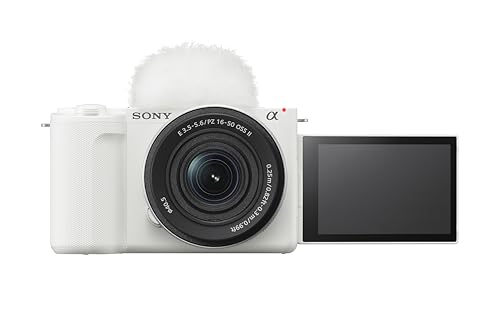
Sony ZV-E10 II — Best overall tutorial camera
The ZV-E10 II is the camera a beauty channel grows into and then stops needing to replace. Start with the creator essentials executed properly: a fully articulating screen you can frame yourself in, face and eye autofocus that locks on and behaves like a professional focus puller, and Sony’s product-showcase mode, which shifts focus from your face to a product held toward the camera and back again — a feature that sounds like a gimmick until your first foundation review, after which it is simply how filming works.
Colour is where it earns the top spot for serious channels. Sony’s current colour science renders skin accurately and kindly, and the camera’s picture profiles give you range: a clean, true look for shade reviews where fidelity is the promise, and softer, prettier looks for routines and get-ready-with-me content where mood matters more. Because the lens is interchangeable, your close-focus problem is permanently solved by lens choice — a macro-capable or close-focusing prime turns swatch shots into a speciality rather than a struggle, and a fast portrait prime gives the creamy background separation that signals ‘professional channel’ to a new viewer in the first three seconds.
The creator ergonomics are thoroughly thought through: a tally light so you know you are recording, controls arranged for the person in front of the lens rather than behind it, clean streaming over a single cable, and battery and recording stamina for long filming days split into the genre’s natural chapters. It asks for the usual mirrorless investments — a lens or two, an audio solution beyond the built-ins if your room is echoey — and it is more camera than a brand-new creator needs on day one.
But beauty channels that last tend to converge on a camera like this, because it removes the genre’s three ceilings at once: colour you can defend, focus you can trust, and a lens mount that makes every future idea — closer, wider, prettier — a purchase rather than a new camera.
Buy it as the channel’s foundation. Of the six, it is the one you will still be using, happily, at your hundredth tutorial.
- Format: APS-C mirrorless, interchangeable lenses
- Screen: fully articulating, front-facing
- Focus: face/eye autofocus plus product showcase mode
- Colour: accurate profiles for reviews, softer looks for routines
- Creator extras: tally light, single-cable streaming
Strengths
- Product showcase focus was designed for exactly this genre
- Lens choice solves close focus and background blur permanently
- Colour range covers honest reviews and pretty routines alike
Trade-offs
- Needs lens investment beyond the kit to show its best
- More setup than a compact for a first-ever camera
- Built-in audio is a starting point, not a finish
Best for: a beauty creator filming at a vanity who wants one camera for years.
Not suited for: a total beginner who wants to press one button and film today.

Canon PowerShot G7 X Mark III — Best compact for beauty channels
No camera is more associated with beauty YouTube’s classic era than the G7 X line, and the Mark III remains the compact a generation of creators measures others against. The reasons are beauty-specific. Canon’s colour flatters skin in the way this genre canonised — warm, smooth, forgiving of a long filming day — and the lens focuses close enough for the swatch-and-product grammar of tutorials while opening wide enough to give a vanity setup a soft, expensive-looking background even in a small room.
The handling is a tutorial natural. The screen flips up to face you, the body is small enough to live on a mini tripod at the mirror’s edge, and the whole operation — record, review, adjust — can be run with the clean fingertips of one hand between applications. It films lovely vertical-friendly content for the short-form platforms where beauty now breaks new creators, streams to a computer when the channel goes live, and takes photographs good enough to carry the channel’s thumbnails and product stills without a second camera.
Its compromises are the compact class’s own. The lens is fixed, so your framing is your zoom and your feet; autofocus, while good, is a generation behind the Sony pair’s eye-tracking serenity and can breathe gently in busy frames; and long filming sessions ask the small battery to be managed with spares or mains power. None of this stopped it becoming the genre’s default compact, because none of it touches the core promise: sit down, flip the screen, look wonderful, tell the truth about the shade.
Choose it if your channel films at a vanity or a desk, values stills as well as video, and wants the flattering Canon look without a mirrorless system’s size and decisions. It is the beauty compact, full stop.
One habit from its long-serving owners: fix your white balance manually under your filming lights. The G7 X rewards it with the most consistent shade-to-swatch colour in the compact class, which is the whole game.
- Format: compact, one-inch sensor, fixed zoom
- Screen: tilts up to face the creator
- Focus: close-focusing lens for swatches and products
- Colour: Canon’s flattering skin rendering
- Extras: streaming support, strong stills for thumbnails
Strengths
- The genre’s classic look — skin rendered kindly and truly
- Close focus handles tutorial grammar natively
- Handbag size with a real zoom and real stills
Trade-offs
- Fixed lens — framing is feet and zoom only
- Autofocus a step behind the newest Sony system
- Small battery wants spares on long filming days
Best for: a vanity-based beauty channel wanting compact simplicity and Canon colour.
Not suited for: a creator needing interchangeable lenses or marathon recording.

Sony ZV-1F — Simplest filming camera
The ZV-1F is engineered around a radical beauty-tutorial insight: most filming frustration is not quality, it is friction. Its lens is fixed and wide — the framing of a vanity or a bathroom mirror, solved permanently — its screen flips to face you, and its controls are reduced to the decisions a creator actually makes mid-routine. One button melts the background into blur for the pretty shots; Sony’s product showcase focus handles the hold-it-up moments; face autofocus keeps you sharp while both your hands are busy being a beauty tutorial.
Colour and skin rendering follow Sony’s friendly creator tuning: faces look fresh rather than forensic, and the camera’s skin-smoothing options — adjustable, and worth using gently — take the edge off a 4K-close world without the plastic look of aggressive filters. For new creators especially, the ZV-1F’s gift is confidence: the footage looks like a beauty channel from the first day, which keeps people filming, which is the only growth strategy that has ever worked.
What it refuses to do defines it as clearly. No zoom beyond digital help, no lens changes, no viewfinder, and stills that are a convenience rather than a portfolio — this is a filming instrument, purified. Creators who also photograph products seriously will outgrow it toward the G7 X or the ZV-E10 II; creators whose world is the tutorial itself may never need to. Battery life is compact-class, so filming days run on spares or a power lead, as with its compact rivals.
There is a confidence dividend worth naming for new creators. Filming is exposing: your face, your skin, your technique, at close range, in public. A camera that reliably makes you look like yourself on a good day — kind colour, gentle smoothing, focus that never embarrasses — lowers the psychological cost of pressing record, and channels are built out of pressing record on the days you would rather not. Equipment that encourages its owner is not a soft consideration in this genre; it is the growth strategy.
Price the simplicity honestly: you are paying to never think about lenses, focus modes or framing geometry again, and for the genre’s beginners that trade is frequently the difference between a channel that launches and a camera that gathers dust in a drawer of good intentions.
If your tutorial is you, a mirror, and something to say about a product, the ZV-1F is the shortest distance between the idea and the upload.
- Format: compact, fixed wide lens
- Screen: fully articulating, front-facing
- Focus: face priority plus product showcase mode
- Colour: creator tuning with adjustable skin smoothing
- Extras: one-button background blur
Strengths
- Filming reduced to its essentials — minimal friction
- Product showcase and face focus run themselves
- Wide lens frames vanity setups without thought
Trade-offs
- No zoom, no lens changes, stills are basic
- Outgrown by creators who add photography
- Compact-class battery life
Best for: a new beauty creator who wants to film today, simply.
Not suited for: a hybrid creator who photographs products seriously.

DJI Osmo Pocket 3 — Best for routines anywhere
The Pocket 3 films the beauty content the vanity cameras cannot: the routine in motion. A tiny gimbal-stabilised camera with a one-inch-class sensor, it follows you from bathroom to bedroom to hotel suite with footage so smooth it looks professionally crewed, and its rotating screen flips between horizontal filming and vertical short-form with a physical twist that creators describe, accurately, as addictive. Get-ready-with-me content, travel routines, salon visits, the morning-of-a-wedding film — this is their camera.
Its beauty credentials are stronger than its size suggests. The sensor is the largest in the compact group here, with low-light grace that keeps evening routines clean; autofocus tracks a face around a room; and the colour profiles include looks tuned for skin that creators have adopted wholesale. The gimbal does a second, underrated beauty job: it holds the frame steady at arm’s length for long stretches, so the swatch close-up does not swim and the viewer does not seasick — the failure mode of handheld routine footage.
The boundaries are physical. It is a filming camera, not a stills camera; its fixed view is wide, so classic seated tutorials are framed wider than the vanity natives frame them, and the intimate close-focus grammar of swatches is served adequately rather than brilliantly — the ZV-E10 II with the right lens remains the swatch champion. Battery is built in, so long days are managed with the charging handle or a power bank, and the little gimbal, while tougher than it looks, asks not to be dropped on tile.
Pair it with any vanity camera here and a channel owns both halves of beauty content: the seated truth-telling and the moving story. Alone, it is the pick for creators whose tutorials are journeys rather than lectures.
If your audience follows your life as much as your liner technique, this is the camera that keeps up with the life.
- Format: gimbal camera, one-inch-class sensor
- Screen: rotating, horizontal and vertical filming
- Stabilisation: three-axis mechanical gimbal
- Focus: face tracking for moving routines
- Extras: pocket size, fast start, creator colour looks
Strengths
- Gimbal smoothness makes routines look professionally filmed
- Follows you anywhere — bathroom, hotel, salon
- Large sensor keeps evening routines clean
Trade-offs
- Stills are an afterthought
- Swatch close-ups served adequately, not brilliantly
- Built-in battery and a gimbal to protect
Best for: a creator whose tutorials move — routines, travel, days-in-the-life.
Not suited for: a seated-tutorial specialist who lives at swatch distance.

Logitech Brio 4K — Best webcam for streaming
A large and growing share of beauty tutorials never pass through a memory card: they happen live, at a desk, on stream. The Brio 4K is the webcam built for that room. Its 4K sensor gives streaming software a clean, detailed image to crop and downscale, its colour is honest in the way shade talk demands, and its adjustable field of view lets you choose between the wide desk shot and the tighter face frame without moving anything. For a creator whose vanity is also a streaming desk, it collapses the whole camera question into a USB cable.
Live work exposes weaknesses that filming hides, and the Brio’s strengths are live-shaped: autofocus that behaves while you lean in with a product, exposure that copes when you switch a ring light on mid-stream, and software control over the image — zoom, pan, colour nudges — from the desk rather than by reaching for the camera. Paired with decent lighting, its streamed image is close enough to a ‘real camera’ that audiences simply stop asking, which is the webcam endgame.
Its limits are the category’s physics. The sensor is small, so in dim rooms its image softens where the mirrorless picks stay crisp — streamers solve this with light, which they should own anyway. There is no recording brain of its own: it is an eye for your computer, and your computer’s software, storage and reliability become part of the camera system. And depth of field is webcam-deep; the creamy blurred background is not in its gift, though streaming software’s artificial blur fills the gap for many.
Choose it if your tutorials are primarily live or recorded at the desk through streaming software, and spend the savings against the mirrorless picks on the lighting section of this guide. In a lit desk setup, the Brio is not the budget option. It is the appropriate technology, perfectly fitted.
One setup note that separates good Brio streams from great ones: mount it at eye level on a small arm, not perched on the monitor, and your close-ups will look filmed rather than surveilled.
- Format: 4K webcam, USB connection
- View: adjustable field of view for framing
- Focus: autofocus suited to lean-in product shots
- Software: image controls from the desk
- Streaming role: the live tutorial camera
Strengths
- Clean 4K image gives streams professional polish
- Zero-friction setup — one cable, no cards or batteries
- Adjustable framing without moving the camera
Trade-offs
- Small sensor needs good light to shine
- No standalone recording — the computer is the system
- Background blur is software’s job, not the lens’s
Best for: a beauty streamer whose desk is the studio.
Not suited for: a creator who films away from a computer.

OBSBOT Tiny 2 — Best tracking webcam
The Tiny 2 answers the streamer’s framing problem with a small robot: a 4K webcam on a motorised gimbal that pans and tilts to keep you in frame as you move. Stand to show a full look, step to the mirror, lean across the desk for a product — the camera follows, smoothly, like a tiny camera operator who never tires. For beauty streams that are performances rather than seated talks, that tracking changes what one person alone at a desk can broadcast.
Control is part of the charm: gestures start and stop tracking or zoom, so with product on your hands you can direct the camera without touching anything — a feature that sounds like a novelty until a live tutorial’s third hand-dependent moment. Image quality is strong webcam class, with a sensor larger than most rivals’, good low-light behaviour for the category, and voice and app control layered over the gesture system for creators who prefer their direction explicit.
Like the Brio, it is an eye for a computer — no standalone recording, depth of field is webcam physics, and its very cleverness adds a moving part to a desk that values reliability. Its field of wizardry is also desk-bound: this is not the camera for filming a routine around a flat. Within the desk’s borders, though, it solves the one problem the Brio leaves open, which is why both webcams earn places here rather than one representing the category.
Choose the Tiny 2 if your streams move: try-on hauls with standing segments, hair tutorials that turn and tilt, desk-to-mirror formats. Choose the Brio if you sit, talk and swatch. Between them, the streaming half of beauty is covered at two philosophies — and both cost less than the lighting you should pair them with.
A final practical note: give the tracking a rehearsal before a live audience does. Five minutes learning its gestures and limits at home saves the one viral moment every streamer dreads — the camera admiring the wall while the tutorial happens elsewhere.
- Format: 4K webcam on a motorised gimbal
- Tracking: follows the presenter automatically
- Control: gesture, voice and app direction
- Image: strong low-light behaviour for a webcam
- Streaming role: the moving presenter’s camera
Strengths
- Follows you around the desk and mirror
- Gesture control works with product-covered hands
- Strong image quality for the webcam class
Trade-offs
- Desk-bound — not a filming-around-the-home camera
- Moving parts add a reliability consideration
- No standalone recording
Best for: a streamer whose tutorials stand, turn and move.
Not suited for: a seated swatch-and-talk streamer, or a vanity filmmaker.
How Do the Six Beauty Cameras Compare Side by Side?
| Pick | Key specification | Standout trait | Watch out for |
|---|---|---|---|
| Sony ZV-E10 II | Mirrorless, lenses change | Colour, focus, growth | Needs lenses and setup |
| Canon G7 X Mark III | Compact, fixed zoom | Flattering colour, stills | Older autofocus |
| Sony ZV-1F | Compact, fixed wide lens | Simplicity itself | No zoom, basic stills |
| DJI Osmo Pocket 3 | Gimbal camera | Movement and smoothness | Swatches only adequate |
| Logitech Brio 4K | Webcam | Live polish, zero friction | Needs light and a computer |
| OBSBOT Tiny 2 | Tracking webcam | Follows the presenter | Desk-bound cleverness |
The table’s first divide is recording versus streaming. The first four picks are cameras that film to a card and forgive you in the edit; the two webcams are eyes for a live computer, immediate and unrepeatable. Channels increasingly do both, and the honest reading is that the webcams are not lesser cameras but different instruments — judged on a stream, the ZV-E10 II’s card-based workflow is the awkward one.
The second divide is where each camera spends its excellence. The ZV-E10 II spends it on the future — lenses, growth, ceilings removed. The compacts spend it on today — sit down and film beautifully now. The Pocket 3 spends it on motion, the webcams on presence. Beauty tutorials are not one genre but four wearing one name, and the right pick is the one whose excellence matches the videos you actually make, not the ones in your mood board.
What Lighting Do Beauty Tutorials Actually Need?
Every camera on this page is hostage to the same truth: beauty filming is lighting with a camera attached. Skin is a demanding subject — it shows every colour cast, every harsh shadow, every flicker — and the standard that flatters it is a large, soft, colour-honest source placed close and slightly above eye level, the geometry of every makeup mirror and film set. A ring light earns its ubiquity honestly for seated tutorials: even, shadow-soft, with the catchlights viewers read as ‘beauty video’ — but a large soft panel or a window with a sheer curtain achieves the same softness with gentler eyes over long sessions.
Colour honesty is the part beginners skip and shade reviews cannot. Choose lights with high colour-rendering quality and set one fixed colour temperature, then lock the camera’s white balance to match it — that single discipline, light plus locked balance, is what makes a foundation read true from your arm to a viewer’s phone. Mixed light — daylight window plus warm room bulb plus ring light — is the enemy, because no white balance can be true to three colours at once. Turn off the room light, close the blind or embrace it fully, and let one source rule.
Then expose for the face and let the background fall where it may. Beauty audiences forgive a dim background instantly and a badly lit face never. The camera’s job in this arrangement is easy, which is precisely the point: creators who master one soft source find that even the simplest pick here produces footage viewers call professional.
How Close Is Close Enough: Filming Swatches and Detail Work?
The swatch shot is beauty filming’s close-up grammar: a forearm, a palette, a lipstick bullet held toward the lens while you describe it. Cameras handle it three ways. The ZV-E10 II’s product showcase mode automates it — raise the product, focus glides to it; lower it, focus returns to your face — and with a close-focusing lens it produces genuine macro-ish detail of textures and shimmer. The G7 X Mark III’s lens focuses close natively, the traditional compact solution. The ZV-1F automates focus priority like its big sibling within its fixed lens’s range.
The webcams and the Pocket 3 serve the shot adequately at desk distances, which is a polite way of saying their swatches are clear rather than lush. If your channel’s signature is texture — cream products, glitters, the exact payoff of a highlighter — that difference is your purchasing decision, and it points at the mirrorless or the Canon compact. If your signature is talk, reviews at arm’s length and routines, every pick here clears the bar.
Technique helps every camera: present the product at the lens’s comfortable distance rather than thrusting it at the glass, hold it still for a full breath — autofocus, however good, is not instant — and light the swatch with the same source as your face so its colour stays in the same truth. Viewers forgive a soft swatch; they do not forgive a swatch that changes colour between your hand and your cheek.
How Should You Set Up Audio for a Beauty Tutorial?
Beauty audio is intimate audio: one voice, close, in a small room, describing textures in a near-whisper of concentration. Viewers tolerate a soft picture far longer than echoey, distant sound, and the genre’s standard is a microphone near the face — a wireless lavalier clipped at the collar, a small shotgun on the camera, or for streamers a desk microphone on an arm. The recording picks here all accept external microphones; the webcams hand audio to the computer, where the same desk microphone serves.
The room matters as much as the microphone. Bare walls, a mirror and a tiled bathroom are echo chambers wearing domestic costumes; soft furnishings, a rug, even filming in a wardrobe-lined dressing area calms the reflections that make voices sound cheap. Test with headphones before a filming day, not after — thirty seconds of playback reveals the room honestly, and the fix is usually moving soft things, not buying things.
Levels deserve one discipline: set them so your excited voice — the genuine reaction to a product that works — does not distort, because that reaction is the moment the audience came for. Automatic gain is a servant that pumps and breathes audibly in quiet rooms; manual levels, set once per setup, are the professional habit every pick here supports.
How Do You Film a Tutorial Alone, Without a Camera Operator?
Every pick here was chosen for a crew of one, and the solo workflow has a liturgy worth learning. Frame with the flip screen, then check the frame’s edges — the genre’s classic intruders are the product graveyard creeping into shot and the ring light’s reflection in the mirror behind you. Record a thirty-second test and watch it fully, focus, colour and sound, before the real take; the test is cheaper than the retake, and retakes of a makeup application are not really possible, which is the genre’s unique cruelty.
Build the tutorial in chapters and film them in order, pausing between steps to reset products and check the last clip’s focus. The cameras’ tally lights and front screens exist for exactly this self-direction. Keep a clean towel and micellar water at the desk’s edge — the solo creator’s continuity department — and a written running order, because at hour two of filming, memory is the first crew member to quit.
For streamers the solo craft is rehearsal: the OBSBOT’s gestures practised, the Brio’s framing presets saved, the lighting scene one switch away. Live beauty forgives nothing and repeats nothing, and the creators who look effortless live are, without exception, the ones who rehearsed the machinery until it disappeared.
What Should a Beauty Channel Buy After the Camera?
In order of impact: light, then audio, then the unglamorous third — storage and backup, because a channel’s archive is its pension and cards fail. The lighting section above describes the one soft source that transforms every camera here; the audio section the microphone that makes tutorials feel close. After those, a second angle is the genre’s quiet luxury: the Pocket 3 or a webcam covering the over-the-shoulder product view while the main camera holds your face, which is how small channels acquire a ‘produced’ feel.
Resist the accessory spiral beyond that. Beauty channels are not won on cages, rails and matte boxes; they are won on colour truth, focus reliability and the creator’s consistency — all of which you already own if you chose from this page and lit it properly. Spend the fourth purchase on time: a filming day protected in the calendar teaches more than any equipment, and the camera you have will still be the right one when it ends.
The one upgrade path worth planning is the ZV-E10 II’s lens shelf, because it is the only pick whose ceiling rises with purchases: a fast prime for prettier seated work, a close-focusing lens for signature swatches. Buy them in that order, a season apart, and the channel’s look will mature on screen like a time-lapse of your own skill.
How Do You Film Vertical Beauty Content for Short-Form Platforms?
Beauty now breaks on vertical video, and the picks divide by how gracefully they turn. The Pocket 3 was built for it — its screen rotates and the framing follows, making it the short-form native of the page. The mirrorless and compact picks film vertical happily on a rotated mount, with their screens still readable, and the discipline is compositional: keep the face in the upper two-thirds, the product action in the centre, and remember that captions and interface furniture will eat the frame’s edges and bottom.
Film vertical deliberately rather than cropping horizontal footage in apology. A tutorial framed for vertical from the start — closer, simpler, one product at a time — outperforms a cropped widescreen film on every platform that serves phones, because the subject fills the small screen instead of visiting it. The cameras’ face autofocus is format-blind and works identically; your framing habits are the only real adaptation.
Short-form also rewards the finished-file habit: colour that is right in the camera and a look chosen in advance, because the posting rhythm of short-form leaves no evening for grading. Set the look once, per series, and let consistency become the channel’s signature — viewers recognise a beauty creator by their light and colour before they read the name.
How Should You Organise Filming Days and Files?
Beauty filming days are long because makeup is sequential and irreversible, and the creators who survive them run a system. Charge and format the night before — never format a card that has not been copied twice — and lay the running order beside the products in filming order, which is application order, which is the order your memory will fail you in by hour three. Film the introduction last, when you know what the tutorial actually contains; the genre’s professionals all do, and the confidence difference is visible.
File discipline continues after the camera stops. Name folders by date and tutorial, copy before you shower the makeup off, and review the focus-critical clips — the swatches, the final reveal — before the set is struck and the face is washed. A soft reveal discovered at midnight is a tragedy; discovered at six, it is a reshoot of one chapter while the makeup is still on.
None of this is equipment, and all of it is the difference between channels that publish weekly and channels that publish apologies. The cameras here were chosen to disappear into that system — tally lights, front screens, dependable autofocus — so that the system, and the creator, can be the visible talent.
What About Filming Someone Else: Makeup Artists and Client Work?
Artists who film clients inherit a second set of duties: the model’s comfort and consent join the colour and focus. Practically, the seated-tutorial picks serve best — the ZV-E10 II or G7 X at the artist’s station, screen angled so the client can see themselves, which relaxes faces and improves footage in one move. Explain the camera once, then let it be forgotten; the gimbal and webcam picks, built around a solo performer, serve client work less naturally.
Colour truth doubles in importance when the face is not yours to experiment on: the locked white balance and single-source discipline protect the client’s skin tone exactly as they protect a foundation shade, and the artist’s reputation rides on both. Keep the test-recording habit — with the client’s permission, it doubles as the before photograph — and agree the sharing boundaries before filming, not in the comments afterwards.
Artists building a portfolio channel often end with the hybrid this page keeps recommending: a vanity camera for client and tutorial work, a Pocket 3 for the salon’s life and events. It is the genre’s complete kit in two small bags, and it is telling that neither bag contains a large camera.
How Do You Keep a Beauty Channel’s Look Consistent Across Cameras?
Multi-camera channels — a vanity camera plus a Pocket 3, a webcam for streams — live or die on whether the footage matches. The method is unglamorous and total: fix one white balance value for your lights and set it manually on every camera, choose each camera’s most neutral honest profile as the family resemblance, and film a reference card and a familiar foundation swatch on every device whenever lights or rooms change. Intercut footage then grades together in minutes instead of arguing for hours.
Accept each camera’s accent rather than fighting it. The Canon will run a touch warmer, the Sony a touch cleaner; cut on action and keep individual shots long enough that the eye settles, and audiences perceive one production rather than two devices. Consistency of light matters more than consistency of brand — the same soft source at the same distance makes different cameras cousins; different lights make the same camera a stranger to itself.
Write your settings down as a channel bible — one page, taped inside a cupboard door — because the second camera is always set up in a hurry, six weeks after the first was perfected, by someone who has forgotten everything. The bible is the difference between a system and a superstition.
What Mistakes Do Beauty Creators Make With Their Cameras?
Trusting auto white balance across a whole tutorial. It drifts between your face and a white palette, and the foundation changes colour mid-video. Lock the balance to your lights once and the shades stay honest.
Filming under mixed light. Window daylight plus a warm ceiling bulb plus a ring light is three colours of light, and no camera can be true to all of them. One source, one temperature, one truth.
Thrusting products at the lens. Autofocus needs a held, still moment at a sensible distance; a lipstick waved at the glass is a blur with a logo. Present, pause, describe — in that order.
Judging the camera before the lighting. A flagship under a bare bulb looks worse than the simplest pick here under one soft source. Buy the light before blaming the camera; the order of this guide’s sections is deliberate.
Smoothing skin into plastic. Every creator tool here offers skin softening, and the line between flattering and uncanny is one notch. Set it gently, check it on a large screen, and remember the audience trusts a face that still looks like skin.
Skipping the test recording. Makeup cannot be un-applied for a retake. Thirty seconds of test — focus, colour, sound, frame edges — is the cheapest insurance in the entire genre.
Final Recommendation
For the channel that films seated tutorials and intends to grow, the Sony ZV-E10 II is the recommendation: colour you can defend in a shade review, autofocus that works as your focus puller, and a lens mount that turns every future ambition into a lens rather than a new camera. The Canon G7 X Mark III remains the compact answer — flattering, close-focusing, proven by a generation of beauty channels — and the ZV-1F its simpler sibling for creators who want filming reduced to a button and a smile.
The DJI Osmo Pocket 3 owns the moving half of beauty — routines, travel, days in the life — and the two webcams own the live half, the Brio 4K for seated streams and the OBSBOT Tiny 2 for presenters who stand and move. Whichever shape your channel takes, pair the camera with one soft, honest light and a locked white balance, and your viewers will trust your shades — which, in beauty, is the entire business.
A last encouragement for the creator still filming on a phone and pricing this page wistfully: the phone taught you the genre’s real skills — light, honesty, consistency — and every pick here simply removes the ceilings you have started to hit. Buy when the ceiling, not the calendar, says so, and the camera will feel less like an expense and more like a promotion you gave yourself.
Frequently Asked Questions
Which camera here is best for a complete beginner’s first beauty channel?
The Sony ZV-1F, by design: fixed wide lens, flip screen, automatic face focus and product showcase, and one-button background blur remove nearly every technical decision, so a new creator can spend their attention on the tutorial itself. If the channel will also photograph products and thumbnails seriously, step up to the Canon G7 X Mark III; if it will grow for years, start with the ZV-E10 II and its kit lens.
How important is 4K for beauty tutorials?
Less than colour and focus. Most beauty is watched on phones, where a clean, well-lit, true-coloured 1080p tutorial beats a harsh 4K one every time. 4K earns its place for cropping — filming wide and reframing close-ups in the edit — and the picks that offer it do so usefully. But buy light before resolution; your viewers’ eyes will vote accordingly.
Can a webcam really carry a beauty channel?
For a streaming-first channel, yes — the Brio 4K and OBSBOT Tiny 2 in good light produce live images audiences accept without comment, and live beauty is a real and growing format. Their limits appear when you leave the desk or demand recorded, editable, close-focus swatch work; most hybrid creators pair a webcam for streams with one of the recording picks for filmed tutorials.
Why does my foundation look a different colour on camera?
Usually light, not the camera: mixed colour temperatures, auto white balance drifting, or a light with poor colour rendering will shift shades. Use one high-quality source, lock the camera’s white balance to it, and film a colour reference — a white card and a familiar foundation — in your test recording. The cameras here were chosen for colour honesty; the discipline makes that honesty visible.
Do I need a macro lens for product close-ups?
Not to start. The G7 X Mark III focuses close natively, the ZV cameras’ product modes handle presentation distance, and stepping the product slightly further from the lens sharpens most ‘macro’ problems. A dedicated close-focusing lens for the ZV-E10 II becomes worthwhile when texture itself is your channel’s signature — glitters, creams, brush detail — because that is where its extra resolving power turns into views. Until then, the honest order of purchases is light, then audio, then lens — the lens is the third beauty upgrade, not the first, however much the camera shops argue otherwise.
How can I check that a lip or blush shade reads true before I film a full tutorial?
Build a short colour rehearsal into your setup ritual so a mismatched shade never wastes an entire recording. After your lights and camera position are locked, apply a single stripe of the product beside a shade you know extremely well, place a plain white or grey card at the edge of frame for a few seconds, and record a brief test clip that includes speaking, smiling and turning your head toward and away from the key light. Watch that clip on the device your audience most likely uses, not only on your editing monitor, and look specifically at whether reds drift orange, pinks turn grey at the jawline, or shimmer overwhelms the base colour when you move. If a shade shifts, adjust in a deliberate order: confirm the white balance is locked, check that no coloured wall or clothing is bouncing tint onto your face, then nudge the light angle before touching any camera colour setting. Note the combination that worked in a small setup log with the product name and light position, because memory blurs after a week of filming. This five-minute habit protects the promise at the heart of a tutorial, namely that viewers can trust what they saw when they choose a shade for themselves. Repeat the rehearsal whenever a new light, lens or backdrop enters your setup, even if the product itself is familiar, because a small change in angle can alter how shimmer and undertone behave on skin. Over time these tiny checks build a personal shade library in your head, so you can predict on sight which formulas will survive filming honestly and which will need a disclaimer, a different pairing shade, or a swatch filmed in natural window light as supporting evidence for your viewers.
Related Guides
Keep exploring with best cameras for vlogging and best cameras for beginners with flip screen and best cameras for youtube videos.


