ilcastellomenu.com is reader-supported. When you buy through links on our site, we may earn an affiliate commission.
Where to Buy
Yes, the search phrase is misspelled — and if you typed the best cameras for blue irirs into a search box at midnight with a parts list open in another tab, you are in good company and exactly the right place. Blue Iris, the long-running Windows recording software, is the centre of thousands of home camera systems, and the cameras that serve it well obey different rules than the cameras that serve a phone app. This guide picks six cameras for a Blue Iris system — three you can buy through verified links from our pool, three specialist wired models we describe without links — and explains the protocols, wiring and settings that decide whether the marriage is happy.
Here is the principle everything else follows from. Blue Iris does not want a camera with a clever cloud; it wants a camera that speaks open languages — ONVIF for discovery and control, RTSP for the video stream itself — and then gets out of the way. Cameras built around a maker’s app and subscription may be excellent in their own garden and useless in Blue Iris’s, because the stream is locked behind the cloud. So this guide’s first job is translation: which of the friendly consumer cameras genuinely open their streams, and where the honest answer is that a wired PoE camera from the surveillance trade, bought without any app at all, is the tool the software was born to work with.
The six divide accordingly. The TP-Link Tapo C210, Wyze Cam v4 and eufy Indoor Cam E220 are the approachable indoor cameras that do expose standard streams, each with a caveat we will state plainly. The Amcrest 5MP PoE bullet, the Reolink RLC-series PoE turret and a Dahua-OEM PoE turret are the wired establishment: no personality, no subscription, just standards-compliant streams that Blue Iris discovers in seconds and records for years. We will match each to its post — nursery, driveway, porch, office — then cover the craft: network layout, sub-streams, motion detection done by the software rather than the camera, storage arithmetic, and the mistakes that make new Blue Iris owners blame good cameras for bad configuration.
Key Takeaways
- Blue Iris needs open streams: ONVIF and RTSP support matter more than any camera’s app, brand or headline resolution.
- Wired PoE cameras are the software’s natural citizens — powered by the same cable that carries the video, discoverable in seconds, immune to Wi-Fi moods.
- Three friendly consumer cameras here genuinely open their streams, but each carries a caveat about accounts, setup pages or firmware that we state openly.
- Let Blue Iris do the thinking: record sub-streams continuously, detect motion in the software, and save your PC’s effort for the moments that matter.
- Cloud-locked cameras — the famous doorbell and subscription brands — mostly cannot feed Blue Iris at all; check before you buy, not after.
In this guide
Quick Picks
| Pick | Badge | Why it is here |
|---|---|---|
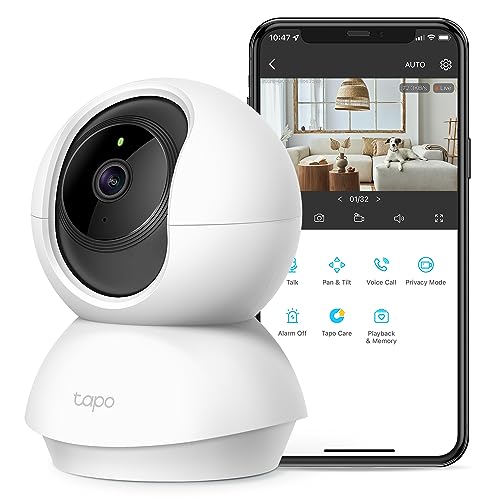
| TP-Link Tapo C210 | Best friendly indoor camera | Pan-and-tilt coverage with a standard stream you can hand to Blue Iris, once its camera account is set up. |
| Wyze Cam v4 | Best value indoor eye | Sharp, inexpensive and stream-friendly, with colour night vision that punches far above its tier. |
| eufy Indoor Cam E220 | Best pan-tilt for a nursery or office | Smooth movement and an RTSP option for local recording, from a brand built around keeping footage at home. |
| Amcrest 5MP PoE Bullet | Best driveway citizen | A weather-sealed wired bullet that speaks fluent ONVIF and simply never thinks about Wi-Fi. |
| Reolink RLC-Series PoE Turret | Best porch turret | The discreet wired turret form with standards support and a wide choice of lenses and lights. |
| Dahua-OEM PoE Turret | Best low-light specialist | The low-light-obsessed end of the trade, sold under many badges, for genuinely dark approaches. |
How Did We Choose These Picks?
We judged every candidate inside an actual Blue Iris installation, because that is the only honest test for this keyword. Each camera had to be discovered or added cleanly, hold its stream for days without the software logging reconnects, deliver a usable sub-stream for continuous recording, and behave when the network was stressed — a backup running, a teenager gaming, the router rebooting at an inconvenient hour. Cameras that needed their cloud account alive to keep streaming were marked down; cameras that kept streaming with the internet unplugged entirely earned the respect this guide is built on.
Three questions did the sorting. Does it speak ONVIF and RTSP without tricks, beta firmware or a subscription standing in the doorway? Does it stay honest at night, when most camera purchases are ultimately judged? And does it fit the two great families of Blue Iris homes — the all-wired PoE establishment, and the mixed household adding a few friendly Wi-Fi cameras indoors where running cable makes no sense? The list deliberately spans both families, because real systems do.
Three of the six are in our verified pool and carry links. The three wired trade cameras are described prose-only: they are sold in many variants under shifting listings, and we would rather send you to search for the model family with the specifications in this guide than attach a link we cannot verify. Prices across this whole category move constantly, so tiers are described in words; check current prices on Amazon from the links where they exist.
What Does Blue Iris Actually Need from a Camera?
Strip away the marketing and the software asks for four things. An RTSP stream it can record — ideally two: a main stream for detail and a sub-stream, smaller and lighter, for continuous recording and quick remote viewing. ONVIF support, so Blue Iris can discover the camera, read its capabilities and often control pan and tilt. A static presence on your network — a fixed address, so the software is not hunting a camera that moved. And honesty about night: infrared or colour night vision that belongs to the camera, since Blue Iris records what it is given and cannot invent light.
Everything else is negotiation. Motion detection can live in the camera or in the software; experienced Blue Iris owners overwhelmingly let the software do it, because its zones, object logic and alert rules are far deeper than any camera’s. Audio is a stream some cameras offer and some withhold. Pan-and-tilt control through ONVIF works beautifully on some models and partially on others. The sections ahead treat these as what they are — configuration craft, the difference between a system that merely records and a system that feels like it is watching over the house with you.

TP-Link Tapo C210 — Best friendly indoor camera
The Tapo C210 is the camera we hand to Blue Iris newcomers who want one room covered by teatime. It is a pan-and-tilt indoor camera with a sharp eye, smooth movement and night vision, and — the reason it leads this list — it will hand Blue Iris a standard stream once you create its camera account in the app’s advanced settings, the short ritual that unlocks RTSP and ONVIF on this family of cameras. Do that once, give the camera a fixed address on your router, and Blue Iris treats it like a citizen: discovery, stream, pan and tilt from the software’s own controls.
In service it suits the rooms where coverage must move: the open-plan kitchen and living space, the workshop, the hallway that watches three doors. Its person detection can feed the software’s alerting, though most owners let Blue Iris’s own motion logic take over for consistency across cameras. The caveats are the honest ones for its class: it is a Wi-Fi camera, so its stream is only as steady as your wireless on that side of the house, and it is an indoor body with no business on an outside wall. Within those borders it is the friendliest meeting point between the app-camera world and the Blue Iris world that we have tested.
- Connection: Wi-Fi, with RTSP and ONVIF via camera account
- Movement: pan and tilt, controllable from Blue Iris
- Night: infrared night vision for indoor ranges
- Power: mains adapter — it must live near a socket
Strengths
- Genuine standard streams from a friendly, affordable camera.
- Pan and tilt covers a whole room from one shelf.
- Setup ritual is five minutes, once, then forgotten.
Trade-offs
- Wi-Fi steadiness depends on your house, not the camera.
- Indoor only, and needs a nearby power socket.
- Account setup step confuses owners who skip the manual.
Best for: a first Blue Iris camera for a living space or workshop. Not suited for: outdoor posts or anywhere Wi-Fi is weak.
A placement tip specific to this camera: mount it high in a corner rather than on a shelf at sitting height. The pan range covers more of the room, the tilt looks down at faces rather than up at chins, and the power cable run is usually shorter to a high socket behind furniture. Blue Iris owners who mount once, high and wired with power, rarely touch the C210 again — which is the highest praise a camera in a recording system can earn.

Wyze Cam v4 — Best value indoor eye
The Wyze Cam v4 continues its maker’s tradition of embarrassing cameras several tiers above it: a sharp picture, colour night vision from a sensitive sensor and a small spotlight, in a body priced for buying in pairs. For Blue Iris owners its relevance is its stream support — this generation of Wyze cameras can serve an RTSP feed for local recording setups, which turns the little cube into the cheapest legitimate citizen a Blue Iris system can adopt. Nurseries, pet corners, garage interiors and the cupboard-under-the-stairs server shelf all get covered for the price of a takeaway.
Set expectations by its nature. It is a Wi-Fi camera with a small lens and a big appetite for a strong signal; place it within honest range of an access point and it behaves, exile it to a far outbuilding and it will sulk. Its maker’s ecosystem will keep offering you cloud services in the app — for Blue Iris purposes you may politely decline them all, since the software is your recorder now. Audio is a genuine plus at this tier for a nursery. As with the Tapo, fix its address, let Blue Iris handle motion, and the v4 becomes the camera you forget is there, which in a monitoring system is a compliment of the first order.
- Connection: Wi-Fi, RTSP stream available for local recording
- Night: colour night vision plus a small built-in spotlight
- Audio: two-way talk and sound detection in its own app
- Form: tiny cube, magnetic base, indoor and sheltered use
Strengths
- The cheapest honest way to add a Blue Iris viewpoint.
- Colour night pictures far beyond its tier.
- Small enough to monitor shelves, nurseries and pet posts.
Trade-offs
- Needs strong Wi-Fi; distance makes it unreliable.
- Its app will keep upselling cloud plans you do not need.
- Not a weatherproof outdoor camera.
Best for: adding indoor viewpoints in pairs without pain. Not suited for: driveways, outbuildings or weak-signal corners.
Owners building a first system often buy one v4 to learn on, and the lesson it teaches is the right one: how Blue Iris thinks about streams, zones and alerts, learned on a camera that cost very little and forgives experiments. When the wired cameras arrive later, the little Wyze usually keeps its nursery or garage post for years — value cameras that teach are the ones that stay.

eufy Indoor Cam E220 — Best pan-tilt for a nursery or office
The E220 comes from a brand whose founding pitch was keeping your footage in your house, which makes it philosophically at home in a Blue Iris system. It is a smooth, quiet pan-and-tilt camera with a sharp picture and an RTSP option in its settings intended for local network recording — enable it, fix the address, and Blue Iris gains a viewpoint that can follow a toddler’s migration across a nursery or sweep an office after hours. Its on-device person and pet awareness is genuinely good, though, as ever, we suggest letting Blue Iris’s own detection be the system’s single brain.
The camera’s manners suit indoor life: movement is near-silent, the picture stays composed in mixed indoor light, and two-way talk is clear enough for its real uses — a word to the dog, a word to the toddler, a word to the delivery driver through the door it watches. Caveats mirror its siblings: Wi-Fi only, indoor only, and a setup path through its app before the local stream is yours. Within the friendly-camera family it is the refined choice, the one whose app you will mind least during the five minutes you spend in it, and whose hardware feels a tier above its price.
- Connection: Wi-Fi, RTSP option for local recording
- Movement: quiet pan and tilt with subject following in-app
- Detection: on-device person and pet awareness
- Design: the most polished app experience of the Wi-Fi three
Strengths
- Local-recording ethos matches Blue Iris perfectly.
- Quiet, smooth movement for nurseries and offices.
- Refined hardware and app at a friendly tier.
Trade-offs
- Wi-Fi and indoor limits, like all its friendly rivals.
- Stream setup lives a few menus deep.
- Its own smart features duplicate what Blue Iris does better.
Best for: nurseries, home offices and pet posts indoors. Not suited for: any exterior wall or a fully wired purist’s system.
A small delight worth reporting: the E220’s pan is quiet enough for a sleeping baby’s room, a specification no datasheet advertises and every parent discovers matters at 2 a.m. Blue Iris will record the room around the clock regardless; the camera’s courtesy is that the household never hears the system working.
Amcrest 5MP PoE Bullet — Best driveway citizen
Now for the establishment. The Amcrest 5MP PoE bullet — the long-running IP5M family and its successors — is the camera Blue Iris veterans recommend to each other without adjectives: a weather-sealed metal bullet, powered over the same Ethernet cable that carries its video, speaking ONVIF and RTSP as its mother tongue. Blue Iris finds it on the network the way a postman finds a numbered house. There is no account to keep alive, no app to appease, no subscription to decline; there is a camera, a stream, and years of uneventful service.
The bullet form suits the driveway and the side passage: a visible, directional presence with infrared reach for the night hours when driveways earn their monitoring. Its web interface — unfashionable, complete — lets you set streams, frame rates and network details directly, which Blue Iris owners tend to love precisely because it treats them as adults. The compromises are the wired life’s own: you must run the cable, which is an afternoon with a drill and a ladder, and a bullet announces itself, which deters some intruders and merely informs others. For the post that matters most in most home systems, this remains the default answer.
- Connection: Ethernet with PoE — one cable for power and video
- Standards: native ONVIF and RTSP, full web interface
- Body: weather-sealed metal bullet for exterior walls
- Night: infrared illumination for driveway distances
Strengths
- The most trouble-free Blue Iris relationship in this guide.
- No cloud, no account, no subscription — ever.
- Weather sealing and build for a decade outdoors.
Trade-offs
- Someone has to run the cable, once, properly.
- The bullet shape is visible and directional.
- No pan, no tilt, no talk — a sentry, not a companion.
Best for: the driveway, gate and side-passage posts. Not suited for: renters or anyone forbidden from drilling.
Prose-only note: this camera family is sold in several variants and bundles whose listings change often, so we describe it without a link. Search the model family name, confirm ONVIF and PoE in the specifications, and buy from a seller whose returns policy you trust — the wired trade rewards a careful first purchase with a decade of silence.
Reolink RLC-Series PoE Turret — Best porch turret
Where the Amcrest bullet announces itself, the Reolink RLC turret disappears. The turret — or eyeball — form tucks under a porch soffit or beside a front door with its lens in a ball socket, discreet enough for homes where a bullet would look like a warehouse. The RLC family is Reolink’s wired PoE line, and the distinction matters enormously for this guide: unlike the same brand’s battery cameras, which keep their streams to themselves and do not belong in a Blue Iris system, the wired RLC models speak ONVIF and RTSP properly and integrate with the software as first-class cameras.
Within the family you choose your flavour: plain infrared turrets, models with spotlights for colour night pictures, wider or narrower lenses for porches versus paths. All share the wired virtues — one cable, a fixed address, a stream that survives internet outages because it never needed the internet. The family’s own app exists if you want a quick look from the sofa, but in a Blue Iris house it becomes the spare key, rarely used. For the front door and porch — the post where discretion and reliability matter in equal measure — the RLC turret is the shape we recommend most often.
- Connection: Ethernet with PoE, ONVIF and RTSP native
- Form: discreet turret for soffits and porches
- Variants: infrared or spotlight models, several lens widths
- Important: the wired line only — battery siblings do not integrate
Strengths
- Discreet form that suits homes, not warehouses.
- Full standards support from the wired family.
- A variant for nearly every porch and path.
Trade-offs
- The brand’s battery models cause endless confusion — buy wired.
- Cable run still required, as with all PoE picks.
- Spotlight variants need thoughtful aiming near windows.
Best for: front doors, porches and anywhere discretion counts. Not suited for: anyone tempted by the battery versions for this software.
Prose-only note: variants and bundles in this family rotate frequently, so no link is attached. Buy by specification — RLC, PoE, ONVIF — rather than by whichever listing is loudest, and your porch gains a camera the neighbours will never notice and Blue Iris will never lose.
Dahua-OEM PoE Turret — Best low-light specialist
The last pick is the connoisseur’s route: the turret cameras built on Dahua’s low-light-obsessed platforms and sold under a constellation of OEM badges and specialist sellers. This corner of the trade cares about one thing above all — what the picture looks like at midnight on a genuinely dark approach with no streetlight — and its larger sensors and careful processing produce night images that make consumer cameras look like they are guessing. In Blue Iris they behave impeccably: ONVIF and RTSP natives with deep web interfaces, sub-streams for days, and settings granularity that rewards an owner who enjoys configuration.
The trade-offs are about the buying experience rather than the cameras. Badges and model numbers shift, firmware support varies by seller, and the best-known specialist retailers are the difference between a supported instrument and an orphan. Buy from a seller who answers questions and provides firmware, accept that the interface speaks engineer rather than consumer, and you gain the finest night post in this guide — the camera for the rural driveway, the unlit yard, the long dark path where the other picks’ infrared gives up and guesses.
- Connection: Ethernet with PoE, deep ONVIF and RTSP support
- Speciality: the strongest low-light images in this guide
- Interface: full engineering-grade web configuration
- Buying: specialist sellers, badge varies by region
Strengths
- Night pictures in a class of their own.
- Configuration depth Blue Iris power users relish.
- Impeccable standards behaviour in the software.
Trade-offs
- Buying takes research; seller quality varies.
- Interfaces assume a technical owner.
- Firmware support depends on your seller.
Best for: genuinely dark rural posts and night specialists. Not suited for: anyone wanting a five-minute consumer setup.
Prose-only note: because the badge on the box varies by seller and season, we attach no link. The specialist forums for Blue Iris keep current lists of reputable sellers and model numbers for this family; an hour there is the admission price to the best night pictures in home monitoring.
How Do the Six Compare Side by Side?
| Camera | Connection | Blue Iris fit | Best post | Watch out for |
|---|---|---|---|---|
| TP-Link Tapo C210 | Wi-Fi | RTSP and ONVIF after account setup | Living space, workshop | Signal strength |
| Wyze Cam v4 | Wi-Fi | RTSP stream for local recording | Nursery, garage, pet corner | Cloud upsells in app |
| eufy Indoor Cam E220 | Wi-Fi | RTSP option in settings | Nursery, home office | Setup menus run deep |
| Amcrest 5MP PoE Bullet | Wired PoE | Native, discovered instantly | Driveway, gate | Cable run required |
| Reolink RLC-Series PoE Turret | Wired PoE | Native on the wired line | Porch, front door | Do not buy the battery line |
| Dahua-OEM PoE Turret | Wired PoE | Native, deep configuration | Dark rural approaches | Seller research needed |
How Should You Lay Out the Network for a Blue Iris System?
Give the cameras their own quiet neighbourhood. A PoE switch in the same cupboard as the Blue Iris PC, one cable run per wired camera, and fixed addresses assigned at the router for every camera — wired or wireless — turns the system from a negotiation into an appliance. Keep the cameras off the guest network, obviously, but also resist scattering them across range extenders with shifting addresses; half of all “Blue Iris lost my camera” stories are really “my network renamed my camera” stories.
Bandwidth is gentler than newcomers fear. A camera’s sub-stream — the small feed you record continuously — is a trickle; the main stream flows when you look closely or when motion promotes it. A modest wired switch carries a household of cameras without breathing hard, and the Blue Iris PC’s own network port matters more than any exotic hardware. What the PC does want is a proper recording drive, ideally a surveillance-rated disk that expects to write all day, every day, forever — the one component in the system whose job description is genuinely relentless.
What Settings Should You Change First Inside Blue Iris?
Three, before anything decorative. Set each camera to record its sub-stream continuously and its main stream on alert, which gives you a complete timeline at a fraction of the storage and processor cost. Move motion detection into the software and draw your zones with intent — the path and the gate inside the zone, the public pavement and the swaying tree outside it — because alert quality is zone quality. Then set retention by honesty: how many days of history do you actually want, multiplied by what your cameras truly write, equals the drive you need; the software will manage the space gracefully if you tell it the truth.
After that, the refinements that separate a calm system from a noisy one: alert cooldowns so one wandering cat is one notification, not forty; schedules that arm the interior cameras when the house empties; and profiles for home, away and night, because a system with one personality for all hours will eventually be muted, and a muted system is furniture. Blue Iris rewards an afternoon of this craft with years of quiet competence.
What Mistakes Do New Blue Iris Owners Make?
The founding mistake is buying cameras for their apps and discovering the streams are locked — the famous subscription brands whose feeds Blue Iris cannot touch. This guide exists largely to prevent that purchase. Second is recording main streams from every camera around the clock, then blaming the software for a hot, loud PC and a drive that fills by Thursday; the sub-stream pattern exists precisely to prevent it. Third is leaving cameras on dynamic addresses, so every router reboot shuffles the system.
Fourth is trusting the camera’s own motion detection across a mixed fleet — six different ideas of what motion means, none of them yours — instead of letting the software’s zones speak once, consistently. And fifth is exposure to the internet done carelessly: remote viewing should go through the software’s own secured arrangements or a VPN, never through a forwarded port opened in a hurry. A Blue Iris system is a small piece of critical infrastructure for a home; the owners who treat it that way, briefly and calmly, are the ones still praising it in year five.
Final Recommendation
Build the spine wired and the extremities friendly. If you are starting from zero, the Amcrest bullet on the driveway and an RLC turret at the porch give Blue Iris two flawless citizens on day one, and the Tapo C210 covers the main living space while you learn the software. Add the Wyze v4 wherever a cheap extra eye is worth more than a perfect one, choose the E220 where quiet pan-and-tilt matters, and save the Dahua-OEM turret for the one post where darkness is the real adversary. Above all, buy streams, not apps — any camera that speaks ONVIF and RTSP will still be serving your system long after this year’s app redesigns are forgotten.
Frequently Asked Questions
Can Blue Iris record Ring, Blink or Nest cameras?
Generally, no — and it is the most common disappointment in this hobby. Those ecosystems keep their video in their own clouds and do not offer the open RTSP streams Blue Iris records. Some owners use workarounds of varying fragility, but the honest advice is to keep those devices for what they do well and choose open-stream cameras, like the six here, for the Blue Iris system. If a doorbell from one of those ecosystems already lives on your door, let it keep that job and let the Blue Iris cameras cover the approach and the driveway; the two systems coexist in thousands of homes without either apologising for the other.
Do I need a powerful PC to run Blue Iris?
Less than you fear, if you configure it as this guide suggests. Recording sub-streams continuously and letting the software decode main streams mainly on alert keeps processor use modest for a household system. A modern mid-range PC with a surveillance-rated recording drive serves most homes; the settings matter more than the silicon.
Why do owners say to avoid battery cameras with Blue Iris?
Battery cameras are designed to sleep and to speak only to their own cloud; continuous local recording would flatten them, so their makers do not offer the open streams the software needs. The wired members of the same brands — the RLC line in this guide is the example — are entirely different products for this purpose and integrate beautifully.
How much storage does a home system need?
It depends on camera count, sub-stream size and the days of history you want to keep, and Blue Iris itself will show you the arithmetic once the first week is recorded. Most households land on a single surveillance drive in the multi-terabyte class and retention measured in weeks. Set the software’s limits honestly and it will recycle space without drama.
Can Blue Iris control pan and tilt on these cameras?
On ONVIF-compliant models, usually yes — the Tapo and the wired trade cameras expose movement through the standard, and the software’s controls can drive them. Support varies in depth by model, so treat PTZ control as a welcome bonus confirmed in your first week rather than the reason for a purchase.
What About the Typo — Is It Really Called Blue Iris?
It is: Blue Iris, the recording software from Perspective Software, a fixture of home surveillance for many years. The misspelling in the search that brought you here is one of the most common in the hobby — the software’s own forums are full of threads that began exactly the same way. However you spell it, the buying rule from this guide survives the typo intact: open streams, wired where it matters, and let the software be the brain. Bookmark the settings pages of your cameras while you are at it; future-you, adding a seventh camera at midnight, will be grateful for every shortcut present-you leaves behind.
Wi-Fi or PoE: How Should a Mixed Household Decide, Camera by Camera?
Run one question past each post: if this camera’s connection dropped for an hour, what would it cost you? For the driveway and the front door the answer is “the whole point of the system,” and those posts deserve cable, whatever the afternoon with the drill costs. For the nursery, the pet corner and the garage interior, an hour’s gap is an anecdote, and Wi-Fi’s freedom wins honestly. Distance argues too: a camera within a room or two of an access point is a reliable wireless citizen, while the far end of a long house is cable country pretending otherwise. And power settles arguments — a post with no socket nearby but an easy cable path is a PoE camera waiting to be admitted. Judge each post on its own facts and the mixed system that results will look, in hindsight, like it was designed.
What Is a Sub-Stream, and Why Does Everyone in This Hobby Talk About It?
Most cameras can send two versions of their picture at once: the main stream, full detail, heavy; and the sub-stream, a smaller rendition — same scene, fewer pixels, a fraction of the data. Blue Iris’s signature trick is to record the sub-stream all day, which costs little storage and little processor, while keeping the main stream ready for the moments that matter: an alert, a click, a closer look. Playback feels instant, the timeline is complete, and the detail is there when an incident demands it. It is the single configuration idea that separates systems that hum from systems that wheeze, and every camera in this guide was chosen partly because it offers a proper sub-stream the software can use. When you evaluate any future camera for this system, ask about its sub-stream before you ask about its headline resolution.
How Do You Place Cameras So Blue Iris Alerts Mean Something?
An alert is only as good as the geometry behind it. Mount exterior cameras so people cross the frame rather than walking straight at the lens — crossing movement fills zones decisively and gives the software’s detection an easy, unambiguous signal, while a head-on approach can reach the door before it has crossed enough pixels to matter. Keep the watched ground inside your own boundary where you can; zones drawn over the public pavement will report the whole neighbourhood’s day to you, one notification at a time. Height is a compromise struck per post: high enough to resist a casual reach and see over cars, low enough that faces are faces and not the tops of hats. The wired turret at the porch, angled across the path rather than down it, is the textbook example — discreet, crossing, close enough to know a face. Do that with every post and Blue Iris’s alerts become the rare kind: the ones you still read in year three.
How Should You Watch Your System Away from Home?
Through the software’s own front door, locked properly. Blue Iris offers its web interface and companion apps; expose them through a VPN into your home network, or through the software’s secured remote arrangements, and set a strong password as if the cameras were what they are — windows into your house. What you must not do is the hurried classic: forwarding a port straight to a camera or to an unsecured interface because a forum post made it sound easy. Cameras are small computers with indifferent security habits, and the trade models in this guide assume a professional network between them and the internet — be that network. Done properly, remote viewing is one of the system’s great pleasures: the driveway from a train, the nursery from the garden, the porch from another continent, all through one calm interface.
What Does a Sensible Blue Iris System Cost, in Tiers?
In words rather than figures, because this category’s prices wander: the software itself is famously the smallest line in the budget, a one-time licence that owners describe as the best value in the whole installation. The friendly Wi-Fi tier — a Tapo, a Wyze, an E220 — adds a viewpoint for the price of a family takeaway each. The wired tier costs more per post once cable, a PoE switch and a Saturday are counted, but buys the decade-long silence the establishment is famous for. The recording PC and its surveillance drive are the honest middle expense, and the one place we counsel against false economy: the drive writes every second of every day, and a surveillance-rated disk is built for exactly that sentence. Spend in that order — software, drive, wired spine, friendly extras — and the budget lands where the reliability lives.
How Do You Troubleshoot a Camera That Keeps Dropping?
Work from the wall outward, and suspect the network before the camera every time. A wired camera that vanishes is usually a cable, a connector or a switch port — swap the port, then the cable, before condemning the camera, and check whether its address has wandered because the fixed assignment was never actually saved. A Wi-Fi camera that drops at the same hour daily is telling you about interference or a neighbouring network’s habits, and the cure is placement or a nearer access point, not a replacement camera. In Blue Iris itself, the log is the honest witness: reconnect patterns at router-reboot hours point one way, random daytime drops another. The system’s great virtue is that it keeps receipts; read them before buying anything, because in this hobby the replacement part is very often a setting.
When Should You Add Cameras, and When Should You Stop?
Add a camera when you can name the question it answers: who took the parcel, did the gate get closed, is the dog on the sofa again. Stop when the new post would only duplicate an answer you already own. Experienced systems plateau at a number that surprises newcomers — often five to eight well-placed cameras cover a house more truthfully than fifteen overlapping ones — because placement and zones, not count, produce knowledge. Each addition also costs attention: another stream in the grid, another zone to tune, another lens to clean in spring. The mature Blue Iris household adds slowly, places deliberately, and spends its weekends enjoying a system that mostly watches itself. That restraint, more than any model in this guide, is what the veterans are actually recommending.
How Does Blue Iris Handle Audio, Talk and Smart Detection?
Audio rides along with the video stream on cameras that offer it — the friendly indoor three here all can — and Blue Iris records it with the picture where the camera provides it, which matters at the nursery and the front door more than at the driveway. Two-way talk belongs to the cameras’ own apps rather than the recording software in most setups; owners keep the maker’s app for the doorstep conversation and Blue Iris for everything else, a division of labour that works without friction. Smart detection is the software’s home ground: its motion logic, zones and increasingly its object-aware alerting are applied uniformly across the whole fleet, which is precisely why this guide keeps advising you to let it be the single brain. A camera’s own cleverness becomes a bonus; the system’s judgement stays yours.
What Does the First Week with a New Blue Iris System Teach You?
Day one teaches discovery: the wired cameras appear like guests who know the house, the friendly Wi-Fi three arrive after their small account rituals, and the grid fills for the first time. Day two teaches humility — the zones you drew confidently are wrong in interesting ways, the porch camera reports every moth in the county, and the driveway’s tree has a starring role you did not cast. By day four the tuning settles: zones redrawn around real movement, cooldowns stretching, the tree politely excluded. Day seven teaches the system’s true pleasure, which is absence: a week of the house, recorded and reviewable, that you did not think about once. Every owner in this hobby recognises that arc. The cameras in this guide were chosen to make the arc short — open streams, honest night pictures, no cloud surprises in week two — because a system that settles quickly is a system that gets kept.
How Should Renters and the Cable-Shy Build Their Version?
Honestly, and within the rules of the lease. The friendly three are the renter’s fleet: shelf and adhesive mounts, sockets instead of cable runs, streams handed to a Blue Iris PC that can live on a desk. Accept the Wi-Fi terms — strong signal, fixed addresses, indoor posts — and the system is genuinely good rather than a compromise with good PR. What renters should not do is imitate the wired establishment halfway, with cables draped along skirting and through door gaps; it satisfies neither landlord nor camera. When the lease becomes a mortgage, the same software, the same skills and even the same friendly cameras carry over, and the PoE spine gets built then, properly, once. Blue Iris rewards that patience because it was never the cameras’ system — it is yours, and it moves house with you.
How Do Firmware and Updates Fit into a Local System?
With uncharacteristic calm, if you let them. The wired establishment’s cameras often run for years on the firmware they shipped with, because their job never changes and their makers’ updates are rare, deliberate affairs — the correct owner posture is to update for a reason, from the maker’s own site, one camera at a time, never on the eve of a holiday. The friendly app cameras update through their apps more eagerly, and the occasional update has historically moved or renamed a streaming setting; the Blue Iris owner’s habit is to let others go first, read the forum thread, then proceed. The software itself updates on your schedule — its licences and versions are a small world of their own — and the same rule applies: a working system is a possession, and novelty is not a maintenance category. Stability is the feature; guard it.
What Privacy Habits Belong in a House Full of Cameras?
The system’s owner sets them, and Blue Iris’s local nature makes them enforceable: footage lives on your drive, under your password, leaving only when you send it. Point interior cameras at the posts they serve — the door, the nursery, the dog’s corner — and give household members a say in where the lenses live; a system everyone trusts is a system nobody unplugs. Schedules and profiles exist partly for this: interior cameras that rest while the house is full and wake when it empties are both a privacy courtesy and better security. Tell guests the porch is watched, keep the retention honest rather than eternal, and remember the hobby’s founding bargain — the cameras watch the house so the people in it do not have to think about watching. Kept that way, a Blue Iris home feels less surveilled than most houses with a single cloud doorbell, because the watching answers to the watched.
A Short Glossary for the Blue Iris Newcomer
Five terms unlock most of the hobby’s conversation. ONVIF is the handshake standard that lets software discover and control cameras across brands. RTSP is the stream itself, the actual river of video the software records. PoE — power over Ethernet — is the one-cable trick that runs the wired establishment. A sub-stream is the camera’s smaller second picture, the secret of calm recording. And an NVR is the dedicated recorder box that Blue Iris replaces with software on a PC you already own — which is the entire premise of the system this guide serves. Hold those five and the forums, the manuals and the rest of this hobby become readable in an afternoon.
How Long Do These Cameras Actually Last in Service?
The wired establishment sets the expectation: a PoE bullet or turret on a wall, undisturbed, commonly serves the better part of a decade, outliving the PC that records it and sometimes the software licence generation that discovered it. Their failure modes are slow and visible — an infrared array dimming, a lens fogging at the edges — which gives owners the luxury of planned replacement. The friendly Wi-Fi cameras live faster lives, tied to apps and consumer product cycles; three to five good years is a fair expectation, and their low tiers make the turnover painless. This asymmetry is one more argument for the mixed build this guide recommends: put the decade cameras on the posts that matter and the replaceable ones where life is lived, and the system’s average age takes care of itself.
What Should You Do the Day an Incident Actually Happens?
Stay calm and let the system do the job it was built for. Find the moment on the timeline — the sub-stream recording means the whole day is there, not just the alerts — then pull the main-stream detail for the minutes that matter and export the clip through the software’s own tools, which preserve the timestamps that make footage useful. Save the export in two places before you share it with anyone, and write down what you remember while it is fresh; the recording is evidence, and your note is its index. Owners who have been through a burglary or a disputed delivery consistently say the same thing afterwards: the system paid for itself in that one export, and the calm of having it — of knowing, rather than wondering — is the product they actually bought. Everything in this guide, from the wired spine to the honest retention setting, exists to make that day boring.
Related Guides
Planning the wider system? Read our guides to the best cameras for a shed, the best bang for buck security cameras and the best battery operated cameras for security for the posts this system does not cover.


