ilcastellomenu.com is reader-supported. When you buy through links on our site, we may earn an affiliate commission.
Where to Buy
A quick honesty note before the list, because the search that brought you here — the best cameras for businees security wi fi ratings, typos and all — contains a word we are going to handle carefully. Shoppers hunt for score numbers on security cameras the way they hunt for them on kettles, but a camera guarding a stockroom is not a kettle: the number that matters is not a crowd’s average mood, it is whether the footage is there, clear and findable, on the one morning you need it. So this guide contains no score numbers and no review tallies — those numbers shift weekly and describe popularity, not protection. Instead it rates cameras the way a business should: on evidence quality, uptime, storage economics and how the system behaves at 3 a.m. in February.
What a small business actually needs from Wi-Fi cameras differs from the home wish list in ways that matter. Coverage must be deliberate — entrances, till, stockroom, delivery door — rather than decorative. Recording must survive the questions an insurer, a landlord or the police will ask, which means timestamps, exportable clips and retention measured in weeks, not hours. The system must be manageable by whoever is on shift, not just by the owner who installed it. And the running costs — subscriptions, storage plans, replacement batteries — must be legible in advance, because a camera system is an operating expense wearing a one-time purchase as a disguise.
The six picks below are all current models from our verified pool, and they divide by business shape. The Wyze Cam v4 and Blink Outdoor 4 are the value workhorses, one for indoors and one for battery-powered posts where no cable can go. The Ring Indoor Cam and the Arlo Essential Indoor Pan Tilt serve businesses that want a managed app experience and pan-tilt coverage of a shop floor. The eufy 4K Indoor Camera E30 is the local-storage advocate, sharp-eyed and subscription-free in spirit. And the REOLINK Argus PT Ultra is the wire-free exterior specialist, solar-friendly and built for yards, car parks and delivery bays. We will match each to its premises, then cover the commercial craft: placement law and courtesy, retention arithmetic, staff access, and the mistakes that leave businesses with cameras everywhere and evidence nowhere.
Key Takeaways
- Judge business cameras on evidence quality and uptime, not popularity scores — the clip either exists and reads clearly, or the system failed.
- Storage is the real purchase: decide between cloud plans and local recording before choosing cameras, because the cameras follow from it.
- Battery cameras belong on the posts cables cannot reach; the till, the entrance and the stockroom deserve powered cameras that never sleep.
- Pan-and-tilt covers a shop floor from one device, but two fixed cameras cover it more honestly — know which problem you are solving.
- Access control is a business feature: the system must let staff view without letting anyone delete, and must survive the installer leaving.
In this guide
Quick Picks
| Pick | Badge | Why it is here |
|---|---|---|
| Wyze Cam v4 | Best value indoor coverage | Sharp colour night pictures and local recording options at a tier that lets a business cover every room. |
| Blink Outdoor 4 | Best wire-free exterior post | Battery life measured in seasons, not weeks, for yards and doors where no power runs. |
| Ring Indoor Cam (2nd Gen) | Best managed-app experience | A polished ecosystem with a privacy shutter, for businesses already living in that world. |
| eufy 4K Indoor Camera E30 | Best local-storage picture | Very sharp indoor coverage from a brand built around keeping footage on your own premises. |
| Arlo Essential Indoor Pan Tilt | Best single-camera shop floor | Pan-and-tilt coverage with a privacy mode, from a security-first brand with business manners. |
| REOLINK Argus PT Ultra | Best solar exterior specialist | A wire-free pan-tilt camera for yards and bays, designed to live outdoors on battery and sun. |
How Did We Choose These Picks?
We assessed these cameras as a business would deploy them, not as a household would admire them. Each was run through the premises test: an entrance with backlight, a till point with faces at working distance, a stockroom in near-dark, a delivery door opened forty times a day. We checked the unglamorous essentials — how fast a clip from three days ago can be found and exported, whether the app distinguishes an owner from a viewer, what happens to recording when the internet drops, and what the system costs to keep, in plain terms, over a year of trading.
Three filters did the heavy work. Evidence first: can the camera read a face at the distance its post demands, in the light that post actually has, including the colour night pictures that decide most real incidents? Continuity second: powered cameras scored over battery ones for the critical posts, local recording options scored everywhere, and any camera that stops being useful without a subscription was marked down in writing. Manageability third: a system the Saturday staff cannot operate is a decoration, so app clarity, shared-access controls and alert sanity all counted. Everything here is a current model from our verified pool, and running costs are described in structure rather than figures — plans change too often for printed prices to stay honest.
What Should a Business Actually Look for First?
The storage decision, because it quietly chooses everything else. Cloud-plan cameras trade a monthly fee for effortless off-site footage — if the camera is stolen, its last clips survive — and for apps polished by enormous user bases. Local-storage cameras keep footage on a card or a home base inside the premises: no fee, no third party holding your shop floor’s film, but the evidence lives where the incident happens and must be protected accordingly. Many sound businesses run a deliberate mixture — cloud at the entrance, local in the stockroom — and the picks below were chosen to let you build exactly that, rather than to recruit you into one church.
Second, look at the posts before the products. Walk the premises at opening and at closing and list the questions the cameras must answer: who came in, what happened at the till, when the delivery arrived, whether the yard gate was opened in the night. Each question names a post, a distance and a light condition, and those three facts — not a brand, not a score — select the camera. The sections ahead keep returning to that discipline, because businesses that buy posts first end up with systems; businesses that buy bargains first end up with footage of everything except the incident.

Wyze Cam v4 — Best value indoor coverage
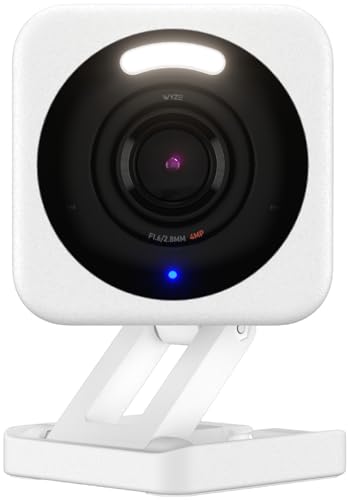
The Wyze Cam v4 is how a small business covers every room without a finance meeting. Its picture is sharp, its colour night vision — helped by a small spotlight — reads faces across a stockroom in light that defeats cameras several tiers above it, and it records to a local card as happily as to its maker’s cloud, which gives a business the storage choice this guide keeps insisting on. At the till, over the back door, in the corridor to the office: the v4’s tier means no post has to be argued for, and coverage stops having gaps where incidents prefer to happen.
Its business manners need one honest paragraph. The app will offer cloud plans persistently, and the business must decide once — card, cloud or both — and configure deliberately rather than drift. Wi-Fi quality is the other variable: a busy shop’s network, crowded with tills, printers and customers’ phones, must still give the cameras a clean signal, which argues for placing them within honest range of the router or an access point. Within those disciplines the v4 is the fleet camera of this guide: buy several, place them by post, and let their sheer coverage do what one expensive camera at the door cannot.
- Recording: local card and optional cloud, your choice
- Night: colour pictures with a built-in spotlight
- Power: mains — a socket within cable reach of each post
- Role: the fleet camera for rooms and corridors
Strengths
- Coverage per budget that no rival here matches.
- Local recording keeps the storage decision yours.
- Night pictures that serve as actual evidence.
Trade-offs
- The app promotes its cloud plans relentlessly.
- Needs strong Wi-Fi on a busy commercial network.
- No pan or tilt — placement must be right first time.
Best for: stockrooms, corridors, back doors and till oversights. Not suited for: exterior posts or anywhere Wi-Fi is an afterthought.
A deployment note: businesses get the most from the v4 by standardising it — same mounting height, same settings profile, same card size across the fleet — so any member of staff who can check one camera can check all of them, and a replacement inherits a known configuration in minutes.

Blink Outdoor 4 — Best wire-free exterior post
Every premises has the post that wiring cannot reach: the yard gate, the far end of the car park, the delivery bay on the wrong side of the building. The Blink Outdoor 4 is this guide’s answer to that post — a weather-sealed battery camera whose cells are famous for lasting seasons rather than weeks, recording motion clips to its sync module or the cloud, and asking nothing of the building’s electrics. For a business, that combination converts impossible posts into covered ones for the price of a ladder visit twice a year.
Run it with a businesslike understanding of battery logic. It watches by motion, not continuously; a busy gate will drink its batteries faster than a quiet one, and its clips are evidence of events rather than a full film of the day. Within that contract it is superb: the picture is clear, the night vision is honest infrared, the app is simple enough for any shift supervisor, and the sync module’s local storage option keeps footage on the premises. Place it where its questions live — arrivals, gates, the bins where fly-tipping happens — and it will answer them for a very long time between ladder visits.
- Power: batteries with season-long endurance
- Recording: motion clips via sync module or cloud
- Body: weather-sealed for exterior walls and posts
- Role: the unreachable post, covered
Strengths
- Installs anywhere in minutes, no electrician.
- Battery life that respects a business’s calendar.
- Local storage option via its sync module.
Trade-offs
- Motion clips only — not a continuous witness.
- Busy posts shorten battery life considerably.
- Two-way talk and live view are rationed by design.
Best for: yard gates, car parks, delivery bays and outbuildings. Not suited for: the till or any post needing a continuous record.
One operational habit separates happy Blink fleets from neglected ones: put the battery change on the same calendar as the fire-alarm test. A camera whose cells die in the month of the incident is worse than no camera, because everyone believed the post was covered — the calendar is the cheapest insurance in this entire guide.

Ring Indoor Cam (2nd Gen) — Best managed-app experience
Some businesses already live inside Ring’s world — the doorbell at the shop entrance, the app on the owner’s phone — and for them the Indoor Cam is the path of least resistance to interior coverage: a compact camera with a physical privacy shutter, clean pictures, and an app experience polished to a shine by an enormous installed base. Staff learn it in minutes, alerts arrive in the ecosystem the owner already reads, and the camera’s small size lets it sit on a shelf over the till without changing the room.
The business calculation must be made with eyes open. This camera’s recording life runs through its maker’s subscription; without a plan, you are watching live rather than building an archive, and for a business the archive is usually the point. Price the plan across all your Ring devices as one operating cost and the decision becomes clear-headed — many businesses pay it gladly for the polish and the off-site safety of the footage. The privacy shutter, meanwhile, is a genuinely commercial feature: close it during a private meeting or a staff celebration and the camera is visibly, physically off, which settles conversations that software toggles never quite do.
- Recording: cloud, subscription-based, off-site by design
- Privacy: a physical shutter you can see and hear close
- App: the most polished management experience here
- Role: till oversight and office coverage in Ring households
Strengths
- Staff-proof app that everyone already half-knows.
- Footage survives even if the camera is taken.
- The privacy shutter settles staff-room questions.
Trade-offs
- No meaningful local recording — the plan is the product.
- Costs scale with every camera you add.
- Indoor only, and tied to one ecosystem.
Best for: businesses already invested in the Ring ecosystem. Not suited for: owners who want footage stored on their own premises.
A governance tip for Ring-based shops: set up the owner’s account as the business’s, not an employee’s personal one, and use shared-user roles for staff from day one. Systems installed under a manager’s personal login have a way of leaving when the manager does, and re-establishing ownership mid-incident is a misery this guide would spare you.
eufy 4K Indoor Camera E30 — Best local-storage picture
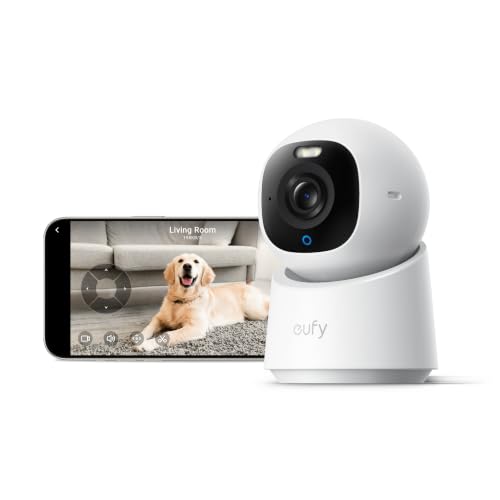
The E30 represents the opposite philosophy to the pick above: a very sharp indoor camera from a brand whose reputation rests on keeping footage at home — in business terms, on your premises, under your control, without a monthly toll. Its picture quality is the finest of the indoor cameras here, the kind of clarity that reads a label across a stockroom and a face across a shop, and it pairs that eye with the local-recording routes its maker is known for. For businesses uneasy about their floor’s film living on someone else’s servers — a clinic’s waiting room, a solicitor’s corridor, any premises where clients are the picture — that philosophy is not a preference but a policy.
In daily service it behaves like a premium indoor camera: composed colour, capable night pictures, an app that respects its owner. It asks for the usual indoor disciplines — a socket, a good Wi-Fi signal, placement that respects the privacy of the people it serves. What it returns is the strongest evidence file in this guide’s indoor class and a running-cost ledger with a notably empty subscription line. Businesses that think in policies rather than products tend to land here, and their reasoning is sound.
- Picture: the sharpest indoor eye in this guide
- Recording: local-first, on the brand’s home-storage logic
- Night: detailed pictures in low indoor light
- Role: evidence-grade coverage of interiors that matter
Strengths
- Clarity that serves insurers and police well.
- Footage stays on your premises by design.
- No subscription toll for the core job.
Trade-offs
- Indoor only — the exterior needs other picks.
- Local footage needs physical protection and backup thought.
- Wi-Fi dependent like all its indoor peers.
Best for: clinics, offices and shops wanting evidence-grade interiors. Not suited for: yards, bays or any outdoor post.
Pair it with one operational rule: the storage it records to should be somewhere a burglar would not think to look, and its contents reviewed on the same weekly rhythm as the banking. Local storage’s freedom and its responsibility are the same fact viewed from two sides, and businesses that grasp that get the best of this camera.

Arlo Essential Indoor Pan Tilt — Best single-camera shop floor
A small shop floor poses a specific puzzle: one room, several questions — the door, the till, the shelves at the back — and a budget that would prefer one camera. The Arlo Essential Indoor Pan Tilt is built for that puzzle. It pans and tilts to sweep the room, can be set to watch a primary post and tour others, and carries a privacy mode that turns its eye away when the business is open and staffed — a feature designed for exactly the human sensitivities of filming a workplace. Arlo’s security-first pedigree shows in the app’s alert manners and account controls.
Be clear-eyed about the pan-tilt bargain, because this guide insists on it everywhere: a moving camera sees everything in turn and anything only sometimes, and an incident at the till while the camera admires the door is an incident missed. The honest deployments are two — as a night watchman, sweeping an empty premises where any movement is news, or as a daytime supplement to one fixed camera on the critical post. Used so, it is excellent: the night sweep of a small shop from one device, with footage in a mature cloud ecosystem. Priced as a plan-based camera, it belongs in the same ledger conversation as the Ring pick.
- Movement: pan and tilt with scheduled positions
- Privacy: a mode that averts its eye while staffed
- Recording: cloud ecosystem with business-grade app controls
- Role: the one-camera shop floor, especially after hours
Strengths
- One device sweeps a whole small premises at night.
- Privacy mode respects the staffed hours.
- Mature app and alert management.
Trade-offs
- A touring camera can be looking the wrong way.
- Plan-based recording is an ongoing cost.
- Moving parts ask for a stable, considered mount.
Best for: small retail floors and after-hours sweeping. Not suited for: being the only witness on a critical post.
Deployment wisdom from the shops that love it: give the Arlo the night and a fixed camera the day-critical post, and let each do the job its nature suits. The pan-tilt’s sweep catches the 3 a.m. window test at the back of the shop that no single fixed camera would have seen, which is the incident class it was born for.

REOLINK Argus PT Ultra — Best solar exterior specialist
The Argus PT Ultra is the exterior counterpart to the Arlo’s idea: a pan-and-tilt camera that lives outdoors on battery, sips from an optional solar panel, and watches the wide, wired-never places — the yard, the car park’s far corner, the storage containers, the delivery bay roofline. Its picture is sharp, its night work is aided by spotlights that can flood a scene with colour when motion arrives, and its maker’s local-recording habits mean clips can live on a card in the camera rather than only in a cloud. For premises whose risk lives outdoors, it covers ground that would otherwise need a trench and an electrician.
Its terms are the battery terms, stated as plainly as this guide states them everywhere: it is a motion-activated witness, not a continuous one; its solar appetite depends on your latitude and your winters; and a pan-tilt outdoors must be mounted where weather and ladders-with-intent cannot easily reach it. Observe those terms and it is a formidable post — the camera that watches the gate swing at midnight and pans to follow, sending the clip before the intruder has crossed the yard. Businesses with land around them, from builders’ yards to garden centres, are its natural constituency.
- Power: battery with optional solar panel
- Movement: outdoor pan and tilt with motion following
- Night: spotlight-assisted colour pictures
- Recording: local card option alongside cloud choices
Strengths
- Serious exterior coverage with no wiring at all.
- Solar sipping stretches battery visits to seasons.
- Local recording keeps the storage choice open.
Trade-offs
- Motion-activated, not a continuous record.
- Solar yield varies with climate and season.
- A reachable mount is a vulnerable mount.
Best for: yards, car parks, container rows and delivery bays. Not suited for: the till, the entrance interior or continuous evidence.
One siting lesson from the yards: mount it high enough to see over the tallest vehicle that parks beneath it, and aim its home position down the yard’s throat rather than across it — intruders walk the throat, and the pan should spend its travel following people, not admiring fences.
How Do the Six Compare Side by Side?
| Camera | Best business post | Recording home | Power | Watch out for |
|---|---|---|---|---|
| Wyze Cam v4 | Stockroom, till, corridors | Local card or cloud | Mains | Busy Wi-Fi |
| Blink Outdoor 4 | Yard gate, outbuildings | Sync module or cloud | Battery, seasons-long | Motion clips only |
| Ring Indoor Cam (2nd Gen) | Till and office in Ring shops | Cloud plan | Mains | Plan is essential |
| eufy 4K Indoor Camera E30 | Evidence-grade interiors | Local-first | Mains | Protect the storage |
| Arlo Essential Indoor Pan Tilt | Night sweep of a shop floor | Cloud ecosystem | Mains | Can look the wrong way |
| REOLINK Argus PT Ultra | Yard, car park, bays | Local card or cloud | Battery and solar | Motion-activated |
How Long Should a Business Keep Its Footage?
Longer than feels necessary, shorter than forever — and the honest number comes from your risks, not from a camera’s marketing. Most small-business incidents are discovered within days: the stock discrepancy at the weekly count, the damage noticed on the next delivery, the dispute raised when a card statement arrives. Retention of a few weeks covers the realistic discovery window for most premises, which is why this guide treats storage capacity and plan tiers as core buying criteria rather than footnotes. Businesses with seasonal patterns — the tax adviser in April, the retailer after the holidays — should count retention from the discovery, not the event, and size accordingly.
Whatever window you choose, set it deliberately in the system rather than inheriting a default, and rehearse the export once before you need it: find a clip from last week, download it, play it on a machine that is not yours. The businesses that discover their export path during an incident discover it too late, and every camera system here makes the rehearsal a five-minute job. Evidence is a process, not a purchase.
Where Should Cameras Go — and Where Must They Not?
Place by question, as this guide has argued throughout: the entrance gets a camera at a height that captures faces rather than the tops of hats, angled across the doorway’s path; the till gets oversight wide enough to include the drawer and the customer’s hands; the stockroom gets the door and the high-value shelves; the yard gets its gate and its throat. Light decides the fine placement — a camera staring into the entrance’s daylight will silhouette every arrival, so angle along the wall where you can, and test at the brightest hour, not the most convenient one.
The must-not list is shorter and absolute. No cameras where people have a reasonable expectation of privacy — changing areas, washrooms, the private office used for sensitive conversations — whatever the temptation; the law in most places agrees, and staff trust, once lost to a discovered lens, does not return. Signage is the companion rule: visible notices that recording is in operation are required in many jurisdictions, expected by insurers, and — the part owners forget — a deterrent in themselves. A camera everyone knows about prevents more incidents than a hidden one detects.
How Do You Manage Staff Access Without Creating Risk?
Roles, not shared passwords. Every system in this guide supports some form of shared access; use it to give shift staff view-only rights, keep deletion and sharing rights with the owner, and never let the whole business run on one login taped inside a drawer. When a staff member leaves, their access leaves with them — a five-minute revocation that businesses postpone at their peril, since the ex-employee who can still watch the stockroom is a risk with a name and a leaving date. The installing account should belong to the business itself, under an email the business controls, so the system survives every individual’s departure, including the owner’s nephew who set it up.
Audit the quiet settings once a quarter: who has access, which cameras are actually recording, whether the retention you set is the retention you are getting, and whether the batteries’ calendar is being kept. That quarterly half hour is the difference between a security system and a security souvenir, and it belongs on the same list as the alarm test and the extinguisher check.
What Mistakes Leave Businesses with Cameras but No Evidence?
The silhouette entrance is the classic: a camera facing the door’s daylight, faithfully recording a procession of anonymous black shapes. Angle, height and a test at noon prevent it. Second is the sleeping critical post — a battery camera on the till because the socket was awkward — discovered flat or mid-nap during the one incident that mattered; critical posts get mains power, always. Third is retention by default: the system quietly keeping three days when the business discovers losses weekly, a mismatch nobody noticed until the footage had already overwritten itself.
Fourth is the single-login business, where the system departs with an employee or the password departs with a memory. Fifth is filming without signage or consent where the law requires it, which can turn good footage into inadmissible footage and a security measure into a liability. None of these failures is a camera failure; all of them are management failures, and all are prevented by the half-hours of discipline this guide keeps prescribing. The cameras are ready when you are.
Final Recommendation
Build the system by posts, not by bargains. For most small businesses the spine is powered and indoor: the Wyze Cam v4 fleet for rooms and corridors, or the eufy E30 where evidence quality and local control lead. Add the Ring Indoor Cam if your business already lives in that ecosystem and values its polish, the Arlo Pan Tilt for the after-hours sweep of a small floor, and put the wire-free pair — Blink Outdoor 4 and the Argus PT Ultra — on the gates, yards and bays that cables cannot reach. Decide storage before cameras, set retention on purpose, rehearse one export, and review access quarterly. Do those unglamorous things and your system will be the rare kind: the one that is simply there, clear and findable, on the morning it is needed.
Frequently Asked Questions
Why does this guide not give score numbers?
Because a crowd’s score measures popularity and early impressions, not whether a camera will produce usable evidence in your premises in February. Scores also change as products age and reviews accumulate, so a printed number would be stale on arrival. Judge by the criteria in this guide — evidence quality, continuity, storage and manageability — and you are judging the things an insurer would.
Do I need a subscription for business cameras?
It depends on the family you choose, and the choice should be conscious. Ring and Arlo cameras build their recording around a plan; Wyze, eufy and Reolink offer meaningful local recording without one. Price the plan across the whole fleet as an operating cost, or commit to local storage with its own disciplines — either is defensible, drifting into one by accident is not. Write the decision, with its date, into the system folder; future managers inherit systems more gracefully when the reasoning survives alongside the passwords.
How many cameras does a small business need?
As many as there are questions, and usually fewer than feared: an entrance, a till, a stockroom and a delivery door cover most small premises, with the yard added where one exists. Count posts on a walk of the building at opening and closing, and let that list — not a bundle offer — set the number.
Can Wi-Fi cameras be trusted for a business, or must everything be wired?
Wi-Fi serves most small premises honestly when the network is decent and the critical posts are powered cameras within good signal. Wired systems remain the reference for larger sites and for owners who want recording independent of wireless entirely. The middle path in this guide — powered Wi-Fi indoors, battery Wi-Fi at the unreachable posts — is what most small businesses actually run, successfully.
What should I do when an incident actually happens?
Preserve first, investigate second. Export the relevant clips immediately, before retention overwrites them, and keep the exports in two places with a note of times and camera names. Then call whoever the incident concerns — insurer, landlord, police — with the footage ready. The rehearsal this guide recommends makes that morning a procedure instead of a panic.
How Do Cameras Fit with Alarms, Lights and Locks?
As the witness in a team of four. Locks delay, lights deter and reveal, alarms summon, cameras testify — and a business that funds only the witness has bought the least preventive member of the team. The good news is that the systems here cooperate informally: a camera’s motion alert is often the first notice that a light has failed or a gate was left open, and the quarterly review this guide prescribes naturally audits the other three members too. Spend in the order the team works — secure the doors, light the approaches, then place cameras to watch both — and each purchase makes the others worth more. Security is a system; the cameras are simply the part that remembers.
How Does Wi-Fi Quality Make or Break a Business System?
The cameras in this guide are only as reliable as the wireless beneath them, and a trading premises is a hostile radio environment: thick walls, metal shelving, a microwave in the staff kitchen, the customers’ own devices crowding the air at lunch. The businesses whose systems simply work share a few habits. The router or access point sits central and high, not in the office’s far corner behind the filing cabinets. Cameras are placed within honest range — tested at the post with a phone’s signal readout before the ladder is packed away. And where a critical post sits at the edge of coverage, the fix is a proper additional access point, not hope. None of this is camera shopping, and all of it decides whether the camera shopping mattered. Budget the network a thought and a little money, in that order, before the second camera arrives.
What Should Different Kinds of Business Emphasise?
A café lives on its entrance and till, with a kitchen corridor as the third post; its cameras work in steam, warmth and a lunchtime radio crowd, and the Wyze fleet’s tier suits its margins. A boutique lives on its floor and its fitting-room corridor — never the rooms themselves — and the Arlo’s polite night sweep with a fixed camera on the door is its natural shape. A workshop or trade counter lives on its yard and its goods-in door, which is Argus and Blink territory, with one interior camera over the counter where the paperwork changes hands. A clinic or professional office lives on discretion: the eufy E30’s local storage and a waiting-room camera angled at the door rather than the chairs. The premises differ; the method does not — questions first, posts second, products third, and the guide’s six cover the whole high street between them.
How Do You Expand a System Without Replacing It?
Start standardised and expansion is a purchase; start improvised and it is a project. Businesses that pick one indoor family and one outdoor family early — as this guide’s picks invite — add cameras in an afternoon: same app, same settings profile, same storage logic, the new post live before the ladder is down. The discipline that makes it work is documentation, kept in the same folder as the insurance papers: which camera watches which post, which account owns the system, when the batteries are due, what the retention is set to. Four lines per camera, written once, and the system becomes an asset the business owns rather than a favour one employee performs. When the second premises opens — the happy reason systems expand — that folder is the difference between copying a working design and reinventing one under time pressure.
What Happens When the Internet Goes Down?
Ask it of every system before you buy, because the answer divides this guide’s families honestly. Local-recording cameras keep witnessing: the Wyze on its card, the eufy on its storage, the Blink on its sync module all continue through an outage and reconcile when the connection returns. Pure cloud cameras pause their archiving — live view and recording alike depend on the road to the server — which is one more reason the entrance, the post most likely to matter during exactly the chaos an outage suggests, deserves a camera with a local leg to stand on. None of this makes cloud systems wrong for business; it makes the mixture this guide recommends — local at the critical posts, cloud where its polish earns — a considered design rather than an accident.
How Should You Talk to Staff About the Cameras?
Early, plainly and in writing. Tell the team where the cameras are, what they are for — the door, the till, the stock, the yard — and what they are never for, which is watching the staff room or timing anyone’s break. Put the access list where everyone can see who holds it. Businesses that have this conversation at installation find the cameras become what they should be: a shared protection that staff themselves invoke when a customer disputes a transaction or a delivery goes missing. Businesses that let the cameras be discovered find a different conversation waiting, and it is not about the cameras at all. The technology in this guide is the easy half of a workplace system; the trust is the other half, and it is built with the same deliberateness as the camera placement.
What Does a Year of Owning the System Actually Cost?
Structure the answer rather than chasing figures that will move. The hardware is the visible sum. Behind it stand four recurring lines: any cloud plans, priced across the fleet; storage media — cards wear under constant writing and should be treated as consumables with a replacement rhythm; batteries for the wire-free posts, bought in the calendar’s good time rather than the incident’s bad one; and the quarterly half hour of management this guide prescribes, which is a cost in attention rather than money and the one most often skipped. None of these lines is large; together they are the difference between a system whose true price was known at purchase and one that invoices its owner in surprises. A business that writes the four lines down before buying has, in our experience, already made the most important security decision of the project.
How Do You Test the System Before You Trust It?
Stage the incidents you fear, at a quiet hour, with a colleague playing the stranger. Walk the entrance at noon and at closing and read the footage for a face. Have them take a parcel from the delivery shelf, browse the back of the shop, test the yard gate. Then sit down and find each moment in the app, export it, and judge the clip the way an insurer would: is the person identifiable, is the sequence complete, does the timestamp agree with the till record? Every weakness the rehearsal exposes — a silhouette, a gap, a wrong angle — costs a ladder visit to fix now and would have cost the claim later. The businesses in this guide’s debt all rehearsed; the ones with regrets all assumed. Twenty minutes of theatre is the cheapest consulting in the security industry.
What About Deliveries, Cleaners and the Out-of-Hours Crowd?
A business’s riskiest hours are often its emptiest legitimate ones: the dawn delivery, the evening cleaner, the contractor with the alarm code. Cameras earn a quieter kind of keep here — not suspicion, but sequence. The delivery that definitely arrived at six and was signed for becomes a fact rather than an argument; the cleaner locked in by a faulty latch has the footage that explains the alarm callout; the contractor’s visit has a beginning and an end that match the invoice. Configure alerts with these hours in mind — expected motion should be recorded but not alarmed, or the owner learns to ignore the phone, and an ignored alert system is worse than none. The systems in this guide all allow schedules and sensitivity shaping; use them to teach the cameras your business’s actual rhythm, and the alerts that remain will be the ones worth waking for.
How Do You Choose Between Two Cameras That Both Fit a Post?
By the second question, since the first — can it see the post — is already answered. Ask which one’s storage story matches the post’s risk: evidence that must survive a stolen camera argues cloud; evidence that must never leave the building argues local. Ask which one’s app your least technical shift supervisor can run at midnight. Ask which one’s failure mode you prefer: the battery camera fails silently and slowly, the mains camera fails loudly and rarely, the plan camera fails at a billing problem you will see coming in email. There is no universal winner in this guide because there is no universal business; there is only the discipline of matching a named post to a named camera for named reasons — and writing the reasons down, so the next camera is chosen by the same logic rather than by whoever is holding the ladder.
What Should the Second Year of the System Look Like?
Quieter than the first, and deliberately so. By the second year the placement arguments are settled, the retention matches the business’s real discovery rhythm, and the system’s work becomes mostly invisible — which is when the two characteristic second-year failures arrive. The first is drift: a camera nudged by a shelf restock, a new display quietly blocking a post, a password shared one person too far. The quarterly review exists to catch drift while it is still funny. The second is scope creep by bargain — a cheap extra camera from a different family, added on a whim, fragmenting the apps and the storage logic the first year worked to unify. Add within your families or not at all. A system that reaches its third year standardised, reviewed and boring has done something genuinely difficult, and the businesses that own such systems speak of them the way they speak of a good accountant: rarely, and with respect.
A Final Word on Scores, Brochures and Other People’s Opinions
This guide opened by declining to print score numbers, and it closes by explaining what to do instead when the whole internet offers them. Read opinions for failure stories, not for averages: the owner whose camera died in a storm, the shop whose app update broke a holiday weekend, the landlord dispute where the footage settled everything. Those narratives carry the information a business needs — how a system behaves at its worst, in premises like yours — while an averaged score carries only the weather of other people’s first impressions. Then return to the method this guide has used throughout: name your posts, decide your storage, match the six cameras to the questions your building actually asks. A system chosen that way needs no score to justify it, because it was never a popularity decision. It was a business decision, and it will read that way on the one morning it matters.
How Do You Handle a Camera Failure on a Trading Day?
Assume it will happen and decide the drill now. The symptom is usually an app tile gone grey; the drill is a ladder, a power cycle, and — the step businesses skip — a check of whether the gap in recording overlaps anything that must be reconstructed from till records and memory while memories are fresh. Keep one spare camera from your indoor family on the shelf, configured to the business’s network, and a dead post becomes a twenty-minute swap rather than a week of exposure. Log the failure in the system folder: which camera, how old, what the weather and the network were doing. Patterns in that log — the same post failing, the same season — are the system’s way of asking for a different camera or a moved access point, and they are only visible to businesses that write things down. Reliability is not the absence of failures; it is the presence of a rehearsed response.
What About Audio — Should Business Cameras Listen?
Mostly, no — and the reasons are legal as much as technical. Many jurisdictions treat audio recording far more strictly than video, and a camera that hears the till conversation can create liabilities a silent one never would, quite apart from what it does to staff trust. The exceptions are narrow and deliberate: a door intercom function where a visitor speaks to be admitted, an after-hours post where sound is part of the alarm picture and no one’s conversation is at stake. Every camera in this guide offers some audio capability; the business decision is to enable it by exception, with the reason recorded, rather than by default because the toggle was there. When in doubt, film the room and let the room keep its voice — the evidence almost never needs the soundtrack, and the one time it might is rarely the time the lawyers enjoy.
How Should a Growing Business Plan Its Camera Future?
Buy for the premises you have, standardise for the ones you hope for. The family choices in this guide — one indoor line, one outdoor line, a storage philosophy written down — are the whole strategy: they let a second shop, a bigger stockroom or a new yard inherit a working design instead of a fresh research project. Resist the two temptations that break the pattern: the flagship camera bought for a post a fleet camera serves, which teaches the budget the wrong lesson, and the orphan bargain from an unfamiliar family, which teaches the staff a second app for no gain. Growth, in camera systems as in businesses, is mostly the discipline of repeating what works — and the six cameras here were chosen to be worth repeating.
Related Guides
For the home side of the same questions, see our guides to the best cameras for a shed, the best cameras for blue irirs and the best bang for buck security cameras.


