ilcastellomenu.com is reader-supported. When you buy through links on our site, we may earn an affiliate commission.
Where to Buy
Renters can order any of the six through Amazon — and, just as usefully, return one without a quibble when its app annoys the household or its night picture disappoints. When people search for the best cameras for my appartment — spelling and all — they usually mean one of three jobs: watching the front door of a rented flat, keeping an eye on a dog during work hours, or having some evidence if a parcel vanishes from the hallway. This guide is built around those three jobs, in a home you are not allowed to drill into.
Renting changes the camera question completely. A homeowner can run cable through a wall, mount a floodlight over the porch, and hardwire a doorbell into the existing chime. A tenant works under a lease, a deposit, and a landlord who will absolutely notice four screw holes in a door frame. So every pick here sticks to a shelf, plugs into an ordinary socket, or runs on a battery, and every one can leave with you on moving day without a filler tube and an apology.
There is also the question of what an apartment camera should not do. It should not record your neighbours’ conversations through a shared wall. It should not stare into the flat across the courtyard. It should not demand a subscription before it will show you the clip of the person who took your delivery. The six cameras below were chosen because they respect those limits to different degrees, and the honest differences between them — local storage versus cloud, pan-and-tilt versus fixed, sharp 2K versus merely adequate 1080p — are what the rest of this guide pulls apart.
Notice what this guide is not: it is not a list of the most powerful cameras money can buy. Apartments punish excess. A bulky camera with a screaming spotlight annoys neighbours, a hardwired system annoys landlords, and a five-camera array in a one-bedroom flat mostly produces footage of you, in your own home, being watched by your own purchases. The renter’s art is proportionality — enough coverage to answer real questions, small enough to forget between incidents.
One more thing before the picks: measure your Wi-Fi before you measure anything else. Apartment blocks are radio jungles, with forty neighbouring networks fighting over the same channels. A camera placed at the far end of a long flat, behind two brick walls and a fridge, will misbehave no matter how good its sensor is. Walk to the spot where the camera will live, run a speed test on your phone, and if the upload number is miserable, plan for a camera position closer to the router or a small mesh node. Several frustrated one-star reviews of perfectly good cameras are really reviews of bad signal.
Key Takeaways
- Renters need cameras that sit, stick, or stand — nothing in this guide requires drilling, wiring, or your landlord’s permission.
- The Wyze Cam v4 is the value standout: colour night vision and local card storage mean it stays useful with no subscription at all.
- Pan-and-tilt models like the eufy E220 and Tapo C210 cover a whole open-plan room from one shelf corner.
- Fixed cameras such as the Blink Mini 2 and Ring Indoor Cam trade coverage for simplicity and tiny footprints.
- Local microSD recording is the renter’s friend — clips stay in your drawer, not on a server you rent monthly.
- Point cameras at your own door, your own hallway, your own pet — never into shared spaces or a neighbour’s windows.
In this guide
Quick Picks
| Camera | Badge | Why it earns its shelf space |
|---|---|---|
| Wyze Cam v4 | Best value overall | Colour night vision, a built-in spotlight, and card storage that keeps the subscription optional. |
| eufy Indoor Cam E220 | Best pan-and-tilt | Rotates to follow a pet across the room and records to a local card inside the eufy app. |
| TP-Link Tapo C210 | Best budget room coverage | Wide panning range and 2K detail at a price that forgives buying two. |
| Blink Mini 2 | Smallest footprint | A cube so small it disappears on a bookshelf, with a weather-resistant streak for balconies. |
| Ring Indoor Cam (2nd Gen) | Best for Ring households | A physical privacy shutter and seamless behaviour alongside a Ring doorbell or alarm. |
| Arlo Essential Indoor Pan Tilt | Best automated privacy | The lens physically turns away when you are home, so the camera visibly stops watching. |
Why six cameras and not sixteen? Because the apartment market is a hall of mirrors: dozens of near-identical cubes pour out of the same few factories, wearing different logos and the same compromises. The honest differences cluster around storage, night vision, movement, and privacy hardware — so this guide keeps one strong representative of each philosophy rather than padding the list with twins. If a camera below does not suit you, its nearest rival differs in ways the trade-off lists make plain.
How We Chose These Picks
We started from the lease, not the spec sheet. Any camera that needed a wired power run, a junction box, or permanent outdoor mounting was cut immediately, however good its picture. What survived had to power from a USB cable or a battery, connect over ordinary apartment Wi-Fi, and offer a mounting story that a tenant can defend at deposit-inspection time: a flat base, a magnetic plate, or an adhesive pad that peels cleanly.
Next we weighed recording economics. Renters move, budgets wobble, and a camera that becomes a paperweight the month you cancel its plan is a bad buy. Models with microSD slots scored heavily because the card is a one-time purchase that travels with you. Cloud plans were treated as a bonus for off-site backup, never as the price of basic function, and where a brand locks person detection behind a plan we say so in that pick’s trade-offs rather than hiding it.
Picture quality was judged at night first, because apartment incidents — the 2 a.m. hallway noise, the cat knocking a plant off the sill — rarely happen under good light. Colour night vision from a sensitive sensor beats a spotlight that blinds your pet and advertises the camera. Field of view mattered too: in a studio flat, one wide camera in the right corner can replace two narrow ones, which halves both cost and the number of lenses pointed at your life.
We also asked a renter’s question that spec sheets never answer: what does this camera cost you over a two-year tenancy, all in? The honest arithmetic includes the plan, the card, the replacement cable you will inevitably buy after the first one vanishes in a move, and the hours spent fighting an app. By that measure the local-storage cameras pull further ahead than their shelf prices suggest, and the plan-based cameras need their polish and integrations to justify a gap that quietly doubles over twenty-four months.
Finally, we considered the app as a daily object. You will open it half-asleep, one-handed, after a notification buzz. Cameras whose apps bury the live view under ads, upsells, or three menus lost ground to those that open straight onto the picture. Privacy controls were the last filter: a physical shutter or a lens that turns to the wall tells guests — and you — the truth about whether the camera is watching, in a way a software toggle buried in settings never quite does.
What Should an Apartment Camera Actually Watch?
The honest answer is: less than you think. The front door from inside is the single most valuable angle in a rented flat. It shows who entered, when, and what they carried out, and it does so without filming the public hallway your landlord controls. A camera on a hallway bookshelf, angled at your own door, covers burglars, parcel thieves who tail the courier in, and the cleaner-versus-dog dispute, all in one frame.
The second useful angle is the pet angle, and it wants a different camera personality: low placement, a wide view of the room where the animal actually spends the day, and ideally pan-and-tilt so a restless spaniel does not simply exit stage left. Two-way talk sounds like a gimmick until the first time you talk an anxious rescue dog down from the sofa cushions during your lunch break; then it becomes the feature you would not give back.
There is a fourth angle people forget until they need it: the temporary one. A camera that can be unplugged and re-aimed in ten seconds becomes a holiday tool — pointed at the door while you travel, at the Christmas tree during the party, at the kitten’s box for the first week. Renters who buy one good, movable camera often get more real use from it than homeowners with six fixed ones, because the camera goes where life is currently happening instead of where a installer guessed it would.
What about windows and balconies? A camera inside, looking out through glass, loses its infrared at night — the LEDs reflect off the pane and white out the picture. If the balcony matters, choose a model rated to sit outside under cover, or accept daylight-only coverage through the glass and turn the IR off in settings. Fire escapes deserve a special note: in many leases and some local laws, filming a shared fire escape is filming your neighbours’ emergency exit and, often, their windows. Skip it. Your own front door, your own rooms, your own cat — that is the defensible triangle, and it happens to cover nearly everything that actually goes wrong in a flat.
Which of the Best Cameras for My Appartment Fits Your Flat?

Wyze Cam v4 — Best value overall
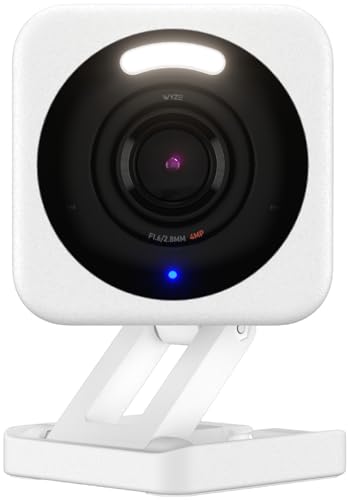
The Wyze Cam v4 is the camera we would hand to a friend moving into their first rental and asking what to buy before the boxes are unpacked. It records in 2.5K, which in practice means a face at the door is a face and not a suggestion, and its colour night vision pulls a recognisable image out of the gloom of a hallway lit by a single bulb. There is a small spotlight and a siren you will probably use exactly once, to frighten your own cat, but the real headline is the microSD slot: record locally, skip the subscription entirely, and the camera loses almost nothing that matters.
Its body is a small cube on a magnetic, folding base, which makes it the most flexible placer in this guide. It stands on a shelf, clings to a fridge door, or hangs under a metal cabinet strip in the kitchen. It is also rated for outdoor use, unusual at this level, so the same camera that watched your hallway this year can watch a covered balcony next year. The Wyze app has grown cluttered over the years and will try to sell you a plan; decline politely, format the card, and the camera settles into honest work.
Living with it day to day, the detail that owners mention most is the night picture’s colour. A hallway in a rented block is never truly dark — there is always a stairwell bulb, a neighbour’s door light, the glow of an exit sign — and the v4 turns that scraps-of-light situation into footage where a coat is navy rather than black and a face has features. That matters when the clip’s job is to convince a landlord or a police officer rather than merely reassure you. The two-way talk is loud enough to hold a doorstep conversation with a courier through a closed door, and the motion zones can be drawn tightly around the door itself so the cat’s nightly patrol stops generating a highlight reel.
One habit worth forming: check the card monthly. Local recording is gloriously free of bills, but it is also silent when a card fills or fails, and the app only mentions storage when you go looking. Set a calendar nudge, scrub one clip, confirm the newest timestamp, and the camera goes back to being invisible infrastructure. That thirty-second ritual is the entire maintenance contract of the subscription-free life, and it is a better deal than any cloud plan on this page.
- Resolution: 2.5K with colour night vision
- Storage: microSD local recording, optional cloud plan
- Power: USB cable, mains adapter
- Mounting: magnetic folding base, indoor/outdoor rated
- Extras: built-in spotlight, siren, two-way talk
Strengths
- Colour night pictures that stay useful in dim hallways
- Local recording removes the monthly bill completely
- Magnetic base makes renter-friendly placement trivial
Trade-offs
- The app pushes its subscription harder than rivals do
- Person detection is a paid-plan feature
- The fixed lens cannot follow movement across a room
There is one scenario where we steer people away from it: the multi-camera flat. Wyze’s app handles a handful of cameras gracefully, but owners building a six-camera mesh across a big shared house sometimes find the experience less polished than the dedicated ecosystems below. For one, two, or three cameras — the realistic renter count — that ceiling never comes into view, and the money saved against subscription rivals buys the second camera outright.
Best for: renters who want one capable camera at the door with zero ongoing cost. Not suited for: anyone who wants the camera to pan after a wandering pet.

eufy Indoor Cam E220 — Best pan-and-tilt
The eufy Indoor Cam E220 solves the oldest problem in small-flat security: the interesting thing never happens where the camera is pointing. Its motorised head pans and tilts through a wide arc, and when motion catches its attention it swivels to follow — a dog pacing at the window, a toddler making for the bookshelf, a flatmate’s guest helping himself to your yoghurt. The 2K sensor keeps those travelling shots detailed enough to be evidence rather than theatre.
eufy’s pitch to renters is privacy economics. Recordings live on a microSD card inside the camera, the app works without an account-level subscription, and there is no monthly toll for the privilege of watching your own living room. The camera can flag people and pets and even listen for a baby crying, which makes it a double agent in a young family’s flat: security camera by day, nursery monitor by night. Its one theatrical habit is the audible click and whir as the head moves; light sleepers should not park it in the bedroom.
The tracking deserves a closer look, because it changes what the footage is for. A fixed camera gives you a stage and hopes the action crosses it; the E220 follows the action, so a clip shows the dog arriving at the bin, committing the crime, and leaving with the evidence — a beginning, middle, and end that a fixed frame would have chopped into entrances and exits. For settling the eternal question of which pet started it, or whether the cleaner really did stay the full hour, that narrative completeness is worth more than extra pixels.
Placement is the E220’s one real demand. It needs a corner or shelf end with room for the head to sweep, and a view down the room’s long axis rather than across it. Put it on the bookshelf at the end of the living room, let it patrol between door and window, and a single unit does the work of two fixed cameras. Owners in small studios sometimes mount it high and inverted; the app flips the picture, and the tracking works just as well from the ceiling’s perspective as from the shelf’s.
- Resolution: 2K, motorised pan and tilt
- Storage: microSD local recording, no required plan
- Power: USB cable, mains adapter
- Tracking: automatic motion following, pet and person alerts
- Extras: cry detection, two-way talk
Strengths
- Follows movement across a whole open-plan space
- No subscription needed for core recording
- Pet and person alerts cut notification noise
Trade-offs
- The moving head makes a faint mechanical sound
- Setup inside the eufy app takes longer than rivals
- Needs a shelf with a clear swing arc for the lens
Renters with a home hub should know the E220 plays reasonably with the major voice assistants for pulling the live view onto a TV or smart display, which turns “check the dog” into a spoken request during dinner. It is a small thing, but cameras earn their keep in small things: the glance, the quick check, the clip forwarded to the landlord before the phone call. Frictionless checks happen; buried ones do not.
Best for: pet owners in studio and one-bed flats who want one camera to cover the room. Not suited for: bedrooms, where its moving, clicking head feels intrusive.

TP-Link Tapo C210 — Best budget room coverage
TP-Link’s Tapo C210 is the quiet overachiever of this list. It offers a 2K sensor, a pan range that effectively erases blind corners in a rectangular room, and local recording to a generously sized microSD card, at a price point where buying a second unit for the hallway does not require a family meeting. In a rental, that math matters: two Tapo cameras watching door and living room often cost less than one premium camera watching only one of them.
The Tapo app is refreshingly free of theatre. Live view loads quickly, playback scrubs along a timeline you can actually read, and the privacy mode parks the lens and stops recording when you are home and want your evenings back. Night vision is infrared rather than colour, so after-dark clips are monochrome — clear, honest monochrome, but monochrome all the same. Detection covers motion, people, and a baby’s cry, and the alerts arrive without the upsell garnish some rivals sprinkle on every notification.
There is a second, less obvious reason the C210 suits renters: it is undemanding about infrastructure. It runs happily on the crowded 2.4 GHz band that older apartment routers actually provide, its power cable is long enough to reach the shelf you want rather than the shelf near the socket, and the app lets several household members watch from their own phones without a family-plan negotiation. Flatmates can each keep an eye on the shared hallway; nobody has to be the household’s camera administrator, a job nobody applied for.
Its motion detection offers the usual sensitivity dial, and it is worth turning down from the factory setting. At full sensitivity the C210 reports curtains breathing in a draught and headlights sweeping the ceiling at night, and a camera that reports everything teaches you to ignore it. Set the zone to the door and the first metre of hallway, drop sensitivity a notch, and the notifications that remain are the ones worth standing up for.
- Resolution: 2K, infrared night vision
- Storage: microSD local recording up to large capacities
- Power: mains adapter with a long cable
- Movement: full-room pan and tilt from the app
- Extras: privacy mode, baby-cry detection
Strengths
- Two-camera coverage for the price of one rival
- Fast, unfussy app with a readable playback timeline
- Large local storage keeps weeks of motion clips
Trade-offs
- Night footage is black-and-white infrared only
- The design is functional rather than decorative
- Cloud storage, if wanted, is a separate paid tier
TP-Link also deserves credit for the unglamorous detail of firmware support. Budget cameras from no-name brands often ship and are forgotten; the Tapo line receives updates, and its app has steadily gained features rather than advertisements. In a category where the software is half the product, buying the cheap camera from a company that maintains its software is the genuinely frugal move — the alternative is a bargain that becomes e-waste at the next phone upgrade.
Best for: renters covering two rooms on a strict budget. Not suited for: anyone who specifically wants colour footage after dark.

Blink Mini 2 — Smallest footprint
The Blink Mini 2 is barely there. It is a small cube that perches on a shelf edge, tucks beside the books, and draws so little attention that visitors routinely fail to notice it — which, for a camera watching your own front door, is exactly the point. It records in 1080p with a wide field of view that suits small rooms, and this second-generation model adds colour night vision helped by a built-in spotlight, plus person detection for those on its plan.
Blink’s model is cloud-first, and honesty requires saying so plainly: the richest experience — stored clips, person alerts — rides on a Blink subscription, though a sync module with a USB drive restores a local-storage path for those who prefer one. What you get in return is an ecosystem that sips power, an app that grandparents manage without phoning you, and a weather-resistant body that can move to a covered balcony or a porch-adjacent window ledge. For a small flat needing a discreet door-watcher and nothing more, the Mini 2’s simplicity is the feature.
The Mini 2 also wins a specific apartment scenario the bigger cameras handle clumsily: the rented room in a shared house. When your private space is one bedroom and a shelf, a discreet cube that watches your own door and your own desk is proportionate in a way a panning robot head is not. It asks nothing of the household, needs no agreement about shared spaces, and its live view answers the only question that matters — is my room as I left it — in about four seconds from phone to picture.
Battery-free living is its other quiet virtue. Some apartment cameras drift toward battery power, which means a charging ritual every few months and a camera that dies the week you are on holiday. The Mini 2 plugs in and forgets itself. Paired with a smart plug you already own, it can even follow your routines, sleeping while you are home in the evening and waking when the flat empties — a low-effort privacy schedule built from parts already in the drawer.
- Resolution: 1080p HD, wide field of view
- Storage: cloud plan, or local via sync module
- Power: USB cable, mains adapter
- Body: compact cube, weather-resistant
- Extras: colour night vision with spotlight, two-way talk
Strengths
- Smallest and least noticeable camera in this guide
- Simple app that non-technical households handle easily
- Can live on a covered balcony thanks to its sealing
Trade-offs
- Best features assume the Blink subscription
- 1080p shows less facial detail than 2K rivals
- No pan or tilt, so placement must be right first time
Consider also the gift scenario, because a surprising number of apartment cameras are bought by adult children for parents living alone. The Mini 2 is the one we suggest for that purchase: it can be set up in advance, named plainly in the app, and checked by family with permission rather than by password-sharing. The picture will not win awards, but the 3 a.m. reassurance of seeing the hallway lamp on and the kettle’s room quiet is the actual product being bought.
Best for: minimalists in small flats who value discretion over detail. Not suited for: subscription refuseniks — look at the Wyze or Tapo instead.

Ring Indoor Cam (2nd Gen) — Best for Ring households
If your rented flat already answers the door with a Ring doorbell, the Ring Indoor Cam (2nd Gen) is the indoor piece that clicks into the same app, the same alerts, and the same household routines. Its signature move is disarmingly low-tech: a swivelling plastic shutter that physically covers the lens and mutes the microphone. Guests can see the camera is blind. You can see it. That visible honesty is worth more in a living room than any software promise.
The camera records 1080p colour video, colour night vision included, and speaks the language of the wider Ring system — modes that arm everything when you leave, notifications that distinguish a person at the door from the cat’s evening patrol, and easy pairing with an alarm if your tenancy grows into one. The catch is the familiar Ring catch: recorded history lives behind the Ring Protect subscription, and without it you are watching live only. Households already paying for the doorbell will shrug; households starting from zero should price that plan into the decision.
Think about who the shutter really serves. It is not you, exactly — you know whether you pressed the privacy toggle in an app. It serves your partner, your flatmate, your visiting parents, and the friend crashing on the sofa, none of whom should have to take a software setting’s word for it that they are not on camera. The little plastic cover turns an argument about trust into a glance across the room. In shared rentals, where a camera one person bought watches space several people live in, that glance prevents more resentment than any other feature in this guide.
The camera itself is otherwise deliberately plain: a cylinder on a small stand, a swivel base you aim once, and a picture that is good rather than great. Ring saves its sharpest sensors for its outdoor line. What you are buying is membership — one app for door and room, modes that arm the whole flat when the last phone leaves, and clips that sit beside the doorbell’s clips in a single timeline when you are reconstructing an evening.
- Resolution: 1080p HD with colour night vision
- Storage: cloud recording with Ring Protect plan
- Power: mains adapter, barrel-plug cable
- Privacy: manual physical shutter over lens and mic
- Extras: two-way talk, system modes with other Ring gear
Strengths
- Physical shutter settles the privacy question visibly
- Integrates with Ring doorbells and alarms in one app
- Colour night vision improves on the first generation
Trade-offs
- No local storage option at all
- Recorded clips require the paid plan
- Fixed lens with no movement tracking
Renters sometimes ask whether the indoor camera makes the doorbell redundant, or the reverse. They watch different worlds: the doorbell sees the landing and the doorstep, where tenancy law and building rules apply; the indoor camera sees the moment a door actually opens. Together they tell the whole story of an incident, and because both clips live in one timeline, reconstructing that story takes a minute rather than an evening of app-switching.
Best for: flats already invested in Ring doorbells or alarms. Not suited for: anyone determined to avoid subscriptions entirely.

Arlo Essential Indoor Pan Tilt — Best automated privacy
Arlo’s Essential Indoor Pan Tilt takes the privacy idea one step further than a shutter: when you come home, the camera rotates its lens down into its own body and goes visibly, mechanically blind. When you leave, it wakes, lifts its head, and starts its patrol. That little bow is the most honest gesture any camera in this guide makes, and for renters whose living room is also their office, gym, and cinema, it solves the psychological problem of being watched by your own furniture.
As a camera it is thoroughly equipped: 2K recording, a pan-and-tilt range that covers a room corner to corner, automatic tracking of moving subjects, and night vision that keeps faces readable across a living room. Arlo’s app leans on its Secure subscription for stored clips and the smartest alerts, which is the standing Arlo bargain — polished hardware, plan-shaped software. There is no microSD slot to escape through, so go in with eyes open: this is the pick for people who value the automated privacy theatre and the tracking, and who accept a plan as the rent on those talents.
The automation runs deeper than the bow. Arlo’s system can arm and disarm on your phone’s location, so the lens lifts as your train pulls away and lowers as you turn into your street — no routine to remember, no app to open with your arms full of shopping. For renters whose work hours wander, geofenced arming is the difference between a camera that protects the flat and a camera that films its owner making tea in a dressing gown, three hundred clips deep.
Picture quality in a dark room is the Arlo’s other strength. Its night images hold faces together at distances where cheaper cameras smear them into watercolour, and the tracking keeps a moving figure framed rather than letting them drift out of the sharp centre. If the camera’s job is evidence — a letting agent dispute, a break-in report — that composure under poor light is the thing you are actually paying the plan for.
- Resolution: 2K HD, motorised pan and tilt
- Storage: cloud recording with Arlo Secure plan
- Power: mains adapter
- Privacy: lens rotates away automatically when disarmed
- Extras: motion tracking, two-way talk, night vision
Strengths
- Automatic lens-away privacy you can see working
- Tracking keeps a moving subject centred in frame
- 2K detail holds up when you zoom into a clip
Trade-offs
- No local storage; clips depend on the plan
- Costs more than the other pan-and-tilt picks
- The app reserves its best alerts for subscribers
One caution belongs to shared flats: the geofencing follows the account holder’s phone, not the household. If your flatmate comes home while you are out, the camera stays awake and filming the common room unless you add their phone to the household or lean on a schedule. Set that up on day one, together, over the actual app — it is a five-minute job that prevents the only argument this camera ever starts.
Best for: privacy-first renters who want the camera to visibly stand down. Not suited for: anyone whose budget ends at the purchase price.
How Do You Set Up a Rental Camera Without Losing Your Deposit?
Start with placement, not mounting. Put the camera where it will live, on a stack of books, and live with the live view for a day. Doors swing, curtains billow, afternoon sun blasts through the west window — all of these teach you more in twenty-four hours than an afternoon of drilling ever will. Only when the angle survives a full day do you make it permanent, and permanent for a renter means a shelf, a clamp, or an adhesive strip rated well above the camera’s weight.
Power is the second puzzle. These cameras sip electricity but they sip it constantly, so the cable run matters: along the skirting board, behind the bookshelf, never across a doorway where a vacuum or a heel will find it. If the only socket is across the room, a longer USB cable is cheaper than a new camera position. Then comes the network ritual — connect the camera while it sits near the router, confirm the picture, and only then carry it to its post, so that when something fails you know the culprit is distance rather than setup.
While the camera is still on its stack of books, decide the household rules and write them down — literally, on the shared note or the fridge list. Who can view the live feed? Which hours is the living-room camera off? What happens to clips of guests? Tenants skip this conversation because it feels dramatic, then have it later at higher volume when a flatmate discovers the hallway camera during a argument. The boring version, held early, is the one that keeps both the camera and the friendship.
Finish with the settings nobody touches. Turn off the status LED if the camera watches a bedroom door, set a motion zone that excludes the window where buses pass, schedule privacy hours for the evenings you are home, and test the alert on your own phone by walking through the frame like a burglar with stage fright. A camera that cries wolf forty times a day will be muted within the week, and a muted camera is furniture.
Should an Apartment Camera Record All the Time, or Only Motion?
Continuous recording sounds like the thorough option, and for a shop or a warehouse it often is. In a flat it is mostly a way to fill a memory card with nine hundred hours of an empty hallway while burying the forty seconds you actually need. Motion-triggered recording is the setting that matches how apartment incidents work: something changes, the camera wakes, and you get a clip that begins with the change. Every pick in this guide does motion recording well, and for most renters it is the correct default for the entire tenancy.
There are exceptions. A pet with a medical condition, a baby in the next room, or a door that a determined toddler keeps testing — these are situations where the minutes between motion events are the story, and a camera that sleeps between triggers misses the slow build-up. In those cases choose one of the local-storage picks, set it to record continuously during the hours that matter, and accept the card cycling every few days. What you should not do is run continuous cloud recording on a camera whose plan charges by the camera; the bill scales, the value does not.
Sound deserves its own sentence in this decision. Motion alerts triggered by noise — a bark, a bang, a cry — are genuinely useful, and several picks listen for specific sounds. But a microphone that hears through your front door also hears the landing, and in a thin-walled block that means fragments of your neighbours’ lives landing on your memory card. Most apps let you keep sound detection for cries and alarms while muting audio in recordings; that combination respects both your safety and the people on the other side of the wall.
There is also a middle setting worth knowing about: several of these cameras can record continuously to their card while still flagging motion events on the timeline. That hybrid gives you the slow build-up when you need it and a marked trail when you do not, at the cost of the card cycling faster. For the pet-medical and toddler scenarios above, it is the configuration we would actually run — the flags tell you where to look, and the continuous record guarantees the looking is not in vain.
Retention is the last dial. A week of motion clips is enough for almost every real dispute — the parcel, the pet, the mysterious scratch on the door — because you learn about incidents within days, not months. Set local cards to overwrite the oldest footage, let cloud plans keep their standard window, and export the one clip that matters to your phone the day it happens. Evidence you saved deliberately beats an archive you never search.
How Do the Six Apartment Cameras Compare?
| Camera | Resolution | Movement | Storage without a plan | Privacy control |
|---|---|---|---|---|
| Wyze Cam v4 | 2.5K | Fixed | Yes — microSD | Software off |
| eufy Indoor Cam E220 | 2K | Pan and tilt, tracking | Yes — microSD | Software off |
| TP-Link Tapo C210 | 2K | Pan and tilt | Yes — microSD | Privacy mode parks lens |
| Blink Mini 2 | 1080p | Fixed | Via sync module | Software off |
| Ring Indoor Cam (2nd Gen) | 1080p | Fixed | No | Physical shutter |
| Arlo Essential Indoor Pan Tilt | 2K | Pan and tilt, tracking | No | Lens rotates away |
What Mistakes Do Renters Make With Their First Camera?
The classic error is aiming a camera at a problem it cannot solve. A lens pointed at the parking court will not identify anyone at that distance; a camera in the kitchen will not tell you who took the parcel from the lobby. Match the camera to the doorway it can actually see. The second error is forgetting the upload: four cameras streaming to the cloud over a wheezing apartment connection will strangle everyone’s video calls, so prefer local recording or lower the stream quality on secondary cameras.
Third, people film their neighbours by accident and occasionally on purpose. A wide lens at a window captures the courtyard, the opposite windows, and a privacy complaint in the making. Angle down, use privacy zones to black out everything beyond your own balcony rail, and remember that audio is the sharper legal edge — many places treat recording conversations you are not part of far more strictly than silent video of your own door.
A quieter mistake is buying for the flat you wish you had. People order the outdoor-rated, spotlight-blazing model for a balcony they use twice a year, or the nursery-grade monitor for a baby who is currently a rumour. Cameras are cheap enough now that the correct sequence is to solve the problem in front of you — the door, the dog, the deliveries — and let next year’s problem buy next year’s camera, which will be better and probably cheaper anyway.
Fourth, renters forget the camera when they move. Factory-reset it before it goes in the box, because the next owner’s app pairing should start from a clean slate, and take the microSD card out — it holds a month of your hallway. Finally, do not tell the whole building. A camera is most useful when the person at your door does not know exactly where it sits; discretion is a feature, and the group chat does not need a tour.
And a word about cats specifically, because cat owners write to us most. A camera at human head height shows you a room; a camera at cat height shows you a world. Put the pet camera low — on the skirting-side shelf, near the food bowls or the window perch — and the footage becomes genuinely watchable rather than a security obligation. Two of the pan-and-tilt picks exist in this guide largely because a low, following camera turns pet-watching from a chore into the best channel in the flat.
Final Recommendation
A closing thought on expectations: none of these cameras will stop a determined intruder, and that was never their job. Their job is to answer questions — did the parcel arrive, is the dog calm, who was at the door at midnight — and to answer them quickly, from your phone, without a bill or a hole in the wall. Judged on that job, the six above are the strongest answers a tenant can currently buy.
For most rented flats, the Wyze Cam v4 is the answer we keep arriving at: sharp colour pictures after dark, local recording that costs nothing monthly, and a magnetic base that treats your deposit with respect. Pet owners in open-plan spaces should step up to the eufy Indoor Cam E220 or the Tapo C210 and let the lens do the walking. If your flat already runs on Ring, the Indoor Cam’s shutter and single-app life justify its plan. And if the very idea of a lens on your evening makes your shoulders rise, the Arlo’s little bow — lens down when you are home — is worth its premium. Buy one camera first, learn its habits for a fortnight, and add a second only for the angle the first one proved it cannot cover. That patience sounds unglamorous, and it is — but it is also how a rented flat ends up watched by exactly the cameras it needs, instead of a drawer full of almost-right ones.
Related guides
- Best Digital Cameras for Beginneers: The No-Homework Guide to Cameras That Do the Thinking
- Best Cameras for Taking Good Photos: 6 Beginner-Friendly Picks That Need Little Editing
Frequently Asked Questions
Can my landlord forbid me from using an indoor camera?
Rules vary by country and lease, but a camera inside your own rooms, filming your own space, that requires no drilling or wiring changes is rarely something a lease can reasonably prohibit. Cameras aimed into shared hallways, courtyards, or other tenants’ doors are the ones that create trouble — keep the lens inside your own four walls and you stay on firm ground.
Do I need a subscription for an apartment camera to be useful?
No. The Wyze Cam v4, eufy E220, and Tapo C210 all record to a microSD card and show you motion clips without any monthly payment. Subscriptions buy cloud backup — useful if a thief takes the camera itself — and smarter person alerts, but they are an upgrade, not a toll.
Will a camera work through my window to watch my car?
Poorly at night. Infrared LEDs reflect off glass and fog the image, and even colour night vision struggles with double glazing and distance. You will get a daylight record and a night-time impression. A camera rated for outdoor use, mounted under a balcony or porch cover, does the job properly.
How much Wi-Fi does one camera use?
A motion-triggered indoor camera recording locally uses very little — mostly brief uploads when you view clips. Cloud-recording cameras send more, but a single unit still sits comfortably on a typical apartment connection. Problems begin around four or five cloud cameras on a slow line, or when several cameras share a weak corner of the flat with a microwave and two brick walls between them and the router. If your live view stutters, move the camera or the router before blaming the brand; in apartment blocks, a metre of repositioning can outperform a model upgrade.
What size microSD card should I buy?
For motion-only recording in a normal flat, a mid-sized card holds weeks of clips before overwriting the oldest. Continuous recording eats space far faster — expect days rather than weeks — so most renters choose motion recording and a card they can afford to treat as a consumable. Buy the card from a reputable seller and format it in the camera before first use; counterfeit cards are common, they fail silently, and a camera happily “recording” to a fake card is worse than no camera at all, because it spends your trust as well as your money.
Is one camera enough for a two-bedroom flat?
Usually, yes — if it is the right camera in the right place. A pan-and-tilt model covering the living room and hall junction sees the front door, the kitchen entrance, and the corridor to the bedrooms, which is where anything worth recording must pass. Add a second camera when a specific blind spot proves itself — a nursery, a home-office desk with equipment — rather than carpeting the flat in advance. Coverage bought after a real gap appears is always better aimed than coverage bought on moving-in day enthusiasm.
Can I take my cameras when I move out?
Yes — that is the point of every pick in this guide. Unplug, factory-reset, remove your card, and peel any adhesive slowly with heat from a hairdryer if it resists. Your deposit survives, and the same cameras start work in the next flat the same evening.
Related Guides
Once the inside of the flat is covered, the natural next reads are our guide to doorbell cameras renters can install without wiring and our roundup of outdoor cameras that mount without screws. If the pet angle is your real priority, see our dedicated pet camera guide with treat-tossing and tracking picks. Renters setting up a first smart home may also want our walkthrough of routines that arm every camera automatically when the last phone leaves the flat.


