ilcastellomenu.com is reader-supported. When you buy through links on our site, we may earn an affiliate commission.
Where to Buy
A camera for an online business is not a hobby purchase; it is a piece of sales equipment, and it should be judged like one. The best cameras for online business pay for themselves in the only currencies that matter here — conversion, returns avoided, and hours saved — because in e-commerce the photograph is the product as far as the customer is concerned. Nobody handles your goods before buying. They handle your images, your video, and your livestreams, and they decide in seconds.
Online businesses, though, are not one business. The candle maker photographing jars on a kitchen table, the vintage clothing seller shooting garments on a model, the coach selling courses from a desk, and the boutique running weekly livestream sales all need ‘a camera for online business’ — and they need noticeably different ones. This guide is organised around those jobs rather than around camera categories, and every pick is labelled by the revenue task it performs best.
Two disciplines run through all of it. The first is repeatability: a business shoots the same kind of frame hundreds of times, so a camera that tethers to a computer, holds its settings, and produces consistent colour batch after batch is worth more than a marginally better sensor that fights the workflow. The second is video, because the modern storefront moves — product demos, unboxings, livestream selling, and short social clips are now ordinary commerce, and a camera that only does stills is half an employee.
A phone deserves its honest paragraph. For a brand-new seller testing whether anyone wants the product at all, a recent phone is a rational camera. The moment the business is real — the moment listings multiply, video becomes weekly, and image quality is the visible difference between you and the competitor on the next search row — a dedicated camera stops being an indulgence and becomes the cheapest professional in the building. The six picks below start exactly at that moment.
Key Takeaways
- Buy for the job that earns: product stills, garment and model shots, desk video, or livestream selling — each favours a different pick here.
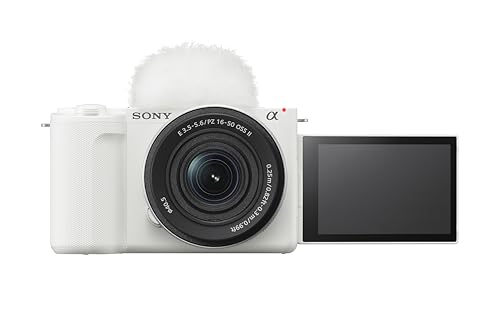
- The Sony ZV-E10 II is the best all-round business camera in this guide: stills, product video, and streaming in one body.
- The Canon EOS R50 is the value pick for sellers graduating from a phone.
- The DJI Osmo Pocket 3 is the walkthrough and market-stall specialist — stabilised video with almost no setup.
- Consistency beats peak quality in commerce: tethering, repeatable colour, and fast turnaround win listings.
In this guide
Quick Picks
| Camera | Badge | What it does for the business |
|---|---|---|
| Sony ZV-E10 II | Best all-rounder | Stills, product video, and clean streaming output with product-showcase autofocus built for sellers. |
| Canon EOS R50 | Best value starter | Friendly controls and strong colour straight from the camera for fast listing photography. |
| Sony Alpha 7 IV | Best for premium brands | Full-frame polish for hero images, lookbooks, and brands whose price point demands it. |
| Panasonic LUMIX S5II | Best for video-led shops | Serious product films, long livestreams, and stabilised walkthroughs without overheating anxiety. |
| Canon PowerShot G7 X Mark III | Best compact for makers | A bright-lens compact for craft fairs, workshops, and quick listing shots anywhere. |
| DJI Osmo Pocket 3 | Best for walkthroughs | A gimbal camera that makes premises tours and stall videos smooth in one take. |
How We Chose These Picks
We evaluated these cameras the way a working seller would: by shooting a listing. Each candidate was judged on a standard commercial set — a textured product on a plain background, a garment with a pattern that exposes moiré and colour drift, a reflective object that punishes weak lighting control, and a sixty-second spoken product demo. Cameras that produced a publishable set quickly, with the least editing, ranked above cameras whose files were marginally finer after an hour of correction.
Colour accuracy was weighted as a returns issue, not an aesthetic one. A dress photographed a shade warmer than reality comes back in a returns parcel with a note attached, and the postage is yours. We favoured cameras whose colour science is trustworthy out of camera and whose custom white balance is quick to set against a grey card — the ten-second habit that separates professional listings from hopeful ones.
Video and streaming manners were tested as commerce, not cinema: how fast the camera connects as a webcam or via capture, whether it can run for a full livestream sale without drama, how its autofocus behaves when a product is held toward the lens — the single most common shot in online selling. Product-showcase focus modes, which lock onto an object presented to the camera and return to the presenter afterwards, earned real points because they remove an assistant from the payroll.
Finally, we costed the system around each camera, not just the body: the standard lens a seller actually needs, a tripod-friendly body design, tethering support for studio sellers, and the availability of affordable lenses as the business grows from tabletop to lookbook. A business camera is a platform decision disguised as a purchase.
Why Do Product Photographs Decide What Sells?
Because the listing photograph carries information the customer cannot get any other way, and uncertainty is the enemy of the buy button. A sharp, honest, well-lit image answers the silent questions — what is the texture, how big is it really, what does the clasp look like, is this the colour I think it is — and every unanswered question is a reason to click the competitor instead. Marketplaces know this; their search rankings quietly reward listings whose images hold attention, which makes the camera a marketing expense as much as a photographic one.
Video multiplies the effect for anything that moves, fits, pours, opens, or glows. A thirty-second demo of a bag’s interior, a jacket worn and turned, a candle lit and carried through a darkening room communicates scale and quality in a way no still can, and it pre-answers the questions that otherwise become returns. Sellers consistently report that their first good product video does more for a listing than their tenth good photograph — which is why every pick in this guide takes video seriously.
There is a trust dimension that beginners underestimate. Consistent, professional imagery signals a business that will also pack carefully, answer messages, and still exist next month; inconsistent imagery — mixed lighting, changing backgrounds, phone snapshots beside polished shots — signals the opposite, fairly or not. A dedicated camera’s deepest commercial value is that it makes consistency easy: same lens, same light, same colour, every listing, every week.
None of this requires studio grandeur. The setups in this guide assume a table, a window or an affordable light, and a background that stays out of the way. The camera’s job in that modest theatre is to be reliable, truthful, and quick — the three virtues the pick-by-pick section now examines in turn.
What Does the First Month of Shooting Your Own Products Teach You?
Week one teaches light, rudely. The new camera — any camera — reveals that the room you have been photographing products in with a phone is two different rooms: the one near the window in the morning, which flatters everything, and the one under the ceiling light at night, which forgives nothing. Sellers respond in one of two ways: they schedule shooting into the good light like professionals, or they buy the affordable continuous light that makes all hours equal. Both are correct; drifting between them is the only error.
Week two teaches the tyranny of the background. A surface that looked ‘plain enough’ in person becomes, on a listing, a theatre of crumbs, creases, and cables. The lesson generalises into the studio corner discipline this guide recommends — one surface, one backdrop, nothing within the frame that is not selling — and it is usually the week a catalogue visibly transforms from homemade to professional in customers’ eyes, without the camera changing at all.
Week three teaches colour, usually through a return. A customer writes that the scarf is ‘more orange than the photo’, and the seller discovers white balance the way most people discover plumbing — urgently and permanently. The grey card enters the workflow, the reference frame habit begins, and the business’s return rate starts a slow, measurable decline that the accounts will notice before the photography forum ever hears about it.
Week four teaches throughput. The seller who shot six products in the first session now shoots twenty in the same time, because the setup never moved, the settings live on a card on the wall, and the shot story — hero, scale, detail, honesty, in-use — has become choreography. This is the week the camera’s purchase price stops looking like a cost and starts looking like the cheapest hire the business ever made.
A month also teaches the limits honestly. The seller learns which products defeat the current setup — the mirror-polished, the transparent, the enormous, the alive — and can price the solutions rationally: a polarising filter, a larger backdrop, a specialist shoot twice a year for the impossible pieces. Knowing precisely which five per cent of a catalogue needs outside help is a professional skill, and the camera teaches it by failing informatively.
The month’s final lesson is about the founder’s own eye. After a hundred products, the seller starts seeing the shop the way customers do — which listings look tired, which products photograph above their price, which deserve the hero treatment. That seeing, more than any single image, is what the camera was bought for. The equipment was always a way of purchasing attention; the attention is what compounds.
Which of the Best Cameras for Online Business Matches Your Shop?

Sony ZV-E10 II — Best all-rounder
The ZV-E10 II reads like a camera designed by someone who has actually run a store. Its product-showcase autofocus — hold an item toward the lens and focus snaps to it, lower it and focus returns to your face — removes the most awkward moment in every solo product video ever filmed. Around that trick sits a complete business tool: crisp stills for listings, strong 4K video for demos, a flip screen for working alone, and clean output for streaming when the shop goes live.
Sony’s lens shelf is the business argument underneath. Start with the kit zoom for listings; add an affordable fast prime when the brand’s photography needs to soften backgrounds and look expensive; the same body keeps serving as the catalogue grows from tabletop products to worn garments to a small studio corner. Few purchases in a young business scale this gracefully.
One workflow detail elevates the ZV-E10 II from good to obvious for sellers: its background-defocus and product modes are arranged for a person working alone at arm’s length from the camera, which is the actual posture of e-commerce. The solo seller is simultaneously presenter, camera operator, and floor manager, and every feature that removes a trip back to the tripod — a flip screen that can be read from in front, focus that handles the product handover, recording that starts without a menu — is measured in listings per hour by the end of the month.
- Sensor: APS-C, strong stills and 4K video
- Autofocus: product-showcase mode for solo demos
- Screen: vari-angle for working alone
- Streaming: clean USB and HDMI output
- System: Sony E — deep, affordable lens bench
Strengths
- Product-showcase focus is built for sellers
- One body covers listings, demos, and livestreams
- Lens upgrade path at every budget
Trade-offs
- No in-body stabilisation — a tripod earns its keep
- Rolling shutter in the fastest pans
- Viewfinder absent — screen-only composition
Craft and marketplace sellers should note its colour manners: skin and product tones stay honest, and the camera’s picture profiles can be left alone entirely — the files are sellable straight from the card, which for a one-person business shipping orders the same afternoon is worth more than any laboratory advantage.
If the business plan includes a weekly livestream sale, this is the pick to build around: it presents, it demonstrates, it streams, and it does all three without an operator. Solo founders are the crew of their own productions; this camera is designed for a crew of one.
Best for: solo sellers doing stills, demos, and livestreams. Not suited for: handheld walkthrough filming as the main job

Canon EOS R50 — Best value starter
The R50 is the graduation camera: the one a seller buys when the phone starts costing sales. Canon’s colour — particularly skin tones and the warm materials of food, wood, leather, and textiles — comes out of this camera looking like the product on a good day, with minimal editing, and its guided menus make the step from phone to camera the gentlest in this guide. For a first dedicated business camera, confidence is a feature, and the R50 manufactures it.
Its stills will carry a young catalogue for years, and its video is entirely respectable for demos and social clips. Where it concedes to the Sony is in streaming polish and showcase tricks; where it wins is price of entry and the speed with which a non-photographer becomes a competent listing photographer. For handmade, food, and vintage sellers especially, that speed is the whole business case.
The R50’s quiet superpower is JPEG discipline. Many sellers never open a raw editor and never should; their workflow is shoot, select, upload. Canon’s in-camera rendering — its colour, its noise handling at the sensitivities a lamp-lit room demands, its lens corrections applied without asking — produces uploadable files at a rate that keeps a small catalogue current. In commerce, the best file is the one that exists on the listing today, and the R50 manufactures those files with the least ceremony in this guide.
- Sensor: APS-C, pleasing colour straight from camera
- Menus: guided, beginner-friendly
- Video: capable 4K for demos and clips
- Screen: vari-angle for solo work
- System: Canon RF, growing affordable range
Strengths
- Fastest route from phone to professional listings
- Canon colour flatters products and people
- Gentle learning curve for non-photographers
Trade-offs
- Fewer streaming refinements than the Sony
- Lens range younger than Sony E
- No in-body stabilisation
Vintage and second-hand sellers get a specific gift here: the R50’s honest colour and good macro-capable kit options photograph one-off items quickly and truthfully — essential when every listing is a unique object that must be shot, sold, and shipped before the next arrives. Throughput is a vintage seller’s margin, and this camera is built for throughput.
Pair it with a simple two-light setup and a grey card before buying any lens upgrade. In listing photography, light is the senior partner; the R50 plus good light will outsell a flagship camera under a ceiling bulb every week of the year.
Best for: new and growing sellers leaving the phone behind. Not suited for: livestream-first businesses wanting showcase focus tricks

Sony Alpha 7 IV — Best for premium brands
Some businesses sell on price; others sell on the feeling that the object is worth more. The Alpha 7 IV is for the second kind. Its full-frame files carry the depth, tonal smoothness, and low-light grace that make hero images look like a brand rather than a listing — the difference a customer feels on a jewellery page, a leather goods storefront, or a boutique whose prices need visual justification.
It is also the professional’s safety net: dual card slots for a paid shoot that cannot be lost, resolution that survives cropping a hero image into three detail shots, and video strong enough for brand films. A business whose imagery is its moat — fashion, beauty, premium homeware — should cost this camera against a single professional photoshoot; it usually wins by the second month.
The Alpha 7 IV’s resolution deserves translation into shop language: it means one photograph can serve as the hero image, the zoomed detail a marketplace creates automatically, the social crop, and next season’s packaging shot. Businesses re-shoot products constantly because earlier files were too small for a new use; a high-resolution master file is a small insurance policy against that labour, and professionals price it accordingly. For a brand with a stable catalogue of hero products, the arithmetic is compelling.
- Sensor: full-frame, 33 megapixels
- Cards: dual slots for shoot security
- Video: high-quality 4K for brand films
- Autofocus: eye and product tracking excellence
- System: Sony E — the deepest professional bench
Strengths
- Hero images with genuine brand polish
- Cropping room turns one shot into several
- Professional reliability features throughout
Trade-offs
- Costs like the professional tool it is
- Full-frame lenses extend the investment
- More camera than a tabletop catalogue needs
Lookbook and campaign work is where it separates from the APS-C picks: models in mixed light, garments whose texture is the selling point, locations that cannot be lit like a studio. The files hold together in print as well as on screen, which matters the season the business adds packaging, signage, or a trade-show wall.
If the plan is to hire a photographer later, note that this is the class of camera they will expect to find — a small, unglamorous argument that has settled more than one purchasing meeting.
Best for: premium brands whose imagery justifies their prices. Not suited for: budget-first sellers with simple tabletop needs

Panasonic LUMIX S5II — Best for video-led shops
The S5II is the camera for businesses where video is not a garnish but the shop floor: furniture and equipment sellers whose demos close the sale, course creators filming long sessions, boutiques running extended livestream events. Its stabilisation lets a presenter walk a product around a room without a gimbal; its recording manners suit long takes; and its full-frame stills keep the listing photography at the same standard as the films.
Panasonic’s video heritage shows in the details sellers actually use — monitoring tools that keep exposure honest, colour that grades gracefully when the brand wants a look, and a body that treats a two-hour livestream as a normal afternoon rather than an endurance event. For a business budgeting one serious camera for a video-first storefront, this is the safest pair of hands in the guide.
The S5II’s stabilisation changes what a product film can be at small-business scale. A presenter can carry a lamp, a chair, a garment on its hanger through the showroom in one continuous, level shot — the kind of footage that once required a gimbal, an operator, and rehearsal. Continuous movement sells space and scale better than any cut, and for furniture, equipment, and premises-led businesses it is the difference between a listing that describes size and one that demonstrates it.
- Sensor: full-frame, excellent stills and video
- Stabilisation: in-body, strong for walkthroughs
- Video: long-form and livestream friendly
- Tools: professional exposure monitoring
- System: L-mount lenses from several makers
Strengths
- Video-led storefronts served end to end
- Walk-and-talk demos without a gimbal
- Long sessions handled calmly
Trade-offs
- Autofocus a step behind Sony for frantic demos
- Full-frame kit weight and cost
- Stills burst pace is ordinary
Showrooms and workshops are its parish: the camera that films the joiner at the bench, the restorer turning a chair in the light, the dealer walking a row of machines. Stabilised, honest, long-running — it turns premises into a channel, which is increasingly what a premises is for.
Course creators should weigh its long-session manners heavily. A camera that can be trusted through a three-hour recording day, in a warm room, without a minder, changes what a one-person education business can publish in a week.
Best for: video-first businesses, showrooms, and course creators. Not suited for: stills-only catalogue sellers watching budget

Canon PowerShot G7 X Mark III — Best compact for makers
Not every online business has a studio corner; many have a market stall, a workshop bench, a kitchen table that must be cleared for dinner. The G7 X Mark III is their camera — a compact with a bright lens and a one-inch sensor that photographs products beautifully wherever the making happens, then slips into a pocket when the space must become something else.
Its video is creator-grade, with a microphone input for the maker narrating a process, and its stills carry the colour and low-light ability that stall and workshop lighting demand. What it surrenders is the system future — no lens changes, no tethering theatre — and for the maker-seller whose photography must fit around the actual work, that surrender is the point.
The G7 X Mark III earns a second examination on audio, of all things. Its microphone input transforms the maker’s process video: the narration recorded on a small external mic, close and clear, while the camera sits at the bench. Process content — the making shown honestly — is the handmade sector’s strongest marketing, and it lives or dies on whether the maker’s voice sounds present. A compact that accepts a real microphone is a compact that understands its parish.
- Sensor: 1-inch type, bright fixed zoom
- Video: strong, with microphone input
- Body: pocketable — the studio that travels
- Stills: excellent in workshop and stall light
- System: none — deliberately self-contained
Strengths
- Professional listings from a kitchen table
- Process videos with proper audio options
- Zero setup — photograph between making
Trade-offs
- Fixed lens caps the business’s growth
- No tethering for high-volume studio work
- Small body, small battery — carry a spare
Craft-fair sellers live a double life — making all week, selling in person at weekends, listing the remainder online — and this camera serves all three without a bag of its own. Photograph the new stock at the stall in morning light, film the technique clip at lunch, list from the sofa at night.
It is also the honest recommendation for businesses where the camera competes for budget with materials and rent. Its images will not be the reason a good product fails to sell, and that is the exact standard a working tool must meet.
Best for: makers, stallholders, and kitchen-table businesses. Not suited for: growing brands needing interchangeable lenses

DJI Osmo Pocket 3 — Best for walkthroughs
The Pocket 3 is a camera on a gimbal the size of a chocolate bar, and for a certain kind of online business it is not a compromise but the ideal: estate-adjacent sellers, showroom tours, market traders, Airbnb-adjacent product stories, anyone whose selling happens while walking. Its stabilisation turns a stroll through stock into footage that looks professionally crewed, and its rotating screen starts and frames a shot in seconds.
Stills are a side dish — adequate for social posts, not a listing workflow — so the Pocket 3 is bought as the business’s video specialist alongside whatever takes the product photographs, or as the only camera of a business that sells entirely through video. Judged on those terms it has no rival in this guide for speed from pocket to publishable tour.
The Pocket 3’s tracking deserves its paragraph: lock it onto a presenter and it will hold them in frame through a walk of the entire premises, panning with a smoothness that reads as a camera operator’s hand. For the business whose premises are the product — the studio, the salon, the showroom, the holiday property — that single capability replaces a shelf of equipment. Its weakness remains stills, and the honest setup pairs it with any competent stills camera, including the phone it was bought to outgrow.
- Form: gimbal-stabilised camera, pocket size
- Screen: rotating, fast vertical and horizontal framing
- Video: smooth walkthroughs, strong tracking
- Audio: good onboard, wireless mic ecosystem
- Stills: social-grade, not a catalogue tool
Strengths
- Walkthrough footage that looks crewed
- Fastest setup of any pick here
- Face and product tracking for solo presenters
Trade-offs
- Stills cannot carry a listing catalogue
- Small sensor in dim interiors
- A specialist — pair it with a stills camera
Property-adjacent and experience businesses have adopted it wholesale: the holiday let walkthrough, the studio tour, the workshop visit that sells the course. One continuous smooth take, narrated live, outperforms a gallery of stills for anything whose value is spatial — and it can be filmed between other jobs.
Livestream sellers who move — through racks, shelves, and stockrooms — should test it against their current rig before buying anything else in this guide. The freedom of a camera that stabilises itself and tracks its presenter is difficult to un-experience.
Best for: businesses that sell by walking and showing. Not suited for: stills-led catalogue sellers
How Do You Set Up a Repeatable Product Photo Corner?
Choose the corner for its light and its permanence, in that order. A spot near a large window, or a fixed affordable light that never moves, matters more than any backdrop purchase — because repeatability comes from light that is the same on Tuesday as it was in March. Mark the tripod’s feet with tape, note the camera settings on a card taped to the wall, and the business has acquired its most underrated asset: a setup that a tired founder, or a new assistant, can reproduce exactly.
Fix the colour before fixing anything else. Set a custom white balance from a grey card under your actual light, save it as the studio preset, and photograph one reference product — something with known colours — as the first frame of every session. When that reference frame looks right, the batch will be right; when it drifts, you have caught the problem before it becomes forty listings.
Shoot the set, not the shot. A selling listing is a small story told in a fixed order — the hero frame, the angle that shows scale, the detail that proves quality, the flaw honestly shown before a customer discovers it, the object in use. Photograph every product through the same story and the catalogue acquires the consistency that reads as professionalism, while your shooting time per product falls with every week of practice.
Name and file like a business, on the day. Product code, angle, date — a naming habit that takes ten seconds per file and saves hours per month, because the true cost of business photography is rarely the shooting; it is finding, resizing, and re-uploading the right frame in November for a product shot in June.
Which Business Model Needs Which Camera?
The catalogue seller — many products, plain backgrounds, relentless throughput — needs tethering manners, repeatable colour, and speed: the ZV-E10 II or R50, chosen by whether streaming is on the roadmap. Their camera is a production line worker and should be specified like one.
The brand seller — fewer products, higher prices, imagery as identity — needs the Alpha 7 IV’s polish or the S5II’s film craft, and should budget for the lens and light that let those bodies perform. Their camera is the art department.
The presenter seller — livestreams, demos, courses, walkthroughs — lives on autofocus that handles products held to camera and stamina for long sessions: ZV-E10 II at the desk, S5II on the floor, Pocket 3 on the move. Their camera is the co-host.
The maker seller — photography fitted around production, in real workspaces — needs the G7 X Mark III’s zero-setup honesty, possibly with the Pocket 3 for process films. Their camera is a tool among tools, and it should behave like one.
Tethering deserves its own examination for catalogue sellers approaching real volume. Shooting into a computer — each frame appearing large, named, and backed up the second it is taken — changes a session’s economics: flaws are caught while the product is still on the table, an assistant can rename and sort in real time, and the end of the session is the end of the work. The system cameras in this guide support it through their makers’ software or standard tools; the compacts, deliberately, do not, which is one honest line between the catalogue business and the maker business.
Marketplace image rules are a constraint to design around rather than discover. Each platform crops, compresses, and sequences images by its own logic; the hero frame that sings on your own website may be centre-cropped into nonsense elsewhere. Shoot the hero with margin — product centred, breathing room on all sides — and export platform-specific crops from the master file rather than re-shooting. The camera cannot know the platforms’ rules; the workflow must.
Video commerce has its own first principle, and it is not cinematic: answer the question the listing cannot. Every product has one thing photographs fail to convey — how it opens, how it drapes, how loud it is, how it feels at scale in a hand. The sixty-second demo exists to answer exactly that, which is why rehearsed specificity outperforms production gloss. A seller who can state their product’s one unphotographable truth owns their first video script already.
Livestream selling adds a second principle: the camera is furniture. It must sit at a height and distance that lets the presenter handle products naturally for hours, framed by lights that do not cook the presenter by the second hour. The picks favoured for streaming in this guide earned their places on stamina and manners — feeds that stay clean, focus that behaves when products approach the lens, power that does not negotiate. Test any livestream rig for a full session length before the audience is invited; commerce hates a premiere.
Insurance and records sound beneath a camera guide’s dignity until the first disaster. A business’s product photographs are assets; the camera’s cards are not their home. A same-day copy to the computer and a weekly copy elsewhere — cloud or a drive that lives off the premises — is the whole policy. Sellers have rebuilt stock after fires from many things; nobody has ever rebuilt a catalogue from memory.
Accessibility is a commercial virtue hiding as a courtesy. Alt text written from real knowledge of the product, captions on demos, and honest scale references serve customers whom competitors’ listings silently exclude — and marketplaces increasingly reward the completeness. The camera’s contribution is frames clear enough to describe accurately; the habit of describing them belongs to the seller, and it pays.
There is a seasonal rhythm to business photography that planning can exploit. Shoot the evergreen catalogue in the quiet months, when light and time are both cheaper; reserve the busy season for new arrivals and hero refreshes. A camera bought in the quiet season — with its setup debugged before the rush — is worth two bought in November, and sellers who have lived one frantic season on phone photographs rarely need the argument twice.
Assistants change the specification in one way worth naming: the setup must be teachable. A settings card on the wall, a shot story anyone can follow, a camera whose menus do not punish the occasional user — these decide whether the founder can delegate photography or is chained to it. The R50’s friendliness and the ZV-E10 II’s solo design both serve delegation differently: one by being easy to hand over, the other by making handover unnecessary.
Finally, measure the camera the way the business measures everything: listings refreshed per hour, return rate on photographed-versus-unphotographed stock, conversion before and after the first video. Cameras bought on those numbers get upgraded on those numbers, and the upgrade conversation — when it comes — will be the calmest purchasing decision the business makes all year.
Returns deserve one more angle, because sellers consistently misread their own data. A return marked ‘not as expected’ is often a photograph’s failure wearing the product’s name — the size was imaginable only beside a hand that was never shown, the colour was true only under a light the customer does not own. The discipline of showing scale honestly — a hand, a coin’s modern equivalents, the object in a real room — costs one extra frame per listing and buys back postage, fees, and the quiet algorithmic penalty returns carry. The camera’s part is detail honest enough to bear that scrutiny.
There is also the question of when to stop improving the photography and improve something else. Once listings are consistent, colour-true, and video exists for the products that move, the marginal hour is usually better spent on the products, the descriptions, or the prices. The mature seller’s camera gathers no dust — it shoots every new arrival through the same reliable routine — but it has stopped being a project. That plateau, reached deliberately, is the real return on the purchase, and it is why this guide ranks reliability and repeatability above every laboratory virtue.
For businesses selling through their own website as well as marketplaces, one master archive serves both masters. Shoot once, at the highest quality the workflow tolerates, and derive every platform’s crops and sizes from that master. The sellers who maintain separate shoots per platform are paying twice for the same afternoon forever; the archive discipline — product code, date, master file, derivatives — is unglamorous, teachable, and worth more than any single camera body discussed here.
Packaging and unboxing have become part of the product’s photographed life, and the wise seller shoots them too: the box as the customer receives it, the layers as they open, the care card where it actually sits. Those frames answer the gift-buyer’s questions, set delivery expectations honestly, and give the business’s social channels a steady supply of truthful theatre. A camera already set up for the product is set up for its packaging at no extra cost but ten minutes.
Wholesale and press opportunities arrive disguised as image requests. A buyer, a journalist, or a marketplace editor asks for high-resolution files by Friday, and the business with an organised archive and a camera that shoots print-capable masters says yes while competitors are re-shooting in a panic. Several sellers trace their largest single order to exactly such a Friday. Professional imagery is not only conversion; it is readiness.
And when the business grows a second pair of hands — a packer who photographs, a partner who films — the camera choices in this guide reveal their last virtue: none of them requires its owner’s genius to operate. The routine, the settings card, and the shot story transfer. Equipment that can be handed over is equipment that scales, and scaling, in the end, is the entire subject of a camera bought for a business.
A closing thought on the founder’s own photograph — the maker’s hands in frame, the seller’s face in the welcome video. Businesses hide behind product photography longer than they should, because customers buy from people they can picture. Every camera in this guide photographs its owner as willingly as its owner’s stock, and the listing page or channel that finally includes the human being usually watches its messages change tone within the week: warmer, more patient, more loyal. The camera was bought for the products. Its best frame may be the portrait.
Shoot the business, occasionally, as well as the products: the bench mid-morning, the parcels going out, the stall before the crowd. Those frames become the website’s about page, the marketplace’s banner, the press kit’s evidence that a real operation stands behind the listings — and they age into the business’s own history, the photographs a founder looks back on when the kitchen table has become a warehouse. The camera bought for conversion turns out to have been bought for memory as well; most good equipment is.
The discipline that survives every platform change is embarrassingly simple: same corner, same light, same story, every product, every week. Algorithms will rename their requirements and marketplaces will redesign their pages, but a catalogue that looks like one business, photographed by one careful hand, keeps converting through all of it. That is the asset the camera was really bought to build.
How Do the Six Business Cameras Compare?
| Camera | Stills | Video and streaming | Handling | Best business fit |
|---|---|---|---|---|
| Sony ZV-E10 II | Excellent | Excellent, showcase focus | Screen-based, solo-friendly | All-round solo seller |
| Canon EOS R50 | Excellent | Good | Guided, friendly | Phone graduates |
| Sony Alpha 7 IV | Outstanding | Excellent | Professional | Premium brands |
| Panasonic LUMIX S5II | Excellent | Outstanding, long sessions | Professional | Video-led shops |
| Canon PowerShot G7 X Mark III | Very good | Very good | Pocketable | Makers and stalls |
| DJI Osmo Pocket 3 | Basic | Outstanding walkthroughs | One-handed | Tours and livestreams on foot |
What Mistakes Cost Online Sellers the Most?
Buying resolution when the problem is light. A dim, unevenly lit product photographed on any camera in this guide will lose to a well-lit product photographed on the cheapest of them. Light first, background second, camera third — sellers who reverse the order spend twice to learn it once.
Shooting every listing differently. Changing backgrounds, distances, and colour treatment product by product makes a catalogue look like a jumble sale and quietly taxes conversion on every page. The fix is a written setup — the corner, the settings card, the shot story — and the discipline to bore yourself with it.
Photographing colour approximately. ‘Close enough’ colour is the returns department’s best recruiter, particularly in clothing, cosmetics, and homeware. A grey card and ten seconds of white-balance care per session is the cheapest insurance in e-commerce; skipping it is a decision to pay postage on your own mistakes.
Treating video as next year’s problem. The competitors filming demos this year are answering, on the listing itself, the questions your customers are asking in messages at midnight. Any pick in this guide can start a business filming this week; the only true barrier is the belief that the first video must be good rather than merely honest and clear.
Neglecting the presenter skills the camera cannot supply. A flip screen and showcase focus help enormously, but the businesses that sell on video rehearse the sixty-second demo until it is a routine — product up, three true sentences, the detail shot, the close. Buy the camera, then spend the first week practising the routine; the second week is when it starts paying.
Final Recommendation
Match the camera to the revenue task. The Sony ZV-E10 II is the default recommendation for most online businesses — listings, demos, and livestreams from one solo-friendly body with a lens shelf to grow into. The Canon EOS R50 brings phone graduates to professional listings fastest and cheapest. Premium brands should step to the Sony Alpha 7 IV; video-led shops and course creators to the Panasonic LUMIX S5II. Makers and stallholders will get the most honest work from the Canon PowerShot G7 X Mark III, and any business that sells by walking should add — or start with — the DJI Osmo Pocket 3. Buy the light and the grey card in the same order, tape the tripod marks this week, and the camera will repay the business the way good equipment does: quietly, weekly, in conversion.
Related guides
Frequently Asked Questions
Can I run an online business with just my phone camera?
At the testing stage, yes — a recent phone is a legitimate way to learn whether a product sells. The case for a dedicated camera begins when listings multiply, video becomes a weekly habit, and you can see a competitor’s imagery out-converting yours. At that point the camera’s cost is usually recovered through conversion and reduced returns faster than almost any other equipment purchase a small business makes.
Which matters more for product photos: the camera or the lens?
Within this guide’s class, the lens and the light matter more than small differences between bodies. A standard zoom covers most catalogues; a fast prime transforms worn garments, food, and premium goods by separating them from their backgrounds. Budget in this order: light, lens, body — and remember that every body here is already good enough to sell with.
Do I need tethering for a product photography workflow?
Only when volume demands it. Tethering — shooting straight into a computer, seeing each frame large instantly — transforms high-throughput catalogue work and team workflows, and the system cameras here support it. A maker shooting five products a week gains little from it and loses setup simplicity. Adopt it when the number of products per session makes checking frames on a small screen the bottleneck.
How do I stop my product colours looking wrong?
Set a custom white balance with a grey card under your own lights, keep those lights consistent, and photograph a reference product at the start of each session to confirm nothing has drifted. Avoid mixing window daylight with warm room bulbs in the same shot — mixed light is the one colour problem no camera can fully solve. These habits, not the camera model, are what separate accurate listings from approximate ones.
Is a full-frame camera worth it for a small shop?
For most small shops, no — the APS-C picks here produce listings indistinguishable in quality at screen sizes, for meaningfully less money that is better spent on light and lenses. Full-frame earns its place when the brand’s price point depends on imagery polish, when print and large displays enter the business, or when paid shoots make reliability features like dual card slots a form of insurance.
What should my first product video setup be?
The camera on a tripod at arm’s length, the presenter lit by the same light used for stills, the product-showcase routine rehearsed to sixty seconds: product raised, three true sentences about it, one detail shown close, one honest limitation, the close. Add a microphone before adding any lens — audiences forgive plain pictures in a demo far sooner than they forgive unclear speech — and publish the tenth take’s competence rather than waiting for a perfect first.
Do I need a tripod for product photography?
For stills, effectively yes — not for glamour but for repeatability. A tripod holds the frame identical across a whole catalogue, lets you use the slow shutter speeds that modest lights require, and frees both hands to style the product. It need not be expensive; it must be stable and tall enough for your table. For video walkthroughs the stabilised picks here can work handheld, but the desk demo, like the still, belongs on legs.
How many products can one person realistically shoot in a session?
With a fixed setup and a practised shot story, a solo seller photographs fifteen to thirty simple products in a half-day session, including selection and basic processing — and far fewer garments on a model or complex reflective pieces. The number that matters is your own second month compared with your first; the setup discipline in this guide typically doubles it, which is the camera purchase repaying itself in the only currency a small business cannot print: the founder’s hours.
Related Guides
Once the storefront camera is chosen, the supporting guides most sellers read next are our guide to cameras for livestream selling and product demos our webcam and streaming camera roundup for online courses our compact camera guide for makers and market traders


