ilcastellomenu.com is reader-supported. When you buy through links on our site, we may earn an affiliate commission.
Where to Buy
Sellers searching for the best cell cameras for etsy usually mean something refreshingly practical, so let us say it plainly in the open: on Etsy, the camera that matters most is the phone already in your pocket, because listings are photographed between packing orders, answering messages and living a life. “Cell cameras” in this guide therefore means phone cameras first, judged honestly as shop tools, with a second honest route alongside them: the compact and small mirrorless cameras that sellers graduate to when product photographs start deciding real income.
That framing shapes the six picks below. Three are phones, recommended in prose without shopping links, because phone buying belongs to contracts, carriers and personal taste far beyond a listing guide’s remit. Three are dedicated cameras from our verified pool with links, offered as the upgrade path for sellers whose knitwear, ceramics, jewellery or prints have outgrown what a phone can flatter. Both routes are treated with equal respect, because both, used well, sell things.
What Etsy photographs must do differs from what holiday photographs must do. A listing image has roughly a thumbnail’s worth of time to stop a scrolling thumb, then a zoom’s worth of scrutiny to survive: weave, glaze, stitching, solder joints and paper grain all get inspected by buyers who cannot touch the object. Colour accuracy is commercial honesty here, because a scarf photographed bluer than it is becomes a return, a refund and a review that mentions the word “disappointed” in the first line.
Key Takeaways
- Your current phone is a legitimate Etsy camera; technique usually outranks hardware.
- Colour accuracy protects you from returns more than sharpness wins you sales.
- Window light plus a plain background beats most equipment upgrades.
- Phones win on speed from photograph to published listing.
- A compact camera earns its keep when texture and detail close the sale.
- Consistency across a shop’s photographs reads as professionalism to buyers.
In this guide
Quick Picks
| Camera | Badge | Why it earns its place |
|---|---|---|
| Apple iPhone (current standard model) | Prose-only: the effortless listing machine | Fast, colour-confident photographs and an editing flow that publishes listings in minutes. |
| Google Pixel (current model) | Prose-only: the colour truth-teller | Computational care with tricky colours and textures suits dyed, glazed and woven goods. |
| Samsung Galaxy (current model) | Prose-only: the bright-screen workhorse | A vivid screen for checking shots on location and flexible cameras for varied stock. |
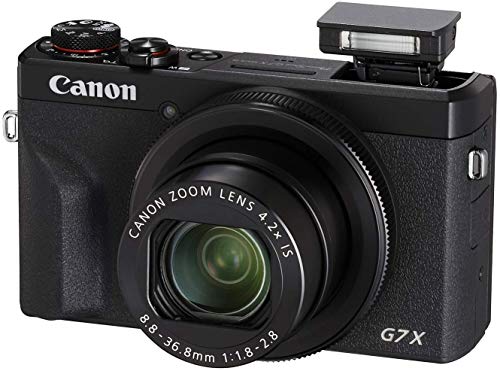
| Canon PowerShot G7 X Mark III | The pocket product-photo upgrade | A bright lens and larger sensor render texture and shallow depth a phone cannot fake as well. |
| Sony ZV-E10 II | The video-and-listing creator pick | For sellers adding reels, process videos and live selling to still listings. |
| Canon EOS R50 | The serious shop camera | Interchangeable lenses and honest files for sellers whose photographs are the brand. |
How Did We Judge Cameras as Shop Tools Rather Than as Gadgets?
Reviewers usually judge cameras on holidays and wildlife; sellers need them judged on a Tuesday at the kitchen table with eleven orders waiting. So the criteria here were commercial: how fast can a seller go from object to live listing, how truthfully do colours survive the journey, how well does texture read at thumbnail size and at full zoom, and how forgiving is the tool when the light is a north-facing window in November rather than a studio?
Every pick was also weighed on the hidden labour around the photograph. A camera whose files need an hour of correction per batch quietly taxes a small business, while a phone that shoots, edits and uploads inside one app returns that hour to making stock. Conversely, a dedicated camera that renders a glaze or a gemstone so much better that returns fall and prices rise pays its rent in the other direction. The guide keeps both ledgers open, because Etsy sellers, of all photographers, know that time and money are the same account.
Finally, shops were imagined at different scales. A hobby seller listing six items a month needs different advice from a studio dispatching daily, and the picks below are ordered as a ladder between those lives rather than as a single verdict. Start where your shop actually is; climb when the photographs, not the forums, tell you to.
Why Does Colour Accuracy Matter More on Etsy Than Anywhere Else?
A photograph of a sunset may be as blue as its maker likes; a photograph of a hand-dyed scarf is a promise. Buyers order the colour they saw, and every gap between the listing and the parcel becomes friction: messages, returns, partial refunds and the particular sorrow of a disappointed review that begins “lovely item, but”. Phone cameras, tuned to please, sometimes warm skin and saturate food in ways that flatter people and betray products, which is why sellers learn to check a photograph against the object in the same light before publishing.
Certain goods are notorious witnesses. Reds drift orange, purples slide toward blue, glossy glazes mirror the room instead of showing their depth, and white backgrounds expose every white-balance hesitation as a grey or yellow cast across a whole shop. The picks below earned their places partly on how calmly they handle those witnesses, and the technique sections that follow matter just as much: a grey card, a consistent window and a locked white balance will rescue a modest camera and embarrass an expensive one used carelessly.
There is also a trust dividend that compounds quietly. A shop whose colours arrive as photographed earns reviews that praise accuracy, and those reviews sell the next hundred items to buyers who have been burned elsewhere. In that sense the best camera for a seller is partly a reputation machine, and its most valuable specification never appears on a box: the smallness of the gap between its pictures and your parcels.
What Makes a Listing Photograph Stop a Scrolling Thumb?
The first image in a listing works at the size of a postage stamp in a grid of rivals, so it must communicate one idea instantly: what this is, and why it is the good one. Phones excel here because their screens show the seller exactly the thumbnail buyers will see, and their bright, contrasty default rendering suits small sizes. Dedicated cameras answer with texture and depth, a knitted stitch you can almost feel, a ceramic glaze with a soft highlight rolling across it, which stop thumbs by promising substance rather than by shouting.
Backgrounds decide more stops than lenses do. A plain, light, uncluttered setting lets the object own the frame, while a styled scene, hands holding the item, a plant for scale, belongs in the later images where context persuades. Sellers who reverse that order, lifestyle first and clarity later, routinely watch inferior products outsell them purely on first-image discipline. Every camera in this guide can execute the disciplined version; the workflow sections below describe how to make whichever you own actually do it.
Consistency is the quiet multiplier. When a whole shop shares one background, one light direction and one colour mood, the grid of listings reads as a brand rather than a jumble sale, and buyers linger longer because the shop feels curated by someone careful. That feeling is available to a phone and a window as fully as to a studio, which is the most encouraging sentence in this entire guide for a seller starting out with empty pockets and full shelves.
Which Are the Best Cell Cameras for Etsy Sellers, Phone First and Camera Second?
Three prose-only phones lead, because they are what the keyword asks about and what most sellers will actually use; three linked cameras follow as the considered upgrade ladder.
Apple iPhone (current standard model) — Prose-only: the effortless listing machine
This pick is prose-only because the right iPhone for you depends on your carrier, your contract and the phone you already own, none of which a listing guide should pretend to settle. What can be said plainly is that a recent iPhone is the smoothest listing tool most sellers will ever hold: the camera opens instantly, focuses without negotiation, renders colours in a way buyers find familiar from their own phones, and hands its photographs to editing and listing apps with almost no friction in between.
Speed is its commercial superpower. A seller can photograph a finished piece on the workbench, crop and brighten it with a thumb, and have it live in the shop before the glue has dried, and that immediacy suits the rhythm of small-batch making where stock appears one piece at a time. The portrait mode’s background softness, used gently, can lift a product from a busy bench, though sellers should check edges carefully, because software blur that eats a necklace chain or a plant’s leaves looks worse than no blur at all.
- Format: phone camera, prose-only recommendation
- Workflow: shoot, edit and list inside one device
- Colour: familiar rendering buyers trust instinctively
- Video: strong short clips for listing videos
- Role: the default camera for most Etsy shops
Strengths
- Fastest route from finished item to live listing
- Colours buyers recognise from their own screens
- Enormous accessory and app ecosystem for sellers
Trade-offs
- Small sensor struggles in dim workrooms
- Portrait blur can mangle fine product edges
- Files please first and archive second
Its second gift to a seller is confidence in mixed company. Because so many buyers view listings on the same family of devices, what the seller sees while photographing is unusually close to what the buyer sees while deciding, and that symmetry quietly removes a whole category of “it looked different on my screen” disappointments. Few product pages anywhere can promise their makers that kind of preview honesty, and it is worth real money to a shop that lives on photographs.
Keep expectations adult. In a dark workshop the phone will lean on computation and longer processing, fine textures can smooth into watercolour at full zoom, and jewellery’s sparkle may need the help of the lighting technique described later. None of that dethrones it as the default; it merely marks the border where the linked cameras below start earning their shelf space.
Best for: most sellers, especially new shops and one-off makers who list as they finish pieces. Not suited for: texture-critical goods photographed in poor light all winter
Google Pixel (current model) — Prose-only: the colour truth-teller
Also prose-only, for the same contractual reasons as its rival above, the Pixel family has built its name on computational photography that treats difficult colour and awkward light with unusual intelligence. For Etsy purposes that translates into a phone that copes gracefully with the mixed lighting of real homes, warm ceiling bulbs arguing with cool window light, and that renders dyed yarns, glazed stoneware and painted surfaces with a fidelity sellers of colourful goods learn to lean on.
HDR handling is its listing-room party trick. A dark walnut box on a pale cloth, a black cat-shaped planter, a white candle against a bright window: scenes where one end of the brightness range usually dies are exactly where this phone’s processing keeps both ends alive. Sellers of high-contrast goods spend less time rescuing blown highlights or muddy shadows, and the saved minutes per listing compound across a season of stock into whole evenings returned.
- Format: smartphone camera, recommended in prose only
- Processing: strong handling of contrast and mixed light
- Colour: a reputation for truthful, calm rendering
- Editing: capable built-in tools for quick corrections
- Role: colourful and high-contrast stock specialist
Strengths
- Mixed household light forgiven gracefully
- Dark and pale goods in one frame survive
- Editing tools reduce app-hopping for sellers
Trade-offs
- Processing can over-tidy fine natural texture
- Video polish trails its stills reputation
- Availability and deals vary by region
Sellers of food-adjacent goods, soaps, candles, dyed textiles and art prints, tend to become this phone’s evangelists, because their stock lives and dies on hue. A bath salt that photographs the wrong pink is a small commercial tragedy repeated at scale, and a camera that keeps pink honest under kitchen light is not a luxury for such a shop but a form of insurance purchased once and claimed weekly.
The caution to attach is about texture rather than colour. Aggressive processing that rescues a dim scene can also iron the grain out of handmade paper or the tooth out of raw linen, and sellers should zoom to full size on a test listing before trusting a batch. Used with that one check as a habit, the Pixel is arguably the most forgiving phone a colourful shop can own.
Best for: dyers, glazers, painters and any shop whose stock argues with ordinary cameras about colour. Not suited for: sellers who want the absolute widest accessory ecosystem
Samsung Galaxy (current model) — Prose-only: the bright-screen workhorse
The third prose-only phone earns its place on a feature sellers underrate until they have worked a craft fair: the screen. Galaxy displays are bright and vivid enough to judge a photograph outdoors, in a market tent or beside a stall window, which makes this the phone of the seller who photographs where the stock is rather than where the studio would be. Checking focus and colour at the point of shooting prevents the particular heartbreak of discovering soft images back home with the moment gone.
Its camera system is the flexible all-rounder of the three phones here, with zoom options that help a seller move from a whole-item view to a stitch-level detail without physically rearranging a display, and a rendering style that leans vivid. That vividness flatters many goods at thumbnail size, where listings are won, though the colour-accuracy sermon earlier in this guide applies double: compare against the object, and dial back any scene mode that makes a pastel nursery print shout like a sports poster.
- Format: handset camera, a prose-only pick
- Screen: bright enough for outdoor shot-checking
- Cameras: flexible zoom range for detail work
- Rendering: vivid by default, tames with settings
- Role: market, fair and workshop-floor photography
Strengths
- Judging shots outdoors is genuinely practical
- Zoom flexibility suits whole-item and detail pairs
- Strong battery for a full market day of shooting
Trade-offs
- Default vividness can betray pastel goods
- Large models are two-handed listing tools
- Processing style varies across the range
Consider the seller whose shop is seasonal and physical first: fairs in summer, a market stall in December, stock photographed on the stall between customers because that is where the light and the props already are. For that working life the Galaxy’s screen and stamina are not specifications but colleagues, and its photographs, checked on the spot and corrected while the display still stands, arrive home already trustworthy.
Back at a desk, its files behave like any good phone’s, quick to edit and list, and its detail zooms give a listing the macro-ish close-ups buyers use to inspect workmanship. Keep the vividness leash on, and this is the phone for sellers whose studio has wheels.
Best for: fair and market sellers, outdoor stalls and anyone photographing stock where it stands. Not suited for: pastel and colour-critical shops unwilling to tame default settings

Canon PowerShot G7 X Mark III — The pocket product-photo upgrade
Here the ladder leaves phones behind. The G7 X Mark III is the compact sellers buy when a phone’s files start costing sales: its larger sensor and bright lens render the textures Etsy buyers zoom into, knit, grain, brushstroke, glaze, with a physical honesty that computation imitates but cannot match in dim rooms. Yet it stays pocket-sized, so the photographing habit it asks for is barely heavier than the phone habit it replaces.
Shallow depth of field is its signature listing trick. A product placed a little way in front of a softly blurred background gains the crafted, boutique look that separates a premium shop from a marketplace crowd, and unlike phone portrait modes the blur here is optical, falling off naturally around chains, stems and handles instead of chewing their edges. Jewellery, candles, ceramics and stationery all photograph with a new sense of occasion through this little lens.
- Format: premium compact, one-inch-class sensor
- Lens: bright zoom for low-light product work
- Depth: genuine optical background softness
- Carry: jacket pocket, always on the premises
- Role: the first dedicated camera of a growing shop
Strengths
- Texture survives zoom scrutiny and dim light
- Optical blur flatters products without artefacts
- Small enough to keep the phone-era habit
Trade-offs
- Files need transferring before listing
- Fixed lens ends the growth path here
- Small body, modest battery reserves
The transfer tax deserves honest arithmetic. Photographing on a camera, moving files to a phone or computer, editing and listing adds minutes a phone skips, and for a seller listing two items a week those minutes are trivial while for a seller listing forty they are a workflow to design rather than a nuisance to endure. Shops at the higher volume usually build a fixed station, same background, same light, camera on a small tripod, so the tax shrinks to a routine measured in breaths.
Judged purely on photographs, though, this is where a shop’s ceiling visibly rises. Buyers zoom further, hesitate less and pay the prices that handmade work deserves when the images stop apologising for the goods, and many sellers date their shop’s serious chapter from the month a compact like this arrived.
Best for: growing shops selling texture-rich goods who want camera quality without a system. Not suited for: high-volume listers unwilling to add a transfer step

Sony ZV-E10 II — The video-and-listing creator pick
Some shops no longer sell through stills alone. Process videos, reels of hands at work, live selling sessions and listing clips have become part of how Etsy buyers fall for a maker, and the ZV-E10 II was designed from the flip screen outward for exactly that solo-creator labour. Its stills are properly strong, APS-C files with real texture, but its soul is in how easily it films the making while the maker is busy making.
Autofocus that understands products is the feature sellers write home about. Hold a finished piece toward the camera and focus settles on it; return to your face and the camera returns with you, which turns a one-person film crew into a feasible afternoon rather than a farce of retakes. For a shop adding video to listings that already sell, that reliability converts video from a monthly ordeal into a habit attached to every new piece.
- Format: APS-C mirrorless, creator-first design
- Screen: fully articulating for self-filming
- Focus: face and product presentation behaviour
- Lenses: interchangeable, grows with the shop
- Role: stills plus serious shop video in one body
Strengths
- Filming yourself making things feels designed-for
- Stills quality matches dedicated cameras here
- Lens system leaves years of headroom
Trade-offs
- No viewfinder for bright-day stills sessions
- Long filming needs power planning
- More camera than a stills-only shop requires
Think of this pick as buying the shop’s second channel. The stills it makes will satisfy the listings; the films it makes will satisfy the algorithms and the humans who buy from people rather than from catalogues. A potter’s thirty-second clip of a glaze opening in the kiln light sells the mug in a way nine stills cannot, and a camera that lowers the effort of such clips to an afterthought changes what a small shop can plausibly publish every week.
Sellers who never intend to film should walk past it toward the R50 below or the compact above, because unused video design is dead weight in a budget. Sellers already filming on a phone and cursing its focus will recognise this body as the answer to a very specific prayer.
Best for: makers adding process video, reels and live selling to a growing shop. Not suited for: stills-only sellers who want the simplest possible tool

Canon EOS R50 — The serious shop camera
At the top of this ladder sits the camera for the seller whose photographs have become the brand itself. The EOS R50 is a small interchangeable-lens mirrorless body whose files carry the depth, colour control and print-worthy detail that premium shops, the ones selling original art, fine jewellery and heirloom textiles, need when buyers zoom with serious money in mind. Its guided menus keep that power approachable for a maker whose expertise is in the product, not the camera.
Lenses are the long argument for it. A macro lens turns a hallmarked clasp or an embroidered motif into a full-frame listing image; a fast prime renders lifestyle photographs with the soft, expensive background blur that signals a boutique; the kit zoom handles the everyday catalogue work in between. A shop can grow its lens shelf one honest frustration at a time, exactly as the buying advice later in this guide recommends, and the body will not be the thing holding the photographs back for years.
- Format: APS-C mirrorless, interchangeable lenses
- Files: detailed stills that survive printing and zoom
- Menus: guided, friendly to non-photographers
- Focus: dependable face and subject tracking
- Role: the brand-level camera for premium shops
Strengths
- Macro and prime lenses unlock listing detail
- Files support prints, press and lookbooks too
- Friendly handling despite serious capability
Trade-offs
- A system to buy into, not a single purchase
- Transfer and editing workflow needs designing
- Overkill for casual or seasonal selling
The R50 also future-proofs a shop’s ambitions beyond the marketplace. The same files that fill a listing can fill a printed lookbook, a wholesale catalogue or a press feature, and a seller courted by a boutique or a magazine will be grateful the archive was born at this quality. Phones serve the shop you have; a body like this quietly serves the shop you are becoming, which is either prophecy or presumption depending on the seller’s plans.
Buy it when the evidence justifies it: when listings are limited by photographs rather than by stock, when returns mention colour, when a macro detail keeps being requested in messages. Bought on that evidence, it stops being an expense and becomes the shop’s hardest-working employee, on duty at every shoot.
Best for: premium and growing shops whose images carry the brand. Not suited for: occasional sellers whose phone has not yet become the limit
How Do the Six Etsy Picks Compare as Shop Tools?
| Camera | Route | Listing strength | Watch it struggle when |
|---|---|---|---|
| iPhone (current) | Prose-only phone | Speed from bench to live listing | The workroom light is dim and textured |
| Google Pixel (current) | Prose-only phone | Colour and contrast honesty | Fine texture gets over-processed |
| Samsung Galaxy (current) | Prose-only phone | Outdoor checking and detail zooms | Pastels meet its vivid defaults |
| Canon PowerShot G7 X Mark III | Linked compact | Texture and optical background blur | Listing volume makes transfer a chore |
| Sony ZV-E10 II | Linked mirrorless | Stills plus solo process video | The shop never films anything |
| Canon EOS R50 | Linked mirrorless | Macro detail and brand-level files | Selling is casual and seasonal |
Read the routes as a timeline rather than a ranking: most shops live happily on row one for a year, and the rows below exist for the day the photographs start arguing with the income.
How Do You Set Up a Listing Corner with Window Light?
Choose the brightest window that never takes direct sun across your shooting hours, because direct sun creates harsh shadows and blown highlights while bright shade gives the soft, wrapping light that flatters almost everything handmade. Place a plain backdrop, a roll of paper, a linen cloth, a painted board, at a gentle angle to that window, and photograph with the light falling from the side so texture casts tiny shadows and declares itself to the camera.
Distance is the free dimmer switch. Moving the product closer to the window brightens and softens the light; moving it away calms an overexposed scene without touching a single setting. A white sheet or foam board opposite the window bounces light back into the shadow side, rescuing the dark half of a vase or a folded knit, and costs less than the packaging tape a shop already owns by the roll.
Then freeze the arrangement. The same corner, the same backdrop, the same hour-ish of day produces the consistency buyers read as professionalism, and it converts photographing from a creative expedition into a ten-minute station in the making process. Sellers who build this corner once, beside the packing bench rather than in a spare room’s imagination, photograph more stock, more often, with fewer excuses, on any camera in this guide.
What Editing Should a Seller Do, and What Should Stay Untouched?
Edit for truth, then stop. The legitimate corrections are the ones that close the gap between the photograph and the object on the table: straighten the horizon, crop the distractions, lift a shadow the camera exaggerated, and set the white balance so the backdrop returns to the neutral your eye saw. Those four moves, applied gently and identically across a batch, make a shop look professional without making its goods look fictional.
The forbidden edits are the ones that close a gap the other way. Saturating a yarn beyond its dye, smoothing a handmade texture into plastic, whitening a vintage item’s honest patina or cloning out a flaw the buyer will discover on delivery all convert photography into liability. Etsy’s buyers leave reviews with photographs of their own, and a listing image that lied meets its rebuttal in public, attached to the shop’s name, forever searchable.
Batch discipline keeps editing honest and fast. Photograph everything in the same session light, correct one image carefully, then apply those same restrained settings to its siblings rather than reinventing each file’s personality. Phones make this easy inside their own editors; camera shooters can do the same in any basic editing app. The goal is a shop that looks like one careful person made and photographed everything, because one careful person did.
How Do You Photograph the Hard Cases: Shiny, Tiny, White and Dark?
Shiny goods, jewellery, glazed ceramics, resin art, photograph the room as much as themselves, so control the room. A large soft light source, that shaded window again, gives a long graceful highlight instead of a harsh dot, and dark cards placed just out of frame carve the dark edges that make silver and glass readable against pale backdrops. Move the object, not the camera, in small turns until the reflection becomes a feature rather than an accident.
Tiny goods demand scale and focus discipline. Include one honest scale cue, a hand, a coin-sized prop the listing names, a ruler in a later image, and focus precisely on the detail the price depends on, the clasp, the hallmark, the stitching. Phones do this surprisingly well at close range with a tap to focus; the R50 with a macro lens does it best of all, which is why jewellery sellers climb this guide’s ladder faster than anyone.
White-on-white and black-on-black are exposure lessons wearing costumes. A white candle on a white cloth needs the camera persuaded to render the scene brighter than its meter prefers, while a black bag on a dark backdrop needs side light to draw its edges and restraint to keep its shadows detailed rather than crushed. Every pick here offers exposure compensation for exactly these negotiations; learning that one control transforms the two hardest categories in most shops.
What Mistakes Make Good Products Look Ordinary in Listings?
Photographing in the evening under ceiling lights is the commonest quiet sabotage. Warm bulbs yellow every colour, mixed bulbs argue across a single frame, and shadows fall like bruises behind products, yet sellers shoot then because that is when the making finished. The fix costs nothing but patience: hold the finished piece until morning, or build the window corner and let daylight, the unpaid lighting designer of every great Etsy shop, do the work it has always done for free.
Cluttered backgrounds run second. A product photographed on a busy tablecloth, against a bookshelf, beside the kettle, asks the buyer to excavate it visually, and most buyers simply scroll to a rival who did the excavating for them. The camera is rarely the problem in such listings; the metre of space behind the object is, and it is the cheapest metre in the whole business to fix.
Finally, sellers photograph too few angles and blame the camera for the questions buyers ask. A listing with a front, a back, a detail, a scale shot and a context shot answers objections before they become messages, and returns fall because surprises fall. Six honest photographs from a phone outsell two beautiful ones from a flagship, a sentence worth pinning above the packing bench.
How Should a Seller Photograph a Whole Batch in One Session?
Batching is where a shop’s photography turns professional without spending a penny. Gather the week’s finished stock, set the corner once, and work through the pile in a fixed rhythm: whole item, back, detail, scale, context, then the next piece onto the backdrop. The rhythm matters because decision fatigue is the enemy of consistency, and a seller deciding every angle from scratch for every item produces a shop that looks like six different businesses sharing a name.
Order the pile by difficulty. Photograph the easy, matte, mid-toned goods first while your eye calibrates to the day’s light, save the shiny and the white-on-white for the middle of the session when your judgement is warm, and finish with anything that needs a prop or a hand model before patience runs out. Sellers who shoot in this order retake less, and retakes are where batch sessions go to die.
Review on a bigger screen before the corner comes down. A phone’s display forgives soft focus that a buyer’s zoom will not, so send the session to a computer or tablet, inspect the details at full size, and reshoot the failures while the light and the setup still exist. That single habit, checking before dismantling, separates shops whose listings are uniformly sharp from shops haunted by one beautiful photograph and five apologies.
What Props and Scale Cues Persuade Without Deceiving?
A prop earns its place in a listing photograph by answering a question. Hands answer size and use; a plant beside a vase answers proportion; a stack of books under a candle answers the shelf it dreams of. Props that answer nothing, scattered petals, random twine, the ubiquitous coffee cup beside objects nobody uses near coffee, decorate the photograph while taxing the buyer’s attention, and decoration is the rival of the product, not its friend.
Scale honesty deserves its own emphasis because disappointment about size is among the commonest reasons for returns in handmade marketplaces. Photograph the item in a hand, beside a named everyday object, and include one plain measurement image in every listing where size carries the price, earrings, prints, storage, anything worn or fitted. A buyer who understood the size from the photographs and still orders is a buyer who keeps the item, and kept items are the whole economics of a small shop.
Keep a small prop box beside the shooting corner so the vocabulary of your photographs stays consistent: the same hand model’s clean nails, the same linen, the same wooden surface that appears across the shop like a signature. Buyers browsing a grid recognise that signature before they recognise a logo, and recognition is the beginning of the trust that lets a stranger send money to a maker they will never meet.
How Do Seasons and Shop Events Change What the Camera Must Do?
A shop’s photographic year has seasons as real as its making year. Autumn’s low, golden light flatters everything and shortens the shooting day cruelly; December demands photographs weeks before the goods can be listed if the shop wants its Christmas stock found in time; spring cleaning sales need honest condition photographs of older pieces, where the camera’s job flips from flattery to documentation and every scratch must show because the price depends on it showing.
Events multiply the camera’s duties beyond listings. A craft fair wants photographs for social posts taken in the noise of the stall; a wholesale enquiry wants a clean catalogue set; a magazine feature wants files large and careful enough to print. The phones in this guide cover the first of those lives gracefully, the linked cameras cover the second, and the R50 covers the third, which is another way of reading the ladder this guide built: it is not a ranking of cameras but a map of the lives a shop grows through.
Plan the camera purchase against that calendar rather than against a single bad photographing day. A seller whose December is coming buys in October, learns the tool on autumn stock, and meets the season with a system already habitual. A seller who buys in the December panic owns a better camera and worse photographs, because no camera in this guide, however gifted, can substitute for the month of practice its owner skipped.
How Should a Seller Handle Reviews, Restocks and Repeat Photography?
A successful listing creates its own photographic homework. When an item sells and restocks, buyers compare the new batch against the old photographs, and a dyer whose second batch runs paler or a potter whose glaze shifted owes the listing fresh images rather than hopeful silence. The camera that made the originals, used in the same corner with the same recipe, makes that honesty painless, which is yet another argument for systems over improvisation: repeatability is a form of customer service.
Reviews feed the camera’s brief as well. When buyers praise the photographs’ accuracy, the system is working and should be disturbed as little as a sleeping cat. When reviews or messages keep asking the same visual question, the size of a clasp, the colour in daylight, the back of a frame, the answer is not a better camera but a missing photograph, and adding that one frame to the standard rhythm costs a minute and saves a message thread per sale thereafter.
Archive the originals like business records, because they are. A dated folder per batch lets a seller prove what a listing showed in a dispute, rebuild a shop after a platform mishap, and see their own photographic progress across a year with a clarity no memory supplies. Phones make this easy to neglect precisely because they make everything else easy; a monthly export ritual is the small tax that keeps the shop’s visual history owned rather than rented from a handset’s memory.
What Should a Seller Spend on First: Lights, Lens or a New Body?
Light, almost always, and it is not close. A seller photographing under a dim ceiling bulb owns a lighting problem wearing a camera costume, and the window corner in this guide, or one affordable daylight lamp used with discipline, will transform a phone’s output more than any body upgrade transforms a badly lit scene. Cameras record light; they do not invent it, and the history of product photography is mostly the history of people learning that sentence in the expensive order.
Second comes the surface and the backdrop, the unglamorous metre behind the product, because buyers judge a shop by its backgrounds the way diners judge a kitchen by its floor. Third comes the lens or the compact, the tool that renders texture once light and setting stop sabotaging it. The body, the mirrorless system, arrives last and earns most, which is why this guide’s ladder is ordered as it is and why sellers who climb it in order rarely regret a single rung.
How Can a One-Person Shop Keep Photographing When Time Collapses?
Every seller knows the week when orders, messages and life arrive simultaneously and photography becomes the task that slips. The defence is a minimum viable session defined in advance: the corner already standing, the rhythm already memorised, and a promise that even the busiest week gets whole item, detail and scale before anything ships. Three honest photographs taken in standing light beat a masterpiece session postponed until the item is already in the post and its listing belongs to the next batch.
Templates rescue the editing half of that week. A saved crop, a saved correction recipe and a saved order of images turn listing construction into assembly rather than artistry, and the phones in this guide all support some version of that assembly inside their own galleries. Sellers who build these templates during a quiet month are buying time in the loud months at the cheapest rate it will ever be offered.
Finally, forgive the occasional imperfect photograph in a way you would never forgive an inaccurate one. A slightly soft context shot inside an otherwise truthful listing harms a shop far less than a week of unlisted stock, and buyers, who are mostly kind people buying handmade things from other people, read effort and honesty in a set of images more readily than they read technical scores. Keep the standard of truth absolute and the standard of polish human, and the camera, whichever of the six it is, will keep up with the shop.
How Do You Know When the Phone Has Truly Become the Limit?
The evidence arrives in a recognisable order. First, the reshoots multiply: the same glaze, the same dark wood, the same fine print defeats session after session while other goods sail through. Then the messages change, asking for photographs the phone cannot supply, a closer detail, a truer red, a view in honest daylight. Finally the arithmetic changes, when the hours spent rescuing files in a month would have paid a meaningful share of a dedicated camera, and time, as every seller learns, is the one stock that never restocks.
When those three witnesses agree, upgrade without guilt and without skipping the ladder’s logic. The compact answers a texture problem, the creator body answers a filming problem, the system camera answers a brand problem, and buying the answer to a different problem than the one your shop actually has is how good money becomes shelf decoration. Diagnose first, from your own listings and your own inbox, and the right camera will feel less like a purchase and more like a conclusion.
Frequently Asked Questions
Is my current phone honestly good enough to start a shop?
Almost certainly yes. Every phone pick in this guide, and most recent phones generally, can produce listings that sell when paired with window light, a plain background and restrained editing. Start there, sell things, and let evidence, returns, buyer questions, your own frustration at texture, tell you when a dedicated camera has become a business expense rather than a toy.
Why are the phones in this guide not linked?
Because the right phone depends on your carrier deal, your existing contract and the ecosystem your life already uses, and a listing guide earns trust by refusing to pretend otherwise. The dedicated cameras are linked because they are single-purpose purchases with verified listings; the phones are recommended as directions, and your own circumstances choose the exact model.
Which upgrade should a jewellery seller buy first?
Light and a backdrop before any camera, then the compact or the R50 depending on ambition. Jewellery lives on macro detail and controlled reflections, so the G7 X Mark III’s optical quality is the gentle step and the R50 with a macro lens is the destination. Either way, the window corner in this guide will improve your photographs before the parcel even arrives.
How many photographs should each listing carry?
Enough to answer the buyer’s silent questions: the whole item, its back or underside, a close detail, a sense of scale, and one image of it in the life it is meant for. Five to eight honest frames from any camera here will outperform a pair of masterpieces, because buyers purchase certainty as much as they purchase objects.
Can video really change what a listing earns?
For process-rich goods, yes, often noticeably. A short clip of hands making, opening, pouring or wearing the item gives buyers a maker’s presence no still can counterfeit, and it is the reason the ZV-E10 II sits in this guide. Keep clips short, well lit and honest, and let them support the stills rather than replace them.
Should I photograph in the marketplace app or the camera app?
Use the camera app for the master photographs, because it keeps the full-quality files and the widest editing choices, then bring the finished images into the listing flow. Shooting directly inside a marketplace app is tempting in a rush, but it can compress files and scatter your archive across places you will not think to back up when the shop’s history is needed.
How do I keep colours consistent across a whole shop?
One corner, one backdrop, one light pattern and one restrained editing recipe, applied to every batch without exception. Consistency is a system, not a camera feature, and it is the main reason two shops with identical phones can look a price bracket apart. Build the system first; upgrade the camera inside it when the system starts showing you its limits.
Final Recommendation
Begin with the phone in your pocket and the window in your home, because for most sellers that combination, disciplined by the corner setup and editing restraint in this guide, is the real answer to the best cell cameras for etsy. Choose among the phones by your life: the iPhone for effortless flow, the Pixel for colour-critical stock, the Galaxy for market-day work under bright skies.
Climb when the photographs give you evidence rather than envy. Texture that will not survive a phone in winter light points to the G7 X Mark III; a shop falling in love with video points to the ZV-E10 II; a brand outgrowing the marketplace’s frame points to the R50 and its lenses. Each step is a business decision wearing a camera’s clothes, and sellers who treat it that way rarely waste money on the climb.
One practical promise before you go: give any new routine four full listing sessions before judging it. The first session with a corner, a rhythm or a new camera is always the slowest, and shops are routinely abandoned at exactly the moment the habit was about to start paying. Judge on the fourth session’s clock and the fourth session’s photographs, because that is the honest preview of the next hundred.
And keep the phone, whichever camera joins it. The dedicated bodies will win the planned sessions, but the phone will still catch the kiln opening, the market morning and the finished piece glowing in unexpected light by the door, and a shop’s story is told in those unplanned frames as surely as in its listings. The mature Etsy camera kit is not a phone replaced but a phone promoted, from sole employee to quickest member of a small, honest team.
Related Guides
Continue with product photography lighting on a budget, compare compact cameras for online sellers, or learn from mirrorless cameras for craft businesses.


