ilcastellomenu.com is reader-supported. When you buy through links on our site, we may earn an affiliate commission.
Where to Buy
Your front room is not a stage, and that is its superpower. The best cameras for shooting music youtube home videos are chosen for a world where the performer is also the camera operator, the audience arrives through a recommendation feed, the lighting is a window and a lamp, and the performance can be attempted again in ten minutes if the dog walks through frame. Nobody here needs pit access, a desk feed or protection from a confetti cannon. What a home music creator needs is a camera that frames an instrument and a face kindly, stays in focus while both hands are busy playing, and makes a small room look like a place music belongs.
That last point separates this guide from its venue-filming companion. Filming other musicians live on stage is a discipline of darkness, distance and permission; filming your own music at home is a discipline of framing, room sound and repeatability. The cameras below were ranked for the second discipline entirely — for the guitarist in the spare room, the pianist whose students learn from her uploads, the singer-songwriter whose channel is shot between shifts at the kitchen table.
Audio gets an honest preface, because home music videos live or die by it. The camera’s job is the picture and the sync; the sound will usually come from an interface, a USB microphone or a recorder you already own for the music itself. Every pick here either accepts an external microphone gracefully or pairs with the tracking and framing tricks that let a solo performer forget the camera exists — which, when your hands are on the keys, is the whole point.
Six cameras, six home-studio personalities: two mirrorless bodies that grow with a channel, two compacts that ask almost nothing of their owner, a gimbal camera for the roaming one-take performance, and a smart webcam that follows a teacher around the room. Check availability on Amazon through the Quick Picks and the detailed reviews, and read the room-setup sections before rearranging any furniture.
Key Takeaways
- The Sony ZV-E10 II is the home music all-rounder: autofocus that watches the performer, a microphone input and lenses for every instrument’s framing.
- Canon’s EOS R50 makes a first music channel feel easy, with colour that flatters faces beside a window.
- The Sony ZV-1F and Canon PowerShot G7 X Mark III are the zero-fuss options for covers filmed at a desk or a piano.
- A DJI Osmo Pocket 3 turns a hallway, a garden or a stairwell into a one-take performance space.
- The OBSBOT Tiny 2 follows a teacher or demonstrator automatically — no operator, no tripod shuffle.
- At home, the microphone and the room matter more than the camera; buy the camera that fits the routine you will actually repeat weekly.
In this guide
Quick Picks
| Camera | Badge | Why it earns its place |
|---|---|---|
| Sony ZV-E10 II | Best overall at home | Trustworthy focus, real audio inputs and a lens for every instrument. |
| Canon EOS R50 | Best for a first channel | Gentle menus, kind colour and room to grow into bigger productions. |
| Sony ZV-1F | Best desk companion | Wide fixed framing that fits a singer and a guitar without a thought. |
| Canon PowerShot G7 X Mark III | Best piano-and-desk compact | A zoom for framing hands and faces, in a body that lives on the music stand. |
| DJI Osmo Pocket 3 | Best one-take roamer | Gimbal smoothness and face tracking for performances that move through the house. |
| OBSBOT Tiny 2 | Best for teachers | AI tracking that pans and tilts to follow a lesson without an operator. |
How Did We Choose Cameras for Home Music Videos?
We imagined the actual session: a musician alone, an instrument in hand, a camera across the room and nobody to press record twice. The first criterion was therefore autonomy — autofocus that holds a face while hands are occupied, remote or app control, tracking where it exists, and a screen the performer can check from the stool. A camera that needs an operator is a guest; a home music camera must be furniture.
Framing came second. Instruments impose geometry: a piano wants width and a view of the keys, a guitar wants the hands and the face in one honest frame, a drum kit wants the whole room’s cooperation. We favoured cameras and lens systems that solve these framings without moving walls — flip screens for self-checking, wide options for small rooms, zooms for the desk-bound.
Third was the audio pathway. Home creators record sound properly or not at all, so microphone inputs, clean connections to recorders and interfaces, and reliable sync behaviour mattered more than any built-in microphone’s quality. Finally, we weighed the weekly reality: setup time, file sizes a home computer can edit, and whether the camera encourages the unglamorous consistency that actually builds a music channel.
Why Does Home Music Filming Reward Different Cameras Than Stage Filming?
Control replaces chaos. At home you choose the light, repeat the take, move the sofa and hang the blanket that tames the echo; the camera’s job shifts from surviving an environment to refining one. Sensitivity for club darkness matters less than colour in mixed window-and-lamp light; weather sealing matters less than a flip screen; and the decisive features become the quiet ones — silent operation near a microphone, a tally you can disable, fans that do not sing along.
The audience’s expectation differs too. A concert video is judged as a document; a home performance is judged as an invitation. Viewers linger in a room that feels warm, framed and personal, and they forgive modest production long before they forgive a cold, echoing, badly framed one. Cameras that help a small room feel intentional — gentle depth from a fast lens, kind skin tones, a frame that includes the instrument’s hands — are doing audience work, not just recording.
And the economics invert. A stage filmer rents reach and sensitivity for a night; a home creator buys a routine for a year. The best home music camera is the one still set up on Tuesday, charged and pointed at the stool, because channels are built by the sessions that actually happen.
Which Are the Best Cameras for Shooting Music YouTube Home Videos?
Two systems that grow, two compacts that simply work, one roaming gimbal and one tireless robotic teacher — arranged by how much production each creator wants to invite into the room.

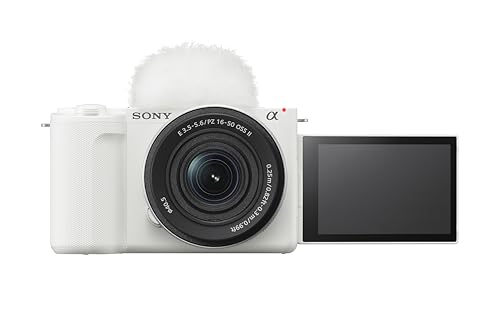
Sony ZV-E10 II — Best overall at home
Set this camera on a tripod in the corner, sit down with the instrument, and notice how little of your attention it consumes for the next hour. That is its genius for home music. The autofocus keeps your face honest while your hands are otherwise employed, the product-showcase habit that serves reviewers also serves a guitarist holding a capo or a teacher raising a bow toward the lens, and the picture — detailed, gently coloured — makes a spare room look like a considered set rather than a compromise.
The lens mount is where its home-studio future lives. Start with the kit zoom framing the whole scene, add a fast prime when the evening sessions demand light and the background deserves to melt, and the same body keeps serving as the channel grows from covers to lessons to a small ensemble in the front room. Microphone input and straightforward file handling complete the working picture: plug the good sound in, record the performance, edit on an ordinary computer.
Its trade-offs are the familiar ones for its class: no in-body stabilisation, which a tripod renders irrelevant at home, and rolling shutter that only a violent pan would reveal in a music room. For the creator building a channel meant to last, it is the surest foundation in this guide — capable on day one, unembarrassing on day five hundred.
- Format: APS-C mirrorless, E-mount
- Focus: eye tracking plus product showcase
- Audio: microphone input for proper sound
- Lenses: from kit zoom to fast primes
- Screen: flip-out for self-framing checks
Strengths
- Lets a solo performer forget it exists
- Grows from first cover to full channel
- Picture that dignifies small rooms
Trade-offs
- No in-body stabilisation for handheld use
- Serious low-light work wants a fast lens
- Menus take an evening to personalise
A piano teacher filming her weekly lesson series shows the rhythm: camera resident in the corner, settings saved, students learning from footage that looks like a programme rather than a video call. Consistency of that kind is a channel’s real production value, and this body is built to deliver it without a crew.
Its behaviour with mixed household light deserves the teacher’s attention too. Skin stays believable under a warm lamp’s influence, and the custom white balance discipline this guide recommends locks in across a whole term of lessons — students see the same room, the same teacher, the same trustworthy colour every week.
Best for: growing music channels, teachers and multi-instrument creators. Not suited for: creators who never want to think about lenses

Canon EOS R50 — Best for a first channel
The first music channel dies of friction, not of picture quality — the setup that takes forty minutes, the menu that hides the microphone level, the footage whose colours need a tutorial to fix. The R50 is the antidote. Its guided interface speaks plainly, its autofocus simply handles the performer, and Canon’s colour hands a beginner a face that looks like themselves on a good day, straight from the camera, beside an ordinary window.
That kindness extends to the whole routine. It is light enough to live on a small tripod in the corner, its stills serve the channel’s thumbnails and community posts, and the RF system’s affordable primes wait patiently for the month the creator wants the background to soften and the evening sessions to clean up. A first channel’s real curriculum is showing up weekly; this camera’s curriculum is removing every excuse not to.
The ceiling arrives honestly: monitoring is basic, the video toolkit is a younger sibling of Canon’s flagships, and a creator who graduates to multi-camera lessons will feel the limits. Graduation, though, is the goal — and the lenses and habits bought here travel upward into the rest of Canon’s range without a restart.
- Format: APS-C mirrorless, RF mount
- Handling: guided modes in plain language
- Colour: flattering with no grading
- Hybrid: stills for thumbnails and posts
- Growth: RF primes as the channel matures
Strengths
- The gentlest learning curve in this guide
- Footage that encourages a second upload
- A system with a future, bought in stages
Trade-offs
- Basic audio monitoring
- Video tools a subset of the flagships
- Kit lens is a starting point, not a destination
A teenager posting her first guitar covers from a bedroom captures its purpose exactly: the camera forgives the room, the light and the learning curve, and what reaches YouTube is the performance — which is the only thing her future audience will ever care about.
Parents filming a child’s recital pieces for distant grandparents discover its second vocation here. The same forgiving autofocus and colour that serve a channel serve a family archive, and the footage graduates from keepsake to portfolio without a change of camera when the young musician’s ambitions do.
Best for: first channels, students and family music projects. Not suited for: multi-camera lesson studios or deep monitoring needs

Sony ZV-1F — Best desk companion
Some music rooms are a desk, a chair and an hour between other obligations. The ZV-1F was designed by people who understand that hour. Its fixed wide lens frames a singer and a guitar — or a face and a ukulele, or a presenter and the instrument on the desk — without a framing decision ever being made, its defocus switch softens the bookshelf behind, and its face priority keeps the performer honest while their attention is entirely on the chorus.
The routine it enables is the shortest in this guide: take it from the drawer, set it on the small tripod, play the song, put it back. For cover-a-week creators, that brevity is not a compromise but the entire strategy, because the channel that survives is the one whose filming fits inside an ordinary evening. Its built-in microphone serves quiet rooms respectably, and USB streaming turns it into the lesson camera when a student calls.
What it refuses to do is grow. The lens is the lens; the piano across the room is out of its framing reach; dim rooms tax its small sensor. Creators who know their format — one person, one instrument, one desk — will find those limits theoretical. Creators still discovering their format should take the R50’s open road instead.
- Format: compact, fixed wide lens
- Framing: singer-plus-instrument by design
- Focus: face priority with defocus switch
- Routine: drawer to recording in a minute
- Streaming: USB webcam duty built in
Strengths
- Zero-friction weekly filming
- Framing that flatters desk performances
- Doubles as a streaming camera
Trade-offs
- Fixed lens, no framing flexibility
- Small sensor in dim rooms
- No system to grow into
A songwriter documenting a new song every Friday — before the polish, while the lyric sheet is still on the desk — shows why it exists. The camera’s job is to be invisible to the habit, and by that measure it may be the most successful instrument in this entire guide.
Its silence is a musical virtue rarely listed. No fan, no lens motor wandering into a quiet verse, nothing between the room’s stillness and the first note — for fingerstyle players and soft singers, that absence is a feature money usually has to buy at higher prices.
Best for: desk covers, songwriters and streaming lessons. Not suited for: piano-wide framing, ensembles or system builders

Canon PowerShot G7 X Mark III — Best piano-and-desk compact
The G7 X Mark III solves the framing problem the fixed-lens compacts cannot: it zooms. From its perch on the piano, on the desk or on the shelf, it can compose the wide shot of the performer, the tighter frame for the face, or — the shot piano students actually scrub back to — the hands on the keys. For teachers and desk musicians, that small optical generosity replaces a second camera.
Canon’s colour and the flip-up screen complete the self-filming kit: check the frame from the bench, trust the face detection while you play, and let the microphone input take a proper source when the room’s own acoustics stop flattering the instrument. It streams as happily as it records, which suits the teacher whose week mixes uploaded lessons with live ones.
Its generation shows in the honest places — autofocus that is capable rather than clairvoyant, a small sensor that prefers decent light, and a body that asks care with battery rotation across a long teaching day. None of that displaces it from its niche; it displaces it only from ambitions it never claimed. As a resident camera for one instrument and one room, it remains a deeply sensible instrument.
- Format: compact with zoom lens
- Framing: wide, face and hands from one perch
- Screen: tilts up for self-checking
- Audio: microphone input fitted
- Streaming: live-ready for lessons
Strengths
- Zoom framing without moving the camera
- Kind colour for faces at a desk
- Small enough to live on the instrument
Trade-offs
- Autofocus a step behind the newest bodies
- Small sensor prefers good light
- Battery rotation on long days
A violin teacher’s practice room explains the perch logic: the camera sits above the music stand all term, framing face for the talk, hands for the demonstration, wide for the play-through — three shots from one small body that nobody has to operate. Teachers buy time, and this camera sells it cheaply.
Grandparents learning an instrument late in life have become an unlikely constituency for perched compacts like this: big, legible results from a small, patient device, and lessons filmed for the family as easily as for the public. A camera that serves both audiences doubles its value in a household.
Best for: piano, desk and teaching setups. Not suited for: dark rooms, fast-moving performers or lens changers

DJI Osmo Pocket 3 — Best one-take roamer
Not every home performance should sit still. The one-take cover that drifts from the hallway into the sunlit kitchen, the loop artist building a song room by room, the dancer-musician whose performance is choreography — these need a camera that moves like a guest rather than a crane. The Pocket 3’s gimbal supplies that movement from a device the size of a chocolate bar, while face tracking keeps the performer framed as the rooms change around them.
Its sensor gives the roaming footage unusual polish for the size: evening lamps and window light stay clean, the rotating screen flips to vertical for the short-form cut without a second setup, and the wireless microphone option turns a walking performance into finished audio in one pass. Homes are full of unrepeatable light — the stairwell at six, the garden at dusk — and this is the camera that can be inside it in ten seconds.
The cautions are physical. A gimbal dislikes knocks, toddlers and being left on a vibrating speaker; the fixed lens will not tighten on the hands for a tutorial close-up; and battery planning governs any long session. Treat it as the channel’s movement specialist beside a static main camera, and it expands a home’s filming geography more than any other purchase here.
- Format: gimbal camera, pocket size
- Movement: three-axis mechanical smoothness
- Tracking: follows the performer’s face
- Sensor: strong in household evening light
- Audio: wireless microphone pairing
Strengths
- One-take performances through the whole house
- Vertical clips without a second rig
- Ready before the light changes its mind
Trade-offs
- Gimbal mechanism needs gentle owners
- No close-up lens for tutorial detail
- Internal battery sets the session length
A folk singer’s dawn performance — beginning at the back door, ending on the garden step as the street wakes — is the kind of video this camera makes possible and no tripod camera can imitate. Channels are remembered for one such video; this is how they get filmed.
Loop performers should note its rehearsal value as well. A quick roaming pass through a new arrangement reveals staging problems — the dead corner, the cable crossing, the moment the light dies — before the keeper take, like a dress rehearsal the whole production can watch.
Best for: roaming one-takes, loop artists and movers. Not suited for: static tutorial close-ups or careless handling

OBSBOT Tiny 2 — Best for teachers
The Tiny 2 is the only camera in this guide that watches you back. Its motorised gimbal and AI tracking pan, tilt and zoom to keep a moving teacher in frame — the violin instructor who steps from the desk to the instrument cupboard, the drum teacher circling the kit, the singing coach who teaches on her feet. For live lessons especially, it replaces the operator entirely, and its gesture controls let the teacher start, stop and reframe without touching a keyboard mid-phrase.
Its picture is a webcam’s perfected: a large sensor for its class, clean low-light behaviour for evening lessons, and colour that survives the mixed lighting of real homes. Paired with a proper microphone — the teacher’s own interface or USB microphone — it produces lesson video that students experience as presence rather than as a call, and its tracking close-ups follow a demonstration to the instrument and back.
Its boundaries are the boundaries of its category. It is a USB camera first: recording runs through the computer, the framing intelligence serves a room rather than a production, and nobody will shoot a cinematic cover on it. But a music teacher’s channel is built on lessons, Q&A sessions and demonstrations — precisely the formats this small robot was born to film alone.
- Format: AI-tracking PTZ webcam
- Tracking: pans, tilts and zooms automatically
- Control: gestures and voice commands
- Picture: large sensor for its class
- Role: lessons, streams and demonstrations
Strengths
- An operator that never sleeps or charges rent
- Follows demonstrations around the room
- Evening lessons stay clean and bright
Trade-offs
- Records through a computer, not standalone
- Not a cinematic performance camera
- Tracking can be surprised by multiple people
A singing teacher’s evening of back-to-back online lessons shows the economy: the camera greets each student already framed, follows her to the piano and back, and never once asks her to break the teaching spell to adjust a tripod. That is not a gadget’s party trick; it is an hour of professional attention returned to the students.
Its privacy manners suit teaching minors and camera-shy adults: processing that lives in the camera rather than the cloud, and framing that follows the teacher without recording the room’s every corner. Trust is a teaching material too, and this design respects it.
Best for: music teachers, streamers and demonstrators. Not suited for: standalone recording or cinematic covers
How Do the Six Home Music Cameras Compare in the Room?
| Camera | Format | Home strength | Best use |
|---|---|---|---|
| Sony ZV-E10 II | APS-C mirrorless | Autonomy and growth | Channels and lesson series |
| Canon EOS R50 | APS-C mirrorless | Kindness to beginners | First music channels |
| Sony ZV-1F | Compact | Zero-friction desk framing | Covers at a desk |
| Canon PowerShot G7 X Mark III | Compact zoom | Framing hands and faces | Piano and teaching perches |
| DJI Osmo Pocket 3 | Gimbal camera | Moving one-takes | Roaming performances |
| OBSBOT Tiny 2 | Tracking webcam | Operator-free lessons | Teaching and streaming |
Notice the pattern: at home, the contest is not about image specifications but about which routine each camera makes effortless. Choose the routine you will repeat fifty times, and the camera attached to it becomes the right one almost regardless of the league table.
How Should You Set Up a Room for Music Videos?
Start with the chair and work outward. Place the performer where the window’s light arrives at an angle — flattering, dimensional, free — then frame the shot to include the instrument’s working parts: hands, keys, strings, the breath before the phrase. Move the camera, not the musician, until the background tells a small story — the shelf, the plant, the framed poster — without competing with the performance.
Then tame the room’s sound with the soft things you already own. A rug, curtains drawn for the session, cushions and a duvet over a door will calm the flutter echo that makes home recordings sound like bathrooms; record thirty seconds of test and listen on headphones before believing any of it. The camera will forgive a modest room. The microphone, and the audience, will forgive a treated one.
What Mistakes Do People Make When Filming Music at Home?
The first is filming the room they have rather than the frame they want — the camera placed where the tripod fits, the performer exiled to a corner against a bare wall. The second is recording the sound from across the room because the camera was already there; music deserves the microphone near the instrument and the voice, with the camera’s audio kept for sync. Third comes the single heroic take syndrome: home filming’s gift is the retake, and refusing it out of a misplaced live-performance pride wastes the medium’s kindest feature.
Two more follow from kindness misapplied. Over-lighting a small room until it resembles an office destroys the intimacy home viewers came for; and buying a flagship before treating the room spends the budget where the audience cannot hear or feel it. Frame, sound, light, then camera — in that order, every time.
How Do You Frame Each Instrument at Home?
The piano asks for the diagonal. Seat the camera high and to the side opposite the player’s face, so one frame can hold the profile, the hands and a slice of the keys’ geography; a second, tighter pass — the compacts’ zoom earns its keep here — supplies the fingering close-ups a student will pause on. Uprights forgive this arrangement easily; a grand’s raised lid becomes a reflector and a backdrop in one, if the camera sits where the lid throws the room’s light kindly.
The guitar wants honesty about hands. Frame wide enough for both the fretting hand and the strumming hand, resist the glamour close-up that crops the very technique viewers came to study, and let the face share the frame’s upper third so the performance stays a person rather than a mechanism. Classical players add the footstool and the raised neck to the geometry; singer-songwriters add the microphone, which should enter the frame like a guest, not a fence.
Drums and percussion concede that no single frame is fair. A wide from the room’s corner establishes the kit’s geography, and the performance’s energy survives on that honesty better than on a close crop that amputates cymbals. Voice, finally, is the simplest and most exposing frame of all: eye-level, a breath of headroom, the microphone visible as a promise of sound quality — and nothing behind the singer that moves, glitters or apologises.
How Should You Record the Sound of a Home Performance?
Decide what the audience is really buying: the room as it sounded to you, or the instrument as it sounds to itself. Most loved home music videos choose a blend — a close microphone or interface capture for clarity and body, softened by a measured amount of the room’s natural air. Record both, always, even if the mix later favours one; options in the edit are the difference between a sound and a rescue.
Gain staging is the unglamorous sacrament. Set levels for the loudest chorus, not the gentle verse you soundchecked with; leave headroom rather than flirting with distortion, because a clipped forte cannot be unclipped by any software’s apology. Play the hardest thirty seconds of the piece as your test, listen on headphones for the room’s hums and fridges, and silence what can be silenced before the real take rather than filtering it afterwards.
Finally, respect the performance’s own workflow. Record the audio continuously across several takes while the camera stops and starts as it must; musicians think in arcs, not in clips, and the take where the music catches fire may be the one where the camera was being adjusted. The clap or count-in at each take’s head is the thread that lets the edit find that fire again.
How Do You Light a Music Room Without a Studio?
Begin by switching things off. Mixed household light — a warm lamp, a cool ceiling fitting, daylight from a side window — paints a face in three competing colours and gives footage a restlessness no grade fully calms. Choose one family of light and evict the others: daylight hours with the lamps off and a curtain as your softbox, or evening with the window blinded and one warm lamp, diffused through a shade or bounced from a pale wall, as your sun.
Depth is the second ingredient, and it is arranged, not purchased. A small lamp behind the performer, a string of warm bulbs at a distance, the glow of the hallway through a door left ajar — these separate the musician from the wall and tell the viewer the room continues beyond the frame. Audiences read that depth as production value while being unable to name it, which is the definition of money well spent when the money is nearly none.
Faces get the final vote. Whatever the arrangement, sit in the performer’s chair, look at the screen, and ask whether the eyes have light in them and the skin looks like skin. Instruments are forgiving subjects; faces are the channel’s contract with its audience, and every lighting decision in a home music room should be audited from the stool.
How Do You Edit a Home Performance So It Feels Alive?
Cut less than you think. A home performance’s intimacy lives in continuity — the breath before the difficult passage, the glance at the lyric sheet, the smile when the run lands — and an edit that slices every four seconds trades that intimacy for a nervous energy the music never asked for. Let the main frame carry whole phrases; spend your cuts on the hands at the teaching moment, the face at the emotional one, and the wide at the architecture’s turns.
Sound edits deserve the same restraint. Keep the room’s small truths — the pedal’s thump, the string squeak on a position shift — at a level where they certify the performance as real, and resist polishing the life out of the take in pursuit of a studio finish the video never promised. Viewers of home music are connoisseurs of authenticity; the comments can hear a comped performance the way a tuner hears a flat string.
Endings matter disproportionately. Let the last chord decay into the actual room, hold the frame a breath longer than feels necessary, and put the channel’s invitation — the next song, the lesson, the subscribe — after the music has finished being music. Respect at the exit is what converts a viewer into a regular.
How Do You Keep a Weekly Music Channel Alive?
Routine is the entire secret, and the camera is either part of the routine or part of the resistance. Leave the chosen body set up — same corner, same settings, same chair — so that filming is a decision of minutes rather than a production of hours. Batch the week’s filming into one session while the room is arranged and the instrument is tuned; edit on a different day, when the performer in you has stopped judging and the producer in you can simply choose.
Repertoire planning is the other half of survival. Alternate the beloved cover that feeds the algorithm with the original that feeds the artist, the lesson that feeds the students with the performance that feeds the soul — a channel fed on only one diet starves one of its audiences every week. The cameras in this guide were ranked partly on how gracefully they serve all four courses without a change of room.
And protect the joy on purpose. The home music channel begins as love and dies as admin; the creators still filming in year three are the ones whose setup stayed light enough that a new song can be captured the evening it is written, while it still feels like news. Every verdict above should be read through that lens: the best camera is the one that keeps the evening short and the song long.
How Should You Present Songs So Viewers Stay?
The first ten seconds are an audition the performer does not get to watch. Begin on the music or on the face mid-phrase rather than on a spoken preamble; put the title where a searcher recognises the song and the instrument in the same breath; and let the thumbnail show hands and expression together, the two things a music viewer is actually shopping for. None of this requires equipment — which is precisely why it outranks equipment in the audience’s experience.
Chapters and pinned comments serve the students hiding inside the audience. Mark the verse, the chorus, the difficult passage and the slow teaching pass, and the video becomes a practice room resource that viewers return to daily rather than a performance they applaud once. Returning viewers are a channel’s pension; design for their return and the cameras in this guide will have something worth filming every week.
How Do You Film an Ensemble in a Living Room?
The duo or trio changes the geometry and the diplomacy. Frame the group as a conversation — angled toward each other rather than lined up for a photograph — and give the camera the third seat in the circle, close enough for faces, wide enough for the instruments’ negotiations. One camera can serve if it holds the whole ensemble honestly; a second, tighter angle on whoever carries the melody transforms the edit, provided somebody owns the sync clap and the audio plan before the first note.
Sound becomes the real production. Each voice and instrument wants its own capture or a thoughtfully placed pair, and the blend is mixed like a tiny live album rather than a video soundtrack. Rehearse the recording, not just the song: levels for the loudest harmony, a plan for the solo’s moment, and a room arrangement where nobody’s music stand becomes somebody else’s eclipse. The cameras above scale to this gracefully — the mirrorless pair as the two angles, the compacts as the honest wide — which is why growing home channels so rarely need to leave this guide’s list.
What Should You Spend on First, at Home?
The microphone and its placement, before everything. Then the chair-height tripod that does not wobble, the curtain or rug that calms the room, and one source of soft light. The camera body follows — the one in this guide whose routine matches yours — and the lens after that, when a specific frustration has earned it. This order offends showrooms and delights audiences, because every early purchase is audible or visible in the first upload.
Keep a small, honest list of what actually went wrong across the first ten videos — the echo, the cramped frame, the battery that died at the bridge — and let that list, not advertising, schedule the upgrades. Home studios built from evidence grow straight; home studios built from envy grow expensive. The distinction will be visible in the videos long before it is visible in the equipment cupboard.
Final Recommendation
Build the channel on the Sony ZV-E10 II if it must grow, start it on the Canon EOS R50 if it must begin gently, and let the Sony ZV-1F or Canon PowerShot G7 X Mark III serve the desk and the piano with zero ceremony. Add the DJI Osmo Pocket 3 when the performances start to move, and give the OBSBOT Tiny 2 to the teacher who is tired of filming herself. In every case, put the microphone close and the camera where the routine is — a home music channel is a habit with a lens attached.
Related guides
Frequently Asked Questions
Can I use my camera’s built-in microphone for music?
For a first upload in a kind room, yes; for a channel, treat it as the sync reference and record the real sound separately — an interface, a USB microphone or a recorder near the instrument. Music exposes microphones the way it exposes intonation.
How do I sync separately recorded audio with the video?
Clap once on camera at the start of each take, or play a single sharp note, then align that spike with the video’s scratch audio in the editor. Mute the camera track afterwards and keep the good recording as the soundtrack.
What if my room is very small?
Small rooms favour wide lenses and the compacts in this guide, plus one trick: film diagonally across the room’s longest dimension. A corner-to-corner frame borrows depth the walls do not advertise.
Do I need a second camera for the hands?
Not at first. Reframe between takes — the wide for the full performance, the close pass for the hands — and edit them together; the audience assumes simultaneity. A true second angle earns its place when lessons need live switching.
How do I stop annoying the neighbours?
Film amplified and percussive work at sociable hours, keep sessions shorter than your goodwill, and use practice mutes, electronic kits and amp modelling where the music allows. A channel that survives its street is one the street barely notices.
Should lessons and performances use the same camera?
They can, and consistency helps a channel feel like one place. Teachers who stream live often add the tracking webcam for lessons while keeping the main camera for performances — the pairing this guide’s last two picks describe.
How Do You Film Practice and Progress Without Boring Everyone?
The practice diary is the home channel’s quiet growth engine, and it asks different things of a camera: speed of setup above all, honesty over polish, and a frame consistent enough across months that the improvement itself becomes the spectacle. Film the same passage from the same angle in January and in June and no commentary is needed; the camera’s consistency is the narrative device, which is why resident, untouched setups — the perched compact, the corner mirrorless — serve this format so faithfully.
Present the struggle with the same respect as the triumph. Viewers who are learning alongside the creator trust the channel that shows the metronome’s tyranny and the fortieth attempt, and that trust converts into the students, patrons and regulars a performance-only channel rarely earns. Keep the takes shorter, the captions honest about tempo and difficulty, and the camera rolling through the sighs — the sigh is the most relatable note in the entire repertoire.
There is a private dividend, too. A year of practice footage is a mirror no memory can argue with, and many creators report that the channel’s greatest gift was not its audience but its evidence. Choose the camera that makes that evidence effortless to gather, and the filming will continue long enough for both dividends to arrive.
One final encouragement, from every creator who has stood where you are standing: the first video is the worst one you will ever make, and it is also the one that makes all the others possible. The room is ready enough, the song is learned enough, and one of the six cameras above is more than ready. Set it on the tripod, sit down, count yourself in, and let the house hear itself sing.
How Do You Handle Copyright and Covers on YouTube?
A home music channel lives on other people’s songs, so the paperwork deserves a paragraph beside the cameras. Cover versions occupy a well-trodden middle ground on the platform: rights holders commonly claim and monetise rather than remove, but policies vary by song and territory, and a channel built entirely on covers should understand that its revenue conversation includes the composers. Original arrangements, public-domain repertoire and your own songs diversify that risk while distinguishing the channel’s voice.
Practically: credit composers accurately, respond to claims through the platform’s own channels rather than disputing reflexively, and keep records of any licences you do obtain for arrangements or backing tracks. None of this needs a lawyer for a bedroom channel, but all of it needs the same quality the music does — attention. A channel is a small business wearing a hobby’s clothes, and the creators who last treat both garments with respect.
How Should You Archive a Home Music Library?
Keep the masters. The performance you upload today becomes the comparison point, the anniversary repost and the student’s evidence tomorrow, and storage at home resolutions is cheap enough that deleting originals is a false economy dressed as tidiness. A simple discipline suffices: a folder per song, the best take and the uploaded edit inside it, the audio masters beside them, backed up to a second drive that does not live in the same bag as the first.
Names matter more than systems. Date, song, instrument and take in the filename will still make sense in a decade, when the clever folder taxonomy has been forgotten. Future-you, assembling a progress compilation or answering a student’s question about a fingering from two years ago, will bless the boring consistency — and a channel’s back catalogue, properly kept, quietly becomes its most valuable asset.
And if the house includes other people, recruit them gently. A household that understands the red-light hour — the forty minutes when the door is closed and the piano is loud — becomes a production’s first patron. Offer the family the premiere of every finished video before the internet sees it; the channel that is celebrated at home rarely needs to apologise for existing, and its filming schedule survives contact with domestic life, which is where most home channels are truly won or lost.
What Does a Good Filming Session Feel Like When It Works?
It feels almost disappointingly ordinary. The camera was already there, the settings were already right, the first take was a warm-up and the third was the keeper, and the whole performance reached the card before the kettle from the pre-session tea had gone cold. That ordinariness is the achievement this entire guide has been shopping for: not a studio, not a production, just a room and a routine so well matched that the music is the only remarkable thing left in them.
Judge every future purchase by whether it protects that feeling. The upgrade that adds ten minutes of setup to save a theoretical flaw is a downgrade wearing a specification sheet; the humble accessory that disappears into the routine — the longer cable, the second battery, the stool at the right height — is the true professional purchase. Home music filming is a long game played in short sessions, and it is won by the creators whose equipment keeps volunteering to be forgotten.
So choose the camera whose company you enjoy. You will spend more evenings with it than with most of your instruments’ cases, and the relationship shows in the footage: relaxed performers, unhurried takes, a room that looks like it expects music. That expectation, repeated weekly, is what an audience subscribes to — the songs are simply how it introduces itself.
Tune the instrument, warm up the voice, and let the room settle into its listening hush. The red light at home is not an interruption of the music’s life; filmed well, it becomes the way the music travels — out of one small room, into a thousand others, carrying the room’s warmth with it, and arriving, if the routine holds, every single week of the year.
None of the six cameras above will practise the scales for you, and none will apologise to the neighbours. What each promises, in its own dialect, is that when the playing is ready — when the take arrives that deserves an audience — the picture will be worthy of the sound, the frame worthy of the face, and the room worthy of the song that was written in it. That is the whole contract of home music filming, and it is enough.
Related Guides
Read alongside our venue companion on filming live music on stage, our setup notes for home recording interfaces, and our framing guide for teaching music online.


