Disclosure: As an Amazon Associate, ilcastellomenu.com earns from qualifying purchases. Links on this page are affiliate links; they cost you nothing extra. Prices and availability change often, so check the current Amazon listing before you buy.
Is a usb foot switch worth it? The honest answer is that it depends entirely on one thing you already know about your own work: whether there is a command you issue so often, at such awkward moments, that your hands resent it. A usb foot switch is a floor pedal that sends keystrokes, shortcuts or media commands to your computer, and its value is not in the hardware — the hardware is a simple, durable switch — but in the interruption it removes, multiplied by every working day. For streamers muting microphones, transcriptionists driving audio, gamers holding push-to-talk and office workers chained to one repeated shortcut, the arithmetic is not close. For everyone else, the same device is a plastic wedge waiting to be kicked. This page makes the value case properly: what you actually get, what it really costs beyond money, who it pays off for, who should skip it, and the checklist that settles the question for your desk.
Short answer: Worth it if you can name, right now, the specific command the pedal will own — and that command currently pulls a hand away from the keyboard, mouse or controller many times a day. Not worth it if the purchase is motivated by a general sense that your setup should be more optimised, because a pedal without a job becomes clutter faster than almost any other peripheral. The rest of this page exists to help you determine, honestly, which of those two buyers you are. For the hardware side once you have decided, the {L(“usb foot switch buying guide”, “usb-foot-switch-buying-guide”)} matches models to workflows, and the {L(“usb foot switch pros and cons”, “usb-foot-switch-pros-and-cons”)} page argues the ownership case from both directions.
Key Takeaways
- A foot switch is worth it in proportion to one number: how often a specific command interrupts your hands. Frequent interruption, clear value; occasional interruption, no value.
- The real costs are not the purchase tier but floor space, a learning period of about a week, cable routing and the discipline of assigning the pedal a genuine job.
- Streamers, transcriptionists and push-to-talk gamers are the proven winners; speculative productivity buyers are the proven disappointed.
- The entry tier makes the question cheap to answer empirically — one pedal, one command, a fortnight of use — which is the most reliable worth-it test in the category.
- Alternatives exist for every pedal job, and the pedal wins only inside its niche: a few frequent commands, issued blind, with no hand available.
- If you buy, get configuration software only from the manufacturer’s official website, and size the pedal to the job — simple for one command, programmable only when the workflow demands it.
In this guide
Is a Usb Foot Switch Worth It: What You Actually Get
Strip the category to its substance and a foot switch buys you three things. The first is continuity: the command that used to break your hand position, your aim or your typing rhythm simply stops breaking it. A transcriptionist’s hands stay on the home row while the foot runs the audio. A streamer’s mute happens without a visible flinch. A gamer’s voice key is held by a limb that had no other duties. This benefit is easy to underestimate from a product page because each saved interruption is worth seconds — but it is not purchased per interruption, it is purchased per day, per month, per year of working hours, and it compounds in the currency of unbroken concentration, which most knowledge workers would tell you is the scarcest resource they have.
The second thing you get is a new input channel with universal compatibility. Because the pedal presents itself as a standard input device and sends ordinary shortcuts, it works inside the software you already own, with no integrations to maintain. That universality gives the purchase an unusual longevity: applications change, jobs change, and the pedal — a mute here, a transport control there, a shortcut elsewhere — keeps finding work. The third thing is durability of the boring kind. The mainstream designs from iKKEGOL, PCsensor, Kinesis, X-keys and Infinity are wired, mechanically simple and proven over years of production. A foot switch is one of the few peripherals you can reasonably expect to outlast the computer it is plugged into, and a purchase that amortises over that kind of lifespan needs to justify far less per month than one that will be replaced in two years.
What you do not get is equally part of the accounting. You do not get a general productivity transformation; the pedal improves exactly the commands it owns and nothing else. You do not get precision, capacity or analogue control. And you do not get the benefit on day one — you get it after your foot has learned, which brings us to the costs that are not printed on the box.
The Real Costs Beyond Money
The purchase tier of a foot switch is the smallest cost of owning one, and buyers who budget only for it misjudge the transaction. The first real cost is the learning period: roughly a week of daily use in which foot control feels deliberate and occasionally wrong, accidental presses happen, and the pedal’s value is still theoretical. That week is a genuine investment of patience, and it is non-refundable — which is why the fortnight test matters and why buying during a crunch week, when patience is scarce, stacks the odds against the device. The second cost is floor space and its management. The pedal occupies under-desk territory, must be given a stable position, may need a mat on hard floors, and claims a cable route through the least organised space in your setup. None of this is expensive; all of it is yours to arrange.
The third cost is attention at setup. Configuration is not difficult, but it is a task: downloading the manufacturer’s utility from its official website — a rule worth repeating, because these small tools are exactly what bundling sites target — assigning commands, placing the pedal where your foot actually rests rather than where it looks neat, and keeping a note of what you assigned. The fourth cost is subtler: commitment to a method. A pedal pays off when one command is assigned and used relentlessly until it is automatic. Buyers who reprogram it weekly, chasing the perfect layout, keep restarting the learning curve and conclude the device does not work. The pedal’s price, in other words, is partly paid in discipline — and that is the cost that decides most ownership stories. Against these, the maintenance burden is trivial: occasional cleaning at floor level and sensible cable care, measured in seconds a month.
Who It Pays Off For
The Streamer or Content Creator
The clearest yes in this article. Broadcasting hands are committed — to the game, the instrument, the mouse — while the commands that protect the broadcast, above all microphone mute, are urgent, frequent and unforgiving of fumbles. A pedal converts each potential disaster — the cough, the doorbell, the household interruption — into a silent foot press. Creators who record rather than stream gain the same logic in transport and marker commands. If you broadcast or record regularly, a foot switch is not an accessory purchase; it is part of the standard furniture of the job, and the only real question is which simple pedal to start with. The model comparison for this workflow is in the usb foot switch reviews.
The Transcriptionist
The ancestral yes. Transcription is the workflow the category was built around, and the arithmetic is overwhelming: hands that never leave the keyboard, audio controlled entirely by the foot, hundreds of interruptions a day simply deleted. At professional volumes the question is not whether a pedal is worth it but which pedal — the dedicated Infinity layout for pure transcription, a programmable Kinesis setup for mixed work. Even occasional transcriptionists, working through interviews or research audio, usually find a basic triple arrangement pays for itself in patience within the first long session. If your work involves turning audio into text with any regularity, stop deliberating.
The Gamer Who Talks
Push-to-talk is the pedal’s gift to gaming: a voice key held by a foot is a voice key that never costs you a finger at the moment the game demands all of them. Team players who communicate constantly feel the difference immediately, and the pedal’s blindness — no looking, no reaching — suits the tempo of play. The worth-it boundary for gamers is equally clear: if you rarely use voice, or your games make no demands that conflict with a keyboard voice key, the pedal solves a problem you do not have. Buy it for the conflict, not for the novelty, and keep twitch-critical commands where they belong.
The Professional With One Miserable Shortcut
Every field has one: the image advance in a viewing workstation, the form command in a data-entry flow, the play-and-stop pair in an editing suite, the advance key in a trading or monitoring setup. If your working day is punctuated by one command that drags your hand from its post, a pedal aimed at that command is among the highest-return small purchases available to you — the more specialised and repetitive your work, the stronger the case. These buyers often become the category’s quiet evangelists, and their setups frequently graduate from an entry pedal to a programmable platform once the pedal has become infrastructure. Desks built around rapid-fire commands tend to share DNA with the ones in our keyboards for day trading guide — worth a look if that is your world.
Who Should Skip It
The speculative optimiser should skip it. If the motivation is a diffuse feeling that a serious setup ought to include a pedal, the purchase will fail, because the pedal’s value is borrowed entirely from a specific command and there is no specific command. The result is predictable: a brief novelty period, a slow migration across the floor, and a permanent low-grade annoyance under the desk. The buyer whose work has no recurring hand-interruption should also skip it — if your commands are varied, occasional and comfortably within reach of your hands, a pedal adds a learning curve to solve a problem that does not exist, and a labelled macro pad serves varied commands better anyway.
Two more profiles should pass. The buyer in a genuinely unsuitable physical setup — no reachable floor space, a working position that keeps feet occupied or elevated, a shared hot-desk where a personal pedal cannot live — will never accumulate the use that makes the device pay. And the buyer expecting transformation should skip it on principle: a foot switch is a small, honest tool that removes a small, specific friction, and anyone sold a revolution will judge the tool by the revolution’s standard and discard it. Skipping is not a failure of ambition; in this category it is frequently the correct, money-saving verdict, and this page’s checklist below is designed to deliver it without regret.
Strengths and Trade-Offs of Owning One
Strengths
- Interruption removal that compounds. One command moved to the foot pays its dividend hundreds of times a month, in unbroken concentration rather than raw seconds.
- Universal and durable. Standard input behaviour means it works with your existing software, and simple wired hardware means it keeps working for years.
- Cheap to test honestly. The entry tier turns the worth-it question from a debate into an experiment with a definitive answer inside a fortnight.
Trade-Offs
- A learning period before any payoff. The first week is clumsy, and the value only arrives once the movement becomes unconscious.
- Floor logistics forever. Placement, drift, cables and cleaning are small but permanent features of ownership.
- Total dependence on one named job. Without a specific frequent command, the device has no value at all — the worth is borrowed, never inherent.
Alternatives to Consider
A fair worth-it verdict prices the competition. The first alternative is the keyboard shortcut itself: free, precise and already installed, and the right answer whenever the hand movement it costs is rare or painless. The second is a macro pad or stream deck, which beats the pedal whenever your commands are numerous, varied or need labels — it asks for a hand, but it shows you what it does, and for command libraries that visibility wins. The third is voice control, which is genuinely hands-free but brings noise sensitivity, privacy questions and shared-space problems that a silent pedal avoids. The fourth is software automation — remapping tools and application macros — which can sometimes remove the command entirely rather than relocating it, and is always worth checking first because a problem deleted beats a problem moved.
Notice the shape of the pedal’s remaining niche after those alternatives take their share: a few commands, very frequent, needed at moments when hands are committed and voice is impractical. That niche is narrower than pedal marketing suggests and more valuable than pedal sceptics admit — inside it, none of the alternatives compete. The worth-it question, precisely stated, is whether your work contains that niche. Everything else on this page is commentary on that single determination. The single-lens review of the category explores the same territory from the hardware side.
How to Get the Most Value If You Buy
Value in this category is extracted by method, not by model. Assign exactly one command — the most frequent hand-interrupter you have — and use the pedal for it relentlessly until the press is unconscious; only then consider a second assignment or a second pedal. Place the pedal where your foot rests during real work, anchor it against drift, and route its cable once, properly, so the floor never reopens the question. Download the configuration software from the manufacturer’s official website, save a note of your assignments, and resist reprogramming for at least the first month — stability is what lets the learning curve finish. Choose the tier by the job’s weight: an entry pedal for a single light command, a programmable platform when the pedal has become infrastructure you depend on, the specialist pedal when the job is transcription. And if, after a fair fortnight, the pedal has not earned its place, believe the evidence and remove it — a clean negative is also value extracted, because it ends the question. The full operating method is in how to use a usb foot switch, and the selection method in how to choose a usb foot switch.
The Sensible Test Purchase
If this page has moved you to experiment, the experiment should be sized to your uncertainty. A single entry pedal — the iKKEGOL design is the archetype, with PCsensor’s family the choice when you already suspect a multi-pedal layout — puts the question to your workflow at the lowest tier the category offers. Treat the programmable Kinesis and X-keys platforms and the specialist Infinity pedal as second purchases: what you buy when the experiment has succeeded and the job’s shape is proven. Buying in that order is the financial expression of this article’s whole argument — evidence first, investment second.
The Decision Checklist
Answer honestly, counting actual working days rather than intentions. One: can you name the exact command the pedal will own? Two: does that command pull a hand away from its main task many times a day? Three: does it arrive at moments when your hands are genuinely committed? Four: do you have reachable floor space where a pedal can live permanently? Five: are you willing to give foot control a fair fortnight, including its clumsy first days? Six: have you checked that a shortcut, a macro or a software setting does not already solve the problem for free? The rule of thumb: yes to the first five, with the sixth checked, means buy with confidence at the tier your job justifies. A no on the first or second question means skip it without regret — the niche is not in your work, and no pedal can put it there.
The Arithmetic, Worked Slowly
Because the worth-it question is ultimately arithmetic, it deserves to be worked rather than asserted. The method is to count interruptions, not seconds. Take the command you have in mind — mute, transport, the repeated shortcut — and tally, over one honest working week, how many times it pulls a hand away from its main task. Do not estimate from memory; memory flatters and forgets in equal measure, and the tally is the entire value of the exercise. Then look at the shape of the number rather than its size. A command that fires in bursts at the worst moments — the cough during the live segment, the rewind during a difficult passage of audio, the voice key during the team fight — is worth more per occurrence than its count suggests, because each interruption lands where concentration is most expensive. A command that fires steadily but painlessly, in pauses where your hands were idle anyway, is worth less than its count suggests, and the tally will show you that too.
Three scenarios cover most readers. In the first, the tally is high and the moments are bad: the pedal is worth it, and the only live question is tier. In the second, the tally is moderate and the moments are mixed: the pedal is worth an entry-tier experiment, run properly for a fortnight, with the tally kept beside it so the verdict is evidence rather than mood. In the third, the tally is low or the moments are harmless: the pedal is not worth it, and the correct purchase is nothing — a conclusion this page regards as a successful outcome, because a question answered cheaply is worth money by itself. What the arithmetic will not support, in any scenario, is the premium-first purchase. The tally justifies depth only when it also shows complexity — multiple commands, multiple machines, occupational volume — and complexity is a fact about your work that you will already know before you count anything.
Hidden Benefits and Hidden Costs
Beyond the headline exchange — money and a learning week, against a repealed interruption — ownership carries smaller line items on both sides that rarely make it into the decision. On the benefit side: the pedal tends to improve the rest of your input habits, because choosing its command forces an audit of your shortcuts that most users have never performed, and the knowledge gained stays with you across every future application. It also ages unusually gracefully as purchases go — no battery to fade, no subscription to renew, no platform to be discontinued out from under it — so its useful life is measured against desks and computers, not against product cycles. And it retains a quiet option value: a pedal bought for one job has a demonstrated habit of finding a second job when work changes, because its universality means the next role’s shortcut is already within its vocabulary.
On the cost side, the hidden items are domestic rather than technical. The pedal is one more object in the least managed space of the home or office, and it will be kicked, vacuumed around, questioned by guests and occasionally relocated by people who clean. It claims a permanent USB port, which on a port-poor laptop setup is a real allocation. It imposes the small standing chore of its software rule — official sources only — each time a computer changes. And it carries a subtle expectation cost: having bought a tool for your workflow, you may feel obliged to use it past the point where the evidence says stop, which is why this page insists that a clean negative verdict after a fair trial is a success and not a sunk cost to be defended. None of these hidden items, on either side, outweighs the headline arithmetic. All of them belong in an honest ledger, and buyers who include them are rarely surprised by ownership in either direction.
What Changes After the First Month
The worth-it verdict is not static, and a page that pretends otherwise misleads. In week one, as the pros-and-cons analysis concedes, the device is mostly cost: learning, logistics, attention. The buyers who return pedals are overwhelmingly returning this week-one experience, and some of them are returning a product that would have paid off — the category’s saddest and most preventable outcome. By the end of the first month, the surviving setups share a recognisable shape: one command, perfectly learned, placed beyond thought. The question owners ask at this stage is no longer whether the pedal was worth it but why the desk ever worked without it, and the upgrade conversations — a second pedal, a programmable platform, the specialist tool for a workflow that has become a livelihood — begin from evidence rather than hope. A year in, the pedal has typically outlasted at least one more fashionable peripheral bought in the same season, which is perhaps the most persuasive worth-it datum of all: in a market of annual cycles, the simple wired switch keeps its job. Judge the purchase on the month and the year, therefore — and structure the trial, as this page has argued throughout, so that the device actually gets to live that long.
Three Owners, Revisited After a Year
The Streamer Who Kept the Receipt
She bought the entry pedal half-convinced, kept the packaging for a month, and can no longer remember where the receipt is. Her mute pedal has survived a change of game, a change of streaming software and a house move, and in each transition it was the first peripheral reconnected, because a broadcast without it had come to feel unprotected — like driving without the habitual glance at the mirror. Asked the worth-it question directly, she does not talk about time saved; she talks about the incidents that never happened, the coughs and doorbells and side conversations that her audience never heard. Value that consists of disasters silently prevented is hard to itemise, and it is the kind this category most reliably produces. Her verdict after a year is not that the pedal was worth its price, but that the question has stopped making sense to her — the pedal is part of how broadcasting works, like the microphone itself.
The Analyst Who Did the Counting
He is the reader this page was written for: he tallied his repeated command for a week before buying, found the number higher than his guess, bought the mid-tier programmable pedal his two-machine workflow justified, and kept the tally habit. A year later he can report the thing analysts love — that the pedal’s assignments grew exactly twice, each time when a counted command earned promotion, and that he has never once reprogrammed it on a whim. His worth-it verdict is expressed as a ratio he will not publish in a review but states privately to colleagues: the pedal cost him less than a single hour of the attention it returns each month. His story matters because it demonstrates the ceiling of the category when the method is followed completely — not transformation, but a small, permanent, compounding correctness in the shape of his working day.
The Designer Who Returned It
Her story belongs in this article precisely because it ends with a return. She bought on a colleague’s enthusiasm, assigned the pedal a command she used perhaps a dozen times a day in work that was otherwise gloriously varied, gave it the honest fortnight, and concluded — correctly — that her workflow had no niche for it. The pedal went back inside its return window, and she describes the episode not as a failed purchase but as a cheap education: she now knows the actual shape of her command usage, knowledge that has since steered her away from two other peripheral purchases that would have failed the same way. Her verdict on the worth-it question is the one this page most wants its readers to be able to give: the device is worth it for the work it fits, her work was not that work, and finding out cost her nothing but attention. A category that can produce a satisfied non-owner has told the truth about itself.
The Opportunity Cost, Honestly
Every purchase is also the purchases it displaces, and a fair worth-it account should name what the same money and attention could buy instead. The entry tier of this category competes with very little — a modest meal out, a month of a streaming subscription — which is part of why the experiment it funds is so rational. The professional tiers compete with real alternatives: a better chair component, a monitor arm, a genuinely good keyboard, each with its own claim on a workflow’s comfort and speed. The pedal’s defence at those tiers is specificity: it is the only item on that list that removes an interruption rather than improving a posture or a view, and for the buyer whose tally is high, removal beats improvement because the interruption is paid hundreds of times a month. The pedal’s honest weakness in the comparison is that its benefit is invisible in a photograph and unglamorous in conversation; nobody’s setup tour lingers on the switch under the desk. Buyers who need their purchases to be seen should factor that in without embarrassment. Buyers who need their purchases to work have the tally to consult, and the tally does not care about glamour in either direction.
If the Answer Is No, Spend the Insight Instead
A reader who works through this page and concludes “not worth it” has not wasted the reading, because the process that produces the no — counting interruptions, auditing shortcuts, pricing alternatives — is itself a small workflow audit with standalone value. Most people who tally their commands discover something actionable even when the pedal fails the test: a shortcut they never knew existed, a macro their software already supports, a repeated action that software settings can delete entirely. The no, properly earned, usually comes with a consolation improvement that costs nothing at all. And the question remains open in the right way: workflows change, roles change, and the command that does not exist in this year’s work may dominate next year’s. The pedal will be the same simple, stable device then as now. Worth-it is a verdict with a date on it, and this page is content to have helped you date yours correctly.
The Question Behind the Question
Spend enough time with worth-it questions and a pattern emerges: people rarely ask them about the object. They ask them about themselves — about whether their work is the kind of work that justifies tools, whether their setup deserves investment, whether the small friction they feel every day is real enough to spend money silencing. The foot switch attracts this question more than most peripherals because it is small, cheap and strange, and because its benefit — an interruption that stops happening — is nearly invisible to anyone who has not felt the interruption. So it is worth saying plainly, near the end of a long page: if you have read this far while thinking of one specific command, that thought is the data. People whose work contains no pedal-shaped problem do not read four thousand words about one; they leave at the short answer. The readers who remain are, overwhelmingly, the readers with the tally already forming in their heads. Trust that signal enough to run the count, and let the count — not the doubt, and not the enthusiasm — make the final call.
Worth It, Priced in the Only Currency That Matters
Close the ledger in the currency this device actually trades in. Not money, which it asks for modestly and once. Not desk space, of which it takes none. The foot switch trades in attention: it costs a week of yours up front, in the deliberate, slightly awkward currency of learning, and it repays attention for years afterward, in the small denominations of moments that were not broken — the sentence finished, the aim held, the audio ridden without a hand’s defection. Attention is the one input no workflow can buy more of, which is why a device that conserves it, however humbly, keeps passing the worth-it test in profession after profession while cleverer tools are retired around it. If your work is attention-rich and interruption-poor, the exchange is a bad one and this page has told you so. If your work is the reverse — if your days are a fabric of concentration torn hourly by one repeated, necessary, hand-stealing command — then the exchange is among the best a small purchase can offer, and it is available at the entry tier, this week, for the price of one named command and seven honest days.
The Regret Audit: What Owners Actually Wish They Had Done
Ask owners a year in what they regret, and the answers sort themselves into a pattern too consistent to ignore — and too useful to omit from a worth-it verdict. Almost nobody regrets the purchase itself when a named command preceded it; the regrets cluster around the manner, not the fact. The commonest is tier regret in the downward direction: the professional who bought entry, proved the workflow in a month, and bought again properly — paying twice for one lesson the tally could have taught in advance. Next is its mirror, the enthusiast who bought the platform first and spent a year feeling faintly accused by its unprogrammed depths. Then placement regret, the cheapest to have avoided and the most commonly reported of all: a pedal spent its first month in the wrong square of floor, and the owner’s early verdict on the whole category was really a verdict on a position. And finally, the rarest and saddest, timing regret — the pedal bought during a workflow’s upheaval and judged against a job that changed before the learning week ended. Read the pattern once more and its lesson assembles itself: the worth-it question is seldom answered wrongly by the arithmetic, and often answered wrongly by everything around the arithmetic. Count the command, size the tier to the count, place the pedal like you mean it, and buy when the work is stable — do those four things and the regret audit has no entry with your name on it.
Worth It, For the Reader Still Hovering
Every long verdict page has a reader it cannot quite reach: the one who has followed the argument, accepts the arithmetic, suspects the answer is yes — and still hesitates, because the device is odd, the benefit is invisible, and no one they know owns one. To that reader, this page offers its last and simplest counsel. The hesitation is not information; it is the ordinary friction of buying something without a social proof to lean on, and it dissolves on contact with the experiment the entry tier makes so cheap. One pedal, one named command, one fortnight. The worst outcome the experiment can return is knowledge, purchased at the lowest price in the peripherals aisle, about how your own hands and feet prefer to work. The best outcome is a small, permanent improvement in every working day that follows. A bet with that shape — bounded downside, compounding upside, an answer guaranteed either way — is the closest thing to a free decision that buying anything ever offers. Take the bet, or decline it on the tally’s evidence; but do not let the hovering itself make the decision, because hovering is the only outcome on this page with nothing to recommend it.
And if the tally, honestly kept, says no — believe it with the same confidence. The worth-it question has no universally correct answer, which is why it was worth a page. It has a correct answer for your desk, this year, in this work — and you are now equipped, as fully as any reader can be, to give it.
One Sentence for the Skimmers
Pages like this one are often read backwards, from the conclusion up, so the conclusion should survive being read first: a USB foot switch is worth it when a specific, frequent command is stealing your hands’ attention, it is not worth it when bought as a general promise, and the distance between those two verdicts is one week of honest counting. Everything above that sentence is evidence, arithmetic and testimony gathered in its support. Everything below it is answers to the questions it predictably raises. If the sentence has already settled your decision, the page has done its work and releases you without another word of argument — the tally, the trial and the tier are yours to run, and they run best in the real world rather than in a review.
It is fitting to end on the observation that the worth-it question, properly answered, tends to stay answered. Owners do not revisit it seasonally, the way they revisit monitors or chairs, because the evidence it rests on — the tally, the fortnight, the quiet accumulation of unbroken work — does not expire. Your workflow will evolve, and this page’s checklist will still be the right instrument when it does. Until then, the verdict you have reached, in either direction, can be allowed to rest.
The Ownership Maths of a Usb Foot Switch: Time, Hassle and Recurring Frustration
Add up the hidden costs of ownership in time and attention, including setup, cleaning, storage and the accessories you will inevitably want, before deciding it earns its keep. Give a new usb foot switch a fair trial in the position it was bought for before improvising workarounds, since many early complaints disappear once placement is corrected. Ask what you would do on the day this usb foot switch stops working as expected, and whether you could swap, reset, clean or return it without dismantling half your setup. Prefer a setup you can explain to another person in a minute, because simple arrangements are easier to troubleshoot, share and repeat than fragile clever ones.
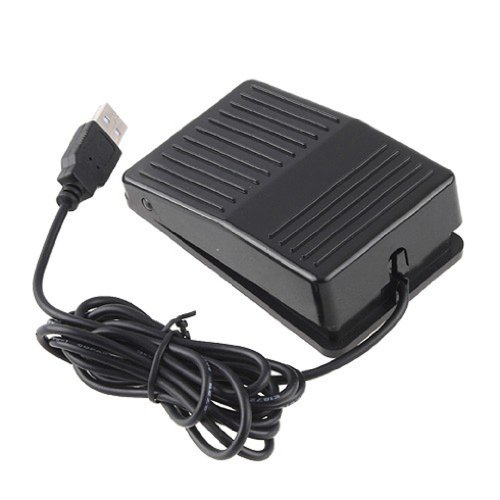
As a concrete listing check, take the PCsensor USB Foot Pedal named earlier in this article and confirm, line by line, that the variant offered matches the size, connection and contents described for it here. Keep liquids, loose papers and anything that sheds dust or fibres at a sensible distance, unless the usb foot switch was clearly designed to work right beside them. A calm final test is to walk away mid-task, come back later, and see whether the setup still makes sense at a glance without reconstructing what you were doing. Leave a little headroom in every direction that matters, whether that means physical space, connection capacity, adjustment range or simply time to do a task properly. If the benefit depends on a habit you do not yet have, be sceptical, since products rarely create routines on their own and often end up waiting in a drawer or corner.
Decide in advance what good enough looks like for your use, so a minor cosmetic flaw does not distract you from performance that genuinely meets the brief. When something behaves oddly, return to the basics first: power, connection, position, cleanliness and the last setting you changed, in that order, before assuming a fault. Separate the features you will use in the first month from the ones that only sound reassuring, and let the first group carry far more weight in the decision. Start this final check away from the listings, with the space, the equipment and the routine you already have written down in plain terms.
Notice how the usb foot switch behaves when you are tired or in a hurry, since products that demand perfect technique tend to fail exactly when you have least patience. Avoid forcing a connector, bracket or moving part that resists you, because resistance is usually information about alignment or fit rather than an invitation to push harder. The value question for a usb foot switch is answered by your calendar more than by any feature list: count how often the problem it solves actually interrupts your week. Ask whether the benefit you want survives your least favourite conditions, such as low light, a crowded desk, a warm room or a rushed start to the day. Keep the instructions somewhere you can find them months later, since the setting or step you skip today is often the one a future problem sends you hunting for.
Write the exact model name and variant from the packaging into your notes, so replacement parts, accessories and support conversations start from certainty rather than guesswork. Test in the order you actually work: power on, connect, adjust, run a real task, then tidy up, rather than judging the usb foot switch on a single impressive first impression. Plan where the cables or materials connected to this usb foot switch will run when the room is tidy, not just while you are testing on an empty surface.
Picture the busiest version of your week and ask whether this usb foot switch still fits when other people, other tasks and other equipment compete for the same space. Compare it honestly with the workaround you use now, describing that workaround in the same detail, because vague dissatisfaction makes almost any purchase look worthwhile. Keep a short note of what worked, what annoyed you and what you adjusted, because that note is more useful than memory when you later replace or add another usb foot switch.
Frequently Asked Questions
Is a USB foot switch worth it for working from home?
It depends on the work, not the location. Home workers with a repetitive, hand-interrupting command — in editing, data work, customer systems, design tools — get the same compounding benefit as any office professional, and home desks often have the floor space and permanence that make pedal placement easy. Home workers whose tasks are varied and keyboard-comfortable gain nothing. Judge by the command, not the postcode: name the interruption your pedal would remove, count it for a week, and let that number decide.
How long before a foot switch pays off?
The learning investment is roughly a week of daily use before the press becomes automatic; after that, the payoff is continuous and cumulative rather than a single break-even moment. Heavy users — transcriptionists, streamers, anyone whose pedal command fires hundreds of times a day — typically feel the value within the first proper working session after the learning period. Light users feel it more slowly, which is exactly why the category’s honest test is a fortnight rather than a first impression.
Is a cheap foot switch worth it, or should I buy a premium one?
A cheap one is worth it as a test and often as the final answer. Entry pedals cover the classic single-command jobs completely, and most satisfied owners never need more. Premium platforms are worth their tier when the pedal becomes professional infrastructure — when you need onboard memory across machines, macros and layers, or all-day build quality. The error is buying premium on speculation: let a cheap pedal prove the workflow, then upgrade with evidence if the job outgrows it.
Can a foot switch replace a stream deck?
No, and it should not try. A stream deck holds many labelled commands and suits varied, occasional actions; a pedal holds a few memorised commands and suits frequent, blind, hands-free ones. They solve different problems and frequently coexist in serious streaming setups, the deck handling scenes and effects, the pedal owning mute and push-to-talk. Worth-it analysis that pits them against each other misses that the real question is always which device matches which command.
What if I buy one and do not use it?
Then you have run the experiment and received a real answer about your workflow — which is worth something, provided the experiment was cheap and properly conducted. Before concluding, audit the usual failure causes: was there a named command, was the pedal placed where your foot rests, did you give it a full fortnight of constant use for that one job? If all three were done and the pedal still gathers dust, remove it without guilt. If any was skipped, the experiment has not actually been run yet.
Does a foot switch hold its usefulness if I change jobs or software?
Usually, yes — better than most peripherals. Because it sends ordinary shortcuts and works with virtually any application, a pedal tends to find a new command in a new role: the mute pedal becomes a transport pedal becomes a shortcut pedal. Its simplicity is its portability. The exception is the dedicated transcription pedal, whose value is bound to transcription work by design — which is a reason to buy that specialist tool only when the specialism itself is secure.
Related Reading
Act on the verdict with the usb foot switch buying guide, compare models in the usb foot switch reviews, and weigh the balanced case in usb foot switch pros and cons. For adjacent high-frequency-command desks, see keyboards for medical transcriptionists and mechanical keyboards for writers.