Disclosure: As an Amazon Associate, ilcastellomenu.com earns from qualifying purchases. Links on this page are affiliate links; they cost you nothing extra. Prices and availability change often, so check the current Amazon listing before you buy.
This usb foot switch buying guide is organised around a truth the product pages will not tell you: a usb foot switch is one of the simplest devices you will ever buy, and one of the easiest to buy wrong. The hardware is a pedal that sends keystrokes, shortcuts or media commands to your computer when your foot presses it. Nothing about that is complicated. What buyers get wrong is the matching — pedal count against workflow, configuration depth against patience, a specialist tool against a general job. This guide works through the category in the order decisions should actually be made: what the devices are, which types exist, the questions that separate them, how to prioritise by use case, and finally the models worth your attention, from iKKEGOL and PCsensor at the accessible end to Kinesis, X-keys and the transcription specialist Infinity.
Everything here is discussed in prose and qualitative tiers rather than prices, because the right question is never what a pedal costs in isolation but what tier your usage justifies. If you arrive at this guide already knowing the category is for you, the picks below will settle the model. If you are still deciding whether foot input belongs in your setup at all, start with the worth-it analysis and come back; and for the operational side after purchase, how to use a usb foot switch covers placement, learning and care.
Key Takeaways
- Decide the job before the pedal: name the exact command or commands the switch will own, because every correct buying decision in this category flows from that answer.
- Pedal count follows the workflow — one pedal for one command, a triple layout for transcription-style control, and nothing in between unless a second real job exists.
- Configuration depth is the main price driver: simple assignment utilities at the entry tier, onboard memory, macros and layers in the professional platforms.
- Pedal feel and base stability are the qualities you will notice daily; prioritise a pedal your foot can rest on without triggering and a base that stays where you put it.
- Dedicated transcription pedals are a separate species — buy one only for transcription, where it is the best tool in the category.
- Download configuration software only from the manufacturer’s official website, and factor that small discipline into any brand you consider.
In this guide
What a USB Foot Switch Does and the Main Types
The Basic Idea
A USB foot switch is best understood as a keyboard reduced to one to three very large keys and moved to the floor. Pressing a pedal sends the computer a signal — a key, a key combination, a short typed string, a mouse action or a media command — and because the device presents itself as a standard input device, your applications receive that signal exactly as if it came from your hands. There is no integration layer and no per-application support to check: if the function you want has a keyboard shortcut, a pedal can trigger it. This is why the same humble device appears under streamers, transcriptionists, gamers, video editors and office workers. The pedal is not smart; it is obedient, and obedience turns out to be extremely useful.
Single Pedals
The single pedal is the category’s default form and the right starting point for most buyers. One wide pedal, one assigned command, minimal setup. The classic single-pedal jobs are microphone mute, push-to-talk, play and pause, and one dominant application shortcut. Single pedals dominate the entry tier, and their simplicity is a feature rather than a compromise: there is nothing to misconfigure, nothing to learn beyond the one assignment, and the pedal either earns its floor space within a fortnight or tells you cheaply that foot input is not for you. Buyers who already know they have exactly one job should resist every upsell in this guide and start here.
Dual and Triple Pedals
Multi-pedal units exist for workflows whose commands come in families. The defining example is audio control: play, rewind and fast-forward belong together, under one foot, in a fixed arrangement your body can learn as a single skill. Editors adapt the same layout to play, stop and mark; streamers to mute, scene and marker. The buying rule is strict — each pedal beyond the first must correspond to a command you can already name and already use daily. Pedals bought for hypothetical future commands do not get learned, and an unlearned pedal is just an obstacle on the floor. When the family of commands is real, though, a multi-pedal unit is not a luxury; it is the correct shape of the tool.
Dedicated Transcription Pedals
Transcription pedals look similar and are philosophically different. A wide, low unit with a large central play zone flanked by rewind and fast-forward, they are shaped by one workflow refined over decades and are supported directly by professional transcription software. They are not general programmable pedals and do not pretend to be. The buying guidance is correspondingly binary: if you transcribe at any serious volume, this is your category and the Infinity design below is its reference; if you do not transcribe, pass this entire type by, however impressive its professional pedigree looks.
Programmable Platforms
At the top of the category sit the platforms: pedals from makers like Kinesis and X-keys whose real product is configuration. Onboard memory so assignments travel with the device, macro and layer support, companion software with genuine depth, and construction aimed at all-day professional use. These are the right purchase when the pedal is infrastructure — when it will be programmed carefully, used for hours daily, possibly moved between machines, and expected to behave identically for years. They are the wrong purchase as a first pedal, because their depth is wasted on a single mute command and their tier is not entry-level. Platforms reward a buyer who already knows exactly what they will program.
Usb Foot Switch Buying Guide: Top Picks at a Glance
The five models below are the category’s reference points, arranged by the buyer each serves rather than by rank. Badges are qualitative on purpose: the right pedal is the one matched to your workflow, and a badge that ignores your workflow is marketing, not guidance.

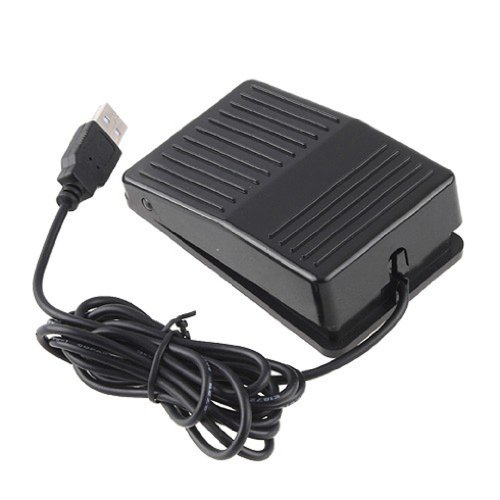
iKKEGOL USB Foot Switch — Best Overall First Pedal
One wide pedal, a simple configuration utility from the manufacturer’s official site, and the standard assignment vocabulary of keys, combinations and media commands. The iKKEGOL is the pedal this guide recommends to the largest number of readers: anyone with one clear job — mute, push-to-talk, a single shortcut — and no evidence yet that they need more. Entry tier, minimal learning curve, honest ceiling. Best for: first-time buyers and single-command workflows. Not suited for: multi-command or macro-heavy setups.

PCsensor USB Foot Pedal — Best for Matching Pedal Count on a Budget
PCsensor sells the same straightforward philosophy in single and multi-pedal forms, which makes it the natural recommendation when your workflow’s pedal count is known and your tier is the accessible one. The triple arrangement is the value pick for transcription-style layouts and three-command media control. Configuration is utilitarian and entirely sufficient. Best for: buyers who know they need two or three pedals and want them covered simply. Not suited for: buyers seeking onboard memory or deep macro programming.
Kinesis Savant Elite2 — Best Programmable Pedal for Professionals
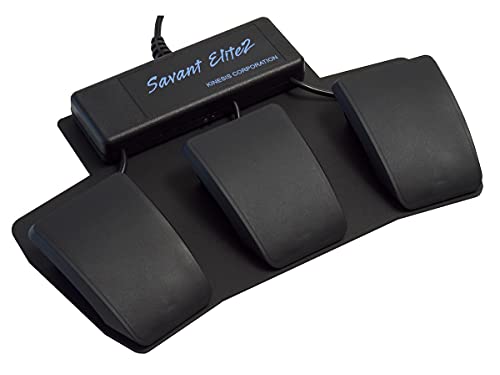
The Kinesis dual pedal, expandable with an additional connected pedal, is the guide’s recommendation when configuration is a real requirement: programming that lives with the device, tooling that supports considered layered setups, and an ergonomic pedigree from a maker known for serious input devices. Mid-to-premium tier, repaid by users whose pedal works as hard as they do. Best for: professionals with defined workflows across one or more machines. Not suited for: casual single-command use.
X-keys USB Foot Pedals — Best for Control Rooms and Macro-Heavy Work
From P.I. Engineering’s ecosystem of programmable controls, the X-keys pedals bring broadcast-grade intent: hinge arrangement choices, macro-capable software from the maker’s official site, and build aimed at environments where commands cannot be missed. Premium tier, justified when the pedal is one surface in a larger control setup or a single point of professional reliability. Best for: production, broadcast and specialist workstations. Not suited for: simple jobs or first purchases.

Infinity IN-USB-2 — Best for Transcription, Full Stop
The classic transcription layout — large central play pedal, rewind and fast-forward at either side — supported directly by professional transcription software and refined for hours of ball-of-the-foot operation. Within transcription it has no serious rival in this guide; outside transcription it should not be bought at all. Specialist tier. Best for: transcriptionists at any serious volume. Not suited for: gaming, streaming or general shortcuts. Transcriptionists should also see keyboards for medical transcriptionists for the other half of the workstation.
How Many Pedals Do You Need?
This is the first real buying question, and it is answered by your workflow, not by ambition. Count the commands you issue, every working day, that force a hand to leave its post. If the honest answer is one — and for most people it is one — buy a single pedal and spend the difference elsewhere in your setup. If the answer is a tight family of two or three commands that you use in rotation, like audio transport controls, a multi-pedal unit is the correct shape. If the answer is a long list, stop: a pedal bank is the wrong tool for a long list, because pedals must be memorised blind, and the practical ceiling on memorised foot commands is low. Long lists belong on a macro pad or stream deck where buttons are labelled and visible. The pedal’s kingdom is the small set of commands you issue so often that your foot should own them outright.
There is a second, quieter consideration: feet. Most people drive a pedal with their dominant foot and keep the other as an anchor, especially in a chair with castors. A triple unit worked by one foot asks that foot to travel laterally between pedals, which is fine at transcription rhythm and tiring at frantic rhythm. Think about the tempo of your commands as well as their count. Slow, deliberate, frequent commands are pedal-shaped; rapid sequences are not, whatever the pedal count on the box.
How Much Configuration Depth Do You Need?
Configuration is where the tiers separate, so be honest about which of these buyers you are. The first buyer needs a pedal to send one key or media command, set once and never revisited; the entry utilities from iKKEGOL or PCsensor cover this completely, and paying for more is waste. The second buyer needs combinations, typed strings or different assignments over time; mid-level configuration covers this, and the Kinesis approach of storing programming with the device becomes attractive if the pedal moves between machines. The third buyer is building a control system: macros, layers, application-specific behaviour, a pedal as one surface among several. That buyer is the platforms’ natural customer, and X-keys in particular is designed for them. The trap is buying as the third buyer while living as the first — depth you never program is not future-proofing, it is just cost and complexity. Software, wherever you land, comes only from the manufacturer’s official website; treat any brand whose downloads you cannot find there with suspicion.
What Makes a Pedal Good to Live With?
Specifications will not answer this; the floor will. A pedal you live with happily has a surface large enough to find blind and shaped so your foot knows its position by feel. It tolerates a resting foot: you should be able to park your weight lightly on or beside it through a working day without accidental triggers, because a pedal you must hover over is a pedal you will abandon. Its press should be definite — a clear actuation you can feel through a shoe — without demanding a stomp that tires your leg. Its base should be heavy or grippy enough to stay planted on your actual floor surface, carpet and hard floors behaving very differently here. And its cable should reach your computer without tension and route without crossing a walkway or a chair’s castor path. None of these qualities appears in a headline feature list, and all of them decide whether the pedal is still in use in six months. When reviews and owner discussions praise a pedal’s feel, that is the signal to weight most heavily — heavier than any feature comparison, including the ones in this guide.
Does the Pedal Need to Work Across Computers?
For most buyers this question never arises, but for those it affects, it decides the purchase. If the pedal will live on one desk with one computer, any configuration model works. If it will travel — between a workstation and a laptop, between home and office, between the machines of a shared studio — then where the programming lives becomes decisive. Pedals that store their configuration onboard arrive at each new machine already themselves; pedals configured by software on one computer arrive as strangers and must be set up again, assuming the utility is even installed there. Professionals who hot-desk or maintain identical setups in two places should treat onboard configuration as a headline feature and buy accordingly, which in practice means the Kinesis or X-keys tier. Everyone else can safely ignore the distinction and buy on pedal count and feel.
How to Prioritise by Use Case
The Streamer or Gamer
Your command list is short and known: microphone mute, push-to-talk, perhaps a scene or marker. Prioritise pedal feel and a tolerable resting position above everything, because you will press this pedal mid-action, blind, for hours. A single iKKEGOL-class pedal covers the classic setup; add pedals only when a second command has truly joined the first. Depth of configuration is nearly irrelevant to you — spend nothing on it. Our roundup of foot switch reviews scores the field for this workflow, and gaming keyboards for streaming covers the rest of the desk.
The Transcriptionist
Your decision is the simplest in this guide. Serious volume means the dedicated pedal: the Infinity layout, supported by your software, shaped for the work. Mixed workflows — transcription plus other programmed commands, or transcription across machines — point to the Kinesis. Occasional transcription points to a PCsensor triple and a mapped media player. Do not buy a single pedal for transcription under any circumstances; the workflow is a trio and the hardware should be too.
The Office Worker and Editor
Your pedal exists because of one repeated shortcut, so buy for that shortcut: a simple single pedal, assigned in minutes, judged within a fortnight. Editors with transport-style command families can justify a triple arrangement on the same logic as transcriptionists. If the pedal becomes load-bearing — if your whole workflow reorganises around it, as happens more often than buyers expect — that is the moment the professional platforms earn their tier, and not before. Readers outfitting the whole desk may find keyboards for office typing a useful companion.
The Accessibility-Oriented Buyer
Your criterion is flexibility of input location: a pedal moves a command to the foot, and the programmable models give the most control over exactly what moves and how it behaves. Described plainly, that is a feature to evaluate against your own tasks and experience — no product guide can promise an individual outcome, and you should be wary of any that does. Start with one command, prefer a pedal whose configuration you can adjust easily as you learn what suits you, and judge the result over weeks of real use.
First Setup and Care Essentials
Setup for any model in this guide follows the same arc: plug in, confirm the computer sees a standard input device, install the manufacturer’s utility from its official website, assign each pedal, and then spend your effort on placement rather than programming. Place the pedal where your working foot naturally rests, angle it to your foot rather than the furniture, and anchor it against drift with a mat or a fixed position. Learn one command until it is automatic before adding another. Care is a floor-level routine: keep grit away from the hinge, route the cable clear of castors and tension, and keep a note of your assignments for the day you change computers. The complete operational walk-through is in how to use a usb foot switch.
Mistakes to Avoid
The category’s mistakes are consistent enough to list. Buying pedal count for hypothetical commands, which produces an unlearned obstacle instead of a tool. Buying configuration depth you will never program, which converts a simple purchase into an expensive one for no benefit. Buying a transcription pedal for general use, or a general pedal for professional transcription — the specialist mismatch in both directions. Downloading configuration software from aggregator sites instead of the manufacturer’s official page, a small risk with entirely avoidable consequences. Placing the pedal where it looks tidy rather than where your foot rests, then blaming the hardware. And finally, judging the purchase in the first three days: foot control feels clumsy before it feels natural, and the fortnight verdict is the honest one. The argumentative companion to this guide, usb foot switch pros and cons, weighs the ownership case itself.
Reading Between the Lines of a Product Listing
What the Photos Tell You
A foot switch listing’s photographs carry more real information than its feature list, if you know how to read them. Look first at the pedal’s proportions relative to anything familiar in the frame: you are judging whether a foot can rest on or beside this surface blind, and small, narrow pedals announce themselves honestly in pictures. Look at the base — its footprint, its apparent weight, any visible rubber surfacing — because stability is photographed more truthfully than it is described. Look at the hinge end and the cable’s exit point, and imagine the cable’s route across your own floor. Look, finally, for a photograph of the pedal in an actual under-desk setting rather than floating on a white background; makers who show the device in its real habitat are usually makers who understand the product. A listing whose images are all dramatic angles and lifestyle glow is selling an object; a listing that shows you the base, the hinge and the cable is selling a tool, and in this category the tool-sellers have the better track record.
What the Description Avoids
Omissions are the second text of any listing. If a pedal’s configuration method is never explained — no mention of a utility, of what can be assigned, of where the programming lives — assume the simplest possible arrangement and verify on the manufacturer’s official website before buying; established makers document their software plainly, because it is a selling point. If pedal count options are paraded but the workflow those counts serve is never discussed, the listing is aimed at browsers rather than buyers. If the description reaches for medical language — promises about conditions, treatment or guaranteed relief — treat it as a disqualifying signal about the seller’s honesty; legitimate makers describe an input feature and leave outcomes to the user. And if compatibility claims are extravagant while the maker’s own support pages are thin, believe the support pages. The guide’s rule is simple: the manufacturer’s official site is the ground truth for software, configuration and support, and any gap between the listing and that site resolves in the site’s favour.
Questions Worth Asking Before You Buy
Five questions, answerable from the maker’s own pages and honest owner discussions, will settle most purchases. Can each pedal send a combination and a typed string, or only single keys — and does your named command need the more? Does the configuration live on the device or on one computer — and does your Step-worthy workflow care? What does the maker’s download page look like today: current, model-specific, clearly official? How do owners describe the pedal’s behaviour at rest — can a foot park on it through a working day? And what is the return route if foot control turns out not to suit you, since that is the one question research cannot answer? A model that passes all five, from a maker whose official presence is in order, is as de-risked as this category allows a purchase to be.
Matching the Pedal to Your Desk Setup
Standing and Adjustable Desks
A height-adjustable desk changes the pedal equation in one specific way: your feet have two working positions, seated and standing, and the pedal must be findable in both. Standing operation is actually natural for a pedal — the foot is already loaded and deliberate — but the pedal’s home needs to be generous, because a standing user shifts weight and stance through the day. Place the pedal slightly further forward than the seated position suggests, anchor it firmly since standing presses carry more force, and route the cable with enough slack for the desk’s full height range, securing it so the rising desk never tensions it. Buyers who work mostly standing should weight base stability even more heavily than this guide already does.
Shared and Hot-Desk Setups
Shared desks are the pedal’s hardest environment, and the buying answer follows from where configuration lives. A pedal whose programming is onboard arrives at a shared machine already itself, needs no software installed by whoever manages the workstation, and leaves with its owner at the end of the day — the professional platforms exist partly for this case. A software-configured pedal in a shared environment tends to decay into a generic device with nobody’s assignments, used by nobody. If your desk is shared, either buy the onboard kind and treat the pedal as personal equipment that travels with you, or accept that a pedal may simply not fit your working arrangement — an honest outcome this guide is content to reach.
Laptop-Centred Setups
Laptop users should think about the port, not the pedal. A foot switch needs a permanently available USB connection, and on a laptop that usually means a dock or hub position that the pedal can own. If your laptop lives on a dock at a fixed desk, the pedal integrates exactly as it would with a desktop, and the dock’s position decides the cable route. If your laptop genuinely roams — different rooms, different postures, no fixed station — be honest that a wired floor pedal fits that life poorly, and that the money is better held until a fixed working position exists. The category rewards rooted setups; it cannot follow a nomadic one, and no model choice changes that.
Budgeting in Tiers, Honestly
This guide avoids static prices, but tier discipline can still be taught. The entry tier buys the category’s core benefit complete: a reliable pedal, a simple assignment, years of service for a single command. Nothing about it is a compromise version of the professional tools; it is a correctly scoped tool, and the majority of readers should both start and finish there. The professional tiers buy three specific things — configuration depth, configuration that travels, and construction for all-day occupational use — and each of those things is either visibly present in your workflow or absent from it. The budgeting error is never choosing the entry tier; it is choosing a higher tier as a form of insurance against needs that have not appeared. In this category, insurance is cheap to buy later and expensive to buy early, because the entry pedal that proves a workflow remains useful forever as a second command’s home. Budget for the job in front of you, keep the difference for the desk’s other needs, and let evidence — a second command, a second machine, a professional volume — authorise every promotion.
The Decision, Walked Through as a Tree
Guides explain; trees decide. Walk this one with your own workflow in hand. First question: can you name the command, today, that the pedal will own? If not, the tree ends here — your purchase is a week of observation, and this guide will be waiting when the command has a name. If yes, second question: is the command one of a family of two or three that rotate together, like audio transport? If yes, you are buying a multi-pedal layout, and the only remaining branch is volume: professional volume in a specialist family — transcription above all — sends you to the dedicated pedal, while ordinary volume sends you to a general triple arrangement. If your command stands alone, third question: will the pedal work occupational hours, travel between machines, or grow further assignments that you can already foresee in concrete terms? If yes, the programmable professional tier is your branch, with the Kinesis pattern as its reference. If no, the tree delivers the answer it delivers to most readers: a simple single pedal from the entry tier, bought without apology, because every question that could have promoted the purchase has been asked and answered in the negative.
Notice what the tree never asks. It never asks about brand first, because brand is the last expression of a decision, not its beginning. It never asks about features in the abstract, because a feature is only a fact about your workflow wearing a costume. And it never asks what the pedal might do for you someday, because someday is the most expensive word in this category. The tree’s discipline is the guide’s whole argument compressed: the right pedal is a conclusion, and conclusions are reached by answering questions in the correct order. Buyers who feel the pull of a product before they have walked the tree should treat that pull as marketing’s gravity and walk the tree anyway — it takes two minutes, and it has saved more money than any comparison table ever published.
Support, Warranty and the Maker Behind the Pedal
A foot switch is simple enough that buyers rarely think about the company behind it until something goes wrong, at which point the company is the only thing that matters. The established names in this category share a profile worth shopping for deliberately: a real official website with model-specific support pages, configuration software that is visibly maintained, documentation that treats the buyer as an adult, and a production history long enough that replacement and advice will exist when you need them. These qualities are not glamorous and they do not appear in feature grids, but they are the difference between a pedal that is a decade-long tool and one that is a disposable experiment. Before buying, spend three minutes on the maker’s site performing the errand this guide set earlier — find the utility for your model — and read the support page as a character reference. A maker who documents clearly, publishes software cleanly and answers the obvious questions in public is a maker whose hardware you can buy with both eyes open. The reverse also holds, and in a category with this many obscure listings, the three-minute check is the highest-value step a cautious buyer can take.
What to Do When Nothing Quite Fits
Occasionally the guide’s method produces an honest misfit: the workflow is real but no stock design matches it — an unusual command family, an awkward physical environment, a pedal count between the standard arrangements. Three options exist, in the order this guide recommends them. First, simplify the job: most misfits dissolve when the command family is re-examined, because families that look inseparable at five commands usually contain two that matter and three that were decoration. Second, use the programmable platforms as they were intended to be used — layered assignments and macros exist precisely to fold an irregular workflow onto standard hardware, and the Kinesis and X-keys ecosystems absorb more oddity than any fixed design. Third, wait: the category is stable but not frozen, and a workflow that genuinely has no pedal today may be served by next year’s arrangement, while a forced purchase serves nobody at any date. What not to do is improvise against the hardware — modifying pedals, chaining adapters, building fragile contraptions of software remapping on top of a device that was almost right. The pedal’s value is its reliability, and reliability is the first casualty of improvisation. A misfit honestly recorded is a buying guide doing its job; the guide that claims a product for every reader is a catalogue wearing a guide’s clothes.
A Last Word on Timing
When to buy is a smaller question than which to buy, but it has one sharp edge: buy when the workflow is stable enough to judge. A pedal purchased in the first week of a new job, a new game, a new streaming schedule or a new application will be configured for a workflow that is still changing underneath it, and its assignments will churn exactly when they should be hardening into reflex. The experienced pattern is to let the work settle — a few weeks of the new routine, until the repeated commands have revealed themselves by repetition — and then let the pedal arrive to a job description written by evidence. The exception is the professional tool: the transcriptionist starting a transcription career buys the pedal with the job, because there the workflow is known in advance by the profession itself. For everyone else, patience is not delay; it is the final step of the method, and it costs nothing but the willingness to let your own working life finish writing the specification.
The Guide’s Answers, Compressed
Buying guides earn their length in the reasoning, but they should survive compression, so here is this one reduced to its skeleton. The pedal you need is the simplest one that owns your named command completely. Pedal count is your workflow’s shape, not your ambition’s. Configuration depth is worth money exactly when your assignments will evolve, travel or multiply — and not one tier sooner. Feel and stability are the qualities your mornings will be made of, so they outrank every feature comparison, including the ones printed here. Specialists are bought by specialists. Software comes from the maker’s official site, full stop. And the purchase is timed for when the workflow has settled enough to be specified honestly. A reader who internalises those seven sentences has absorbed the guide; the preceding pages exist to defend them against the specific doubts — the listing’s seductions, the tier’s gravity, the hypothetical command’s siren call — that every real buyer meets on the way to checkout. Keep the sentences; let the defences go.
One Final Distinction: Buying for Now Versus Buying for the Job
Most guidance in this category quietly assumes a hobbyist’s frame, in which the pedal serves the buyer’s current setup. Professional buyers invert it: the pedal serves the job, and the setup is arranged around the job’s requirements. The distinction changes three decisions. It changes tier, because a job can justify infrastructure pricing that a setup cannot. It changes timing, because a job’s start date is a specification date — the transcriptionist beginning work buys the specialist pedal with the work, not after a season of approximation. And it changes the standard of success, because a pedal bought for a setup is judged by whether it delights, while a pedal bought for a job is judged by whether the work flows — a colder, clearer test that the professional models in this guide were built to pass. Know which frame you are buying in. The hobbyist frame is not the lesser one; it is simply the one where the entry tier’s sufficiency and the fortnight experiment’s wisdom apply. The job frame is where this guide’s professional recommendations stop sounding expensive and start sounding like the ordinary cost of doing the work properly.
A Note for Buyers Reading This Guide Twice
Some readers will arrive at this guide for a second time — after a first pedal has succeeded, after a workflow has grown, after the entry purchase has taught them what their questions should have been. For them, the guide reads differently, and deliberately so: the steps that felt like caution the first time reveal themselves as the promotion criteria for the second. The second command has announced itself by interruption, exactly as Step 2 said it would. The configuration audit has a lived answer now. The tier question has evidence behind it. If that is your situation, the guide’s advice compresses to a single sentence: buy the pedal your first pedal’s success has specified, at the tier your counted commands justify, from the tier of makers whose official support you have already verified once. The first purchase taught you the category; the second one merely shops in it.
The Smallest Possible Summary
If this guide were reduced to the size of a note taped inside a desk drawer, it would say: buy the pedal your command count demands, at the depth your workflow proves, from a maker whose official site you have visited, and place it where your foot already lives. Everything else — the types, the tiers, the trees, the worked reasoning — is that note defended against the doubts a real purchase raises. Keep the note. The doubts will pass; the pedal, correctly chosen, will not.
A closing observation for the guide’s own record: every buying mistake described in these pages was, at the moment it was made, a reasonable-sounding decision — more pedals for flexibility, more depth for the future, a specialist admired out of context. The method exists precisely because reasonable-sounding is not the same as matched. Walk the steps in order, and the reasonable decision and the right one become, reliably, the same decision.
The Last Check Before Buying a Usb Foot Switch: Space, Connections and Edge Cases
Use the models named in this guide as reference points for checking a listing page carefully, confirming the exact variant, the included parts and the stated compatibility before you commit. Give a new usb foot switch a fair trial in the position it was bought for before improvising workarounds, since many early complaints disappear once placement is corrected. Leave a little headroom in every direction that matters, whether that means physical space, connection capacity, adjustment range or simply time to do a task properly. If the usb foot switch will be shared, agree on one home position and one simple reset routine, so each person does not undo the previous person’s adjustments.
As a concrete listing check, take the iKKEGOL USB Foot Switch and the PCsensor USB Foot Pedal named earlier in this article and confirm, line by line, that each variant offered matches the size, connection and contents described for it here. Think about the longest session you realistically run, not the average one, since heat, noise, clutter and small annoyances all grow more noticeable over time. When a specification is stated in unfamiliar terms, translate it into your own routine: how long, how often, how far, how loud in practice, before letting it sway you. Notice how the usb foot switch behaves when you are tired or in a hurry, since products that demand perfect technique tend to fail exactly when you have least patience. A sensible buying order is fit first, compatibility second, everyday handling third, and only then the extras that make one good option feel more appealing than another.
Consider who else will use, move or clean around this usb foot switch, because a choice that only works for one careful owner often frustrates everyone else in the household or team. Look closely at seams, edges, hinges, threads or contact points when the usb foot switch arrives, because build quality is easiest to judge before everyday wear hides the evidence. Allow a short settling period for your own habits to adapt, but set a firm date to decide, well inside the return window, whether this usb foot switch has earned its place. Start this final check away from the listings, with the space, the equipment and the routine you already have written down in plain terms.
A calm final test is to walk away mid-task, come back later, and see whether the setup still makes sense at a glance without reconstructing what you were doing. Keep liquids, loose papers and anything that sheds dust or fibres at a sensible distance, unless the usb foot switch was clearly designed to work right beside them. Rank your criteria before you look at any single listing, because the order you choose in advance protects you from being persuaded by whichever feature is presented loudest. If two options look identical on paper, choose the one whose controls, layout or handling you understood fastest, since clarity in daily use beats a longer feature list you never touch. When you compare notes with other owners, match their comments to setups like yours, because advice from a very different room, workload or routine can mislead.
Write the exact model name and variant from the packaging into your notes, so replacement parts, accessories and support conversations start from certainty rather than guesswork. Test in the order you actually work: power on, connect, adjust, run a real task, then tidy up, rather than judging the usb foot switch on a single impressive first impression. Keep the instructions somewhere you can find them months later, since the setting or step you skip today is often the one a future problem sends you hunting for.
Notice the small sounds, lights and movements during normal use, because those everyday details decide whether a usb foot switch feels settled or constantly demands attention. Buy for the setup you have today plus one realistic upgrade, not for a complete rebuild you may never do, and the shortlist usually becomes much clearer. Separate the features you will use in the first month from the ones that only sound reassuring, and let the first group carry far more weight in the decision. Recheck the return window and the condition requirements before you discard any packaging, especially for a usb foot switch whose fit only becomes clear after several real sessions. Make one change at a time during the first days, so that when something improves or gets worse you know which change caused it.
Prefer a setup you can explain to another person in a minute, because simple arrangements are easier to troubleshoot, share and repeat than fragile clever ones. Picture the busiest version of your week and ask whether this usb foot switch still fits when other people, other tasks and other equipment compete for the same space.
Frequently Asked Questions
What is the best first USB foot switch to buy?
For most people, a simple single pedal such as the iKKEGOL design: one command, minimal setup, entry tier. The first pedal’s job is to prove that foot input suits your workflow, and it should do that as cheaply and simply as possible. Buyers who already know their workflow needs several commands, or professional configuration, can skip the first step — but that knowledge should come from experience with your own work, not from a product page’s enthusiasm.
Should I buy a single, dual or triple pedal?
Match the count to commands you already use daily. One command means one pedal. A family of two or three commands used in rotation — audio transport is the model example — justifies a multi-pedal unit. A long list of commands does not justify anything with pedals at all; it belongs on a labelled macro pad. The most common buying error in this category is purchasing pedals for commands that do not exist yet, so count honestly before you shop.
Is an expensive foot switch actually better?
It is deeper and more durable, not faster. Premium platforms add onboard memory, macros, layers, more capable software and construction intended for all-day professional use. If your pedal is infrastructure — programmed carefully, used for hours, moved between machines — those qualities are real value. If your pedal mutes a microphone twice an hour, they are invisible. The category’s entry pedals are not failed versions of the premium ones; they are correctly scoped versions for simpler jobs.
Can I use a foot switch with my existing software?
Almost certainly yes. A foot switch sends ordinary keystrokes, combinations or media commands, and applications receive them as normal input, so no special support is required. The practical check is whether the function you want has a keyboard shortcut in your software; if it does, a pedal can trigger it. Dedicated transcription pedals are the exception in the other direction — they are supported directly by professional transcription software, which is even simpler.
Where do I get the software to configure a foot switch?
From the manufacturer’s official website, and nowhere else. These are small, niche utilities, exactly the kind of download that third-party sites bundle with unwanted software. Every maker in this guide publishes its configuration tool on its own support pages. If you cannot find a brand’s official download, treat that as information about the brand and choose one of the established names instead.
What if I am not sure a foot switch is right for me?
Then buy the question cheaply: a single entry-tier pedal, one named command, and a fortnight of honest use. If the command migrates to your foot and stays there, you have your answer and a foundation to build on. If the pedal gathers dust, you have learned something real about your workflow at the lowest price the category offers. Either outcome is a success compared with guessing at the premium tier.
Related Reading
Compare the field in the usb foot switch reviews, read the single-lens usb foot switch review, weigh ownership in is a usb foot switch worth it, and follow the step method in how to choose a usb foot switch. For the desk around the pedal, see keyboards for day trading and keyboards chosen with comfort in mind.