Disclosure: As an Amazon Associate, ilcastellomenu.com earns from qualifying purchases. Links on this page are affiliate links; they cost you nothing extra. Prices and availability change often, so check the current Amazon listing before you buy.
This usb foot switch review starts from a simple observation: the most useful input device on a desk is sometimes the one that never touches the desk at all. A USB foot switch is a pedal, or a small bank of pedals, that lives on the floor and sends keystrokes, shortcuts or media commands to your computer when you press it with your foot. It sounds like a novelty until you map it onto real work: a streamer who mutes a microphone without taking a hand off the mouse, a transcriptionist who plays and rewinds audio while both hands stay on the home row, a gamer who pushes to talk mid-fight, or an office worker who offloads one endlessly repeated shortcut to a limb that was doing nothing. This review works through the product class properly — what the pedals are, how the main designs differ, how they behave across a working week, where they genuinely help and where they honestly do not — so the verdict at the end is one you can act on.
A note on how this review treats products. The foot switch market is small and unusually stable: a handful of long-running designs from iKKEGOL, PCsensor, Kinesis, X-keys and Infinity account for most of what people actually buy and use, and those are the models examined here. Each one is discussed in prose, in its own section below, so you can compare philosophies rather than spec-sheet noise. If you are still deciding whether the category itself makes sense for you, read this alongside our look at whether a foot switch earns its floor space and the companion usb foot switch buying guide, which frames the whole category before you narrow to a model.
Key Takeaways
- A USB foot switch is a programmable pedal that sends keystrokes, shortcuts, mouse actions or media commands; the computer sees it as a standard input device, so it works inside almost any application.
- The real divide in the category is not pedal count but configuration: simple plug-and-play pedals with a small vendor utility versus programmable platforms with onboard memory and richer software.
- Transcription, streaming, gaming push-to-talk and repetitive office shortcuts are the proven use cases; vague hopes of general productivity are where buyers end up disappointed.
- Pedal feel matters more than features: a pedal you can rest your foot on lightly without triggering it will be used daily, while a hair-trigger pedal gets unplugged within a week.
- Only download configuration software from the manufacturer’s own official website; these small utilities are exactly the kind of download that third-party mirrors love to bundle with junk.
- Start with one well-chosen pedal and one job for it. A foot switch earns its place by owning a single repeated action completely, not by collecting assignments.
In this guide
What a USB Foot Switch Is and Where It Fits
At its core, a USB foot switch is a keyboard that happens to be operated by a foot. Press the pedal and the device sends the computer a signal — a single key, a key combination, a typed string, a mouse click, or a media command such as play and pause — exactly as if you had pressed it by hand. Because operating systems treat the pedal as an ordinary human interface device, there is no special integration to negotiate: if an application accepts a keyboard shortcut, a foot switch can almost always trigger it. That one fact explains both the breadth of the category and its longevity. The pedal does not need your software to support it; it only needs your software to have a shortcut worth pressing.
The hardware falls into a few recognisable shapes. Single pedals are the entry point and, for many people, the whole story: one wide pedal mapped to one job, such as muting a microphone or advancing dictation. Dual and triple pedal units serve workflows with a small family of related commands — play, rewind and fast-forward for transcription is the classic trio — and they keep those commands under one foot in a fixed spatial arrangement your body learns quickly. A separate strand of the market is the transcription pedal, a wide, low unit with a large central play pedal flanked by rewind and fast-forward zones, designed to be driven by the ball of the foot for hours at a time. Finally there are the programmable platforms: pedals built as part of a wider control ecosystem, with deeper software, onboard memory and a price tier to match.
Where does the category fit in a modern setup? Think of it as the third input channel. Your hands are already committed — one on the keyboard, one on the mouse, or both on a controller, an instrument or a tool. Any recurring command that forces a hand to leave its post is a candidate for the floor. Streamers recognised this early, which is why pedals became standard streaming furniture; transcriptionists recognised it decades earlier, which is why their pedals predate the USB era entirely. The newer adopters are office workers automating one miserable repeated shortcut, gamers who want push-to-talk without surrendering a mouse finger, and people who use pedals as part of an accessibility-oriented setup, where a foot-operated control is simply one more way to distribute input across the body. That last use deserves a careful description rather than a promise: a pedal adds a feature — an alternative input location — and whether that feature helps a particular person is an individual question, not a medical claim anyone should make in a product review.
It is equally worth saying where a foot switch does not fit. It is not a precision device; nobody should map aiming, steering or anything analogue to a pedal and expect finesse. It is not a replacement for learning your software’s shortcuts, because the pedal can only send shortcuts that exist. And it is not silent magic in shared spaces — a pedal click is quieter than most keyboard strokes but it is not nothing, and a pedal drifting around a hard floor will announce itself. Judged on what it actually is — a durable, simple way to move a few high-frequency commands to your foot — the category is far more practical than its novelty reputation suggests.
Design, Build and Setup
The physical design questions are unglamorous and decisive. First, the pedal surface: you operate this thing through a shoe or a sock, without looking at it, so the pedal needs enough area to find blind and enough texture or shaping that your foot knows where it is. The best designs use a broad, slightly sculpted pedal that your foot can rest on at idle; the worst use a small, slick button that demands a deliberate stab. Second, the hinge and switch feel. Pedals pivot either at the front or the rear, and the choice changes the ergonomics of the press: a rear-hinged pedal is pressed by rocking your foot forward over a fixed heel, which many people find natural for repeated tapping, while a front-hinged pedal is pressed by lifting and dropping the toe. Neither is universally better, but they feel different enough that experienced users have strong preferences.
Third, the base. A foot switch lives on carpet, hardwood, tile or a desk mat, and it will try to travel. Weight, rubber feet and a low centre of gravity are what keep it parked; a light pedal on a smooth floor will migrate until it is wedged against a wall or lost under the desk. Some users add a small mat or position the pedal against a fixed object, and that humble trick solves most wandering complaints. Fourth, the cable. These are wired devices in almost every case — wireless foot pedals exist at the margins, but the mainstream category is USB cable, and for good reason: a pedal must never sleep, lag or need charging in the middle of a stream or a dictation session. Cable length and routing deserve a thought before purchase, because a cable that crosses a walkway or pulls taut from a distant tower case will annoy you daily.
Setup follows a consistent pattern across the category. You plug the pedal in and the computer recognises it as an input device immediately; the pedal usually arrives pre-mapped to a common key or media command, so it does something right away. The real setup is the configuration step: installing the manufacturer’s utility — always from the maker’s official website, never a download aggregator — and assigning each pedal its action. Depending on the model, assignments are stored either on the device itself, in onboard memory, or in a profile on the computer. That distinction matters more than it first appears. A pedal that remembers its own programming can move between computers and simply work; a pedal that depends on software running on one machine is tied to that machine and that setup. The deeper platforms also support layers, macros and application-specific behaviour, while the simpler utilities cover single keys, combinations, text strings and media controls — which, honestly, is everything most workflows need.
Build quality in this category is refreshingly legible. The long-running models use either moulded plastic housings engineered for stomping, or metal-adjacent construction in the professional lines, and the switches underneath are the same broad families used in other durable input devices. What wears out in practice is rarely the switch; it is the cable at the strain relief, the hinge after years of sideways presses, or the rubber feet. None of the mainstream pedals is user-serviceable in any meaningful sense, so the practical buying advice is to choose a design with a track record. This is a category where the models below have been in production for years, and that boring fact is a genuine quality signal. For a fuller walk-through of first-time configuration, see how to use a usb foot switch.
Performance in Real Use
Streaming and Content Creation
Streaming is the use case that made the modern foot switch mainstream, and it remains the easiest recommendation in this review. A streamer’s hands are spoken for: game or instrument, mouse, maybe a stream deck already crowded with scenes. The commands that remain — mute the microphone, toggle a camera, mark a moment, push to talk in a group call — are exactly the kind of discrete, high-frequency, must-not-fumble actions a pedal was born for. Pressing a pedal to mute is faster and more reliable than reaching for a keyboard shortcut, and it does not move your aim, your hands or your eyes. Coughs, doorbells, a dog announcing itself to the neighbourhood: the pedal turns each into a non-event. In practice, most streamers assign one pedal to microphone mute and stop there, and that single assignment alone justifies the device for anyone who broadcasts regularly. If streaming is your world, the keyboard side of the desk matters too — our guide to the best keyboards for streaming covers the hand-operated half of the same problem.
Transcription and Dictation Work
Transcription is the category’s ancestral home, and the workflow explains why pedals here are shaped differently. A transcriptionist’s hands never leave the keyboard; the audio must start, stop and rewind constantly, and every hand movement to a mouse or a shortcut is a small tax paid hundreds of times a day. The pedal removes the tax entirely. The classic arrangement puts play under the centre of the foot, with rewind and fast-forward to either side, and after a short learning period the control becomes unconscious — the foot keeps time with the audio while the hands simply type. Dedicated transcription pedals such as the Infinity design below are built for exactly this rhythm and are supported directly by professional transcription software, while general programmable pedals can be mapped to the same shortcuts in simpler tools. If transcription is your trade, pair this with our notes on keyboards for medical transcriptionists, since the two devices share one desk and one goal: keeping hands and feet each doing the job they are fastest at.
Gaming
Gamers adopt pedals for one overwhelming reason: push-to-talk. Voice communication in a team game demands a held key at precisely the moments when every finger is busy, and moving that hold to a foot is an immediate, tangible upgrade. Beyond voice, pedals take well to other hold-or-toggle jobs — a sprint modifier, a map overlay, a healing item, a screenshot key — provided the action is binary and forgiving. The limits are equally clear. A pedal is a switch, not an axis, so it cannot steer or aim; its actuation is slower and less precise than a finger’s, so it should never carry a twitch-critical command; and a pedal that requires a heavy stomp will tire your leg in a long session. The gamers who love their pedals assign them humble, frequent, low-precision jobs and keep the glory actions on the mouse and keyboard. Treated that way, a pedal is not a gimmick peripheral but a sensible extra button in the one place you had a spare limb.
Office Shortcuts and Accessibility-Oriented Setups
The quietest growth area for foot switches is ordinary office work. Every profession has its pedal-shaped problem: the radiology viewer that advances images, the design tool with one shortcut pressed all day, the spreadsheet workflow built around a single repeated keystroke, the video editor who wants play and stop underfoot. The pattern is always the same — find the command you issue most often that drags a hand away from its home position, and give it to the floor. Pedals also appear in accessibility-oriented setups, where the relevant fact is purely functional: a foot switch provides an additional input location, so a command that is awkward or tiring to reach by hand can be relocated to a foot. Described that way — as a feature, a redistribution of input — it is a legitimate and increasingly common reason to buy one, and it deserves neither hype nor medical promises. What can honestly be said is that spreading repetitive input across more of the body is a strategy many people find more comfortable in practice, and a pedal is the simplest tool that enables it. Readers thinking along these lines may also find our roundup of keyboards chosen for comfort-focused setups useful background.
Usb Foot Switch Review: The Main Models, Examined
Five designs account for most of the category’s real-world use. They are presented here in prose, from the simplest to the most programmable, because the honest difference between them is philosophy: how much configuration you want, and how much you want the pedal to be a platform rather than an appliance.

iKKEGOL USB Foot Switch — The Simple Single Pedal
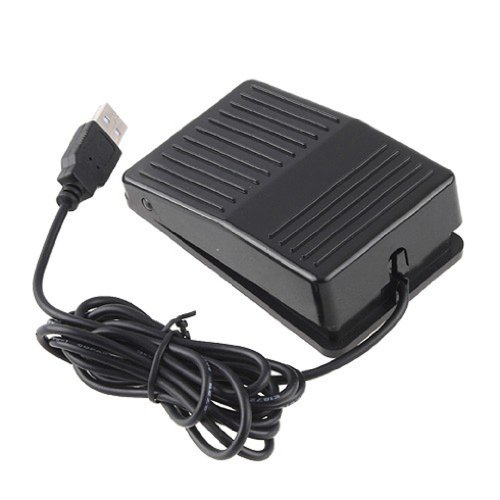
The iKKEGOL single pedal is the category’s front door: one wide pedal, one job, minimal fuss. It arrives ready to work as a basic input and is configured through the maker’s own utility, downloaded from the manufacturer’s official site, where you assign the pedal a key, a combination or a media function. Its appeal is precisely its narrowness. For the streamer who needs a mute pedal or the office worker offloading a single shortcut, there is nothing here to learn beyond one assignment, and the pedal’s broad surface is easy to find blind. The trade-offs follow from the same simplicity: one pedal means one command, the configuration options are the shallow end of the pool, and anyone who suspects their ambitions will grow should look further down this list before buying twice. As a first pedal — the one that proves whether foot input suits you at all — it is the sensible default, sitting firmly in the entry tier of the category.

PCsensor USB Foot Pedal — Single, Dual and Triple Options
PCsensor is the other name that dominates the affordable end of the market, and its distinguishing feature is range: the same basic design language offered as a single pedal and in multi-pedal arrangements, so a buyer can match the hardware to the workflow rather than the other way round. The triple version is the interesting one for transcription-style work on a budget, giving play, rewind and fast-forward style assignments a home under one foot. Configuration is handled through the vendor’s software from its official source, and the pedals cover the standard vocabulary of keys, combinations and media commands. The honest limitations are about refinement rather than function: the software experience is utilitarian, the pedal feel is workmanlike rather than luxurious, and the platform depth of the professional lines is not here. What is here is the category’s core value proposition — reliable pedals mapped to your shortcuts — at the accessible end of the range, which is why PCsensor units show up under so many desks.
Kinesis Savant Elite2 — The Programmable Dual Pedal
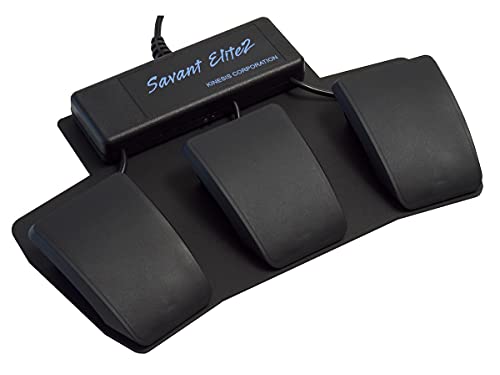
The Kinesis Savant Elite2 comes from a company whose reputation was built on ergonomic input devices, and it shows in the design priorities: this is a pedal system for people who intend to configure it once, thoughtfully, and then rely on it for years. The dual-pedal unit offers two generously sized pedals, and the design allows an additional pedal to be connected for a third action, which suits workflows that grow. Programming is a genuine strength — the Savant Elite2 stores its configuration so the pedals carry their assignments with them, and the configuration tooling supports the layered, considered setups that professional users in fields like transcription, imaging and media production tend to build. The trade-off is commitment: this is a mid-to-premium tier device, its software rewards a user willing to read and think, and its talents are wasted on someone who only ever wanted a mute button. For the user with a defined, demanding workflow, it is arguably the most complete pedal in this review.
X-keys USB Foot Pedals — The Control-Room Platform
X-keys, from P.I. Engineering, approaches the foot switch from the control-room direction: the pedals are one surface in a wider ecosystem of programmable control devices used in broadcasting, media production and specialist workstations. The foot pedal units are offered in different hinge arrangements — a choice that matters, as discussed above, because it changes how the press feels across a long session — and the programming software, obtained from the manufacturer’s official site, supports macros and layered assignments well beyond a simple key press. Build intent is professional: these are pedals designed to be driven all day in environments where a missed command is a real problem. The corresponding trade-offs are a premium tier position and a platform learning curve; an X-keys pedal used as a glorified mute button is magnificent overkill. But for users whose pedal is one instrument in a larger control setup — or whose single pedal must be utterly dependable — this is the heavyweight option in the category.

Infinity IN-USB-2 — The Transcription Specialist
The Infinity IN-USB-2 does not try to be a general-purpose pedal, and that focus is its strength. It is a transcription pedal in the classic layout: a wide, low unit with a large central play section flanked by rewind and fast-forward, shaped to be operated by the ball of the foot through hours of audio. Its natural habitat is professional transcription software, where it is recognised and supported as the tool of the trade, and its design reflects decades of that single workflow — the pedal spacing, the travel and the resting position are all answers to the question of how a foot controls audio comfortably at speed. Judged as a transcription instrument, it is the reference design in this review. Judged as anything else, it is the wrong purchase: it is not the pedal for gaming macros or streaming scenes, and its specialisation is total. Buy it for the job it was born for and it disappears into the work, which is the highest praise a tool like this can earn.
Strengths and Trade-Offs
Strengths
- Hands stay where they belong. The entire value of the category is captured here: high-frequency commands move to an idle limb, and the hands never break position, aim or typing rhythm to issue them.
- Universally compatible by design. Because a pedal presents itself as a standard input device and sends ordinary shortcuts, it works inside virtually any application without plugins, integrations or developer support.
- Simple, durable hardware. The mainstream designs are mechanically straightforward, wired for reliability, and proven over years of production — there is very little inside a foot switch to go wrong.
Trade-Offs
- Binary and imprecise. A pedal is a switch. It cannot do analogue control, fine timing or rapid repeated precision work, and assigning it such jobs guarantees frustration.
- An adjustment period is real. Foot control feels clumsy for the first days; the benefit arrives only after the movement becomes unconscious, and some users quit before that point.
- Floor logistics. Pedals wander on smooth floors, cables need routing, and the device occupies under-desk space that chairs, feet and PC towers also want. None of this is hard, but none of it is nothing.
How a USB Foot Switch Compares
The honest comparison for a foot switch is not other pedals; it is the alternative ways of issuing the same command. Against a keyboard shortcut, the pedal wins on hand position and loses on precision and on the sheer number of commands available — a keyboard offers dozens of shortcuts, a pedal bank offers a few. Against a stream deck or macro pad, the pedal wins on eyes-free, hands-free operation and loses on labelling and capacity: a deck shows you what each button does, while a pedal must be memorised, which is why pedals suit a small set of deeply learned commands rather than a library. Against voice control, the pedal wins on reliability and privacy and loses on flexibility. Against doing nothing — simply accepting the hand movement — the pedal wins exactly when the command is frequent enough that the accumulated interruption matters. That is the whole calculus, and the companion piece on usb foot switch pros and cons works through it in a more argumentative form for readers who want the case made both ways.
Within the category, the comparison that matters is configuration depth versus simplicity. The iKKEGOL and PCsensor pedals ask almost nothing of you and give you the core benefit; the Kinesis and X-keys platforms ask for setup time and repay it with memory, macros and growth room; the Infinity ignores the general market entirely and perfects one workflow. None of these is the wrong answer in the abstract. The wrong answer is a mismatch: a platform pedal bought for a single mute command, or a single basic pedal bought for a transcription business. Match the depth of the tool to the depth of the job and every design in this review is defensible.
Who Should Buy One — and Who Should Skip It
Buy a foot switch if you can already name the command it will own. That sentence is the entire buying guide in miniature, and it is expanded properly in how to choose a usb foot switch. Streamers with a mute or push-to-talk need, transcriptionists, gamers with a voice key problem, editors and office workers with one dominant repeated shortcut: these buyers succeed because the pedal arrives to a job that is already waiting. Buy the simplest pedal that covers that job, in the tier that matches how many hours a day it will work — entry designs for a single light-duty command, the professional platforms when the pedal is load-bearing infrastructure for your work.
Skip it, for now, if your motivation is a general feeling that your setup should be more optimised. A pedal without an assigned job becomes under-desk clutter with remarkable speed, and the honest sequence is to first notice, over a week of work, which command keeps pulling your hand out of position — then buy the pedal for that command. Also skip the specialist transcription pedals unless you transcribe; skip the deep platforms unless you will genuinely program them; and skip the whole category if your floor space, chair style or working position makes foot operation impractical, because a pedal you cannot comfortably reach is a pedal you will never press. Readers still on the fence will find the dedicated verdict in the worth-it analysis for usb foot switches more useful than another product paragraph.
Setup, Care and Maintenance Essentials
Good setup is mostly placement. Put the pedal where your foot naturally rests when you are working, not where it looks tidy; angle it to match your foot rather than the desk edge; and give it a surface it cannot skate across — a mat, carpet, or a position against a fixed object. Assign one command, use it for several days until the movement is automatic, and only then consider adding a second pedal or a second layer. Download configuration software only from the manufacturer’s official website, keep a note of your assignments somewhere you can find them, and if your pedal stores its programming onboard, remember that the configuration travels with the device when you change computers. The full step-by-step treatment lives in our guide to using a usb foot switch day to day.
Care is minimal but not zero. Keep the pedal free of the dust and grit that accumulate at floor level, since debris around a hinge or switch is the enemy of a clean press; a quick brush or wipe during desk cleaning is enough. Route the cable so it is never pinched by chair castors or pulled taut, because the cable and its entry point are the most common failure sites in the category. If a pedal begins to double-trigger or miss, check the simple things first — cable seating, a different USB port, the assignment in the configuration utility — before concluding the hardware has failed. Treated this way, a mainstream foot switch is one of the longest-lived devices on a desk, routinely outlasting the keyboards and mice it works alongside.
Final Verdict
A USB foot switch is a small device with an unusually honest value proposition: it does one mechanical thing — moving a command from your hands to your foot — and for the right workflow that thing is worth a great deal. This review’s verdict is that the category deserves its quiet ubiquity in streaming and transcription, and that most buyers should start simple: the iKKEGOL or a PCsensor arrangement for a first, single job; the Kinesis Savant Elite2 or an X-keys pedal when the workflow is defined and demanding; the Infinity IN-USB-2 when the job is transcription itself. Buy for a named command, download software only from the maker’s official site, give your foot a week to learn — and the pedal will repay you in the currency it trades in: interruptions that never happen.
A Week With a Pedal: What Daily Use Actually Feels Like
The First Two Days
Honesty about the adoption curve is this review’s duty, so here it is plainly: the first two days with a foot switch are faintly ridiculous. You will press it a half-second late, because the decision to mute or pause begins in the part of your mind that still addresses your hands. You will glance down to confirm the pedal is where you left it. You will fire it once or twice while shifting in your chair, and each accidental press will feel like evidence against the whole idea. What is actually happening is motor learning in its least glamorous phase — your foot is building a map of the floor and a new association between intention and limb. Nothing about the hardware can shorten this phase, and no reviewer should pretend otherwise. The only variable you control is exposure: the more often the pedal’s one command arises and is answered by the pedal, the faster the map gets drawn. This is why the review keeps insisting on a single, frequent assignment for beginners. Frequency is not a preference; it is the mechanism.
The Middle of the Week
Somewhere around the third or fourth day of honest use, the quality of the experience changes. The glance downward disappears first. Then the half-second delay goes. What replaces them is a small, satisfying directness: the intention and the press become the same event, and your hands — this is the part users describe with genuine surprise — start to feel strangely privileged, as if a minor tax they had paid for years without noticing has been repealed. The accidental presses also fade, not because you have become more careful but because your foot has learned the difference between resting territory and the pedal’s address. If a review could bottle one moment, it would be this one: the first time you mute, pause or advance with your foot while your attention is entirely somewhere else, and only realise afterwards what your body did. That is the product working. Everything sold in this category is, in the end, an attempt to deliver that moment reliably.
After a Month
A month in, the pedal has usually undergone a quiet change of status: it stops being a device you own and becomes part of the room’s furniture, like the chair’s armrest — unnoticed until it is missing. Users who unplug a learned pedal for a day, to lend it or test another desk, consistently describe the experience as disproportionately irritating: the hand keeps not-reaching, the foot keeps pressing a ghost. That irritation is the most reliable evidence in this entire review, because it measures the benefit in reverse. It also explains the category’s upgrade pattern. The month-two questions are never “was this worth it” but “should the second command get a pedal too” and “would the programmable version serve the bigger workflow I now understand.” A review can ask for no cleaner verdict than a user whose only complaint is that they started with one pedal instead of two.
Sound, Travel and the Details Nobody Lists
A few lived details deserve record because no feature list carries them. Sound: a pedal press produces a soft mechanical click, quieter than a typical keyboard stroke and far quieter than a mouse being set down hard, but in a silent room at night it is present. Streamers in shared housing should know the pedal is not the loudest thing in their setup and not the quietest either. Travel: the pedal’s cable is its leash, and desk layouts with the computer on the opposite side from the working foot create routing puzzles worth solving before purchase rather than after. Chair interaction: a pedal placed inside the sweep of a chair’s castors will eventually meet one, so the correct home is outside the glide path, where your foot rests when you are settled rather than where it lands when you sit down. And socks versus shoes change the feel more than any reviewer admits — most long-term users develop a preference and a placement tuned to it. None of these details decides a purchase alone. Together they are the texture of ownership, and they are why this review weights placement and feel above every specification the category offers.
What Would Change This Review’s Mind
A review should state its own falsification conditions, so here are this one’s. The verdict in favour of starting simple would weaken if the entry pedals’ configuration tools became unreliable or vanished from their makers’ official sites, because the simple pedal’s case rests on a five-minute setup that anyone can repeat. It would strengthen further — toward the platforms — if professional software began expecting pedal input as a standard part of its interface, the way transcription software already does; at that point the programmable tier stops being an upgrade and becomes the default language of the category. And the review’s confidence in the whole product class would genuinely wobble if a credible hands-free alternative matured — voice control with perfect reliability and privacy, say — because the pedal’s niche, a few frequent commands issued silently and blind, is precisely the ground such a technology would contest. None of those shifts is visible today. The category’s designs are stable, its software is maintained, and its niche is unchallenged, which is why this review can be unusually definite: for the workflows named, in the order given, these are the right tools, and the burden of proof now sits with anyone who would complicate that sentence.
One more condition deserves record, because it concerns the reader rather than the market. This review’s recommendations assume the buyer’s command is real. Every model examined here will fail a buyer who purchases on speculation, and no revision of the hardware can fix that, because the failure lives in the match, not the product. If you finish this review unable to name your command, the review’s actual verdict for you is the one it has repeated in every section: wait, watch your own work for a week, and let the command introduce itself. The pedal will still be here, unchanged, when it does — stability being, as this review has noted more than once, the category’s defining virtue.
A Note on Who Wrote This Review’s Standards
Every judgement in this review was made against the working reader rather than the browsing one: the person whose pedal will be pressed during real work, under real time pressure, by a foot that cannot spare attention. That is why feel outranks features throughout, why the learning week is described at uncomfortable length, and why the simplest model in the field receives the review’s warmest general recommendation. A pedal is not a showcase purchase. It is closer to a tradesman’s habit — invisible when right, maddening when wrong — and it has been reviewed here in that spirit, with the glamour left to categories that need it.
What a Careful First Week With a Usb Foot Switch Reveals
Note the moment you first had to think about the usb foot switch instead of your work, since that moment usually reveals more than any summary of features can. Keep liquids, loose papers and anything that sheds dust or fibres at a sensible distance, unless the usb foot switch was clearly designed to work right beside them. Decide in advance what good enough looks like for your use, so a minor cosmetic flaw does not distract you from performance that genuinely meets the brief. Avoid forcing a connector, bracket or moving part that resists you, because resistance is usually information about alignment or fit rather than an invitation to push harder.
As a concrete listing check, take the iKKEGOL USB Foot Switch and the PCsensor USB Foot Pedal named earlier in this article and confirm, line by line, that each variant offered matches the size, connection and contents described for it here. Give a new usb foot switch a fair trial in the position it was bought for before improvising workarounds, since many early complaints disappear once placement is corrected. Consider who else will use, move or clean around this usb foot switch, because a choice that only works for one careful owner often frustrates everyone else in the household or team. Check the connection points you rely on every day, and note which ones are already occupied, shared or awkward to reach once furniture is back in place. A fair test repeats the same task at least twice, once while you are paying attention and once while you work normally, because concentration can hide clumsy design.
Prefer a setup you can explain to another person in a minute, because simple arrangements are easier to troubleshoot, share and repeat than fragile clever ones. Think about storage for the accessories this usb foot switch brings with it, so spare parts and tools end up in one known place instead of scattered across drawers. Take a quick photo of the working setup before you change anything, so cable routes, positions and settings can be restored exactly if the new arrangement disappoints. Check the underside, back or hidden face of the usb foot switch as part of your inspection, because labels, vents, switches and fasteners often live where first impressions never look.
If you work in more than one place, decide whether this usb foot switch stays fixed in one spot or travels, and judge its size, weight and setup time accordingly. Look closely at seams, edges, hinges, threads or contact points when the usb foot switch arrives, because build quality is easiest to judge before everyday wear hides the evidence. Judge the controls by whether you can use them without looking down or stopping your task, because that is how they will be used for most of their life. Notice how the usb foot switch behaves when you are tired or in a hurry, since products that demand perfect technique tend to fail exactly when you have least patience. Test in the order you actually work: power on, connect, adjust, run a real task, then tidy up, rather than judging the usb foot switch on a single impressive first impression.
Keep the instructions somewhere you can find them months later, since the setting or step you skip today is often the one a future problem sends you hunting for. Run one deliberately awkward task early on, the kind you usually avoid, and see whether this usb foot switch handles your edge cases or only your easiest work. Leave a little headroom in every direction that matters, whether that means physical space, connection capacity, adjustment range or simply time to do a task properly.
Notice the small sounds, lights and movements during normal use, because those everyday details decide whether a usb foot switch feels settled or constantly demands attention. When you check a single usb foot switch closely, work from the outside in: condition and finish first, then controls and connections, then behaviour during a real task from start to finish. Check that nothing you place on, under or beside the usb foot switch blocks airflow, movement, visibility or access that the design quietly depends on. If the usb foot switch will be shared, agree on one home position and one simple reset routine, so each person does not undo the previous person’s adjustments.
Frequently Asked Questions
Does a USB foot switch work with any program?
In practice, yes. A foot switch presents itself to the computer as a standard input device and sends ordinary keystrokes, combinations or media commands, so any application that responds to a keyboard shortcut can be driven by a pedal. The configuration utility from the manufacturer decides what each pedal sends; the application simply receives it. The rare exceptions are programs with no shortcut for the function you want — the pedal cannot invent a command the software does not have.
How many pedals do I actually need?
One, to start. Most successful foot switch setups are built around a single command — mute, push-to-talk, play and pause — and one pedal covers it completely. Multi-pedal units earn their place when a workflow has a small family of related commands that belong together, transcription being the classic example. Buying pedals for hypothetical future commands is the most common way buyers overspend in this category, so let a real second job appear before you add a second pedal.
Is a foot switch hard to learn?
The learning curve is short but real. For the first few days you will look down, think about the press and occasionally trigger the pedal by accident while shifting in your chair. Within roughly a week of daily use for most people, the movement becomes unconscious — the same trajectory as learning a new keyboard shortcut, except your foot does the memorising. The trick is to assign one command and use it constantly rather than programming an elaborate layout on day one.
Can I use a foot switch for gaming?
Yes, within its limits. Pedals are excellent for push-to-talk, because holding a voice key with your foot frees every finger for the game, and they handle other binary toggles and holds well. They are not suited to aiming, steering or any action needing analogue control or split-second precision, and competitive players should keep twitch-critical commands on the mouse and keyboard. Think of the pedal as an extra, very reachable button — not as a replacement for your main controls.
Where should I download the configuration software?
Only from the manufacturer’s official website. Foot switch utilities are small, niche downloads, which makes them a favourite target for third-party download sites that bundle unwanted extras or worse. The maker’s own support or downloads page will carry the current version for your model, and it is the only source you should trust. If a pedal arrives with a printed link or instructions, type the manufacturer’s address yourself rather than following links from unknown pages.
Will a foot switch help with comfort during long sessions?
It can redistribute work, and that is the honest way to describe it. Moving a frequently repeated command from a hand to a foot spreads input across more of the body, and many users find that arrangement more comfortable in practice — it is one reason pedals appear in accessibility-oriented setups. What no review should promise is a medical outcome. Treat the pedal as a flexible input tool, arrange your whole workstation sensibly, and judge the comfort question by your own experience over a few weeks of use.
Related Reading
Continue with the usb foot switch reviews roundup, the usb foot switch buying guide, and the practical walk-through of how to choose a usb foot switch. For the hand-operated side of a streaming or transcription desk, see keyboards for medical transcriptionists and keyboards for day trading.