Disclosure: As an Amazon Associate, ilcastellomenu.com earns from qualifying purchases. Product examples below link to Amazon, where you can check current availability and specifications; this guide itself lists no fixed prices because printer pricing and bundles change frequently.
The monochrome vs color laser printer decision looks simple — do you need colour or not? — but the honest version is: how often do you need colour, and what will you do on the days you do? A monochrome laser is cheaper to buy, cheaper to run, faster and simpler, with one toner cartridge to manage. A colour laser prints everything a mono model does plus colour documents, charts and handouts, at the cost of four toner cartridges, a higher purchase price and slightly slower colour output. This guide compares the two across cost, speed, quality and real-world use so you can buy the simpler machine with confidence — or justify the colour one properly.
Browsing already? Compare Best Monochrome Laser Printers for Home against Best Color Laser Printers for Home Use, and read Inkjet vs Laser Printer if you have not settled the technology question yet.
Quick Verdict: Monochrome vs Color Laser Printer
If ninety percent or more of your printing is black text, buy monochrome and do not look back — you will save money on the machine, on toner and on maintenance for its entire life. If colour appears weekly in documents other people see — proposals, teaching materials, marketing handouts — buy colour laser and enjoy never thinking about it again.
Choose monochrome if…
Your pages are essays, invoices, contracts, shipping documents, forms and reading material. You value the lowest cost per page and the fastest first page, and the rare colour job can go to a copy shop or a colleague’s printer.
Choose colour if…
Your documents regularly include charts, logos, highlighted sections or photographs-for-reference, and they represent you or your business. Colour laser output on plain paper looks crisp and professional in a way inkjet colour on plain paper often does not.
The trap to avoid
Buying colour ‘just in case’ and then feeding four cartridges for a decade of black text is the common mistake. The opposite trap — saving money on mono, then paying copy-shop prices monthly — is rarer but real. Count your actual colour pages from the last few months before deciding.
In this guide
How the Two Differ Inside
A colour laser is essentially four monochrome print engines working in sequence — cyan, magenta, yellow and black — which explains nearly every practical difference between the two classes.
Cartridges and consumables
A mono printer needs one black toner cartridge, and sometimes a separate drum. A colour printer needs four cartridges plus, on many models, a waste-toner container and a transfer belt that eventually wear. More consumables means more replacement events and more shelf space for spares.
Size and mechanics
Passing the page past four toner stations takes space, so colour lasers are noticeably larger and heavier than mono equivalents. They also take slightly longer to produce the first page, as the system calibrates colour alignment.
What stays the same
Text sharpness, paper handling quality, network features and durability are comparable between good mono and colour models. A colour laser printing black text is not compromised — it simply uses its black cartridge and behaves like a mono machine.
Monochrome vs colour laser, criterion by criterion
| Criterion | Monochrome laser | Colour laser | Edge |
|---|---|---|---|
| Purchase price | Lower | Higher | Mono |
| Toner cartridges | 1 (black) | 4 (CMYK) | Mono |
| Black cost per page | Low | Low | Tie |
| Colour documents | Not possible | Crisp business colour | Colour |
| Photos | Not suitable | Flat, not photo-quality | Neither — use inkjet |
| Speed | Fastest in class | Fast mono, slower colour | Mono |
| Size | Compact | Larger | Mono |
| Maintenance | Minimal | Moderate | Mono |
Costs: Purchase, Toner and Cost Per Page
Money is where this comparison is usually decided, and the gap is bigger than most buyers expect once toner enters the picture.
Purchase price
Mono lasers occupy the budget tier of the laser world; colour lasers start where mono models are already well specified. The same money buys a mono printer with duplexing, a feeder and fast speeds, or an entry colour printer with fewer of those comforts.
Toner economics
Black cost per page is similar between the two classes when both use high-yield black cartridges. Colour pages cost several times more, because all four toners contribute. The real mono advantage is structural: you can never accidentally spend colour toner, and there is only one cartridge to keep in reserve. See Best Printers for Low Cost Ink for the running-cost mindset applied across technologies — the principle is identical for toner.
The colour-printing household audit
Print a month of your normal work and count colour pages honestly. If colour is under five percent and none of it is client-facing, mono plus an occasional external print is the economical answer. If colour is a third of your output, the colour laser earns its keep quickly.
Speed, Quality and Paper
Both classes share laser strengths — sharp text, water-resistant output, fast long runs — but differ in the details of colour work.
Speed differences
Mono lasers are typically the fastest printers in their price class, rated purely on black pages. Colour lasers quote two speeds: mono speed, which is competitive, and colour speed, which is slower. If your long runs are black, a colour laser will not hold you up; if they are colour, read the colour rating carefully.
Colour quality expectations
Colour laser excels at business colour: charts, diagrams, logos, coloured headings and flat graphics on ordinary paper. It is not a photo printer — photographs look flat compared with inkjet — so households wanting real photos should look at Best Color Printers for Photos rather than expecting a colour laser to cover that job.
Paper and media
Both handle the same laser-safe papers, card within weight limits, labels rated for laser use and envelopes. Neither tolerates inkjet-only media, whose coatings can melt in the fuser. Colour models add nothing here except the ability to print that media in colour.
Who Each Class Suits: Real Scenarios
Abstract comparisons settle faster when mapped to the buyers who actually face this choice.
Students and home workers
Mono, unless your course or job visibly involves colour documents. Essays, research and forms are black-text work, and the savings fund a lot of library colour printing. Our Best Laser Printers for Students picks lean mono for exactly this reason.
Small businesses and client-facing work
Colour, if documents leave the building with your name on them. Invoices with a colour logo, proposals with charts and handouts all look materially more professional. Businesses in Best Color Laser Printers for Small Businesses territory usually recoup the premium in presentation alone.
Teachers and community groups
Colour earns its place: worksheets, posters and notices use colour functionally, not decoratively. But volumes can be high, so check colour toner yields carefully before committing the budget.
Households sharing one printer
The mixed case. If one member prints colour weekly for work or school, colour laser serves everyone and never clogs during holidays — a genuine advantage over a colour inkjet for households with long idle gaps, as how to choose a printer discusses.
Ownership Over Five Years
Project the ownership forward and the two classes diverge in predictable ways that are worth picturing before you buy.
Maintenance events
Mono: replace toner occasionally, replace a drum rarely, wipe dust. Colour: the same, multiplied across four cartridges, plus eventual belt or waste-container attention on some models. Neither is burdensome; colour simply has more small events.
Failure modes
A mono printer has fewer things to go wrong and its problems are easy to diagnose — faint prints mean toner or drum, as how to fix faded printer prints explains. Colour adds alignment and single-colour faults, which are still user-manageable but take longer to pin down.
Resale and replacement logic
Both classes hold up well. When replacement time comes, households usually repeat their previous choice — which suggests the best decision aid is your own last printer: did you miss colour, or did you feed cartridges you never used? Answer that and this comparison is over.
The Hidden Middle Option: Mono Laser Plus Occasional Colour Elsewhere
Before paying the colour premium, price the alternative honestly: a mono laser at home, with colour needs met elsewhere. For many households this hybrid is the actual optimum, and it deserves a fair hearing against the colour laser.
What 'elsewhere' realistically costs and involves
Copy shops, office-supply stores, library printers and online print services all produce colour pages on demand. If your colour need is a few dozen pages a year — a school project, a presentation, party invitations — the hybrid’s total cost is trivial and the mono laser’s savings bank themselves monthly. The friction is real but small: a trip, or a two-day wait for delivery.
When the hybrid breaks down
The hybrid fails when colour is frequent, urgent or confidential. Weekly colour printing turns trips into a chore; same-day deadlines cannot wait for a shop; and client or personal documents may not belong on a shared machine. If any of those describe you, the colour laser is not a luxury — it is the tool, and this section has done its job by making the need explicit.
The other hybrid: mono laser plus colour inkjet
Households that need colour at home but print it rarely sometimes pair a mono laser with a small colour inkjet. Price this carefully: the inkjet reintroduces clog management and cartridge costs, and a colour laser often costs less to own over five years while doing everything. The pairing wins mainly when the inkjet is really there for photos, which no laser replaces.
Reading Colour Laser Specifications Critically
If you do choose colour, its specification sheet contains two traps that mono shopping never taught you. Knowing them prevents the commonest colour-laser disappointments.
Colour speed is the real speed
Listings headline the mono speed because it is bigger. Your lived experience of a colour laser is its colour speed, which can be markedly slower, plus a longer first-page wait while the machine calibrates. If your long runs are colour, compare colour ppm figures between models and ignore the headline number entirely.
Single-pass versus multi-pass designs
Some colour lasers lay all four colours in one page pass; others rotate the page through four passes. Single-pass designs are faster and kinder to registration on thick media; multi-pass designs are cheaper and smaller. Neither is wrong, but the distinction explains size and speed differences that otherwise look arbitrary on the shelf.
'Colour capable' features that are really mono features
Duplex scanning, fax and network features work identically in both classes, so do not let a colour model claim credit for them in a comparison. The honest colour premium buys exactly one thing — colour toner stations and their output — and it should be justified by colour pages alone.
Colour Laser Ownership: Getting the Best From Four Cartridges
If you chose colour, a few ownership practices specific to four-cartridge machines will keep its output honest and its costs contained. None applies to mono owners, which is itself part of the comparison.
Print colour regularly, in small amounts
Colour lasers calibrate themselves and keep toner paths exercised best when colour printing is part of normal life rather than a quarterly event. Households that print colour weekly rarely meet the alignment and density drift that afflict colour machines used as mono printers for months — one more argument for buying colour only when colour is genuinely routine.
Manage defaults to protect colour toner
Set the default to black-and-white (or ‘mono’) in the driver for everyday printing, switching to colour deliberately for documents that need it. Without this, applications cheerfully render black text using all four toners on some settings — the most expensive way known to print a letter. This single default is worth real money every month.
Replace cartridges individually, as they empty
Colour cartridges deplete at different rates; replace them one at a time as the printer reports them empty, not as a set. Keep one spare black — the cartridge that actually stops most offices — and let the colours’ warnings trigger their own orders. A shelf of four spares is capital sitting in a cupboard.
Judge colour output on business documents
Evaluate your colour laser with charts, logos and photographs embedded in documents — its actual job — rather than with full-page photo prints it was never built for. Owners who grade it on the wrong test replace good machines; owners who grade it on its real work keep them for years.
What Owners Actually Report After a Year
Specifications predict a purchase; ownership reports predict satisfaction. Drawing together the patterns that mono and colour laser owners consistently describe after real time with their machines gives this comparison its most practical section.
Mono owners' consistent themes
Mono owners praise forgettability: the printer is simply there, cartridge changes are rare events, and nothing about printing requires thought. Their commonest regret is not colour — it is under-buying paper handling, wishing they had taken the document feeder or the larger tray. If you buy mono, spend the colour savings partly on the handling features; that is the upgrade mono owners actually miss.
Colour owners' consistent themes
Colour owners praise presentation: documents that look like they came from a business that means it. Their commonest regret is the reverse of the mono owners’ — discovering how rarely colour was truly needed, usually admitted around the first full set of cartridge replacements. Their second theme is default settings: those who set mono-by-default stay happy; those who did not, subsidise their black printing.
The shared theme
Both groups converge on one point: nobody regrets buying enough printer. The duplexing, networking and tray capacity bought at purchase are appreciated for years, while the money ‘saved’ by stepping down a model is forgotten within a month. Within your chosen class, buy the well-specified version — that may be the most transferable sentence in this entire comparison series.
Gear for This Guide
The examples below come from our verified product pool and illustrate the printer classes discussed in this guide. They are examples, not a ranked list — use the criteria in this article to judge any model, including newer revisions of these machines.

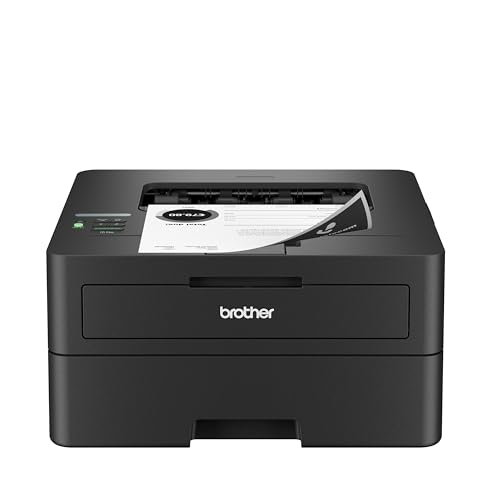
Brother HL-L2460DW
The mono archetype: one cartridge, duplex printing, wireless, and nothing you do not need — the benchmark every colour model must justify itself against. Brother HL-L2460DW — Check on Amazon

Brother MFC-L3780CDW
A full colour laser all-in-one with scanning and duplexing, showing what the colour premium buys when your documents genuinely need it. Brother MFC-L3780CDW — Check on Amazon

PANTUM P2502W
A basic compact mono laser for the simplest text-only brief — proof of how inexpensive the mono route can be. PANTUM P2502W — Check on Amazon
The Question Behind the Question: How Much of Your Colour Is Real?
Every buyer in this comparison faces one measurement problem: estimating how much colour they truly print. Guesses flatter colour, because colour jobs are memorable — the presentation, the party invitation, the child’s project — while the grey tide of everyday text passes unnoticed. Measure instead. If your current printer reports it, check the colour-versus-mono page counts in its status pages or driver counters; many machines quietly keep exactly this tally, and a year of real data settles arguments that opinions cannot. If no counter exists, spend two representative weeks keeping a tally sheet by the printer, marking each job with a stroke in one of two columns. Most households that perform this small experiment discover colour is a far smaller share than they believed, often a tenth or less of pages — which does not automatically settle the choice, because that tenth may be the most important tenth, but it prices the decision honestly: you are weighing a modest premium on every page, forever, against convenience on a small minority of pages.
The second measurement is colour’s purpose. Distinguish colour as information — charts where series must be distinguishable, maps, diagrams, warning labels — from colour as decoration, and both from colour as identity, the branding on documents that represent a business. Informational colour can often be redesigned for mono with patterns, labels and line styles, a skill older than colour printing. Decorative colour can go to a print shop on the occasions it matters. Identity colour is the stubborn category: if your documents carry your business’s face into the world weekly, in-house colour stops being a luxury and becomes infrastructure, and the colour laser’s case strengthens accordingly. Naming which kind of colour you print is worth more than any specification in this comparison.
Life With a Colour Laser Running Mostly Black: The Fine Print
Buyers often assume a colour laser used mainly for text behaves like a mono laser with benefits. Mostly it does — until the day it does not, and the exceptions deserve daylight before purchase. Many colour lasers consume small amounts of colour toner even during black printing, through calibration cycles and the colour components’ role in the imaging process; the rate is low but real, so colour cartridges in a text-heavy home still age toward replacement on a timescale of years rather than never. More sharply, many models refuse to print at all when any single cartridge reports empty, including colour cartridges during a purely black job. Policies vary by brand and model — some allow a black-only mode with an empty colour cartridge removed or set aside, others halt completely — and this single behaviour is responsible for a disproportionate share of colour-laser resentment. Check it for your specific finalist, in the manual, before buying: the phrase to look for is whether the machine can print in black with an empty or missing colour cartridge.
There are gentler differences too. Colour lasers run periodic calibration that mono machines skip, adding occasional pauses and faint mechanical activity that startle owners in quiet rooms. Their warm-up and first-page times on colour work exceed their mono performance, narrowing the speed story told in the main sections. And a colour laser’s black cartridge, while high-yield options exist, shares the machine with three companions whose combined replacement, when the day eventually comes, arrives as one large supply event rather than the mono owner’s single modest one. None of this makes the colour laser a poor choice for a mostly-text household that values the option; it makes it a choice to enter with eyes open, ideally with the empty-cartridge policy verified and a spare black cartridge kept on the shelf.
Greyscale Quality: When a Mono Laser Out-Prints a Colour Machine at Its Own Game
An underappreciated corner of this comparison is how each class renders black-and-white images and shaded graphics. A monochrome laser renders greys by halftoning with its single black toner, and good mono engines do this with fine, well-tuned screens that produce smooth charts, legible shaded diagrams and surprisingly decent photographic greys within documents. A colour laser printing a black document may engage its colour imaging for richer blacks in some modes, but in its standard black mode it typically prints with the black cartridge alone through a colour engine’s paper path — and the results, while perfectly good, are not automatically superior. Owners sometimes discover their colour machine’s greyscale gradients band slightly more than a mono stablemate’s, because the colour engine’s calibration priorities lie elsewhere.
The practical translation: for reports heavy with charts, scanned documents and greyscale figures, do not assume the dearer machine prints them better. Test both classes with your own most demanding greyscale page if the work matters to you, and judge small text in shaded table headers — the first place weak greyscale rendering becomes illegibility. Conversely, the colour machine earns its keep precisely where the mono cannot follow at all: the one chart in twenty where colour carries the meaning. The decision is rarely about which greyscale is finer; it is about how often the colour-only page appears in your real work, which returns the choice, as ever, to the measurement exercise at the top of these sections.
The Third Architecture: Mono Laser at Home, Colour by Exception
The middle option in the main guide — mono laser plus occasional colour elsewhere — deserves a fuller working-out, because for many households it is not a compromise but the optimum. Price your exceptions honestly across a year: the handful of colour documents sent to a copy shop or printing service, the photographs ordered from a lab, the one presentation printed at work with permission. Set against those, the mono laser’s savings on every single everyday page, its smaller supply cupboard, its simpler mechanics and its indifference to the empty-colour-cartridge problem. Households whose colour is rare but precious — the annual photo book, the wedding stationery — often get better colour from a professional service than any home colour laser would give them, so the exception route upgrades quality at the same time as it cuts cost.
The exception route fails where colour is frequent, urgent or confidential. A teacher printing colour materials weekly will not tolerate a shop’s timetable; a business whose colour documents contain client data should not be carrying them to a high-street counter; a family whose colour needs arrive at 9 p.m. before a school morning needs the capability in the house. There is also a hybrid worth naming for these households: the mono laser as the workhorse plus an inexpensive colour inkjet — ideally a tank model — for colour duty, which frequently undercuts a colour laser’s total ownership while beating it at photographs. The colour laser’s true stronghold is the narrower band between: colour that is regular, document-shaped, and needed at laser pace and finish. Recognising whether your colour lives in that band is the whole decision, stated in one sentence. Buyers in that band can compare the current field in our best colour laser printers for home use roundup.
Environment, Energy and the Four-Cartridge Footprint
The environmental comparison between the classes is subtler than cartridge counting suggests, though it starts there: a colour laser cycles four toner cartridges where a mono cycles one, and even with return-and-recycling schemes, more consumable mass moves through the colour machine across its life for the same number of printed pages, most of them black. Energy tells a similar story in miniature — both classes draw their serious power only while fusing pages, and standby efficiency is good on modern examples of each, but the colour machine’s larger engine, calibration activity and longer warm states give it the slightly heavier footprint in like-for-like use.
The decisive environmental variable, as in most product comparisons, is longevity and fit. A mono laser bought for genuinely mono work tends to serve for many years with minimal intervention — a long-lived appliance is a sustainable one. A colour laser bought speculatively and replaced early because its supply costs annoyed its owner is the worst outcome on every axis. Duplexing, which both classes offer, saves more paper in a busy household than any other single feature; enabling it by default is the greenest setting in this entire comparison. Buyers for whom this dimension leads should let it push them toward the class that matches their measured colour share — no more machine than the work requires — which is, not coincidentally, also the cheapest advice in this guide.
Scenario Verdicts: Six Buyers, Called Plainly
The solicitor’s home office and the landlord
Contracts, notices and filings: mono, without a serious contest. The documents are text, their life is archival, colour appears only as the occasional highlighted clause that a pen handles better. Spend the colour premium instead on duplexing, a deep paper tray and a high-yield cartridge.
The estate agent and the mortgage adviser
Property particulars and client documents live or die by their photographs and branded presentation, produced daily, often while a client waits. Colour laser, chosen for its document finish on plain paper — the exact task inkjets do worst and colour lasers were born for.
The teacher
Split the difference by level. Text worksheets and exam materials argue mono; classroom displays and colour-coded learning materials argue colour. Primary teachers, whose colour is constant and visual, belong in the colour camp or the mono-plus-tank hybrid; secondary and exam-focused teachers usually discover their colour share is smaller than feared and thrive on mono.
The home business that ships
Labels and paperwork are mono work; branded inserts and instruction cards are colour work with deadlines. If inserts are printed in weekly batches, a colour laser earns its place; if they are occasional, the mono laser plus exception route wins and the savings fund better packaging.
The student household
Essays are mono; the occasional colour coursework page is an exception-route errand. Mono laser, bought once, shared by siblings, and still printing when the youngest graduates — this profile is where mono’s longevity legend comes from.
The committee and community volunteer
Minutes and accounts are mono; posters and event programmes are colour, infrequent and plannable. Mono at home, with event colour handled by the exception route or the venue’s own facilities, unless the events calendar is dense enough to make colour a weekly resident rather than a visitor. Volunteers printing at volume in either class may also find the workhorse models in our best laser printers for small business roundup better matched than home models.
A Tally in Practice: One Household Measures Its Colour Share
To make the measurement exercise concrete, consider a composite household that kept the tally sheet this guide recommends: two adults working partly from home, one teenager, a printer used for documents, schoolwork and household administration. Before measuring, both adults guessed colour was about a third of their printing — the worksheets and one partner’s presentation decks loomed large in memory. Four weeks of tally marks told a different story. Of just under nine hundred pages in the month, colour accounted for fewer than eighty: one set of presentation handouts, a school project, a birthday banner assembled from several pages, and a scattering of single pages where a chart or a map carried colour inside an otherwise black document.
The interesting pages were the mixed ones. Roughly a fifth of their “black” documents contained a single colour element — a logo in a letterhead, a highlighted table row, a colour photograph inside a report. On a mono printer those pages still print perfectly well in greyscale; the information survives, the branding mutes. The household’s verdict followed the shape of their data rather than their guess: they kept a mono laser as the workhorse, sent the one presentation deck that genuinely represented a business to a print service, and banked the difference. A different household — the estate agent from the scenarios above — running the same experiment would find colour on most pages and reach the opposite conclusion with equal confidence. The experiment is the point. Two weeks and a tally sheet convert this entire comparison from an argument about printers into a fact about your house, and facts make purchasing decisions strangely peaceful.
Paper Handling and Finish: Where the Classes Quietly Diverge
Buyers fixate on the engine and overlook the path the paper takes, yet the classes differ there in ways owners feel weekly. Colour lasers are physically larger because four imaging stations must sit along the path, and that size buys straighter paper travel on many models, which handles heavier card and longer runs with less fuss. Mono lasers, smaller and simpler, sometimes route paper through a tighter turn that very thick stock dislikes, though business-class mono models match their colour siblings here. Output finish differs too: both classes fuse toner, but colour output on plain paper carries the slight sheen of layered toner that reads as “printed professionally” for documents and “not quite a photograph” for images, while mono output has the flat, matte finish that suits text archives.
Tray capacity and media flexibility follow budget more than class, with one exception worth checking: if your work includes envelopes, labels or card in quantity, compare the straightness of each finalist’s manual feed path in its manual rather than assuming the larger machine wins. And confirm the colour finalist’s behaviour with the media you actually use — colour lasers are fussier about correctly set paper types, because fusing four layers onto an unannounced heavy stock is how disappointing colour and the occasional jam are born. Set the type honestly and both classes are obliging; skip it and the colour machine complains first.
Frequently Asked Questions
Does a colour laser use colour toner when I print a black-only document?
A small amount, on most models, yes. Colour lasers periodically calibrate using all four cartridges, and some designs lay a faint toner marker or engage colour components during parts of the imaging cycle even for black output. The consumption is minor compared with colour printing — colour cartridges in a text-led household last years, not months — but it is not zero, which is why a colour laser kept for a decade will eventually ask for colour replacements despite a lifetime of black documents. If absolute mono purity matters to you, that slow background consumption is one more argument for the dedicated mono machine.
Can I just remove the colour cartridges and run a colour laser as mono?
On most models, no. Colour lasers expect all four cartridges present for their imaging and calibration routines, and many will not print with one removed or reported empty, as the fine-print section above explains. A minority of models offer an explicit black-only mode tolerant of an empty colour cartridge, and that tolerance — where it exists — is documented in the manual rather than discoverable by experiment. Treat this as a pre-purchase check, not a post-purchase hope, and be wary of advice suggesting third-party tricks to defeat cartridge sensing: a machine persuaded to run against its design is a machine whose print quality and warranty you have volunteered to gamble.
Is a colour laser slower than a mono laser at black printing?
Peak black speeds of comparable colour and mono models are often similar on paper, but lived speed differs at the margins: colour machines typically take longer to the first page from sleep, pause occasionally for calibration, and carry more mechanics between tray and output. For a five-page document you will notice little; for a hundred-page run or a day of stop-start single pages, the mono machine’s simplicity shows. Judge by first-page-out time and your real job pattern rather than the headline figure, which both classes measure in their most flattering mode.
Which class holds its value better if I upgrade in a few years?
Monochrome lasers are famously durable second-hand purchases — simple, tolerant of neglect, and renewed by a cartridge — so a good mono model tends to find its next owner easily and to serve them well, which supports its value. Colour lasers carry more unknowns for a buyer: four cartridges’ worth of remaining life, calibration state and the empty-cartridge behaviour of the specific model. Neither class should be bought as an investment, but if your plans genuinely involve passing the machine on — to a student, a relative, a growing business’s second desk — the mono machine is the kinder inheritance and the easier sale.
Does a colour laser waste colour toner when printing black pages?
No. Printing a black-only document uses the black cartridge. Colour toner is consumed by colour pages and by small amounts during calibration cycles on some models.
Is text from a colour laser as good as from a mono laser?
Yes — black text quality is effectively identical. The colour engine does not compromise the black output.
Can a colour laser replace a photo printer?
No. Colour laser output suits business graphics, not photographs. For photos, choose an inkjet — see our photo printer coverage for the right class.
Which is cheaper to run overall?
Monochrome, for any household whose printing is mostly black. Colour running costs only make sense when colour pages are a real, recurring part of your output.
Should a small office buy one colour or two mono printers?
One colour laser usually serves a small office better — shared, networked and capable of everything. Two mono machines make sense only where colour is truly never needed and redundancy matters.
Do colour lasers need all four cartridges present to print black?
Most models require all cartridges installed and not fully empty to operate, even for black printing. That is a real ownership consideration if a colour cartridge runs out mid-deadline.
Is a colour laser good for printing photos on photo paper?
No. Colour lasers should not use inkjet photo paper at all — its coating can melt in the fuser — and on laser-rated media, photographs still look flat compared with inkjet output. Keep photos on an inkjet; use the colour laser for documents with colour in them.
Do colour laser printers use colour toner when idle?
Some models run occasional calibration cycles that consume minute amounts of toner to keep colour aligned. The quantities are small, but they are one more reason a household that never prints colour should not buy the colour machine.
Which is better for a home office that prints contracts and occasional proposals?
If proposals go to clients with charts and branding, colour laser earns its place. If proposals are emailed as PDFs and only contracts are printed, monochrome is the rational buy — print the rare colour proposal externally.
Can I add colour later if I buy a monochrome laser?
Not to the same machine — colour is hardware, not an upgrade. Your later options are a second, colour-capable printer or external printing. That permanence is exactly why this guide insists on auditing your real colour pages before deciding, rather than assuming either way.
Which type is better for printing boarding passes, tickets and forms?
Monochrome, emphatically. These are pure black-text jobs where laser sharpness and reliability shine and colour adds nothing. If your printing life is mostly documents the world sends you, the mono laser is your machine.
Do colour lasers print black-and-white photos acceptably?
They print recognisable greyscale images within documents, but tonal range is limited and photo paper for lasers is not the equal of inkjet photo media. For photographs you intend to keep or display, use an inkjet; for a photo embedded in a report, a colour laser is perfectly serviceable.
If I choose mono now, can I add colour later without replacing the printer?
Not within the same machine — a monochrome laser has one imaging station and no upgrade path — but easily within the same household. The usual pattern is to add an inexpensive colour inkjet, ideally a tank model, beside the mono laser when colour work genuinely grows, giving you a pairing that beats a single colour laser at photographs and matches it for documents. This is why choosing mono is a lower-regret decision than it first appears: it forecloses nothing, it defers the colour spending until colour demand is proven rather than predicted, and the mono machine keeps its job permanently as the text workhorse whatever colour device eventually joins it.
Do colour lasers need more maintenance than mono lasers?
Slightly more attention, rather than more maintenance in the chores sense. Both classes ask the same of you — keep dust out, change cartridges when asked, update firmware occasionally. The colour machine adds calibration cycles it runs itself, four supplies to monitor instead of one, and a greater sensitivity to correct paper-type settings. Nothing on that list is burdensome, but it is real, and it is one more reason the measured colour share matters: the household printing colour on five percent of pages is accepting one hundred percent of the colour machine’s extra attentions for that five percent.
The Bottom Line
Buy monochrome for text and save money every single month; buy colour when colour documents are a recurring, visible part of your work. The worst outcome is paying colour prices for black printing — and the second worst is explaining to a client why their proposal came from a copy shop.
Related Guides
Keep exploring with these guides and roundups from the same printers collection: