Disclosure: As an Amazon Associate, ilcastellomenu.com earns from qualifying purchases. Product examples below link to Amazon, where you can check current availability and specifications; this guide itself lists no fixed prices because pricing and bundles change frequently.
The wired vs wireless gaming mouse debate has changed completely in the last few years: modern low-latency wireless is, for nearly every player, indistinguishable from a cable in responsiveness, so the honest decision now rests on drag, weight, battery habits and budget class rather than on the old fear of lag. This guide gives the quick verdict first, then compares the two connection types criterion by criterion so you can see exactly where each still wins.
One clarification before the verdict: ‘wireless’ in this guide means a dedicated 2.4 GHz receiver connection designed for gaming. Bluetooth is a different, slower mode that many gaming mice include for laptops and travel — fine for work, not the mode to judge gaming wireless by. If your experience of wireless mice is an old office Bluetooth model, set that memory aside; it tells you nothing about the current gaming implementations from any major brand.
Wired vs Wireless Gaming Mouse: The Quick Verdict
Choose wireless if you hate cable drag, play with low sensitivity and big arm movements, or keep a clean desk — and you are willing to charge a mouse every so often and pay more for the same sensor class. Choose wired if you want the lightest possible setup routine, never want a battery thought in your head, play at a fixed desk, or want the strongest specifications available in the entry and mid price classes. Players who compete at the very highest level have won major tournaments on both, which settles the performance question better than any benchmark.
If you remain torn, the deciding experiment is cheap: play a week with your current wired mouse’s cable managed by a bungee or a strip of tape overhead, which simulates most of the freedom of wireless. If the improvement feels trivial, wired will serve you perfectly well. If it feels liberating, you have your answer. The rest of this guide unpacks the criteria behind the verdict, starting with the one everyone asks about first.
In this guide
Latency and Connection Reliability
Modern gaming wireless protocols report at the same polling rates as wired mice and add latency so small it sits below human perception and below the variation introduced by displays and game servers. In practical testing terms, a good 2.4 GHz connection is a solved problem. What is not solved is interference: a receiver buried behind a metal PC case, next to a USB 3 hub, or across the room will produce micro-stutters that feel like lag. The fix is placement — receivers belong on the short extension cable most gaming mice include, close to the pad — and the diagnosis method in How to Fix Mouse Lag in Games applies directly.
Wired’s reliability advantage is simpler: it cannot suffer interference, cannot be forgotten in a low-power state, and behaves identically on every machine. In shared or tournament environments where you plug into unfamiliar PCs, that determinism has real value. Against that, a cable can snag, and a damaged cable is a common end-of-life failure for wired mice, whereas wireless mice more often die by battery ageing — both connections have a characteristic way of failing, just on different schedules.
Cable Drag, Weight and Movement Feel
Drag is wireless’s strongest argument. Even the softest modern paracord-style cable exerts some force, and it changes with direction: pushes away from you feel different from pulls toward you, and wide low-sensitivity swipes drag the cable across the pad’s edge and the desk. Players using the arm-aiming styles described in How to Grip a Gaming Mouse feel this most. A mouse bungee reduces drag substantially and is the right first step before spending on wireless, but it manages the cable rather than eliminating it.
Weight cuts the other way than most expect. Wireless mice carry a battery, so at equal price a wired mouse is usually lighter — yet the best-selling wireless models are light in absolute terms because manufacturers design around the battery from the start. The practical gap today is small, and both types offer ultralight options. What matters is the interaction with your grip and sensitivity, which Lightweight vs Heavy Gaming Mouse explores in depth: wireless freedom plus low weight is the combination competitive players currently favour, at a price.
Battery Life and Daily Routine
Battery is the genuine ongoing cost of wireless. Depending on model, lighting and polling rate, expect anything from a few days of heavy use to several weeks per charge; high polling rates above 1000 Hz shorten that noticeably. The routine is not onerous — plug in during a break, or charge overnight weekly — but it is a routine, and forgetting it before a long session is an experience every wireless owner has once. Most mice warn you through software or an LED, and many can be used wired while charging, which softens the failure to an inconvenience.
| Criterion | Wired | Wireless (2.4 GHz) | Edge |
|---|---|---|---|
| Latency | Baseline reference | Indistinguishable in normal play | Tie |
| Movement freedom | Cable drag, managed by bungee | No drag at all | Wireless |
| Weight at same class | Usually lighter, no battery | Battery adds some mass | Wired, slightly |
| Routine | Plug in once, forget | Charging habit required | Wired |
| Reliability risks | Cable wear and snags | Interference if receiver is badly placed | Depends on setup |
| Price for same sensor class | Lower | Higher | Wired |
| Desk flexibility | Tied to one spot | Easy between desk, laptop and couch | Wireless |
Notice how few rows are landslides. That is the honest state of the comparison in 2026: the technologies have converged on performance and diverged mainly on lifestyle. Your desk layout, travel habits and tolerance for charging decide this — not a specification sheet.
Price, Features and Who Should Buy Which
At any given budget tier, wired buys you more mouse: a better sensor class, better switches or a lighter shell than the same money spent on wireless. Our roundups reflect that split — compare Best Wired Gaming Mouse for Under 30 with Best Wireless Gaming Mouse for Under 50 and you will see the wireless premium at work. Wireless earns it back in flexibility: one mouse serves the gaming desk, the work laptop and the living-room PC without re-cabling, and several models store multiple device pairings.
So: competitive players on a budget should buy the best wired mouse they can, add a bungee, and never think about this again. Players whose aim style involves huge swipes, whose desks are shared or minimal, or who simply know cable drag annoys them every session should go wireless and place the receiver properly. Hybrid owners exist too — many mice now run both modes, and the Logitech G305 and G703 in the gear section can both be used plugged in while charging. Whichever you choose, verify the result with the stability tests in How to Test a Gaming Mouse during your first week, while returning it is still easy.
The Third Option Hiding in Plain Sight: Dual-Mode Mice
The comparison is usually framed as a permanent identity — wired player or wireless player — but a large share of current gaming mice refuse the binary: they run wirelessly for play and plug in to charge, functioning as a wired mouse while they do. That dual-mode reality softens the decision considerably. A wireless mouse with a cable in the box is also a wired mouse on the days you want one, and a wired mouse with a detachable cable at least travels and stores gracefully. When you shop, treat ‘wireless that also works wired’ as the flexible default and pure-wired as the deliberate specialist choice for budget or absolute simplicity.
There is a second hybrid worth knowing: wireless mice paired with charging docks or charging-compatible pads, which remove the charging cable from your routine entirely — set the mouse down at night, pick up a full battery in the morning. These ecosystems cost more and tie you to a brand’s accessories, but they retire the last practical objection to wireless, the forgotten charge. Judge them as quality-of-life purchases rather than performance ones, and they price themselves honestly.
Travel, Tournaments and Second Machines
Context outside the home desk reshapes the comparison. A wireless mouse serves a laptop bag, a friend’s setup, a living-room PC and a work desk without a cable negotiation at each stop, and its receiver can live permanently in the laptop. Players who compete at events face the mirror-image logic: a wired mouse behaves identically on any tournament PC, needs no pairing, no receiver management and no battery anxiety on the longest day of the season — which is why many wireless-at-home professionals still travel with a wired twin of their main mouse.
Households with more than one gaming machine should count the cable cost honestly: a wired mouse belongs to one desk in a way a wireless mouse simply does not, and the second desk’s mouse is a real purchase the wireless owner may never make. Conversely, a household that shares one desk and one PC gains nothing from the flexibility and should pocket the wired saving. The comparison, like most setup decisions, rewards counting your actual rooms and machines over imagining other people’s.
Longevity: How Each Type Ages
A wired mouse ages through its cable and its switches: cable fray at the strain relief is the classic end, years in, and it is usually preceded by visible wear you can plan around. A wireless mouse ages through its battery first — capacity fades over hundreds of charge cycles until a mouse that lasted weeks lasts days — and replacement batteries are rarely user-serviceable on gaming models. Neither lifespan is short, but they differ in kind: the wired mouse’s decline is mechanical and often repairable, the wireless mouse’s is chemical and effectively permanent.
That asymmetry argues for matching the connection to your replacement rhythm. Players who upgrade mice every couple of years for new shapes and sensors will never meet a tired battery; players who buy one excellent mouse and keep it for half a decade should weigh the wired model’s simpler old age — or choose a wireless model whose battery life is so generous that even a faded version of it remains convenient. Either way, the connection decision, made with your time horizon in view, stops being a gamble and becomes a plan.
Three Buyers, Three Correct Answers
The comparison resolves fastest when it is personal, so meet three buyers. The first is a competitive shooter player on a tight budget, playing at a fixed desk, low sensitivity, big swipes. The textbook wireless case — except the budget: at this buyer’s tier, wireless money buys a whole class less mouse, and a bungee tames most of the cable’s offence. Verdict: the best wired mouse available, a bungee, and no regrets. The deciding factor was not latency folklore but the price criterion, applied honestly.
The second buyer plays the same games on a generous budget, at a desk shared with work, in a home where the PC also serves the living-room television. Here the cable’s costs are daily and the battery’s costs are trivial — the mouse charges during work hours without being missed. Verdict: wireless, receiver on the desk extension, and the freedom dividend collected in three rooms. Same games, same genre, opposite answer — because the comparison was never about the games in the first place.
The third buyer is a student whose gaming happens wherever the semester puts it: dorm desk, library, home at holidays, a friend’s floor. The desktop at home is real but the life is mobile, and a laptop is the main machine. Verdict: a dual-mode wireless mouse that pairs with the laptop on the move and plugs in at the home desk, chosen light enough to live in a bag. The pattern across all three is the guide’s whole thesis: connection type is a lifestyle specification. Write your lifestyle down first — rooms, machines, budget, charging tolerance — and the wired-versus-wireless question answers itself in one pass, without a single benchmark.
The Latency Question, Measured Honestly
Latency is the argument that kept wired mice alive long after wireless became convenient, so it deserves precision rather than folklore. A modern 2.4 GHz gaming connection adds a delay so small that it sits below the threshold of human perception and below the noise introduced by your monitor’s own processing. In blind comparisons, players — including very good ones — cannot reliably identify which connection they are using when both are set up properly. The wired advantage that was real in the era of office-grade wireless has narrowed to a rounding error on any gaming-grade link.
Where latency differences do still appear is at the edges of setup quality. A wireless receiver plugged into a rear port, behind a metal case, next to a busy USB 3 hub, performs measurably worse than the same receiver on a short extension cable near the pad. A wired mouse has no equivalent failure mode, which is the honest core of the wired case: not that wired is faster at its best, but that wired is almost impossible to set up badly. Wireless at its best equals wired; wireless at its worst is a troubleshooting session.
Polling rate interacts with both. At very high polling rates the wireless link works harder and battery drain climbs steeply, while a wired connection absorbs the same rates without a power budget to defend. Players chasing the highest polling settings for high-refresh monitors will find wired the path of least resistance, and players content at standard gaming polling will never meet the difference. Our explainer on what is polling rate on a mouse walks through what those rates actually buy you, which is worth knowing before letting them decide this comparison for you.
There is also a consistency argument that cuts the other way. A wired mouse’s latency never varies with battery level, interference from a neighbour’s new router, or a receiver knocked askew. Wireless latency is a distribution with an excellent average and occasional outliers; wired latency is a constant. For most players the outliers never land in a moment that matters. For a player on a tournament stage surrounded by hundreds of wireless devices, the constant starts to look like wisdom.
Weight, Balance and the Cable’s Hidden Tax
Wireless mice pay for their freedom in grams: the battery is dead weight that wired models simply do not carry, and it sits wherever the engineers could fit it, which is not always where your hand wants the balance point. Wired mice at the same shell size are typically lighter and can be balanced more purely, because the designer spends the entire weight budget on structure. When people say a wired mouse feels more agile, part of that is the missing cable’s drag being imagined — and part of it is genuinely this weight and balance difference, which is real and measurable on a scale.
The cable’s counter-tax is drag, and drag is more subtle than weight. A cable does not pull constantly; it pulls variably, depending on how much slack is deployed, what it rests on, and where it catches. That variability is what players actually dislike, because a constant force can be learned and an inconsistent one cannot. A mouse bungee converts most of the variable drag into something close to constant, which is why wired setups with a bungee feel dramatically closer to wireless than raw cable setups do — the bungee is not an accessory so much as the wired mouse’s missing half.
Cable quality has quietly split the wired market. Stiff rubber cables of the older school drag, coil and announce themselves; modern flexible paracord-style cables genuinely approach the ‘forgot it’s there’ standard that marketing claims. If your memory of wired mice is a decade old, your drag expectations are calibrated to cables the market has largely retired. Judge the current generation by current cables.
Balance interacts with grip in ways worth one experiment. Rear-heavy wireless models suit palm players who plant and pivot; front-heavy examples fight fingertip players on every correction. Before deciding the connection question, decide whether the specific models you are comparing put their mass where your grip wants it — because a well-balanced mouse on your less-preferred connection will outperform a badly balanced one on your preferred connection, every session, without exception.
Ownership Over Three Years: Batteries, Cables and Failure Modes
Compare the two types not on day one but across a realistic ownership span, and their failure personalities diverge clearly. A wired mouse’s wear items are the cable — which fatigues at the strain reliefs after years of flexing — the feet, and the switches. A wireless mouse shares the feet and switches, adds a battery that will slowly lose capacity, and adds electronics that can age out of software support. Neither list is damning; they fail differently, on different schedules, and the better choice depends on which schedule fits your temperament.
Battery ageing deserves an honest paragraph. A wireless mouse that ran for weeks per charge when new will run for noticeably fewer weeks in year three, and the battery in most models is not designed for user replacement. For a player who charges at a dock nightly, this decline is nearly invisible. For a player who loved the month-long battery as the reason to buy wireless, the decline quietly deletes the feature they paid for. Wired mice have no equivalent slow fade; they work identically until something breaks outright.
Cable failure, by contrast, is sudden but often curable: models with detachable cables turn a fatal flaw into a replaceable part, and even fixed cables frequently outlive the switches. The repairability edge sits slightly with wired, the convenience edge sits clearly with wireless, and the longevity verdict is honestly a draw decided by which failure mode you would rather eventually meet.
Software support is the shared risk nobody prices in. Both types increasingly depend on companion software for full function, and both become lesser products when a manufacturer abandons that software. Onboard memory — settings stored in the mouse itself — is the insurance policy for either connection type, and it is worth more over a three-year span than any single performance specification in this comparison.
Scenario Head-to-Heads: Who Actually Wins Where
The competitive FPS player
For the ranked-grind shooter player, the honest answer is that either connection survives contact with reality, and the decision should be made on weight, shape and drag preference. Choose wireless if cable drag has ever tilted you mid-match and your desk allows a clean receiver setup. Choose wired if you run very high polling rates, distrust batteries on principle, or play in RF-crowded environments like dorms and LAN cafés where your link shares airspace with dozens of others.
The MMO and MOBA player
Long sessions and heavy side-button use shift the calculus toward comfort and battery indifference. Wireless wins on desk freedom during marathon sessions, provided the battery comfortably outlasts your longest day or the mouse charges fast enough to forgive a mid-session plug-in. Wired wins if the specific wireless models in your button-count class are heavier than your hand wants for six-hour stretches — in button-heavy genres, the wireless options are often the heaviest mice in the catalogue.
The hybrid worker-player
If the mouse earns its living in spreadsheets by day, wireless pulls ahead on quality of life: it moves between laptop and desktop, travels without a cable nest, and keeps a clean desk that does not need re-cabling for meetings. A dual-mode model that pairs to the work machine and runs its gaming receiver on the desktop is the closest thing to a solved problem this comparison offers.
The minimalist and the traveller
One cable less is a genuine lifestyle feature for players who game on the move. But note the traveller’s trap: the wireless mouse depends on a small receiver that is the easiest component in your entire setup to lose in a hotel room. Models that also support Bluetooth or a wired fallback forgive the loss; models that do not become paperweights with excellent sensors. Pack the receiver in the mouse’s own case, every time, or choose wired and never think about it again.
The Cost Conversation Without Prices: Value Over the Whole Life
Strip out the price tags — which move constantly — and the value question becomes structural. A wireless mouse concentrates more of its cost in things that age: the battery, the radio, the charging system. A wired mouse concentrates its cost in the shell, sensor and switches, the parts that define feel. Players who upgrade mice frequently for new shapes will not keep either long enough for ageing to matter. Players who buy once and play for five years should notice that the wired mouse’s value decays slower, because less of what they bought is perishable.
The accessory tail matters too. Wireless ownership quietly assumes a charging habit and sometimes a dock; wired ownership at its best assumes a bungee. Neither tail is expensive, but each is a small ongoing relationship with the product. Count also the cost of the second mouse: wireless players often keep a backup for the day the battery dies mid-session, which is really the wired mouse they did not buy, returning through the back door.
Resale and hand-me-down value follow the same logic. A three-year-old wired mouse with healthy switches is a complete product to its next owner. A three-year-old wireless mouse is a product minus some battery, and both parties to the transaction know it. None of this makes wireless a bad buy — convenience is a real feature worth paying for — but it does mean the wireless premium buys a depreciating asset while the wired discount buys a durable one, and clear-eyed buyers should know which they are purchasing.
Interference: The Wireless Variable Nobody Sees
Wireless performance is partly a property of your environment, and environments change without asking. The 2.4 GHz band your mouse uses is shared with Wi-Fi routers, wireless headsets, baby monitors and your neighbours’ entire digital lives. In a detached house your mouse may enjoy a nearly private channel; in an apartment block it negotiates a crowd. This is why two owners of the identical mouse can report opposite reliability, and both are telling the truth about their own desks.
The practical defences are simple and worth doing once. Place the receiver close to the pad on the short extension cable most gaming mice include, rather than in a rear case port behind a metal box. Keep it away from USB 3 hubs and external drives, whose signalling is a known source of local interference in this band. If your router sits on the same desk, a little distance between it and the receiver costs nothing. These steps take five minutes and permanently retire most wireless weirdness.
Wired mice are immune to all of it, and that immunity is their most underrated feature. There is no environment in which a cable gets worse. Players in dense housing, shared offices or RF-chaotic venues are not being paranoid when they choose wired; they are pricing a variable that detached-house reviewers never meet. Environment is a legitimate axis of this comparison, and yours is the only one that counts.
Test your own environment before deciding, if you can borrow a wireless mouse for a week. Run it through your real evenings — router busy, household streaming, headset live — and log any hiccup with the time it happened. A clean week in your actual conditions is worth more than a hundred benchmark charts from someone else’s lab.
The Desk Itself: Cable Management, Docks and Daily Rituals
Each connection type imposes a small daily ritual, and rituals compound over years. The wired ritual is cable management: routing the cable so it neither drags on the desk edge nor piles behind the monitor, checking the bungee’s anchor, occasionally re-dressing the slack after the desk gets cleaned. It is five minutes a month, forever, and players who skip it conclude incorrectly that wired mice drag.
The wireless ritual is energy management: noticing the battery indicator, docking or plugging in before the warning becomes an interruption, keeping the receiver where it belongs. Modern batteries stretch this ritual to a weekly or monthly rhythm, and fast charging shrinks the consequence of forgetting. But the ritual never fully disappears, and players who hate all device-charging admin — the ones with a dead smartwatch in a drawer — should hear that about themselves before buying.
Desk aesthetics cut honestly in wireless’s favour. A cable-free desk is easier to clean, easier to photograph and calmer to work at, and for players whose gaming desk is also their work desk and their video-call background, that calm has real daily value. Wired players can approach it with disciplined routing, but approach is the operative word. If the desk’s appearance genuinely matters to you, count it as a feature, not a vanity.
There is a final desk-level consideration: pets and children. Cables get chewed, yanked and used as toys; receivers get knocked behind desks by cats conducting their nightly operations. Households with chaos agents may find wireless’s lack of a chewable, yankable tether a practical safety feature, while households with toddlers who hide small objects should note that a receiver is exactly the size of thing toddlers hide.
Making the Decision: A Short Checklist in Prose
Work through five questions and the answer usually assembles itself. First: does cable drag genuinely bother you, in your actual games, on your actual desk — or do you merely believe it should? Players who have never noticed their cable owe wired a fair trial with a bungee before paying to escape a problem they may not have. Second: how hostile is your wireless environment, honestly assessed? Dense apartment, desk full of radios, router within arm’s reach — each is a point for the cable.
Third: what is your charging temperament? Be honest about the drawer of dead wearables, if you own one. Fourth: how long do you keep a mouse? Short-cycle upgraders can ignore battery ageing entirely; five-year keepers should weigh it heavily. Fifth: does this mouse have a second job — laptop, travel, work desk? A second job is wireless’s strongest argument and often decides the matter alone.
Score the five answers and you will rarely land on a tie. Where you do land on a tie, buy on shape and buttons, because the connection question has just told you it does not matter for your life — and a variable that does not matter should never outrank the ones that do. That, in one sentence, is the mature version of this entire comparison: the connection is a real choice with real edges, and for a large middle of players it is the third most important thing about the mouse, behind the shape in their hand and the switches under their fingers.
What Reviewers Get Wrong About This Comparison
Most comparisons are written from a test bench, and test benches systematically flatter wireless. A reviewer tests for a week, in a controlled room, with a fresh battery and a receiver placed by someone who reads manuals for a living. Every wireless weakness — battery ageing, household interference, the lost receiver, the forgotten charge before a tournament — lives outside that week and that room. The wired mouse’s weaknesses, by contrast, are all visible on day one: the cable is right there, dragging or not. Reviews therefore compare wireless at its best against wired at its most obvious, and readers should mentally re-run the comparison across a three-year timeline in their own home before trusting the verdict.
The second reviewer blind spot is the single-game assumption. Latency is measured in a shooter, drag is judged in a shooter, and the verdict is issued to everyone. But the MMO player’s marathon sessions, the strategy player’s eight-hour workday hybrid use, and the traveller’s hotel desk each reweight every variable in this comparison. A verdict without a scenario attached is a coin flip wearing a lab coat, which is why this guide has insisted on scenario head-to-heads throughout.
The third is treating the two categories as frozen. Wireless improves yearly in battery and weight; wired improves in cables and detachability. A comparison read two years after publication describes products that have partly left the market. The durable parts of the decision — your environment, your charging temperament, your second-machine needs, your ownership horizon — change far slower than the products do, and they are where a wise buyer spends their deliberation.
Gear for This Guide
The examples below come from our verified product pool and illustrate the product classes discussed in this guide. They are examples, not a ranked list — use the criteria in this article to judge any model, including newer revisions.

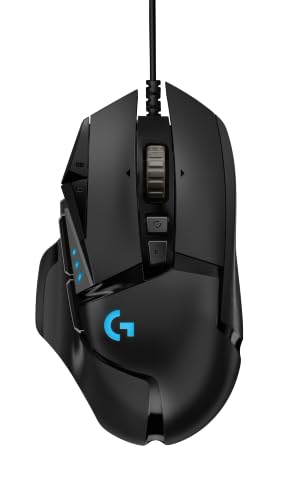
Logitech G502 HERO Wired Gaming Mouse
The wired benchmark in this comparison: no battery, no charging, a soft cable, and a feature set that shows how much mouse the wired budget buys. Logitech G502 HERO Wired Gaming Mouse — Check on Amazon

Logitech G703 LIGHTSPEED Wireless Gaming Mouse
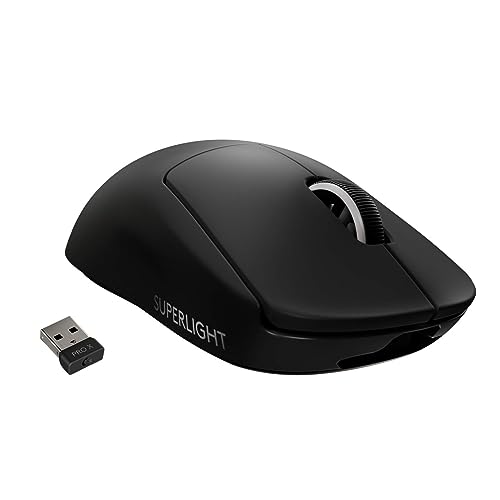
The wireless counter-argument: a full-performance 2.4 GHz connection, optional wireless charging compatibility, and a cable in the box for charging while you play. Logitech G703 LIGHTSPEED Wireless Gaming Mouse — Check on Amazon

Logitech G305 LIGHTSPEED Wireless Gaming Mouse
Proof that wireless freedom does not require the flagship tier — a light, simple, long-battery-life design that has converted many wired loyalists. Logitech G305 LIGHTSPEED Wireless Gaming Mouse — Check on Amazon
Frequently Asked Questions
Do professional players use wireless mice?
Yes — wireless models are now common at the highest level of several esports titles, which is the strongest practical evidence that modern gaming wireless latency is a solved problem. Plenty of professionals still choose wired, but it is preference, not necessity.
Is Bluetooth good enough for gaming?
Bluetooth trades latency and polling rate for convenience and battery life. It is fine for turn-based games, casual play and laptop use, but for shooters and anything competitive, use the 2.4 GHz receiver mode your gaming mouse provides.
How much lighter is a wired mouse, really?
At the same price class, typically a modest amount — the battery and radio hardware add mass, but good wireless designs minimise it. The felt difference in play usually comes more from cable drag than from the weight gap itself.
Can a wireless mouse interfere with Wi-Fi?
Both use the 2.4 GHz band, but gaming receivers are designed to coexist with busy networks. Real-world stutter almost always traces to receiver placement — behind the PC or beside a USB 3 hub — rather than to your router.
What happens when a wireless mouse battery dies mid-game?
Most models warn you well in advance through software or an LED, and nearly all can be plugged in and used wired while charging. The failure mode is an annoying minute, not a lost evening — provided you keep the cable within reach.
Do wireless mice work through a KVM switch or USB hub?
Receivers generally work through hubs and switches, but each added link is a chance for interference or polling oddities. For a gaming setup, plug the receiver into the machine or the shortest, cleanest path you can — and test after any change.
Bottom line: performance is a tie; lifestyle decides. Wired wins on price, weight and zero routine. Wireless wins on freedom from drag and desk flexibility. Pick the set of trade-offs that matches how you actually play, and place the receiver properly if you go wireless.
Does a wireless mouse lose connection often enough to matter?
On gaming-grade 2.4 GHz links with the receiver placed sensibly — near the pad, away from metal enclosures and busy hubs — dropouts are rare enough that most owners never experience one. Nearly every ‘wireless is unreliable’ story traces back to receiver placement or interference rather than the technology itself. Bluetooth connections are a different matter: they are built for convenience, carry more latency, and are not the link to judge gaming wireless by.
Can I use a wireless gaming mouse while it charges?
Most models work as a wired mouse while charging, which quietly removes the worst-case scenario from the wireless column: the battery dying mid-match becomes a thirty-second cable plug-in rather than a dead session. Check that the charging cable is a flexible one, though — a stiff charging cable gives you the worst wired experience imaginable for the duration of the charge.
Is wired still better for very high refresh rate gaming?
High-refresh play is where the remaining wired advantages concentrate: very high polling rates are easier to sustain over a cable, and the connection’s absolute consistency suits players chasing the last increments of responsiveness. Even here, the gap is small and shrinking, and it should be weighed against how much cable drag costs the same player. It is a legitimate tiebreaker, not a verdict.
Which type is better for a desk shared with a laptop?
Wireless, and it is not close. A mouse that moves between machines without re-cabling, pairs to the laptop for travel, and keeps one receiver on the gaming desktop fits shared-desk life the way wired simply cannot. Dual-mode models exist precisely for this household, and for it they are the correct answer to the whole comparison.
Do wired mice last longer than wireless ones?
The switches and shells age identically; the difference is the battery, which slowly loses capacity in a wireless mouse while a wired mouse has no equivalent wear item. Offsetting that, the wired mouse’s cable is a failure point the wireless lacks. Over a typical ownership span both are durable, but a wired mouse is more likely to be fully functional — rather than functional-with-a-weaker-battery — at year five.
Should I keep my old wired mouse after switching to wireless?
Yes — as a backup it is nearly free insurance. It covers the forgotten charge, the lost receiver and the day the wireless mouse needs warranty service, and it takes no maintenance while it waits in a drawer. Many wireless owners quietly rely on exactly this arrangement, which is worth remembering when the comparison is framed as an either-or: in practice, households often end up owning the answer ‘both, in sequence’.
Does wireless affect how the mouse feels in non-gaming use?
Only positively, for most people. Desktop work involves constant small repositioning, window management and moving between screens, and the absence of cable drag is more noticeable across an eight-hour workday than in a focused match. Players who split their desk between work and play often report that wireless won them over at the office first and at the game second.
If I buy wireless, what should I do on the first day to set it up properly?
Three things, in order. Put the receiver on its extension cable close to the pad, not in a rear port. Charge the mouse fully before its first session so your sense of its battery rhythm starts from a known point. Then save your settings to onboard memory if the model supports it, so the mouse carries your configuration even when the software is not running. That five-minute setup is the difference between wireless as its reviewers describe it and wireless as its complainers describe it — the hardware is the same in both stories.
Are there games where wired is clearly the safer choice?
Games themselves rarely decide it; circumstances do. Wired is the safer choice at crowded LAN events with hundreds of radios in one hall, in venues where you cannot control receiver placement, and in any setting where a dead battery cannot be tolerated and no charging break exists. At home, on your own desk, with a properly placed receiver, those circumstances mostly evaporate and the choice returns to preference.
Related Guides
Keep exploring with these guides and roundups from the same Gaming Mouse collection: