Disclosure: As an Amazon Associate, ilcastellomenu.com earns from qualifying purchases. Links on this page are affiliate links; they cost you nothing extra. Prices and availability change often, so check the current Amazon listing before you buy.
Ask is a kvm switch worth it in a room of multi-computer owners and you will start an argument, because the honest answer depends on a variable nobody puts in the question: how often you switch. A KVM switch — the box that lets several computers share one keyboard, monitor and mouse, and hands that set over at a button press — is worth it almost unconditionally for the person who changes machines every day, and genuinely questionable for the person who changes machines every month. Between those poles lies most of the readership of this article, so the answer below is built properly: a short verdict first, then what you actually get, what it really costs beyond money, the profiles it pays off for, the profiles it does not, and a checklist that turns your own week into the verdict.
The Short Answer: Is a KVM Switch Worth It?
Worth it if you run two or more computers at one desk, you switch between them daily or several times a week, your second machine currently makes do with inferior peripherals or a cable ritual, and your desk space is worth money to you. In that situation the switch pays for itself in reclaimed time, reclaimed surface and a boundary between machines you can press — and it keeps paying every day you own the desk. Not worth it if you own one computer, if the second machine sleeps for weeks between uses, or if the problem you are actually trying to solve is a laptop that needs more ports and screens — that problem belongs to docks and hubs, and no switch will fix it. Everything below exists to help you locate your own desk on that line with confidence rather than vibes — and to show its working, because a verdict you can audit is worth more than a verdict you are merely asked to believe, especially when the audit takes one ordinary week and a sticky note.
- Key takeaway one: switching frequency is the whole question. Count your switches for a week before deciding; the number already knows the answer.
- Key takeaway two: the value is mostly not monetary. It is measured in friction removed, windows left undisturbed, and a second machine promoted from appliance to workstation.
- Key takeaway three: the costs are mostly not monetary either — an installation hour, a compatibility checklist, a small etiquette of sharing — and they are paid once, while the value recurs daily.
- Key takeaway four: tier discipline matters. A switch matched to your desk’s demands is worth it at almost any tier; a mismatched one is not worth it at any discount.
In this guide
What You Actually Get
Strip the marketing away and a KVM delivers four concrete goods. The first is consolidation: several computers presenting themselves through one chosen set of peripherals, so the good monitor, the good keyboard and the good mouse stop being the property of a single machine. This sounds modest until you live with its opposite — the second computer exiled to the small screen and the drawer keyboard, avoided for tasks it could perfectly well do, because sitting down to it felt like a downgrade. Consolidation promotes every machine you own to the full dignity of your desk, and owners routinely report using a second computer more, and for more serious work, within a week of installing the switch.
The second good is immediacy. The switch converts changing computers from a small project — cables, input menus, pairing, waking — into a gesture, and gestures get used where projects get rationed. The behavioural consequence is the real product: tasks stop being batched and postponed, the right machine gets chosen for each job instead of the convenient one absorbing everything, and the day’s rhythm reorganises itself around intention rather than friction. The third good is space, measured in the desk’s scarcest currency: one set of peripherals instead of two or three, a surface that can hold a notebook and a lamp again, and a fleet that can grow by a machine without growing by a workstation. The fourth good is the boundary — for the enormous population now working where they live, a physical, pressable line between the employer’s machine and their own, which turns finishing work from a decision you renegotiate nightly into a gesture you perform once. Each of these goods is examined from the cost side in kvm switch pros and cons; here it is enough to note that all four are delivered by the same small box, simultaneously, from the first day.
There is also a fifth good, quieter and longer-term: the switch changes what your next computer can be. Once peripherals are shared, a new machine needs no monitor budget, no keyboard compromise, no corner of its own — so owners find themselves choosing small, quiet, inexpensive machines they would previously have dismissed as incomplete, and keeping older machines in useful service as servers and spare seats. A peripheral accessory that reshapes your future purchasing is delivering value of an unusually durable kind, and it is one reason the category’s owners tend to measure the purchase in years rather than in the first month’s impressions.
It is worth pausing on how unusual that bundle is. Most desk accessories deliver one good: a stand delivers posture, a hub delivers ports, a lamp delivers light. The switch delivers consolidation, immediacy, space and boundary simultaneously, and the four reinforce each other — the space makes the desk calmer, the calm makes the boundary easier to keep, the boundary makes the immediacy feel like freedom rather than restlessness. Worth-it calculations that price the goods separately and add them tend to undervalue the bundle, because the lived experience is not a sum but a change of regime: the desk stops being several workstations negotiating and becomes one workstation with several minds. Owners reaching for language land on the same metaphor from different directions — the desk became a place again — and a purchase that changes the character of the room it sits in has cleared a higher bar than convenience.
The Real Costs Beyond Money
Worth-it arithmetic that only counts the purchase price is rigged, so here is the full bill. The first cost is the installation: an hour of honest cabling for a simple desk, more for a dual-monitor one — routing each computer’s video and USB leads to the switch, labelling them, dressing the bundle. It is paid once, but it is paid by you, and buyers who deny it write the category’s disappointed reviews. The second cost is the homework premium: a KVM is not a thoughtless purchase. Your peripherals’ ambitions, your monitor’s handshake behaviour, your machines’ port inventory all have to be known before the right tier can be chosen, and the learning curve, while shallow, is real. The third cost is the compatibility lottery’s tail risk: even a well-chosen switch can meet one peripheral that behaves oddly, and resolving it — a different port, a pass-through connection, a cable swap — costs an evening of diagnosis that a duplicate-peripherals desk never spends.
The fourth cost is etiquette, small but permanent. Shared devices change owners when you switch, so transfers must finish, calls must conclude, and credentials must be typed only after a glance at which machine is lit. The fifth cost is coupling: peripherals, monitor and switch become a system, and future changes — a monitor from a different connection era, a machine with different ports — ripple through the switch’s compatibility instead of stopping at the replaced part. None of these costs is large, and several are arguably investments wearing a costume. But a worth-it verdict that hides them would not deserve your trust, and they belong on the scale opposite the four goods above — where, for the frequent switcher, they are outweighed not narrowly but structurally, because every cost on this list is paid once or occasionally, while every good on the other list is collected daily.
Who It Pays Off For
The hybrid worker with two machines. This is the profile the category was reborn for: an employer’s laptop that must stay separate, a personal desktop that holds the rest of life, one desk. The switch pays off in every currency this article tracks — the good peripherals serve both machines, the boundary between work and evening becomes a press, the second set of peripherals is never bought, and the switching rhythm of a hybrid day, which is constant, multiplies the dividend. If this is your desk, the question is not whether but which tier, and the answer is a mainstream design with display emulation and a control that works at a login screen.
The creator, streamer or gamer with a division of labour. Two machines exist because each does something the other should not: the gaming rig plays while the streaming machine encodes; the workstation renders while the second machine handles everything else. Here the switch pays off by making the division operable — one command post for two specialists — and the payoff scales with the seriousness of the setup. The caveat rides along: this profile’s peripherals and displays are demanding, so the payoff is collected through the tier engineered for transparency, and the worth-it answer assumes that match rather than a bargain unit asked to punch above its design.
The household or small office with a fleet. A family desktop, a parent’s laptop, a home server, a spare machine for guests and homework — the fleet desk collects the space and consolidation dividends several times over, because every additional machine joins the desk at the cost of a cable pair instead of a workstation. The switch also pays a governance dividend here: one screen, one keyboard, one visible point of control is a genuinely useful property in a household, and the legibility of a button or remote makes the whole fleet operable by everyone who shares it.
Who Should Skip It
The one-computer desk. If a single machine sits on your desk, a KVM has literally nothing to switch, and the itches that brought you here — too few ports, too few screens, a laptop that needs to feel like a desktop — belong to the expansion tools. Spend the money on the dock or hub your machine actually needs; the comparison that sorts those two is laptop docking station vs usb hub.
The rare switcher. A second machine used monthly — the server you administer, the legacy box kept for one application — does not generate the frequency the dividend compounds on. Remote-desktop software reaches it free, from anywhere in the house, and the honest verdict for this profile is that the switch is a solution in search of a rhythm. Revisit the question if the machine’s role grows; categories wait patiently.
The merger. If what you truly want is one continuous workspace — files flowing between machines, a clipboard that crosses, two computers behaving as one larger computer — a KVM will frustrate you precisely because it is designed not to do that. Its separation is architectural. Your tools are networking, sync and sharing software, and buying the switch first only delays them.
The Strengths and Trade-Offs of Owning One
Strengths of Ownership
- The dividend compounds daily. Every switch is faster, every machine is better equipped, every day the desk is one place — and the sum over a year dwarfs the purchase.
- It is infrastructure, not a subscription. No software, no account, no ongoing cost; the box works at boot, at login screens, and when the network is down.
- It disciplines the desk kindly. One set of peripherals, chosen well, ends the drawer of spares and the rationing of the good equipment to one machine.
Trade-Offs of Ownership
- The first week carries the costs. Installation, homework and any compatibility surprises all arrive early; owners must walk through them to reach the annuity.
- Your peripherals become a system. Changing a monitor or a machine later means re-checking the switch’s place in the chain, not just swapping a part.
- It cannot grow beyond its shape. A two-computer, one-monitor switch stays exactly that; growth means replacement, so speculative headroom must be judged at purchase.
Alternatives to Consider
Three alternatives deserve honest space in a worth-it analysis, because for some desks each of them is the correct purchase. Remote-desktop software is the free incumbent: it reaches any machine on your network, from any other, and for occasional access it is not merely adequate but superior — no cables, no hardware, no desk space. Its limits are presence and depth: it shows you a machine through another machine, depends on the network, and cannot help before boot or at a bare login screen. A laptop docking station is the expansion answer: if your fleet is really one laptop with ambitions, the dock’s ports, displays and power delivery are worth more than any switch, and the two tools are contrasted directly in kvm switch vs laptop docking station. Duplicate peripherals are the brute-force answer: zero compatibility questions, total independence, at the price of space and duplicated spending — a legitimate choice for the rare switcher with a large desk. Against those alternatives, the switch’s worth-it case rests on its unique ground: several computers, one desk, constant motion between them. Four designs cover the profiles this article has blessed, all prose-first, so check the current listing for configuration.

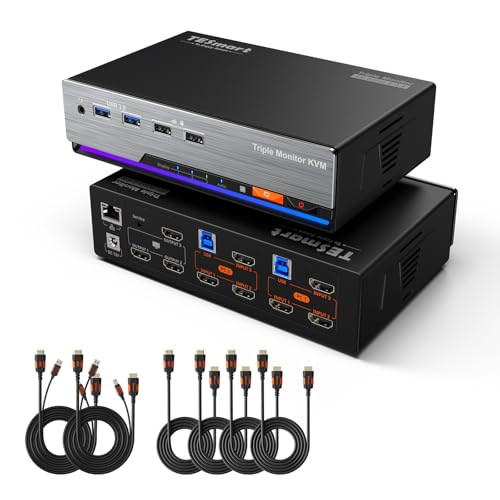
TESmart KVM Switch — For the Hybrid Worker’s Desk
The mainstream box whose configurations fit the work-laptop-plus-desktop rhythm, with the manners — display emulation options, a choice of controls — that daily switching rewards. Mid tier; check price on Amazon for your monitor count.
Level1Techs KVM Switch — For the Demanding Two-Machine Desk
The enthusiast design whose transparency makes the creator and gamer profiles’ payoff collectable. Premium tier; check price on Amazon, and verify compatibility with your specific display first.
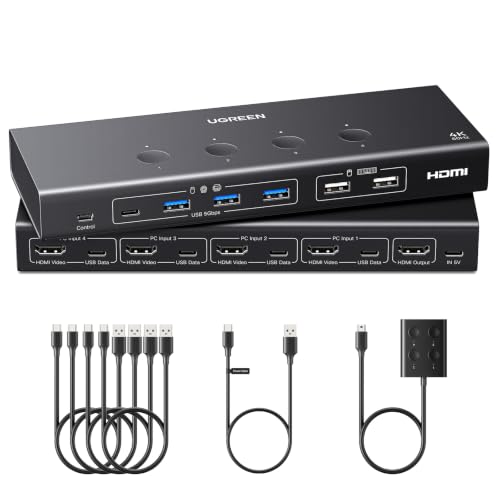
UGREEN KVM Switch — For Testing the Water
The compact entry that lets a simple desk learn whether switching life suits it, at the category’s gentlest commitment. Entry tier; check price on Amazon.

IOGEAR KVM Switch — For the Household Fleet
The established all-rounder whose legible, mature designs suit desks operated by several humans. Mid tier; check price on Amazon.
How to Get the Most Value If You Buy
Owners who extract the category’s full value share a handful of habits, and they are worth adopting from day one rather than discovering by season two. Install it properly the first time: matched, labelled cable pairs for each computer, one machine booted and settled at a time, the control placed where your hand rests. The labelled installation is the one that can be troubleshot in minutes and bypassed in an emergency, and it converts the switch from a tangle into infrastructure. Use the shared USB deliberately: put the headset, webcam and printer on the switch so every machine inherits your best call setup, and learn the finish-before-switching habit while it is still a novelty rather than after the first interrupted transfer. Choose your switching method as a workflow decision — hotkeys if your hands live on the keyboard, a remote if the box hides, a button if guests share the desk — and commit to it, because a consistent gesture becomes invisible while a rotating cast of methods never does.
Then let the switch reshape the fleet, which is where the long value hides. Keep the old machine in service as a server or spare seat now that it costs no desk space. When the next computer is chosen, let it be small and quiet and free of peripheral budgeting, because the desk already owns everything it needs to be useful. Revisit the arrangement when the desk changes — a second monitor, a new machine — and re-run the inventory rather than assuming the original match survives; the owners who treat the match as a living thing are the ones still praising the purchase years later. Finally, keep the receipt of your reasoning: a note of why this tier, this shape, this control. It sounds precious until the day a peripheral misbehaves and the note tells you whether the behaviour is the design’s known trade-off or a genuine fault — the difference between an adjustment and a return.
The Decision Checklist
Answer yes or no, honestly, and apply the rule that follows.
- Do two or more computers genuinely live at your desk — not visiting, not hypothetical?
- Did you switch between them, or wish you could, at least several times in the last ordinary week?
- Does your second machine currently use worse peripherals than your best set, or cost you a cable ritual?
- Is your desk space scarce enough that a second set of peripherals would hurt?
- Are your peripherals and display mainstream enough for a mainstream switch — or are you willing to buy the tier your demanding gear requires?
- Can you give the installation one honest hour, including labels?
- Is the problem you are solving really sharing — not expanding one laptop, not merging two machines?
The rule: five or more yeses, buy with confidence and buy the tier your inventory specifies. Three or four, buy the gentle end of the category and let the desk prove the rhythm. Two or fewer, keep your money — the alternatives above will serve the desk you actually have, and the switch will still be there if the rhythm changes. Readers who land on “buy” will find the choosing itself made methodical in how to choose a kvm switch and the models organised by desk in the kvm switch buying guide. Either way, you will have decided the way the category’s happiest owners decided: from evidence about your own desk.
The Arithmetic of an Ordinary Week
Abstract dividends persuade nobody, so let us walk one ordinary week at a two-computer desk and count what the switch actually does. Monday begins with the work laptop: calls through the good headset, documents on the good screen, the keyboard your hands trust. Four times during the day the personal machine is needed — a file, a message, a lunchtime errand — and four times the switch answers in a gesture where the old desk charged a cable ritual. Tuesday is a personal project day with work interruptions; Wednesday inverts it. By Friday the count of switches sits somewhere in the dozens, and each one carried the same small cargo: no unplugging, no input-menu diving, no window archaeology on return, no sentence typed into the wrong machine’s login screen because the ritual made you careless.
Now run the counterfactual week without the switch, which is the week the purchase must be weighed against. The same dozens of transitions happen at project prices: some are paid in full, with cables and menus; more are not paid at all, because the human rations them — the personal file waits until evening, the work check waits until morning, the second machine’s update waits until the weekend, and a faint, constant inefficiency settles over the desk that nobody itemises because it never appears as a single event. This is the arithmetic the worth-it question actually turns on. The switch does not save dramatic blocks of time; it abolishes a tax so small per transaction that its victims never audit it, and so frequent that its abolition changes how the whole week feels. Owners asked to justify the purchase rarely cite the minutes. They cite the feeling that the desk stopped arguing with them — which is what dozens of abolished micro-frictions feel like from the inside.
The same week exposes the cost side’s true size, for balance. The installation hour happened once, before the week began, and does not recur. The etiquette — finish the transfer, check the lit machine — costs a glance per switch, and by Wednesday it is autonomic. The compatibility homework was an evening of reading before purchase, already amortised. Set the two columns side by side at week’s end and the shape of the verdict is visible without any numbers at all: recurring small gains against expired one-time costs. Extend the week to a year and the columns do not merely diverge — the cost column stops growing almost entirely, while the gains column adds another week, and another, at the same steady rate. That asymmetry, more than any feature, is what “worth it” means for this category.
Worth It, Pairing by Pairing
The verdict also varies with which two machines are being paired, and the common pairings deserve individual answers. A work laptop with a personal desktop is the strongest case in the catalogue, for the reasons the profiles gave: separation mandated, rhythm constant, peripherals worth sharing. A gaming PC with a streaming PC is nearly as strong, with the tier caveat attached — the pairing’s value is only collectable through a switch that respects the gaming side’s demands. Two laptops — say, two employers’ machines in a contractor’s life — make a strong case with a twist: each laptop may also want docking, and the worth-it answer often becomes “both tools,” docks for expansion and a switch for sharing, which costs more and is worth more, because the alternative is two complete workstations colonising the desk.
A desktop with a home server is the pairing where the verdict most often flips to no — not because the switch fails, but because the server’s rhythm is administrative and occasional, and remote access serves it from anywhere including the sofa. The exception is the server that is also a workstation in disguise — the machine that renders, compiles or hosts a desktop session daily — which is really the two-workstation pairing wearing a server badge. A modern machine with a legacy one, kept alive for a single irreplaceable program or peripheral, makes a surprisingly warm case: the legacy box costs the desk nothing but a cable pair, appears on the good screen when its one job calls, and vanishes the rest of the time — a retirement home with visiting hours, and frequently the pairing owners describe with the most affection. Read your own pairing in this list before the general verdict; the category’s worth is written pairing by pairing, desk by desk.
When the Answer Changes: Life Events and Desk Events
Worth-it verdicts are usually delivered as if desks were permanent, but the honest ones come with revision dates, because the variables that decide the question — machine count, switching rhythm, space, peripherals — are exactly the variables life keeps editing. A new job that issues a laptop converts a one-computer desk into the category’s strongest case overnight. A promotion to a role with a second employer’s machine, a child old enough to need the family computer at the same desk, a hobby that grows a streaming or rendering machine: each is a small event that rewrites the arithmetic in the switch’s favour, and owners who dismissed the category a year earlier find the dismissal expiring. The reverse events exist too. A consolidation — the personal desktop sold, the work moved entirely onto one machine — retires the switch’s purpose as cleanly as the fleet created it, and the correct response is to sell or gift the box without sentimentality, because infrastructure that outlives its problem is just clutter with ports.
Desk events matter as much as life events. A second monitor arriving is the commonest: it doubles the value of switching well and simultaneously demands the dual-monitor shape, which can convert a satisfied owner of a single-monitor switch into a shopper again — the one growth path the original purchase cannot absorb, and the reason this cluster’s guides keep asking about monitor plans before recommending a shape. A move to a smaller home re-prices the space dividend upward; a move to a dedicated office re-prices it down while leaving the rhythm dividend untouched. The practical habit this section recommends is a tiny one: when the desk changes materially, re-ask the worth-it question with the checklist above, in the expectation that the answer may have changed in either direction. The switch is a small purchase with a long life, and the owners who keep it matched to a changing desk are the ones whose verdict, years later, is still yes.
There is a final, almost sentimental entry in the worth-it ledger that surveys keep surfacing and this article would be incomplete without: owners lend these switches. A colleague describes the two-laptop problem and the box is pressed into their hands for a fortnight’s trial; a parent inherits it when a household fleet thins; a student receives it as the one piece of desk wisdom a graduate actually passes down. Products that get lent and handed down occupy a particular place in the material world — they are the ones whose value survived contact with real desks and real years. A KVM switch is not glamorous, and it will never be the object a desk tour lingers on. But when the tour is over and the work begins, it is the object the work runs through, and that is the oldest definition of worth it there is.
A Trial You Can Run Before Spending Anything
Unusually for a hardware question, this one can be rehearsed free, and the rehearsal is worth more than another hour of reviews. For one ordinary week, keep a tally — a sticky note on the monitor is the traditional instrument — and mark every occasion on which you change computers, postpone changing computers, or do a task on the wrong machine because changing was too much trouble. Count the postponements and the wrong-machine tasks at full weight: they are switches the friction suppressed, and they belong to the demand the switch would serve. At the week’s end, look at the tally and then at your peripherals drawer, and ask the two questions that decide everything. Is the tally large enough that abolishing its friction would change how the desk feels? And is the gap between your best peripherals and your second machine’s set wide enough that closing it matters? Two yeses make the purchase as close to certain as buying advice gets. A yes and a no describe the gentle end of the category. Two noes retire the question honourably, with the money unspent and the software alternatives holding the fort.
The rehearsal has a second act for the undecided: simulate the etiquette. Spend the same week noticing your shared-device moments — the headset that lives on one machine while a call arrives on the other, the drive that must be carried, the printer that belongs to whichever computer it is cabled to — and count how many would have been non-events if the devices had simply followed the active machine. For some desks this count, not the switching count, delivers the verdict, because peripheral sharing is the benefit nobody shops for and everybody keeps. Between the two tallies, a week of honest observation will tell you more about whether a KVM switch is worth it for your desk than any article — including this one — can. The article’s job is to make sure you run the right experiment; the desk’s job is to report the result.
What Owners Say a Year Later
The most reliable worth-it evidence is longitudinal, so consider the shape of the category’s year-later testimony. Almost nobody remembers the purchase price; the tier debates that consumed the shopping week have faded into the desk’s woodwork. What owners remember, and volunteer, is the counterfactual: a description of the desk before, told with the mild disbelief people reserve for their own past inconveniences — the cable swapped behind the monitor, the second keyboard on the lap, the good screen rationed to one machine while the other squinted. They also volunteer the surprises, which cluster in two places. The first is how completely the second machine was promoted: machines bought as auxiliaries became daily tools once the desk stopped taxing access to them, and several owners describe work — a server maintained properly at last, a personal project finished — that they attribute, only half-jokingly, to a peripheral switch. The second surprise is how rarely the box itself is thought about at all. A year of daily use produces no stories about the switch, because infrastructure that works generates no anecdotes; the absence of stories is the story.
The dissenting year-later voices are equally instructive, and they are remarkably consistent: they belong to the profiles this article flagged in advance. The rare switcher whose tally was always going to be small. The buyer whose real problem was a laptop’s expansion, solved a season later by the dock they should have bought first. The under-buyer whose demanding desk exposed a bargain switch’s manners within the month. None of them describes a bad product; all of them describe a mismatched one, which is why this article has spent its length on matching rather than on enthusiasm. Worth it is not a property of the box. It is a property of the fit between the box and a life — and lives, unlike listings, can be examined honestly before the purchase, with a sticky note, a week, and the checklist above.
Opportunity Cost, Counted in Both Directions
Every purchase is also a refusal, and a complete worth-it analysis prices the refusals on both sides. Buying the switch refuses other uses of the same money: a better keyboard for the one machine, a larger monitor, a chair upgrade — each a genuine good, and for the one-computer desk each plainly superior. Not buying the switch refuses something too, and this direction is the one shoppers systematically underprice, because its costs arrive as friction rather than invoices. The un-bought switch means the second monitor eventually purchased for the second machine, the spare keyboard, the desk that stays two desks — a slow duplication bill that can exceed the switch’s price without ever presenting itself as a single decision. It also means the tasks quietly done on the wrong computer, the second machine ageing unused, the work boundary negotiated nightly instead of pressed once. Opportunity cost is usually invoked against purchases; in this category it argues at least as often for them, because the alternative to the switch is rarely “the same desk, richer” — it is a more duplicated, more rationed desk whose costs are real but unbilled.
The balanced conclusion is the one this article has been building since its first paragraph: the switch is worth it when the desk’s life matches the shape of its dividend — several machines, one set of peripherals, constant motion — and the match can be verified in advance with a week’s observation rather than taken on faith. Few purchases in the whole desk catalogue offer that courtesy. The category does not ask to be believed; it asks to be counted. Count your switches, count your suppressed switches, count your shared-device moments, and the verdict will not need this article’s permission — it will simply be the shape of your own week, finally given a name and a small, unglamorous, entirely sufficient box.
Two Special Cases: The Gift and the Granted Budget
Two buying situations bend the usual arithmetic and deserve explicit verdicts. The first is the gift: a KVM switch is an unusually good present for the multi-computer person in your life, precisely because it solves a problem they have normalised and would never prioritise buying their way out of. The friction of a two-machine desk is invisible to its owner in the way of all chronic frictions — it feels like the nature of desks rather than a solvable defect — so the box arrives as a small revelation, the rare gift that is used daily and thought of kindly at every use. The giver’s only homework is the inventory in miniature: count the recipient’s machines and monitors, glance at their peripherals, and choose the mainstream shape that matches, because a gift that needs an exchange teaches the wrong lesson.
The second case is the granted budget: the employer equipping a home office, the household furnishing a shared study, the small business standardising desks. Here the worth-it question is asked by someone other than the user, and the answer improves further, because the buyer’s alternative is never a cable swap — it is the duplicated workstation, bought at organisational prices, multiplied across every desk. Against that baseline the switch is not merely worth it but obvious, and the organisational buyer’s real decisions are the standardisation ones: one model everywhere, legible controls for rotating staff, and a spare on the shelf. Whether the money is yours, a gift-giver’s or an employer’s, the underlying exchange is the same one this article has priced from every angle — a small, one-time cost against a daily, compounding removal of friction — and in each of its currencies, for the desk that switches, the exchange holds.
Is the Payoff Real? Testing Whether a Kvm Switch Earns Its Place
A kvm switch is worth it when it removes a recurring frustration completely, and much harder to justify when it only makes an occasional minor annoyance slightly smaller. Treat any accessory bundled in the box as a starting point, and check whether it suits your setup before assuming the maker has solved that part for you. Check that nothing you place on, under or beside the kvm switch blocks airflow, movement, visibility or access that the design quietly depends on. Keep liquids, loose papers and anything that sheds dust or fibres at a sensible distance, unless the kvm switch was clearly designed to work right beside them.
As a concrete listing check, take the TESmart KVM Switch and the Level1Techs KVM Switch named earlier in this article and confirm, line by line, that each variant offered matches the size, connection and contents described for it here. Look for the failure you would notice first if you chose badly: a port you cannot reach, a part that will not fit, a control you cannot see, or a routine that becomes slower instead of easier. When you compare notes with other owners, match their comments to setups like yours, because advice from a very different room, workload or routine can mislead. Separate the features you will use in the first month from the ones that only sound reassuring, and let the first group carry far more weight in the decision. Add up the hidden costs of ownership in time and attention, including setup, cleaning, storage and the accessories you will inevitably want, before deciding it earns its keep.
Leave a little headroom in every direction that matters, whether that means physical space, connection capacity, adjustment range or simply time to do a task properly. Keep the packaging and any small adapters, feet, brackets or fasteners together until the kvm switch has survived a full week of ordinary use in its final position. Ask whether the benefit you want survives your least favourite conditions, such as low light, a crowded desk, a warm room or a rushed start to the day. Clean and inspect the area around a kvm switch on a simple schedule, since dust, loose fasteners and tangled leads cause many problems that get blamed on the product itself.
Make one change at a time during the first days, so that when something improves or gets worse you know which change caused it. Ask what you would do on the day this kvm switch stops working as expected, and whether you could swap, reset, clean or return it without dismantling half your setup. The value question for a kvm switch is answered by your calendar more than by any feature list: count how often the problem it solves actually interrupts your week. Run one deliberately awkward task early on, the kind you usually avoid, and see whether this kvm switch handles your edge cases or only your easiest work. Think about the longest session you realistically run, not the average one, since heat, noise, clutter and small annoyances all grow more noticeable over time.
If you work in more than one place, decide whether this kvm switch stays fixed in one spot or travels, and judge its size, weight and setup time accordingly. Prefer a setup you can explain to another person in a minute, because simple arrangements are easier to troubleshoot, share and repeat than fragile clever ones. Avoid forcing a connector, bracket or moving part that resists you, because resistance is usually information about alignment or fit rather than an invitation to push harder.
If the kvm switch will be shared, agree on one home position and one simple reset routine, so each person does not undo the previous person’s adjustments. If the benefit depends on a habit you do not yet have, be sceptical, since products rarely create routines on their own and often end up waiting in a drawer or corner. When a specification is stated in unfamiliar terms, translate it into your own routine: how long, how often, how far, how loud in practice, before letting it sway you. Think about storage for the accessories this kvm switch brings with it, so spare parts and tools end up in one known place instead of scattered across drawers. Decide in advance what good enough looks like for your use, so a minor cosmetic flaw does not distract you from performance that genuinely meets the brief.
Plan where the cables or materials connected to this kvm switch will run when the room is tidy, not just while you are testing on an empty surface. Recheck the return window and the condition requirements before you discard any packaging, especially for a kvm switch whose fit only becomes clear after several real sessions. Consider who else will use, move or clean around this kvm switch, because a choice that only works for one careful owner often frustrates everyone else in the household or team. Set a review date a month after buying, and judge the kvm switch by whether you would choose it again knowing exactly how your routine actually uses it.
Frequently Asked Questions
Is a KVM switch worth it for working from home?
For the commonest work-from-home shape — an employer’s laptop beside a personal computer — it is the category’s clearest yes. The switching rhythm of a hybrid day is constant, the good peripherals deserve to serve both machines, and the physical boundary between work and home that the switch provides is worth as much as the convenience. The conditions are the usual ones: buy the tier that matches your monitor count, favour display emulation if your windows matter, and make sure the control works at your work machine’s login screen. Desks matching that description almost never regret the purchase.
How long does a KVM switch take to pay for itself?
In money, the comparison is against duplicated peripherals: for desks that would otherwise buy a second monitor, keyboard and mouse, the switch is frequently the cheaper option on day one. In time, the payback is the friction removed at every switch, which daily switchers measure in reclaimed minutes and a calmer desk rather than in a date on the calendar. The honest framing is that the switch is less an investment with a payback date than a permanent removal of a recurring tax — and taxes removed daily are felt within the first week.
Is a cheap KVM switch worth it, or should I buy a better one?
A cheap switch is worth it when the desk is simple: two computers, one mainstream monitor, ordinary peripherals, a modest switching rhythm. Its limits appear exactly where desks stop being simple — dual monitors, demanding displays, specialist keyboards, constant switching that exposes handshake manners. The rule is to let the desk, not the discount, set the tier: the cheapest switch that honestly matches your inventory is a bargain, while a cheaper one that does not is the category’s most expensive purchase, because it is usually followed by the correct one.
Can a KVM switch replace a docking station?
No — they answer different questions, and substituting one for the other is the commonest worth-it error in this corner of the catalogue. A docking station expands a single laptop with ports, displays and power. A KVM switch shares peripherals between several computers. If your problem is one laptop that needs to become a workstation, the dock is worth it and the switch is not; if your problem is several computers competing for one desk, the reverse. Some desks run both, docking each laptop and switching between the docks, which is legitimate when the fleet genuinely consists of laptops.
What if I only switch computers once a week?
Then you are near the line, and the honest answer leans no — or at least, not yet. At a weekly rhythm, remote-desktop software or a thirty-second cable swap already costs you very little, and the switch’s dividend, which compounds on frequency, stays small. The exception is the weekly switcher whose sessions are long and whose peripherals gap is wide: an afternoon a week spent on the second machine, through the good screen and keyboard, can justify the box on quality rather than frequency. Judge by the session, not just the count.
Does a KVM switch hold its value if my setup changes?
Partially, and predictably. A switch matched to mainstream connections and a common shape — two computers, one or two monitors — remains useful across several generations of machines, because computers rotate faster than connection standards do. Its value erodes when the desk outgrows its shape: a third machine, a second monitor, a display from a new connection era. Buying one size of honest headroom where your plans genuinely point — a spare input, a dual-monitor path — is the practical hedge, and standard cables keep the rest of the installation reusable even if the box itself is eventually replaced.
Related Guides
Continue with the kvm switch review, kvm switch reviews across the category, and docking stations for four-monitor laptop setups.