Disclosure: As an Amazon Associate, ilcastellomenu.com earns from qualifying purchases. Links on this page are affiliate links; they cost you nothing extra. Prices and availability change often, so check the current Amazon listing before you buy.
This guide to how to set up standing desk converter walks through the job in the order that avoids the common mistakes: preparation first, the main steps in sequence, then the checks that tell you the setup is genuinely finished. Whether this is your first attempt at how to set up standing desk converter or a redo of a setup that never felt right, the steps below assume ordinary household tools, a clear hour of unhurried time, and a willingness to adjust twice rather than force things once.
Key Takeaways
- Preparation decides the outcome: clear the surface, gather everything first, and never start with the heavy lifting.
- Work in the order given, checking each stage before moving on, because later steps assume the earlier ones are right.
- Small adjustments after a day of real use are part of the process, not a sign the setup failed.
- Safety steps are written into the sequence where they belong, including pinch points, heavy units and trip hazards.
In this guide
What You Need
Required: a second person for the lift, a tape measure, a screwdriver or the hex keys supplied with the unit, a soft blanket or the packaging foam to rest the converter on, and enough clear floor space to work around the desk. Optional but useful: reusable cable ties, a small level, adhesive cable clips for the desk’s rear edge, and a protective mat if your desktop finish is delicate. Everything on the required list exists for a reason, and the second person is the item people most regret skipping.
Treat the unboxing as a two-person job from the start, because a converter is a heavy, awkward unit and its folded scissor frame makes it hard to grip safely alone. Before the first lift, check that the desk underneath is genuinely sturdy, because the converter, two monitors, a laptop and your leaning forearms all load the same desktop. Lower the platform slowly and deliberately every time, guiding it with both hands rather than letting the springs drop it the last stretch. A wobbly or hollow-core desk that flexes under a firm push is a poor foundation, and no converter can fix a weak desk below it. Children find the lift handles fascinating, so teach them early that the converter is not a toy and never let them hang off the raised platform. Route power and display cables with enough slack for full height before you raise the platform with real equipment on it. Place the converter far enough back that its feet sit fully on the desktop, with nothing overhanging the rear edge where the lift travel needs clearance.
Treat the unboxing as a two-person job from the start, because a converter is a heavy, awkward unit and its folded scissor frame makes it hard to grip safely alone. Before the first lift, check that the desk underneath is genuinely sturdy, because the converter, two monitors, a laptop and your leaning forearms all load the same desktop. Lower the platform slowly and deliberately every time, guiding it with both hands rather than letting the springs drop it the last stretch. A wobbly or hollow-core desk that flexes under a firm push is a poor foundation, and no converter can fix a weak desk below it. Children find the lift handles fascinating, so teach them early that the converter is not a toy and never let them hang off the raised platform. Route power and display cables with enough slack for full height before you raise the platform with real equipment on it. Place the converter far enough back that its feet sit fully on the desktop, with nothing overhanging the rear edge where the lift travel needs clearance. Keep the area under the descending platform clear of mugs, phone stands and stacked notebooks, which can jam the mechanism or get crushed.
Safety and Before You Start
Treat the unboxing as a two-person job from the start, because a converter is a heavy, awkward unit and its folded scissor frame makes it hard to grip safely alone. A wobbly or hollow-core desk that flexes under a firm push is a poor foundation, and no converter can fix a weak desk below it. Keep the area under the descending platform clear of mugs, phone stands and stacked notebooks, which can jam the mechanism or get crushed. Route power and display cables with enough slack for full height before you raise the platform with real equipment on it. Children find the lift handles fascinating, so teach them early that the converter is not a toy and never let them hang off the raised platform. Before the first lift, check that the desk underneath is genuinely sturdy, because the converter, two monitors, a laptop and your leaning forearms all load the same desktop. Place the converter far enough back that its feet sit fully on the desktop, with nothing overhanging the rear edge where the lift travel needs clearance. If the lift ever feels gritty, uneven or reluctant, stop using the height adjustment and inspect the mechanism rather than forcing it.
Treat the unboxing as a two-person job from the start, because a converter is a heavy, awkward unit and its folded scissor frame makes it hard to grip safely alone. A wobbly or hollow-core desk that flexes under a firm push is a poor foundation, and no converter can fix a weak desk below it. Keep the area under the descending platform clear of mugs, phone stands and stacked notebooks, which can jam the mechanism or get crushed. Route power and display cables with enough slack for full height before you raise the platform with real equipment on it. Children find the lift handles fascinating, so teach them early that the converter is not a toy and never let them hang off the raised platform. Before the first lift, check that the desk underneath is genuinely sturdy, because the converter, two monitors, a laptop and your leaning forearms all load the same desktop. Place the converter far enough back that its feet sit fully on the desktop, with nothing overhanging the rear edge where the lift travel needs clearance. If the lift ever feels gritty, uneven or reluctant, stop using the height adjustment and inspect the mechanism rather than forcing it. Owners usually notice this most during the first fortnight of daily use, when habits are still forming.
Treat the unboxing as a two-person job from the start, because a converter is a heavy, awkward unit and its folded scissor frame makes it hard to grip safely alone. A wobbly or hollow-core desk that flexes under a firm push is a poor foundation, and no converter can fix a weak desk below it. Keep the area under the descending platform clear of mugs, phone stands and stacked notebooks, which can jam the mechanism or get crushed. Route power and display cables with enough slack for full height before you raise the platform with real equipment on it. Children find the lift handles fascinating, so teach them early that the converter is not a toy and never let them hang off the raised platform. Before the first lift, check that the desk underneath is genuinely sturdy, because the converter, two monitors, a laptop and your leaning forearms all load the same desktop.
Clear the desk completely before anything else. Monitors, mugs, lamps and paperwork all need a temporary home that is not the floor in your walking path, and every cable connected to the desk should be unplugged rather than stretched. Check the desktop itself for wobble and damage while it is empty, because this is the last easy moment to discover the desk underneath is not up to the job.
How To Set Up Standing Desk Converter, Step by Step
Step 1: Position the Empty Converter
With your helper, lift the converter by its frame — never by the keyboard tray or the lifting surface edges — and set it centred on the desk with its feet fully supported and clearance behind for the lift travel. Check from the side that nothing overhangs the rear edge. Slide it a small amount forwards or back until the tray, when you imagine it loaded, will sit where your hands naturally fall from your chair. This positioning is the decision the whole setup hangs on, so take the extra minute now rather than after the monitors are aboard.
Step 2: Cycle It Empty
Before loading anything, raise and lower the empty platform slowly through its full travel twice. Learn where the lift handles are, how the spring assistance feels, and exactly where the pinch points close as it descends. Keep fingers on the handles and the top surface only, never inside the scissor frame. If the travel feels gritty, uneven or reluctant while empty, stop here and inspect, because loading it will only magnify the problem.
Step 3: Place Screens and Keyboard
Load the heaviest items first and keep the weight centred: monitors in the middle of the top surface, not pushed to one side, and the keyboard centred on the tray with the mouse beside it. If you use a laptop as a second screen, give it the side position and let the main monitor own the centre. Sit down and check the lowered position before raising anything, because the converter adds height even when closed and your chair may need to come up a notch to meet it.
Step 4: Route Cables With Slack
Connect power and display cables with the platform raised to your standing height, not lowered, so every cable is proven long enough at maximum travel. Leave a gentle loop behind the screens, route the bundle down the rear of the desk, and only then lower the platform and confirm nothing pulls tight or gets trapped in the mechanism. A cable that is perfect while sitting and drum-tight while standing will eventually work a connector loose or, worse, drag something off the platform.
Step 5: Set Your Two Working Heights
Raise the platform until your elbows rest naturally with forearms roughly level while standing, and note the position; then lower it and set your sitting arrangement so the same relaxed arm position works from the chair. Move between the two a few times, adjusting screen tilt and distance, because the converter changes screen distance as it rises on a scissor design. Small changes now — a screen nudged back, the tray pulled a fraction closer — are what separate a setup that feels designed from one that merely functions.
Step 6: The First-Week Check
After several days of real use, unload the platform and snug every assembly bolt, since new mechanisms settle under their first week of loads. Recheck cable slack at full height, confirm the converter has not crept on the desktop, and clear anything that has migrated underneath the descent path. Make these checks a habit monthly thereafter and the lift will keep the smooth, even feel it had on day one.
Honesty about wobble matters: almost every converter moves a little at full extension, and the question is whether the movement is a faint sway or a typing problem. The heavier the monitor load and the higher the platform, the more any movement is amplified, so test at your real working height with your real screens. Wobble shows up most when you type firmly, rest your wrists on the tray, or nudge the desk while reaching for something behind the monitors. Keeping the converter loaded evenly, with screens centred rather than pushed to one side, noticeably calms the platform down. A monitor arm mounted to the converter raises the centre of gravity and can make a steady converter feel loose, which is worth knowing before you buy the arm. If your work is mostly typing and calls, mild movement is easy to ignore; if you draw, edit precisely or game competitively, it can become the whole story.
Honesty about wobble matters: almost every converter moves a little at full extension, and the question is whether the movement is a faint sway or a typing problem. The heavier the monitor load and the higher the platform, the more any movement is amplified, so test at your real working height with your real screens. Wobble shows up most when you type firmly, rest your wrists on the tray, or nudge the desk while reaching for something behind the monitors. Keeping the converter loaded evenly, with screens centred rather than pushed to one side, noticeably calms the platform down. A monitor arm mounted to the converter raises the centre of gravity and can make a steady converter feel loose, which is worth knowing before you buy the arm. If your work is mostly typing and calls, mild movement is easy to ignore; if you draw, edit precisely or game competitively, it can become the whole story. Tightening every assembly bolt after the first week of use is a small habit that removes a surprising amount of play. Scissor-lift designs tend to sway fore and aft, while straight-up designs feel steadier front to back but can rock side to side if the base is narrow.
Troubleshooting and Common Mistakes
A monitor arm mounted to the converter raises the centre of gravity and can make a steady converter feel loose, which is worth knowing before you buy the arm. Honesty about wobble matters: almost every converter moves a little at full extension, and the question is whether the movement is a faint sway or a typing problem. Keeping the converter loaded evenly, with screens centred rather than pushed to one side, noticeably calms the platform down. Wobble shows up most when you type firmly, rest your wrists on the tray, or nudge the desk while reaching for something behind the monitors. Scissor-lift designs tend to sway fore and aft, while straight-up designs feel steadier front to back but can rock side to side if the base is narrow. The heavier the monitor load and the higher the platform, the more any movement is amplified, so test at your real working height with your real screens.
A monitor arm mounted to the converter raises the centre of gravity and can make a steady converter feel loose, which is worth knowing before you buy the arm. Honesty about wobble matters: almost every converter moves a little at full extension, and the question is whether the movement is a faint sway or a typing problem. Keeping the converter loaded evenly, with screens centred rather than pushed to one side, noticeably calms the platform down. Wobble shows up most when you type firmly, rest your wrists on the tray, or nudge the desk while reaching for something behind the monitors. Scissor-lift designs tend to sway fore and aft, while straight-up designs feel steadier front to back but can rock side to side if the base is narrow. The heavier the monitor load and the higher the platform, the more any movement is amplified, so test at your real working height with your real screens. It is a small point on paper and a surprisingly large one across a full working week.
The classic mistakes are all in this guide’s margins: lifting the unit alone, loading it before cycling it empty, routing cables at sitting height, and judging wobble before tightening the bolts after the first week. A platform that favours one side usually has an uneven load; a lift that feels heavy usually has cables quietly resisting it. Work through load, cables and bolts in that order and most setup problems explain themselves.
Lower the platform slowly and deliberately every time, guiding it with both hands rather than letting the springs drop it the last stretch. Place the converter far enough back that its feet sit fully on the desktop, with nothing overhanging the rear edge where the lift travel needs clearance. Treat the unboxing as a two-person job from the start, because a converter is a heavy, awkward unit and its folded scissor frame makes it hard to grip safely alone. Keep the area under the descending platform clear of mugs, phone stands and stacked notebooks, which can jam the mechanism or get crushed. Children find the lift handles fascinating, so teach them early that the converter is not a toy and never let them hang off the raised platform. Before the first lift, check that the desk underneath is genuinely sturdy, because the converter, two monitors, a laptop and your leaning forearms all load the same desktop. A wobbly or hollow-core desk that flexes under a firm push is a poor foundation, and no converter can fix a weak desk below it.
Maintenance and Keeping It Working
Raise and lower the platform through its full travel now and then even in weeks when you mostly sit, which keeps the springs working evenly. If the lift begins to favour one side, clear everything off, cycle it empty a few times, and only reload it once it travels level again. Store the original packaging until you are sure the converter suits your desk, because returning a heavy unit without its box is a miserable errand. Check the tray and surface bolts on a monthly rhythm and snug any that have worked loose under daily raising and lowering. Keep drinks on the desk beside the converter rather than on the moving platform, since a spill at height runs straight into the mechanism. Dust the lifting surfaces weekly and wipe the scissor joints with a dry cloth, because grit in the mechanism is what turns a smooth lift into a gritty one.
Raise and lower the platform through its full travel now and then even in weeks when you mostly sit, which keeps the springs working evenly. If the lift begins to favour one side, clear everything off, cycle it empty a few times, and only reload it once it travels level again. Store the original packaging until you are sure the converter suits your desk, because returning a heavy unit without its box is a miserable errand. Check the tray and surface bolts on a monthly rhythm and snug any that have worked loose under daily raising and lowering. Keep drinks on the desk beside the converter rather than on the moving platform, since a spill at height runs straight into the mechanism. Dust the lifting surfaces weekly and wipe the scissor joints with a dry cloth, because grit in the mechanism is what turns a smooth lift into a gritty one. Readers setting up in a shared room will feel this more than those with a dedicated office corner.
Raise and lower the platform through its full travel now and then even in weeks when you mostly sit, which keeps the springs working evenly. If the lift begins to favour one side, clear everything off, cycle it empty a few times, and only reload it once it travels level again. Store the original packaging until you are sure the converter suits your desk, because returning a heavy unit without its box is a miserable errand. Check the tray and surface bolts on a monthly rhythm and snug any that have worked loose under daily raising and lowering. Keep drinks on the desk beside the converter rather than on the moving platform, since a spill at height runs straight into the mechanism. Dust the lifting surfaces weekly and wipe the scissor joints with a dry cloth, because grit in the mechanism is what turns a smooth lift into a gritty one. This is also where patience pays: judge the effect over several days, not a single afternoon.
Gear for This Guide
VIVO Standing Desk Converter
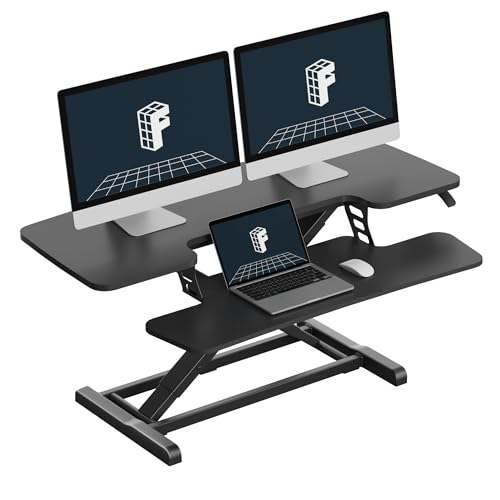
The VIVO Standing Desk Converter is the name most people meet first in this category, and it earns that position by being a straightforward, widely available example of the classic scissor-lift design. The platform rises on an X-frame with spring assistance, the keyboard tray is generously sized for a full keyboard and mouse, and the whole unit arrives mostly assembled, which matters more than it sounds with a unit this heavy. In daily use it behaves like the category in miniature: easy to raise with a moderate load, calmer at mid heights than at full extension, and happiest on a desk that is solid in its own right.
Where the VIVO asks for honesty is at the top of its travel with two large monitors aboard, where a gentle sway when you type firmly is part of the deal rather than a defect. Treat it as a mid-tier, general-purpose choice for one or two screens, keep the load centred, and budget a second pair of hands for the lift out of the box and onto the desk. If your desk is deep and sturdy and your standing sessions come in bursts through the day, this is the converter shape that suits you; if you plan to stand for entire afternoons under a heavy triple-screen load, a full sit-stand desk will serve you better.

FlexiSpot Standing Desk Converter
The FlexiSpot Standing Desk Converter represents the straight-up school of design, where the surface travels vertically on posts rather than swinging out on a scissor frame. That geometry keeps your screens at the same distance from your eyes at every height, which many people prefer, and it tends to feel composed front to back while typing. FlexiSpot positions its converters as premium-tier desk equipment, and the finishing reflects that: smooth lift action, tidy edges and a keyboard tray that feels like part of the design rather than an accessory bolted on afterwards.
The considerations are the usual ones for the type. The footprint on your desk is committed whether you sit or stand, the unit is heavy enough that placement is a two-person decision you will not want to revisit, and the tray height relative to the main surface will not suit every chair and desk combination. For a single-screen or laptop-plus-monitor setup on a quality desk, it is a confident, settled choice; for a cramped desk where every inch is contested, measure twice before committing.
Fine-Tuning After the First Week
Keep the things you touch hourly within easy reach and let the rarely used gear live further away, which keeps the working zone calm. Work through changes one at a time and live with each for a day, because adjusting everything at once leaves you unable to tell what actually helped. Dual-monitor households should pay close attention to the depth of the top surface, because two screens on their own stands eat space quickly. Every desk setup decision is really a chain: the desk supports the gear, the gear sets the screen height, and the screen height decides where your hands and chair need to be. A converter earns its place when raising and lowering it becomes a habit rather than a project, which is why smooth, one-motion lifting matters so much. The trade-off for all this flexibility is footprint: a converter permanently claims the middle of your desktop, whether it is raised or lowered.
Gas-spring and spring-assisted models do most of the lifting for you, while purely manual designs ask your arms and shoulders to share the work. Comfort at a desk is mostly about neutral, unstrained positions you can hold without thinking, not about any single perfect measurement. Sitting height matters too, because a converter adds thickness on top of your desk even when fully lowered, which can push your keyboard higher than your chair expects. Light matters as much as furniture: a screen facing a bright window will fight glare no matter how good the stand or converter beneath it is. The appeal is simple: you keep the desk, the drawers and the room layout you already have, and you add the option to stand for part of the day. Most converters use either a scissor-style X lift or a straight vertical post, and the two designs feel noticeably different once a pair of monitors is loaded on top. Converters are at their best in shared and rented spaces where replacing the whole desk is not an option.
The keyboard tray is the part your hands live on all day, so its size, its edge finish and whether it sits slightly below the main surface matter more than the brochure suggests. Small setups benefit most from gear that folds, slides or stacks, because the desk has to return to being a table at the end of the day. A standing desk converter sits on top of the desk you already own and lifts your keyboard and screens to standing height when you pull the lift handles. People who alternate in short bursts tend to love converters, while people who stand for whole afternoons often end up wanting a full sit-stand desk instead. Cable slack becomes a real issue the first time you raise the platform, since every cord connected to the desk below has to travel with the lift.
Living With the Setup
Wobble shows up most when you type firmly, rest your wrists on the tray, or nudge the desk while reaching for something behind the monitors. If the lift begins to favour one side, clear everything off, cycle it empty a few times, and only reload it once it travels level again. Tightening every assembly bolt after the first week of use is a small habit that removes a surprising amount of play. Raise and lower the platform through its full travel now and then even in weeks when you mostly sit, which keeps the springs working evenly. Keep drinks on the desk beside the converter rather than on the moving platform, since a spill at height runs straight into the mechanism. Check the tray and surface bolts on a monthly rhythm and snug any that have worked loose under daily raising and lowering. Store the original packaging until you are sure the converter suits your desk, because returning a heavy unit without its box is a miserable errand. Keeping the converter loaded evenly, with screens centred rather than pushed to one side, noticeably calms the platform down.
Dust the lifting surfaces weekly and wipe the scissor joints with a dry cloth, because grit in the mechanism is what turns a smooth lift into a gritty one. If your work is mostly typing and calls, mild movement is easy to ignore; if you draw, edit precisely or game competitively, it can become the whole story. The heavier the monitor load and the higher the platform, the more any movement is amplified, so test at your real working height with your real screens. Honesty about wobble matters: almost every converter moves a little at full extension, and the question is whether the movement is a faint sway or a typing problem. A monitor arm mounted to the converter raises the centre of gravity and can make a steady converter feel loose, which is worth knowing before you buy the arm. Scissor-lift designs tend to sway fore and aft, while straight-up designs feel steadier front to back but can rock side to side if the base is narrow.
Wobble shows up most when you type firmly, rest your wrists on the tray, or nudge the desk while reaching for something behind the monitors. If the lift begins to favour one side, clear everything off, cycle it empty a few times, and only reload it once it travels level again. Tightening every assembly bolt after the first week of use is a small habit that removes a surprising amount of play. Raise and lower the platform through its full travel now and then even in weeks when you mostly sit, which keeps the springs working evenly. Keep drinks on the desk beside the converter rather than on the moving platform, since a spill at height runs straight into the mechanism. Check the tray and surface bolts on a monthly rhythm and snug any that have worked loose under daily raising and lowering.
Height Habits That Make It Stick
Before the first lift, check that the desk underneath is genuinely sturdy, because the converter, two monitors, a laptop and your leaning forearms all load the same desktop. Lower the platform slowly and deliberately every time, guiding it with both hands rather than letting the springs drop it the last stretch. Most converters use either a scissor-style X lift or a straight vertical post, and the two designs feel noticeably different once a pair of monitors is loaded on top. Sitting height matters too, because a converter adds thickness on top of your desk even when fully lowered, which can push your keyboard higher than your chair expects. The trade-off for all this flexibility is footprint: a converter permanently claims the middle of your desktop, whether it is raised or lowered. The keyboard tray is the part your hands live on all day, so its size, its edge finish and whether it sits slightly below the main surface matter more than the brochure suggests. Place the converter far enough back that its feet sit fully on the desktop, with nothing overhanging the rear edge where the lift travel needs clearance. If the lift ever feels gritty, uneven or reluctant, stop using the height adjustment and inspect the mechanism rather than forcing it.
Cable slack becomes a real issue the first time you raise the platform, since every cord connected to the desk below has to travel with the lift. Keep fingers well clear of the scissor joints and the underside of the lifting surface, since the pinch points close quickly when the platform comes down. A converter earns its place when raising and lowering it becomes a habit rather than a project, which is why smooth, one-motion lifting matters so much. A standing desk converter sits on top of the desk you already own and lifts your keyboard and screens to standing height when you pull the lift handles. People who alternate in short bursts tend to love converters, while people who stand for whole afternoons often end up wanting a full sit-stand desk instead. Gas-spring and spring-assisted models do most of the lifting for you, while purely manual designs ask your arms and shoulders to share the work. Converters are at their best in shared and rented spaces where replacing the whole desk is not an option. Keep the area under the descending platform clear of mugs, phone stands and stacked notebooks, which can jam the mechanism or get crushed.
Children find the lift handles fascinating, so teach them early that the converter is not a toy and never let them hang off the raised platform. The appeal is simple: you keep the desk, the drawers and the room layout you already have, and you add the option to stand for part of the day. Treat the unboxing as a two-person job from the start, because a converter is a heavy, awkward unit and its folded scissor frame makes it hard to grip safely alone. Dual-monitor households should pay close attention to the depth of the top surface, because two screens on their own stands eat space quickly. A wobbly or hollow-core desk that flexes under a firm push is a poor foundation, and no converter can fix a weak desk below it. Route power and display cables with enough slack for full height before you raise the platform with real equipment on it.
When the Setup Needs a Rethink
Every desk setup decision is really a chain: the desk supports the gear, the gear sets the screen height, and the screen height decides where your hands and chair need to be. Scissor-lift designs tend to sway fore and aft, while straight-up designs feel steadier front to back but can rock side to side if the base is narrow. Light matters as much as furniture: a screen facing a bright window will fight glare no matter how good the stand or converter beneath it is. A monitor arm mounted to the converter raises the centre of gravity and can make a steady converter feel loose, which is worth knowing before you buy the arm. If your work is mostly typing and calls, mild movement is easy to ignore; if you draw, edit precisely or game competitively, it can become the whole story. Tightening every assembly bolt after the first week of use is a small habit that removes a surprising amount of play.
Wobble shows up most when you type firmly, rest your wrists on the tray, or nudge the desk while reaching for something behind the monitors. Comfort at a desk is mostly about neutral, unstrained positions you can hold without thinking, not about any single perfect measurement. Keeping the converter loaded evenly, with screens centred rather than pushed to one side, noticeably calms the platform down. Keep the things you touch hourly within easy reach and let the rarely used gear live further away, which keeps the working zone calm. Work through changes one at a time and live with each for a day, because adjusting everything at once leaves you unable to tell what actually helped. The heavier the monitor load and the higher the platform, the more any movement is amplified, so test at your real working height with your real screens. Honesty about wobble matters: almost every converter moves a little at full extension, and the question is whether the movement is a faint sway or a typing problem.
Every desk setup decision is really a chain: the desk supports the gear, the gear sets the screen height, and the screen height decides where your hands and chair need to be. Scissor-lift designs tend to sway fore and aft, while straight-up designs feel steadier front to back but can rock side to side if the base is narrow. Light matters as much as furniture: a screen facing a bright window will fight glare no matter how good the stand or converter beneath it is. A monitor arm mounted to the converter raises the centre of gravity and can make a steady converter feel loose, which is worth knowing before you buy the arm. If your work is mostly typing and calls, mild movement is easy to ignore; if you draw, edit precisely or game competitively, it can become the whole story. Tightening every assembly bolt after the first week of use is a small habit that removes a surprising amount of play. In a rented home, where permanent changes are off the table, this consideration carries extra weight.
Step by Step With a Standing Desk Converter: Preparation, First Run and Troubleshooting
Finish by repeating the whole routine once more from the beginning, because fluency on the second run is the real sign that the method, and the standing desk converter, suit you. When a specification is stated in unfamiliar terms, translate it into your own routine: how long, how often, how far, how loud in practice, before letting it sway you. Think about the longest session you realistically run, not the average one, since heat, noise, clutter and small annoyances all grow more noticeable over time. Keep the packaging and any small adapters, feet, brackets or fasteners together until the standing desk converter has survived a full week of ordinary use in its final position.
As a concrete listing check, take the VIVO Standing Desk Converter and the FlexiSpot Standing Desk Converter named earlier in this article and confirm, line by line, that each variant offered matches the size, connection and contents described for it here. When something behaves oddly, return to the basics first: power, connection, position, cleanliness and the last setting you changed, in that order, before assuming a fault. Write the exact model name and variant from the packaging into your notes, so replacement parts, accessories and support conversations start from certainty rather than guesswork. Revisit the decision after the novelty fades: the right standing desk converter should feel almost boring in use, doing its job without negotiation every single time. Before the first real attempt, do one slow practice run that you are willing to undo, which lets you learn the sequence without pressure and spot missing tools early.
Notice the small sounds, lights and movements during normal use, because those everyday details decide whether a standing desk converter feels settled or constantly demands attention. Picture the busiest version of your week and ask whether this standing desk converter still fits when other people, other tasks and other equipment compete for the same space. Take a quick photo of the working setup before you change anything, so cable routes, positions and settings can be restored exactly if the new arrangement disappoints. Consider who else will use, move or clean around this standing desk converter, because a choice that only works for one careful owner often frustrates everyone else in the household or team.
Clean and inspect the area around a standing desk converter on a simple schedule, since dust, loose fasteners and tangled leads cause many problems that get blamed on the product itself. Keep the instructions somewhere you can find them months later, since the setting or step you skip today is often the one a future problem sends you hunting for. Work through the process in a calm order, preparing the space and the parts first, so each step starts from a tidy position rather than from the leftovers of the previous one. Notice how the standing desk converter behaves when you are tired or in a hurry, since products that demand perfect technique tend to fail exactly when you have least patience. Check that nothing you place on, under or beside the standing desk converter blocks airflow, movement, visibility or access that the design quietly depends on.
Treat any accessory bundled in the box as a starting point, and check whether it suits your setup before assuming the maker has solved that part for you. Ask whether the benefit you want survives your least favourite conditions, such as low light, a crowded desk, a warm room or a rushed start to the day. Make one change at a time during the first days, so that when something improves or gets worse you know which change caused it.
Write down the oldest and the newest device you expect this standing desk converter to work alongside, because compatibility problems usually appear at the edges of a setup rather than in the middle of it. If a step produces an unexpected result, stop and return to the last point where everything behaved as expected, rather than layering new adjustments on top of confusion. Check the underside, back or hidden face of the standing desk converter as part of your inspection, because labels, vents, switches and fasteners often live where first impressions never look. Recheck the return window and the condition requirements before you discard any packaging, especially for a standing desk converter whose fit only becomes clear after several real sessions.
Frequently Asked Questions
How long does setup take?
Allow an unhurried hour for a first setup including cable routing and height tuning, though the physical placement itself takes minutes with a helper. Most of the time goes where it should: positioning, cycling the empty lift, and adjusting screen and tray positions once you can sit and stand at the real thing. Rushing the tuning stage is how setups end up redone the following weekend.
Can I set up a converter on a small desk?
Only if the converter’s feet sit fully on the desktop with room behind for its travel and room in front for the tray at sitting height. Measure the footprint honestly, including how far the tray extends towards you when lowered. If the fit is marginal, a smaller converter or a different standing solution will serve you better than a large unit balanced at the desk’s limits.
Why does my converter feel heavier to lift than expected?
Usually the load is working against you: monitors placed far forward, cables routed without slack, or extra gear riding the platform all add resistance the springs must fight. Centre the load, re-route cables at full height, and remove anything the platform does not need to carry. If it still feels wrong while empty, inspect the mechanism rather than forcing it.
Where should drinks and notebooks go?
On the desk beside the converter, never on the moving platform and never underneath its descent path. A mug on the platform adds sloshing weight at height and risks a spill straight into the mechanism, while items below can jam the lift as it comes down. Giving everything a fixed home off the converter is a small habit that prevents most accidents.
How do I know the desk underneath is strong enough?
With the desk empty, push firmly down and sideways at the edge: a sound desk feels solid and quiet, while a weak one flexes, rocks or creaks. Remember the converter, screens and your leaning forearms all load the same surface, and any flex in the desk is amplified at standing height. If in doubt, strengthen or swap the desk first.
Should I use a monitor arm with my converter?
You can, and it frees surface space, but an arm raises the load’s centre of gravity and can make a steady converter feel loose at full height. If you add one, mount it centrally, keep screens as low on the arm as your viewing position allows, and re-run the first-week bolt check afterwards. Many setups are happiest with screens on their own stands.